
K7 Total Security Antivirus
4.2Editor score
Intelligent antivirus
Ransomware protection
Webcam protection
Internet security
This guide compares the top 10 laptop protection software options to help you choose the best security suite for your device.
Laptop protection software is essential for safeguarding your device from malware, viruses, and online threats. A good suite offers real-time scanning, firewall protection, and privacy tools to keep your data secure while you browse, shop, or work remotely without risking your personal information.
We compared ten leading laptop protection solutions based on threat detection rates, system impact, user interface, and additional features like VPN and password management. Our analysis focuses on how well each option defends against modern cyber threats while maintaining performance and ease of use for everyday users.
Each pick below shows key specs, pros, cons, and detailed insights to help you decide which software fits your needs. Prices and availability can change, so verify the latest details before purchasing to ensure you get the most current version and licensing terms for your devices.
4.2Editor score

4.2Editor score

4.3Editor score
The following table provides a side-by-side comparison of all ten products to help you quickly identify key features, device coverage, and unique selling points for your specific protection needs.



This software ranks as our top pick for overall protection offering comprehensive threat detection for five devices. It combines antivirus identity monitoring and secure connection features into a unified suite designed to keep your laptop safe from evolving online risks.
We may earn a commission when you buy through this link, at no additional cost to you.
The suite excels at catching suspicious links and scams before they reach your system. Identity monitoring watches for exposed personal info while secure connection features automatically protect your data when you connect to public Wi-Fi networks. Clear alerts guide you on what to do next without requiring deep technical knowledge.
Some users may find the auto-renewal terms requires careful attention to avoid unexpected charges. The digital code delivery means you must wait for email instructions after purchase which adds a small delay before activation. These trade-offs are acceptable given the robust protection and support provided.
It is ideal for households needing multi-device coverage with strong identity and web protection. If you value a suite that handles scams identity and secure browsing in one place this option delivers reliable performance. Verify your renewal settings to maintain control over your subscription.
Identity monitoring watches for your exposed info and tells you what to do about it to keep your personal data safe from breaches.
Automatic secure connection features protect your info on public Wi-Fi every time you connect without requiring manual setup each time.
We may earn a commission when you buy through this link, at no additional cost to you.
This variant offers all-in-one protection for three devices including antivirus VPN and password management. It is well suited for small families or individuals who need coverage across multiple devices without upgrading to unlimited licenses.
We may earn a commission when you buy through this link, at no additional cost to you.
The suite delivers award-winning antivirus and identity monitoring with unlimited VPN for secure browsing anywhere. You can generate and store complex passwords securely while dark web monitoring alerts you if your info appears online. This combination helps secure accounts and privacy simultaneously.
The main limitation is the three device cap which may not suit larger households. Digital code delivery means you must check email for activation instructions after purchase. These constraints are minor for users with fewer devices who value VPN and password tools.
Choose this if you need solid coverage for laptops phones and tablets with added privacy tools. The unlimited VPN is a standout feature for travelers or those using public networks. Ensure your device count fits the three device limit before purchasing.
Protect your online privacy automatically when connecting to public Wi-Fi with unlimited VPN included in the subscription.
Secure your accounts by generating and storing complex passwords with a built-in password manager included in the suite.
We may earn a commission when you buy through this link, at no additional cost to you.
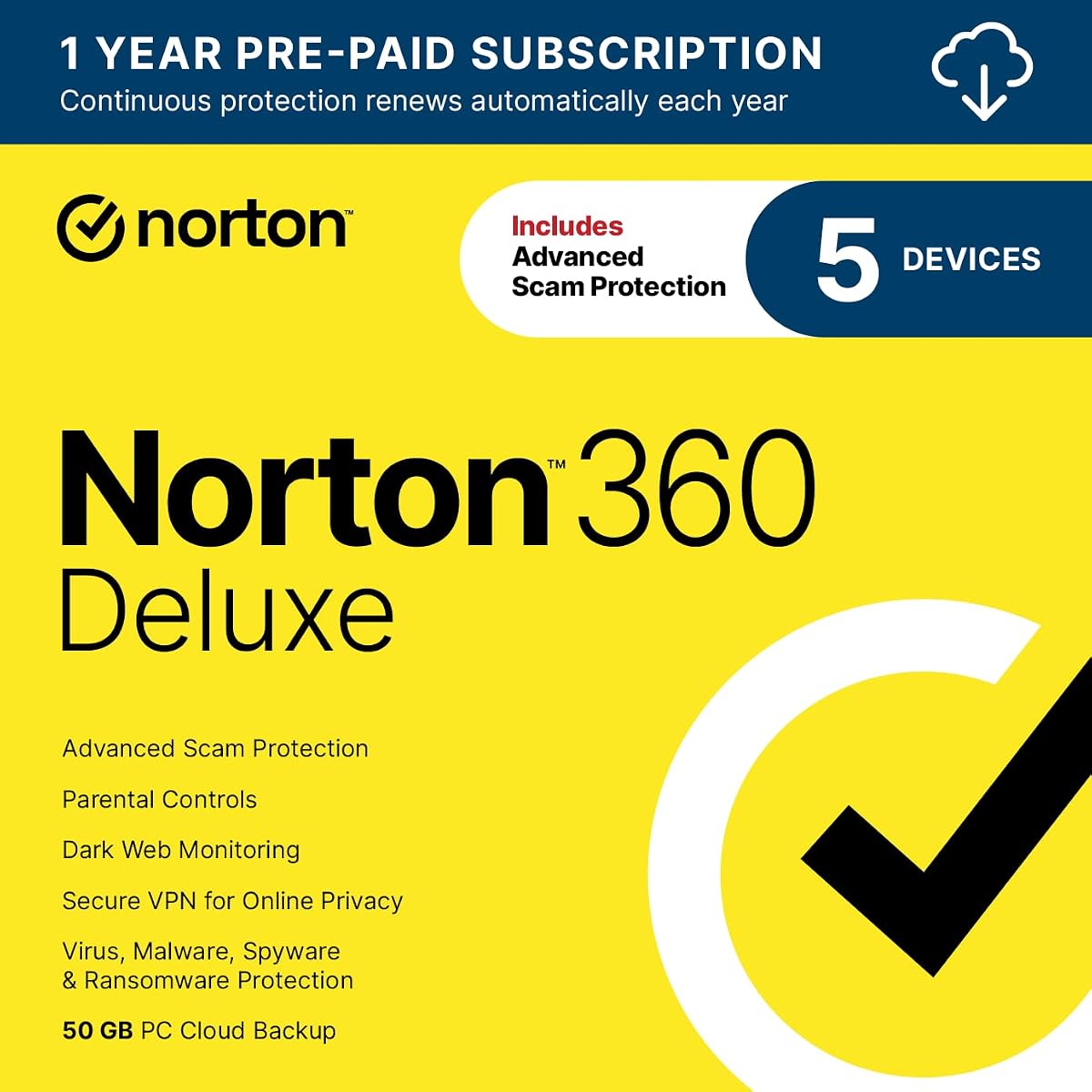
Norton 360 Deluxe offers ongoing protection for five devices with a built-in Genie AI assistant and cloud backup. It stands out for its scam protection and VPN performance making it strong for users who prioritize privacy and data recovery.
We may earn a commission when you buy through this link, at no additional cost to you.
Advanced scam protection helps spot hidden scams online while real-time protection guards against malware without slowing down your device. Dark web monitoring notifies you if your information is found on hidden sites. Fifty GB of secure PC cloud backup helps prevent loss due to ransomware or drive failures.
The introductory pricing applies only for the first year so renewal rates may increase. You must store a payment method to activate even if you are not charged until the term ends. These policies are standard but require attention to manage costs.
This suite is ideal for users who want cloud backup alongside strong antivirus and VPN. The Genie AI assistant simplifies scam detection and adds a modern touch to the protection. Review renewal terms before signing up to avoid surprises.
Never wonder if a message or email is suspicious again with the built-in Genie AI assistant helping spot scams online.
Help prevent the loss of photos and files due to ransomware or hard drive failures with secure PC cloud backup.
We may earn a commission when you buy through this link, at no additional cost to you.
This premium tier extends protection to unlimited devices and adds personal data scans and social privacy management. It is designed for households with many devices or users who want deeper control over their online privacy settings.
We may earn a commission when you buy through this link, at no additional cost to you.
Personal data scans take your info off the market by finding it on sites selling it. A social privacy manager helps decide what you share by fixing buried privacy settings in social accounts. Threat detection and secure connections work together to protect you across all devices.
The higher price reflects the unlimited coverage and advanced privacy features. Auto-renewal terms apply so you must cancel before the renewal charge if you do not wish to continue. These factors may deter budget-focused users but justify the cost for larger families.
Select this option if you need coverage for many devices without buying extra licenses. The social privacy manager is a unique tool that helps manage online presence. Ensure you understand the subscription terms before committing.
Take your info off the market by finding your personal information on sites selling it and guiding you on removal.
Decide what you share as McAfee finds privacy settings buried in your social accounts and fixes them automatically.
We may earn a commission when you buy through this link, at no additional cost to you.
K7 Total Security offers a budget-friendly entry point with intelligent antivirus and ransomware protection. It is suitable for single users seeking basic protection without the higher cost of full suites from major brands.
We may earn a commission when you buy through this link, at no additional cost to you.
The software safeguards your laptop against viruses malware spyware phishing and other online threats. Ransomware protection keeps your files from being encrypted or deleted by untrusted apps. Webcam protection prevents unauthorized access to your camera and maintains your privacy during use.
The one user and one year limit means it is not ideal for households with multiple devices. Activation codes arrive via email within twenty four hours so you must wait for delivery. These constraints keep the price low but reduce flexibility.
Choose this if you need simple protection for a single laptop at a low price. The inclusion of ransomware and webcam protection adds value beyond basic antivirus. Verify the user and term limits match your needs before purchasing.
Photos and files in your windows laptop/pc are protected from ransomwares and other untrusted apps from changing or deleting them.
Prevents unauthorized applications and hackers from spying on you by blocking access to your webcam automatically.
We may earn a commission when you buy through this link, at no additional cost to you.
This plan is a hardware protection service rather than software and covers drops spills and malfunctions after the manufacturer warranty. It is essential for users who want financial protection against accidental damage or device failure for a covered price range.
We may earn a commission when you buy through this link, at no additional cost to you.
You pay nothing for repairs including parts labor and shipping. Claims are approved quickly online or by phone and experts are available twenty four seven to help with troubleshooting. If repair is not possible you receive an Amazon e-gift card for the purchase price.
The plan must be purchased with a product or within thirty days and does not cover pre-existing conditions. It complements software protection by addressing physical risks that software cannot prevent. It is not a substitute for antivirus but adds a layer of device security.
Add this if you have a laptop within the eligible price range and want peace of mind against accidents. The coverage for cracked screens and spills is a major benefit for daily users. Check your device eligibility and timing before buying.
Drops spills and cracked screens due to normal use are covered from day one to protect against accidental damage.
File a claim anytime online or by phone and most claims are approved within minutes for quick resolution.
We may earn a commission when you buy through this link, at no additional cost to you.
This version offers three device protection with adaptive threat detection and twenty four seven support. It provides the same core security features as the five device version but at a lower price for smaller households.
We may earn a commission when you buy through this link, at no additional cost to you.
Suspicious links risky sites and scams are caught automatically before they reach you. Identity monitoring watches for exposed personal info and alerts you with guided actions on what to do next. Secure connections protect your info on public Wi-Fi automatically when you connect.
The three device limit may not fit growing families with many devices. Auto-renewal terms apply so check your account settings to manage future charges. These limitations are minor for users who need fewer device licenses.
Select this if you need basic multi-device protection without paying for unlimited coverage. The guided actions and support options simplify security management for non-tech users. Ensure your device count fits the license before purchasing.
Alerts tuned to you and detection that keeps up as threats change to maintain security as risks evolve.
Clear alerts and simple guidance make it easy to take action when threats are detected without confusion.
We may earn a commission when you buy through this link, at no additional cost to you.
Bitdefender offers world-class antivirus and cyber protection for Windows Mac iOS and Android in a cross-platform suite. It includes safe online banking tools and multi-layer protection to secure your digital life across different operating systems.
We may earn a commission when you buy through this link, at no additional cost to you.
The suite includes safe online banking with a dedicated browser to secure your transactions. Multi-layer malware and ransomware protection defend against threats while social network protection and anti-tracker tools maintain your privacy. Microphone monitor and webcam protection prevent unauthorized access to your device hardware.
Activation codes are shipped by mail which may delay setup compared to digital delivery. The included VPN offers limited daily data compared to unlimited options in other suites. These trade-offs may be acceptable for users who value robust detection and hardware monitoring.
Choose this if you use a mix of operating systems and want strong detection rates. The safe banking feature is valuable for online shoppers and remote workers. Verify the VPN limits suit your browsing habits before purchasing.
A unique dedicated browser secures your online transactions to keep your financial data safe during purchases.
Anti-tracker fraud and spam protection help maintain your privacy and reduce unwanted tracking across the web.
We may earn a commission when you buy through this link, at no additional cost to you.
This compact version covers three devices with Genie AI scam protection and cloud backup. It offers the core Norton experience in a smaller license ideal for single users or small families who do not need extensive device coverage.
We may earn a commission when you buy through this link, at no additional cost to you.
Advanced scam protection and real-time protection guard against emerging malware without slowing down your device. Dark web monitoring alerts you if your info is found and twenty five GB of cloud backup helps prevent file loss. VPN speeds and server locations support privacy across your devices.
The thirty device limit and lower cloud storage compared to deluxe versions may limit larger needs. Introductory pricing applies only for the first year so budget for renewal costs. These are acceptable trade-offs for users seeking affordable security.
Select this if you need reliable protection for a few devices with essential privacy tools. The Genie AI assistant simplifies scam detection. Verify device count and storage needs before purchasing.
Advanced security protects against existing and emerging malware threats without slowing down your device performance.
We search the dark web and notify you should your information be found to help prevent identity theft.
We may earn a commission when you buy through this link, at no additional cost to you.
This premium tier covers ten devices and offers seventy five GB of cloud backup. It is ideal for large households or users who need to secure many devices including phones tablets and desktops in a single subscription.
We may earn a commission when you buy through this link, at no additional cost to you.
The suite provides ongoing protection with Genie AI scam protection and dark web monitoring. VPN speeds and server locations protect your privacy across all devices including Smart TVs. Real-time protection guards against malware and ransomware without slowing device performance.
Ten device coverage and higher cloud storage come at a higher cost compared to smaller licenses. Auto-renewal rates apply after the first year so check renewal pricing. These factors may deter some but justify the value for large multi-device households.
Choose this if you need extensive device coverage with large cloud storage for your family. The dark web monitoring and scam tools add significant value. Verify device counts and renewal terms before signing up.
Help prevent the loss of photos and files due to ransomware or hard drive failures with 75 GB secure PC cloud backup.
Install protection for 10 PCs Macs iOS or Android devices in minutes with ongoing protection coverage.
We may earn a commission when you buy through this link, at no additional cost to you.
Selecting the right laptop protection software requires evaluating features device coverage and cost to match your needs. This section outlines the key factors to consider before making a purchase.
Most suites offer licenses for one three five or unlimited devices. Check how many devices you need to protect including laptops phones and tablets before buying. Extra licenses cost more so choose a plan that fits your household size.
Pick a license that covers all your devices to avoid paying for additional subscriptions later.
Look for real-time protection against malware ransomware viruses and phishing. Strong detection rates ensure your laptop stays safe from evolving threats without constant user intervention.
Prioritize suites with proven detection records to minimize the risk of successful cyberattacks.
Many suites include VPN and identity monitoring tools to protect your online privacy. Check if the VPN is unlimited or limited by data caps and whether it supports your devices.
Choose a VPN that meets your usage needs to ensure secure browsing on public networks.
Some options include secure cloud backup to help you recover files after ransomware or drive failure. Compare storage amounts like 25 GB 50 GB or 75 GB to match your data needs.
Select a plan with sufficient backup space to protect your important photos and documents.
Lightweight suites protect your device without slowing down daily tasks. Read reviews on system impact to ensure the software runs smoothly on your laptop.
Choose software that balances strong security with minimal performance loss for better usability.
Many subscriptions auto-renew at the end of the term. Check renewal rates and cancel policies to avoid unexpected charges.
Set account reminders or cancel before renewal if you do not plan to continue the service.
Reliable support via phone chat or email helps resolve setup or detection issues quickly. Look for 24/7 availability and access to help articles for self-service.
Pick a provider with responsive support to minimize downtime if you encounter security alerts.
Codes may arrive digitally via email or by physical mail. Digital delivery allows faster activation while mail may take longer.
Check delivery methods to ensure you can activate the software when you need it.
Install the software immediately after receiving your activation code and follow the on-screen setup. Run a full scan to detect any existing threats before you start normal use.
Enable real-time protection and auto-update features so the software can respond to new threats automatically. Check your dashboard weekly to review scan results and adjust settings like VPN or backup as needed.
Keep your subscription active and renew before it expires to maintain uninterrupted protection. Remove unused devices from your account if you have changed hardware to stay within your license limits.
Modern laptop protection software includes antivirus as a core feature along with additional tools like VPN and firewall. Using a suite is often more efficient than buying separate antivirus and privacy tools. This approach ensures comprehensive coverage without overlapping costs.
Most licenses allow one three five or unlimited devices. Choose a plan that covers all your laptops phones and tablets. Buying separate licenses for each device costs more than a multi-device suite.
Yes you can cancel anytime before your subscription ends to avoid charges. Check your account settings to manage your renewal date. You will continue to have protection until the end of the prepaid term.
Modern suites are optimized to minimize performance impact. Look for lightweight options with real-time protection that runs in the background. Reviews on system performance can help you choose a fast and secure option.
Many premium suites include identity monitoring to watch for exposed personal info. This feature alerts you to breaches and guides you on what to do. Check the product specs to confirm if it is included.
Laptop protection software secures your data from cyber threats but does not cover physical damage. Consider a separate protection plan like ASURION for spills drops and screen cracks. Hardware plans complement software security by addressing physical risks.
The top picks offer strong protection ranging from budget options to comprehensive suites with unlimited devices. McAfee Norton and K7 provide reliable detection privacy tools and backups to suit different needs.
Focus on device coverage threat detection and privacy features when comparing options. Choose a plan that aligns with your household size and security goals.
Prices and terms can change so verify the latest details before purchasing. Review renewal policies to maintain control over your subscription and costs.