
Hyperkin Trooper 2 Premium USB Game Controller
4.1Editor score
Ergonomic design for comfort
Durable construction materials
Compatible with macOS
Discover the top Mac game joysticks for 2026. Our guide compares controllers for flight sims, arcade games, and general gaming on macOS.
Finding the right Mac game joystick can transform your gaming experience significantly. Whether you enjoy flight simulations or retro arcade titles, the right controller provides precision and comfort for extended play sessions.
We have evaluated ten top-rated options based on compatibility, build quality, and user feedback. This list covers versatile controllers that work seamlessly with macOS systems across different gaming genres.
Each pick highlights key features and performance aspects to help you decide. Please note that prices and availability may change over time so verify current details before purchasing your preferred model.
4.1Editor score

4.3Editor score

4.0Editor score
This side-by-side comparison outlines the core specifications of each joystick to help you identify the best fit for your specific gaming needs and budget.




The Hyperkin Trooper 2 offers a classic gaming experience at a budget friendly price. It is highly rated for its retro design and reliable performance on Mac systems.
We may earn a commission when you buy through this link, at no additional cost to you.
Its ergonomic design with chamfered corners ensures comfort during long sessions. The quiet movement joystick provides precise inputs without distracting noise.
While it lacks modern wireless connectivity, the solid base and rubber grommet ensure durability. It is ideal for emulation and arcade games.
Buyers seeking an affordable Mac compatible controller will find this reliable. It delivers consistent performance for casual gamers.
The controller replicates the feel of vintage arcade sticks for nostalgia.
Chamfered corners help reduce hand fatigue during extended use.
We may earn a commission when you buy through this link, at no additional cost to you.
This joystick is designed specifically for flight simulations with precise resistance controls. It features a weighted base for stability during intense maneuvering.
We may earn a commission when you buy through this link, at no additional cost to you.
The built in throttle and rudder twist offer a complete control system in one device. Programmable buttons allow customization for different aircraft profiles.
Although primarily marketed for PC, it offers solid performance for compatible Mac titles. The plug and play setup reduces installation hassles significantly.
Flight sim enthusiasts will appreciate the responsive inputs and sturdy construction. It provides a professional feel for serious aviation gaming.
Fine tune stick tension to match your specific flying style.
Integrated throttle lever ensures smooth speed management.
We may earn a commission when you buy through this link, at no additional cost to you.
The abxylute C6 stands out with its Hall Effect joysticks preventing drift issues. It supports a wide range of platforms including Mac and Tesla.
We may earn a commission when you buy through this link, at no additional cost to you.
Its 1000Hz polling rate ensures low latency in wired mode. The rechargeable battery delivers up to 18 hours of continuous gameplay.
Turbo modes allow rapid fire attacks for competitive advantage. While wireless latency varies, the dongle option minimizes lag effectively.
Gamers wanting wireless freedom without sacrificing precision should consider this. It balances performance and versatility for most Mac users.
Prevents stick drift and extends the controller lifespan.
Works seamlessly across PC Mac Switch and mobile devices.
We may earn a commission when you buy through this link, at no additional cost to you.
This arcade stick is compatible with Sanwa buttons for a professional feel. It works on Mac and various consoles for broad game library access.
We may earn a commission when you buy through this link, at no additional cost to you.
The F300 supports both XINPUT and DINPUT modes on PC. Users can customize the inside platform for further modifications.
While it lacks wireless capability, the build quality remains high for the price. Turbo functions add versatility for fighting games.
Fighting game fans will appreciate the responsive inputs and modding potential. It is a solid choice for retro enthusiasts.
Allows easy replacement with premium arcade components.
Connects to multiple systems without extra adapters.
We may earn a commission when you buy through this link, at no additional cost to you.
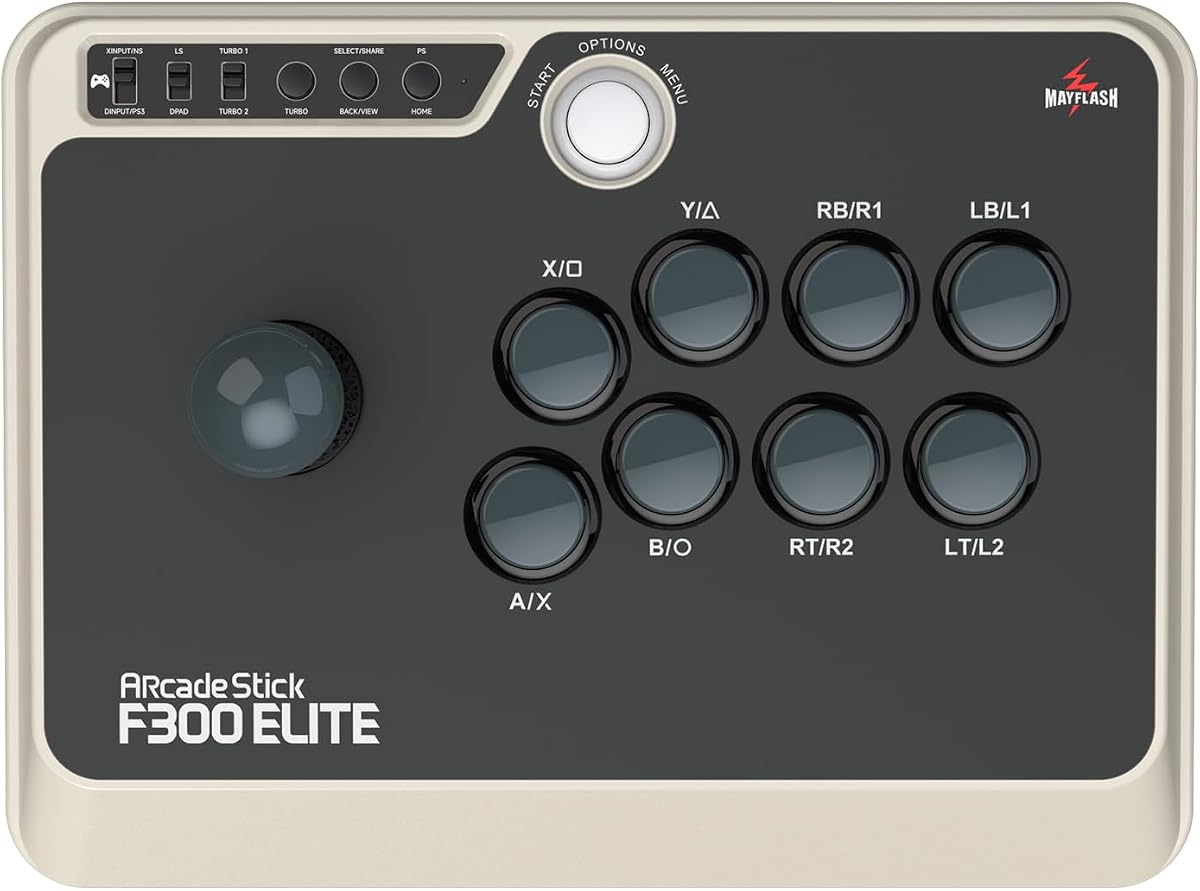
The F300 Elite uses premium Sanwa components for maximum responsiveness. It is designed for modding enthusiasts who want full customization.
We may earn a commission when you buy through this link, at no additional cost to you.
Nine highly responsive buttons and a precision joystick ensure peak performance. The accessible interior allows easy button swapping to suit styles.
While priced higher than the standard version, the quality justifies the cost. It is built to last through intense competitive gaming.
Serious arcade gamers will benefit from the elite build quality. It delivers consistent inputs for demanding fighting games.
Sanwa parts ensure reliable strikes game after game.
Internal access allows easy customization for players.
We may earn a commission when you buy through this link, at no additional cost to you.
This joystick is designed specifically for Farming Simulator 25 on PC. It offers a true plug and play experience for immediate gameplay.
We may earn a commission when you buy through this link, at no additional cost to you.
The 3 axis joystick provides smooth control for heavy machinery. Up to 33 programmable inputs allow full function management.
Hall Effect sensors eliminate drift ensuring long term precision. The ambidextrous design supports flexible cockpit setups easily.
Farm sim fans will find this essential for immersion. It brings realistic control to construction and agricultural games.
Controls tractor operations with smooth precision.
Ensures durability and accuracy over time.
We may earn a commission when you buy through this link, at no additional cost to you.
This controller features TMR joysticks for high sensitivity. It delivers a stable connection with ultra low latency under 1ms.
We may earn a commission when you buy through this link, at no additional cost to you.
The trigger mode switch allows switching between linear and tactile triggers. It includes back paddles for enhanced control during play.
Wireless stability is key for competitive gaming. The multifunctional charging dock keeps the device ready for sessions.
Apple and PC users seeking precision will find this ideal. It offers modern features like motion control for immersion.
Offers higher sensitivity and enhanced durability than standard.
Provides rock solid reliability with anti interference.
We may earn a commission when you buy through this link, at no additional cost to you.
This controller uses Hall Effect sensors to prevent stick drift. It features dynamic RGB lighting for an immersive gaming atmosphere.
We may earn a commission when you buy through this link, at no additional cost to you.
Supporting up to 1000Hz polling rate ensures minimal input lag. The rechargeable battery provides long playtime on a single charge.
Seamless device switching saves time between platforms. Turbo and macro functions add utility for complex commands.
Gamers seeking a feature packed wireless option on a budget will like this. It balances performance and visual appeal.
Prevents drift and offers longer lifespan.
Creates an immersive setup visual appeal.
We may earn a commission when you buy through this link, at no additional cost to you.
This HOTAS system offers military grade precision for flight sims. It includes over 189 programmable controls for complex setups.
We may earn a commission when you buy through this link, at no additional cost to you.
RGB backlighting helps customize the look of your rig. Mini analog stick surfaces help control pitch and roll effectively.
While requiring Windows drivers it delivers unmatched performance. It places controls perfectly under fingers for ease of use.
Serious flight pilots will appreciate the depth of this controller. It brings professional simulation to home gaming setups.
Achieves exact performance levels for aspiring pilots.
Accurate axis and twin throttles with friction.
We may earn a commission when you buy through this link, at no additional cost to you.
This anniversary edition features a nostalgic design from original arcade machines. It is perfect for playing retro games on PC or Android.
We may earn a commission when you buy through this link, at no additional cost to you.
The bundle includes 20 retro games for download to get started. The digital USB joystick is simple and easy to use.
While lacking modern analog features, it captures classic gameplay. It is an affordable entry for arcade fans.
Buyers looking for a retro experience at low cost will enjoy this. It offers a direct path to classic titles.
Takes inspiration from original competition arcade sticks.
Includes collection of games for download.
We may earn a commission when you buy through this link, at no additional cost to you.
Selecting the right joystick involves considering compatibility, connection types, and the specific games you play most.
Ensure the controller supports macOS to avoid driver issues. Some flight sticks focus on Windows while general controllers support multiple platforms.
Check manufacturer specs to confirm Mac OS support before purchasing.
Choose between wired and wireless based on your needs. Wireless offers convenience but may have slight latency compared to USB.
Consider USB dongles for low latency wireless performance.
Hall Effect joysticks prevent drift and last longer than traditional ones. Retro arcade sticks use digital inputs while flight sticks use analog axes.
Select the type that matches your preferred gaming genre.
Solid construction ensures durability during intense gaming sessions. Weighted bases provide stability for flight sims.
Look for high quality materials that resist wear over time.
Programmable buttons allow mapping for complex game commands. Turbo functions help with repetitive rapid fire actions.
More customizable options provide flexibility for different games.
Prices vary widely from basic controllers to premium systems. Determine what features you need before deciding on a price point.
Affordable options often work well for casual gaming.
For wireless models check rechargeable battery capacity. Longer battery life reduces downtime during gaming sessions.
Consider playing while charging if battery is short.
Vibration and haptic feedback enhance immersion in games. Motion controls help for certain platformers and racing games.
Feedback features add a layer of sensory realism.
Connect the joystick to your Mac via USB or Bluetooth. Ensure drivers are installed if required for flight sims.
Clean the surfaces regularly with a dry cloth to remove dust. Avoid using harsh chemicals that may damage the material.
Store in a cool dry place when not in use. Protect wireless models from extreme temperatures that could affect battery.
Many flight sticks are designed for Windows but some offer Mac support. Check product specs for macOS compatibility before purchasing a simulator stick.
It uses magnetic sensors to detect stick position preventing physical wear and drift. This technology ensures longer lifespan and smoother inputs.
Wireless controllers using 2.4G dongles typically have low latency. Bluetooth may have slightly higher latency but is usually acceptable for casual play.
Most standard PC controllers work on Mac as they use standard USB HID protocols. Specialized flight controllers may require specific drivers.
Use system preferences on Mac to access game controller settings. Follow the on screen instructions to test and adjust axis response.
Arcade sticks offer better precision for fighting games compared to standard controllers. Ensure the model explicitly supports macOS for the best experience.
Standard controllers may last years with regular use. Hall Effect joysticks tend to last longer due to reduced physical wear.
Some sim rigs allow pairing sticks with racing wheels for full cockpit setups. Check compatibility if planning a multi device simulation.
We have reviewed ten options ranging from arcade sticks to flight simulators to help you find the right match.
Prioritize compatibility and build quality when choosing. Decide on wireless needs based on your setup preferences.
Verify current pricing and availability on retailer sites before buying. Your ideal controller will enhance your Mac gaming experience.