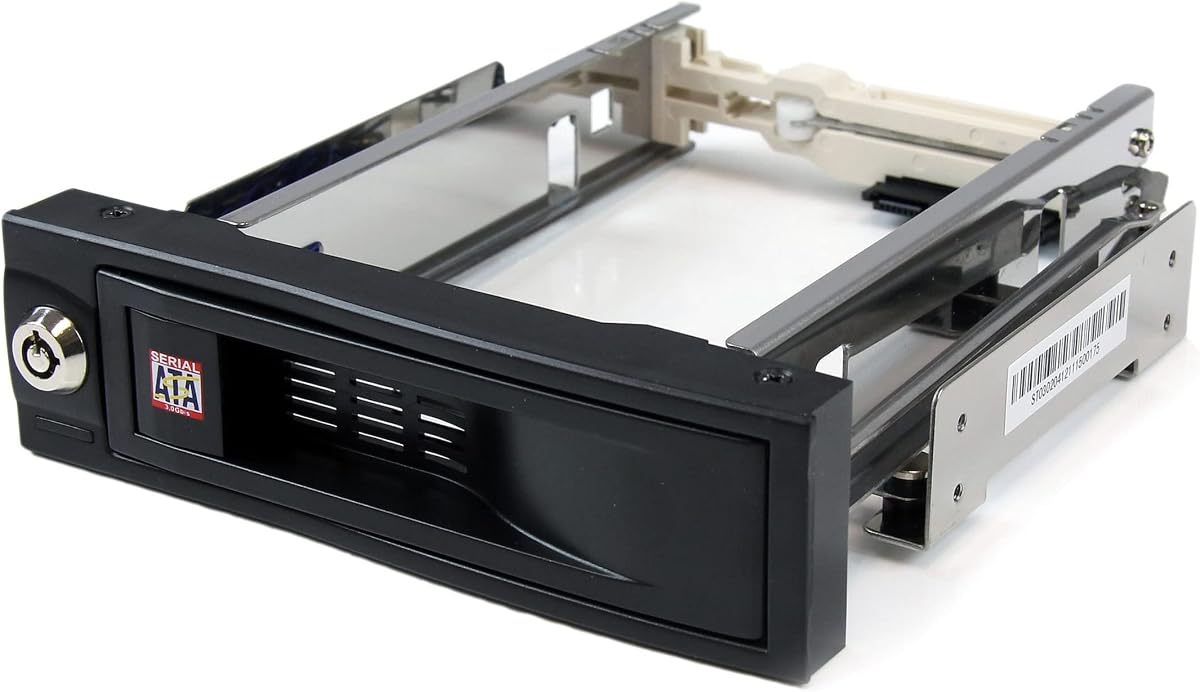
StarTech 3.5in Trayless Rack
4.4Editor score
Lockable drive bay design
Internal rubber shock absorbers
Trayless quick installation
Hot swappable drive bays allow you to add or remove storage without shutting down your system. This feature is crucial for servers, workstations, and NAS devices where uptime matters. A good enclosure provides secure mounting, effective cooling, and reliable data transfer speeds.
We evaluated ten top-rated hot swap enclosures based on build quality, drive compatibility, and thermal performance. Our analysis covers internal rack mounts and external DAS units suitable for different user needs. Each product was assessed for ease of installation and long-term durability.
Each pick highlights key strengths and potential drawbacks to help you find the right fit. Prices and availability may change over time so verify details before purchasing. This guide aims to simplify your decision process with clear comparisons and expert insights.
4.4Editor score

5.0Editor score

4.0Editor score
As an Amazon Associate we earn from qualifying purchases.
This side-by-side comparison highlights the key specifications and features of each hot swappable drive bay option to help you make an informed decision.


The ICY DOCK MB326SP-1B is a top-tier internal enclosure designed for professionals needing dense storage. It holds six 2.5 inch drives in a single 5.25 inch bay with excellent build quality. Its 5.0 rating reflects strong user satisfaction regarding reliability and performance.
We may earn a commission when you buy through this link, at no additional cost to you.
This model features Active Power Technology which only powers drives when installed saving energy and reducing heat. The ExpressTray system allows quick installation without tools while maintaining stability. Dual 40mm fans with three-speed control ensure optimal thermal management during heavy loads.
While it is an internal rack solution requiring a specific bay size the benefits for server environments are clear. The individual LED indicators help monitor drive status quickly. Some users might prefer wider compatibility but for 2.5 inch SSDs this is hard to beat.
If you manage a server rack or workstation needing high capacity in limited space this enclosure is ideal. It balances cooling efficiency with secure drive mounting perfectly. We recommend it for anyone prioritizing uptime and ease of maintenance.
APT ensures power is only supplied when a drive is present reducing unnecessary heat generation and electrical waste.
Dual 40mm fans with adjustable speed provide precise cooling control to keep drives operating within safe temperature ranges.
We may earn a commission when you buy through this link, at no additional cost to you.
The StarTech 3-Bay Backplane offers a robust solution for converting two 5.25 inch bays into a hot-swappable interface. It supports up to three 3.5 inch SATA or SAS drives and includes power and status LEDs for each bay. Its 4.3 rating indicates solid reliability for IT pros.
We may earn a commission when you buy through this link, at no additional cost to you.
This backplane features individual ejection levers with a key-lock design for added security during drive swaps. The vented solid aluminum enclosure aids heat dissipation significantly. A built-in fan with speed control helps maintain optimal temperatures even under sustained workloads.
It is designed specifically for enterprise system applications where reliability is non-negotiable. The trayless design speeds up maintenance tasks but the fan noise can be noticeable on high settings. Most users find the trade-off acceptable given the performance and security features.
For server admins or businesses needing secure and quick drive access this backplane is a strong choice. It simplifies cable management while keeping data safe during hot swaps. Choose this if you prioritize security and enterprise-grade support.
The key-lock design prevents unauthorized drive removal adding a layer of physical security to your storage infrastructure.
Vented aluminum construction paired with a speed-controlled fan ensures drives stay cool during intensive data processing tasks.
We may earn a commission when you buy through this link, at no additional cost to you.
The Rosewill Internal Hard Drive Enclosure efficiently converts three 5.25 inch bays into four 3.5 inch drive slots. It supports SATA I II III and SAS drives making it versatile for mixed storage setups. With a 4.3 rating it delivers reliable performance for home servers and workstations.
We may earn a commission when you buy through this link, at no additional cost to you.
Its single rear 120mm exhaust fan produces effective airflow to prevent overheating during extended use. The rugged design combines durable steel and ABS materials for long-term reliability. It accommodates four drives in a compact footprint without compromising stability.
While the SAS support is limited to 6Gbps it remains a budget-friendly option for many users. Hot-swap functionality works smoothly allowing drive changes without shutdown. The fixed fan placement is effective but may not suit all airflow configurations inside a case.
This enclosure is ideal for those needing to maximize space in an existing PC case. It balances cost and features well without sacrificing build quality. Select this if you need affordable internal storage expansion with hot swap support.
Transforming three optical drive bays into four hard drive slots maximizes storage density in your PC chassis efficiently.
Steel and ABS materials ensure the cage withstands vibration and physical stress for years of consistent use.
We may earn a commission when you buy through this link, at no additional cost to you.
The StarTech 3.5in SATA Trayless Mobile Rack offers a simple and effective way to access hard drives quickly. It holds a single 3.5 inch drive in a front accessible 5.25 inch bay. Its 4.4 rating highlights its ease of use and sturdy construction.
We may earn a commission when you buy through this link, at no additional cost to you.
The innovative trayless design lets you install drives without opening the chassis saving time during maintenance. Rubber shock absorbers protect drives from vibration while the lockable bay secures data from unauthorized access. The solid aluminum construction aids passive heat dissipation naturally.
It has a high insertion rating ensuring longevity even with frequent drive changes. The lack of active cooling is not an issue for single drives but might concern heavy users. Overall it remains one of the most affordable and reliable options available.
This rack is perfect for users who need quick access to backup drives or archives occasionally. It simplifies storage management without requiring complex setup. We recommend it for budget-conscious buyers seeking quality hardware.
The trayless structure allows drive installation and removal in seconds without needing tools or opening the PC case.
Rated for over 50000 insertions this rack ensures long-term reliability even with frequent storage swaps and changes.
We may earn a commission when you buy through this link, at no additional cost to you.
The RackChoice Internal Hard Drive Enclosure turns three 5.25 inch bays into a hot-swappable interface for five drives. It supports both 2.5 inch and 3.5 inch SATA or SAS hard drives with 6 Gbps speeds. Its 3.6 rating reflects mixed user experiences regarding cooling and setup.
We may earn a commission when you buy through this link, at no additional cost to you.
A full metal body aids heat dissipation and structural stability during operation. An 80mm cooling fan is included but power must be supplied via 2x MOLEX connections. It supports RAID configurations if a separate card is used for advanced setups.
While the capacity is high the requirement for external power cables can complicate cable management inside a case. Some users report higher noise levels due to the single fan. However for the price it offers significant storage density and versatility.
This enclosure is suitable for users needing maximum internal capacity without external enclosures. It is a practical choice for budget builds requiring multiple drives. Consider your case compatibility before purchasing due to power and cable needs.
Accommodating five drives in three optical bays provides excellent storage density for users needing bulk capacity internally.
Supporting RAID 0 1 5 and 10 with a separate card allows flexible data redundancy and performance configurations.
We may earn a commission when you buy through this link, at no additional cost to you.
The TERRAMASTER D4-320 is a powerful external hard drive enclosure supporting up to four disks without needing a NAS. It uses USB 3.2 Gen2 to achieve read speeds up to 1016 MB/s when using four SATA III HDDs. A 4.2 rating shows satisfaction with its speed and design.
We may earn a commission when you buy through this link, at no additional cost to you.
Tool-free trays with a unique push-lock design secure drives firmly without tools. It features an intelligent temperature-controlled fan for cooling and sound-absorbing panels to reduce noise by up to 50%. Hot swapping is supported for easy drive replacement while running.
While it lacks native RAID functions it works well for straightforward storage expansion. The USB Type-C interface supports various ports including Thunderbolt 3 and 4. Users note it is very quiet even under load compared to previous generations.
This unit is perfect for content creators needing fast portable storage without complex setup. It balances performance with ease of use for both Windows and Mac systems. Choose this if you need external storage with hot swap convenience.
USB 3.2 Gen2 protocol ensures high-speed data transmission up to 10Gbps for rapid file transfers and backups.
Sound-absorbing panels and vibration damping reduce noise levels significantly creating a quieter workspace environment.
We may earn a commission when you buy through this link, at no additional cost to you.
The CENMATE Aluminum 6 Bay Enclosure supports 2.5 and 3.5 inch HDDs and SSDs for flexible storage options. It uses USB 3.0 to transfer files quickly and allows hot swapping without powering off. With a 4.3 rating it is a reliable choice for personal or enterprise use.
We may earn a commission when you buy through this link, at no additional cost to you.
Built from aluminum-alloy materials it features two 2.7 inch fans for optimal heat dissipation during extended sessions. Tool-free trays make installation simple while the USB Type-C and A ports ensure broad compatibility. Daisy chain support allows expansion up to 360TB storage total.
Although fan noise is around 40-50 decibels it does not significantly impact performance for most users. The lack of RAID keeps it simple but limits redundancy without software solutions. It is a cost-effective solution for bulk storage needs.
This enclosure is ideal for users needing large external storage with multiple drive bays. Its compatibility with Windows Mac and Linux makes it versatile for different environments. Select this if you need expandable external storage at a reasonable price.
Connect up to three devices via daisy chain to expand total storage capacity up to 360TB effectively.
Compatible with Windows 7 and above Mac 9.1 and above and Linux ensuring broad operating system support.
We may earn a commission when you buy through this link, at no additional cost to you.
The CENMATE Aluminum 6 Bay 10Gbps Enclosure delivers high-speed data transfer for demanding users. It uses USB 3.2 Gen 2 to reach speeds up to 10Gbps transferring files 20 times faster than USB 2.0. A 4.0 rating reflects strong performance and build quality.
We may earn a commission when you buy through this link, at no additional cost to you.
Constructed from aluminum-alloy materials it includes two 2.7 inch fans for effective cooling during intensive tasks. Tool-free trays simplify drive management while hot swapping allows replacements without shutdown. Thunderbolt 3 and 4 compatibility ensures it works with modern devices seamlessly.
Noise from the fans is noticeable at 40-50 decibels but acceptable for performance gains. The higher price tag is justified by the speed and durability it offers. Daisy chain support expands storage capacity for growing needs over time.
This premium enclosure is best for professionals needing fast reliable external storage. It balances speed with ease of use for efficient workflows. Invest in this if you prioritize transfer speeds and long-term reliability.
USB 3.2 Gen 2 interface enables ultra-fast file transfers up to 10Gbps for efficient data workflows.
Supports USB 3.0 to 3.2 plus Thunderbolt 3 and 4 ensuring compatibility with latest computer interfaces.
We may earn a commission when you buy through this link, at no additional cost to you.
The Silverstone FS304-V fits four 3.5 inch drives in three 5.25 inch device bays efficiently. It supports SAS 12G and SATA 6Gbit/s drives making it versatile for high-performance storage. Independent LED indicators help you monitor drive statuses easily during operation.
We may earn a commission when you buy through this link, at no additional cost to you.
A built-in cooling fan ensures excellent heat dissipation keeping drives safe under load. The trayless design allows quick access without tools for maintenance tasks. Its rugged construction provides the durability required for server environments and workstations.
While it requires three optical bay slots the density it offers is excellent for internal setups. The SAS compatibility supports higher throughput for demanding applications. It is a solid choice for users needing reliable internal storage expansion.
This cage is best for server admins needing high-speed SAS drive access internally. It simplifies drive management while maintaining performance. Choose this if you need internal hot swap capabilities with SAS support.
Compatible with SAS 12Gbps drives to maximize throughput for intensive server and workstation storage needs.
Built-in fan provides consistent airflow to dissipate heat and protect drives during continuous operation.
We may earn a commission when you buy through this link, at no additional cost to you.
The Kingwin Hard Drive Enclosure provides a 5-bay hot swap design for 3.5 inch HDDs and SSDs internally. It fits into a 3x 5.25 inch bay space maximizing storage in your PC case. The trayless mobile rack ensures tool-free installation for quick drive access.
We may earn a commission when you buy through this link, at no additional cost to you.
Built from durable aluminum it supports SATA and SAS drives with high performance speeds up to 12 Gbps. Integrated power control features ensure drives are powered efficiently and safely. Its 4.2 rating indicates it is a solid choice for professional use.
While setup may be complex due to the power requirements the reliability is worth the effort. The aluminum shell case ensures drives remain cool during extended use for stability. It is a robust option for high-capacity internal needs.
This enclosure is ideal for workstations needing significant internal storage without external units. It balances performance with durability for gaming rigs and servers. Choose this if you need a large internal hot swap solution.
Integrated power control features protect drives from damage and ensure efficient power usage during operation.
The aluminum shell case enhances heat dissipation to maintain stable drive performance under heavy workloads.
We may earn a commission when you buy through this link, at no additional cost to you.
Selecting the right hot swappable drive bay requires considering several factors to ensure compatibility and performance.
Ensure the enclosure supports your drive types whether 2.5 or 3.5 inch and interfaces like SATA or SAS. Some models only handle specific protocols which limits your options.
Always check drive height and interface support before purchasing to avoid mismatch issues.
Internal bays fit into PC cases and utilize existing power and data connections. External enclosures connect via USB or Thunderbolt and offer portability but cost more.
Choose internal for dedicated servers and external for portable storage needs.
Effective cooling prevents drive failures caused by overheating. Look for models with built-in fans or solid aluminum bodies that dissipate heat efficiently.
Active cooling is crucial for multi-bay units running at high loads.
Trayless designs allow quick drive access without tools saving time during maintenance. Tool-based systems may be more secure but slower to access.
Prioritize trayless racks if frequent swapping is a priority.
Internal units typically draw power from the system while external enclosures may need separate adapters. Check if power cables are included or bought separately.
Ensure your power supply can handle the total load of all drives installed.
Some enclosures include key-lock designs or independent LEDs to track drive status. These features help prevent unauthorized access and monitor failures.
Enterprise users should prioritize models with enhanced physical security.
Verify supported bus speeds like USB 3.2 or SAS 12Gbps to match your performance needs. Slower interfaces may bottleneck fast SSDs significantly.
Opt for the latest standards if high-speed data transfers are essential.
Metal enclosures generally last longer and dissipate heat better than plastic ones. Warranty terms vary by manufacturer and reflect expected durability.
Invest in units with robust warranties and durable materials.
Begin by ensuring the enclosure is properly connected to power and data sources. For internal units verify that drive cables are securely attached to the motherboard.
When inserting drives align the connectors carefully and slide them in until they click into place. Use any provided locking mechanisms to secure them firmly.
Regularly clean the cooling fans with compressed air to prevent dust buildup. Monitor drive health using software tools to ensure optimal operation over time.
Yes hot swappable drive bays are designed to allow drive insertion and removal while the system is running. However always use proper ejection procedures to avoid data corruption. Ensure your operating system supports hot swapping.
Internal bays fit inside a PC case and use direct power connections while external enclosures connect via USB. Internal units are better for servers and external units offer portability for laptops.
Some models support RAID but usually require a separate RAID card or software. External enclosures often do not support hardware RAID unless specified. Check the product specs carefully.
Keep cooling fans clean and ensure good airflow inside the enclosure. Avoid frequent unplugging while transfers are active. Use software to monitor drive health regularly.
Most bays are designed for either 2.5 or 3.5 inch drives not both. Some have adapters to allow mixed sizes. Verify compatibility before installing different drive types.
Check cable connections and ensure the drive is receiving power. Reinsert the drive and restart the system if needed. Update drivers for your storage controller.
No software is usually required for basic operation but driver updates may be needed. RAID setups often require specific management software. Most modern systems detect drives automatically.
High-quality models last for several years even with frequent use. Durability depends on build quality and cooling efficiency. Regular maintenance extends their lifespan.
We reviewed ten excellent hot swappable drive bays suitable for various needs from budget to enterprise. The ICY DOCK MB326SP-1B stands out for internal density while CENMATE leads external performance.
Prioritize cooling and compatibility when selecting a model to avoid future issues. Internal racks suit workstations and external DAS units benefit portable storage needs.
Prices change frequently so check current listings before buying. Use this guide to narrow your options and find the perfect storage solution.