
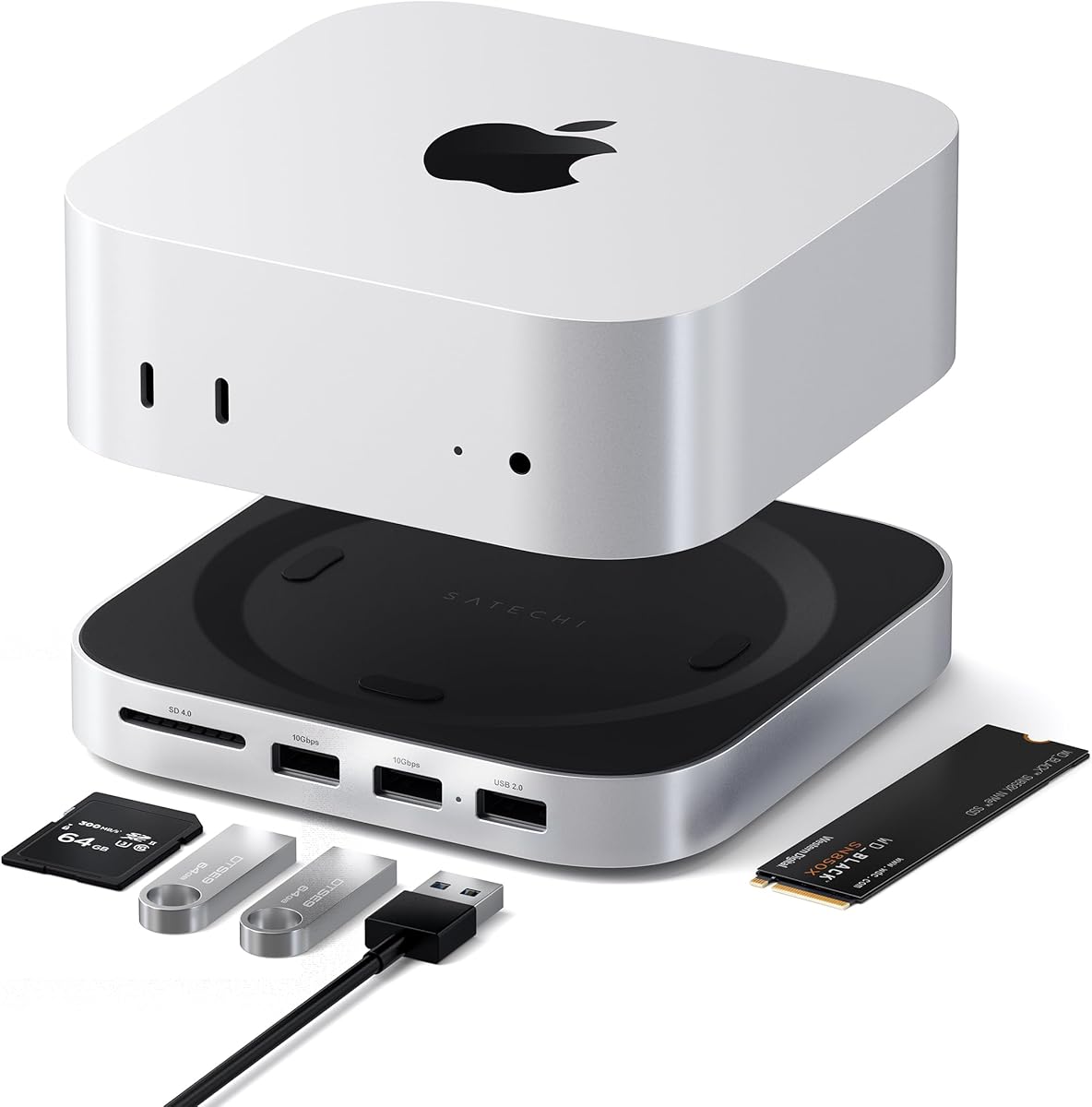
Raycue Mac mini M6, M5 Pro, M4 Dock & Stand with 8T NVMe SSD Enclosure
4.3Editor score
Affordable all-in-one solution
Conductive paint Wi-Fi shielding
Compact 20cm cable length
This guide compares the top Mac Mini M4 Dock options for storage expansion, connectivity, and design to help you choose the perfect accessory for your setup.
The Mac Mini M4 transforms your workspace into a powerful workstation when paired with the right docking solution. A quality dock enhances connectivity, provides essential storage expansion, and keeps your desk organized while matching the sleek aluminum design of your computer.
We evaluated ten highly-rated docks based on port variety, storage capacity, cooling efficiency, and build quality. Our analysis covers options ranging from budget-friendly stands to premium hubs offering Thunderbolt speeds and dual-bay SSD enclosures for professional workflows.
Each selection highlights unique strengths like high-speed data transfer, multi-monitor support, or compact footprints tailored to the Mac Mini form factor. Please note that availability and pricing may change, so verify current details before making your final purchase decision today.
4.3Editor score

4.5Editor score

3.9Editor score
Compare the leading Mac Mini M4 docks side by side to find the perfect balance of ports, storage, and design for your specific workflow needs.


The UGREEN Mac mini Dock stands out as the top pick for users seeking both expansion and functionality. With a 4.5 rating, it excels in providing up to 8TB of storage while maintaining a sleek form factor that matches your Mac Mini seamlessly.
We may earn a commission when you buy through this link, at no additional cost to you.
Its 11-in-1 hub design includes multiple USB-A and USB-C ports along with an SD card reader, making it versatile for creative pros. The 10Gbps data transfer ensures large files move quickly without slowing down your workflow during editing sessions.
While the power lever is a great convenience feature, users should note that optimal performance requires an external power adapter when connecting multiple devices. Also, the SSD is not included, so budget for that separately if you need high capacity.
This dock is ideal for professionals who need reliable storage and connectivity in one unit. It delivers stability and speed without cluttering your workspace, making it the smartest choice for most Mac Mini M4 setups.
The dock is precision-engineered to match your Mac Mini's curves, adding functionality without compromising the minimalist aesthetic of your desk setup.
Supporting M.2 NVMe SSDs with 10Gbps speeds, it provides the fast access needed for 4K editing and large backup operations.
We may earn a commission when you buy through this link, at no additional cost to you.
Satechi delivers a premium experience with this dock, rated 4.5 stars for its robust aluminum build and precise fit. It supports up to 4TB of NVMe storage and features front-facing ports that improve accessibility for daily peripherals.
We may earn a commission when you buy through this link, at no additional cost to you.
The optimized cooling design ensures your Mac Mini stays cool even under load. Heat-dissipating vents and a recessed top prevent fan obstruction, which is vital for consistent performance during intensive tasks like rendering or compiling code.
However, users must avoid SSDs with heatsinks or double-sided drives, which limits hardware choices. Additionally, USB-A ports cannot support CD readers or iPad charging, so you need to plan your peripheral connections carefully.
For those prioritizing build quality and warranty support, this dock is an excellent choice. It offers a clean, professional setup with reliable performance, backed by a strong 2-year limited warranty.
Crafted from industry-grade aluminum, the dock provides durability and heat resistance while matching the Mac Mini's premium aesthetic perfectly.
Ports on the front make it easy to plug and unplug devices without reaching behind your computer, streamlining daily connectivity tasks.
We may earn a commission when you buy through this link, at no additional cost to you.
This UGREEN dock is a powerhouse for creatives needing high refresh rate display support. With a 4.4 rating, it offers 4K@144Hz output via DisplayPort, making it perfect for gaming, smooth editing, and detailed visual work.
We may earn a commission when you buy through this link, at no additional cost to you.
Storage expansion is massive with up to 8TB support for NVMe SSDs, allowing for extensive local file libraries. The 10Gbps transfer speed ensures you spend less time waiting and more time creating on your Mac Mini.
Keep in mind that the dock's DP port works best when combined with the Mac's Thunderbolt port for multi-screen setups. Also, you'll need to purchase an SSD separately to unlock the full storage potential of this dock.
If you need a display dock with high performance, this is a strong candidate. It delivers visual fidelity and storage speed in a sleek package designed specifically for the Mac Mini form factor.
The DisplayPort supports 4K@144Hz for M4 Pro models, offering lag-free visuals essential for smooth creative workflows and entertainment.
A dedicated power button lever allows you to turn on your Mac without lifting it, adding convenience to your daily usage routine.
We may earn a commission when you buy through this link, at no additional cost to you.
With an impressive 4.8 rating, the 4URPC dock delivers exceptional value with its 13-in-1 design. It simplifies your setup by combining storage, video outputs, and audio into a single unit ready for work or entertainment.
We may earn a commission when you buy through this link, at no additional cost to you.
You can create a triple-display workspace by combining its HDMI and DisplayPort outputs with your Mac Mini's built-in ports. This is perfect for multitasking, allowing you to view timelines, references, and tools simultaneously.
The dock transfers data at 10Gbps, which is fast enough for 4K video editing. While you must use an NVMe SSD rather than SATA, the speed and capacity make it a top choice for photographers and designers.
This dock is recommended for anyone wanting a complete workstation without extra clutter. It balances cost and features well, offering robust connectivity and storage expansion in a precise, stable housing.
Supporting HDMI up to 4K@60Hz and DisplayPort up to 4K@144Hz, it enables powerful multi-screen workflows for increased productivity.
The dock requires no drivers or complicated setup; simply plug it in and enjoy a tidy, convenient desktop environment immediately.
We may earn a commission when you buy through this link, at no additional cost to you.
This dock pushes performance boundaries with 40Gbps speeds and dual-bay NVMe support. Although rated 3.9, its unique features make it valuable for pros needing massive local storage and multiple high-resolution displays.
We may earn a commission when you buy through this link, at no additional cost to you.
It offers up to 16TB capacity via RAID or single modes and supports dual or triple displays. The active cooling fans maintain safe temperatures even during extended operation, protecting your hardware and data integrity.
However, the fans may produce noise around 52dB, which might be distracting in quiet studios. Also, ensure you use a 65W adapter to avoid disconnection issues, as proper power is critical for stability.
For power users needing top-tier speed and storage, this is a strong option. It delivers professional capabilities in a compact aluminum frame, balancing performance with practical cooling solutions.
With 40Gbps bandwidth and RAID support, it offers the fastest data transfer available for demanding creative workflows and backups.
Dual silent fans ensure thermal safety during long sessions, keeping internal temperatures around 60°C for steady performance.
We may earn a commission when you buy through this link, at no additional cost to you.
Raycue offers an affordable solution without sacrificing core performance, rated 4.3 for its balance of features and cost. It supports up to 8TB storage and includes conductive paint to protect your Wi-Fi signal from interference.
We may earn a commission when you buy through this link, at no additional cost to you.
The 10-in-1 hub gives you USB-A and USB-C ports plus an SD/TF reader, meeting most connectivity needs. Enhanced thermal design with bottom vents ensures your device stays cool during standard daily tasks.
You will not get Thunderbolt speeds or complex multi-monitor setups with this budget option. However, for typical office or creative use, its 10Gbps transfer speed and stable connection are more than sufficient.
This dock is perfect for budget-conscious users needing reliable expansion. It provides a clean, space-saving design with a short cable, making it an easy and effective upgrade for your Mac Mini.
Conductive paint shielding blocks interference to ensure stable, high-speed wireless performance ideal for streaming and large downloads.
The 20cm cable keeps your desk neat while the compact design maximizes space for a tidy, efficient setup.
We may earn a commission when you buy through this link, at no additional cost to you.
ACASIS offers dual-bay storage in a 4.6-rated dock designed for expanding your capacity efficiently. It supports 16TB max via two NVMe drives and includes a full package with tools for easy installation.
We may earn a commission when you buy through this link, at no additional cost to you.
The cooling system features two silent fans that activate automatically to maintain safe temperatures. Aluminum construction and side vents ensure heat dissipation without obstructing airflow around your Mac Mini.
Be aware that you should not plug or unplug SSDs while powered on to avoid data loss risks. Also, the fans might generate slight noise, though they are optimized to stay quiet during typical operation.
This dock suits professionals needing extensive local storage. With reliable performance and flexible connectivity, it provides a sturdy foundation for data-heavy workflows without compromising build quality.
Supports up to 16TB via dual NVMe SSDs, eliminating capacity concerns for large media libraries and project archives.
HDMI supports 4K@60Hz for mirroring or extension, unlocking full multi-screen potential when combined with Thunderbolt ports.
We may earn a commission when you buy through this link, at no additional cost to you.
UGREEN delivers professional-grade performance with this Thunderbolt 4 dock, rated 4.3 for its powerful expansion. It features three downstream Thunderbolt ports and supports up to 8K displays for high-end video work.
We may earn a commission when you buy through this link, at no additional cost to you.
You can charge your laptop up to 85W while working, reducing cable clutter. Dual 4K@60Hz displays are supported for efficient multitasking, making it ideal for advanced users needing high bandwidth.
The dock is expensive compared to simpler alternatives, and full-featured USB-C laptops only support a single display with it. Also, it is not compatible with Intel-based Mac Mini 2018 models.
For those requiring top-tier speed and video quality, this dock is a top contender. It ensures seamless connectivity and performance for demanding tasks while supporting a wide range of devices.
Eight ports meet all high-performance needs including Ethernet, USB-A, and multiple Thunderbolt 4 connections for ultimate flexibility.
With 85W high-speed charging via included 140W GaN charger, you can power your laptop without needing a separate adapter.
We may earn a commission when you buy through this link, at no additional cost to you.
RayCue offers versatility by supporting both NVMe and SATA SSDs, rated 4.3 for its practical design. It includes a 4K@60Hz HDMI port for mirror or extend options, perfect for presentations or extended workspace.
We may earn a commission when you buy through this link, at no additional cost to you.
The dock features 10Gbps data transfer for fast file movement and 5Gbps ports for keyboards and mice. Its brushed aluminum finish feels premium and matches the Mac Mini naturally without looking out of place.
Note that you need an extra USB-C connection for power when using drives to prevent disconnects. Also, the HDMI port supports only one external monitor, which might limit multi-screen setups.
For those needing a flexible connection solution, this dock is a great fit. It balances storage options and video output well while maintaining an elegant design that fits any workspace.
Supports both NVMe and SATA M.2 SSDs up to 8TB, giving you more options for drive compatibility.
HDMI output delivers 4K@60Hz for vivid video synchronization, ideal for movies and meetings.
We may earn a commission when you buy through this link, at no additional cost to you.
This dock combines classic design with modern tech, rated 4.4 for its unique features. It includes a built-in 5-inch HD display for notifications or music, adding a personal touch to your desktop.
We may earn a commission when you buy through this link, at no additional cost to you.
You get a 14-in-1 hub with 10Gbps USB-C and multiple USB-A ports plus SD card readers. The retro-inspired look transforms your setup into a stylish workstation while keeping cables organized.
While the 80Gbps version is launching later, current models offer solid 10Gbps speeds. The price is higher due to the display integration, but it adds significant functionality beyond standard docks.
Ideal for creative users wanting style and utility, this dock stands out for its visual appeal and connectivity. It makes your Mac Mini a centerpiece while providing essential expansion features.
5-inch HD display offers quick access to notifications, clocks, or lyrics, adding value beyond just connectivity.
14-in-1 hub simplifies connectivity with USB-C, SD readers, and audio jack all in one sleek unit.
We may earn a commission when you buy through this link, at no additional cost to you.
Choosing the right dock for your Mac Mini M4 requires balancing storage needs, connectivity options, and design preferences to ensure a seamless workspace.
Look for docks that support M.2 NVMe SSDs up to at least 8TB to handle large video files and backups. Ensure compatibility with your preferred drive sizes like 2230 or 2280 for easy installation.
Verify that the dock offers high-speed transfer rates like 10Gbps to keep workflow efficient without bottlenecks.
Assess the number and types of ports available including USB-A, USB-C, HDMI, and SD card readers. More ports reduce the need for additional hubs and simplify your connections.
Prioritize models with high-speed USB-C and Thunderbolt support for faster data transfer and modern peripheral compatibility.
Check if the dock supports multiple external displays at high resolutions like 4K@60Hz or 144Hz depending on your needs. Some docks allow triple-screen setups for increased productivity.
Consider DisplayPort and HDMI options to ensure they match your monitor capabilities for clear visuals.
Select a dock made from aluminum to match your Mac Mini aesthetic and ensure heat dissipation. A compact design helps save desk space and keeps your setup tidy.
Look for anti-slip pads and a stable form factor to prevent your computer from sliding or scratching.
Ensure the dock supports power delivery or has an external adapter option to keep all connected devices running smoothly. This avoids issues with disconnects during heavy use.
Verify compatibility with your power budget by checking the wattage ratings and cables provided with the dock.
Cooling is critical during intensive work; check for vents, recessed tops, or active fans to maintain optimal temperatures. Overheating can lead to performance throttling.
Choose models designed with airflow in mind to protect both the dock and your Mac Mini from damage.
A plug-and-play dock with included tools simplifies installation so you can start using it immediately. Avoid models requiring complex drivers or manual adjustments.
Look for features like power button levers to enhance convenience and daily usability without extra effort.
Check the warranty duration to ensure protection against defects and access to customer support when needed. Longer warranties indicate confidence in product quality.
Prioritize brands with a history of reliable service to maintain trust in your long-term investment.
Install your NVMe SSD following the manufacturer's guidelines and secure it inside the dock. Ensure all cables are connected tightly to avoid data loss or intermittent issues during use.
Position the dock on a flat stable surface with clearance around vents to allow airflow. Keep the area dust-free to prevent overheating and maintain optimal performance over time.
Regularly update firmware if available and clean the external surfaces with a soft dry cloth. Proper maintenance ensures longevity and consistent reliability for your connected devices.
Yes, the Mac Mini M4 supports storage expansion docks that connect via USB-C. Many docks provide up to 8TB NVMe storage with high-speed data transfer for efficient workflows.
Most docks are designed to be compatible with Mac Mini M4 and M4 Pro models. Always verify the product details to ensure it supports your exact model for seamless integration.
Some premium docks support dual-bay enclosures allowing multiple SSDs for massive capacity. Check if your chosen model includes multiple bays for flexible storage options.
Some docks draw power from the Mac Mini while others recommend external adapters for stability. Using an external adapter ensures reliable performance with multiple devices connected.
Depending on the model, docks can support one to three external displays. Features like HDMI and DisplayPort allow for triple-screen setups when combined with Mac ports.
Most docks do not include the SSD and you must purchase it separately. This allows you to choose a capacity and type that meets your specific storage needs.
We've highlighted ten top docks with the UGREEN Mac mini Dock leading for overall balance of storage and connectivity. Each option offers unique strengths suited to different professional needs and workspace styles.
Prioritize your primary needs such as storage capacity, port variety, or display support when making your decision. Quality and reliability should guide you to choose a dock that supports long-term productivity.
Remember to check current prices and availability before purchasing since details may change. With the right dock, your Mac Mini M4 becomes a fully expanded workstation ready for any task.