
Canon MegaTank G3270 All-in-One Wireless Color Printer
4.1Editor score
Cost-effective ink replacement
Wireless print copy and scan
Up to six thousand black pages
Finding the right ink tank printer can transform how you handle daily printing tasks at home or in small offices. These devices offer significant savings over traditional cartridge models by using large refillable tanks instead of tiny disposable units. They support high-volume jobs without frequent interruptions for ink changes.
We have carefully evaluated ten leading ink tank printer options available on the market today. Our analysis focuses on key performance metrics like print speed, quality, connectivity features, and long-term ink costs. We also consider user feedback to ensure reliability and ease of use across different environments.
Each product in this list highlights specific strengths such as budget-friendly pricing, premium features, or exceptional page yields. You will find detailed breakdowns of what each model offers to help you match your unique needs. Please note that prices and availability can change rapidly depending on current market conditions.
4.1Editor score

4.2Editor score

3.8Editor score
As an Amazon Associate we earn from qualifying purchases.
This table provides a quick side-by-side comparison of all ten ink tank printers reviewed in this guide. You can easily compare their core specifications to determine which model aligns best with your specific printing requirements and budget constraints.





The Epson EcoTank ET-2803 stands out as a top choice for users seeking reliability and cost-efficiency in a home printer. With a strong rating of 4.2 stars, it is praised for its innovative cartridge-free design that replaces expensive disposable units with large refillable tanks. This model offers impressive print quality and connectivity options that fit seamlessly into modern smart workflows.
We may earn a commission when you buy through this link, at no additional cost to you.
At the heart of this device is Epson's Micro Piezo Heat-Free technology, which delivers sharp text and vibrant color photos on virtually any paper type. The included ink supply is enough to print up to 4,500 black pages and 7,500 color pages, translating to roughly two years of use for average households. Users appreciate the EcoFit ink bottles that make refilling easy and worry-free without spills or messes.
While the printer lacks some advanced features like automatic two-sided printing found in higher-end models, its core functionality remains robust and dependable. The trade-off in speed or automation is often acceptable given the substantial savings on ink costs over time. It also supports voice-activated printing and mobile apps for flexible access from smartphones or tablets around the home.
This printer is ideal for families or small offices that need a reliable workhorse for daily documents and occasional photo printing without breaking the bank on supplies. By choosing this EcoTank model, you also contribute to reducing plastic waste from discarded cartridges. If you prioritize long-term value and ease of use, this Epson EcoTank ET-2803 is a highly recommended investment.
It offers a balanced blend of performance, environmental benefits, and user-friendly features that suit a wide range of printing needs. The built-in scanner and copier add to its versatility as a comprehensive all-in-one solution for home or small business environments.
The cartridge-free design allows users to save significantly on ink costs compared to traditional models, often paying off the initial investment within the first year of use.
By eliminating the need for individual ink cartridges, this printer helps reduce the amount of plastic waste ending up in landfills, supporting sustainable printing practices.
We may earn a commission when you buy through this link, at no additional cost to you.
The Canon MegaTank G3270 offers a compelling entry point into the world of ink tank printers, balancing low upfront costs with high-volume capabilities. Rated at 4.1 stars, it is particularly appealing to budget-conscious buyers who still need reliable performance for everyday printing tasks. This model delivers exceptional value by including enough ink for up to two years right out of the box.
We may earn a commission when you buy through this link, at no additional cost to you.
One of its standout features is the potential to save up to $1,000 on ink costs compared to traditional cartridge printers over the lifespan of the device. It can print up to 6,000 black and white pages and 7,700 color pages with a single set of inks, making it perfect for households with moderate to high printing demands. The wireless capabilities allow you to print from various devices effortlessly.
While it lacks automatic duplexing, which means prints are single-sided, this design choice keeps the price competitive and the mechanical design simple and less prone to issues. The small 1.35-inch LCD screen is functional but not expansive, providing basic navigation without unnecessary complexity. These trade-offs are minor for users focused primarily on cost savings and core functionality.
This printer is an excellent choice for students, families, or small businesses looking for a dependable machine that does not require frequent ink purchases. Its straightforward setup and reliable wireless performance make it accessible even for those who are less tech-savvy. If saving money on supplies is your top priority, the Canon MegaTank G3270 is a smart financial decision.
It provides a solid foundation for home printing needs with a focus on reducing ongoing operational costs significantly. The included ink supply ensures you can start printing immediately without needing to buy additional bottles right away.
With the ability to save up to $1,000 on ink, this printer turns an initial investment into significant long-term savings that benefit tight budgets.
The wireless printing features ensure you can send documents from laptops or phones without physical connections, adding flexibility to your daily workflow.
We may earn a commission when you buy through this link, at no additional cost to you.
The Epson EcoTank ET-4800 is designed for users who prioritize premium print quality and advanced features over strict budget constraints. With a rating of 3.8 stars, it offers unique capabilities like Micro Piezo Heat-Free technology that produces sharp text and impressive color photos. This model stands out for its ability to handle various paper types while maintaining consistent output quality.
We may earn a commission when you buy through this link, at no additional cost to you.
Its high-capacity ink tanks ensure that you spend less time refilling and more time productive. The zero cartridge waste design aligns with environmentally conscious printing habits, reducing the number of disposable items you generate. Additionally, the built-in high-resolution flatbed scanner provides versatile document management features that are essential for small businesses or home offices.
While it comes with a higher initial cost and might be slower than some alternatives, the benefits of superior output quality and sustainability often justify the investment for specific users. The versatility in handling virtually any paper type means you can experiment with different materials for creative projects without worrying about compatibility issues. These features make it a robust choice for demanding environments.
This printer is best suited for creatives, professionals, or households that frequently produce high-quality documents and photos. It delivers professional-grade results while still offering the convenience and savings associated with tank-based systems. If you need a reliable tool that can handle diverse printing needs with style, this Epson model is worth considering.
It combines advanced technology with eco-friendly design to offer a comprehensive solution for modern printing challenges. The scanner and copier functions add further utility, making it a central hub for document handling in any setting.
Micro Piezo Heat-Free technology ensures that every print is sharp and vibrant, meeting the high standards required for professional and personal projects.
By eliminating cartridge waste, this printer supports sustainable practices, making it a responsible choice for users concerned about environmental impact.
We may earn a commission when you buy through this link, at no additional cost to you.
The Canon Megatank G3290 builds on the success of its predecessor by adding automatic two-sided printing and a larger touchscreen interface for easier navigation. With a rating of 4.2 stars, it appeals to users who want efficiency and convenience in their daily workflow. The ability to print on both sides of the paper automatically saves paper and time, making it ideal for offices.
We may earn a commission when you buy through this link, at no additional cost to you.
Like other MegaTank models, it includes enough ink for up to two years, allowing you to print thousands of pages without worrying about running out. The 2.7-inch color LCD touchscreen simplifies settings adjustments and monitoring, offering a more user-friendly experience than smaller displays. It supports wireless connectivity, enabling seamless printing from mobile devices and computers.
While it may come at a slightly higher price point than basic models, the added features of duplex printing and a better interface justify the cost for many users. The trade-off of having a single input tray might be a minor inconvenience for high-volume jobs, but it does not significantly impact daily usability. Its robust construction ensures reliable performance over time.
This printer is perfect for small businesses or home offices where document volume is higher and efficiency matters. The combination of cost savings, environmental benefits from double-sided printing, and ease of use makes it a strong contender in the market. If you need a printer that can handle both color and black-white needs effectively, this is a solid choice.
It offers a balanced mix of functionality and value that meets the needs of modern printing environments. The included ink supply ensures you can start using it immediately without additional purchases.
Automatic duplexing helps reduce paper usage and speeds up job completion, making it a practical choice for document-heavy environments.
The larger color touchscreen makes navigating settings and checking status much simpler, reducing the learning curve for new users.
We may earn a commission when you buy through this link, at no additional cost to you.
The Epson EcoTank ET-4800 continues to offer impressive value for those seeking high-volume printing capabilities without frequent interruptions. With a rating of 3.8 stars, it is designed to handle large jobs efficiently thanks to its supersized ink tanks. The unique Micro Piezo Heat-Free technology ensures that every document is sharp and every photo is vibrant on almost any paper type.
We may earn a commission when you buy through this link, at no additional cost to you.
Its zero cartridge waste design is a major selling point for environmentally conscious users who want to minimize their footprint. The high-capacity ink tanks mean that refills are less frequent, which keeps the printer running smoothly for long periods. Users also appreciate the easy-to-fill EcoFit bottles that make the process simple and mess-free.
While it may not be the fastest printer available, its reliability and print quality compensate for the difference in speed. The built-in scanner and copier add significant utility, allowing you to manage documents without needing separate equipment. It supports a wide range of media, giving you flexibility for creative projects and standard documents alike.
This model is best for users who print frequently and value quality and sustainability over raw speed. It is a strong choice for home offices or small businesses that need a dependable all-in-one solution. If you want to avoid running out of ink unexpectedly, this printer delivers consistent performance and peace of mind.
It provides a comprehensive printing solution that balances functionality with environmental responsibility. The inclusion of high-resolution scanning further enhances its appeal as a central device for your workspace.
By using an EcoTank printer, you actively reduce the amount of cartridge waste ending up in landfills, contributing to a greener environment.
The Heat-Free technology ensures that your prints are sharp and professional, meeting high standards for both text and graphics.
We may earn a commission when you buy through this link, at no additional cost to you.
The Epson EcoTank ET-2903 stands out for including enough ink to last up to three years, which is a significant advantage for home users. With a strong rating of 4.2 stars, it offers fast print speeds of up to 11 pages per minute for black documents. Its high resolution ensures that photos and text are crisp and detailed, making it versatile for various tasks.
We may earn a commission when you buy through this link, at no additional cost to you.
The enhanced mobile printing features allow you to print from smartphones easily using AirPrint or Mopria services. This flexibility is crucial for modern households where printing from multiple devices is common. The supersized tanks and EcoFit bottles make refilling straightforward, eliminating the stress of running out of ink unexpectedly.
While the screen size is modest, the interface is intuitive and designed for easy navigation. The zero warmup time means you can start printing immediately without delays, which is useful for quick documents. The durability and reliability of this model are supported by its Heat-Free technology and permanent printhead designed to last the life of the printer.
This printer is ideal for families that need consistent, high-volume printing without worrying about ink supplies for years. Its combination of speed, quality, and convenience makes it a top choice in the EcoTank line. If you value reliability and long-term savings, the ET-2903 is an excellent investment for your home office.
It offers a robust set of features that cater to the needs of modern households and small businesses. The built-in scanner adds further utility, making it a comprehensive solution for document management.
With up to three years of ink included, you can focus on productivity without the interruption of frequent supply purchases.
Print speeds of 11 pages per minute ensure that you do not waste time waiting for large jobs to complete.
We may earn a commission when you buy through this link, at no additional cost to you.
The HP Smart Tank 5003 is designed to be the last printer you will need, offering reliable daily performance with AI-capable features for easier setup. With a rating of 3.8 stars, it includes enough ink to print up to 6,000 color or black pages right out of the box, providing up to three years of use. The mess-free refill system ensures that replenishing ink is simple and clean.
We may earn a commission when you buy through this link, at no additional cost to you.
Its wireless capabilities allow you to print and scan from mobile devices effortlessly, making it a versatile choice for modern homes. The AI features help streamline the setup process and optimize performance, reducing the technical knowledge required to maintain the device. Sharper text and richer colors are delivered with every print, ensuring high-quality output for documents and photos.
While it may not be the fastest printer available, its ease of use and reliability make it a strong candidate for households seeking simplicity. The trade-off is a moderate speed that fits well with average home needs but might not suit very high-volume environments. The design focuses on user-friendliness and convenience above all else.
This printer is ideal for families or home offices that need a dependable machine without complicated maintenance. Its ability to handle borderless prints and wireless tasks adds to its value proposition. If you want a reliable printer that just works without fuss, this HP Smart Tank is a recommended option.
It offers a seamless printing experience that combines modern tech with traditional reliability. The included ink supply ensures you can start using it immediately without worrying about running out.
AI capabilities simplify the initial setup and ongoing maintenance, making it accessible for users with varying levels of tech expertise.
The easy-access refill system allows you to replenish ink without spilling or squeezing, ensuring a clean environment for your workspace.
We may earn a commission when you buy through this link, at no additional cost to you.
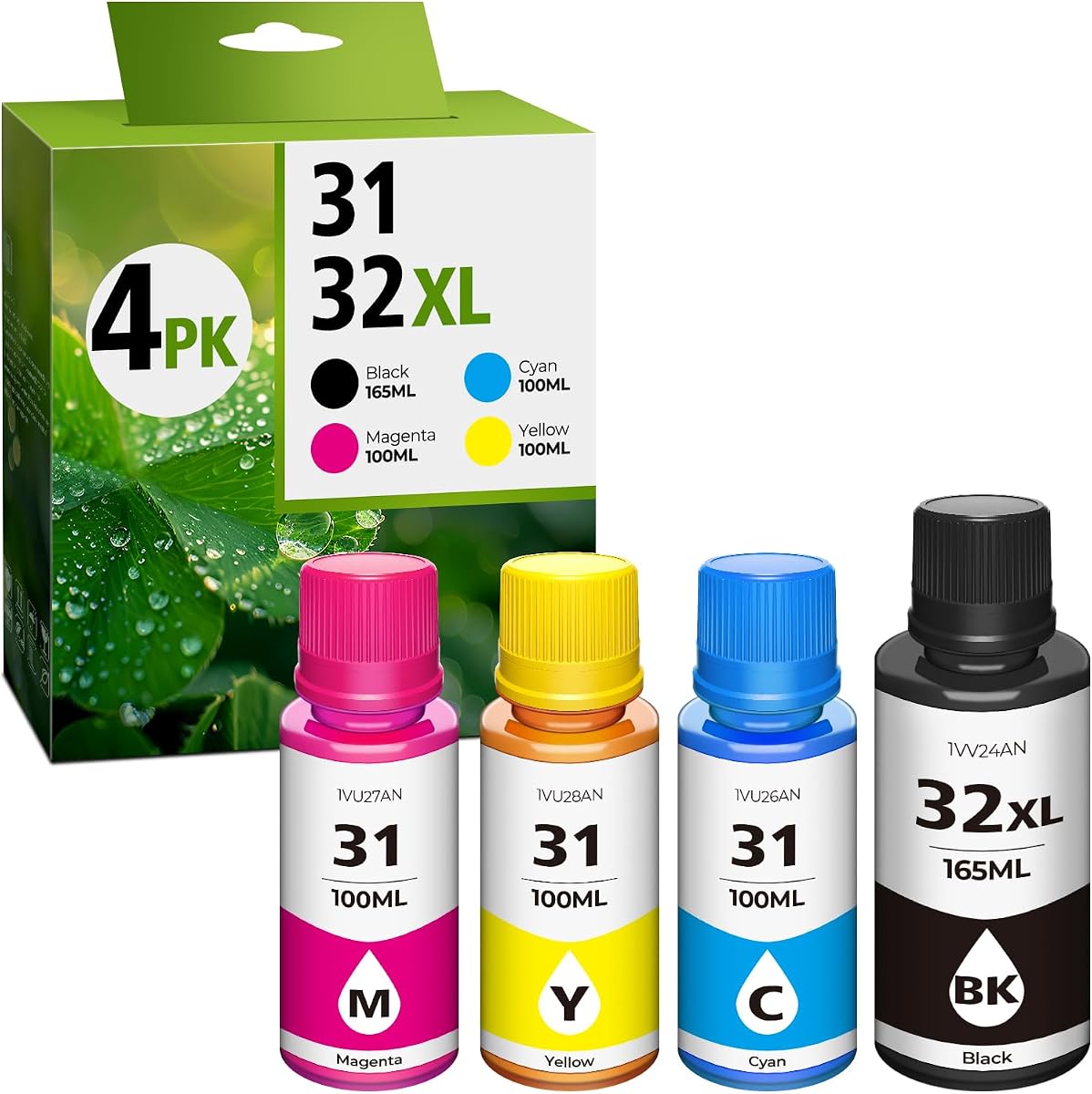
The 31 Ink 32XL Black Ink Bottle Set provides an excellent compatible option for HP Smart Tank users looking to save on ink costs. With a strong rating of 4.4 stars, it offers a high yield of up to 9,500 pages per black bottle, which is impressive for a single unit. The bottles are designed for easy refilling, ensuring seamless replacement with minimal effort.
We may earn a commission when you buy through this link, at no additional cost to you.
Its compatibility extends to a wide range of HP Smart Tank printers, making it a versatile choice for many households. The larger capacity of 165ml for the black bottle reduces the frequency of replacement, adding to its value. Users report that the output remains crisp and professional with vibrant colors and sharp text suitable for daily documents.
While it is dye ink rather than pigment, which may affect longevity for archival documents, the trade-off is acceptable for general printing needs. It is important to clean printer heads before refilling to avoid mixing with OEM pigment inks. This precaution ensures optimal performance and protects the printer from potential damage.
This ink set is ideal for budget-conscious users who want to maintain high print quality without paying premium prices. It offers exceptional value and convenience for those who already own compatible HP Smart Tank printers. If you want to extend the life of your device without breaking the bank, these bottles are a reliable choice.
It provides a practical solution for ongoing ink needs while supporting the efficiency of tank-based systems. The high yield ensures you do not have to order replacements too frequently, saving time and effort.
With a yield of up to 9,500 pages, this refill set offers substantial savings compared to traditional OEM ink options.
Its design supports a broad range of HP Smart Tank models, ensuring that many users can benefit from its cost advantages.
We may earn a commission when you buy through this link, at no additional cost to you.
The Epson EcoTank ET-2980 offers a balanced solution for home users seeking reliability and long-term ink savings. With a rating of 4.0 stars, it includes enough ink to print up to 6,600 black pages and 5,500 color pages, which translates to about three years of use. Its cartridge-free design eliminates the need for disposable ink cartridges, reducing waste and costs.
We may earn a commission when you buy through this link, at no additional cost to you.
The unique EcoFit bottles make refilling simple and stress-free, ensuring you can maintain your printer without technical hassle. It supports wireless printing from smartphones and devices via the Epson Smart Panel app, adding flexibility to your workflow. The built-in scanner and copier provide essential document management capabilities for home offices.
While it may lack some advanced connectivity features found in higher-end models, its core functionality is solid and dependable. The trade-off is a straightforward interface that is easy to use but not overly complex. It delivers consistent output quality suitable for both text documents and color graphics.
This printer is ideal for households that prioritize reliability and ease of use over high-end specs. Its long ink supply and robust design make it a practical choice for daily printing needs. If you want a printer that just works and saves you money, the ET-2980 is a trustworthy option.
It offers a comprehensive package that meets the needs of everyday users without unnecessary complexity. The included ink ensures you can get started immediately without additional purchases.
The EcoFit bottles are uniquely keyed to prevent mix-ups, making the refilling process quick and mistake-free for any user.
Support for the Epson Smart Panel app allows you to print and scan directly from your smartphone, enhancing flexibility.
We may earn a commission when you buy through this link, at no additional cost to you.
The Epson EcoTank ET-2800 is a strong entry-level option for those new to tank printers who want reliable performance without a high price tag. With a rating of 4.0 stars, it includes up to two years of ink in the box, providing a buffer against running out quickly. The Micro Piezo Heat-Free Technology ensures that your prints are vivid and detailed.
We may earn a commission when you buy through this link, at no additional cost to you.
It offers a print speed of 10 ISO pages per minute, which is sufficient for most home needs. Its design focuses on zero cartridge waste, making it an environmentally friendly choice. The wireless capabilities allow you to print from your smart devices, adding convenience to everyday tasks.
While the screen features are basic compared to more advanced models, the interface is intuitive and functional. The trade-off is acceptable given the cost savings and simplicity. It is built to deliver consistent results, making it a dependable tool for documents and photos.
This printer is perfect for students or small households that need a straightforward, effective printing solution. Its reliability and included ink supply make it an attractive starting point for anyone transitioning to tank-based systems. If you want a no-fuss device that gets the job done, the ET-2800 is a smart pick.
It combines essential features with eco-friendly benefits to offer a comprehensive package. The simplicity of design ensures that even those with less tech experience can use it effectively.
As an entry-level model, it provides all the necessary features without unnecessary costs, making it accessible for budget-conscious buyers.
The Micro Piezo Heat-Free Technology ensures consistent performance and longevity, making it a trusted choice for regular tasks.
We may earn a commission when you buy through this link, at no additional cost to you.
Choosing the right ink tank printer involves evaluating several critical factors to ensure it meets your specific needs and budget. This section outlines key considerations to help you make an informed decision.
When selecting an ink tank printer, it is vital to look at the total page yield provided by the included ink supply. Higher yields mean fewer refills and lower costs per page over the device's lifespan. Always compare the number of black and color pages the initial ink set can produce before purchasing.
Prioritize models that offer thousands of pages with a single set of inks to maximize your return on investment and reduce long-term operational costs.
Print speed is measured in ISO pages per minute, which indicates how quickly the machine can produce text or graphics. For high-volume environments, a faster speed will save time and improve workflow efficiency. Additionally, check the DPI resolution to ensure your documents and photos meet your visual quality standards.
Select a printer with a speed and resolution that matches your typical job sizes to avoid bottlenecks during critical tasks.
Modern printers should offer wireless and mobile printing capabilities to allow you to print from various devices without physical cables. Look for support of common protocols like AirPrint, Mopria, or manufacturer-specific apps that streamline the printing process. USB and Ethernet ports can also be useful for direct or networked connections.
Ensure the printer supports the wireless standards your devices use to enable seamless printing from smartphones and computers.
Consider whether you need a device that can scan and copy in addition to printing. An all-in-one model can save desk space and reduce costs compared to buying separate machines for each function. Check the resolution and features of the scanner to ensure it handles document management tasks effectively.
Opt for an all-in-one unit if you frequently digitize paper documents or need to create quick copies alongside your print jobs.
The design of the ink refill system impacts how easy and clean it is to maintain the printer. Look for tanks that are easy to access and bottles that minimize the risk of spills or messes during refilling. Some models feature unique keying to prevent mixing colors, which reduces errors.
Choose a model with a mess-free refill system to keep your workspace clean and make maintenance less stressful for daily users.
The size of the paper tray determines how many sheets you can load at once before needing to refill. Larger trays are beneficial for bulk jobs as they reduce interruptions. Also, check the supported paper types and sizes to ensure compatibility with your typical print materials.
Select a printer with a tray capacity that accommodates your typical job volume to avoid frequent paper reloading delays.
Automatic two-sided printing can save a significant amount of paper and reduce costs for text-heavy documents. If you frequently print double-sided reports or manuals, this feature is worth the extra investment. Manual duplexing is an option, but it requires more effort and time.
Prioritize models with automatic duplexing if environmental impact and paper costs are major concerns in your printing workflow.
Look for printers with a robust build quality and positive user feedback regarding reliability over time. A permanent printhead design can add to the longevity of the device. Check the warranty terms to ensure you have protection against defects and issues during the expected lifespan.
Choose a brand and model known for reliability to ensure the device serves your needs for years without frequent repairs.
After unboxing your printer, follow the setup wizard to connect it to your home Wi-Fi network. Place the device on a flat surface near an outlet and ensure the ink tanks are filled correctly using the provided bottles. This initial setup ensures you can start printing wirelessly from any connected device.
Regular maintenance is essential to keep your printer running smoothly. Clean the printheads periodically using the software tools provided by the manufacturer to prevent clogs. Keep the exterior free of dust and ensure the paper trays are adjusted correctly for the paper size you are using.
When refilling ink, use genuine bottles recommended by the manufacturer to maintain optimal print quality and avoid voiding warranties. Avoid mixing different types of ink formulas unless explicitly instructed by the support team. Proper care extends the life of your printer and ensures consistent output quality.
Most ink tank printers come with enough ink to last from two to three years depending on the model and usage volume. Typically, you can print several thousand black and color pages with the initial supply before needing a replacement bottle.
Yes, ink tank printers offer a significantly lower cost per page compared to traditional cartridge models. While the initial price might be higher, the savings on ink over time make them more economical for frequent users.
Using non-genuine ink is not recommended as it may cause print quality issues and could void your warranty. Manufacturers often advise using their own ink bottles to ensure compatibility and longevity of the printhead.
Clogs usually occur if the printer sits unused for long periods. You can run a cleaning cycle through the printer software or manually clean the head according to the user manual to restore proper function.
Yes, almost all modern ink tank printers support mobile printing via apps or protocols like AirPrint and Mopria. This allows you to print documents and photos directly from your smartphone or tablet without connecting to a computer.
Many higher-end models support automatic duplex printing, but some basic models may require manual flipping. Check the product specifications to ensure automatic two-sided printing is included if this is a priority for your needs.
Ink tank printers generally support standard paper sizes and types including plain paper, glossy photo paper, and envelopes. Always refer to the manual for specific limitations on paper weight and thickness to avoid jams.
Most printers automatically track ink levels and update them based on usage. If you refill the tanks, you may need to reset the system via the printer menu or software to reflect the new level accurately.
Our top picks cover a wide range of needs from budget-conscious home users to those requiring high-quality outputs. The Epson EcoTank ET-2803 stands out as the best overall choice for its balance of quality and cost savings. Meanwhile the Canon MegaTank G3270 offers exceptional value for those on a strict budget.
When making your final decision, prioritize the features that align most closely with your daily printing volume and quality requirements. Consider factors like automatic duplexing and mobile connectivity if these aspects will impact your workflow efficiency significantly.
Remember to check current prices and availability as they can change frequently based on market conditions. Investing in the right ink tank printer will provide reliable service and significant savings on ink costs for years to come.