
GEEKOM IT13 MAX AI
4.6Editor score
Intel Ultra 9 185H Chip
Quiet IceBlast Cooling System
Local AI Processing Support
This guide compares the top Intel Core i9 Mini PC models available in October 2026 to help you find the perfect compact desktop for your specific needs.
Finding the right compact computer can be challenging when you need serious power in a small footprint. The Intel Core i9 Mini PC category offers flagship performance without the bulk of traditional towers, making it ideal for professionals and enthusiasts alike.
We have carefully evaluated ten leading models based on processor speed, memory capacity, storage options, and connectivity features. Each product was selected for its ability to handle demanding tasks like video editing, gaming, and complex computing workloads efficiently.
Every pick in this list highlights specific strengths that cater to different use cases and preferences. Please note that product availability and specifications may change over time, so always verify the latest details before making your final purchase decision.
4.6Editor score

4.5Editor score
4.6Editor score
The following comparison table provides a side-by-side overview of all ten selected models, highlighting their key specifications and unique features to help you quickly identify the best match for your workflow.


The MINISFORUM M1-1390 stands out as a top contender in the Intel Core i9 Mini PC market. With a 4.5-star rating, it delivers flagship-level performance suitable for office, home, and creative workflows.
We may earn a commission when you buy through this link, at no additional cost to you.
Powered by the Core i9-13900HX, this system features 24 cores and 32 threads. It includes 32GB of DDR4 RAM and a 1TB PCIe 4.0 SSD. The integrated graphics support triple 4K display outputs for enhanced productivity.
While it uses DDR4 memory which is slightly slower than DDR5, the sheer core count compensates well for multitasking. The compact design is visually appealing but may generate some noise when running intensive applications.
This unit is ideal for users needing high performance in a small form factor. Whether for video editing or multi-monitor setups, it offers a robust solution that balances power and space efficiency effectively.
The processor intelligently distributes tasks across performance and efficiency cores, ensuring smooth operation even during complex workloads.
Connect up to three 4K displays via HDMI, DP, and USB-C to maximize screen real estate without needing a large tower.
We may earn a commission when you buy through this link, at no additional cost to you.
The Beelink GTi13 is rated at 4.6 stars and offers a compelling package for users prioritizing speed and connectivity. It features the Core i9-13900HK processor with 14 cores.
We may earn a commission when you buy through this link, at no additional cost to you.
It comes with 32GB of DDR5 RAM which provides faster data transfer rates compared to DDR4 models. The inclusion of Thunderbolt 4 ports allows for high-speed data transfer and external GPU support.
While it supports AI voice commands and fingerprint sensors for convenience, the device can get warm and noisy under sustained heavy use. The build quality is solid but the cost is higher than some competitors.
This model is a great choice for creative professionals needing fast memory and versatile ports. It handles rendering and compilation tasks smoothly, making it a strong candidate for high-end mini PC users.
Thunderbolt 4 supports up to 40Gbps data transfer and enables charging, video output, and data through a single versatile port.
Built-in AI chips enable barrier-free voice recognition for smart home control and multi-person conference calls without external microphones.
We may earn a commission when you buy through this link, at no additional cost to you.
The KAMRUI Hyper H2 brings the latest 14th Gen Intel Core i9-14900HX processor to the mini PC space with a 4.5-star rating. It offers up to 5.8GHz clock speed for exceptional single-core performance.
We may earn a commission when you buy through this link, at no additional cost to you.
It features 32GB of DDR4 RAM which is expandable to 64GB. The cooling system uses dual copper heat pipes to maintain stable performance during gaming or video editing tasks.
Although DDR4 is used instead of DDR5, the high clock speed ensures smooth operation. The compact size and included VESA mount make it easy to hide behind monitors in professional environments.
This device is perfect for gamers and creators needing high clock speeds. It handles multitasking well and offers robust cooling to prevent throttling under demanding conditions.
The 5.8GHz turbo boost ensures that single-threaded tasks and games run at maximum speed without lag or stutter.
All-copper heatsink and dual fans provide efficient heat dissipation ensuring stable operation during long work sessions.
We may earn a commission when you buy through this link, at no additional cost to you.
Rated at 4.5 stars, the NAB9S stands out for its unique quad display support and enterprise-grade networking features. It uses the Core i9-13900HK for efficient multitasking.
We may earn a commission when you buy through this link, at no additional cost to you.
The device supports up to four independent 4K displays making it suitable for trading or multi-window work. It features two 2.5G Ethernet ports for fast data transfer or link aggregation.
It includes only 16GB of RAM and a 500GB SSD which may be limiting for heavy users. However, the tool-free design allows easy upgrades to memory and storage as needs grow.
This model is excellent for office environments requiring multiple screens. The cooling design ensures stable operation even during prolonged high-load tasks like video editing.
Supports four independent displays via dual HDMI and USB-C ports significantly improving workflow efficiency for power users.
Dual 2.5G LAN ports allow for link aggregation or connecting to high-speed firewalls and storage servers easily.
We may earn a commission when you buy through this link, at no additional cost to you.
The MS-01 Mini Workstation holds a 4.5-star rating and is designed for enterprise and heavy-duty workloads. It features the Core i9-13900H with vPro support for business environments.
We may earn a commission when you buy through this link, at no additional cost to you.
It stands out with a PCIe 4.0 x16 slot allowing external GPU installation. This is rare in mini PCs and significantly boosts graphical performance for 3D rendering and gaming.
The device includes 32GB DDR5 RAM and multiple M.2 slots supporting RAID configurations. It also offers 10Gbps SFP+ ports for ultra-fast network connections required by professionals.
This is the top choice for users needing desktop-level expandability in a compact chassis. It balances high-end networking, storage, and compute power effectively for complex workflows.
The PCIe 4.0 x16 slot allows installing external GPUs for graphics tasks that integrated chips cannot handle.
10Gbps SFP+ ports provide link aggregation and high-speed data transfer ideal for network storage and servers.
We may earn a commission when you buy through this link, at no additional cost to you.
The GEEKOM IT13 MAX AI is rated at 4.6 stars and offers local AI processing capabilities without cloud dependency. It uses the new Intel Ultra 9 185H processor with 65W TDP.
We may earn a commission when you buy through this link, at no additional cost to you.
It focuses on privacy with local LLMs and AI tasks. The IceBlast 3.0 cooling system ensures it runs silently even during heavy workloads making it suitable for shared spaces.
While 16GB of RAM might be tight for very heavy multitasking it is sufficient for most creative tasks. The 3-year warranty provides long-term peace of mind for business users.
This is the best budget pick for those needing AI features. It offers excellent value with privacy-focused computing and reliable performance in a quiet compact chassis.
Built-in NPU allows private processing of sensitive data locally without sending to the cloud for inference.
IceBlast cooling keeps noise levels low so it won't disturb patients or students in shared environments.
We may earn a commission when you buy through this link, at no additional cost to you.
This barebone version has a 4.5 rating and is ideal for DIY enthusiasts wanting full control over their system specs. It includes the Core i9-13900H but no memory storage or OS.
We may earn a commission when you buy through this link, at no additional cost to you.
It supports discrete graphics cards via a standard PCIe slot and offers triple video output. The networking includes 10Gbps SFP+ ports for fast data transfer needs.
Because you buy components separately the final cost may vary significantly. However it allows you to tailor RAM and storage exactly to your needs without paying for pre-installed extras.
This unit is perfect for home lab users or IT professionals. It offers maximum flexibility and enterprise-grade networking in a small form factor.
By excluding RAM and storage you can choose specific types and capacities to suit your budget and needs perfectly.
The PCIe slot allows adding dedicated GPUs for 3D rendering tasks that exceed integrated graphics capabilities.
We may earn a commission when you buy through this link, at no additional cost to you.
The GEEKOM XT13 Pro is rated at 4.1 stars and offers high capacity out of the box with 2TB storage. It uses the Core i9-13900H for solid multitasking performance.
We may earn a commission when you buy through this link, at no additional cost to you.
It includes 32GB RAM which is generous for most creative workflows. The 3-year warranty offers significant peace of mind for business use compared to standard one-year offers.
While the rating is slightly lower than peers it provides excellent raw capacity. The cooling and build are designed for continuous operation though it may be less compact than rivals.
This is a great choice for users needing large local storage. It balances performance and capacity well for editing or large file archives.
The 2TB PCIe 4.0 SSD allows you to store large media libraries locally without needing external drives immediately.
A three-year hardware warranty minimizes downtime and protects your investment better than standard industry offers.
We may earn a commission when you buy through this link, at no additional cost to you.
Rated at 4.4 stars this unit is designed for professional workflows needing AI and graphics power. It features the Ultra 9 185H processor with dedicated AI NPU.
We may earn a commission when you buy through this link, at no additional cost to you.
It supports lightweight local LLMs and document processing. The Arc graphics enable AAA gaming and video editing. It also supports Wi-Fi 7 for fastest possible wireless speeds.
The housing is reinforced for durability in office settings. However 16GB RAM may be a bottleneck for heavy multitasking. Upgrades are possible but limited to specific slots.
This model suits designers needing on-device AI. It offers privacy and performance in a compact unit suitable for enterprise deployment.
Sensitive data stays on-device reducing cloud risks while enabling fast OCR and document summary tools.
The latest wireless standard ensures low latency connections for streaming large files or video conferencing.
We may earn a commission when you buy through this link, at no additional cost to you.
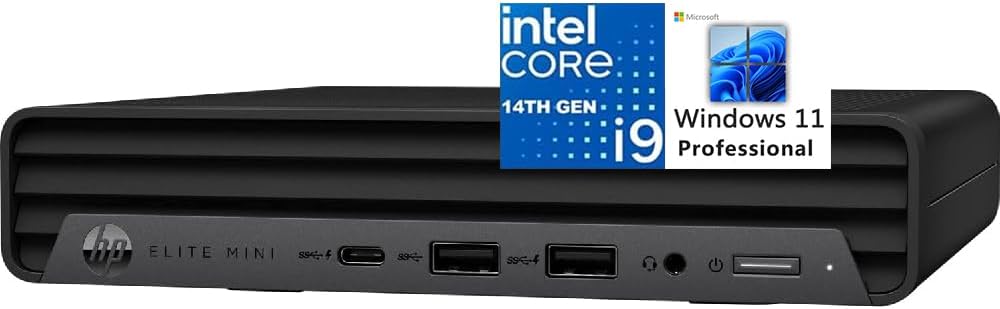
The HP Elite Mini 800 G9 holds a 4.6 rating and is designed for enterprise needs. It uses the Core i9-14900T for power efficient high performance.
We may earn a commission when you buy through this link, at no additional cost to you.
It comes with Windows 11 Pro pre-installed along with a keyboard and mouse. The ultra-quiet design ensures it fits into quiet office spaces without distraction.
While RAM is limited to 16GB the system prioritizes stability and business features. The T-series processor reduces heat allowing for quieter fans compared to standard parts.
This is the best premium choice for business users. It balances performance with manageability and comes ready to deploy with essential peripherals included.
Windows 11 Pro includes features like Remote Desktop and BitLocker essential for secure enterprise workflows.
The T-series processor prioritizes efficiency reducing heat and allowing fans to run quieter during daily tasks.
We may earn a commission when you buy through this link, at no additional cost to you.
Selecting the right Intel Core i9 Mini PC requires understanding your specific needs and matching them to the capabilities of available models.
Different models feature various Intel Core i9 series chips such as the 13th Gen or 14th Gen and T or H or X series. The H series offers high performance while T series focuses on power efficiency and lower heat output. Understanding the specific chip model helps ensure the machine can handle your specific workloads.
Choose based on whether you need raw speed or energy efficiency.
RAM and storage vary significantly across units. Some come with 16GB DDR4 while others offer 32GB DDR5. SSD capacity and expansion slots also differ with some allowing RAID configurations. Ensure the model supports future upgrades if your needs will grow over time.
Prioritize models with at least 32GB RAM for intensive creative tasks.
Connectivity options determine how many screens you can use simultaneously. Many units offer triple 4K outputs but some like the NAB9S support up to four displays. HDMI, DisplayPort, and USB-C ports each offer different capabilities regarding resolution and refresh rates.
Check the ports match your monitor requirements for multi-screen setups.
Networking speed impacts data transfer. Some include standard Ethernet while others offer 2.5G or 10Gbps SFP+ ports for faster connections. Expansion slots like PCIe allow adding graphics cards or capture cards which adds significant versatility for specific work.
Select units with high-speed LAN if data throughput is critical.
High performance generates heat which must be managed. Look for reviews on cooling systems to ensure the unit doesn't throttle under load. Some models use advanced designs with heat pipes or silent fans for quieter operation which is vital in shared environments.
Silent cooling is essential for offices or studio use.
Manufacturer support varies from one year to three years. Longer warranties indicate confidence in build quality and protect against defects. Local repair support and brand reputation are important factors for business continuity.
Always check warranty terms before purchasing for long-term reliability.
Some units come with Windows 11 Pro pre-installed while others may be barebone without an OS. Consider if you need the business features of Windows Pro or if you plan to install Linux. Included software like AI tools can also add value.
Ensure the included software matches your workflow requirements.
Physical dimensions impact where you can place the PC. VESA mounts allow attaching the unit behind a monitor to save desk space. Aesthetics matter for public spaces so design details like color and finish should be considered.
Compact size with VESA mounting offers the most space flexibility.
Begin by placing the Mini PC in a well-ventilated area away from heat sources to ensure proper airflow. Connect your monitors and peripherals carefully ensuring that all necessary cables are secured to avoid accidental disconnections.
Keep the unit clean by gently dusting the exterior regularly using a soft dry cloth. Avoid using liquids near ports to prevent damage. Regularly check vents for debris accumulation that might block airflow and cause overheating.
Install system updates promptly to maintain security and performance. Use built-in tools to monitor temperature and usage. If the system feels sluggish after a period of use consider a restart or cleaning to refresh performance.
Yes, many models feature powerful multi-core processors capable of handling 4K video editing tasks. However, you should check that the model has enough RAM to support smooth editing workflows.
Most models allow RAM expansion up to specific limits like 64GB or 96GB. Check the product specifications to confirm if there are free slots or if replacement is required.
DDR5 offers faster data transfer rates and better efficiency than DDR4. Models with DDR5 are generally newer and more expensive but provide better performance for demanding tasks.
Some workstation models feature PCIe slots that support discrete graphics cards. Others rely on integrated graphics so verify the ports before purchasing for high-end graphics needs.
No, some units come with Windows 11 Home or require a separate license. Business-focused models often include the Pro version which offers more management features.
Noise levels vary by model and cooling design. Some are designed for silent operation in offices while others may be louder under load. Look for reviews mentioning noise levels for your specific use case.
The top picks highlighted in this guide offer diverse strengths from raw speed to quiet operation and AI capabilities. Whether you choose the MINISFORUM M1-1390 for overall performance or the GEEKOM IT13 MAX AI for local processing, there is a model for every need.
Prioritize the features that matter most to your daily workflow such as display outputs or specific RAM capacity. Balancing performance with your budget ensures you get the best value without compromising on essential capabilities.
Always verify the latest product details and availability before making a final decision. Prices and specifications can change so checking current listings ensures you get the most accurate information available.