
Microsoft Surface Dock
4.5Editor score
Four USB 3.0 ports
Mini DisplayPort outputs
Magnetic Surface Connect
This guide compares the top 10 docking stations for Surface Pro devices, evaluating connectivity, charging power, display support, and build quality to help
Finding the right docking station for your Surface Pro can transform a portable tablet into a powerful desktop workstation. A quality dock provides essential ports like USB, Ethernet, and video outputs while keeping your workspace organized and efficient for daily tasks.
We evaluated ten top-rated docking solutions based on their compatibility with various Surface models, port selection, charging capabilities, and overall build quality. Our analysis focuses on real-world performance metrics that matter most to professionals and students using Surface devices.
Each pick below highlights specific strengths and ideal use cases for different users. Please note that availability and pricing can change frequently so verify current details before making your final purchase decision for your specific setup needs.
4.5Editor score

4.4Editor score

4.5Editor score
The following comparison table breaks down key specifications for each of the ten selected docking stations to help you quickly identify which model offers the ports and features you need for your specific Surface device and workflow requirements.




The Microsoft Surface Thunderbolt 4 Docking Station stands out as the premier choice for users seeking top-tier performance and reliability. With a solid rating of 4.4 stars it delivers the high-speed connectivity that modern workflows demand for both professional and personal computing needs.
We may earn a commission when you buy through this link, at no additional cost to you.
Its Thunderbolt 4 ports enable rapid data transfers and media streaming while supporting dual 4K monitors for expansive visual real estate. The quick charge capability ensures your Surface stays powered for extended work sessions without constant replugging or downtime interruptions.
While it comes with a higher price tag than generic alternatives the build quality and integration with the Surface ecosystem justify the investment for serious users. The eco-friendly design using recycled ocean-bound plastic also appeals to environmentally conscious professionals making a responsible purchase.
Anyone who needs consistent high-speed performance and reliable multi-monitor support should consider this dock as their primary desktop connection. It transforms your Surface Pro into a robust workstation capable of handling demanding tasks with ease and efficiency daily.
Thunderbolt 4 ensures rapid data transfers and supports high-resolution displays for seamless workflow continuity.
Built with 20% recycled ocean-bound plastic and tactile port indicators for both eco-responsibility and usability.
We may earn a commission when you buy through this link, at no additional cost to you.
The Microsoft Surface Dock offers exceptional value for users seeking a reliable connection point without breaking the bank. Its impressive 4.5 star rating reflects consistent performance across multiple Surface Pro models from older generations to more recent releases.
We may earn a commission when you buy through this link, at no additional cost to you.
With four USB 3.0 ports and dual Mini DisplayPort outputs it provides sufficient connectivity for standard office peripherals and external monitors. The magnetic Surface Connect cable ensures a secure attachment while delivering power and data through a single elegant connection point.
Though it lacks newer Thunderbolt or USB-C specific features its legacy design makes it perfect for budget-conscious users who prioritize functionality over cutting-edge specs. The wide compatibility range means you can use it across various Surface laptops and tablets without issues.
For anyone needing a straightforward and affordable docking solution the Microsoft Surface Dock remains a top contender. It simplifies your workspace setup efficiently and maintains the trusted Microsoft quality that Surface users expect from official accessories.
Delivers essential ports and stable connectivity at a budget-friendly price for everyday use cases.
Supports a broad range of Surface devices from Pro 3 to Pro 6 and beyond for flexible use.
We may earn a commission when you buy through this link, at no additional cost to you.
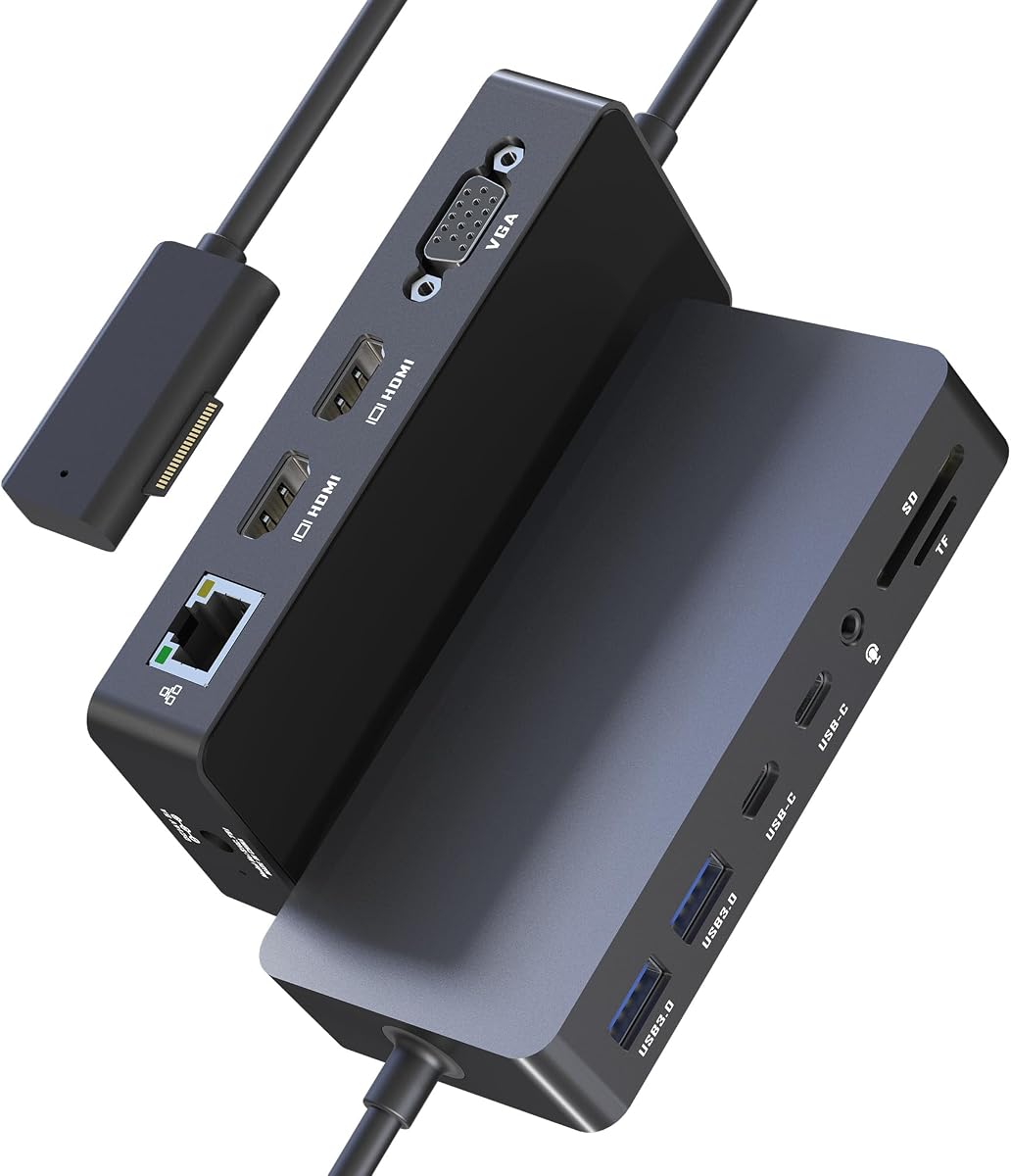
This 12-in-1 Surface Docking Station excels for users who need to connect multiple monitors to maximize productivity during work sessions. A 4.1 star rating indicates solid performance though with minor caveats regarding older video port technologies used in the design.
We may earn a commission when you buy through this link, at no additional cost to you.
The dual HDMI and VGA ports enable triple display setups allowing you to extend your screen across three different monitors simultaneously. This feature is particularly useful for multitasking professionals who manage multiple applications or data streams throughout their day.
The included power adapter and card slots enhance versatility by allowing direct photo transfers and reliable power delivery. Although VGA is less common today its inclusion ensures compatibility with legacy monitors or projectors in conference room environments.
Anyone looking to expand their visual workspace affordably will find this dock meets their needs without requiring complex setup steps. Its plug and play simplicity makes it accessible even for users with limited technical experience connecting peripherals.
Triple display capability boosts productivity by enabling multitasking across multiple screens for complex projects.
Includes SD and TF card slots plus HDMI and VGA for diverse peripheral and legacy device support.
We may earn a commission when you buy through this link, at no additional cost to you.
With an impressive 4.8 star rating this Surface Docking Station delivers exceptional reliability and performance for both creative professionals and general users. Its high score suggests strong user satisfaction regarding speed, build quality, and consistent power delivery over time.
We may earn a commission when you buy through this link, at no additional cost to you.
Engineered for fast file transfers this dock supports 5Gbps speeds on its USB ports which is critical when working with large media files or datasets. The 72W power supply ensures your Surface stays charged even when multiple high-draw peripherals are connected simultaneously.
The triple display setup allows you to turn your tablet into a full workstation ideal for multitasking or detailed design work. Its minimalist design reduces desk clutter while maintaining a sleek aesthetic that complements modern office environments effectively.
This dock is ideal for those who demand speed and reliability without compromising on visual setup flexibility. The combination of high ratings and robust features makes it a top pick for serious professionals daily workflows.
5Gbps USB ports eliminate bottlenecks when transferring large design files or high resolution video.
72W power supply ensures your device stays charged while running multiple peripherals simultaneously.
We may earn a commission when you buy through this link, at no additional cost to you.
This dock shines for users who prioritize high-resolution display output for design work or media consumption. With a 4.2 star rating it delivers consistent performance that appeals to a broad range of Surface Pro and Surface Laptop users across different generations.
We may earn a commission when you buy through this link, at no additional cost to you.
The dual 4K HDMI ports provide crisp visuals while the 72W fast charging keeps your device powered during intensive tasks. This combination ensures you can enjoy stunning imagery without worrying about battery drain or lag during video calls.
Additional features like SD and TF card slots enhance workflow efficiency for photographers and content creators. The 18-month warranty adds peace of mind ensuring you are supported if any issues arise with the hardware.
If clear visuals and reliable charging are your top priorities this docking station is a solid choice for your desk setup. It balances performance with cost effectively and supports diverse workflow needs well.
Dual 4K HDMI outputs deliver crystal clear visuals for design work and media consumption.
Card slots and stable Ethernet ensure quick transfers and uninterrupted internet connectivity.
We may earn a commission when you buy through this link, at no additional cost to you.
The Microsoft Surface Dock 2 is a premium option designed for users who need high refresh rate displays and robust power delivery. Its 4.5 star rating confirms that it meets expectations for stability and performance across compatible Surface devices.
We may earn a commission when you buy through this link, at no additional cost to you.
With dual 4K support at 60Hz you get smooth visuals ideal for video editing or gaming. The 199W power supply ensures even high-draw devices remain fully charged while multiple peripherals operate without performance loss.
The inclusion of both USB-C and USB-A ports offers flexibility for mixing old and new accessories. The longer Surface Connect cable adds convenience for routing connections on larger desks without cable strain.
Investors in high-end productivity setups will appreciate the future-proof connectivity and reliable performance. This dock is best for professionals who cannot afford downtime or display lag in their daily work.
Supports dual 4K at 60Hz for fluid visuals in video editing and multitasking.
199W power and longer cable ensure stable performance and flexible desk routing.
We may earn a commission when you buy through this link, at no additional cost to you.
Another version of the Surface Dock 2 this model boasts an impressive 4.8 star rating indicating superior customer satisfaction and reliability. It transforms your Surface into a desktop PC quickly with next-gen ports that handle demanding workflows smoothly.
We may earn a commission when you buy through this link, at no additional cost to you.
The inclusion of dual 4K at 60Hz ensures high-resolution outputs for creative tasks. The 199W power supply provides ample energy to run your device and all connected accessories without interruption throughout the day.
Wide compatibility covers multiple Surface generations making it a versatile choice for mixed-device environments. Security lock support adds a layer of physical protection for shared office spaces where equipment safety is a concern.
Anyone seeking a premium dock with proven performance and strong security features will find this model ideal. It represents a solid investment for users who prioritize long-term reliability and versatility.
Works with a wide range of Surface models ensuring versatile use in different environments.
Kensington lock support provides added security for shared workspaces and offices.
We may earn a commission when you buy through this link, at no additional cost to you.
This 12-in-1 dock offers extensive connectivity options for users needing multiple ports and high-speed data transfer. A 4.3 star rating suggests it performs well in real-world scenarios while providing a cost-effective alternative to official Microsoft docks.
We may earn a commission when you buy through this link, at no additional cost to you.
Dual 4K@60Hz HDMI ports and VGA support enable a triple monitor setup which boosts multitasking capabilities significantly. The dedicated 100W DC charging ensures your laptop remains powered even when running multiple energy-intensive peripherals simultaneously.
Plug and play functionality reduces setup time so you can focus on work rather than driver installations. The future-proof Thunderbolt compatibility ensures this dock remains useful as your Surface devices evolve over time.
For users who need extensive ports and high-resolution output at a reasonable price this dock is a strong candidate. It balances performance and value effectively for daily professional use.
12-in-1 design provides diverse connections for various peripherals and legacy devices.
100W DC input keeps your device charged during heavy workload usage.
We may earn a commission when you buy through this link, at no additional cost to you.
This renewed version of the Surface Dock 2 offers a sustainable choice for eco-conscious buyers seeking premium performance. A strong 4.7 star rating indicates that refurbished units maintain high functionality and reliability for daily use.
We may earn a commission when you buy through this link, at no additional cost to you.
It includes the original 199W power supply and USB-C cable ensuring you have everything needed for immediate setup. Dual 4K at 60Hz support delivers fluid visuals for professional tasks requiring high-resolution output.
Thermal management design ensures consistent performance even during extended operating periods. The included 1-year warranty provides assurance and support options should issues arise after purchase.
If you want premium performance without the environmental impact of new manufacturing this renewed dock is an excellent option. It offers reliable connectivity and high-speed display support at a competitive value point.
Renewed dock provides high-end performance while reducing environmental impact.
Includes 199W adapter and cables for immediate setup without extra purchases.
We may earn a commission when you buy through this link, at no additional cost to you.
This Surface Dock provides a balanced solution with essential ports for general productivity and connectivity needs. A 4.2 star rating reflects dependable performance for users who want straightforward functionality without unnecessary complexity.
We may earn a commission when you buy through this link, at no additional cost to you.
Four USB 3.0 ports allow connection of multiple accessories while dual Mini DP ports support external monitors for expanded screen space. The 90W power supply ensures your device stays charged during typical work sessions without draining battery.
Gigabit Ethernet ensures stable internet speeds for streaming or large file downloads. The 1-year warranty adds a layer of confidence for buyers seeking reliable hardware from a trusted brand.
For users needing a straightforward dock that handles daily tasks efficiently this model is a solid choice. It covers essential connectivity needs effectively for home and office environments.
Four USB ports and dual Mini DP outputs handle common peripherals and displays.
90W charging and Gigabit Ethernet ensure consistent power and internet speeds.
We may earn a commission when you buy through this link, at no additional cost to you.
Selecting the right docking station involves understanding your specific connectivity needs, device compatibility, and power requirements.
Identify which ports you need most such as USB-A, USB-C, HDMI, or Ethernet. A good dock should have enough ports to connect your peripherals without requiring additional hubs.
Ensure the dock offers the variety of ports that match your workflow needs for efficient daily operation.
Check the power delivery wattage to ensure it can charge your Surface Pro while supporting connected devices. Higher wattage ensures your laptop stays powered during intensive tasks.
Choose a dock with sufficient wattage to avoid battery drain during long work sessions.
Determine how many monitors you need and at what resolution. Some docks support dual 4K monitors while others may only support 1080P.
Match the dock's display capabilities to your visual workspace requirements for optimal productivity.
Verify that the dock is compatible with your specific Surface model. Some docks work best with newer models while others support older generations.
Confirm compatibility details to ensure the dock works seamlessly with your specific Surface device.
Look for docks made with durable materials like aluminum or high-quality plastic. A sturdy build ensures longevity and stability on your desk.
Choose a well-constructed dock to ensure it withstands daily use without damage.
Select a dock that offers plug-and-play functionality without needing complex drivers. This simplifies the installation process significantly.
Opt for docks with straightforward setup to save time and reduce configuration issues.
Check for warranty coverage to protect your investment against defects. A longer warranty period indicates manufacturer confidence in the product.
Look for products with good warranty terms to ensure you are covered for potential issues.
Compare the features offered against the price to ensure you are getting good value. More expensive docks often offer better performance and build quality.
Balance your budget with feature needs to find a dock that offers the best return on investment.
Connect your Surface to the dock using the provided cable such as Surface Connect or USB-C. Ensure the connection is secure to avoid intermittent disconnections during use.
Organize your peripherals like keyboard, mouse, and monitors to the dock ports systematically. Keep cable management tidy to prevent tangling and maintain airflow around the dock.
Regularly clean the ports and surface of the dock to prevent dust buildup. Avoid exposing the dock to extreme temperatures to maintain optimal performance over time.
The Microsoft Surface Dock is an excellent choice for older Surface Pro models as it supports a wide range of generations. It provides essential ports like USB 3.0 and Mini DisplayPorts that work reliably with legacy devices. This ensures compatibility without needing newer Thunderbolt connections.
Yes several of the docking stations listed support triple display setups using combinations of HDMI and VGA ports. You may need to turn off the Surface screen to enable three external displays simultaneously. Check the specific dock specifications to ensure it supports your desired resolution.
No most modern docking stations provide power delivery sufficient to charge your Surface Pro while connected. A dock with a 199W or 100W adapter can power both your device and connected peripherals. Always confirm the wattage meets your device's charging requirements.
Thunderbolt 4 is a more advanced version of USB-C offering higher data transfer speeds and better video support. While USB-C is versatile Thunderbolt 4 provides faster performance for demanding tasks like video editing. Ensure your Surface model supports Thunderbolt 4 before purchasing.
Yes renewed docking stations like the Microsoft Surface Dock 2 Renewed offer a sustainable option with high reliability. They undergo testing to ensure they function like new units. These options come with warranties to protect your purchase effectively.
Use a soft dry cloth to wipe the surface and ports gently. Avoid using liquid cleaners directly on the dock to prevent internal damage. Compressed air can remove dust from ports to maintain optimal connectivity.
First check that the power adapter is properly connected to both the dock and the wall outlet. Ensure the dock is compatible with your specific Surface model for charging capabilities. Restarting the dock may also resolve temporary power issues.
The Microsoft Surface Thunderbolt 4 Docking Station stands out as the overall best choice for users needing top-tier performance and reliability. It offers the best balance of connectivity, charging, and build quality for demanding professional workflows.
When choosing a dock prioritize the specific ports you need most and ensure the power delivery matches your device. Avoid overpaying for features you do not require to get the best value for your setup.
Always check current availability and verify the specifications match your Surface model before purchasing. Prices and stock levels may vary so confirm details directly on the product page.