
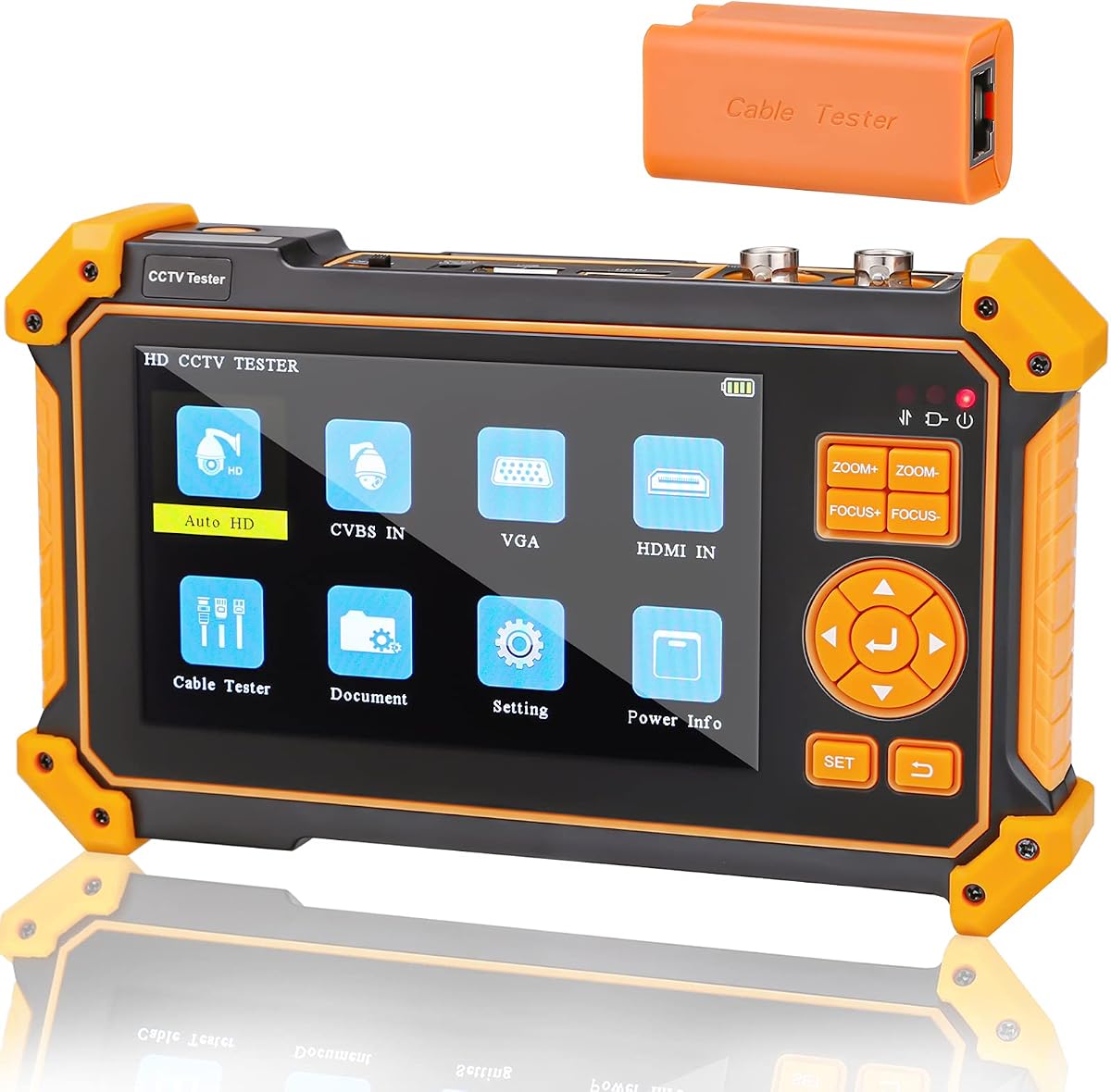
WSDCAM 4-in-1 HD CCTV Tester
5.0Editor score
4.3 inch TFT LCD screen
Supports 8MP CVI TVI AHD
UTP cable test included
LED flashlight for dark areas
7 hour battery life
Choosing the right CCTV Test Monitor is essential for security professionals who need to verify camera functionality before final installation. A reliable tester saves time by diagnosing cable issues, checking power delivery, and confirming video signals across various protocols without requiring multiple tools on site.
We evaluated the leading models available in the market based on their compatibility with modern IP and analog systems, portability, screen quality, and integrated network utilities. Our selection includes devices ranging from compact analog testers to advanced all-in-one units capable of handling 4K IP feeds and fiber optic connections.
Each pick highlights specific strengths such as PoE output power, touchscreen responsiveness, and built-in diagnostic features like TDR and IP scanning. Please note that product availability and pricing can fluctuate, so checking the latest details directly with the retailer is recommended before making a purchase decision.
5.0Editor score

4.5Editor score

4.4Editor score
As an Amazon Associate we earn from qualifying purchases.
The following table provides a side-by-side comparison of the top 10 CCTV Test Monitor models to help you identify which features align best with your specific installation and maintenance requirements.


This device stands out as a top-tier solution for installers working with high-resolution surveillance systems. With a rating of 4.5 stars, it reflects strong user satisfaction regarding its ability to handle 8K 32MP IP cameras alongside traditional analog formats.
We may earn a commission when you buy through this link, at no additional cost to you.
The inclusion of a 90W PoE++ power output allows it to power high-demand PTZ domes without external adapters, significantly streamlining the testing process. Its built-in SFP module port enables direct fiber optic network testing, which is increasingly common in large-scale commercial deployments.
While it excels in performance, the cost is higher than entry-level models, and the SFP module requires specific handling to avoid damage. These factors are acceptable given the advanced capabilities it offers for professional network video installations.
It is an ideal choice for security technicians who need a single device to validate both copper and fiber backhaul systems while supporting the latest camera resolutions. This unit ensures you can verify system integrity from the edge to the core network.
The 90W output ensures that even the most power-hungry speed dome cameras receive stable power for full feature testing on site.
By supporting SFP modules, this tester bridges the gap between modern fiber networks and traditional camera testing workflows.
We may earn a commission when you buy through this link, at no additional cost to you.
The WANLUTECH IPC Tester E88 offers a generous 8-inch touchscreen that makes navigating complex menus and viewing high-resolution video feeds easier. It scores well with users for its robust feature set including 90W PoE and SFP support.
We may earn a commission when you buy through this link, at no additional cost to you.
Its ability to power high-end cameras and test fiber links makes it a versatile tool for complex installations. The Android operating system allows for future updates and potential app additions, keeping the device relevant as standards evolve.
The larger screen size adds bulk to the device, which might be less ideal for tight spaces or travel compared to compact models. Additionally, the larger display consumes more battery power during extended use in the field.
This model is best suited for installers who prioritize screen real estate and advanced connectivity options over extreme portability. It provides a comprehensive platform for validating modern IP and fiber-based security systems efficiently.
The 8-inch display provides ample space to view live feeds and configure settings without squinting in bright outdoor conditions.
Support for HDMI VGA and SFP ensures this unit can interface with a wide range of monitoring and network infrastructure.
We may earn a commission when you buy through this link, at no additional cost to you.
This upgraded model from WANLUTECH is designed for professionals who need to manage complex network environments. It features dual Gigabit Ethernet ports which allow for better traffic management and testing of switch ports directly.
We may earn a commission when you buy through this link, at no additional cost to you.
With support for 8K cameras and 90W PoE, it handles the most demanding hardware in modern surveillance setups. The SFP fiber port further cements its role as a tool for large-scale deployments where fiber is the primary medium.
The advanced feature set can be overwhelming for those accustomed to simpler devices, and the price reflects its professional-grade build. However, these trade-offs are necessary for users needing deep network diagnostic capabilities.
Select this unit if you are working on enterprise level projects where network topology and high bandwidth are critical. It ensures that your camera testing covers every aspect of the connection from power to data throughput.
Having two Gigabit ports allows for simultaneous data ingress and egress testing which speeds up network diagnostics significantly.
The capacity to display 8K feeds ensures you can verify clarity and focus on the highest resolution cameras available.
We may earn a commission when you buy through this link, at no additional cost to you.
The EVERSECU 7 Inch model distinguishes itself with specialized tools like a video level meter and full audio input output capabilities. These features are crucial for verifying that both video quality and sound are optimal during installation.
We may earn a commission when you buy through this link, at no additional cost to you.
Its 5400mAh battery provides up to 10 hours of operation, making it reliable for long days on the job site. The high resolution display ensures that text and live feeds remain clear even in bright environments.
The added functionality increases the weight of the device slightly, which might be a consideration for those carrying it for extended periods. The cost is also higher than simple display monitors due to the advanced diagnostic features.
Choose this tester if you are responsible for installations where audio compliance and signal quality metrics are mandatory. It offers a complete solution for ensuring that every component of the surveillance feed meets technical standards.
Built-in audio input allows you to verify microphone functionality directly without needing extra hardware or software.
The large capacity battery ensures you can work through multiple sites without needing to recharge in the middle of a job.
We may earn a commission when you buy through this link, at no additional cost to you.
This model is a standout for analog and coaxial HD systems, offering a perfect balance of features and affordability. Users have rated it highly for its ease of use and effective auto HD recognition.
We may earn a commission when you buy through this link, at no additional cost to you.
The inclusion of a cable tester and LED flashlight adds significant value, allowing you to check wiring and work in dark ceilings without extra tools. It supports major HD formats like TVI and CVI which are common in many upgrades.
While it lacks IP camera capabilities which limits its use in network-only environments, its focus on analog makes it a specialized and effective tool. The smaller screen is adequate for coaxial signals but may lack detail for high IP resolution testing.
Ideal for residential or small commercial jobs where coaxial cables are still in use, this unit streamlines the setup process efficiently. It ensures you can verify video quality and cabling integrity with minimal hassle.
The combination of video display cable testing and lighting in one package makes it a practical tool for field technicians.
The automatic detection of camera types saves time by instantly displaying the correct resolution without manual configuration.
We may earn a commission when you buy through this link, at no additional cost to you.
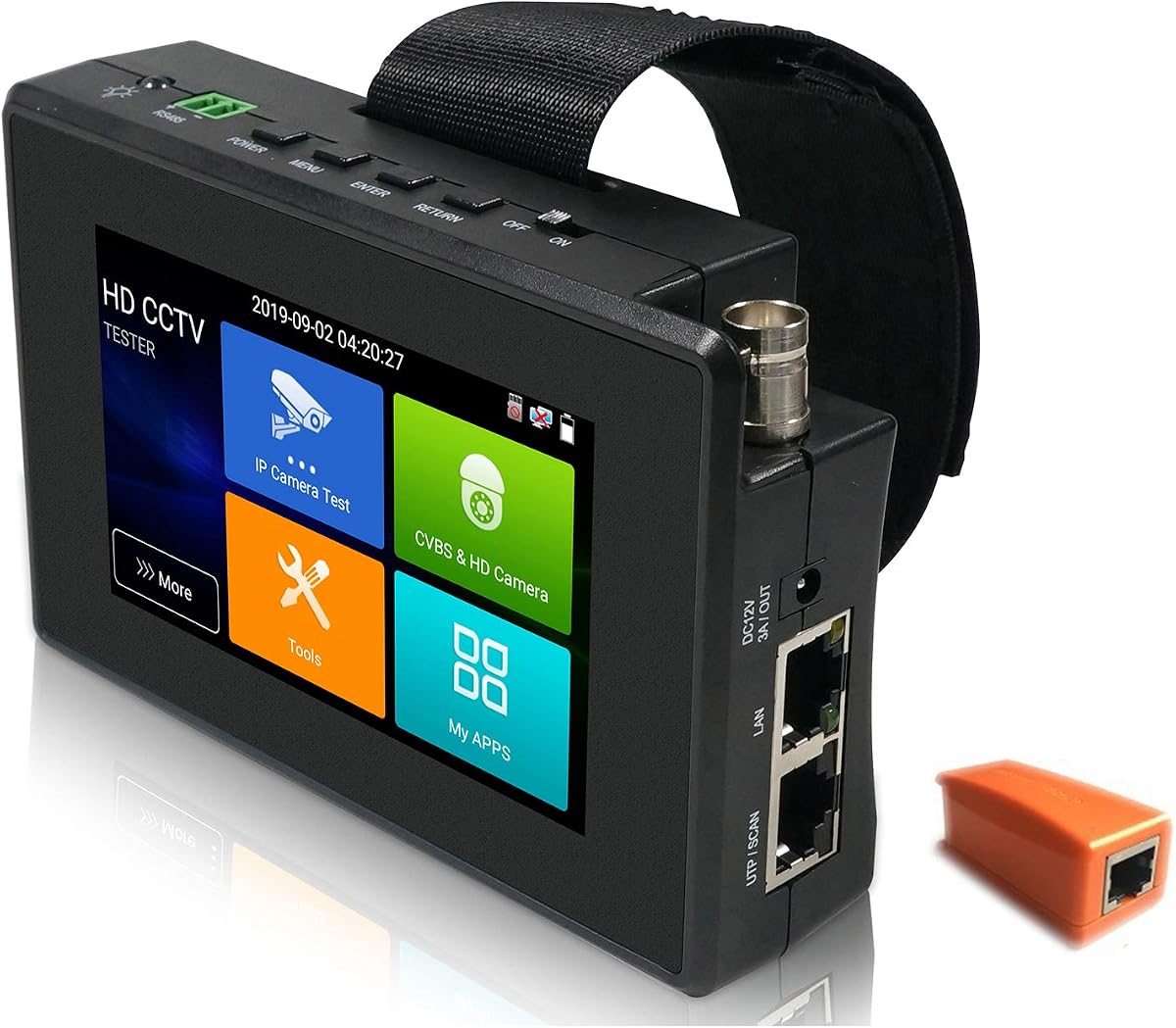
This hybrid tester provides flexibility for jobs that involve both IP and analog cameras without needing separate devices. It supports 4K IP feeds and includes essential network tools like IP scanning which helps quickly locate devices on a subnet.
We may earn a commission when you buy through this link, at no additional cost to you.
The 180-degree screen rotation is a unique feature that makes cabling easier when the tester is mounted or held at awkward angles. Customizable themes allow you to adjust the interface to reduce glare or improve readability in different lighting.
The smaller 4-inch screen limits how much detail you can see compared to larger models, and the network tools are not as advanced as premium options. However, for mixed environments, the balance of features is effective and user-friendly.
Choose this unit if you need a versatile device that can handle legacy cameras alongside modern IP systems in one kit. It simplifies inventory and setup for technicians managing varied hardware types.
Rotating the screen allows for better visibility and access to ports when working in confined spaces or awkward positions.
Support for multiple formats means you do not need to switch devices when moving between different areas of a building.
We may earn a commission when you buy through this link, at no additional cost to you.
The Triplett CamView IP Pro is known for its reliability and focus on essential IP testing needs. It includes an Ookla speed test which allows you to measure network throughput directly from the device to confirm bandwidth requirements.
We may earn a commission when you buy through this link, at no additional cost to you.
Its compact design makes it easy to carry in a tool bag, and it supports standard IP formats effectively. The HDMI output allows you to connect to external monitors for larger displays during setup or client walkthroughs.
While the 24W PoE output is sufficient for many cameras it may not power high-end PTZ units without an extra adapter. The lack of fiber testing also limits its use in networks where cabling runs over long distances.
This unit is a solid choice for residential or small business IP installers who need a straightforward tool for verification. It ensures you can confirm camera connectivity and speed quickly without unnecessary complexity.
The included speed test helps you validate that your network can handle the bandwidth of high-resolution video streams.
HDMI output enables you to show live feeds on a larger TV which is useful for demonstrating camera coverage to clients.
We may earn a commission when you buy through this link, at no additional cost to you.
This tester stands out for its support of SDI formats which are often used in professional broadcast style surveillance setups. It also includes HDMI and VGA inputs which make it versatile for checking DVR NVR outputs directly.
We may earn a commission when you buy through this link, at no additional cost to you.
The 5200mAh battery provides a solid 6 hours of operation and supports a UTP cable test for basic network cabling checks. This makes it a good all-around choice for technicians working with coaxial and professional video hardware.
Since it does not support IP cameras it is specialized for analog and SDI environments which may not suit every job. The added battery capacity also increases the weight slightly compared to simpler models.
Use this device if you are working with high-definition coaxial cameras where SDI stability is a priority. It ensures that you can verify video signal quality and power with a dedicated tool designed for these formats.
Handling EX-SDI and HD-SDI allows you to work with professional-grade cameras that require uncompressed video over coax.
HDMI and VGA inputs let you connect to recording devices or other sources to verify system functionality beyond the camera.
We may earn a commission when you buy through this link, at no additional cost to you.
This compact unit is designed for technicians who need to carry a lightweight IP testing device without sacrificing core features. It includes IP discovery which helps find cameras on the network quickly without manual configuration.
We may earn a commission when you buy through this link, at no additional cost to you.
Support for 4K IP cameras and PTZ control means you can manage all basic functions of a network camera from one small device. The built-in cable test allows you to verify connections before finalizing the mount.
The smaller battery and screen are limitations for long days or high detail verification but are acceptable for a compact unit. It is a cost-effective way to handle IP checks without buying a larger expensive system.
Select this tester for small residential IP jobs or as a backup device to ensure you can handle basic network camera checks on the go. It balances size and functionality well for its specific use case.
Its small form factor makes it easy to keep in a pocket or small bag for quick checks on the fly.
The IP discovery feature automatically scans the network to locate cameras reducing the time spent on setup.
We may earn a commission when you buy through this link, at no additional cost to you.
The Anpviz 5 Inch monitor is a straightforward option for those who primarily deal with analog CCTV systems. Its long 11-hour battery life makes it reliable for long days on the job site without needing frequent charges.
We may earn a commission when you buy through this link, at no additional cost to you.
It supports HDMI and VGA inputs which allows you to use it as a general monitor for DVRs or other video sources. The PTZ controller is built-in so you can control cameras directly from the unit without extra gear.
It lacks IP camera and cable testing features which limits its versatility in modern mixed networks. However for pure analog work its simplicity and battery performance offer good value.
This unit is best for technicians who need a dedicated display for analog setups and want to avoid the complexity of IP tools. It ensures you have a reliable screen and control interface for traditional camera types.
The 11-hour battery allows you to work through a full day without interruption which is critical for large projects.
Its straightforward design makes it easy to use for technicians who prefer essential functions over complex features.
We may earn a commission when you buy through this link, at no additional cost to you.
Selecting the right CCTV Test Monitor requires balancing your budget with the specific camera types and network features you need to verify.
Ensure the tester supports both the analog and IP cameras you will encounter on site. Look for models that handle 4K or 8K feeds if you work with high-resolution systems to avoid future obsolescence.
Verify that the device supports multiple formats like CVI TVI AHD and SDI to maintain flexibility across different brands and setups.
Check the wattage of the PoE output to confirm it can power the cameras you install. High-power PTZ units often require more than standard limits which means you may need a model with 60W or higher output.
A higher wattage capability ensures that you can test and configure all devices without needing external power supplies.
A larger IPS touchscreen improves visibility and ease of use in bright outdoor environments. Devices with at least a 7-inch screen provide better detail for verifying focus and video quality.
Consider the resolution of the display to ensure text and menu items are clear when you are working in the field.
Integrated tools like IP scanning Ping and TDR are essential for troubleshooting network issues on site. These features help you identify broken cables or IP conflicts quickly without bringing a laptop.
Look for models that support fiber optic testing if you work with large-scale deployments that rely on SFP connections.
A battery that lasts at least eight hours will keep you working through the day without interruption. Check the capacity in mAh to compare expected runtime across different models effectively.
Long battery life is crucial for remote sites where access to power outlets is not guaranteed during testing.
If you move between multiple sites daily a compact and lightweight unit will reduce fatigue. Consider the overall weight and dimensions to ensure the device fits comfortably in your tool bag.
A balance between screen size and portability is important to maintain efficiency during transport and setup.
Extra features like an LED flashlight or cable tracer can save you from carrying multiple tools. These additions make the tester a more self-contained solution for complex installation tasks.
Check if the unit comes with necessary cables or adapters to ensure you can use it immediately upon unboxing.
Before using a new device remove the protective film from the battery compartment as instructed. Ensure the battery is fully charged to avoid interruptions during initial testing tasks.
Connect your camera to the tester using the appropriate cable type such as BNC or Ethernet. Verify that the screen displays a clear image and that any power indicators show correct voltage levels.
Clean the screen with a soft dry cloth to avoid damage to the touch layer. Store the device in a protective case to prevent dust and scratches when not in use.
Most modern testers provide PoE up to 60W or 90W which is sufficient for many cameras. However high-power PTZ units may require more wattage so always check your camera's requirements before purchase.
Yes many models support multiple analog formats like CVBS AHD TVI and CVI. This compatibility allows you to use one device for both legacy and new installations.
Time Domain Reflectometry helps you find cable faults like breaks or shorts. It measures the distance to a fault which speeds up troubleshooting in long cable runs.
It is essential for large commercial projects where fiber is used to connect cameras. For small residential jobs it may not be necessary but it adds value for future expansion.
A good tester should last at least eight hours on a single charge. This duration ensures you can work through a full day without needing to recharge.
Some models feature HDMI or VGA input allowing them to act as a monitor for DVRs. This feature adds value if you need to view multiple feeds or connect to other equipment.
Most devices come with intuitive menus for IP scanning and Ping tests. These tools are designed for quick setup to help you verify connectivity without complex software.
The Rsrteng CCTV Camera Tester offers the best overall package for those needing high-resolution support and fiber testing capabilities. Its 90W PoE output and robust network tools make it a reliable partner for professional installers.
For those focused on analog or budget needs the WSDCAM 4-in-1 HD Tester provides excellent value with its built-in cable test and LED light. It is a practical choice for technicians working primarily with coaxial systems.
Remember to review the latest pricing and availability directly with retailers before purchasing. The right CCTV Test Monitor will streamline your workflow and ensure your installations meet all technical standards.