
SABRENT USB 3.0 4-Bay 2.5in SATA SSD/HDD Docking Station
4.2Editor score
Affordable 4-bay solution
Built-in whisper-quiet fan
Tool-free magnetic cover design
Selecting the right external storage solution is crucial for professionals and enthusiasts who need reliable access to large datasets. A 4 Bay Hard Drive Enclosure with Cooling Fans offers the perfect balance of capacity and thermal management for demanding workflows.
We evaluated ten leading models based on transfer speeds, build quality, and cooling efficiency to ensure data safety. Each product was analyzed for compatibility, ease of use, and specific features that differentiate them in a crowded market.
This guide details the strengths and limitations of every enclosure to help you make an informed decision. Please note that product specifications and availability can change, so verify current details before purchasing your final choice.
4.2Editor score

4.3Editor score

4.2Editor score
As an Amazon Associate we earn from qualifying purchases.
This table provides a quick side-by-side comparison of the top ten enclosures to help you identify key differences in speed, capacity, and cooling features at a glance.


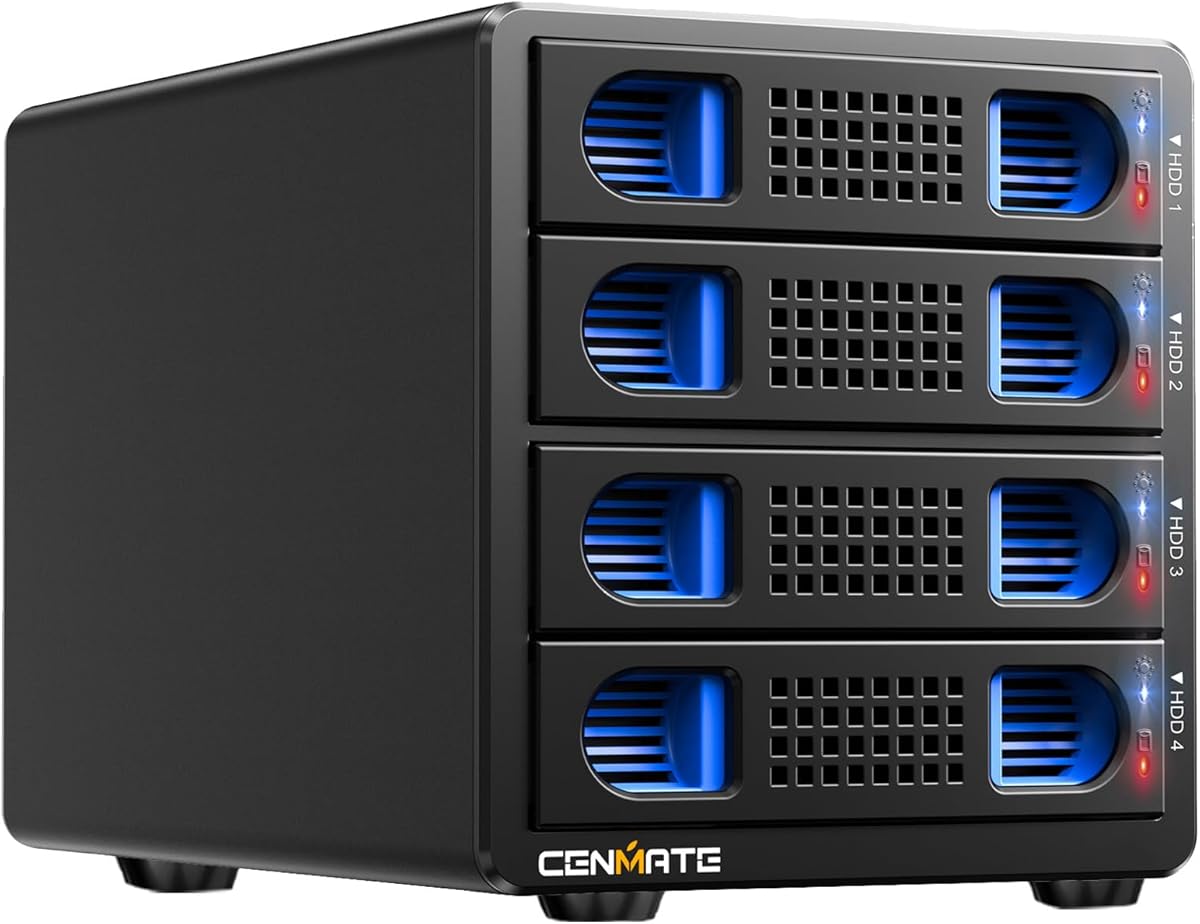
The CENMATE Aluminum 4 Bay Hard Drive Enclosure stands out as a reliable choice for users needing substantial external storage without the complexity of network attached storage. With a strong rating of 4.3 stars, it demonstrates consistent performance in real-world usage scenarios involving multiple drives.
We may earn a commission when you buy through this link, at no additional cost to you.
Its aluminum alloy construction provides exceptional durability and passive cooling, augmented by an active 2-inch fan to prevent overheating during heavy loads. The enclosure supports up to 80TB of total capacity, making it suitable for video editors and data archivists alike. The USB 3.0 interface ensures data transfer speeds of up to 5Gbps, which is significantly faster than older USB 2.0 standards.
While the fan noise is noted to be around 40-50 decibels, this is generally acceptable for office environments though it may be distracting in silent settings. The lack of built-in RAID means users must manage data redundancy independently, which simplifies the device but requires more discipline from the user.
This enclosure is highly recommended for individuals and small businesses seeking a straightforward, high-capacity storage solution. Its tool-free design and hot-swappable feature make it incredibly convenient for workflows that require frequent drive changes without powering down the system.
The combination of aluminum housing and an active fan ensures drives stay within safe temperature ranges even during continuous writes.
Works seamlessly with Windows, Mac, and Linux systems thanks to plug and play drivers and standard USB connectivity.
We may earn a commission when you buy through this link, at no additional cost to you.
This upgraded version of the CENMATE enclosure offers double the theoretical bandwidth compared to its predecessor by utilizing USB 3.2 Gen 2 technology. The 10Gbps capability allows for rapid movement of large video files, reducing wait times significantly during editing workflows.
We may earn a commission when you buy through this link, at no additional cost to you.
Users benefit from the same robust aluminum build quality and fan cooling system found in the standard model. The inclusion of both USB-A and USB-C cables ensures compatibility with a wide range of host computers including older desktops and newer laptops with only USB-C ports.
The performance gains are real but depend heavily on the host system supporting USB 3.2 speeds. If connected to a slower port, the drive will operate at reduced speeds. The noise level remains consistent with other models in this series, so placement is a consideration.
Ideal for professionals working with 4K video or large datasets, this enclosure bridges the gap between cost and performance. It provides the speed of high-end solutions without the premium price tag of enterprise-grade hardware.
Advanced chipsets manage data flow efficiently to maintain high throughput even when multiple drives are active simultaneously.
Multiple cable options ensure you can connect to legacy systems or modern ultrabooks without needing extra adapters.
We may earn a commission when you buy through this link, at no additional cost to you.
The MAIWO 4 Bay DAS stands out for its impressive total capacity potential of up to 96TB when using 24TB drives per bay. It is designed for users who need to aggregate massive amounts of data into a single accessible point on their computer system.
We may earn a commission when you buy through this link, at no additional cost to you.
A unique feature is the HD-TV port which allows direct connection to a television for 4K video output. This makes the enclosure useful for media playback scenarios where you want to view content stored on external drives directly on a large screen.
The dual cooling fans activate automatically when temperatures exceed 48 degrees Celsius which helps maintain energy efficiency while protecting data integrity. However user user reviews suggest variability in performance which may be due to compatibility issues with specific drive models or hosts.
This unit is best suited for advanced users who need expandable storage and multimedia features. While the rating is lower than competitors, the specific features like daisy chaining and TV output offer niche value that may outweigh general reliability concerns.
Connect multiple storage devices in a series to create a massive storage pool without occupying multiple USB ports.
Fans only spin when necessary reducing noise and power consumption while ensuring drives stay cool during intensive use.
We may earn a commission when you buy through this link, at no additional cost to you.
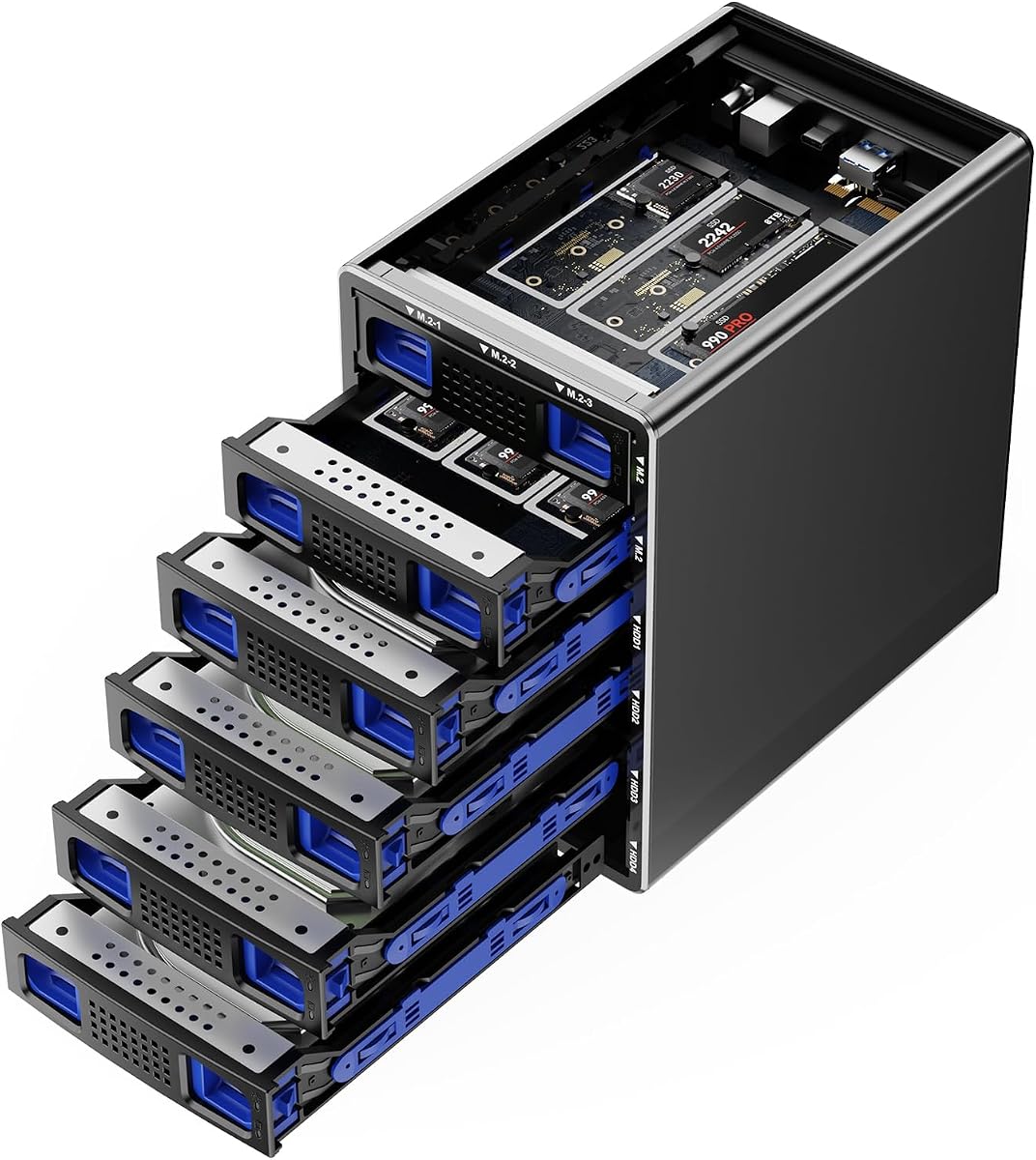
This innovative enclosure breaks new ground by supporting both traditional SATA drives and modern M.2 NVMe SSDs in a single device. It allows users to store bulk data on high-capacity HDDs while keeping active projects on fast NVMe SSDs without buying separate enclosures.
We may earn a commission when you buy through this link, at no additional cost to you.
The theoretical maximum capacity reaches 136TB when fully populated with the largest supported drives. This makes it a powerhouse for archival purposes as well as high-performance workloads requiring quick access times. The USB 3.2 Gen 2 interface ensures that the NVMe speeds are not bottlenecked by the connection.
Installation remains tool-free for easy access to all drive bays. The silent fans help keep the noise down although it is still not whisper quiet. The complexity of managing two types of drives might be a hurdle for users who prefer simple single-format solutions.
For professionals who need both speed and bulk storage this hybrid unit offers a unique all-in-one solution. It future-proofs your setup by supporting the latest drive technologies while remaining compatible with older SATA drives.
Accommodates multiple NVMe sizes ensuring you can use various SSDs you might already own or plan to upgrade to.
Efficiently manages power and data flow for both drive types to prevent bottlenecks or overheating during mixed workloads.
We may earn a commission when you buy through this link, at no additional cost to you.
WAVLINK delivers a premium docking experience with a focus on connectivity and media output. The inclusion of an HDMI port supporting 4K@60Hz resolution transforms the enclosure into a media hub where you can stream content directly to a TV or monitor.
We may earn a commission when you buy through this link, at no additional cost to you.
Data transfer speeds are maxed out at 10Gbps via USB-C ensuring that large file movements are handled efficiently. The aluminum shell helps dissipate heat passively while dual fans activate only when temperatures rise above 48 degrees to save energy and reduce noise.
Each bay has an independent power switch which allows you to manage which drives are active without shutting down the whole unit. This is useful for power saving and extending drive life when not all storage is needed at once.
This enclosure is perfect for creative professionals who need to review high-resolution media on large screens directly from external drives. While the price is higher the added functionality of video output justifies the cost for specific use cases.
Direct HDMI connectivity eliminates the need for separate media players when viewing large video files stored on external drives.
Power switches per bay give you precise control over which drives spin up and save energy when idle.
We may earn a commission when you buy through this link, at no additional cost to you.
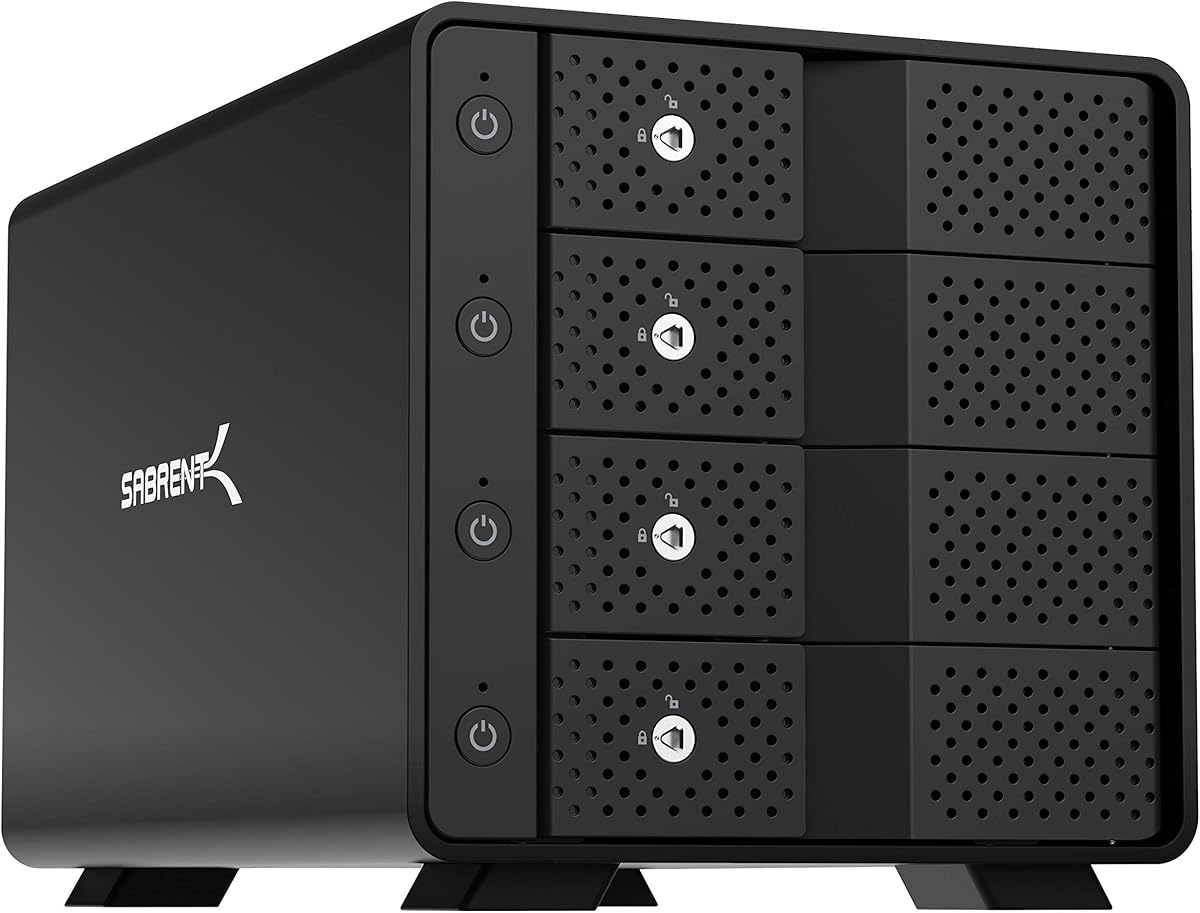
For those needing to interface multiple 2.5 inch drives without breaking the bank this SABRENT docking station offers excellent value. It supports both SSDs and HDDs up to 16TB each making it suitable for many standard laptops and external drive upgrades.
We may earn a commission when you buy through this link, at no additional cost to you.
The build includes a whisper-quiet fan which addresses a common complaint about noise in multi-bay enclosures. It is engineered for continuous 24/7 operation which makes it reliable for servers or home media centers that run round the clock.
The magnetic cover design allows for quick access to the drives without needing tools. While it only supports 2.5 inch form factors this covers the vast majority of portable SSDs and laptop hard drives used by typical consumers.
This is the ideal choice for budget-conscious buyers who prioritize quiet operation and reliability over maximum capacity or high-end speed features. Its simplicity and proven track record make it a safe and effective storage solution.
The dedicated fan design minimizes acoustic disruption making it suitable for home office environments where noise is a concern.
Built for continuous operation it handles long hours of data reading and writing without overheating or instability.
We may earn a commission when you buy through this link, at no additional cost to you.
This model offers versatility by including both USB 3.0 and eSATA connections providing a backup option if your computer lacks sufficient USB bandwidth. The eSATA port can offer stable performance for direct SATA connections though it depends on your host hardware.
We may earn a commission when you buy through this link, at no additional cost to you.
The enclosure supports up to 80TB of total storage capacity and uses an aluminum alloy body to manage heat effectively. An active cooling fan ensures that even under heavy load the drives remain within safe operating temperatures preventing performance throttling.
It is worth noting that the eSATA port does not support all adapters and hot swapping is not supported via eSATA. However USB hot swapping remains available and offers a convenient way to manage drives without shutting down the system.
This unit is a solid choice for users who need flexible connectivity options and robust build quality. The extra eSATA port provides an alternative data path that can be useful in specific workstation configurations.
The inclusion of eSATA gives you an alternative high-speed interface that might be present on older or specialized workstations.
A dedicated power adapter ensures that high capacity drives receive consistent voltage for reliable performance over time.
We may earn a commission when you buy through this link, at no additional cost to you.
The WAVLINK 128TB model pushes the limits of what a consumer enclosure can hold by supporting up to 32TB per drive bay. This total capacity is unmatched by many other options on the market making it ideal for large scale backups and media libraries.
We may earn a commission when you buy through this link, at no additional cost to you.
Like its smaller counterpart this model features HDMI support for direct video output and 10Gbps transfer speeds. The aluminum shell provides excellent heat dissipation and the fans only turn on when needed to maintain a quiet environment when idle.
Independent power switches allow you to control each drive individually which is helpful for managing power consumption. You can activate only the drives you are currently using reducing noise and extending the life of the unused drives.
This enclosure is a top tier option for users with massive storage needs who also want the convenience of multimedia playback features. It combines capacity with speed and display capabilities in a compact form factor.
Supporting drives up to 32TB each allows you to reach total capacities that were previously only possible with NAS systems.
High-speed USB-C and HDMI ensure you can work with your data efficiently and display it without additional hardware.
We may earn a commission when you buy through this link, at no additional cost to you.
This enclosure adds a layer of data redundancy by supporting eight different RAID modes including RAID 0 1 5 and 10. This allows users to balance between speed and redundancy depending on how critical their data is to their workflow.
We may earn a commission when you buy through this link, at no additional cost to you.
It includes both USB and eSATA interfaces ensuring compatibility with various systems. The aluminum build and dual fans help manage heat effectively when multiple drives are spinning at high speeds during RAID operations.
Switching RAID modes involves a hardware reset which means you must power down the device to change configurations. This ensures safety but adds a step to the process. Users should be aware that RAID is not a replacement for backups.
For users who want redundancy without the cost of a dedicated NAS system this enclosure offers a cost-effective middle ground. It provides hardware-level redundancy that is easy to manage on a desktop or portable workstation setup.
With eight modes available you can choose between speed mirroring or parity to match your specific data security needs.
USB and eSATA options ensure you can connect to a wide variety of computers without needing extra hubs or adapters.
We may earn a commission when you buy through this link, at no additional cost to you.
SABRENT focuses on reliability and security with this docking station. Each bay has its own dedicated controller which isolates drive activity and prevents one failing drive from affecting the others on the USB bus.
We may earn a commission when you buy through this link, at no additional cost to you.
Physical security is enhanced by locking keys for the drive trays and a Kensington security slot to anchor the unit to a desk. This makes it a strong choice for shared workspaces or environments where physical theft is a risk.
The USB-C interface supports 10Gbps speeds ensuring fast data transfer while the activity LEDs provide clear visual feedback on drive status. The aluminum and metal build adds to the durability and heat dissipation capabilities.
This enclosure is ideal for professional environments where data integrity and physical security are paramount. While it costs more than basic docks the added reliability features and security mechanisms offer peace of mind for valuable data.
Independent controllers ensure that if one drive fails the others remain accessible and functional without needing a reboot.
Locking trays and security slots deter theft and unauthorized access to your storage hardware and the data within.
We may earn a commission when you buy through this link, at no additional cost to you.
Selecting the right enclosure involves balancing capacity speed and connectivity features. This section outlines the key factors you should evaluate before making a purchase.
Ensure the enclosure supports the physical size of your drives. Most enclosures support 3.5 inch desktop drives and 2.5 inch laptop drives. Some may require brackets for smaller drives.
Check if the enclosure supports both SATA HDDs and SSDs or if it is limited to one type. This affects your upgrade options in the future.
Look for USB 3.2 Gen 2 or USB-C connections if you need high transfer speeds. USB 3.0 offers 5Gbps which is sufficient for most tasks but 10Gbps is better for large video files.
Verify that your computer has the corresponding ports to take advantage of these speeds otherwise you will be limited by the slowest link in the chain.
Active cooling via fans is critical for 4 bay enclosures to prevent thermal throttling. Look for models with temperature sensors that only spin fans when necessary.
Consider the noise level of the fans especially if the device will be in a quiet room. Aluminum chassis also help dissipate heat passively reducing the fan load.
Hot swapping allows you to remove or insert drives without powering down the enclosure. This is essential for users who frequently change drives or need to troubleshoot a specific drive.
Verify that your operating system supports hot swapping for the chosen interface. While most modern systems support it some legacy hardware might require a reboot.
Aluminum enclosures are generally more durable and better at heat dissipation than plastic ones. Check for a robust power adapter that provides stable voltage for all drives.
Look for tool-free designs that allow easy access to drive bays. This saves time and effort when installing or removing drives regularly.
Some enclosures offer extra ports like HDMI for direct video output or eSATA for legacy connectivity. These can add value if you have specific workflow requirements.
Check for RAID support if you need data redundancy. However be aware that hardware RAID can be complex to manage and might void warranties on drives.
Check the maximum supported drive capacity per bay. Some older models may not support drives larger than 16TB or 20TB which limits future upgrades.
Ensure the total capacity of all bays meets your storage needs. If you plan to fill all four bays verify that the enclosure supports that aggregate size.
Review the warranty period and what it covers. A longer warranty often indicates the manufacturer's confidence in the product quality.
Check if technical support is responsive. Having access to help if the enclosure fails or behaves unexpectedly is crucial for peace of mind.
Install drives by placing them into the bays and securing them with screws or clips. Ensure the SATA connectors are firmly seated before closing the enclosure.
Connect the power adapter first to ensure stable voltage before attaching the USB or eSATA cable to your computer. This order prevents electrical surges.
Keep the enclosure in a well-ventilated area to help the cooling fans work effectively. Dust buildup can reduce cooling efficiency so clean the vents periodically with compressed air.
Yes most modern enclosures support macOS out of the box. However you may need to format drives to a compatible file system like ExFAT for cross-platform use or APFS if you are only using Mac. Check the product specifications for any specific driver requirements.
This issue is often caused by missing power or incorrect file system formatting. Ensure you are using the provided power adapter and that the drives are formatted to a file system your operating system recognizes. Also check if the USB cable is securely connected.
Yes but you must format the drives to a file system compatible with the console like NTFS or FAT32. Also ensure the console supports external storage for games which varies by model and game title.
If your enclosure supports RAID it may continue working depending on the level. If it is JBOD each drive is independent so you only lose data on the failed drive. Always keep important data backed up on a separate device.
SSDs generate less heat than HDDs but when using four drives simultaneously heat can still build up. A fan helps maintain performance and longevity especially during long transfers or when the enclosure is enclosed.
Yes but check the power requirements. The Raspberry Pi may not provide enough power for multiple 3.5 inch drives via USB alone. Use the external power adapter and ensure the USB port supports data and power requirements.
Choosing the right enclosure depends on your specific needs for speed capacity and cooling. Models like the CENMATE Aluminum 4 Bay offer a great balance of features and price for most users.
For professionals needing high capacity and multimedia features the WAVLINK 4-Bay models provide excellent value with HDMI output and massive storage potential.
Always verify current availability and pricing before purchasing as technology evolves rapidly. Investing in a quality enclosure now protects your data and ensures smooth performance for years to come.