
SSK Portable SSD 1TB External Solid State Hard Drive
4.5Editor score
Affordable price point
SLC caching for steady speeds
Lightweight aluminum alloy case
Find the best external SSD for Linux with our expert guide comparing speed durability and compatibility for top ranked portable solid state drives.
Linux users need reliable storage that integrates seamlessly with their open-source workflows. An external SSD for Linux offers high-speed data transfer and robust security features essential for developers and creatives working on the go.
We compared ten top-rated portable drives based on throughput speed interface compatibility and build quality. Our analysis focuses on models that perform well with common Linux file systems and kernel drivers without requiring proprietary software.
Each pick highlights key strengths and potential trade-offs for different user needs. Prices and availability can change quickly so please verify current listings before making your final purchasing decision today.
4.5Editor score

4.7Editor score

4.6Editor score
This side-by-side comparison highlights key specifications for all ten drives to help you find the right balance of speed capacity and price for your Linux workstation setup.





The Samsung T7 stands out as a top choice for Linux users seeking a balance of speed and reliability. Its 4.7 star rating reflects consistent performance across various environments. The drive delivers up to 1050MB/s read speeds which is excellent for large file transfers.
We may earn a commission when you buy through this link, at no additional cost to you.
Built with PCIe NVMe technology the T7 offers nearly twice the speed of its predecessor. The aluminum unibody design helps dissipate heat during heavy use ensuring stable performance. It supports extensive compatibility making it easy to integrate with Linux systems.
While the base model lacks the rugged features of the Shield variant it remains durable enough for daily carry. Users should ensure they download the latest firmware for optimal performance on Linux systems which may not be pre-installed.
Ideal for developers and creators the T7 handles video editing and code repository backups efficiently. Its combination of speed security and portability makes it the top recommendation for most external storage needs on Linux.
The drive supports standard USB protocols recognized by most Linux kernels allowing for seamless plug-and-play mounting without proprietary drivers.
Advanced thermal guard technology prevents overheating during long file transfers which is crucial for maintaining speed stability on Linux workstations.
We may earn a commission when you buy through this link, at no additional cost to you.
The SSK Portable SSD offers an excellent entry point for Linux users needing fast external storage without breaking the bank. Its 4.5 star rating indicates solid performance for the price. It delivers read speeds up to 1050MB/s which rivals more expensive brands.
We may earn a commission when you buy through this link, at no additional cost to you.
Key features include SLC caching which ensures consistent write speeds during large transfers. The aluminum alloy case aids heat dissipation keeping the drive cool even during intensive tasks. It weighs only 36.6 grams making it one of the lightest options available.
Linux users should note the capacity variance reported by Windows due to binary calculation differences though this does not affect actual physical storage. The drive is compatible with modern Linux distributions via standard USB interfaces.
For students or budget-conscious professionals the SSK drive provides reliable performance for everyday tasks. It is an ideal choice for backup or media storage where top-tier brand name is less critical than raw value.
Despite the lower price the drive maintains high-speed performance suitable for Linux workflows making it a standout budget option.
The aluminum case effectively manages heat ensuring the drive stays within safe operating temperatures during heavy use on any OS.
We may earn a commission when you buy through this link, at no additional cost to you.
The Samsung T9 represents the pinnacle of portable storage performance with read speeds up to 2000MB/s. Linux users needing high-speed throughput for large datasets or video editing will appreciate its capabilities. Its 4.6 star rating reflects consistent quality and speed.
We may earn a commission when you buy through this link, at no additional cost to you.
Equipped with USB 3.2 Gen 2×2 technology the T9 significantly outpaces older interfaces. The Dynamic Thermal Guard ensures the drive remains cool during sustained heavy use preventing throttling. This is crucial for professional workflows where stability is paramount.
While it requires a compatible host for maximum speeds the drive remains backward compatible with standard USB 3.2 ports. The included Magician software helps manage firmware updates though users on Linux may need to rely on generic updates or manufacturer tools.
For power users and professionals the T9 offers unmatched performance in a portable form factor. Its speed and reliability make it the premium choice for demanding Linux environments where time and efficiency are critical.
The 2000MB/s read speed drastically reduces transfer times for large projects common in Linux development and media production.
Dynamic Thermal Guard technology ensures the drive stays cool during long sessions preventing performance drops due to overheating.
We may earn a commission when you buy through this link, at no additional cost to you.
The Sandisk Extreme Portable SSD is built for tough environments offering IP65 water and dust resistance. Linux users working outdoors or in varied conditions will find this durability valuable. It delivers read speeds up to 1050MB/s ensuring fast data access.
We may earn a commission when you buy through this link, at no additional cost to you.
Featuring a handy carabiner loop it can be easily secured to a bag or belt loop. The 256-bit AES hardware encryption keeps data secure which is essential for sensitive Linux project files. Its updated firmware ensures compatibility with modern systems.
While Linux users often prefer open tools the included software can be ignored for manual mounting. The drive performs well with standard file systems making it a robust choice for field work. It weighs slightly more but the protection justifies the added mass.
For field engineers or travelers needing reliable storage the Extreme SSD is a top contender. Its rugged design and high capacity make it perfect for backing up critical Linux projects anywhere.
IP65 rating ensures the drive survives dust and water exposure making it ideal for Linux users in industrial or outdoor settings.
Hardware encryption ensures data remains secure even if the drive is lost or stolen which is vital for portable storage.
We may earn a commission when you buy through this link, at no additional cost to you.
The Lexar ES3 combines high performance with a sleek thin design suitable for Linux users prioritizing portability. With speeds up to 1050MB/s it handles data transfers efficiently. Its 4.4 star rating reflects consistent reliability for daily use.
We may earn a commission when you buy through this link, at no additional cost to you.
The drive comes with Lexar DataShield software for 256-bit AES encryption keeping your files private. It is plug-and-play meaning Linux users can mount it immediately via the USB-C cable. The silver finish adds a stylish touch to its compact form.
While the encryption software is optional manual encryption can be used on Linux systems. The drive is lightweight making it easy to carry in a pocket or laptop bag. It supports a wide range of devices ensuring broad compatibility.
For users who value style and convenience the Lexar ES3 is a strong choice. It offers fast speeds and security features that cater to modern Linux workflows without unnecessary bulk.
The thin profile allows the drive to fit easily in pockets or laptop sleeves enhancing mobility for Linux users on the go.
Included encryption software offers an easy way to secure sensitive data though Linux users can opt for native encryption tools.
We may earn a commission when you buy through this link, at no additional cost to you.
The Samsung T7 Shield delivers the speed of the standard T7 with enhanced ruggedness. Its 4.7 star rating highlights its dependability in harsh conditions. With drop resistance up to 9.8 feet it can withstand accidental falls that might ruin other drives.
We may earn a commission when you buy through this link, at no additional cost to you.
Featuring IP65 water and dust resistance the Shield is ready for outdoor adventures. Linux users working in field environments will appreciate the extra protection. It retains the fast transfer speeds of its non-rugged counterpart ensuring performance is not compromised.
The drive includes Magician software for monitoring health though Linux users can rely on standard system tools for basic management. The 2TB capacity provides ample space for large media files or development assets. Its protective rubber exterior adds significant durability.
For those needing a tough drive that performs like a regular SSD the Shield is ideal. It is perfect for Linux users who travel frequently or work in challenging environments.
The Shield's IP65 rating and drop resistance make it the toughest option in this lineup suitable for rough handling.
Despite the rugged exterior the drive maintains high-speed data transfer rates comparable to non-shielded models.
We may earn a commission when you buy through this link, at no additional cost to you.
The Western Digital My Passport SSD offers reliable performance with robust hardware encryption. Linux users concerned about data security will appreciate the 256-bit AES hardware encryption built-in. Its 4.5 star rating reflects steady performance and trustworthiness.
We may earn a commission when you buy through this link, at no additional cost to you.
With NVMe technology the drive reaches read speeds up to 1050MB/s making it suitable for fast backups. The sturdy design provides shock and vibration resistance ensuring physical data safety. It supports USB 3.2 Gen-2 for efficient data transfer.
While the software lock is designed for Windows Linux users may need to use native encryption tools. The drive is easily mountable on Linux systems without proprietary software. It is compact and easy to carry for travel or daily use.
For users prioritizing data security the My Passport SSD is a strong candidate. It combines speed with physical and digital protection making it a solid choice for Linux professionals.
Built-in 256-bit AES encryption provides high-level security without relying solely on software solutions.
The sturdy design resists shocks and vibrations protecting data from physical damage during transport or drops.
We may earn a commission when you buy through this link, at no additional cost to you.
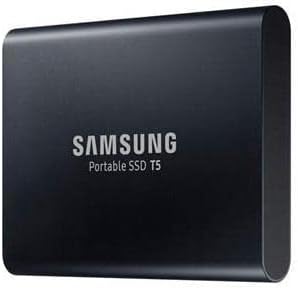
The Samsung T5 Portable SSD holds a high rating of 4.8 stars despite being an older model. Its durable metal design ensures long-term reliability for Linux users. While slower than newer drives it still offers substantial speed for everyday tasks.
We may earn a commission when you buy through this link, at no additional cost to you.
With speeds up to 540MB/s the T5 is significantly faster than traditional hard drives. It includes both USB-C to C and C to A cables ensuring compatibility with various systems. Optional password protection keeps data secure when needed.
Linux users may find its standard USB 3.1 interface less versatile than Gen 2 options. However its robust build and high capacity make it a practical choice for bulk storage. The drive is a proven workhorse in the portable SSD market.
For those seeking reliability and high capacity the T5 is a solid option. It is best suited for users who need large storage space at a moderate speed requirement.
Despite older tech the T5 maintains high reliability ratings making it a safe choice for consistent Linux storage needs.
Included dual cables ensure easy connection to both modern and older devices without needing extra adapters.
We may earn a commission when you buy through this link, at no additional cost to you.
The Samsung T7 500GB offers high-speed performance in a compact package ideal for Linux users needing portability. With read speeds up to 1050MB/s it delivers fast access to files. Its 4.7 star rating reflects strong quality and consistency.
We may earn a commission when you buy through this link, at no additional cost to you.
Dynamic Thermal Guard technology prevents overheating during intensive tasks. The drive is shock-resistant with 6ft drop protection ensuring durability. Password security features are included for basic data protection on Linux systems.
While the capacity is smaller than some models it suits users needing faster access to essential data. The compact size makes it easy to carry in a bag. It supports USB 3.2 Gen 2 for optimal performance.
For users prioritizing speed over capacity this T7 variant is excellent. It is perfect for carrying essential Linux tools or media files with high reliability and speed.
Its small footprint makes it ideal for travel while maintaining high-speed performance for daily Linux workflows.
Dynamic Thermal Guard ensures the drive stays cool during heavy transfers preserving speed and longevity.
We may earn a commission when you buy through this link, at no additional cost to you.
The Samsung T5 500GB offers solid performance at a budget-friendly price point. Its 4.8 star rating indicates high user satisfaction. The metal design ensures durability while keeping the drive lightweight for easy portability on Linux systems.
We may earn a commission when you buy through this link, at no additional cost to you.
It supports USB 3.1 with speeds up to 540MB/s which is sufficient for many tasks. Optional password protection adds a layer of security. The drive includes both USB-C to C and C to A cables for versatile connectivity.
Linux users may find older models compatible with a wider range of legacy ports. While not as fast as newer NVMe drives it remains reliable for daily backups. Its compact size fits easily in pockets or bags.
For budget-conscious users seeking a reliable drive this T5 model is a great option. It balances performance with affordability making it suitable for students or casual Linux users.
Despite being an older model the T5 maintains high reliability ratings for everyday Linux storage needs.
Included dual cables ensure compatibility with both modern and older devices without additional purchases.
We may earn a commission when you buy through this link, at no additional cost to you.
Choosing the right external SSD for Linux involves considering interface speed capacity and durability to match your specific workflow requirements.
USB 3.2 Gen 2 offers higher throughput up to 1050MB/s compared to older USB 3.1 standards which top out around 540MB/s. Ensure your Linux system supports the required interface for optimal speed.
Prioritize Gen 2 or Gen 2×2 interfaces if you regularly transfer large files to minimize wait times.
Most modern Linux distributions support standard USB storage devices without proprietary drivers. However some software features like encryption may require manual configuration on Linux.
Verify that the drive mounts correctly on your specific Linux distribution using standard mount commands.
Rugged drives with IP65 ratings and shock resistance protect data during travel or industrial use. Aluminum cases also help dissipate heat during heavy use.
Choose a build that matches your environment whether it is a office desk or outdoor field work.
Capacity ranges from 500GB to 4TB depending on the model. Larger capacities provide more space for media files or backups but cost more.
Assess your total data size before selecting a drive to avoid running out of space prematurely.
Hardware encryption like AES 256-bit protects sensitive data better than software encryption. Linux users can utilize built-in tools like LUKS for secure mounting.
Look for drives offering hardware encryption if protecting sensitive files is a priority for your workflow.
Sustained transfers can cause drives to overheat leading to throttling. Features like dynamic thermal guard help maintain stable speeds.
Select models with good heat dissipation to ensure consistent performance during long transfers.
Lightweight and compact drives are easier to carry for students or travelers. Some include carabiner loops for added security.
Consider the weight and dimensions if you plan to carry the drive daily.
Prices vary widely based on brand and features. Budget options often sacrifice durability or speed but still offer decent performance for casual use.
Balance your budget with performance requirements to find the best value drive for your needs.
Connect the drive using a compatible USB-C or USB-A cable to your Linux machine. The system should detect the device and prompt you to mount it via your file manager or terminal.
Use standard Linux mount commands if automatic mounting does not occur. Ensure the file system is formatted as ext4 or exFAT for compatibility across different operating systems.
Safely eject the drive before unplugging to prevent data corruption. Keep the device in a protective case when not in use to shield it from physical damage and extreme temperatures.
Yes most modern external SSDs are plug-and-play with Linux. They use standard USB protocols recognized by Linux kernels. Some proprietary software may need to be bypassed or replaced with native tools for full functionality.
Generally no special drivers are required for basic functionality. Most drives are recognized automatically. However encryption software or health monitoring tools may require manual installation of open-source alternatives.
Higher USB standards like 3.2 Gen 2 significantly increase data transfer speeds. This reduces wait times when moving large files between your Linux system and external storage.
You can format SSDs to Linux-native file systems like ext4 using built-in tools. Ensure you have backed up any data before reformatting as the process wipes existing contents.
ext4 is ideal for Linux-only environments. exFAT is better if you need compatibility with Windows or macOS systems as well as Linux.
Use the eject command or file manager menu to safely remove the drive before unplugging it. This prevents data corruption caused by interrupted write processes.
Some models may get warm during sustained use. Drives with thermal guards manage heat better. Ensure adequate airflow around the drive during heavy transfers to maintain speed.
Hardware encryption is secure but often relies on proprietary software. Linux users can use native encryption tools like LUKS for equivalent security without vendor software.
Our top picks highlight the Samsung T7 as the best overall balancing speed reliability and compatibility for Linux users. The SSK Portable SSD offers excellent value for budget-conscious buyers seeking solid performance.
Consider your specific needs such as ruggedness for field work or raw speed for media editing when making your choice. Prioritize drives that support your workflow without requiring excessive configuration or proprietary tools.
Prices and availability can fluctuate frequently so check current listings for the best deals before purchasing. This guide provides a strong starting point to select the ideal external SSD for your Linux setup.