
Focusrite Scarlett Solo 4th Gen USB-C Audio Interface
4.6Editor score
120dB dynamic range converters
Improved Air mode for vocals
Includes Pro Tools and plugins
This guide compares the top audio interfaces with built in Dsp for low latency monitoring and real time effects without taxing your computer CPU during
Audio interfaces with built in Dsp allow musicians and producers to record with zero latency effects directly on the hardware. This technology ensures your computer CPU stays free for complex mixing tasks while you monitor through professional grade processors instantly.
We evaluated ten top rated models based on conversion quality, preamp performance, software ecosystems, and connectivity options. Each device offers unique advantages for streaming, podcasting, or studio recording depending on your specific workflow requirements and budget constraints.
Every pick includes detailed specifications, pros, cons, and real world usage scenarios to help you decide. Note that prices fluctuate frequently so always check the current listing before making your final purchase decision for your setup.
4.6Editor score
4.7Editor score

4.0Editor score
The following table provides a side by side overview of all ten featured interfaces to help you quickly compare core specifications and capabilities at a glance.




The Focusrite Scarlett Solo 4th Gen remains a top choice for solo artists seeking high quality sound without breaking the bank. With a rating of 4.6 stars it delivers studio grade conversion and essential recording tools in a sleek compact chassis.
We may earn a commission when you buy through this link, at no additional cost to you.
Its standout quality lies in the improved Air mode which adds presence to vocals and guitars during recording. The 120dB dynamic range ensures crisp clean captures while the included software like Pro Tools Intro helps you start producing immediately.
While it lacks dedicated hardware DSP for zero latency effects the low latency monitoring provided by drivers is sufficient for most home setups. The single input limitation is the main trade-off for its portable and affordable form factor.
Buyers looking for a simple reliable entry point into professional recording should consider this unit. It balances cost performance and software value better than most competitors in the sub two hundred dollar range.
The Air mode adds harmonic richness to recordings making vocals cut through mixes more easily without post processing.
Included plugins and DAW licenses like Ableton Live Lite and Cubase LE provide everything needed to start producing right away.
We may earn a commission when you buy through this link, at no additional cost to you.
The Elgato Wave XLR MK.2 is designed specifically for content creators who need reliable audio routing and monitoring features built in. It scores a 4.3 rating due to its user friendly interface and robust DSP capabilities that simplify live streaming workflows.
We may earn a commission when you buy through this link, at no additional cost to you.
Its onboard DSP allows you to apply compression EQ and voice enhancement directly before the signal hits your computer. The Wave Link app provides precise control over mixing and routing making it easy to balance mic system and music levels seamlessly.
The main limitation is the single input design which suits solo podcasters or streamers but not bands. Additionally heavy reliance on the software means you need a stable system to access the full feature set during sessions.
If you prioritize ease of use and visual feedback for levels this interface is ideal. It streamlines the recording process for solo creators who want professional sound without complex external mixer setups.
Built-in processors like compressors and EQs let you shape your voice tone instantly without needing external plugins.
Customizable LED rings show levels at a glance so you never clip or lose audio during important recording moments.
We may earn a commission when you buy through this link, at no additional cost to you.
The Universal Audio Apollo Twin X QUAD stands as the top tier option for professionals who demand analog warmth and extensive DSP processing power. It carries a 4.0 rating reflecting its premium status and high performance in professional studio environments.
We may earn a commission when you buy through this link, at no additional cost to you.
Unison preamps allow you to track through authentic emulations of classic hardware gear in real time using dedicated quad DSP chips. This ensures zero latency monitoring with effects while keeping your computer CPU free for complex mixing tasks.
The primary downside is the significant investment required along with the need for a Thunderbolt 3 connection. However for serious producers these costs are justified by the unmatched sound quality and plugin ecosystem that rivals standalone rack gear.
Buyers who need the best possible conversion and access to industry standard virtual plugins should choose this model. It remains the gold standard for home studios aiming for professional broadcast quality results.
Unison technology lets you dial in Neve API or Fender tones while recording for a finished sound right out of the box.
Sonarworks Sound ID Reference calibration helps you trust your mixes in any room by correcting acoustic issues electronically.
We may earn a commission when you buy through this link, at no additional cost to you.
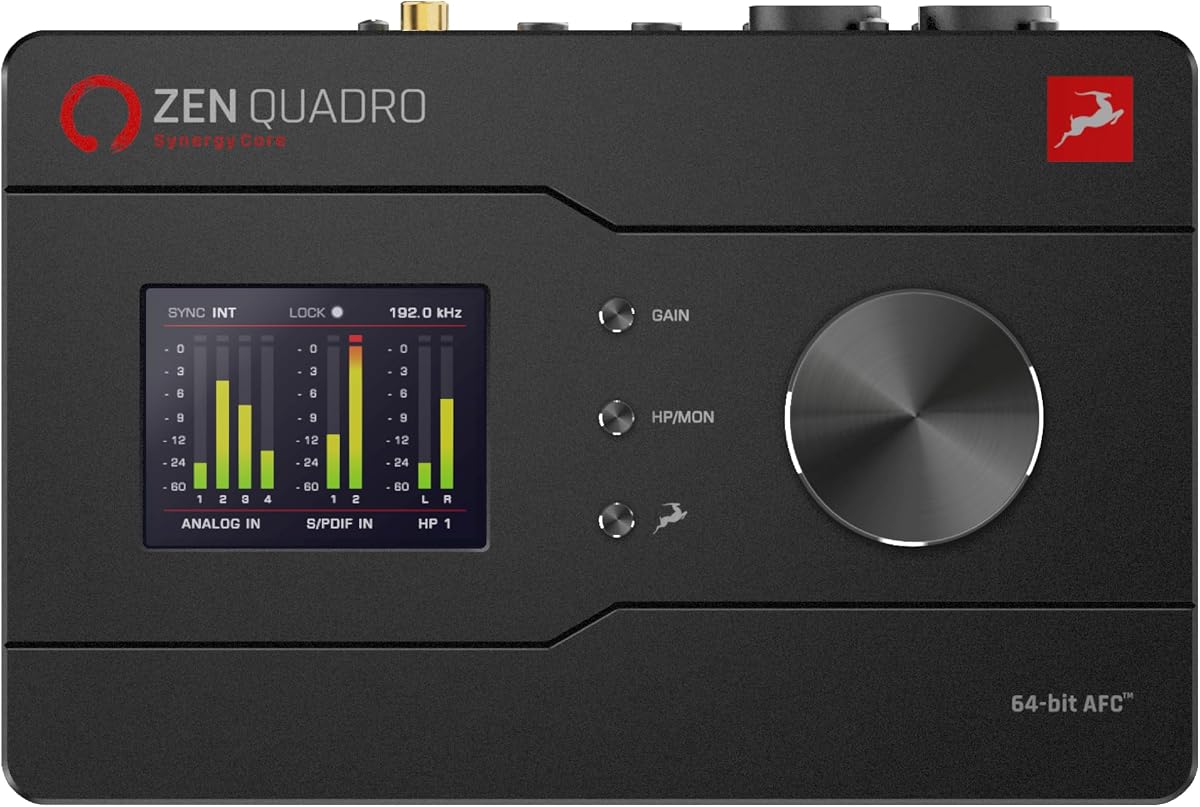
The Antelope Audio Zen Quadro earns our Editor's Choice for its unmatched balance of conversion quality DSP power and portability. With a 4.7 rating it appeals to engineers who need flagship features in a travel friendly USB-C chassis.
We may earn a commission when you buy through this link, at no additional cost to you.
Synergy Core technology runs over 37 included effects on dedicated FPGA and DSP hardware ensuring near zero latency even when recording live. The 130dB dynamic range delivers pristine audio clarity that rivals much larger studio consoles.
While the learning curve can be steep for newcomers the flexibility of dual USB-C and extensive routing options compensates for the initial complexity. Standalone presets allow you to save setups for live use without needing a connected computer.
This unit is best for professionals who need a high end studio hub for both fixed and mobile work. It offers more power and I/O flexibility than most competitors in this price category.
Antelope's 64-bit AFC clocking and conversion tech ensure ultra low jitter and timing accuracy for critical recordings.
Standalone presets let you take your exact signal chain to stage or on location without relying on computer processing.
We may earn a commission when you buy through this link, at no additional cost to you.
The Universal Audio Apollo Twin X DUO offers a slightly more affordable entry into the Apollo ecosystem while retaining the core DSP benefits users love. Its 4.5 rating reflects consistent performance and reliability for mid-level professional studios.
We may earn a commission when you buy through this link, at no additional cost to you.
With dual DSP cores it handles multiple UAD plugins simultaneously without stressing your computer CPU. The Auto-Gain feature speeds up session setup by automatically setting optimal levels across inputs in seconds reducing guesswork for engineers.
Bass management support allows adding a subwoofer to your monitor setup ensuring low end accuracy in critical listening environments. The only constraints are the Thunderbolt requirement and the two input limit which may not suit larger ensembles.
For producers needing robust processing power without the quad core cost this model is a strong choice. It delivers the signature Apollo sound quality and plugin access in a slightly more compact package.
Auto-Gain analyzes input signals to set optimal levels instantly so you can start recording without manual adjustments.
Bass management ensures accurate mixing of low frequencies when using subwoofers for more precise monitor calibration.
We may earn a commission when you buy through this link, at no additional cost to you.
The Solid State Logic 2 MKII Plus brings legendary SSL console tone to the desktop with modern connectivity. It holds a 4.7 rating for its warm analog character and clean conversion suitable for vocal and instrument recording.
We may earn a commission when you buy through this link, at no additional cost to you.
The Legacy 4K Analog Enhancement adds the signature SSL color and top-end detail that defines countless hit records. With 32-bit 192kHz converters the audio fidelity remains pristine even during heavy compression and processing in the mix.
Lacking onboard DSP means you rely on software effects for zero latency monitoring but the high-speed USB connection minimizes delay for most users. The bus powered design makes it incredibly portable for gigging musicians or mobile recording.
Buyers seeking that specific SSL sound and a simple portable interface will love this unit. It is ideal for those who prefer analog warmth over complex software DSP ecosystems.
The 4K mode adds harmonic saturation and top-end sparkle to tracks for an immediate professional finish during recording.
Bus-powered operation means you can record anywhere without carrying an extra power adapter for travel friendly setups.
We may earn a commission when you buy through this link, at no additional cost to you.
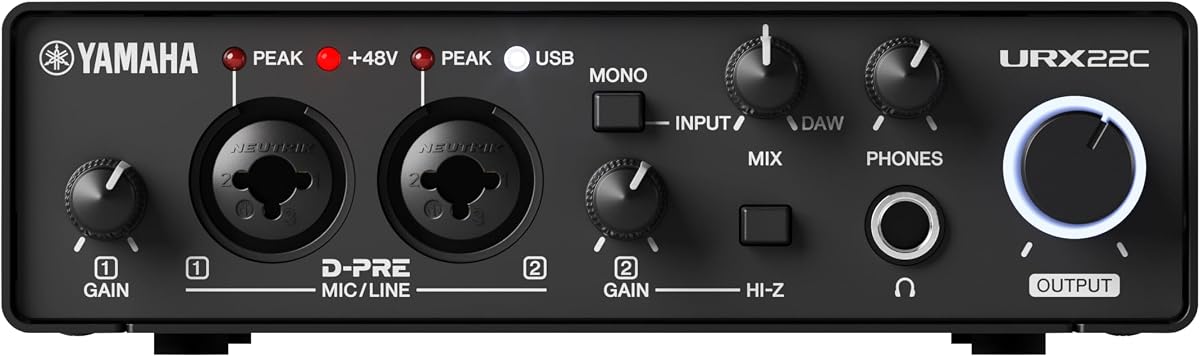
The Yamaha URX22C offers solid DSP-powered monitoring and high-quality preamps in a durable metal chassis. It achieves a 4.5 rating for its robust build and effective zero-latency features for musicians needing a simple reliable interface.
We may earn a commission when you buy through this link, at no additional cost to you.
DSP features like REV-X reverb and Channel Strip run locally ensuring you can hear effects while recording without delay. The Class-A D-PRE mic preamps deliver clean gain and the 32-bit 192kHz support ensures high resolution recording.
Included Steinberg software like Cubase AI and dspMixFx app provide everything needed to start producing immediately. However the limited input count may restrict users who plan to record larger groups simultaneously.
This interface suits guitarists and solo vocalists who want hardware effects and durability. It delivers a no-fuss workflow with proven reliability for home studios on a budget.
DSP-powered monitoring applies reverb and EQ directly to the signal so you hear the finished sound while recording.
Full-metal housing provides durability and protection for transport making it ideal for gigging musicians.
We may earn a commission when you buy through this link, at no additional cost to you.
The MOTU UltraLite-mk5 excels for recording larger bands or live sessions with its 18×22 simultaneous channel capacity. It scores a 4.3 rating due to its exceptional routing flexibility and robust DSP monitor mixing for complex setups.
We may earn a commission when you buy through this link, at no additional cost to you.
DSP-driven monitoring allows you to create separate unique mixes for each output pair ensuring everyone in the studio hears what they need. The high-resolution OLED display provides detailed metering for all analog inputs and outputs at a glance.
On-board effects include reverb EQ and dynamics processing which run independently of host CPU load. The only trade-offs are the initial learning curve for routing and the higher price compared to entry-level interfaces.
If you need to record full bands or integrate extensive analog gear this unit is unmatched. It offers the flexibility of a large console in a compact rack-friendly USB format.
Create up to six separate monitor mixes with unique EQ and effects for each musician using CueMix 5 app.
The OLED screen displays all signal activity simultaneously so you can spot issues instantly during live sessions.
We may earn a commission when you buy through this link, at no additional cost to you.
The Yamaha URX22 distinguishes itself with a large 4.3 inch touchscreen for intuitive control of levels and effects. While it lacks a formal rating yet its design focuses on ease of use and modern features for content creators.
We may earn a commission when you buy through this link, at no additional cost to you.
Built-in DSP ensures latency-free monitoring with professional sound processing before the signal leaves the interface. Dual USB ports offer multi-stream capabilities making it easy to route audio between devices or connect a phone and computer simultaneously.
The high gain range supports demanding microphones and the included software bundle covers recording production and casting needs. As a newer product it may require users to verify compatibility with their specific OS versions before purchase.
This interface is ideal for streamers who prefer visual touch controls over physical knobs. It offers a modern user experience with professional audio quality suitable for live content creation.
Adjust levels and mute channels directly on the screen for fast intuitive control during live recording or streaming.
Dual USB ports allow flexible routing for mobile workflows enabling connections to both computers and mobile devices.
We may earn a commission when you buy through this link, at no additional cost to you.
The Antelope Audio Zenith 2 is a powerhouse for mobile creators needing zero-latency DSP and complete portability. It earns a 4.8 rating for its class-compliant design and exceptional sound quality in a compact USB-C form factor.
We may earn a commission when you buy through this link, at no additional cost to you.
Over 75 plugins including studio quality effects run on dedicated DSP for zero-lag recording. The colorful display is fully customizable allowing you to match themes and languages to your personal workflow preferences directly on device.
Two independent headphone mixes are a rare feature in this class allowing two people to monitor different mixes simultaneously. The only limitation is that full software control requires a PC or Mac though the device works standalone perfectly.
For podcasters and streamers who travel or work from various locations this unit is unmatched. It delivers flagship Antelope audio quality in a pocket-sized device that works seamlessly with iOS Android and computers.
Driver-free USB-C bus power ensures plug-and-play compatibility with any device without needing special installers.
Adjust display colors languages and layout to match your style ensuring the interface adapts to you not the other way around.
We may earn a commission when you buy through this link, at no additional cost to you.
Selecting the right interface with DSP capabilities involves balancing features budget and workflow needs. This guide breaks down the key factors to consider before making your purchase.
Look for dedicated DSP or FPGA cores that handle effects like reverb EQ and compression independently from your computer CPU. This ensures zero latency monitoring during recording so you hear the processed sound instantly.
Higher DSP counts allow more plugins simultaneously without performance issues.
Determine how many microphones and instruments you need to record at once. Interfaces range from single input to sixteen plus inputs for multi-channel recording sessions.
Ensure enough outputs for speakers headphones and external gear.
USB-C is standard for portability and cross platform compatibility while Thunderbolt offers faster bandwidth for high channel counts. Check your computer ports before buying.
USB-C generally works across Windows Mac and iOS without extra adapters.
Quality preamps provide clean gain with minimal noise floor crucial for capturing vocals and acoustic instruments clearly. Look for high dynamic range ratings.
Higher dynamic range means clearer recordings in low volume settings.
Many interfaces come bundled with DAWs plugins and mixing apps. Verify if the software is cross-platform and if it meets your production needs.
Included software can save significant costs for new producers.
If you record outside a fixed studio choose a bus-powered model that runs from your computer or phone without needing external power cables.
Lightweight chassis designs help with travel stability during tours.
Consider interfaces with optical inputs like ADAT or S/PDIF for adding more channels later via external preamps or converters.
Expansion ports protect your investment as your studio grows.
Physical knobs and buttons offer tactile control while touchscreens provide detailed visual feedback. Choose based on your preference for hands-on mixing or visual software control.
Visual feedback helps monitor levels accurately during live recording.
Connect your interface to the computer using the recommended cable such as USB-C or Thunderbolt and ensure the device is powered on. Install any necessary drivers or apps from the manufacturer's website before connecting microphones or instruments.
Adjust gain levels carefully using the knobs on the interface until your audio peaks around -12dB to -6dB. Enable DSP features like compression or EQ on the interface if supported to monitor your sound in real-time during recording.
Regularly clean the exterior with a dry cloth and avoid exposing the unit to moisture or extreme temperatures. Keep cables organized to prevent accidental damage and update firmware periodically to maintain optimal performance and compatibility.
Built-in DSP allows you to apply effects like reverb EQ and compression in real-time without latency. This ensures you hear the processed sound while recording rather than a dry signal which helps performers stay in time and pitch.
Some interfaces work class-compliant without drivers but for full DSP functionality you should install the manufacturer's specific drivers or apps. This ensures all features like mixing and FX are available.
Many modern interfaces allow standalone DSP operation where you can save and recall presets directly on the unit. However full mixing control often still requires connected software.
No one of the main advantages of built-in DSP is that it offloads processing from your computer CPU. This means you can use many plugins without slowing down your system or causing latency.
USB-C is ideal for most users due to universal compatibility and bus power. Thunderbolt is superior for high channel counts and multi-streaming but requires specific ports.
Yes most reputable manufacturers provide firmware updates via their official software tools. These updates often add new features and fix compatibility issues with newer OS versions.
Choosing the right interface with built-in DSP depends on your budget and whether you need zero-latency monitoring or extensive plugin support. The Focusrite Scarlett Solo and Antelope Zen Quadro cover both ends of the spectrum effectively.
Prioritize DSP power if you rely heavily on real-time effects during recording sessions. For streaming and podcasting look for intuitive controls and low-latency features that simplify live mixing.
Always verify current prices and availability before buying as these models frequently go on sale. Selecting the right tool ensures your recordings sound professional and your workflow remains efficient.