
Redragon BM4195 AI Wireless Optical Mouse
3.9Editor score
AI voice typing and translation
Multi-mode connectivity options
Type-C fast charging support
Discover the top AI Smart Wireless Mouse models of October 2026. Our guide compares voice typing, translation, battery life, and connectivity to help you
The AI Smart Wireless Mouse has redefined how we interact with computers by integrating voice typing, real-time translation, and AI assistants directly into a handheld device. These tools allow users to dictate text, manage workflows, and switch between devices seamlessly without relying solely on traditional input methods. As remote work and multilingual collaboration become standard, having a mouse that adapts to your needs is no longer a luxury but a necessity for modern productivity.
To compile this list, we evaluated ten distinct models based on their voice recognition accuracy, language support, battery efficiency, and overall build quality. We focused on devices that offer genuine utility through AI features rather than just marketing gimmicks. Every product selected provides a unique combination of ergonomic design, connectivity options, and software capabilities designed to streamline tasks for professionals, students, and creatives alike.
Each pick in this guide highlights specific strengths, such as silent clicking, long battery life, or advanced AI processing capabilities. We include detailed breakdowns of features, pros, and cons to help you make an informed decision based on your specific workflow requirements. Please note that product availability and pricing can fluctuate frequently, so checking current listings is recommended before making a final purchase.
3.9Editor score

4.1Editor score

4.5Editor score
The following comparison table provides a side-by-side overview of the top ten AI Smart Wireless Mouse models available in November 2026. We have distilled key specifications such as connectivity types, battery capacity, and unique AI features into concise points to facilitate easy decision making for every user type.




This model stands out as the top choice for users needing robust voice-to-text capabilities with added AI intelligence. It carries a strong rating and includes comprehensive features like ChatGPT integration and offline processing. The 600mAh battery ensures long usage periods without frequent recharging needs.
We may earn a commission when you buy through this link, at no additional cost to you.
The voice typing system achieves 98% accuracy across multiple languages including Chinese, English, and German. You can dictate documents, emails, and notes at up to 400 words per minute. The mouse also supports real-time translation for over 200 languages, making it ideal for global collaboration.
While the feature set is extensive, users must download the GAMINJA app to unlock full functionality. There is a brief setup phase to pair devices and configure keys. These steps are necessary to ensure the privacy-focused local AI processing works correctly without cloud dependency.
Professionals, students, and writers who need fast transcription and translation will find this mouse invaluable. It reduces keyboard dependency significantly while maintaining high data security standards. For those seeking a reliable all-in-one AI assistant on a peripheral device, this is the recommended pick.
Data is processed locally on your device ensuring that sensitive voice records and private work files remain secure without cloud storage risks.
The built-in 600mAh battery combined with Type-C fast charging provides extended usage time so you can work uninterrupted through long sessions.
We may earn a commission when you buy through this link, at no additional cost to you.
The Redragon BM4195 offers an accessible entry point into the world of AI-enabled mice without sacrificing core functionality. It supports AI voice typing and translation, allowing users to dictate text and translate content directly from the mouse. The device connects easily across multiple devices through 2.4G and Bluetooth modes.
We may earn a commission when you buy through this link, at no additional cost to you.
Key strengths include its Type-C fast charging port and long wireless transmission distance. Users can customize commands via software to assign specific functions to keys for operational freedom. The 5-level DPI adjustment ensures precise control for various applications ranging from office tasks to creative work.
The AI function requires software activation which may add a minor step to the initial setup process. The shape is functional but may not suit users with larger hands seeking deep ergonomic curves. However, these are acceptable trade-offs considering the competitive price and feature set provided.
Budget-conscious users or students looking for basic AI transcription tools will find this mouse highly useful. It delivers solid performance for everyday tasks while introducing voice control at a fraction of the cost of premium models. It is a great starter device for exploring AI mouse capabilities.
Toggle between 2.4G, BT1, and BT2 modes easily to switch across three devices without interrupting your workflow or needing new hardware.
Download the dedicated software to assign different functions to keys and adjust DPI levels for personalized operational freedom and precision.
We may earn a commission when you buy through this link, at no additional cost to you.
The Logitech Signature M750 brings trusted hardware quality to the AI Smart Wireless Mouse category. While it focuses on reliability and comfort it still supports AI integration through Logi Options+ on Windows and macOS. The device delivers exceptional battery life that lasts up to 24 months depending on usage patterns.
We may earn a commission when you buy through this link, at no additional cost to you.
Its Bluetooth Low Energy technology and Logi Bolt USB Receiver ensure stable and secure connections across devices. The lightweight design reduces hand strain during extended work sessions. Users can customize buttons and settings via the Logi Options+ software to streamline their workflow efficiently.
Unlike some specialized AI mice it relies on external software for advanced AI commands rather than built-in voice assistants. It also uses a standard AA battery which may be less eco-friendly than rechargeable options. These are minor cons given the proven build quality and battery efficiency.
Professionals who prioritize battery life and reliable connectivity will appreciate this model highly. It works seamlessly across desktops laptops and tablets making it versatile for hybrid work environments. For those seeking a durable daily driver with solid AI support this is the top recommendation.
Enjoy up to 24 months of usage on a single AA battery reducing maintenance and ensuring your device is always ready for work.
Switch between Bluetooth and USB receiver modes for a flexible experience that works across Mac PC and laptop devices effortlessly.
We may earn a commission when you buy through this link, at no additional cost to you.
This mouse emphasizes multilingual capabilities making it a strong tool for international meetings and studies. It offers real-time translation across 200+ languages with near-zero latency for seamless communication. A battery display screen allows you to check power levels at a glance without opening software.
We may earn a commission when you buy through this link, at no additional cost to you.
Voice typing reaches up to 98% accuracy with support for 400 words per minute. The device also includes AI tools like auto-summarize and text extraction for enhanced productivity. It connects via dual Bluetooth channels or 2.4G USB for versatile multi-device use.
The voice system may struggle in very noisy environments unless the mouse is held close to the mouth. Initial setup involves downloading the GAMINJA app to pair and configure features which adds a step to the process. These drawbacks are manageable for most dedicated users seeking translation tools.
Business travelers and students in language programs will find this device particularly valuable. It breaks language barriers effectively while keeping power status visible for reliability. If you need advanced translation and battery monitoring this model fits those specific needs well.
The built-in LED real-time power display shows remaining battery life at a glance so you never face sudden power loss during tasks.
Access translation for voice screenshot and highlighted words across 200+ languages breaking barriers for global collaboration and research.
We may earn a commission when you buy through this link, at no additional cost to you.
The LTC OM021 focuses on physical comfort alongside AI voice typing and translation features. Its lightweight ergonomic shape reduces hand strain during extended work hours making it ideal for office environments. The silent click design ensures you can work in shared spaces without disturbing colleagues.
We may earn a commission when you buy through this link, at no additional cost to you.
It supports Bluetooth 5.0 and 2.4G wireless connections for stable performance across systems. A 500mAh rechargeable battery provides reliable power and supports fast charging via Type-C. Users can customize keys and adjust DPI to tailor the mouse to their workflow needs.
The battery life is moderate compared to other premium models and may need frequent charging with heavy daily use. The software support is functional but not as expansive as specialized AI assistants. These are minor limitations given the strong ergonomic and connectivity design.
Office professionals who prioritize comfort and silence will find this mouse highly beneficial. It combines practical AI tools with a user-friendly physical design. If you spend many hours at a desk and need quiet reliable input this is a solid choice.
Designed with a user-friendly ergonomic shape to reduce hand strain during long sessions and improve comfort throughout the workday.
Enjoy a peaceful workspace with quiet clicks that allow focus without disturbing those around you in shared office environments.
We may earn a commission when you buy through this link, at no additional cost to you.
The Cheerdots2 offers a unique magnetic detachable design that transforms into a presentation tool. It serves as an air mouse touchpad and laser pointer which helps presenters move freely during meetings. This 6-in-1 functionality consolidates multiple devices into one portable unit.
We may earn a commission when you buy through this link, at no additional cost to you.
It includes AI transcription to convert spoken words into accurate meeting notes securely. The 20-day battery life and Type-C fast charging minimize interruptions. Users can double-tap to record audio and save notes directly to their computer for later review.
The setup requires understanding both mouse and presentation modes which may take time to master. The price is higher than standard mice reflecting its multifunctional nature. However for frequent presenters the value gained from combining tools is significant.
Professionals who present often or lead meetings will benefit most from this device. It allows confidence and eye contact while controlling slides or notes remotely. If you need a portable tool for public speaking and note-taking this is the ideal pick.
Switch to presentation mode to walk freely while controlling slides or highlighting key points with the built-in laser pointer.
Double-tap to record meetings and lectures effortlessly then transcribe and save notes for quick review later.
We may earn a commission when you buy through this link, at no additional cost to you.
This model adds visual appeal with RGB lighting while maintaining core AI voice typing and ChatGPT assistant features. It supports over 200 languages for translation and includes local offline processing for privacy. The ergonomic design ensures comfort during daily office or creative tasks.
We may earn a commission when you buy through this link, at no additional cost to you.
It offers a 500mAh battery with a standby time of up to 600 hours. Real-time LED power display ensures you track usage easily. The device is compatible with Windows and macOS ensuring cross-platform utility for diverse users.
The daily active usage is capped to preserve battery which might limit heavy users. Also voice recognition may struggle in noisy rooms without proximity adjustments. These are acceptable constraints for users who value privacy and aesthetics.
Creatives and users with multiple devices will find the aesthetic and functional balance appealing. It delivers reliable voice-to-text with a customizable look. If you need a mouse that looks unique and works securely this is a top option.
Customize your workspace with RGB lighting options while maintaining high performance and silent operation for any setting.
Enjoy up to 600 hours of standby time to reduce charging frequency during travel or short work intervals.
We may earn a commission when you buy through this link, at no additional cost to you.
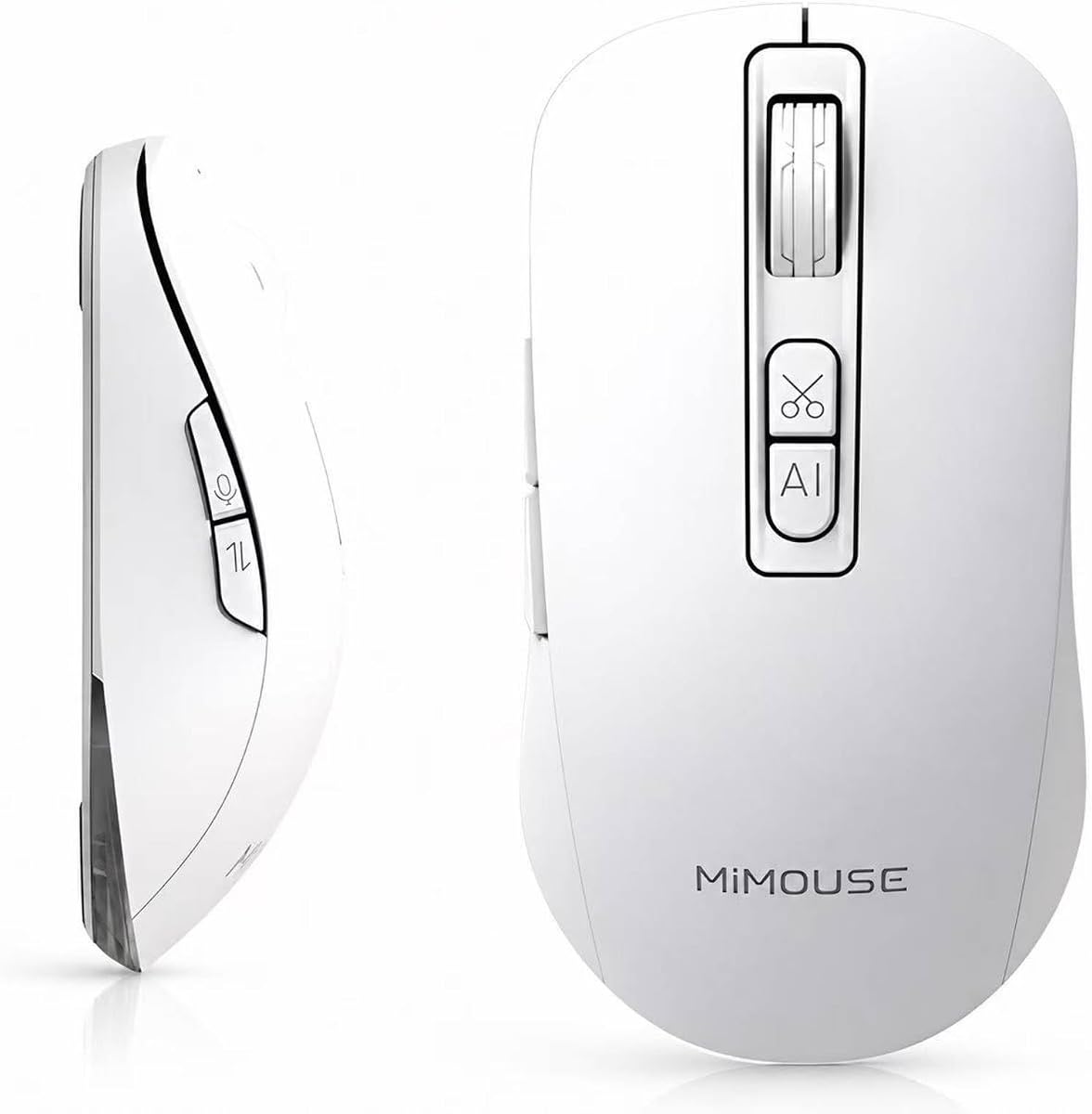
The MiMouse integrates a centralized AI platform supporting multiple models like ChatGPT and Gemini directly in its software. It offers audio transcription and summarization which helps professionals manage meetings efficiently. The ergonomic design and 4 DPI settings ensure precise control across various tasks.
We may earn a commission when you buy through this link, at no additional cost to you.
It supports connecting up to 3 devices simultaneously for seamless switching. A 500mAh battery offers 30-day life and supports charging while in use. This device is compatible with Windows and macOS ensuring broad utility for office environments.
The price is higher than average due to advanced software integration. Learning the platform features may take time for new users. However the benefits of automated notes and summaries outweigh these hurdles for many users.
Professionals and students who need automated meeting notes will find this invaluable. It combines voice-to-text with intelligent summarization for higher productivity. If you want a powerful AI hub in a mouse this model stands out.
Access a unified platform powering writing, reding, drawing, and presentation creation to streamline content creation tasks.
Connect to USB-C to charge while working so you never miss a moment even during long battery drain periods.
We may earn a commission when you buy through this link, at no additional cost to you.
This mouse is designed to work seamlessly with iPads and other mobile devices offering robust connectivity. It supports triple-mode switching between 2.4G USB, BT1, and BT2 for flexibility. Voice typing and translation features help users work faster across languages.
We may earn a commission when you buy through this link, at no additional cost to you.
It includes AI tools for generating PPTs and summarizing text to boost productivity. The ergonomic design ensures secure grip and comfort. Users can adjust DPI levels for precise control across different screen resolutions.
Build quality is standard and may not feel as premium as others. Full functionality relies on specific software which requires setup. These are acceptable limitations for a device tailored to iPad and mobile use cases.
Students and remote workers using iPads will find this mouse highly compatible. It breaks language barriers and automates document creation efficiently. If you need a reliable mouse for tablets and laptops this is a great fit.
Switch between 2.4G, BT1, and BT2 instantly to connect up to three devices without lag or interruptions.
Use AI tools to generate copywriting and PPTs by voice to revolutionize your workflow and save time.
We may earn a commission when you buy through this link, at no additional cost to you.
This model offers a straightforward approach to AI voice typing without complex setups. It converts spoken words to text efficiently and includes summarization tools for notes and reports. Silent clicks help reduce distractions in shared offices and study sessions.
We may earn a commission when you buy through this link, at no additional cost to you.
It supports 200+ languages for translation making it useful for international communication. The rechargeable wireless design keeps your desk simple and tidy. Users can dictate emails and documents to save time on keyboard tasks.
The feature set is more basic than other advanced models. Connectivity options are limited compared to multi-mode mice. However for users needing just voice-to-text this simplicity is a benefit.
Home office workers and students will appreciate the ease of use. It simplifies document creation and translation tasks effectively. If you want a reliable mouse for basic AI tasks this is a solid choice.
Speak naturally to capture ideas and notes instantly so you never lose content while typing feels slow.
Use AI tools to turn rough ideas into organized content and prepare documents without starting from a blank page.
We may earn a commission when you buy through this link, at no additional cost to you.
Selecting the right AI Smart Wireless Mouse requires evaluating several key factors to ensure the device meets your specific workflow needs. We have identified the most critical considerations to help you narrow down your options.
Look for models that advertise 98% accuracy or higher to ensure your dictated text matches your intent. This metric is crucial for reducing manual corrections and saving time during long work sessions.
Prioritize mice with high accuracy ratings to minimize editing and maximize productivity during daily tasks.
If you work in multilingual environments ensure the mouse supports the specific languages you need for translation. Most top models offer 200+ languages but always verify compatibility before purchasing.
Check language lists to confirm your needed languages are supported before translation tasks.
Adequate battery life ensures you are not interrupted by frequent recharging. Aim for devices with 500mAh capacity or larger along with Type-C fast charging for convenience.
Select a mouse with Type-C fast charging and sufficient capacity to last your workday.
Versatile connectivity like dual Bluetooth and 2.4G allows seamless switching between devices. This flexibility is vital if you use multiple computers or tablets daily.
Look for triple-mode switching options to connect multiple devices without lag.
Since these devices process voice data choose models that offer offline local processing. This ensures your sensitive information remains on your device without being uploaded to external servers.
Prefer devices that explicitly state local processing to protect sensitive voice and text data.
Comfort is key for extended use so select a mouse with a shape that supports your hand posture. Silent click features also help in shared environments to reduce distractions.
Choose an ergonomic design with silent clicks to reduce hand strain and noise.
Advanced AI features often require a companion app. Ensure the software is user-friendly and offers useful customization options to unlock the mouse's full potential.
Verify that the companion app provides robust customization and user-friendly controls.
Durable construction and strong after-sales support indicate a reliable product. Look for products that offer warranties or guarantees to protect your investment.
Prioritize models with strong after-sales support and warranty coverage for reliability.
Start by downloading the required software or app and pairing the device via Bluetooth or USB receiver. Ensure all keys are customized to your preference using the settings menu.
Keep the mouse clean by wiping the surface with a soft dry cloth. Avoid exposing it to liquids or dust which could affect the sensor performance over time.
Charge the device regularly using the provided cable and store it in a cool dry place when not in use. This maintains battery health and extends the overall lifespan of the mouse.
Many models support offline processing for basic functions but voice typing and translation often require internet access. Check specific model details to confirm which features work offline.
Most top models support macOS 10.15 or higher. Always verify software availability and system requirements before purchasing for Apple devices.
Leading models claim up to 98% accuracy in quiet environments. Performance may drop in noisy settings unless the microphone is held close to the mouth.
Yes, many models support switching between 2.4G and Bluetooth channels. A dedicated button usually allows seamless transitions between connected computers.
Most modern models feature a built-in rechargeable battery with Type-C charging. Some premium models use AA batteries for extended life but rely on replacements.
Yes, specific software is required to activate and customize voice features. These apps allow you to configure commands and manage translation settings.
They are optimized for productivity rather than gaming. While DPI adjustments exist, specialized gaming mice offer better performance for rapid response times.
Many devices use local processing to keep data on your device. Ensure you select models that prioritize privacy and do not store voice data in the cloud.
We have reviewed ten exceptional models offering voice typing, translation, and AI features to enhance your workflow. The top picks provide a balance of performance battery life, and usability for various user types.
Prioritize devices that match your daily tasks such as offline processing for privacy or battery life for travel. A good AI mouse should integrate seamlessly into your existing workflow without distraction.
Remember that product availability and prices fluctuate regularly. Always check the latest listings and warranty terms before making your final purchase decision.