
8Bitdo M30 Wired Controller
4.2Editor score
Officially licensed by Xbox
USB-C wired connection
Three custom profiles
This guide compares the top fightpads for Xbox to help you find the best controller for competitive gaming and casual play on your console.
Finding the right fightpad for Xbox can transform your gaming experience significantly. A good controller offers precision, comfort, and speed during intense competitive matches.
We analyzed ten top-rated models based on build quality, button layout, and compatibility with modern Xbox consoles to bring you this comprehensive list.
Each pick highlights unique strengths and potential drawbacks. Note that pricing and availability may change over time, so check current listings before purchasing.
4.2Editor score

4.6Editor score

4.4Editor score
This side-by-side comparison highlights key specifications and features across all ten models to help you make an informed decision.
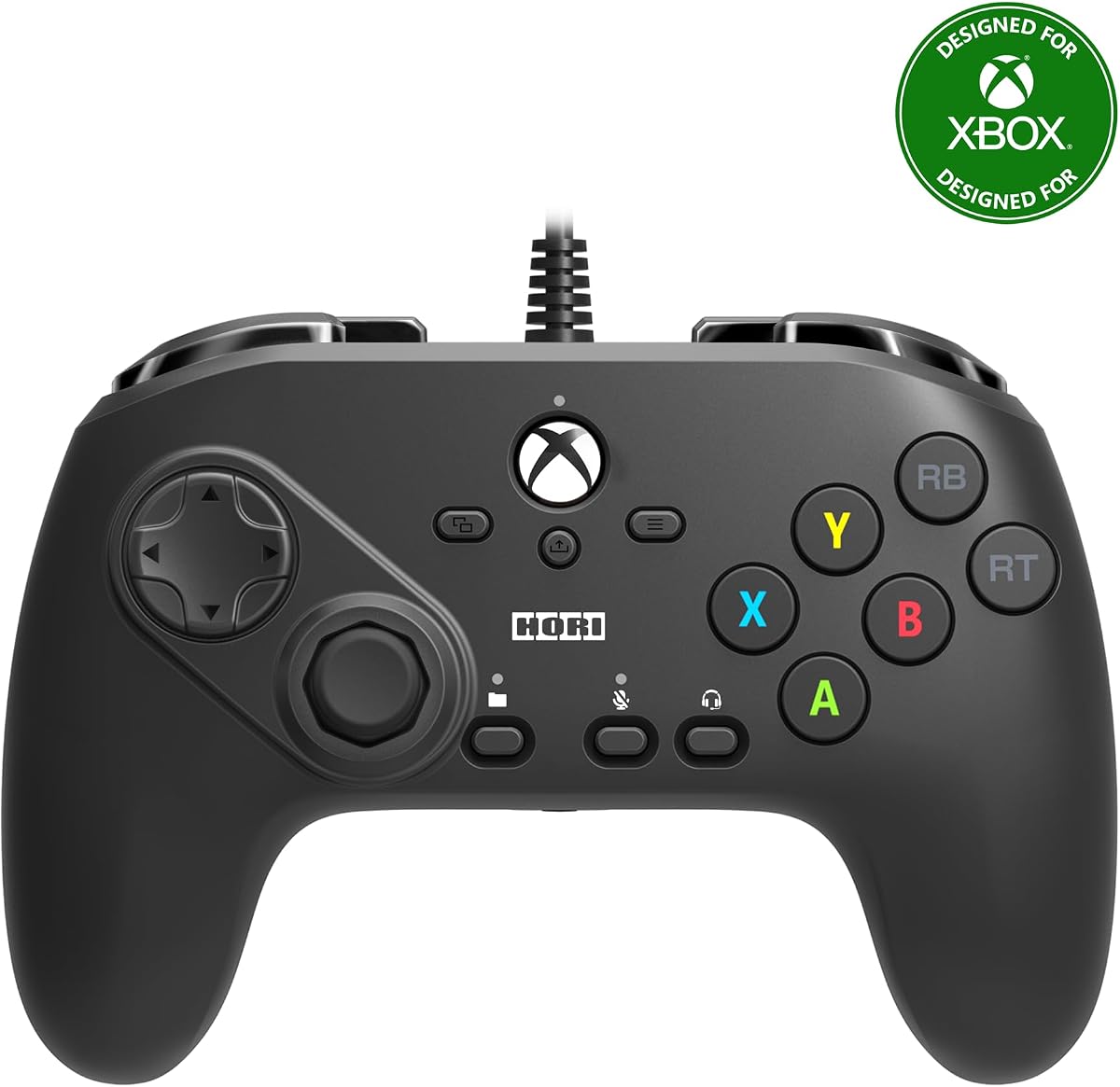


The HORI Fighting Commander Octa stands out as a top choice for serious gamers seeking precision on Xbox Series X|S. With its specialized layout and officially licensed status, it delivers a reliable experience for competitive titles.
We may earn a commission when you buy through this link, at no additional cost to you.
Its six-button layout and micro-switch buttons ensure quick, accurate inputs during fast-paced matches. The adjustable d-pad and short throw analog stick enhance execution speed and accuracy significantly.
While effective, the higher cost might deter casual users. Some players may also prefer wireless options over the wired connection offered here.
This controller is ideal for dedicated fight gamers who value precision and official support. If you prioritize accuracy and durability, this model is a strong recommendation.
The micro-switch buttons and short throw analog stick provide the speed and accuracy needed for complex combos.
Save up to four profiles via the companion app to quickly switch between different game setups.
We may earn a commission when you buy through this link, at no additional cost to you.
The Xbox 360 Street Fighter IV FightPad offers a nostalgic yet functional design for fans of classic arcade styles. Its unique D-Pad layout sets it apart from standard controllers.
We may earn a commission when you buy through this link, at no additional cost to you.
The enlarged circular 8-way floating D-Pad allows smooth directional inputs. Additional multi-speed Turbo functionality enhances gameplay for retro and modern titles.
This model is designed primarily for older Xbox 360 systems, which may limit compatibility for current-gen consoles. The long cable might also be cumbersome depending on setup.
Ideal for collectors or retro gamers, it brings arcade flair to your home setup. Consider compatibility carefully before purchasing for modern systems.
The circular D-Pad design mimics arcade cabinets, offering familiar control for Street Fighter veterans.
Turbo buttons allow rapid firing of actions, adding a layer of fun to classic fighting games.
We may earn a commission when you buy through this link, at no additional cost to you.
The 8Bitdo M30 Wired Controller delivers excellent value for budget-conscious gamers seeking Xbox compatibility. It offers a clean design and reliable performance for fighting games.
We may earn a commission when you buy through this link, at no additional cost to you.
Its USB-C connection ensures virtually lag-free input, crucial for competitive play. The 6-button layout and custom profile switch allow quick adjustments during gameplay.
While cost-effective, it lacks wireless connectivity, which some users may miss. Customization options are also simpler compared to premium models.
This controller suits casual and entry-level competitive players. If you want an affordable, officially licensed option, the M30 is a solid pick.
Get officially Xbox Xbox gaming without spending a premium, perfect for budget builds.
USB-C wired connection minimizes input delay for precise timing in matches.
We may earn a commission when you buy through this link, at no additional cost to you.
The 8Bitdo All-Button Arcade Controller combines traditional arcade feel with modern wireless convenience. Its leverless design appeals to competitive players seeking maximum precision.
We may earn a commission when you buy through this link, at no additional cost to you.
Featuring a quad-movement design, it allows unmatched accuracy and fast inputs. The ultra-thin profile makes it portable, while hot-swappable PCBs let you customize switches.
Its high price might be prohibitive for some, and the leverless layout requires adjustment for traditional players. Despite this, performance is top-tier.
This controller is ideal for players who want arcade precision in a portable wireless package. If you seek advanced customization, this is a great investment.
The all-button arcade layout eliminates stick issues, enabling ultra-fast inputs for combos.
Nearly the size of an A4 sheet and thin enough to carry anywhere for gaming sessions.
We may earn a commission when you buy through this link, at no additional cost to you.
The HORI PAD Pro is a refined standard controller optimized for Xbox Series X|S. Its fine-tuning options enhance responsiveness for gaming.
We may earn a commission when you buy through this link, at no additional cost to you.
Adjustable stick sensitivity and vibration feedback allow players to tailor performance. The Share Button and profile customization add convenience for content creators.
It lacks a dedicated fighting layout, which may limit utility for arcade enthusiasts. The general-purpose design suits broader gaming needs.
Ideal for players who want a versatile, high-quality standard controller. If customization and comfort are priorities, the PAD Pro delivers well.
Fine tune analog stick sensitivity and dead zones to match your playstyle perfectly.
Save and switch between up to four profiles easily using the companion app.
We may earn a commission when you buy through this link, at no additional cost to you.
The Nacon Daija Arcade Fight Stick is a top-tier option for competitive players seeking professional-grade hardware. It offers reliable performance and extensive customization.
We may earn a commission when you buy through this link, at no additional cost to you.
Featuring SANWA joystick and action buttons, it ensures durability and precision. Full button mapping and customizable plates let you personalize your setup.
The cost is significant, and the bulky design requires dedicated space. Despite this, it delivers a true arcade experience at home.
This stick is perfect for serious fighters wanting tournament-quality gear. If you demand performance and durability, the Daija is worth the investment.
SANWA components guarantee smooth, durable inputs used by professional fighting game players.
Fully configure buttons and front plates using intuitive software on Xbox or PC.
We may earn a commission when you buy through this link, at no additional cost to you.
The 8Bitdo Arcade Stick offers wireless freedom for Xbox gaming with official licensing. It brings arcade-style control to your setup without cables.
We may earn a commission when you buy through this link, at no additional cost to you.
Wireless 2.4G connectivity ensures reliable performance, while up to 30 hours of play on one charge reduces interruptions. Software allows deep customization.
Charging time is a slight inconvenience, and wireless setups may occasionally face interference. Still, convenience is unmatched here.
Ideal for players wanting wireless simplicity without sacrificing arcade feel. If you dislike cables, this stick is a compelling choice.
Enjoy a clutter-free gaming setup with wireless 2.4G connectivity on Xbox and PC.
Up to 30 hours of playtime ensures long sessions without frequent charging.
We may earn a commission when you buy through this link, at no additional cost to you.
The HORI Fighting Stick alpha combines durability with easy customization for Xbox users. Its design allows quick maintenance and personalization.
We may earn a commission when you buy through this link, at no additional cost to you.
A chassis that opens easily simplifies part swaps, and assignable buttons add versatility. The Share Button and Key Lock Mode enhance usability.
Pricing is on the higher side, and audio options are limited compared to other sticks. Still, build quality is solid.
Suitable for players valuing longevity and customization. If you want a reliable, official stick with maintenance ease, this fits well.
Open the chassis for quick part swaps and maintenance without tools.
Assign buttons to specific functions for personalized gameplay efficiency.
We may earn a commission when you buy through this link, at no additional cost to you.
The Akko FUNBOX features cutting-edge Hall Effect switches and rapid trigger tech for competitive precision. It supports multiple platforms including Xbox.
We may earn a commission when you buy through this link, at no additional cost to you.
Hall Effect switches ensure no wear over time, and rapid trigger adjustments allow ultra-fast inputs. The LCD and aluminum dial simplify settings.
Setup complexity might overwhelm casual users, and the price is steep. However, performance benefits are significant for pros.
Ideal for tech-savvy competitive players seeking advanced features. If you want the latest in controller tech, the FUNBOX delivers.
Hall Effect switches eliminate friction and debris buildup, ensuring long-term reliability.
Adjustable rapid trigger settings enable lightning-fast inputs for competitive advantages.
We may earn a commission when you buy through this link, at no additional cost to you.
The HyperX Clutch Gladiate is a versatile wired controller designed for Xbox and PC. It balances comfort with competitive features.
We may earn a commission when you buy through this link, at no additional cost to you.
Dual trigger locks and programmable buttons give you control over inputs. Textured grips and dual rumble motors enhance immersion during games.
It lacks a dedicated fighting layout, making it more general-purpose. Build quality is durable but not specialized for arcade gaming.
Great for players wanting a reliable, programmable controller for various genres. If you need versatility with solid build quality, this fits well.
Configure rear buttons for faster access to actions like thumb stick clicks.
Adjust trigger pull length to execute actions faster or with more finesse.
We may earn a commission when you buy through this link, at no additional cost to you.
Choosing the right fightpad involves evaluating several key factors to match your gaming style and budget.
Fightpads vary from standard layouts to arcade-style designs. Consider whether you prefer a traditional controller or a specialized fightpad with D-pad enhancements.
Look for designs that match your hand size and comfort preferences for long gaming sessions.
Wired connections typically offer lower latency, which is critical for competitive play. Wireless options provide convenience but may introduce minor delays.
Choose wired for precision and wireless for flexibility depending on your setup.
High-quality materials like metal or reinforced plastics ensure longevity. Check for durable switches and buttons to withstand intensive use.
Prioritize brands known for robust build quality to avoid frequent replacements.
Customizable buttons and mapping options allow you to tailor controls to your playstyle. Look for controllers with programmable features via companion apps.
More customization means greater flexibility across different games and genres.
Ensure the fightpad is officially licensed for Xbox Series X|S to guarantee full functionality. Compatibility with PC or other platforms adds versatility.
Always verify the product details match your console model before purchasing.
Budget models may lack advanced features, while premium options offer enhanced performance. Balance cost with the features you actually need.
Invest in quality if you play frequently; otherwise, mid-range options may suffice.
Comfort is key for long gaming sessions. Look for textured grips, balanced weight, and ergonomic designs to reduce fatigue.
Try to read reviews or test if possible to ensure a comfortable fit.
Features like audio jacks, vibration feedback, and profile switching enhance usability. Consider what extras add real value to your experience.
Don't pay for features you won't use; focus on core functionality and performance.
Connect your fightpad securely to your Xbox console using the provided cable or wireless pairing instructions to ensure stable input.
Regularly clean the buttons and D-pad with a soft cloth to prevent dust buildup and maintain responsiveness.
Store the controller in a cool, dry place to avoid damage from moisture or extreme temperatures.
Not all fightpads are compatible with Xbox Series X|S. Always check product specifications to confirm compatibility. Many modern models are designed specifically for the latest Xbox consoles.
Wired fightpads typically offer lower latency and consistent performance. Wireless options provide convenience but may introduce minor input delays depending on connection stability.
Many fightpads designed for Xbox also work with PC. Check product descriptions for Windows compatibility. Some models may require additional software for full features.
Most fightpads have companion apps or onboard software for button mapping. Download the app from the manufacturer's website to configure controls to your preference.
Arcade sticks are preferred for traditional fighting games, while fightpads offer portability. Choose based on your gaming habits and whether you prioritize precision or convenience.
High-quality fightpads can last for years with proper care. Durability depends on build materials and usage intensity. Regular maintenance helps extend their lifespan significantly.
Wireless fightpads usually require rechargeable batteries or internal charging. Wired models do not need batteries. Check the product details for power requirements before buying.
Some models allow button swaps via hot-swappable designs. Others require soldering. Review product specs or contact the manufacturer for repair options.
The best fightpad for Xbox depends on your specific needs, whether you prioritize budget, performance, or portability.
Focus on key factors like connection type, build quality, and customization features to find a model that suits your playstyle.
Prices and availability change frequently, so check current listings before purchasing to get the best deal.