
AOC 27" Gaming Monitor
4.6Editor score
240Hz refresh rate overclocked
QHD IPS display quality
Adaptive-Sync compatible technology
Finding the perfect display for competitive gaming requires balancing resolution, speed, and color accuracy. The 1440p gaming monitors at 240Hz category offers an ideal sweet spot, delivering sharp visuals without compromising on the fluid motion needed for esports titles.
This guide evaluates ten leading models based on panel technology, refresh rates, response times, and connectivity options. We analyzed technical specifications, user feedback, and professional reviews to identify monitors that excel in real-world gaming scenarios across different budgets.
Each recommendation highlights unique strengths, from OLED contrast to IPS response times, helping you choose the right screen for your setup. Please note that pricing and availability can change frequently, so verify current details before making a purchase decision online.
4.6Editor score

4.4Editor score

4.5Editor score
As an Amazon Associate we earn from qualifying purchases.
The following comparison table provides a side-by-side overview of the ten selected monitors, highlighting key specifications such as panel type, refresh rate capabilities, connectivity options, and standout features to help you make an informed choice.


The LG 27GR83Q-B stands out as a top choice for competitive gamers seeking a balance of speed and visual fidelity. With a 240Hz refresh rate supported by both HDMI 2.1 and DisplayPort 1.4, it offers flexibility for various console and PC setups.
We may earn a commission when you buy through this link, at no additional cost to you.
Its IPS panel delivers vibrant colors with up to 95% DCI-P3 coverage, ensuring rich visuals across different game genres. The 1ms GtG response time minimizes motion blur, while G-Sync and FreeSync Premium support eliminate screen tearing for a seamless experience.
While HDR400 is present, the contrast levels are typical for IPS panels and may not impress in dark room gaming compared to OLED options. However, features like Black Stabilizer and Dynamic Action Sync enhance visibility in fast-paced scenarios without compromising performance.
This monitor is ideal for players who prioritize high refresh rates and color quality without needing the absolute highest brightness. It serves as a reliable centerpiece for gaming rigs focused on competitive titles and visual clarity.
Unlike many monitors that restrict 240Hz to DisplayPort, this model supports the full refresh rate over HDMI 2.1, making it future-proof for next-gen consoles.
Integrated DTS Headphone:X audio processing and customizable on-screen display modes allow users to optimize both sound and visual settings for specific game types.
We may earn a commission when you buy through this link, at no additional cost to you.
The AOC Q27G41ZE delivers exceptional value by combining a high-speed IPS panel with competitive pricing. Its 240Hz refresh rate, overclockable to 260Hz, ensures smooth motion handling that rivals more expensive alternatives in the market.
We may earn a commission when you buy through this link, at no additional cost to you.
Visual quality is maintained with a QHD resolution and IPS technology, providing wide viewing angles and precise colors suitable for both gaming and content creation. The Adaptive-Sync support works seamlessly with AMD and NVIDIA GPUs to reduce tearing.
The stand allows only tilt adjustments, which may limit ergonomic positioning for some users. Additionally, the lack of built-in speakers means external audio is required, but this is a common trade-off for budget-oriented gaming displays.
For gamers seeking high performance without breaking the bank, this monitor is a compelling option. It excels in fast-paced titles where speed and clarity are prioritized over premium build features.
This model achieves high refresh rates at a lower price point by focusing on core gaming features rather than premium accessories or extensive ergonomic adjustments.
The 0.3ms MPRT response time effectively minimizes blur during rapid movements, enhancing visibility in competitive shooters and racing simulations.
We may earn a commission when you buy through this link, at no additional cost to you.
The Acer Predator X27U brings OLED technology to the 240Hz market, offering unmatched contrast and response times. Its QD-OLED panel produces deep blacks and vivid colors, creating an immersive gaming experience that traditional IPS cannot match.
We may earn a commission when you buy through this link, at no additional cost to you.
With a 0.03ms response time, ghosting is virtually eliminated, ensuring sharp visuals even in the fastest scenarios. The 99% DCI-P3 color gamut and Delta E<2 accuracy make it suitable for creative tasks as well.
Users must manage burn-in risks with image retention refresh features and avoid static HUDs for extended periods. The price reflects the advanced panel tech, placing it in a premium category compared to standard LCD monitors.
This monitor is perfect for enthusiasts who want the best visual fidelity and speed available. It is highly recommended for those who appreciate cinematic quality and are willing to invest in top-tier display technology.
QD-OLED combines quantum dot color accuracy with OLED self-emissive pixels, delivering superior contrast and efficiency without needing a backlight.
The ZeroFrame bezel design maximizes screen real estate, enhancing immersion and providing a cleaner aesthetic for multi-monitor setups.
We may earn a commission when you buy through this link, at no additional cost to you.
The Acer Nitro XV272U provides a reliable gaming experience with its IPS panel and 240Hz refresh rate. While HDMI is capped at 144Hz, DisplayPort unlocks the full speed, making it suitable for PC-centric setups where cable management is flexible.
We may earn a commission when you buy through this link, at no additional cost to you.
The stand offers extensive adjustments including height, tilt, swivel, and pivot, ensuring comfort during long sessions. This attention to ergonomics distinguishes it from many budget competitors that compromise on mounting options.
Response times of 0.5ms G to G are competitive but slightly slower than the latest OLED or high-end IPS alternatives. Color consistency is good, though it may not reach the same vibrancy as premium models.
Ideal for users who prioritize ergonomics and a balanced feature set. It is a strong candidate for those needing a durable monitor with flexible viewing angles and connectivity options.
The fully adjustable stand allows for precise positioning, reducing strain and improving posture during extended gaming or work sessions.
Multiple ports including HDMI and DisplayPort ensure compatibility with various devices, though full speed is restricted to DisplayPort for high refresh rates.
We may earn a commission when you buy through this link, at no additional cost to you.
The KTC H27E6S pushes the boundaries with a native 240Hz refresh rate that can be overclocked to 275Hz. This extra speed provides a competitive edge in fast-paced shooters where every frame counts.
We may earn a commission when you buy through this link, at no additional cost to you.
Its Fast IPS panel offers rich colors with 123% sRGB coverage, ensuring vivid visuals for media consumption and gaming. The white finish adds a unique aesthetic appeal for those wanting a modern workspace look.
While brand support is less established than major players, the three-year warranty provides some peace of mind. Built-in speakers add convenience, though they are not a replacement for dedicated audio gear.
This monitor is suitable for gamers seeking high refresh rates and color accuracy on a budget. It is a practical choice for those who value performance metrics over brand prestige.
The ability to push the refresh rate to 275Hz gives users extra smoothness if their system can support such high frame rates consistently.
The white design and full ergonomic adjustments allow for customization to fit diverse desk setups and personal style preferences.
We may earn a commission when you buy through this link, at no additional cost to you.
The ASUS ROG XG27ACMG targets professional gamers with its 270Hz overclocked refresh rate and USB-C connectivity. This combination supports high-performance gaming and simplified workstation setups for users requiring single-cable docking.
We may earn a commission when you buy through this link, at no additional cost to you.
ELMB SYNC technology allows variable refresh rate and motion blur reduction to work simultaneously, a rare feature that enhances clarity without compromising smoothness. The 95% DCI-P3 color gamut ensures accurate representation of vibrant game environments.
While the price is higher than average, the build quality and feature set justify the investment for serious competitors. DisplayWidget Center software provides easy control over settings without using physical buttons.
This monitor is best suited for enthusiasts who need top-tier performance and advanced connectivity. It serves as a versatile hub for gaming and productivity with exceptional motion handling.
ELMB SYNC enables users to benefit from both adaptive refresh and strobing simultaneously, eliminating ghosting while maintaining screen tear-free visuals.
The USB-C port with DP Alt mode supports video transmission and data, reducing desk clutter for laptops and mobile devices.
We may earn a commission when you buy through this link, at no additional cost to you.
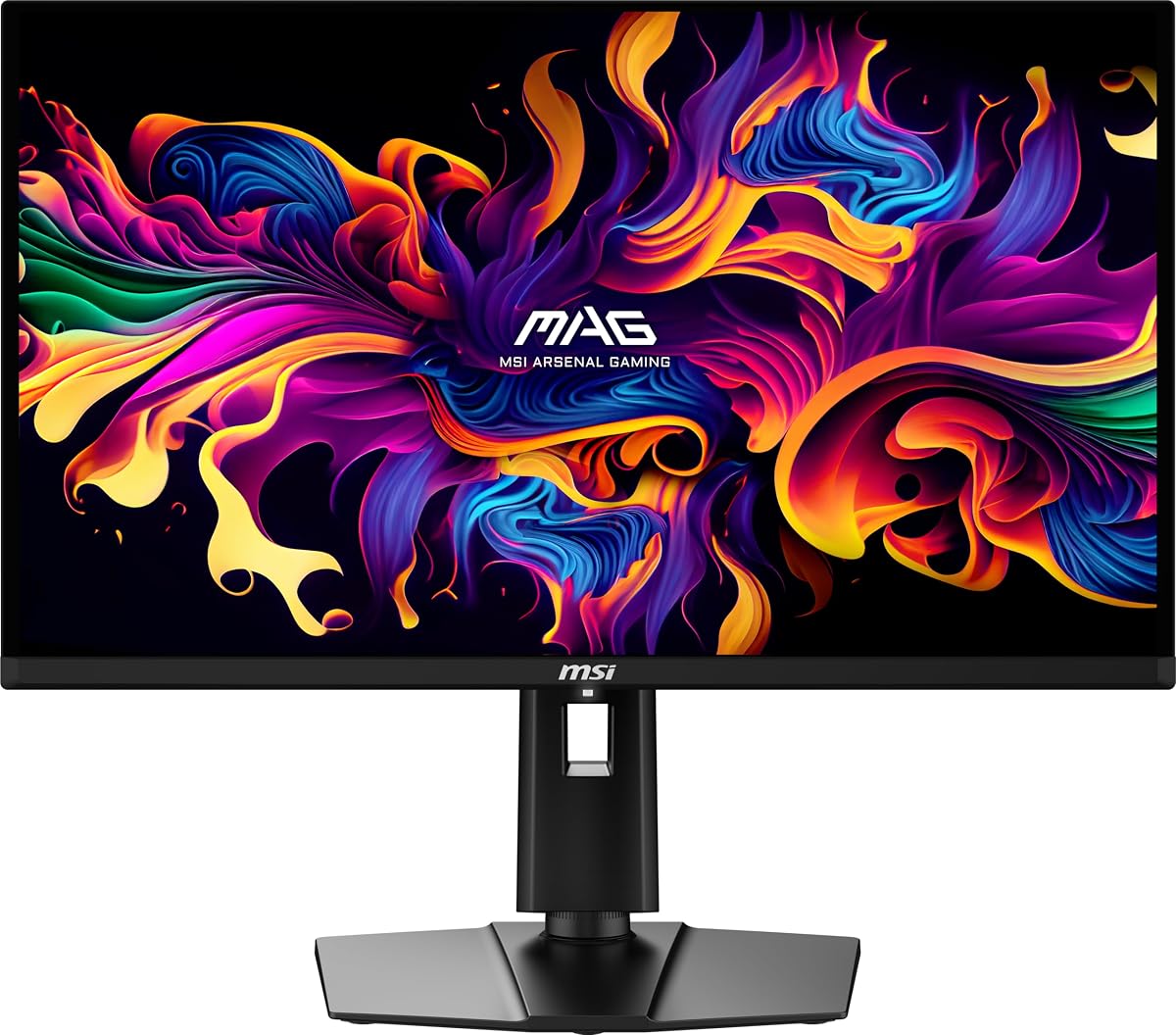
The MSI MAG 274QP offers a premium OLED experience with excellent contrast and speed. Its Quantum Dot OLED panel delivers deep blacks and 1.07 billion colors, creating a visually stunning environment for immersive gaming.
We may earn a commission when you buy through this link, at no additional cost to you.
With HDMI 2.1 support, it is well-equipped for next-gen consoles, ensuring full bandwidth utilization for 4K and high refresh rate inputs. The MSI Gaming Intelligence software provides tools to prevent burn-in and enhance visuals.
While the lack of built-in speakers requires external audio, the panel quality compensates for this omission. The fanless design ensures silent operation, maintaining focus during intense gameplay sessions.
This monitor is ideal for console and PC users seeking high-end visuals. It is a top choice for those who value color fidelity and contrast in their gaming setup.
HDMI 2.1 support allows for high-resolution gaming on modern consoles, delivering crisp visuals with minimal lag for a responsive experience.
OLED Care 2.0 and AI Crosshair help prevent image retention and assist in aiming, extending the monitor's lifespan while aiding performance.
We may earn a commission when you buy through this link, at no additional cost to you.
The Alienware AW2723DF combines high performance with distinctive design elements that fit any battle station. Its Nano Color technology provides vibrant visuals and wide viewing angles, ensuring consistent image quality from any position.
We may earn a commission when you buy through this link, at no additional cost to you.
With G-Sync Compatible certification and HDR600 support, it delivers smooth gameplay and improved dynamic range. The fully adjustable stand allows for perfect ergonomics, making long sessions comfortable for both gaming and work.
The cost is higher than competitors, reflecting the build quality and brand reputation. While the footprint is larger, the advanced cooling and cable management features contribute to a cleaner setup.
This monitor is perfect for users who want reliability and premium aesthetics. It is a robust choice for dedicated gamers who value long-term quality and design integrity.
The Legend 2.0 design with AlienFX lighting adds a unique visual flair, ensuring the monitor complements modern gaming rigs.
HDR600 certification and Nano Color technology ensure bright, vivid scenes that enhance realism and immersion in supported games.
We may earn a commission when you buy through this link, at no additional cost to you.
The Acer Nitro KG271U offers a balanced option for gamers seeking high speed at a reasonable price. Its 240Hz refresh rate ensures smooth visuals, while the zero-frame design maximizes screen space for immersive viewing.
We may earn a commission when you buy through this link, at no additional cost to you.
The IPS panel delivers accurate colors suitable for creative projects, with 99% sRGB coverage. FreeSync Premium ensures tear-free gameplay, and the adjustable stand supports comfortable viewing angles.
While it lacks HDR, the brightness and contrast are adequate for standard gaming. The lack of advanced audio options is typical for this segment but does not hinder core gaming performance.
This monitor is a strong contender for budget-conscious users who prioritize speed and visual quality. It provides a solid foundation for competitive gaming without unnecessary bloat.
The zero-frame design reduces bezels to a minimum, increasing screen real estate and enhancing the immersive experience.
Accurate color reproduction supports graphic designers and editors, making this a versatile tool for both work and play.
We may earn a commission when you buy through this link, at no additional cost to you.
The MSI MAG 271QPX combines QD-OLED technology with practical features like True Black HDR 400. This results in stunning visuals with perfect blacks and vibrant colors, offering a premium look for modern gaming.
We may earn a commission when you buy through this link, at no additional cost to you.
With a 0.03ms response time, motion blur is virtually non-existent, providing the fastest possible feedback loop for competitive shooters. The graphene film heatsink ensures silent cooling without active fans.
While it lacks USB-C connectivity, the DP and HDMI options cover most needs. The OLED Care 2.0 system helps manage longevity, making it a viable choice for long-term daily use.
This monitor is best for those seeking high-quality contrast and speed. It is a top option for enthusiasts who value panel technology and immersive viewing experiences.
The custom heatsink design allows for silent operation, ensuring that noise does not interfere with immersive audio experiences.
Quantum Dot technology enhances color volume and brightness, delivering realistic visuals that stand out in various game environments.
We may earn a commission when you buy through this link, at no additional cost to you.
Choosing the right monitor requires balancing resolution, refresh rate, and panel technology. This guide breaks down the critical factors to ensure you find a screen that meets both performance and aesthetic needs.
The 240Hz refresh rate ensures ultra-smooth motion, essential for fast-paced games like shooters and racers. Lower response times reduce ghosting, keeping moving objects sharp during high-speed action.
Prioritize monitors with 240Hz and under 1ms GtG response for competitive play. Overclocked options can offer extra smoothness if your hardware supports higher frame rates.
IPS panels offer wide viewing angles and accurate colors, while OLED provides perfect blacks and instant response. QD-OLED adds quantum dots for better color volume than standard OLED or IPS.
Choose IPS for budget flexibility or color work. Select OLED for deep contrast and immersion if you can manage burn-in risks and higher costs.
G-Sync Compatible and FreeSync Premium technologies synchronize the monitor with your GPU, eliminating screen tearing and stuttering. Both AMD and NVIDIA GPUs benefit from this feature.
Always verify compatibility with your graphics card. Most monitors support both, but checking certification ensures the best performance without visual artifacts.
Ensure the monitor has DisplayPort 1.4 for full 240Hz support. HDMI 2.1 is becoming standard for consoles. USB-C with DP Alt mode simplifies laptop connections.
Check your device requirements. Having multiple ports allows future upgrades without needing adapters or changing cables.
A fully adjustable stand with height, tilt, swivel, and pivot helps reduce strain. VESA mounting compatibility provides flexibility for custom setups or wall mounting.
Look for zero-frame designs for multi-monitor setups. A clean aesthetic ensures your setup looks professional and distraction-free.
HDR400 and HDR600 ratings indicate dynamic contrast and brightness capabilities. OLEDs excel in HDR, while IPS typically relies on local dimming or basic enhancement.
If HDR is a priority, consider OLED or high-brightness IPS. Otherwise, prioritize refresh rate and color accuracy for standard gaming.
Look for features like Black Stabilizer, crosshair overlays, and FPS counters. These tools enhance visibility and performance in specific game genres.
OSD menus should be intuitive and responsive. Quick access to game modes saves time during setup and matches gameplay needs.
Reputable brands often provide better build quality and longer warranties. OLED panels may have burn-in mitigation features like pixel shifting.
Read reviews on longevity and support responsiveness. A solid warranty protects your investment against early hardware failures.
Always connect via DisplayPort 1.4 to achieve the full 240Hz refresh rate. Verify settings in your graphics control panel to ensure the correct refresh rate is active for optimal performance.
Calibrate brightness and color using built-in presets or external tools. Adjust the stand for proper height and angle to prevent neck strain during long sessions.
For OLED models, use screen savers or turn off the monitor when not in use to prevent burn-in. Regularly clean the screen with a soft, lint-free cloth to avoid damage.
Yes, to reach 240Hz at 1440p, your GPU must be powerful enough to generate high frame rates. Ensure it supports DisplayPort 1.4 or HDMI 2.1 to match the monitor's capabilities.
The difference is subtle but measurable. Competitive gamers often appreciate the extra smoothness and input latency reduction, while casual users may not notice significant improvements.
Yes, HDMI 2.1 supports 4K 120Hz or 1440p 240Hz on next-gen consoles. Check the monitor's specifications to confirm console-compatible features and refresh rates.
Most models include multiple DisplayPort and HDMI ports. This allows you to switch between devices easily without unpluging and replugging cables.
Some models have basic built-in speakers, but most rely on external audio. For best quality, use headphones or external speakers for immersive sound.
Yes, OLED offers superior contrast and response times. However, consider burn-in risks and higher pricing. If budget is tight, IPS provides excellent value.
The monitors highlighted in this guide offer a variety of options from budget-friendly to premium OLED. Each choice delivers high-speed performance tailored to different gaming needs and budgets.
Prioritize panel type and response time if you play competitive shooters. For immersive single-player experiences, color accuracy and contrast should guide your decision.
Always verify current pricing and availability before purchasing. As technology evolves, keeping an eye on promotions can help you secure the best deal for your setup.