
GOLDENMATE 2000VA
4.4Editor score
Lithium Ion Battery
2000VA Capacity
Ten Year Lifespan
This expert guide compares the top ten battery backup for workstation PC options to help you choose the right UPS for your critical computing needs today.
Finding a reliable battery backup for workstation PC is essential for protecting your valuable hardware from unexpected power outages and surges that can cause data loss or hardware failure.
We compared ten top-rated UPS models based on their capacity, output waveforms, outlet configurations, warranty terms, and additional features like USB charging ports and LCD displays.
Each pick highlights specific strengths and ideal use cases while noting that prices fluctuate frequently so always verify current costs before making your final purchase decision online.
4.4Editor score

4.5Editor score

4.7Editor score
The following comparison table provides a side-by-side look at the key specifications and features of all ten selected battery backup for workstation PC models to help you find the perfect fit.




The CyberPower CP1500PFCLCD stands out as our Editor's Choice due to its PFC Sinewave output which is critical for modern workstation power supplies that require clean power.
We may earn a commission when you buy through this link, at no additional cost to you.
Its fifteen hundred VA capacity combined with twelve outlets ensures you can plug in your main PC monitor and peripherals without needing extra power strips nearby.
The only trade-offs are its price and weight which are justified by the robust construction and the inclusion of both Type-A and Type-C USB charging ports.
If you need a reliable battery backup for workstation PC that delivers pure sine power and ample outlets this model is the top recommendation for professional environments.
Modern active PFC power supplies can be damaged by simulated sine waves so this unit uses true sine wave to ensure safe operation for your expensive workstation components.
The color LCD panel provides immediate feedback on battery load and runtime so you always know how much time you have left during a power outage.
We may earn a commission when you buy through this link, at no additional cost to you.
The GOLDENMATE 2000VA offers exceptional value as our Best Budget pick because it uses advanced Lithium Iron Phosphate batteries that last over ten years compared to standard lead acid units.
We may earn a commission when you buy through this link, at no additional cost to you.
With sixteen hundred watts of output it can support high-performance workstations easily while the pure sine wave ensures compatibility with all modern active PFC power supplies.
While it is physically larger and heavier than traditional UPS units the longevity and maintenance free operation save significant money over time reducing total cost of ownership.
If you want a cost effective battery backup for workstation PC that eliminates battery replacements and offers high capacity this lithium model is the clear budget winner.
The LiFePO4 battery provides over three thousand charge cycles which means you rarely need to replace the battery unlike standard UPS units that require frequent battery swaps.
Even at a lower price point this unit delivers pure sine wave power which is essential for protecting sensitive electronics and ensuring stable operation for your workstation.
We may earn a commission when you buy through this link, at no additional cost to you.
The CyberPower BRG1500AVRLCD2 earns the Best Premium badge with its five year warranty and higher equipment guarantee which provides exceptional peace of mind for critical business workstations.
We may earn a commission when you buy through this link, at no additional cost to you.
It features a clear color LCD panel and remote management capabilities that allow you to monitor power status from anywhere in your office or via network connected tools.
Although the management card is sold separately the base unit offers solid performance and the five year coverage is significantly longer than the standard three year warranties found elsewhere.
If you need a premium battery backup for workstation PC with extended warranty and professional management features this model is the ideal choice for long term reliability.
A five year warranty covering the battery itself means your investment is protected longer than typical UPS units which usually only offer three year coverage for the battery.
The unit supports optional network cards so you can integrate it into existing monitoring systems for enterprise level visibility into your workstation power status.
We may earn a commission when you buy through this link, at no additional cost to you.
The CyberPower CP1500AVRLCD3 is a robust option for workstations that need high capacity but can tolerate simulated sine wave power for non PFC sensitive power supplies.
We may earn a commission when you buy through this link, at no additional cost to you.
Its color LCD display offers detailed insights into battery and power conditions while the AVR function corrects minor fluctuations to protect your equipment without using battery power.
The main drawback is the simulated sine wave which may not be ideal for active PFC supplies so it is better suited for general office PCs that do not require pure sine power.
If you need a reliable battery backup for workstation PC with a large outlet count and clear monitoring features this model offers great value for standard work environments.
With nine hundred watts of output you can power a high end workstation plus multiple monitors and networking gear during an outage without overloading the UPS unit.
Automatic Voltage Regulation ensures that minor surges or dips are corrected automatically so your battery remains charged longer and your equipment stays protected.
We may earn a commission when you buy through this link, at no additional cost to you.
The CyberPower EC850LCD is designed with efficiency in mind featuring an ECO mode that cuts power to peripherals when the main PC is off to save electricity.
We may earn a commission when you buy through this link, at no additional cost to you.
It provides eight hundred fifty VA of capacity which is sufficient for smaller workstations or basic office setups while the LCD panel keeps you informed of power status.
While the capacity is lower than other models the ECO mode is a standout feature that helps reduce overall power consumption and operating costs over time.
If you want an eco friendly battery backup for workstation PC that emphasizes energy savings and includes ample outlets this model is a practical choice for budget conscious buyers.
The ECO mode outlets automatically turn off when the main computer is in sleep or off mode so you do not waste energy keeping peripherals like printers powered on.
For smaller workstations that do not require high wattage this unit offers a cost effective solution with enough outlets to cover your essential devices.
We may earn a commission when you buy through this link, at no additional cost to you.
The CyberPower CP1000PFCLCD is an excellent compact option for smaller workstations needing PFC Sinewave power without taking up too much desk or floor space.
We may earn a commission when you buy through this link, at no additional cost to you.
It delivers six hundred watts of output which is enough for standard office PCs while the color LCD panel gives clear details about battery health and runtime.
The trade-off is lower wattage compared to larger models so it may not support very high end graphics cards but it fits perfectly for general office computing tasks.
If you need a compact battery backup for workstation PC that supports active PFC supplies and offers a clean design this model is the ideal choice.
With ten outlets and a small footprint this unit fits easily under or beside a desk making it perfect for workstations with limited physical space.
The PFC Sinewave output ensures that modern active power factor correction supplies run safely and efficiently without risking damage from poor waveform quality.
We may earn a commission when you buy through this link, at no additional cost to you.
The CyberPower AVRG900LCD stands out for its data line protection which safeguards modems or routers connected to the unit from surges traveling through phone lines.
We may earn a commission when you buy through this link, at no additional cost to you.
It provides nine hundred VA of capacity and twelve outlets to cover your workstation and network equipment while the LCD panel keeps you informed on power status.
It lacks USB charging ports and uses simulated sine wave so it is best for standard devices but the data protection feature makes it great for office networks.
If you need a network ready battery backup for workstation PC that protects both power and data lines this model is a practical choice for small businesses.
The included data line protection prevents surges from damaging your modem or router when power comes back on ensuring your internet connection stays safe.
The intelligent LCD panel displays immediate details on battery load and runtime so you can quickly assess the situation during a power disruption.
We may earn a commission when you buy through this link, at no additional cost to you.
The CyberPower CP1000AVRLCD offers a balanced mix of efficiency and capacity making it a solid choice for workstations that need reliable power without excessive energy use.
We may earn a commission when you buy through this link, at no additional cost to you.
Its intelligent LCD panel provides detailed info on estimated runtime and load while the nine outlets offer enough space for your PC and essential peripherals.
The main limitations are the simulated sine wave and lack of USB ports so it is better for standard PCs that do not require pure sine wave or extra charging options.
If you want an efficient battery backup for workstation PC with clear LCD monitoring and standard outlet coverage this model delivers strong performance for the price.
The high efficiency design reduces power consumption during normal operation which lowers your electricity bill and keeps the unit cooler during use.
The LCD panel shows estimated runtime and load capacity so you can plan your shutdowns effectively during a power outage situation.
We may earn a commission when you buy through this link, at no additional cost to you.
The CyberPower ST900U features a slim profile design that fits nicely under a desk making it ideal for workstations with limited floor space or tight office setups.
We may earn a commission when you buy through this link, at no additional cost to you.
It offers nine hundred VA of capacity and twelve outlets including widely spaced ones for larger plugs so you can plug in multiple devices easily.
The GreenPower high efficiency design helps reduce power consumption while the lower wattage means it is best for smaller PCs not high end gaming rigs.
If you need a slim battery backup for workstation PC that saves space and offers ample outlets for standard devices this model is a great choice.
The slim design allows you to slide the unit under your desk or workstation so it stays out of the way while keeping power accessible.
With widely spaced outlets you can use large power adapters without blocking adjacent sockets ensuring all your devices can be plugged in easily.
We may earn a commission when you buy through this link, at no additional cost to you.
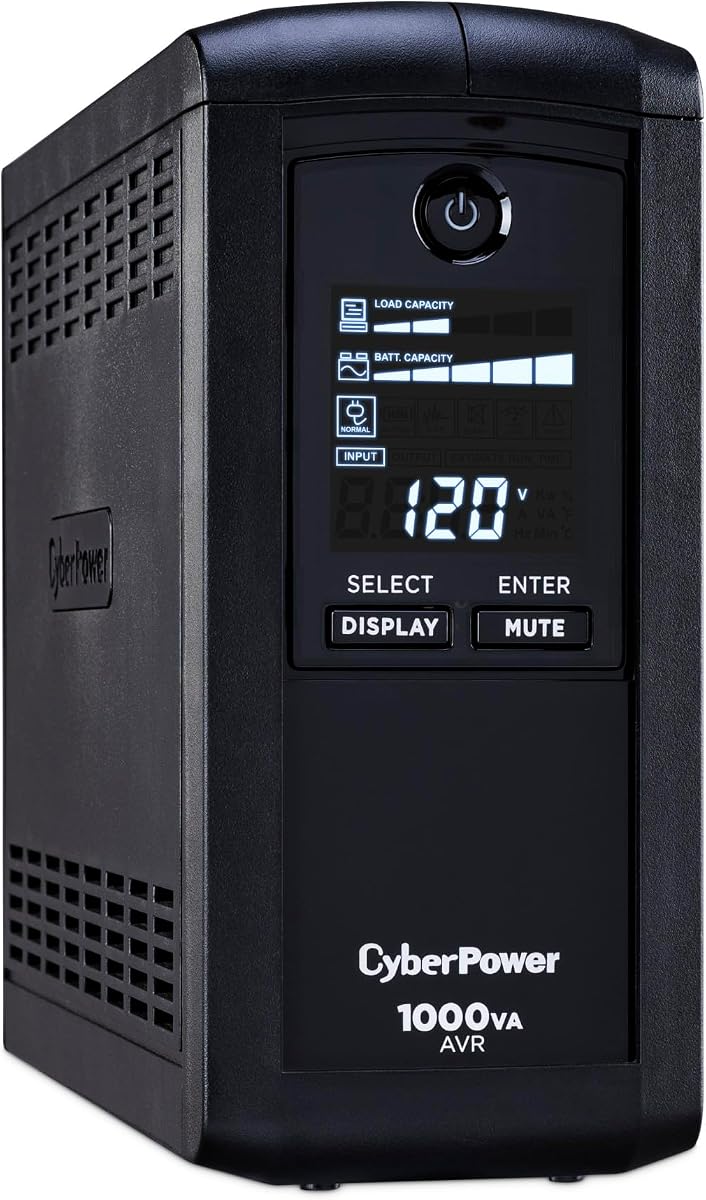
The CyberPower CP850AVRLCD is a basic yet reliable option for entry level workstations that need essential power protection without advanced features like USB charging.
We may earn a commission when you buy through this link, at no additional cost to you.
Its intelligent LCD panel shows clear info on power conditions while the nine outlets provide enough space for a standard PC and monitor setup.
It offers the lowest capacity on our list so it is best for small office PCs not heavy duty workstations but it still includes AVR for basic voltage protection.
If you need a basic battery backup for workstation PC for simple tasks this model offers reliable protection at an affordable price for small offices.
This unit delivers essential surge protection and battery backup for smaller systems without the complexity of higher end models making it easy to use.
The LCD panel gives you clear details on battery and power status so you can monitor the unit without needing additional software.
We may earn a commission when you buy through this link, at no additional cost to you.
Choosing the right battery backup for workstation PC requires understanding key technical factors like VA rating waveform type and outlet count.
VA rating indicates total capacity while wattage determines real load you can support so always check both to ensure your workstation and peripherals fit the UPS.
Select a UPS with at least twenty percent more capacity than your total device power draw for safe operation.
Active PFC power supplies require pure sine wave output to avoid damage while simulated sine wave is fine for standard PCs and monitors.
Choose pure sine wave if your workstation uses an active PFC power supply for best safety.
A good backup should have enough outlets for your PC monitor and peripherals without needing extra power strips and look for wide spacing.
Choose a model with at least eight outlets to cover all your essential devices comfortably.
Lead acid batteries are standard and need replacement every three to five years while lithium options offer longer life but higher cost upfront.
Consider lithium if you want reduced maintenance and longer battery lifespan.
An LCD panel shows real time info on battery load and runtime so you can see how much time you have left during an outage.
Always choose a unit with a clear display for better visibility during power disruptions.
Standard units offer three year warranties including the battery but premium models may offer five years which protects your investment longer.
Look for at least a three year warranty including battery coverage.
USB ports allow you to charge phones or tablets from the UPS during an outage so you stay connected even when outlets are limited.
Check for USB-A and USB-C ports if you need to charge mobile devices.
AVR corrects voltage fluctuations without using battery so your battery lasts longer during actual outages while surge protection shields against spikes.
Ensure your unit includes AVR to protect against minor power dips.
Plug your critical devices into the outlets marked for battery backup and surge protection not the standard outlets so you get protection during an outage.
Run the included management software to set up auto shutdowns and schedule regular battery tests to keep your UPS in top condition.
Keep the unit in a well ventilated area away from heat and dust and replace the battery when the system alerts you for continued reliable operation.
Calculate total wattage of your PC and peripherals then choose a UPS with at least twenty percent more capacity. A typical workstation needs 800 to 1000 VA.
Yes but you must use a UPS with pure sine wave output. Simulated sine wave units may damage active PFC supplies over time so check the specs carefully.
Battery life varies by load but a standard lead acid unit lasts three to five years. Lithium options can last ten years but cost more upfront.
Registration is recommended to ensure full warranty coverage. Check the manufacturers instructions to confirm if registration is required for your specific model.
Yes you can connect multiple monitors as long as their combined power draw plus your PC fits the UPS wattage capacity. Check outlet count and load.
Follow the manufacturer instructions to safely replace the battery. Most units have a user accessible battery door and clear guidance to maintain warranty.
Our top picks offer a range of options from the versatile CyberPower CP1500PFCLCD to the long lasting GOLDENMATE 2000VA depending on your needs and budget.
Prioritize pure sine wave for PFC supplies and consider battery technology for long term savings as well as warranty and outlet counts.
Prices change frequently so verify current offers and stock levels before making your purchase to ensure you get the best deal today.