
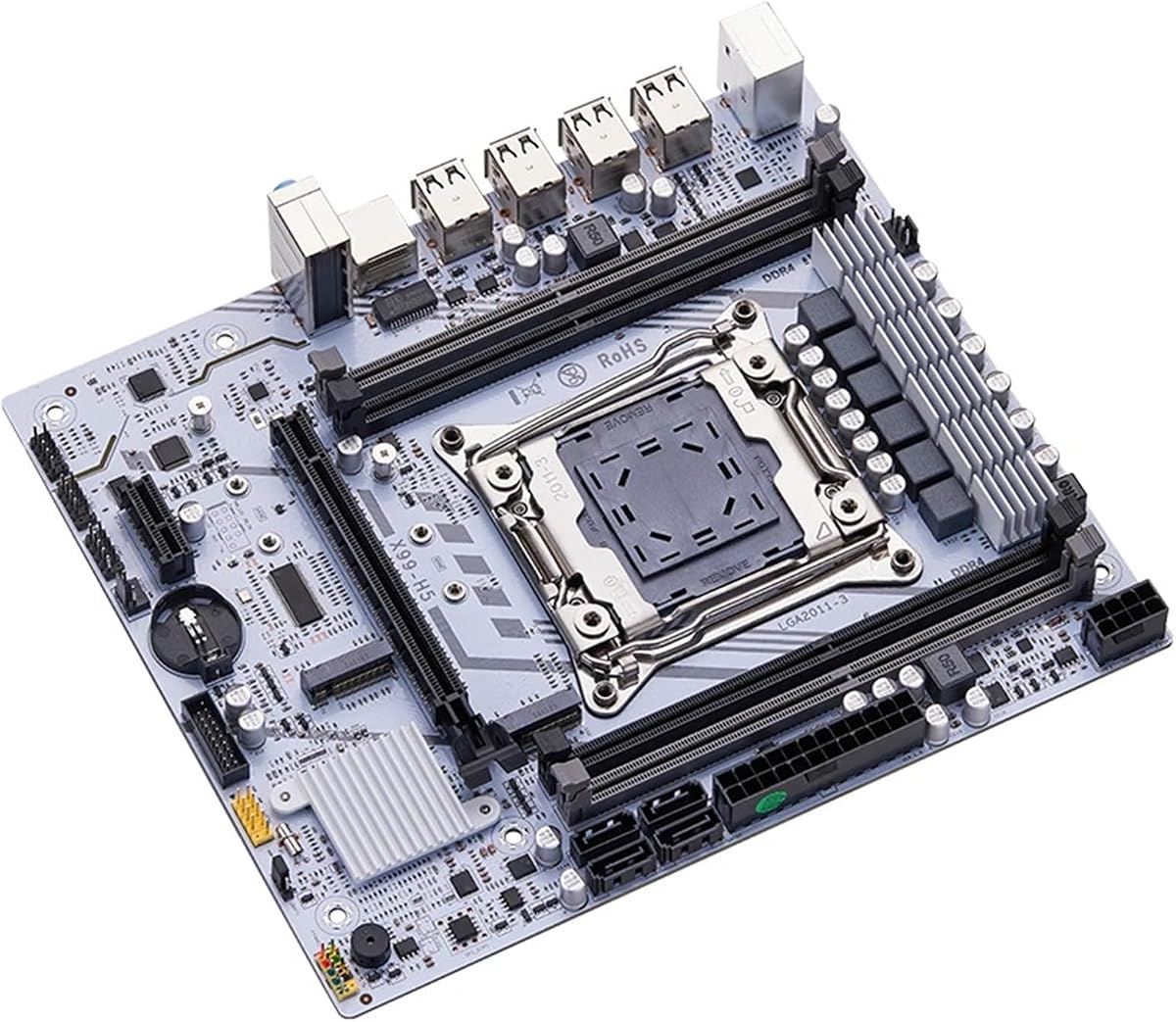
X99 LGA 2011-3 Motherboard PR9-H
3.9Editor score
Affordable White M-ATX Design
Dual Channel DDR4 Support
Realtek Audio and LAN Integrated
This guide compares the top Lga 3 X99 Motherboard options for Xeon and Core i7 processors, evaluating features, performance, and compatibility.
Finding the right Lga 3 X99 Motherboard is essential for building a powerful workstation or gaming rig. These boards support high-core-count Intel Xeon E5 and Core i7 processors, delivering exceptional multi-threaded performance for demanding tasks like video editing and 3D rendering.
We evaluated ten top-rated X99 motherboards based on their socket compatibility, memory support, expansion slots, and overall build quality. Our analysis focuses on models that offer reliable power delivery, modern connectivity options like NVMe, and stable BIOS support for server-grade hardware.
Each pick highlights specific strengths such as budget-friendliness, premium workstation features, or dual-CPU capabilities. Please note that availability and pricing can change rapidly, so verify current stock and details before finalizing your purchase to ensure you get the best value.
3.9Editor score

3.7Editor score

4.1Editor score
The following table provides a side-by-side comparison of all ten selected X99 motherboards. It highlights key specifications such as chipset support, memory types, and expansion slots to help you quickly identify the model that fits your specific build requirements and budget constraints.



The MACHINIST X99 V9S stands out as a top choice for budget-conscious builders seeking workstation-grade performance. With a solid 3.7 rating from users, this board supports the full range of LGA 2011-3 processors including Xeon E5 V3 and V4 series. Its ability to handle 128GB of DDR4 memory across four channels makes it ideal for virtualization and content creation tasks.
We may earn a commission when you buy through this link, at no additional cost to you.
Key strengths include its robust connectivity options and reliable power design. The Intel C612 chipset ensures stable bus communication, while the six-phase power supply with VRM cooling keeps temperatures in check under heavy loads. Users particularly appreciate the triple NVMe M.2 slots which allow for fast RAID configurations without sacrificing PCIe lanes for graphics cards.
Honest trade-offs involve the lack of included documentation and accessories. The user manual is not physically shipped, requiring you to download it online, and the CR2032 battery must be purchased separately. Additionally, while the VRM cooling fan is effective, it may add some acoustic noise to quiet builds, which is a acceptable compromise for thermal stability.
This board is best suited for IT professionals and enthusiasts building dual-systems or render farms on a budget. It delivers essential X99 features without the premium price tag of big-brand alternatives. For anyone needing high RAM capacity and fast storage connectivity, the X99 V9S offers an excellent balance of performance and affordability.
The inclusion of three M.2 slots running at PCIe 3.0 x4 speeds allows users to create fast storage arrays directly on the motherboard without needing expensive add-in cards.
Unlike many consumer boards, this model fully supports ECC and RECC DDR4 memory, making it a viable option for 2 that require error correction and stability.
We may earn a commission when you buy through this link, at no additional cost to you.
The X99 PR9-H White offers an attractive budget solution for those needing the power of the X99 platform in a smaller footprint. With a 3.9 rating, it appeals to users who want a clean aesthetic without breaking the bank. The Micro ATX form factor ensures compatibility with a wide range of compact cases while still supporting high-core CPUs like the Xeon E5 2680 V4.
We may earn a commission when you buy through this link, at no additional cost to you.
Its construction quality includes a 6-layer PCB and full solid capacitors which contribute to stable operation over time. The audio codec provides decent sound quality for general use, and the pre-assembled I/O shield saves time during assembly. Memory support is robust, allowing up to 128GB across dual channels for demanding applications.
The primary limitation is the single M.2 slot which limits high-speed storage expansion compared to boards with triple slots. Additionally, the user manual is not included, which can be a hurdle for first-time builders unfamiliar with LGA 2011-3 specific requirements like CPU cooler bracket installation.
This board is ideal for home servers or compact gaming rigs where size and appearance matter. It balances cost and functionality well for users who do not need extensive multi-GPU setups. If you prefer a white-themed build and need Xeon support, this model is a strong contender in the budget category.
The Micro ATX layout fits perfectly into smaller chassis without sacrificing essential connectivity, making it perfect for stealthy workstations or home media centers.
Optimized circuit layouts and solid capacitors ensure that power reaches the CPU efficiently, reducing heat generation and increasing overall system stability.
We may earn a commission when you buy through this link, at no additional cost to you.
The ASUS X99-E WS represents the pinnacle of workstation design in the X99 lineup with a impressive 4.1 rating. Its EATX form factor provides ample room for four-way GPU configurations and multiple storage devices. This board is engineered for professionals who require maximum bandwidth and reliability for tasks like 3D rendering and scientific simulation.
We may earn a commission when you buy through this link, at no additional cost to you.
Key features include the built-in USB 3.1 controller which doubles data transfer speeds compared to previous generations. The Supreme Power Solution uses premium components to deliver stable power even under extreme multi-GPU loads. Additionally, the onboard M.2 slot supports x4 bandwidth for fast system drives, and it is ready for Thunderbolt II expansion cards.
Trade-offs include the physical size and cost which may be excessive for average gaming or general office use. The Thunderbolt II interface, while fast for its time, is now superseded by Thunderbolt 3 and 4. However, for legacy workstation environments, this remains a powerful and reliable platform.
This motherboard is best suited for high-end CAD workstations or rendering farms that need quad-GPU support. It offers features like the Q Code Logger for easy debugging which saves time for system administrators. If you need a durable, feature-rich board for professional environments, the X99-E WS is a top-tier choice.
The four PCI-E Gen3 x16 links allow for massive graphical power in a single system, essential for professional video editing and complex simulations.
Having native USB 3.1 support means faster data transfers for external drives without needing add-in cards, streamlining workflow efficiency.
We may earn a commission when you buy through this link, at no additional cost to you.
The ASUS X99-A strikes a solid balance between price and features for general enthusiasts. It offers the reliable Intel X99 chipset and supports DDR4 memory up to 3000MHz natively. The Dual Intelligent Processors 5 system simplifies overclocking and cooling management making it accessible even for those new to high-performance hardware tuning.
We may earn a commission when you buy through this link, at no additional cost to you.
Its key strengths include the M.2 PCIe 3.0 slot for fast boot drives and Crystal Sound 2 for immersive audio quality. The 5-Way Optimization allows you to tweak your system with a single click which saves time and ensures stable performance. This makes it a great choice for gaming rigs that also need heavy multi-threaded capabilities.
However, it lacks the Thunderbolt or multiple M.2 slots found on higher-end models. The SATA Express feature, while included, is less common now as users prefer direct NVMe connections. These limitations make it a specific choice for those who do not require maximum I/O expansion.
This board is best for gamers and power users who want a familiar ecosystem and reliable brand support. If you prioritize ease of use and stable performance over extreme expansion, the X99-A delivers excellent value. It remains a popular choice for standard ATX builds in the X99 category.
The 5-Way Optimization automatically tunes performance and cooling based on your system load simpl making it easy to get the most out of your Xeon CPU.
Native support for 3000MHz DDR4 allows for better bandwidth compared to older standards, which helps in memory-intensive applications like virtualization.
We may earn a commission when you buy through this link, at no additional cost to you.
This specialized motherboard is designed for extreme workstations that require dual processors for maximum core counts. While the rating is not available, its feature set targets heavy rendering and scientific computing. With eight DDR4 DIMM slots it can support up to 256GB of memory when combined with two CPUs which is vital for large datasets.
We may earn a commission when you buy through this link, at no additional cost to you.
Key strengths include the dual PCIe x16 slots which allow for multi-GPU setups or dedicated NVMe storage cards. The six SATA3.0 interfaces ensure you have plenty of connections for traditional drives. It is an excellent choice for a dedicated render node where cost efficiency per core is the priority.
Trade-offs include the need for a robust power supply and cooling solution. Dual CPUs generate significant heat and require large cases with ample airflow. Also the lack of user reviews makes it harder to predict reliability compared to more established models.
This board is ideal for building a server or cluster node where raw multi-core power is needed. It is not recommended for casual gaming but fits perfectly in a professional rendering farm. If you need to squeeze every bit of performance from Xeon chips this model offers a unique advantage.
Eight DIMM slots provide flexibility for mixing memory sizes and speeds ensuring you can reach the maximum capacity needed for virtualization workloads.
Running two CPUs simultaneously doubles the available cores making it perfect for parallel processing tasks that do not depend on single-thread speed.
We may earn a commission when you buy through this link, at no additional cost to you.
The Tangxi X99 Gaming is positioned as an affordable option for gamers wanting multi-threaded power. It features an 8-layer PCB and 6-phase power supply which suggest a focus on electrical stability. The 4-channel DDR4 memory support ensures high bandwidth for integrated graphics or memory-bound games.
We may earn a commission when you buy through this link, at no additional cost to you.
Strengths include its support for high-speed memory up to 3200MHz which can improve performance in specific titles. The layout includes essential gaming interfaces like USB 3.0 and Gigabit LAN. It aims to bring server power to the gaming market at a competitive price point.
However the lower rating suggests potential reliability or BIOS issues that users have encountered. The single M.2 slot limits fast storage expansion compared to other options. Also the lack of detailed manuals may frustrate users trying to optimize settings.
This board is best for budget gamers who need many cores for streaming and rendering. If you prioritize raw power per dollar and can handle potential BIOS tweaks it might suit you. For a smoother experience without troubleshooting this model is less ideal.
Support for 3200MHz DDR4 allows for faster memory speeds which can reduce latency in applications and some games depending on the workload.
The dedicated 24+8 pin power connector ensures stable power delivery under load reducing the risk of shutdowns during intense gaming sessions.
We may earn a commission when you buy through this link, at no additional cost to you.
Similar to its counterpart this board focuses on maximum capacity for data-intensive workloads. The 8x DDR4 slots allow for an impressive 256GB RAM configuration when using dual CPUs. This makes it highly capable for virtualization clusters or heavy database servers that need to store large datasets in memory.
We may earn a commission when you buy through this link, at no additional cost to you.
Key strengths include the inclusion of dual PCIe x16 slots which can support high-end graphics or storage cards. The 6-channel audio chip provides basic sound capability for system diagnostics. Its design is purely utilitarian focusing on function over aesthetics.
The low rating points to potential instability or quality control issues. Building with dual CPUs requires precise cooling and a large case which adds to the cost. Users should be prepared for troubleshooting and potential BIOS limitations.
This board is suitable for advanced users building budget servers or virtualization hosts. It is not recommended for gaming or general office use due to complexity. If you need extreme RAM capacity and can manage the hardware this model offers a unique solution.
With eight DIMM slots you can expand memory significantly to handle hundreds of virtual machines or complex data processing tasks efficiently.
The PCIe layout allows for adding powerful GPUs or storage expanders making it versatile for specific workstation needs beyond just computing power.
We may earn a commission when you buy through this link, at no additional cost to you.
This motherboard stands out for its unique support of both DDR3 and DDR4 memory types. This flexibility allows users to repurpose older memory kits while still taking advantage of newer DDR4 speeds. The dual M.2 NVMe slots provide excellent storage performance for operating systems and games.
We may earn a commission when you buy through this link, at no additional cost to you.
Key strengths include the passive heatsink design which reduces noise significantly. The optimized memory routing improves signal integrity for better overclocking results. These features make it a strong choice for quiet workstations or home labs where noise matters.
The higher price may deter budget builders. Support for DDR3 is a legacy feature that might not be needed for new builds. However for those with existing DDR3 kits it offers a cost-effective upgrade path to X99.
This board is ideal for users who need silent operation and memory flexibility. If you have old DDR3 RAM and want to upgrade the CPU this is a viable path. For new builds pure DDR4 boards may offer better value.
Support for both memory types means you can mix old and new components saving money on upgrades while still gaining performance benefits from X99.
The passive heatsink design eliminates fan noise from the chipset making it perfect for sound-sensitive environments like recording studios or offices.
We may earn a commission when you buy through this link, at no additional cost to you.
This board is a straightforward option for users needing essential X99 features in a small package. It supports E5 V3 and V4 CPUs ensuring compatibility with powerful processors. The M-ATX design fits well in compact cases making it ideal for hidden workstations.
We may earn a commission when you buy through this link, at no additional cost to you.
Strengths include its basic yet effective connectivity with PCIe 3.0 support for graphics cards. The single M.2 slot offers a boost in boot speeds. It is a no-frills choice that focuses on getting the system running without extra complexity.
Trade-offs involve limited expansion for future upgrades. If you plan to add multiple GPUs or storage devices you may outgrow this board. However for a dedicated single-GPU system it is sufficient.
This board is best for budget-conscious builders who need Xeon performance in a small case. If you prioritize simplicity and size over features this model delivers. It remains a viable option for basic server or office tasks.
The small form factor allows for flexible case choices reducing desk space usage while still supporting powerful multi-core CPUs.
It includes just enough slots and connectors for a functional system without unnecessary extras that add cost and complexity.
We may earn a commission when you buy through this link, at no additional cost to you.
The E5 MR9A V1.0 offers a standard ATX layout which ensures wide case compatibility. It supports high-frequency DDR4 memory and includes USB 3.0 headers for modern peripherals. The solid power supply design aims to keep system temperatures low under load.
We may earn a commission when you buy through this link, at no additional cost to you.
Its strengths include comprehensive safety protections which guard against over-voltage or short circuits. The board is designed for office gaming and building tasks with smooth multitasking capabilities. It offers a clean path for those needing a traditional form factor.
Trade-offs are the lack of reviews and brand familiarity which make it a risky choice. Without a track record reliability is less certain. However if priced competitively it may offer value for experienced builders.
This board is best for standard builds requiring ATX dimensions. If you need USB 3.0 and high-speed memory without a premium brand tag this fits. It is a balanced option for users who prioritize compatibility and modern ports.
Dedicated USB 3.0 headers provide faster data transfer for external drives and peripherals improving workflow efficiency significantly.
Built-in safety protections prevent damage from power spikes ensuring your components remain safe during unexpected power fluctuations.
We may earn a commission when you buy through this link, at no additional cost to you.
Selecting the right X99 motherboard requires understanding your specific needs for CPU support memory capacity and expansion options. This guide breaks down the key factors to consider before making a decision.
Ensure the board explicitly supports your target Xeon or Core i7 series. Most X99 boards support E5 V3 and V4 but some may lack specific BIOS updates. Check the CPU support list on the manufacturer website before buying.
Verify that the socket type is LGA 2011-3 to avoid physical incompatibility with your chosen processor.
X99 boards vary in supporting 2 or 4 channels. For maximum RAM throughput choose a board with 4-channel slots. Also confirm if it supports ECC or RECC memory for server stability.
Aim for at least 6 slots if you need over 64GB total capacity.
Look for NVMe M.2 slots to ensure fast boot and system drive performance. Boards with two or three slots offer better RAID flexibility.
Check if the M.2 slot shares bandwidth with SATA ports to avoid conflicts.
Xeon CPUs can draw significant power. Select a board with robust VRM cooling like a dedicated fan or large heatsinks to prevent throttling.
Solid capacitors improve longevity and stability under sustained load.
Decide between ATX and Micro ATX based on your case size. Larger boards offer more slots but require bigger enclosures.
Verify that the I/O shield fits your case cutouts to avoid assembly issues.
Most boards include Gigabit LAN which is sufficient for home use. Check audio codec quality if you need sound without a separate card.
Some workstation boards offer 10GbE options for faster networking.
Workstation boards often get better BIOS updates for stability. Budget models may rely on community patches for full feature support.
Check community forums for BIOS reliability of specific models.
Define your budget early. Entry-level boards lack features like WiFi or multiple M.2 slots.
Higher price often means better reliability and warranty support.
Begin by installing the CPU gently without bending pins. Use a high-quality thermal paste and mount a cooler compatible with LGA 2011-3. Ensure the cooler bracket is tightened evenly to prevent warping.
Connect all power cables including the main 24-pin and the 8-pin CPU power. Use a high-wattage power supply if using dual CPUs or multiple GPUs to ensure stable operation.
Update the BIOS immediately using a USB drive if possible. This ensures compatibility with newer CPUs. Regularly clean dust from heatsinks to maintain optimal cooling performance.
X99 is officially supported only for Windows 10. Windows 11 requires TPM 2.0 and specific processor generations not present on X99. However you can bypass restrictions with unofficial patches if you accept the security risks.
No you cannot mix ECC and non-ECC memory on the same system. The motherboard requires all RAM modules to be of the same type. Check your CPU specifications to see if it supports ECC before purchasing.
The Xeon E5 2697 V4 offers high core count and efficiency. For raw clock speed the E5 1650 V4 is a strong choice. Choose based on whether you need multi-threaded performance or single-core speed.
Yes most X99 boards support booting from an NVMe drive directly via the UEFI BIOS. Ensure your BIOS is updated to the latest version for reliable compatibility with M.2 SSDs.
Check the product description for dual CPU support explicitly listed. Dual socket boards usually have two CPU sockets physically visible. A single socket board will only support one processor regardless of model.
For a single CPU a standard 650W PSU is often enough. For dual CPUs or multiple GPUs a 1000W+ unit is recommended. Always check the recommended wattage for your specific components.
Standard X99 boards use DDR4. However some specific Chinese models support both DDR3 and DDR4. You must verify the exact model specs to see if it supports DDR3 before purchasing RAM.
Beep codes usually indicate a hardware issue like RAM or CPU installation problems. Clear the CMOS and reseat the memory modules. Consult the manual for specific beep code meanings for your board.
We have reviewed ten distinct options ranging from budget-friendly to premium workstation models. The MACHINIST V9S stands out as a top value pick while the ASUS X99-E WS leads in professional features. Each board offers unique benefits depending on your build goals.
Prioritize power delivery and memory compatibility when making your decision. If you need ECC support ensure the board lists it explicitly. Also consider the number of M.2 slots required for your storage needs.
Always check current stock and pricing before purchasing as availability changes frequently. Ensure you download the latest drivers and BIOS updates to get the most out of your X99 motherboard experience.