
RedThunder One Handed Gaming Keyboard RGB
4.4Editor score
35 keys anti-ghosting support
Macro recording capability built-in
RGB backlit with 7 colors
This guide compares the top 10 gaming keypads for performance and comfort, helping you choose the perfect one-handed device for your gaming setup in 2026.
Gaming keypads have revolutionized how players interact with their favorite titles by offering specialized layouts designed for speed and efficiency. These compact devices replace traditional keyboards for the left hand, allowing gamers to keep their mouse hand free for precise aiming and movement without sacrificing essential command access.
We have evaluated ten distinct models ranging from budget-friendly options to high-end premium devices featuring advanced Hall Effect technology. Our analysis focuses on build quality, switch responsiveness, customization depth, and ergonomic design to ensure every recommendation meets the rigorous demands of competitive and casual gamers alike.
Each entry in this list provides detailed insights into key features, strengths, and potential limitations based on available technical specifications and user feedback. Please note that product availability and pricing can fluctuate frequently so we encourage verifying current details directly with the retailer before making your final purchase decision today.
4.4Editor score

4.3Editor score

4.3Editor score
This side-by-side comparison highlights the critical specifications and unique selling points of each selected gaming keypad to help you make an informed decision based on your specific gameplay needs and budget constraints.




The Razer Tartarus V2 stands out as a versatile tool for gamers who value deep customization and comfort. With a high rating from users, it delivers a balanced experience through its mecha-membrane switches that mimic mechanical feel without the noise. This device is engineered to keep your left hand productive while your right hand controls the mouse.
We may earn a commission when you buy through this link, at no additional cost to you.
Its standout feature is the analog thumbpad which provides natural movement controls for games designed for console controllers. The 32 fully programmable keys allow you to map complex macros or hotkeys directly to your off-hand setup. Razer Chroma support ensures you can sync lighting effects with your games or other compatible hardware seamlessly.
While it requires software for full functionality, the Hypershift feature doubles the key count significantly. Some users might prefer wireless options but the wired connection ensures zero latency. The trade-off of needing a USB port is acceptable given the reliable performance and tactile feedback provided during long gaming sessions.
This keypad is ideal for MMO and MOBA players who need quick access to numerous abilities. It is also great for streamers who want to manage OBS scenes with one hand. We recommend this for anyone wanting a premium feel with extensive software support from a trusted brand.
The analog thumbpad allows for smooth directional input that feels intuitive for players transitioning from controllers to PC gaming environments.
Razer Chroma support offers millions of colors and patterns that sync with games and other devices to create an immersive visual experience.
We may earn a commission when you buy through this link, at no additional cost to you.
The Redragon K585 Wired is a fantastic entry point for gamers seeking a dedicated off-hand device without breaking the bank. It features a robust 42-key layout that provides ample room for essential commands and macros. The tactile feedback is solid and the RGB lighting adds a nice aesthetic touch to any desk setup.
We may earn a commission when you buy through this link, at no additional cost to you.
One of its most impressive features is the ability to swap switches without soldering. This allows users to customize the feel of their keypad to match their main keyboard or personal preference easily. The onboard macro keys let you bind complex sequences that can be triggered instantly during gameplay or creative work.
The USB pass-through port is a clever addition that helps reduce cable clutter by letting you plug your mouse directly into the keypad. While it lacks wireless connectivity the stable wired link ensures consistent performance. The detachable wrist rest adds comfort for long sessions but takes up space when attached.
This model is perfect for budget-conscious gamers who still want mechanical quality and customization. It suits MMORPG players needing quick ability access or users wanting to map productivity shortcuts. We recommend it for those who value flexibility in switch choice over wireless freedom.
Upgrade or change switches easily to tailor the actuation force and tactile feel to your specific gaming preferences.
The USB pass-through port reduces cable routing needs keeping your mouse cable tidy and accessible directly from the keypad.
We may earn a commission when you buy through this link, at no additional cost to you.
The AZERON Cyborg II is a specialized high-end device designed for gamers who demand precise analog movement alongside traditional key inputs. It features a Hall Effect thumbstick that eliminates drift and offers adjustable sensitivity for movement control. The 3D printed body ensures a customized fit that can adapt to different hand sizes over time.
We may earn a commission when you buy through this link, at no additional cost to you.
Its software allows for deep customization including diagonal keybinds and analog smoothing. This level of control is ideal for FPS or RTS games where nuanced movement is critical. You can store up to six control layouts directly on the keypad which means quick swapping between games or apps without reopening software.
While the price is higher than standard keypads the unique hardware features justify the cost for serious enthusiasts. The setup requires patience to calibrate the thumbstick and key positions correctly. However once tuned it offers a gaming experience that standard keyboards simply cannot replicate for movement and macro management.
This keypad is best for players who want to replace the traditional WASD setup entirely with a more ergonomic solution. It suits competitive gamers and modders who appreciate modular technology. We recommend it for those willing to invest in a unique ergonomic tool.
The Hall Effect thumbstick allows for variable speed movement without stick drift offering superior control in compatible games.
3D printed parts can be adjusted to fit your hand perfectly reducing fatigue during extended gaming sessions.
We may earn a commission when you buy through this link, at no additional cost to you.
The Redragon K585 PRO Wireless brings the flexibility of a wireless connection to the compact one-handed format. It maintains the 42-key layout of its wired counterpart while offering reliable Bluetooth and 2.4GHz connectivity. This allows you to place the device anywhere on your desk without being tethered to a PC.
We may earn a commission when you buy through this link, at no additional cost to you.
Battery life is solid enough to last through long gaming sessions without constant recharging. The swappable switch feature remains a strong point allowing you to customize the feel without needing tools. Software customization lets you tailor macros and RGB lighting to your specific workflow needs.
Wireless connections can sometimes introduce slight latency but this model mitigates that with a dedicated 2.4GHz mode. The wrist rest is magnetic and can be removed if you need a smaller footprint. It is a great choice for users who value desk aesthetics and mobility.
This unit suits gamers who want to clean up their desk while keeping functionality high. It is compatible with standard gaming genres like MMOs where frequent key presses are needed. We recommend it for those who prioritize wireless convenience over absolute minimal latency.
Switch between Bluetooth and 2.4GHz wireless to suit different devices or connection stability preferences.
Enjoy up to 20 hours of play on a single charge reducing the need to interrupt gameplay to recharge.
We may earn a commission when you buy through this link, at no additional cost to you.
The RedThunder One Handed Gaming Keyboard is an excellent choice for those who want simplicity and low cost. It features 35 keys that are anti-ghosting ensuring accurate inputs during intense gaming moments. The design is portable and compact making it easy to store or transport to LAN parties.
We may earn a commission when you buy through this link, at no additional cost to you.
It includes macro recording functionality directly on the device allowing you to create simple scripts without needing complex software. The RGB backlight offers seven colors to match your setup mood. This device is plug and play so it works with most operating systems out of the box.
While it lacks advanced features like swappable switches it gets the job done for basic key mapping and macro use. The ergonomic design reduces wrist strain which is important for comfort. It is not the most feature rich option but it delivers reliable performance for the price.
This keypad is perfect for students or casual gamers who need a dedicated keypad without high-end features. It works well for mapping common commands in RPGs or strategy games. We recommend it for budget buyers seeking immediate utility.
Its lightweight design and easy setup make it ideal for gamers who switch between setups frequently.
Record simple macros quickly to automate repetitive tasks without needing external drivers.
We may earn a commission when you buy through this link, at no additional cost to you.
The Keychron C0 HE 8K is engineered specifically for competitive FPS players who need ultra-low latency. It uses Hall Effect magnetic switches that detect real-time key travel instead of fixed actuation points. This allows for rapid trigger resets which can give you an edge in fast-paced movement.
We may earn a commission when you buy through this link, at no additional cost to you.
With an 8K polling rate the device responds almost instantly to your inputs. The web-based configurator means you do not need to install heavy software to adjust your settings. It supports Windows and macOS making it versatile for different system environments.
The magnetic switches offer adjustable actuation points which help prevent accidental presses. While it costs more than budget options the performance benefits are significant for competitive gamers. The RGB lighting is bright and customizable per key to suit your preferences.
This keypad is ideal for esports athletes or serious gamers who prioritize speed and precision. It handles high-frequency inputs well without ghosting. We recommend it for FPS enthusiasts seeking top-tier hardware technology.
Reset keys instantly upon release to allow for faster movement and counter-strafing in competitive shooters.
Use the same configuration on Mac or Windows devices seamlessly through the web-based tool.
We may earn a commission when you buy through this link, at no additional cost to you.
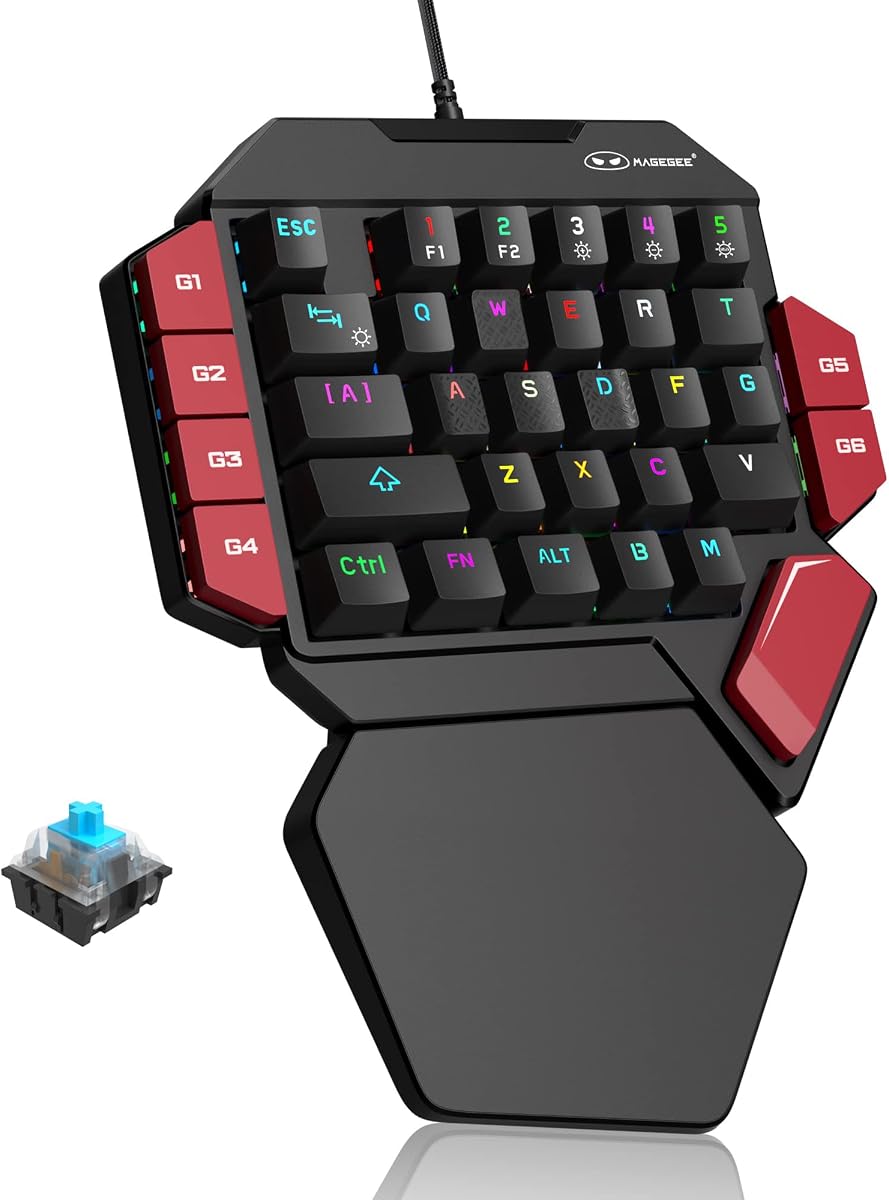
The MageGee One Handed Professional Gaming Keyboard delivers a strong tactile experience with its Blue mechanical switches. It provides clear feedback and a satisfying click for every key press which helps with timing. The layout is compact and includes 35 keys that fit easily on most desks.
We may earn a commission when you buy through this link, at no additional cost to you.
It features six macro recording keys that can be programmed to execute complex sequences. The RGB lighting offers multiple modes to customize the visual vibe of your setup. This device is plug and play so you can start using it immediately without drivers.
The Blue switches are loud which might not suit quiet offices but are great for gaming feedback. The build quality is solid with a wrist rest to reduce fatigue. It is a reliable choice for users who prefer traditional mechanical switches over membranes.
This keypad is best for typists and gamers who love the clicky feel of mechanical keys. It fits well for users needing a dedicated off-hand controller. We recommend it for those who prioritize tactile feedback over silence.
Blue switches provide a distinct physical bump and sound that helps prevent typing errors and confirms keypresses.
Simple key combos allow you to record macros quickly without needing external software.
We may earn a commission when you buy through this link, at no additional cost to you.
The AJAZZ AK029 is designed for users who want a minimal footprint without sacrificing performance. It uses Bingyu Hall Effect switches that are free from debounce delay and offer high precision. The 29-key layout saves significant desk space allowing more room for mouse movement.
We may earn a commission when you buy through this link, at no additional cost to you.
Its web-based driver allows for quick customization without installing bulky software. The aluminum-reinforced build ensures stability during rapid typing. The 8KHz polling rate provides extremely fast response times suitable for competitive play.
While it has fewer keys it forces efficient key mapping which can improve reaction times. The sound-dampening structure makes the keystrokes crisp and clean. It is a modern approach to keypads that favors speed and durability over quantity of buttons.
This keypad is perfect for minimalist setups and FPS players needing space. It is also great for productivity tasks where macros are essential. We recommend it for users wanting high tech features in a small frame.
The compact 29-key design clears your desk for larger mouse movements essential in low sensitivity shooters.
Magnetic switches ensure every input is registered without physical contact reducing wear and latency.
We may earn a commission when you buy through this link, at no additional cost to you.
The Razer Tartarus V2 Standard maintains the legacy of the popular left-handed keypad design. It features 32 programmable keys that are soft and comfortable for extended use. The ergonomic layout ensures your hand rests naturally while you access hotkeys easily.
We may earn a commission when you buy through this link, at no additional cost to you.
It supports Razer Chroma which integrates with many games for dynamic lighting. The thumbpad adds an analog dimension to movement that is often missing on standard keyboards. Synapse software allows for complex macro setups if you wish to customize deeply.
While it is a proven design it does not offer wireless options. The cable is non-detachable which might complicate travel or desk cleanup. However the comfort and functionality remain high for those who value brand reliability.
This unit suits gamers who prefer a familiar setup with strong RGB support. It is good for RPGs and strategy games requiring many commands. We recommend it for brand loyalists seeking a comfortable experience.
Designed to reduce strain by keeping your hand in a natural position during long gaming sessions.
Sync lighting effects with games using Razer Synapse to enhance visual immersion.
We may earn a commission when you buy through this link, at no additional cost to you.
The Redragon RM104 is a versatile wireless keyboard that includes features often found on specialized keypads. Its standout feature is a multifunction smart knob that handles audio control and lighting modes. This allows for quick adjustments without leaving your game or application.
We may earn a commission when you buy through this link, at no additional cost to you.
With a massive 4000mAh battery it offers long usage times before needing a recharge. The tri-mode connectivity supports Bluetooth and 2.4GHz wireless for flexibility. RGB lighting and software customization let you adapt the device to your gaming style.
While it is a full keyboard it can serve as a secondary device for quick tasks or streaming control. The aesthetic design is unique and appeals to those who want a stylish desk setup. It is robust and reliable for daily use.
This device suits streamers and content creators who need quick volume and scene control. It is also great for gamers who prefer wireless setups. We recommend it for those wanting a secondary control surface with audio features.
Rotate or press the knob to manage volume and mute instantly without navigating menus.
Connect via Bluetooth or 2.4GHz to any device keeping your desk clutter-free.
We may earn a commission when you buy through this link, at no additional cost to you.
Selecting the right gaming keypad requires understanding your specific needs regarding switch type, connectivity, and layout features.
Most gaming keypads use either membrane or mechanical switches. Membrane switches offer a soft feel and are quieter while mechanical switches provide tactile feedback and durability. Some high-end models use Hall Effect magnetic switches which eliminate physical contact to reduce friction and latency. Consider how much you value tactile response and noise levels when choosing.
Focus on switches that match your main keyboard if consistency is important or choose one that complements your workflow preferences.
Connectivity can be wired or wireless. Wired connections ensure zero latency and constant power which is ideal for competitive gaming. Wireless options provide cable management benefits and flexibility but require battery maintenance. Look for models with multiple wireless modes like Bluetooth and 2.4GHz for better compatibility.
Choose wired for competition and wireless for a cleaner desk setup depending on your priority.
A strong keypad allows you to program macros and key remapping easily. Check if the device supports onboard memory so you can carry your settings with you without needing software running constantly. More programmable keys give you greater control but also increase the complexity of setup.
Prioritize models with intuitive software or onboard storage to save time and maintain performance across devices.
Your hand size and wrist health matter significantly during long sessions. Look for models with wrist rests or ergonomic contours that support your natural grip. The layout should place frequently used keys within easy reach to minimize finger travel. Some models allow modular adjustments to fit your hand perfectly.
Ensure the device feels comfortable over time to avoid strain and maintain focus on your game.
Construction materials determine how long the device will last. Aluminum reinforced builds offer rigidity and stability while plastic cases may feel cheaper. Detachable cables add convenience if you travel often. Also consider keycap materials such as PBT which are more durable than standard ABS plastics.
Opt for robust materials and detachable parts if you plan to move the device frequently or want long term reliability.
Software depth varies widely between brands. Some require heavy installation while others use web based configurators. Check if lighting and macros can be controlled through the device or via software. Compatibility with your operating system is also crucial to ensure all features work as intended.
Choose software that is lightweight and cross-platform to avoid compatibility issues during setup.
Lighting effects can enhance your gaming atmosphere but vary in quality. Per-key RGB allows for precise customization while simple modes offer basic visual feedback. Sync capabilities with other devices can create a cohesive look. Ensure the brightness levels are adjustable to suit your environment.
Consider RGB as a secondary factor to performance but appreciate its role in creating an immersive setup.
Prices range from affordable to premium depending on features. Budget models offer basic functionality while high-end ones provide advanced tech like Hall Effect switches. Evaluate which features add real value for your play style rather than paying for extras you will not use.
Balance cost against the most critical features to get the best return on your investment.
Start by connecting the device via USB or wireless receiver and installing any necessary drivers. Open the software interface to assign macros and remap keys to your preferred layout. Test each key to ensure it registers correctly before playing a game.
Keep the keypad clean by using compressed air to remove dust from switches regularly. Avoid eating or drinking near it to prevent spills that could damage internal components. Store it in a safe place when not in use to prevent physical damage.
Update firmware periodically if available to ensure optimal performance and compatibility with new games. Check settings occasionally to adjust for any changes in your gaming style. These habits will extend the lifespan and maintain the quality of your device.
Gaming keypads offer specialized layouts optimized for speed and comfort which can be better for certain genres. They free up desk space and allow for macro heavy gameplay without needing a full board. However standard keyboards are more versatile for general tasks and typing.
Yes many gamers use these devices for productivity by mapping shortcuts for video editing or coding. Custom macros can automate repetitive tasks efficiently. The compact layout is ideal for secondary setups or portable work environments.
Most basic functions work out of the box without software. However full customization and RGB settings usually require a driver or companion app. Some models offer onboard memory so you can save settings without keeping software running.
Membrane switches use rubber domes for a soft feel and are quieter. Mechanical switches use physical mechanisms for tactile feedback and durability. Mechanical switches generally have a longer lifespan and better key feel.
A well maintained keypad can last several years depending on usage frequency. High quality switches often have lifespans exceeding 50 million presses. Regular cleaning and careful handling will maximize its longevity.
Modern wireless keypads with 2.4GHz connections perform well enough for competitive play due to low latency. However wired options still provide the most consistent connection. Choose based on your tolerance for wireless technology and need for mobility.
Some models allow basic lighting changes via hardware shortcuts. Full customization usually requires software support. Check specific product details to see what options are available offline.
There is a learning curve to remapping keys and using macros effectively. Most users adapt within a few days of consistent use. The ergonomic benefits often outweigh the initial effort of learning new layouts.
We have reviewed ten top gaming keypads ranging from affordable options to premium devices with advanced Hall Effect technology. Each model offers unique benefits whether you prioritize customization, wireless freedom, or ergonomic design.
Focus on switch type and connectivity features that align with your primary gameplay style. Remember that a well-programmed keypad can significantly enhance your efficiency in MMOs, MOBAs, and FPS titles.
Please verify current availability and details before purchasing as inventory and specifications may change. We hope this guide helps you find the perfect device to elevate your gaming setup.