
Redragon K617 HE Wired Hall-Effect Rapid Trigger Magnetic Gaming Keyboard
4.3Editor score
Rapid Trigger Magnetic Switches
Software Adjustable Actuation
8000Hz Hyper Polling
Discover the top 10 keyboards for CS2 in October 2026. We compare Hall Effect switches, rapid trigger tech, and ergonomics for peak competitive performance.
Finding the right keyboard for CS2 is crucial for competitive players who need speed and precision. Modern gaming keyboards now feature Hall Effect switches that allow for rapid trigger functionality. This technology ensures every keypress is registered instantly without mechanical delay. Selecting the best tool can significantly improve your aim and movement in fast-paced matches.
We evaluated ten top-rated gaming keyboards based on performance features and build quality. Our comparison focuses on models designed specifically for FPS titles like Counter-Strike 2. We analyzed polling rates, actuation points, and switch durability to provide an expert overview. Each product was reviewed for its ability to handle intense gameplay scenarios and daily use.
This guide highlights the strengths and weaknesses of each keyboard to help you decide. You will find detailed reviews covering key features and real-world performance insights. Remember that product availability and specifications may change over time. Check the latest details before making your final purchase decision for your setup.
4.3Editor score
4.4Editor score
4.5Editor score
This side-by-side comparison helps you evaluate the key specifications of each keyboard quickly. We list the essential features and design elements that matter most for competitive gaming. Use this table to find the model that best fits your playstyle and budget constraints.



The Redragon K617 HE stands out as an affordable option for gamers seeking Hall Effect technology. It features magnetic switches that detect keypresses without physical contact for faster response times. With a 4.3 rating this keyboard delivers solid performance for competitive shooters like CS2.
We may earn a commission when you buy through this link, at no additional cost to you.
Its standout feature is the rapid trigger capability which resets keys instantly upon release. This allows for quick direction changes and counter-strafing essential in high-level play. The software allows you to adjust actuation points from 0.1mm to 3.4mm for customized sensitivity.
While it lacks premium materials the keyboard provides excellent value for the price. The compact 60% layout frees up desk space for large mouse movements. Some users might prefer more robust build quality but this model is functional and reliable for daily gaming.
This keyboard is ideal for budget-conscious players who want rapid trigger features. It offers a genuine competitive edge without the high cost of premium brands. If you need fast inputs and software customization this is a strong entry-level recommendation.
Rapid trigger allows keys to reset at the slightest lift of a finger giving you an advantage in speed.
Save multiple actuation profiles between 0.1mm and 3.4mm to match your specific playstyle and game requirements.
We may earn a commission when you buy through this link, at no additional cost to you.
The Redragon K686 HE improves on previous models with a focus on feel and sound. It uses UltraMag POM magnetic switches that offer a soft silky Hi-Fi bounce rather than a harsh clack. This makes it suitable for long gaming sessions where noise matters.
We may earn a commission when you buy through this link, at no additional cost to you.
A single control knob lets you adjust backlight brightness and media playback easily. The dual-module floating structure reduces wobble and enhances stability during intense inputs. With a 4.4 rating users appreciate the balance between performance and acoustic comfort.
While it shares the rapid trigger tech with other models the design improvements stand out. The anti-wobble independent switch plate ensures consistent actuation across the board. Some may find the software required for full customization slightly inconvenient initially.
This keyboard is great for players who prioritize typing feel alongside gaming performance. The noise dampening layers make it a good choice for shared spaces. If you want a quiet responsive keyboard with magnetic switches this is a worthy contender.
The dual-module floating structure paired with dampening layers gives a soft bounce instead of a harsh rigid clack.
A single control knob adjusts backlight brightness and media playback without needing extra key combos.
We may earn a commission when you buy through this link, at no additional cost to you.
The Redragon K673 HE delivers reliable performance for FPS games with rapid trigger capabilities. It features magnetic switches that ensure your timing in CS2 lands exactly when you mean it. The 4.1 rating reflects a solid experience with minor limitations in build refinement.
We may earn a commission when you buy through this link, at no additional cost to you.
You can adjust actuation points through software to fine-tune sensitivity for aiming or typing. The 8000Hz hyper-polling transmits inputs faster than standard keyboards for smoother gameplay. A single knob simplifies media control and brightness adjustments during sessions.
While functional this model may not have the premium feel of higher-end keyboards. The web-based driver offers convenience but requires an internet connection for setup. Users should expect a good balance of features for the price point.
This keyboard is suitable for players transitioning to magnetic switches on a budget. It offers necessary tools for competitive play like rapid trigger and adjustable actuation. If you need consistent inputs and software control this is a practical choice.
Software-powered precision tuning allows you to save multiple actuation profiles between 0.1mm and 3.4mm.
Wired connection transmits inputs up to 8x faster than standard keyboards for better responsiveness.
We may earn a commission when you buy through this link, at no additional cost to you.
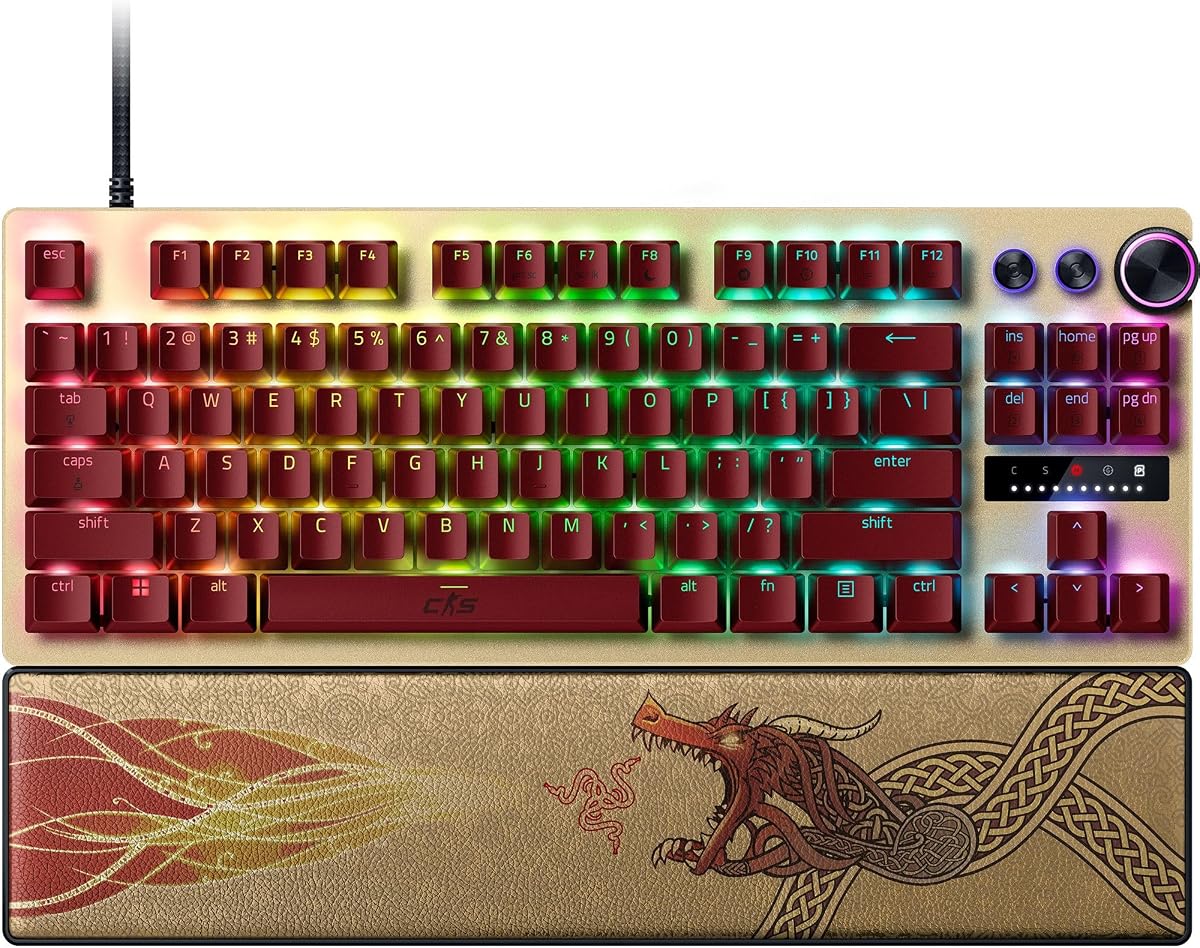
The Razer Huntsman V3 Pro TKL Counter-Strike 2 Edition is designed for elite competitive play. It features Analog Optical Switches Gen 2 with an adjustable actuation range from 0.1mm to 4.0mm. With a 4.4 rating this keyboard is highly regarded by pro players for precision.
We may earn a commission when you buy through this link, at no additional cost to you.
Snap Tap mode allows prioritizing inputs between two keys without releasing the previous one for faster directional changes. The onboard LED array helps you visualize actuation height adjustments without needing software. Textured double-shot PBT keycaps withstand the wear of intense gaming.
While expensive this keyboard offers features specifically tailored for CS2. The magnetic wrist rest adds ergonomic support during long sessions. Users should note that Snap Tap requires the latest firmware update to function correctly.
This keyboard is perfect for serious competitors who want premium build and features. It combines rapid trigger with unique tools like Snap Tap for an edge in gameplay. If budget allows this is one of the best options for CS2 players.
Snap Tap mode allows more responsive inputs for near-instant directional changes in FPS games.
Make precise onboard adjustments to actuation height with the visual aid of an onboard LED array.
We may earn a commission when you buy through this link, at no additional cost to you.
The Corsair Clipper PRO MINI 60 focuses on speed and durability for FPS gamers. It uses MGX Hyperdrive Core switches with zero drift and 100 million keystroke durability. The 4.4 rating indicates strong reliability in competitive environments.
We may earn a commission when you buy through this link, at no additional cost to you.
IP57-rated protection guards against spills and dust ensuring longevity during intense sessions. CORSAIR AXON hyper-processing delivers up to 8000Hz polling for near-instant input registration. Multi-Action and Smart Tap give you consistent execution and reduced finger fatigue.
While the 60% layout saves space it may take time to adjust if you need function keys. The dual-layer sound dampening keeps keystrokes quieter which is nice for shared rooms. The white color is aesthetically pleasing but may require more cleaning.
This keyboard is ideal for players who want durability and fast polling. It handles messy environments well with its water resistance rating. If you need a compact and sturdy Hall Effect board this model is a strong candidate.
Rapid Trigger enables instant 0.1mm reset for rapid taps and faster reactions.
IP57-rated durability protects against water and dust for long gaming sessions without interruption.
We may earn a commission when you buy through this link, at no additional cost to you.
The Redragon K745 HE brings noise dampening and magnetic switches to an affordable package. It uses next-gen UltraMag POM switches that sense keypresses without physical contact. The 3.9 rating suggests mixed feedback but solid core features for the price.
We may earn a commission when you buy through this link, at no additional cost to you.
Five layers of noise dampening create a soft Hi-Fi bounce instead of a harsh clack. Rapid trigger technology cuts redundant keystrokes during quick direction changes for better aim. Vibrant RGB lighting adds to the eSports vibe of your desk setup.
Some users might find the software interface less intuitive than premium brands. The floating switch plate helps reduce wobble but build quality may vary. It remains a viable option for those prioritizing feel and sound.
This keyboard fits players who want a quiet mechanical feel with magnetic speed. The dampening layers are a distinct advantage for noise-sensitive environments. If you enjoy adjusting lighting and sound this is a functional option.
Anti-wobble independent switch plate design paired with multiple dampening layers gives a soft silky bounce.
Adjustable brightness and lighting modes bring your desk to life day or night for true eSports vibes.
We may earn a commission when you buy through this link, at no additional cost to you.
The Keychron C0 HE 8K offers a specialized one-handed layout for complex commands. It features Hall Effect magnetic switches with 0.01mm precision for instant key reset. The 4.2 rating shows appreciation for its unique utility among power users.
We may earn a commission when you buy through this link, at no additional cost to you.
This keypad is perfect for controlling streaming tools or MMO skills alongside your main keyboard. You can trigger OBS scenes or execute complex commands with one hand. The web-based configurator makes customization easy without software installation.
Using a secondary device may take time to get used to effectively. The 8K polling rate ensures inputs are registered instantly for competitive titles. It is best suited for users who need extra keys without cluttering the desk.
This keyboard is ideal for streamers or players using multiple devices. The cross-platform support and precise switches make it reliable for varied tasks. If you need extra programmable keys this model provides unique versatility.
Beyond gaming this keypad is perfect for content creators and streamers to execute complex commands with one hand.
Customize key mapping and RGB lighting through a browser-based configurator with no software installation required.
We may earn a commission when you buy through this link, at no additional cost to you.
The renewed Razer Huntsman V3 Pro offers high-end features at a lower price. It includes Analog Optical Switches Gen 2 with adjustable actuation and Snap Tap mode. The 3.5 rating reflects the uncertainty of refurbished items despite strong specs.
We may earn a commission when you buy through this link, at no additional cost to you.
Snap Tap mode prioritizes inputs for near-instant directional changes in CS2. The magnetic wrist rest provides firm support for long training and competition periods. Textured PBT keycaps offer durability superior to regular keycaps for intense play.
Buying renewed means potential cosmetic imperfections or shorter warranty periods. Ensure you update the latest firmware to enable all features like Snap Tap. For budget-focused gamers wanting premium tools this is an interesting middle ground.
This keyboard is suitable for those willing to trade risk for cost savings. It gives access to elite features without the full retail price. If you want a trusted brand with renewed confidence this model deserves a look.
This renewed model gives access to premium pro features like Snap Tap at a lower price point.
The magnetic firm leatherette wrist rest provides ergonomic support vital for long periods of training.
We may earn a commission when you buy through this link, at no additional cost to you.
The Corsair K55 RGB PRO is a budget membrane keyboard with solid features. It offers dynamic RGB backlighting and six dedicated macro keys for streamlined play. The 4.4 rating shows high satisfaction among users for value and comfort.
We may earn a commission when you buy through this link, at no additional cost to you.
IP42-rated protection guards against dust and spills to keep gameplay running. The detachable palm rest reduces stress on your hands during long sessions. Dedicated media keys let you control volume without interrupting your game.
It lacks the magnetic switches found in other options which limits raw speed. Membrane switches may not feel as crisp for competitive movement. However for general play and casual gaming it remains a reliable choice.
This keyboard is best for casual gamers or beginners on a tight budget. It provides necessary comforts and controls without high-end costs. If you prefer membrane feel and need macros this is a practical option.
IP42-rated protection guards against accidents so your gameplay never has to stop during spills.
Six dedicated macro keys let you activate functions in just one stroke with iCUE software.
We may earn a commission when you buy through this link, at no additional cost to you.
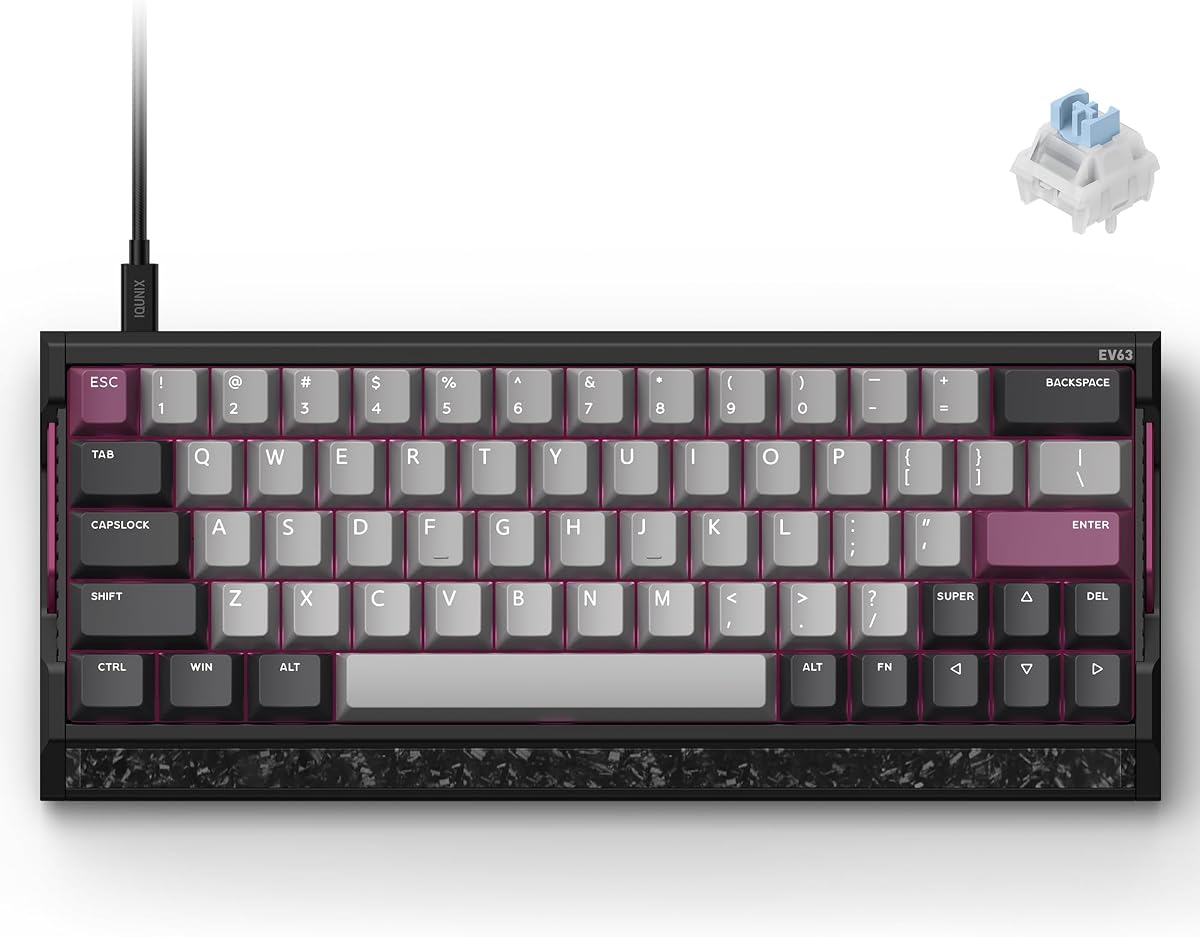
The IQUNIX EV63 combines premium materials with advanced Hall Effect technology. It uses an aircraft-grade CNC aluminum case with forged carbon for a solid custom-like feel. With a 4.5 rating it is highly praised for stability and performance.
We may earn a commission when you buy through this link, at no additional cost to you.
Magnetic X Ultra Switches offer 0.01mm rapid trigger and 8kHz polling. The M.A.T. 2.0 algorithm checks each key in real time to reduce missed inputs. Driver 3.0 makes setup easier with pro-tuned FPS presets based on champions.
The compact layout keeps gaming keys close but full-size users may need to adjust. It weighs about 2.65 lb helping reduce unwanted desk movement during intense play. This model is a top tier choice for quality and speed.
This keyboard is ideal for enthusiasts who want the best build and precision. The combination of materials ensures longevity and consistent input. If you seek a custom-like feel with high tech this is the final recommendation.
Unlike lightweight plastic keyboards EV63 uses a real forged carbon front plate and aluminum case.
The M.A.T. 2.0 algorithm reduces missed inputs and sticky key behavior for cleaner stops.
We may earn a commission when you buy through this link, at no additional cost to you.
Selecting the right keyboard involves understanding several technical aspects that affect gameplay. This guide explains the key factors to consider when buying a keyboard for CS2.
Magnetic Hall Effect switches are currently the standard for competitive FPS gaming. Unlike traditional mechanical switches they detect keypresses without physical contact for faster response times. Look for models that advertise rapid trigger or adjustable actuation for peak speed.
Prioritize keyboards with magnetic switches if you want faster inputs. Mechanical switches are less common now but ensure you check actuation points.
Polling rate determines how often your keyboard sends data to your computer. For CS2 rates of 8000Hz are becoming common and offer near-instant input registration. Higher rates reduce latency which is crucial for competitive shooters.
Look for a polling rate of at least 8000Hz for the best performance in CS2.
Adjustable actuation allows you to set how far a key presses to register. This customization helps tailor the keyboard to your finger strength and playstyle. Some models offer software to save multiple profiles for different games.
Ensure the keyboard lets you adjust actuation points to match your needs.
Compact layouts like 60% or TKL save desk space for larger mouse movements. CS2 players often prefer these smaller designs to allow room for wrist and arm movement. Consider whether you need dedicated arrow keys or numpads.
Choose a compact layout like 60% to maximize your mouse movement space.
A solid build ensures the keyboard stays stable during intense gaming sessions. Materials like aluminum or forged carbon add weight and reduce case vibration. PBT keycaps are more durable than ABS and resist shine over time.
Look for durable materials and keycaps to ensure long-term reliability.
Good software allows for advanced customization of macros and lighting profiles. Onboard memory helps store settings directly on the keyboard without needing software. Features like media knobs or wrist rests add convenience to your setup.
Check that the software is user-friendly and supports your operating system.
Comfort is essential for long gaming sessions to prevent hand fatigue. Detachable palm rests and ergonomic designs help keep your wrists in a natural position. The tactile feedback of the switch also affects how comfortable typing feels.
Select a keyboard with ergonomic features to reduce physical strain during play.
Gaming keyboards range from budget-friendly options to high-end premium models. While expensive boards offer the best features mid-range options can still deliver excellent performance. Determine what features you truly need before setting your budget.
Decide on a budget that balances cost with necessary performance features.
Start by connecting your keyboard to a USB port and installing any necessary drivers. Ensure you have the latest firmware updates to enable all features like rapid trigger or snap tap. Customize your actuation points to suit your specific gaming needs.
Keep your keyboard clean by regularly wiping down keycaps with a soft cloth. Use compressed air to remove dust from between switches to maintain smooth operation. If your keyboard is water resistant check the manufacturer guidelines for cleaning.
Store your keyboard in a dry place away from direct sunlight when not in use. Avoid placing drinks near your setup to prevent accidental spills. Proper care will extend the lifespan of your switches and ensure consistent performance.
A Hall Effect keyboard uses magnetic sensors to detect keypresses rather than physical metal contacts. This allows for faster response times and adjustable actuation points. It is ideal for competitive gaming where speed is essential.
Rapid trigger is not strictly necessary but provides a significant advantage in movement. It resets keys instantly upon release allowing for quicker counter-strafing. Most pro players use it to gain an edge in competitive matches.
Many players prefer a shallow actuation point like 0.5mm for faster inputs. However the best setting depends on your finger strength and preference. Adjusting this in software lets you find the sweet spot for your playstyle.
Membrane keyboards can be used for CS2 but lack the speed of Hall Effect switches. They are cheaper and softer to the touch but may not register inputs as quickly. Competitive players usually prefer magnetic or mechanical options.
A TKL layout frees up desk space which is beneficial for mouse movement in FPS. Full size keyboards have a numpad which some users prefer for other tasks. Choose based on your desk size and whether you need extra keys.
Cleaning your keyboard every few weeks helps prevent dust buildup and sticky keys. Use compressed air to clean between switches and a cloth to wipe down caps. Regular maintenance ensures your inputs remain consistent and smooth.
We reviewed ten top keyboards for CS2 offering various features and price points. From budget options to premium models each has unique strengths for competitive play. Select one that matches your budget and performance needs.
Prioritize switch speed and polling rate if you want the most responsive inputs. Also consider build quality and ergonomics for comfort during long sessions. The right tools can improve your consistency and gameplay experience.
Always verify current product availability and specifications before buying. Prices and features may change so check the official listings for updates. We hope this guide helps you find the perfect keyboard for your setup.