
GIGABYTE Radeon RX 9070 XT Gaming OC 16G Graphics Card
4.7Editor score
WINDFORCE Cooling System
Server-grade Thermal Gel
RGB Lighting Support
This guide compares the top 10 flagship graphics cards for gaming and creative workloads, highlighting performance, cooling, and value for October 2026.
Flagship graphics cards represent the pinnacle of visual computing power available to consumers today. These powerful components drive immersive gaming experiences, realistic ray tracing, and accelerated creative workflows for professionals who demand the best performance possible.
To compile this list, we analyzed technical specifications, architectural advancements, and real-world performance metrics across the latest generation of GPUs. We considered cooling solutions, memory bandwidth, power efficiency, and user feedback to identify the most reliable and capable models on the market.
Each pick in this guide showcases a unique strength, whether it is raw rasterization power, superior cooling, or exceptional value for specific use cases. Please note that pricing fluctuates frequently due to market demand and availability, so check current listings before making your final decision.
4.7Editor score

4.8Editor score

4.6Editor score
This side-by-side comparison highlights the key specifications and unique features of each flagship graphics card to help you find the perfect match for your system requirements and budget constraints.


This flagship graphics card delivers outstanding performance for high-resolution gaming and content creation. Rated 4.8 stars, it stands out due to its advanced thermal design and military-grade component reliability that ensures long-term stability under heavy loads.
We may earn a commission when you buy through this link, at no additional cost to you.
The NVIDIA Blackwell architecture provides a significant leap in efficiency and raw power. With DLSS 4 support and a robust cooling solution featuring phase-change thermal pads, the card maintains high boost clocks without throttling even during extended stress tests.
While the price is higher than mid-range options, the durability and performance justify the investment for enthusiasts. The large 3.125-slot design requires a spacious case but ensures optimal airflow and thermal dissipation for sustained peak performance.
Buyers seeking a premium, durable flagship card for 1440p or 4K gaming should strongly consider this model. Its combination of advanced cooling, reliable components, and strong software support makes it a top recommendation for serious gamers.
The phase-change thermal pad ensures optimal heat transfer and outlasts traditional paste for better longevity and sustained performance under load.
Military-grade components deliver rock-solid power stability and longer lifespan, providing ultimate durability for demanding gaming sessions.
We may earn a commission when you buy through this link, at no additional cost to you.
Offering impressive value, this card combines strong gaming performance with a robust cooling solution. It receives a 4.7 rating for its ability to handle modern titles smoothly while maintaining a competitive price point compared to rival flagships.
We may earn a commission when you buy through this link, at no additional cost to you.
The WINDFORCE cooling system utilizes Hawk Fans and server-grade thermal conductive gel to keep temperatures in check. With 16GB of memory, it ensures smooth frame rates in texture-heavy games and creative applications without stuttering or bottlenecks.
While it may lack some of the latest AI enhancements found in newer architectures, its raw performance remains highly competitive. The customizable RGB lighting adds a nice aesthetic touch for builds where visual appeal is a priority.
This card is an excellent choice for budget-conscious gamers who refuse to compromise on core performance. It balances cost and capability effectively, making it a top pick for those building a high-end system on a tighter budget.
The WINDFORCE cooling system with Hawk Fans and server-grade gel ensures reliable thermal performance during extended gaming sessions.
With 16GB of GDDR6 memory, this card handles high-resolution textures and demanding workloads with ease.
We may earn a commission when you buy through this link, at no additional cost to you.
This premium card offers exceptional performance driven by the latest NVIDIA Blackwell architecture. With a 4.6 rating, it is praised for its ability to handle ultra-high-resolution gaming and professional workloads with consistent efficiency and reliability.
We may earn a commission when you buy through this link, at no additional cost to you.
The 3.6-slot design houses a massive fin array optimized for airflow, supported by phase-change thermal pads. GPU Tweak III software provides intuitive performance tweaking and monitoring, allowing users to fine-tune thermal and power settings easily.
While it demands significant power and case clearance, the performance gains justify the requirements for enthusiasts. The combination of advanced cooling and high-speed GDDR7 memory ensures smooth operation even under the most demanding graphical workloads.
Users prioritizing maximum performance and advanced features should look no further than this flagship model. It delivers a complete package of power, cooling, and software tools for those who want the best gaming experience available.
The massive fin array and phase-change thermal pads ensure optimal thermal performance and longevity under heavy loads.
GPU Tweak III software allows for intuitive performance tweaking, advanced thermal controls, and comprehensive system monitoring.
We may earn a commission when you buy through this link, at no additional cost to you.
This model brings flagship performance to a competitive market segment with its strong 4.6 rating. It features the latest memory technology and cooling innovations to deliver smooth gaming and creative performance for serious users seeking high fidelity visuals.
We may earn a commission when you buy through this link, at no additional cost to you.
Powered by the NVIDIA Blackwell architecture, it supports DLSS 4 for enhanced frame rates and visual quality. The WINDFORCE cooling system maintains low temperatures, while the PCIe 5.0 interface ensures future-ready bandwidth compatibility with modern motherboards.
The card's large size may limit compatibility with smaller cases, but it ensures optimal cooling efficiency. The high-speed GDDR7 memory significantly boosts performance in bandwidth-sensitive tasks, making it a solid choice for future-proofing your system.
Gamers looking for a balanced option with cutting-edge features will appreciate this card. It offers a robust mix of performance, cooling, and modern connectivity without the highest price tag of ultra-premium competitors.
Integrated with 16GB GDDR7 memory on a 256-bit interface for exceptional bandwidth and performance.
Features PCIe 5.0 support for maximum data transfer speeds and compatibility with next-gen systems.
We may earn a commission when you buy through this link, at no additional cost to you.
Even with newer models available, this card remains a powerhouse for raw rasterization and ray tracing. It holds a 4.6 rating for its ability to push 4K 120Hz and 8K HDR content reliably, making it a favorite for high-end gaming setups.
We may earn a commission when you buy through this link, at no additional cost to you.
Featuring 16.384 CUDA cores and fourth-generation tensor cores, it excels in both gaming and AI-accelerated workflows. The built-in NVIDIA encoder is ideal for streamers, ensuring high-quality output without impacting game performance significantly.
While it lacks the latest architectural leaps, its performance is still top-tier for most applications. The support for Variable Refresh Rate and HDMI 2.1a ensures compatibility with the latest high-refresh-rate monitors and displays.
Users who prioritize raw performance and have found a good price on this model will find it compelling. It remains a fantastic choice for those who need proven stability and maximum frame rates in demanding AAA titles.
Supports 4K 120Hz HDR and 8K 60Hz HDR with Variable Refresh Rate for stunning visual fidelity.
Features fourth-generation tensor cores providing up to 2x AI performance for DLSS 3 and other features.
We may earn a commission when you buy through this link, at no additional cost to you.
Designed for smaller builds, this card delivers impressive performance in a compact 2.5-slot form factor. It achieves a 4.7 rating for balancing size and efficiency, making it an ideal choice for enthusiasts building in mini-ITX cases without sacrificing too much power.
We may earn a commission when you buy through this link, at no additional cost to you.
The Axial-tech fan design optimizes airflow for its size, while 0dB technology ensures silence during light gaming. Dual BIOS profiles let you toggle between Quiet and Performance modes, giving you control over noise and thermal output.
Though it has fewer VRAM than high-end flagships, its strong AI performance of 767 TOPS helps in modern titles. Dual ball bearings provide long-lasting reliability, ensuring the fans remain quiet and effective over years of usage.
Small form factor builders will appreciate this card's unique balance of performance and space-saving design. It proves that flagship-level features can be adapted for compact systems without compromising on critical functionality or user experience.
A 2.5-slot design maximizes compatibility and cooling efficiency for superior performance in small chassis.
0dB technology lets you enjoy light gaming in relative silence with automatic fan stop when idle.
We may earn a commission when you buy through this link, at no additional cost to you.
This model aims to deliver extreme performance for ultra-high resolution gaming and complex creative tasks. It scores a 4.4 rating for its massive memory and AI capabilities, making it suitable for workflows that demand heavy compute power and large textures.
We may earn a commission when you buy through this link, at no additional cost to you.
Featuring 772 AI TOPS and a SFF-Ready design, it balances performance with build considerations better than typical high-end cards. The Auto-Extreme manufacturing process ensures precision and reliability, reducing the risk of failure in critical systems.
While it is still a large card, its 2.5-slot design is optimized to fit more cases than usual. Dual BIOS allows flexible control, enabling users to prioritize silence or maximum boost clocks based on their current usage scenario.
Creators and gamers targeting 8K or massive VR workloads should consider this card for its memory headroom. It combines flagship power with thoughtful engineering to suit diverse needs, from gaming to heavy professional applications.
Delivers 772 AI TOPS for advanced machine learning tasks and enhanced in-game AI features.
Auto-Extreme manufacturing process ensures precision and reliability for consistent performance over time.
We may earn a commission when you buy through this link, at no additional cost to you.
Offering solid value and strong software support, this card achieves a 4.6 rating. It appeals to users who want reliable performance and the flexibility to tune their system with advanced software tools without breaking the bank on high-end flagships.
We may earn a commission when you buy through this link, at no additional cost to you.
GPU Tweak III provides intuitive performance tweaking, advanced thermal controls, and system monitoring. The phase-change thermal pad ensures optimal heat transfer, lowering temperatures for enhanced performance and reliability under consistent gaming loads.
The 2.5-slot design allows for greater build compatibility in smaller cases while maintaining adequate cooling. Dual-ball fan bearings last up to twice as long as standard sleeve bearings, improving longevity and reducing maintenance needs over time.
Gamers who value customization and software control will find this card appealing. It balances performance with flexibility, making it a smart choice for those who want to fine-tune their system to match specific performance or acoustic goals.
GPU Tweak III software provides intuitive performance tweaking, advanced thermal controls, and system monitoring.
Dual-ball fan bearings last up to twice as long as standard sleeve bearings for better durability.
We may earn a commission when you buy through this link, at no additional cost to you.
This mid-range card brings flagship features to a more accessible price point, earning a 4.7 rating. It is designed to handle modern titles at high settings while maintaining strong performance and stability through robust construction and cooling.
We may earn a commission when you buy through this link, at no additional cost to you.
Powered by the NVIDIA Blackwell architecture and DLSS 4, it offers efficient high-performance gaming. Military-grade components ensure rock-solid power delivery and longer lifespan, while ASUS GPU Guard reduces the risk of cracks during installation or transport.
The 3.125-slot design with Axial-tech fans optimizes airflow for consistent temperatures. Phase-change thermal pads help ensure thermal performance and longevity, outlasting traditional thermal paste for graphics cards under heavy loads effectively.
Gamers looking for a balance between cost and flagship features will appreciate this card. It delivers strong performance and reliability without the premium price of top-tier models, making it a smart choice for most users.
ASUS GPU Guard and bracket secure the GPU, reducing the risk of cracks and ensuring stable mounting.
Powered by NVIDIA Blackwell architecture and DLSS 4 for enhanced gaming efficiency and performance.
We may earn a commission when you buy through this link, at no additional cost to you.
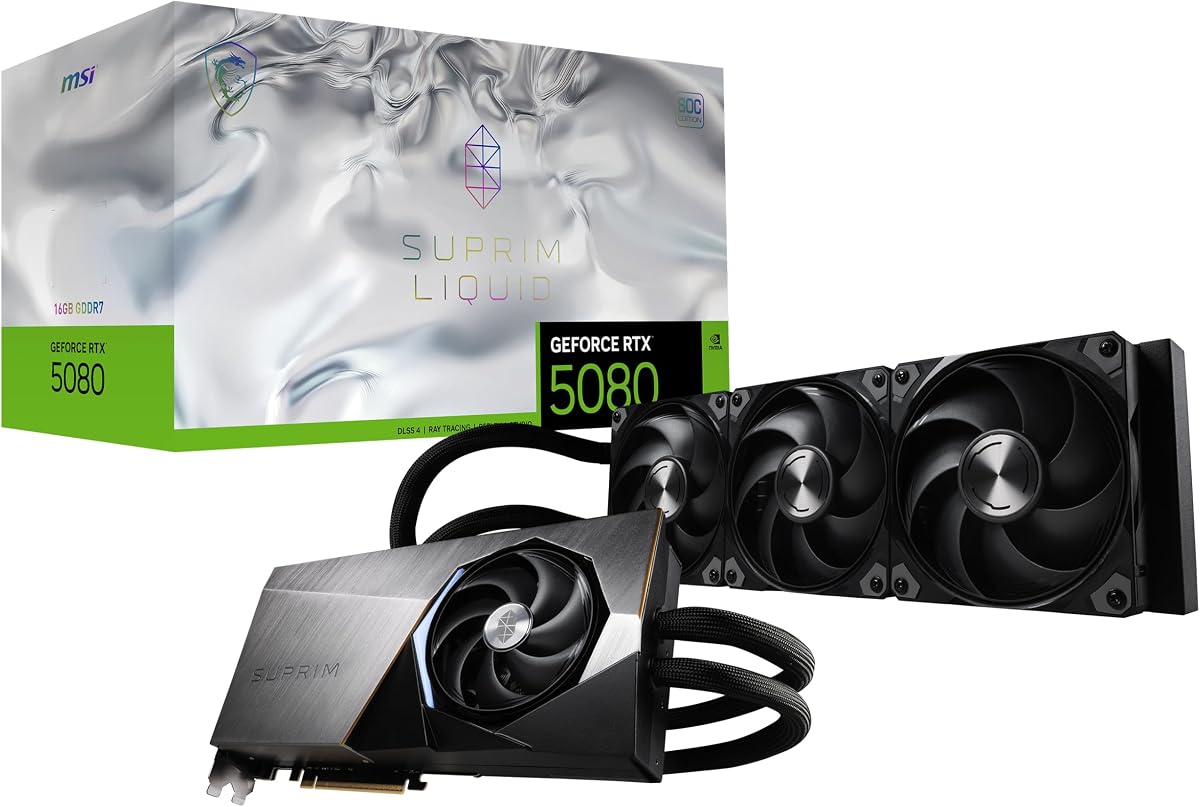
Targeting enthusiasts who demand maximum thermal performance, this liquid-cooled flagship earns a 4.7 rating. It is engineered to push clock speeds higher by maintaining lower temperatures through advanced liquid cooling technology and premium components.
We may earn a commission when you buy through this link, at no additional cost to you.
The NVIDIA Blackwell architecture combined with liquid cooling allows for extreme performance reaching 2760 MHz. It supports DisplayPort 2.1a and HDMI 2.1b for future-ready connectivity, ensuring compatibility with the latest monitors and high-resolution displays.
While liquid cooling adds complexity to system building, the thermal benefits are significant for overclocking and sustained loads. The 16GB GDDR7 memory on a 256-bit interface provides substantial bandwidth for high-fidelity gaming and creative applications.
Enthusiasts who want the absolute best thermal solution and raw speed should consider this unique card. It stands out as a specialized option for those willing to invest in a custom loop for ultimate performance and system stability.
Delivers extreme performance with boost clocks up to 2760 MHz for maximum gaming and creative output.
Includes DisplayPort 2.1a and HDMI 2.1b for compatibility with the latest high-refresh displays.
We may earn a commission when you buy through this link, at no additional cost to you.
Selecting the right flagship graphics card involves evaluating several critical factors to ensure compatibility and optimal performance for your specific needs.
Modern architectures like NVIDIA Blackwell and latest AMD designs offer improved efficiency and AI capabilities. Higher core counts generally translate to better rasterization and ray tracing performance in demanding titles.
Look for cards with the latest architecture generation to ensure longevity and support for upcoming game features.
High-resolution gaming and creative workloads benefit significantly from ample VRAM and fast memory speeds. Flagship cards now offer 16GB or more with GDDR7 technology for increased bandwidth.
Choose models with sufficient memory headroom to avoid bottlenecks when using high-resolution textures or complex scenes.
Effective cooling is essential for maintaining boost clocks during extended gaming sessions. Look for cards with robust fan designs, heat pipe arrays, or liquid cooling options if you plan on overclocking.
Prioritize designs with phase-change thermal pads or high-quality thermal paste for better heat transfer and longevity.
Flagship GPUs often require significant power. Ensure your power supply unit meets the wattage and connector specifications, typically 850W or higher with 12VHPWR support for newer models.
Verify your PSU compatibility before purchase to avoid instability or hardware issues during heavy loads.
High-end cards are physically large. Check your PC case clearance to ensure the GPU will fit, especially if you have a smaller chassis or many drive bays.
Measure your case's length and slot availability to confirm the card will fit without obstruction.
Manufacturer software allows for performance tuning, fan control, and system monitoring. Look for cards with mature software suites that offer intuitive controls and regular updates.
Choose brands with reliable software tools for easier customization and long-term maintenance of your system.
Flagship cards vary significantly in price. Evaluate whether the performance gains justify the cost compared to slightly lower-tier models that might offer similar results in your specific use case.
Consider your budget and performance needs to find the sweet spot between cost and capability.
Modern cards feature HDMI 2.1 and DisplayPort 2.1a for high refresh rates and resolutions. Ensure the card supports your monitor's requirements for bandwidth and features like VRR.
Check the available output ports to confirm compatibility with your existing or planned display setup.
Install the card carefully into the PCIe slot and secure it with screws to prevent sagging. Connect the required power cables directly to your PSU to ensure stable voltage delivery during peak usage periods.
Install the latest drivers from the manufacturer to take advantage of optimizations and bug fixes. Use the provided software to monitor temperatures and fan speeds to catch potential issues early.
Keep your PC environment clean by dusting fans and heatsinks regularly. Avoid extreme ambient temperatures to maintain long-term stability and extend the lifespan of your graphics hardware.
Most modern flagship cards use PCIe x16 which works with older boards. However, bandwidth may be limited to older PCIe versions, slightly reducing performance compared to newer slots. Ensure you have adequate power connectors like 12VHPWR for newer models.
For flagship models like RTX 5080 or 5090, a minimum of 850W to 1000W is recommended. Check the specific card's documentation for exact requirements as higher clocks may need more power.
Most cards have optimized default profiles that work well out of the box. However, using software tools to adjust fan curves can help balance noise and cooling based on your specific environment and preferences.
Yes, GDDR7 offers higher bandwidth and efficiency. This is crucial for high-resolution gaming and memory-intensive workloads where data transfer speed impacts overall performance.
With proper cooling and care, flagship cards often last 5 to 7 years. Regular dusting and avoiding extreme temperatures help maximize their operational lifespan effectively.
Liquid cooled cards typically offer lower temperatures and quieter operation. However, they require a compatible cooling loop which adds complexity and potential maintenance to your system.
Choosing the right flagship graphics card depends on balancing your performance needs with budget constraints. The models listed here offer a range of options from solid value picks to absolute premium powerhouses.
Consider factors like cooling efficiency, memory capacity, and physical dimensions alongside raw performance metrics. Matching these specs to your case and use case ensures a smooth and stable experience over time.
Remember that prices can change rapidly due to market conditions. Check current listings and promotions before buying to secure the best deal available for your chosen configuration.