
UT681 HDMI Cable Tester
4.8Editor score
Supports HDMI 1.2 to 2.0
LED indicator zones for faults
Portable 175g design
This guide compares the top HDMI Signal Tester models for professionals and homeowners, evaluating features like resolution support and cable diagnostics to
Finding the right HDMI Signal Tester ensures your video infrastructure performs reliably. Whether you install home theaters or manage enterprise AV systems, a quality tool diagnoses connectivity issues quickly. It verifies signal integrity and cable health without needing a display.
We evaluated ten distinct models based on resolution support, portability, and diagnostic depth. Our analysis covers budget-friendly cable checkers alongside advanced generators capable of testing 8K signals. Each entry reflects real-world utility for technicians and enthusiasts alike.
Every pick highlights key strengths, trade-offs, and ideal use cases. You will see how each device handles continuity checks, pattern generation, or HDCP validation. Note that availability and pricing fluctuate, so verify details before purchasing.
4.8Editor score

4.0Editor score

4.5Editor score
The table below summarizes the core capabilities of each HDMI Signal Tester to help you compare them side by side. Look for resolution limits, port types, and specific features like HDCP handling or battery life.


The Monoprice HDMI Signal Generator and Display Analyzer earns our Editor's Choice for balancing performance and affordability. With a solid 4.0 rating, it handles 4K signals and provides essential testing modes for installers. Its ability to switch resolutions via DIP switches makes it practical for diverse setups.
We may earn a commission when you buy through this link, at no additional cost to you.
This device excels in generating stable HDMI signals across multiple resolutions including 1080p and 4K. It supports HDCP 1.4 and 2.2 outputs, which is crucial for modern content compliance. Four test patterns help verify display functionality without needing a separate screen.
While it lacks some advanced analytics found in higher-end units, it covers core needs efficiently. The rating suggests minor drawbacks but remains reliable for general troubleshooting. It is a dependable tool for ensuring signal integrity during installation.
Installers seeking a versatile yet affordable HDMI Signal Tester will find this model well-suited. It simplifies diagnosing compatibility issues between sources and displays. We recommend it for professionals needing consistent results without breaking the budget.
Four-pin DIP switches allow easy setting of video resolution and HDCP content. This ensures compatibility with various sources and displays.
Outputs include 4K@60Hz 4:4:4 and 1080p@60Hz with multiple color formats. This flexibility covers most high-definition use cases.
We may earn a commission when you buy through this link, at no additional cost to you.
The Parts Express HDMI Cable Signal Tester stands out as the Best Budget option for quick diagnostics. Rated 4.3, it offers a straightforward way to identify connectivity problems like color shifts or missing pictures. Its compact design makes it ideal for field work.
We may earn a commission when you buy through this link, at no additional cost to you.
This tester simplifies cable verification by displaying the status of each signal component. Users can place it at either the source or display end to isolate faults. The DVI and HDMI connectors allow broad compatibility with older and newer equipment.
While it does not provide deep signal analytics, it excels at identifying physical cable faults. The trade-off is limited functionality beyond basic continuity checks. For many users, this simplicity ensures faster troubleshooting without complex menus.
Technicians needing a lightweight tool for routine checks will appreciate this model. It saves time by quickly pinpointing whether a cable is faulty. We recommend it for those prioritizing speed and affordability over advanced features.
Place the tester at source or display ends to quickly find where signal breaks occur. This reduces setup time significantly.
LED indicators show the status of each HDMI signal component. This visual feedback helps identify specific connection failures.
We may earn a commission when you buy through this link, at no additional cost to you.
This HDMI and Network Cable Tester combines two tools in one compact package. Rated 4.4, it scans up to 19 wires for HDMI cables and verifies RJ45 connections. The remote unit stores conveniently on the main unit for portability.
We may earn a commission when you buy through this link, at no additional cost to you.
It supports HDMI versions from 1.2 to 2.0 along with Type A and Type C connectors. LED lights flash in rotation to confirm proper network cable connections. The main unit can run on a single AAA battery or a USB power supply.
While convenient for dual interface tasks, it may lack deep signal quality metrics for high-end HDMI needs. The small form factor is great for travel but limits display readability. Still, it offers strong value for general connectivity checks.
Users managing both video and network cabling will find this versatile. It eliminates the need for separate testers for different cable types. We suggest it for technicians needing a quick all-in-one diagnostic solution.
Accommodates standard Type A and Type C HDMI connectors for wide device compatibility. This makes it useful across many setups.
RJ45 connectors are tested via LED rotation patterns. Proper connections flash sequentially while faults remain static.
We may earn a commission when you buy through this link, at no additional cost to you.
The STEREN Handheld HDMI Tester provides a dedicated screen for verifying set-top box installations. With a 4.5 rating, it displays full color audio and video to confirm correct setup without a TV. Its rugged design resists dust, water, and shock.
We may earn a commission when you buy through this link, at no additional cost to you.
Technicians can perform 19-pin continuity checks directly on the device. It features two HDMI input output ports plus a dedicated set-top box connection. This configuration simplifies testing cables while monitoring the actual signal output.
While more expensive, the self-contained screen removes the need for a separate monitor. This is useful in locations where no display is available. The battery life supports several hours of continuous use for field work.
Professional installers needing reliable on-site verification will appreciate this device. It ensures that set-top boxes deliver the correct channel lineup and signal. We recommend it for teams prioritizing visual confirmation during installation.
HD LCD screen shows audio and video instantly. This allows immediate confirmation of set-top box performance.
Tempered glass and hybrid silicone plastic housing protect against environmental hazards. This extends tool lifespan in tough jobs.
We may earn a commission when you buy through this link, at no additional cost to you.
This advanced generator supports 8K HDMI 2.1 signals with 40Gbps bandwidth. Rated 4.5, it offers 64 resolutions and 33 built-in patterns for comprehensive testing. Features like EDID read and write provide deep control over signal negotiation.
We may earn a commission when you buy through this link, at no additional cost to you.
It verifies HDCP 2.3 and 1.4 encryption ensuring content compatibility. Audio testing includes LPCM 2CH and external S/PDIF input. The front panel allows direct control while a rechargeable battery ensures portability.
Though priced at a premium level, it covers next-gen standards beyond typical tools. It is ideal for validating 8K displays and high-bandwidth content. The complexity is acceptable for professionals managing advanced AV infrastructures.
Teams deploying cutting-edge HDMI setups will benefit from its robust capabilities. It guarantees signals meet strict bandwidth and encryption requirements. We recommend it for those needing top-tier HDMI testing reliability.
Supports 8K@60Hz with HDR and 40Gbps bandwidth. This ensures compatibility with latest high-resolution standards.
Features EDID read and write plus CEC control. These tools allow precise management of display and source interactions.
We may earn a commission when you buy through this link, at no additional cost to you.
This 2K/4K generator combines signal generation with bandwidth compliance testing. With a 4.2 rating, it supports 18Gbps and offers source video analysis. Its scaling feature ensures compatibility with various display resolutions.
We may earn a commission when you buy through this link, at no additional cost to you.
Technicians can verify cable compliance and manage EDID data easily. It maintains HDCP compliance to ensure secure content delivery. The analyzer helps diagnose timing issues between source and display.
It offers a balanced set of features for UHD deployment without ultra-premium complexity. While it lacks some advanced HDR options, it covers core 2K and 4K needs well. It is a solid choice for enterprise and home theater projects.
Installers focused on resolution scaling and bandwidth integrity will find it useful. It simplifies the process of validating high-resolution signals. We recommend it for teams needing reliable UHD testing tools.
Supports 4K to 1080p scaling for diverse display setups. This helps confirm proper signal adaptation across systems.
Tests cable bandwidth to ensure signal stability. This prevents dropouts in high-resolution environments.
We may earn a commission when you buy through this link, at no additional cost to you.
This portable tester offers two modes for flexible cable verification. Rated 3.9, it scans 19 wires for shorts or open circuits quickly. The auto shut-down after 10 minutes conserves battery during idle periods.
We may earn a commission when you buy through this link, at no additional cost to you.
It supports both HDMI Type A and RJ45 connectors making it versatile for mixed networks. Users can choose between fast scan and full display modes to match task needs. This flexibility helps streamline troubleshooting workflows.
While rated lower than some peers, it provides essential connectivity checks at an affordable price. The lack of detailed indicators might limit deep diagnostics. Still, its power-saving feature makes it convenient for frequent use.
Casual users or technicians needing a quick cable check will appreciate its simplicity. It saves energy and ensures readiness for the next test. We suggest it for those prioritizing convenience and basic functionality.
Choose between fast scan and full display modes to match your needs. This helps streamline verification tasks.
Automatic shut-down after 10 minutes of inactivity saves power. This extends battery life for intermittent use.
We may earn a commission when you buy through this link, at no additional cost to you.
Jonard Tools HDMI-100 is designed for efficient remote testing of installed cables. Rated 4.4, its detachable remote allows quick checks on long runs without moving the main unit. It evaluates shorts and incorrect pairings for each wire.
We may earn a commission when you buy through this link, at no additional cost to you.
It supports various HDMI versions from 1.2 to 2.0 and works on Mini HDMI cables too. Full display mode shows all connections at once while scan mode tracks individual pairs. This dual approach aids detailed diagnosis.
The need for a 9V battery is standard but adds maintenance overhead. The device is rugged and suitable for frequent use in technical environments. Its precision ensures reliable cable verification during complex installations.
Technicians working with long cable runs will find the remote feature invaluable. It reduces physical effort and speeds up fault finding. We recommend it for installers needing precise remote diagnostics.
Remote unit separates to test installed cables efficiently. This simplifies verification of long runs.
Scan mode shows individual connections being tested. This helps pinpoint exact wire faults.
We may earn a commission when you buy through this link, at no additional cost to you.
The UT681 HDMI Cable Tester delivers exceptional value with a 4.8 rating. It supports versions from 1.2 to 2.0 and handles Type A and Type C connectors. LED indicator zones simplify identifying specific cable faults quickly.
We may earn a commission when you buy through this link, at no additional cost to you.
Its double-mode test offers both scan and full display options for detailed views. Battery monitoring provides low voltage warnings via flashing blue lights. The compact 175g body makes it easy to carry on-site.
While it lacks advanced signal analytics, it covers the most common connectivity issues effectively. The rating reflects strong user satisfaction with its reliability. It is a practical choice for frequent cable verification.
Anyone needing a quick and dependable tool for HDMI checks should consider this model. Its high rating and portability make it a favorite among technicians. We recommend it for cost-conscious users seeking solid performance.
LED zones show abnormal points like short circuits or mis-sequence. This streamlines the troubleshooting process.
Weight of about 175 grams ensures easy transport. Tolerance from -10°C to 50°C allows field use.
We may earn a commission when you buy through this link, at no additional cost to you.
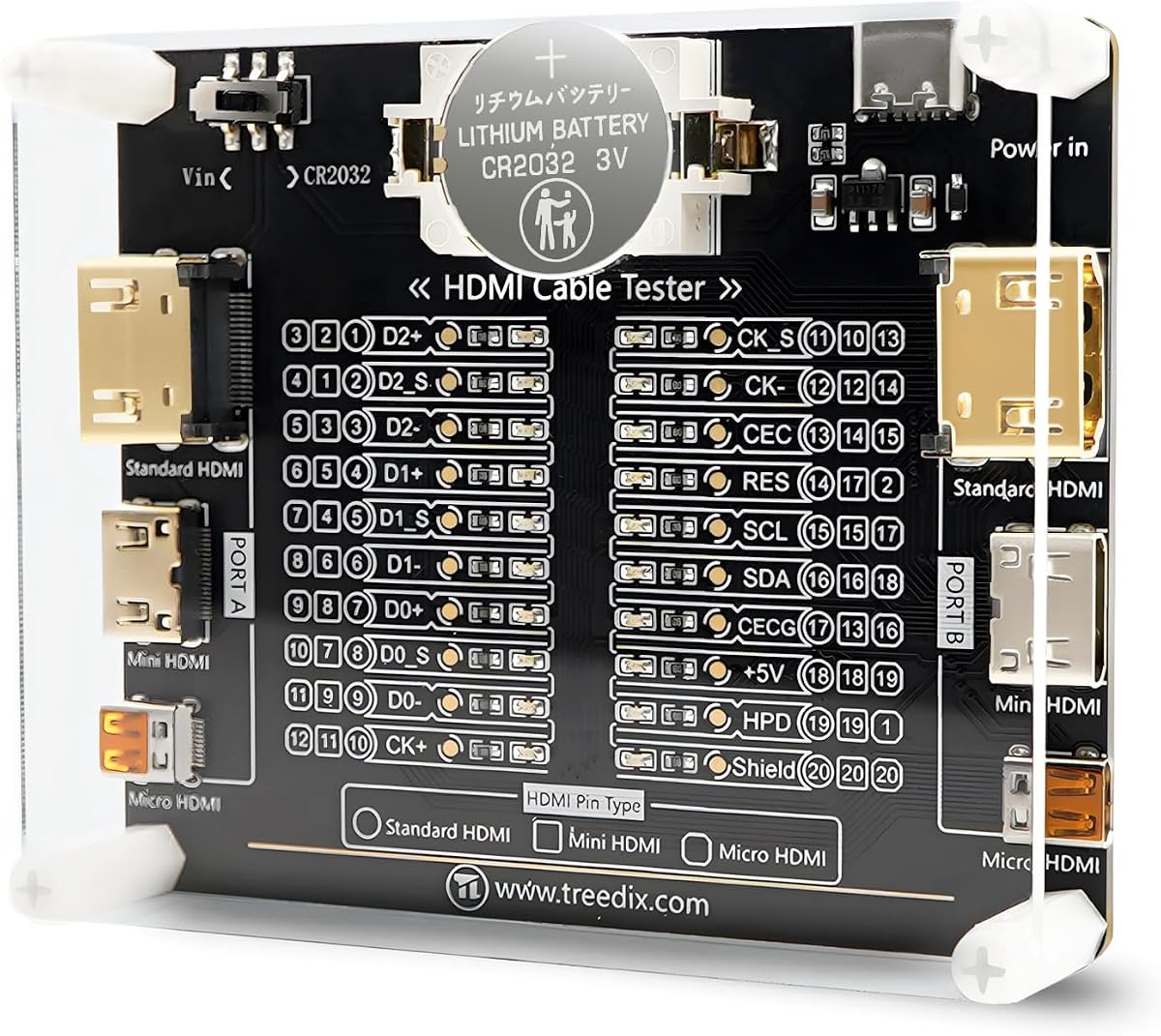
The Treedix Cable Tester Board is designed for precise HDMI continuity checks. With a 4.6 rating, it uses 20 LED indicators to show the status of each pin. It supports HDMI versions from 1.0 to 2.1.
We may earn a commission when you buy through this link, at no additional cost to you.
Vin reverse connection protection ensures the board is not damaged by incorrect power input. An acrylic housing protects the unit during use. Its compact size fits easily in tool kits for on-the-go testing.
While it relies on external power or batteries, the protection features increase reliability. It is useful for technicians verifying cable condition without full signal generation. The simplicity makes it accessible for varied skill levels.
Installers focusing on physical cable health will find this board practical. It highlights faults like shorts or opens efficiently. We suggest it for teams needing a dedicated condition checker.
20 LEDs correspond to each pin for clear feedback. This aids understanding of cable functionality.
Vin input provides reverse connection protection. This protects the board from power mistakes.
We may earn a commission when you buy through this link, at no additional cost to you.
Selecting the right HDMI Signal Tester depends on the complexity of your testing needs and budget. This section breaks down key factors to consider before making a purchase.
Verify the maximum resolution and bandwidth the tester supports. Ensure it handles the specific HDMI version you work with, such as HDMI 2.1 for 8K signals. Testing beyond your required bandwidth ensures future compatibility.
Choose a model that meets or exceeds your highest resolution needs to avoid limitations.
HDCP content protection is critical for modern media sources. Confirm the tester supports HDCP 2.2 or 2.3 if dealing with protected content. Incompatibility can cause black screens or failure to output.
Look for models that allow you to toggle HDCP versions for thorough testing.
Check the number and type of HDMI ports available. Some units offer multiple inputs and outputs for simultaneous testing. Mini and Micro HDMI ports add versatility for different device types.
Select a unit with enough ports to support your typical testing workflow.
Determine if you need signal generation or just cable detection. Generators create test patterns and outputs for display analysis while testers verify continuity. Some units combine both functions for flexibility.
Opt for a combined model if you need to test signals without relying on a source.
Field work requires reliable power sources. Rechargeable batteries or multiple power options like USB or external supplies extend usage. Check estimated battery life to plan your workday effectively.
Choose a device with flexible power input to ensure uninterrupted testing.
Physical durability matters in construction or outdoor environments. Look for shock-resistant housing and protective glass. Weight and dimensions influence how easy it is to carry.
Prioritize robust design if you frequently work in demanding conditions.
Advanced tools may include EDID management or CEC control. These features help debug handshake issues and device communication. Consider if these capabilities justify the cost for your use case.
Evaluate if extras like EDID read or write are essential for your workflow.
Balance the price against the features offered. High-end units provide deeper analytics while budget models cover basic needs. Ensure the investment matches the complexity of your tasks.
Select a model that delivers necessary functionality without overspending.
Begin by connecting your HDMI cable to the tester ports. Ensure both ends are properly seated to establish a stable link. Verify that the tester is powered on or has a fresh battery.
Run the diagnostics or test patterns to check signal integrity. Observe LED indicators or screen outputs for any fault warnings. Note any mismatches between expected and actual signal parameters.
Store the device in a protective case when not in use. Avoid exposing it to extreme temperatures or moisture. Regularly update firmware or check manufacturer notes for performance improvements.
An HDMI Signal Tester verifies the integrity and continuity of HDMI cables and connections. It helps identify faults like shorts, open circuits, or incorrect pin arrangements. Some models also generate test signals to validate display compatibility.
Yes, advanced testers support 8K@60Hz and HDMI 2.1 bandwidth requirements. Standard models may be limited to 4K or 1080p. Check the specifications to confirm 8K compatibility before purchase.
Use testers that explicitly list HDCP version support such as 2.2 or 2.3. These units allow toggling HDCP settings to match source and display requirements. This ensures protected content plays correctly.
Many portable units include adapters or dedicated ports for Mini and Micro HDMI. Check the product details to confirm connector types supported. This versatility is vital for testing cameras and small devices.
Battery life varies by model but usually ranges from 3 to 10 hours. Rechargeable batteries or USB power options extend usability. Always check battery specs if field work is frequent.
Testers diagnose faults but do not repair cables. If a cable fails testing, replacement is usually the solution. They save time by preventing unnecessary troubleshooting steps.
We explored ten reliable HDMI Signal Tester models ranging from basic cable checkers to advanced signal generators. Each offers unique features tailored to different testing scenarios and budgets. The top picks balance performance, reliability, and value.
When selecting a tester, prioritize resolution support and HDCP compatibility to match your equipment. Consider portability and battery life for field work. Investing in the right tool ensures smoother installations and fewer callbacks.
Current availability and pricing may shift, so review the latest product details before buying. Verify features against your specific needs to ensure satisfaction. Choosing wisely helps maintain high-quality HDMI system performance.