
Stylus Pen for Touchscreen iPad
4.5Editor score
3-in-1 high precision tips
Compatible with all touchscreens
Easy tip replacement system
This guide compares the top 10 fine point stylus pens for tablets and phones, evaluating precision, comfort, and compatibility to help you choose the right
Finding the right stylus pen can transform your digital experience. A good fine point stylus offers precision, comfort, and versatility across various devices. Whether you are drawing, writing, or navigating screens, the right tool makes a significant difference in productivity and creativity.
We compared ten popular fine point stylus options available on the market. Our evaluation focused on tip precision, build quality, compatibility, and user feedback. Each product was assessed based on its ability to deliver smooth performance and reliable results for everyday tasks.
Each pick below highlights key features and ideal use cases for different needs. You will find options ranging from budget-friendly multi-packs to premium active pens. Keep in mind that prices and availability can change, so check the latest details before purchasing.
4.5Editor score

4.6Editor score

4.2Editor score
The following table provides a side-by-side comparison of all ten stylus pens. It highlights their core specifications, compatibility, and unique features to help you make an informed decision based on your specific device and usage needs.




This stylus pen offers a versatile 3-in-1 design that meets various touchscreen needs. With a rating of 4.5, it is a strong choice for users seeking affordability and functionality. The transparent disc tip provides precise visibility for accurate writing and drawing.
We may earn a commission when you buy through this link, at no additional cost to you.
The three pen tips include two rubber sizes and a sensitive disc tip. This allows you to switch between scrolling and precise input seamlessly. The 180-degree flexible angle helps avoid lag during use. Replacement tips are easy to change without tools, extending the pen's life.
While it lacks palm rejection features, the design minimizes accidental touches effectively. The rubber tips are soft enough to prevent screen scratches. Some users may find the build less premium than active pens, but it performs well for daily tasks.
Ideal for students or casual users needing a reliable tool for notes or gaming. It is a great gift option for back-to-school or holidays. For basic touchscreen navigation and writing, this budget-friendly option delivers solid value.
The transparent disc tip lets you see the contact point clearly for accuracy.
Works with iPads, iPhones, Android devices, and most capacitive screens.
We may earn a commission when you buy through this link, at no additional cost to you.
The MEKO stylus stands out with its upgraded 3-in-1 design and protective cap. It has a strong rating of 4.6, reflecting user satisfaction with its performance. The transparent disc tip ensures you know exactly where your mark is made.
We may earn a commission when you buy through this link, at no additional cost to you.
The two rubber tips offer smooth scrolling without scratching screens. The 180-degree angle allows comfortable use for extended periods. Tips are replaceable within seconds, and the package includes extra replacements for longevity. It works on most capacitive screens including tablets and phones.
While it does not offer pressure sensitivity, the precision is excellent for notes and icons. The protective cap helps keep the disc tip clean and safe. The build is reliable but standard for capacitive styluses without active features.
Best for artists or students needing a versatile tool without charging. It is a perfect gift for anyone using touchscreens regularly. The combination of tips and durability makes it a top choice for everyday digital interaction.
Choose between disc precision or rubber comfort for different tasks easily.
Replaceable tips and included extras ensure long-term usability.
We may earn a commission when you buy through this link, at no additional cost to you.
This active stylus pen offers premium features like magnetic adsorption and a one-touch switch. Rated 4.4, it bridges the gap between basic capacitive and active pens. The magnetic design keeps it secure on compatible iPads for easy access.
We may earn a commission when you buy through this link, at no additional cost to you.
The one-touch switch simplifies power control for quick creativity. It charges fully in just 40 minutes and lasts up to 10 hours. The writing experience is smooth with minimal lag, and it includes complimentary nibs for precision. It does not prevent accidental touches.
While it is not fully pressure sensitive, the active design improves control over passive tips. The magnetic feature works best on specific iPad Pro models. Users should check device compatibility before purchasing to ensure full functionality.
Ideal for iPad users who want convenience and style without the full Apple Pencil price. The quick charge and battery life support all-day creative work. For those needing a lightweight active option, this pen delivers strong value.
Full charge in 40 minutes ensures minimal downtime for creativity.
Secures to the side of compatible iPads to prevent loss.
We may earn a commission when you buy through this link, at no additional cost to you.
This active pencil offers a 1.5mm diameter tip for precise drawing and handwriting. With a rating of 4.0, it provides a realistic feeling for creation without complex setups. It powers on within one second without needing a Bluetooth connection.
We may earn a commission when you buy through this link, at no additional cost to you.
The battery lasts around 10 to 12 hours on a 1-2 hour charge. It automatically turns off after 30 minutes of inactivity to save power. The tip is designed for smooth drawing and painting with consistent line thickness. It supports a wide range of tablets and smartphones.
The lack of pressure sensitivity means lines remain the same thickness regardless of force. This is acceptable for users focusing on basic writing or outlines. The auto-off function is efficient but may interrupt long sessions if not adjusted.
Suitable for hobbyists needing a rechargeable stylus for daily drawing. It is a practical choice for users who want active performance at a lower cost. Check device compatibility to ensure optimal performance with your specific tablet.
Start drawing immediately with a 1-second power-on without pairing.
Fixed thickness provides uniform lines for simple writing and sketches.
We may earn a commission when you buy through this link, at no additional cost to you.
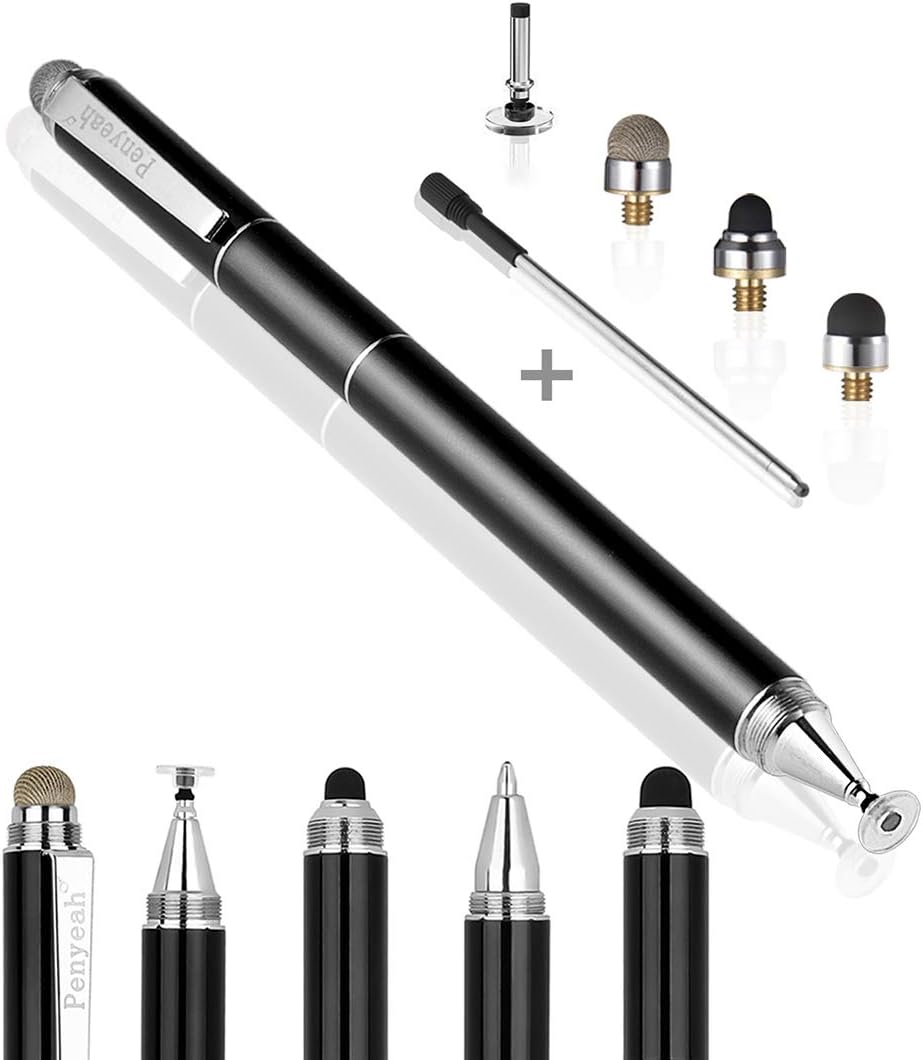
The Penyeah stylus includes 4 different replaceable tips for maximum versatility. Rated 4.4, it supports digital signing, writing, and gaming with one tool. The clear disc tip acts like a fine point stylus for detailed work on screens.
We may earn a commission when you buy through this link, at no additional cost to you.
The mesh fiber tip glides easily on screens for a smooth experience. It also includes rubber tips for icon selection and a ballpoint pen for notes. The high-grade metal body feels durable and corrosion resistant. A slim pocket clip makes it easy to carry.
While it is not palm-rejection, users can manage hand placement for smooth use. The ballpoint pen adds offline utility, making it a great multi-function tool. The screw-type tips allow for customization based on task requirements.
Perfect for professionals or travelers needing a portable multi-tool. The mix of digital and analog writing options adds unique value. For those who carry multiple pens, this unit consolidates functions effectively into one sleek device.
Combine digital stylus and physical pen in one durable tool.
High-grade metal ensures longevity for daily professional use.
We may earn a commission when you buy through this link, at no additional cost to you.
This active stylus features an ultra-fine tip for smooth writing and drawing. Rated 4.2, it is designed for artists and students needing precision without Bluetooth. The 1.5mm tip and buffer unit offer accurate control against touchscreen screens.
We may earn a commission when you buy through this link, at no additional cost to you.
It provides about 8 hours of active use on a 60-minute charge. The auto shutdown after 30 minutes ensures safety and battery saving. It works with iPad series 2018 and newer without complex pairing. Using a screen protector does not affect performance.
The lack of advanced pressure settings makes it suitable for standard input tasks. The lightweight design reduces hand fatigue during long sessions. Micro USB charging is standard but less modern than USB-C options.
Best for users seeking an economical active pen for daily note-taking. It serves well as a substitute for higher-end branded styluses. For those prioritizing precision and simplicity, this pen meets most core requirements.
Buffer unit at tip improves accuracy for detailed digital work.
8 hours of active time supports extended creative sessions.
We may earn a commission when you buy through this link, at no additional cost to you.
This bundle includes six vibrant stylus pens for office or team use. Rated 4.6, it offers reliable performance for writing and navigation on various devices. The fine point capacitive design allows detailed work on laptops and tablets.
We may earn a commission when you buy through this link, at no additional cost to you.
Each pen features a built-in clip for easy attachment to bags or notebooks. The rubber tips glide smoothly without lag, preventing fingerprints and scratches. It is a perfect pen for phone and tablet needs. Setup is unnecessary as it works instantly on touch screens.
The simple design ensures durability but lacks advanced features like magnetic attachment. Having six pens reduces the risk of losing a single unit. This is an economical solution for families or shared environments requiring multiple tools.
Ideal for schools or teams needing a bulk supply of reliable styluses. The included colors help distinguish individual pens easily. For basic touch input across many devices, this set provides excellent value and convenience.
Six pens ensure you always have a spare for work or home.
Built-in clip keeps the pen ready in your pocket or bag.
We may earn a commission when you buy through this link, at no additional cost to you.
This 4-pack offers a 2-in-1 design with disc and rubber tips for precision. Rated 4.5, it features a comfortable aluminum barrel for extended use. The 0.24 transparent disc tip allows accuracy without leaving disconnected lines on screens.
We may earn a commission when you buy through this link, at no additional cost to you.
The set includes 12 replacement tips, ensuring long-term use without extra costs. The soft anti-scratch rubber tips provide responsive touch experiences. It works flawlessly with phones, tablets, and laptops. The customer support guarantees satisfaction with a 90-day replacement service.
While the tips are replaceable, the focus is on everyday precision rather than advanced pressure sensitivity. The design is versatile for writing and sketching alike. This makes it an excellent gift for students or writers needing reliable tools.
Best for households needing multiple styluses with durable tip options. The extra replacement tips add significant value over single units. For those seeking smooth digital writing and drawing at home or office, this pack is a solid choice.
12 replacement tips ensure you never run out of functional stylus ends.
Aluminum barrel offers ergonomic comfort for long writing sessions.
We may earn a commission when you buy through this link, at no additional cost to you.
This 10-pack features 2-in-1 dual rubber tips for versatile touchscreen use. Rated 4.7, it offers exceptional value with replacement nibs included for each pen. The alloy body provides durability and a comfortable grip for daily use.
We may earn a commission when you buy through this link, at no additional cost to you.
The wider tip is ideal for scrolling while the fine tip handles detailed work. It includes 20 matching replacement nibs for long-term supply. The vibrant mixed colors make it easy to distinguish pens for different users. It is a high-value set for school or office.
As a passive capacitive pen, it lacks advanced features like pressure sensitivity. However, it meets all basic navigation and writing needs effectively. The bulk supply ensures you always have replacements ready for shared environments.
Ideal for classrooms or offices needing a large number of reliable styluses. The high rating reflects consistent quality across the pack. For group use, this set offers cost-effectiveness and practical functionality for all touchscreen devices.
10 pens plus 20 nibs provide long-term use for groups.
Wider tip for scrolling and fine tip for precision writing.
We may earn a commission when you buy through this link, at no additional cost to you.
This 10-piece set features premium silicone rubber tips for smooth performance. Rated 4.6, it offers high precision for seamless writing and drawing across devices. The 7mm and 5mm tips allow adaptable use for browsing or detailed input.
We may earn a commission when you buy through this link, at no additional cost to you.
The anti-scratch design keeps your device screen pristine during use. Crafted with a sleek aluminum body, it blends functionality with style. It works on all capacitive touch screens including phones and tablets. No Bluetooth setup is required for immediate use.
The standard capacitive design focuses on reliability and simplicity. While it does not have active features, it delivers consistent results for daily tasks. The replaceable accessory ends ensure continued use if tips wear out.
Best for anyone needing a stylish and reliable multi-pack of styluses. The mix of black and white offers visual variety for users. For general navigation and writing needs across multiple platforms, this set is a practical choice.
Two tip sizes offer flexibility for various precision needs.
Anti-scratch design ensures your device remains in perfect condition.
We may earn a commission when you buy through this link, at no additional cost to you.
Selecting the right stylus involves considering device compatibility, tip precision, and specific features. This guide breaks down the essential factors to help you find the best fit for your digital workflow.
Ensure the stylus works with your specific devices such as iPads, Android phones, or laptops. Capacitive styluses generally work on most screens, but active pens may require Bluetooth or specific models. Check product descriptions for listed supported devices to avoid issues.
Always verify compatibility with your current device model before buying to ensure smooth functionality.
Fine point styluses often use rubber or disc tips. Disc tips offer better visibility and precision for detailed work, while rubber tips are comfortable for scrolling. Consider if you need replaceable tips for longevity and convenience during daily use.
Choose a tip type that matches your primary task, whether it is writing, drawing, or navigation.
Passive capacitive styluses do not require charging, making them simple to use. Active styluses need batteries or charging for advanced features. Consider if you prefer a tool that works instantly or one that offers extra functions like tilt or pressure sensitivity.
Decide based on whether you prioritize instant use or advanced interactive capabilities.
Look for durable materials like aluminum or high-grade plastic for long-lasting performance. A comfortable grip is essential for extended writing sessions. Features like pocket clips or magnetic attachments add convenience for carrying your stylus everywhere.
Prioritize ergonomics and durability to ensure the pen remains comfortable and functional over time.
Stylus tips wear out over time. Check if replacement tips are included or easily available. Packages that offer multiple tips ensure you can continue using the pen without delay when wear occurs during frequent use.
Opt for kits that include extra tips to maintain performance without interruption.
Palm rejection allows you to rest your hand on the screen while writing. Not all styluses support this feature. If you prefer a natural writing position, check for active styluses that include this specific functionality in their specs.
Look for active models if hand placement comfort is a priority for your workflow.
Budget styluses are affordable but may lack advanced features. Premium options offer better build and functionality. Consider multi-packs for families or teams to save money while getting multiple units with essential features for daily use.
Balance cost against the features you truly need for your specific tasks and devices.
Read user feedback to understand real-world performance. High ratings often reflect reliability and satisfaction. Look for comments on precision, durability, and ease of use to gauge if the stylus meets your expectations.
Use community feedback to validate claims about performance and longevity before purchasing.
Start by cleaning your touchscreen with a soft cloth to remove dust and oils. This ensures the stylus tip glides smoothly without interference or skipping. A clean screen also extends the life of the rubber or disc tip.
Use light pressure when writing to avoid wear on the screen or tip. Active styluses may turn off automatically when not in use, so store them safely when done. For capacitive pens, simply touch the tip to the screen to begin writing.
Regularly check tips for wear and replace them if they become frayed or hard. Keep replacement tips handy in a small case or drawer for easy access. Proper care ensures consistent performance and keeps your devices in good condition.
Most capacitive styluses work on any touchscreen device including tablets and phones. However, active styluses may require specific models or Bluetooth support. Always check the product compatibility list for your device model.
Disc tips offer better precision and visibility for detailed work like writing. Rubber tips are more comfortable for scrolling and general navigation. Many styluses include both to provide versatility for different tasks.
Passive capacitive styluses do not need charging. Active styluses require charging for their internal features. Check the product specifications to determine if charging is required for your chosen model.
Yes, most styluses work well with standard screen protectors. Active styluses may require specific types of protection for optimal performance. Check the product notes for recommendations regarding screen protectors.
Most tips are replaceable by twisting or snapping off the old tip and attaching a new one. Some require a small cap removal. Refer to the user manual for the specific replacement steps for your pen.
Basic styluses work for simple drawing and sketching but lack pressure sensitivity. Professional artists may prefer active pens with advanced features for shading and line variation. Consider active models for detailed digital art needs.
This can be due to screen dirt, low battery on active models, or connection issues. Clean the screen and check the battery. If using an active pen, ensure Bluetooth is enabled and paired correctly.
Most passive styluses do not support palm rejection. Only active styluses with specific features allow resting your hand on the screen. Check product descriptions for palm rejection capabilities before buying.
We reviewed ten top fine point stylus options ranging from budget multi-packs to active pens. Each offers unique strengths depending on your device and writing needs. The MEKO and Stylus Pen for Touchscreen models stand out for reliability and value.
When choosing, prioritize compatibility and tip precision to match your daily tasks. Consider if you need rechargeable features or prefer a simple tool that works without charging. Your workflow and device type should guide the final selection.
Prices and availability can change, so verify current details before purchasing. Keep an eye on special offers or bundles for the best deals. These styluses will enhance your digital productivity and creativity effectively.