
BENFEI USB C to HDMI Adapter 4K@60Hz
4.4Editor score
4K 60Hz video support
Compact and portable design
18-month warranty included
This guide compares the top Flash Drive to HDMI Adapter models for 2026, evaluating performance, compatibility, and features to help you choose the right
Finding the right Flash Drive to HDMI Adapter can transform your workstation by enabling seamless video output from USB ports. These devices allow users to connect laptops and desktops to external monitors without needing dedicated graphics cards.
We evaluated ten leading models based on resolution support, driver requirements, and system compatibility. Our analysis focuses on real-world performance for productivity, presentations, and media consumption across various operating systems.
Each pick highlights specific strengths and potential limitations to help you make an informed decision. Please note that availability and specifications may change over time, so verify details before purchasing.
4.4Editor score

4.4Editor score

4.4Editor score
This table provides a side-by-side comparison of all ten adapters, highlighting key specifications such as resolution, compatibility, and unique features to help you quickly identify the best fit for your needs.





The WAVLINK USB 3.0/USB C to HDMI Universal Video Adapter stands out as a versatile solution for users needing multi-monitor setups. With a 4.4 rating, it promises reliable performance across diverse operating systems including Windows, macOS, and ChromeOS.
We may earn a commission when you buy through this link, at no additional cost to you.
Its ability to support up to six monitors makes it ideal for professionals managing complex workflows. The DisplayLink certified GPU ensures stable video output, while the inclusion of microphone and earphone ports adds convenience for conferencing.
While the adapter requires driver installation, the process is straightforward. Some users note the device may become warm during extended use, but this does not significantly impact performance or longevity.
This adapter is best suited for IT professionals or power users who need flexibility in display configurations. Its broad compatibility and multi-monitor support justify its position as a top recommendation for expanding desktop real estate.
The adapter works with USB-C, USB-A, and Thunderbolt ports, ensuring compatibility with a wide range of modern and legacy devices without requiring additional dongles.
By enabling multiple external displays, users can spread applications across screens, reducing clutter and improving focus during intensive tasks like coding or data analysis.
We may earn a commission when you buy through this link, at no additional cost to you.
The BENFEI USB C to HDMI Adapter offers exceptional value with its ability to deliver 4K resolution at 60Hz. Its compact design makes it perfect for professionals who travel frequently and need reliable video output on the go.
We may earn a commission when you buy through this link, at no additional cost to you.
Built with an advanced IC chip, the adapter ensures stable signal transmission and resists corrosion. The molded strain relief enhances durability, making it suitable for daily use in various environments.
Users should note that the USB-C device must support DisplayPort Alternate Mode for proper functionality. While it lacks audio pass-through, its video performance and price point make it a strong contender in the budget category.
Ideal for students and professionals using modern laptops with USB-C ports, this adapter provides a cost-effective way to connect to external displays. Its 18-month warranty adds peace of mind for long-term use.
Supporting resolutions up to 3840×2160 at 60Hz, this adapter delivers crisp video quality suitable for presentations, media consumption, and professional work requiring detailed visuals.
Its lightweight and compact form factor allows it to fit easily into a laptop bag or pocket, ensuring you are always prepared for impromptu meetings or presentations.
We may earn a commission when you buy through this link, at no additional cost to you.
The StarTech.com USB-A to HDMI Adapter is a premium choice for users seeking reliable DisplayLink technology. With a 4.4 rating, it delivers consistent performance for extending desktops on laptops and desktops alike.
We may earn a commission when you buy through this link, at no additional cost to you.
Its automatic driver installation simplifies setup for Windows and Chrome users. The adapter supports USB 3.0 and 3.1 devices, ensuring broad compatibility with modern hardware configurations.
While it comes at a higher price compared to budget options, the build quality and reliability justify the cost. Some users may find the single HDMI output limiting if multiple displays are needed.
This adapter is best for business users who prioritize stability and ease of use. Its DisplayLink certification ensures compatibility across a wide range of systems, making it a trustworthy investment for professional environments.
Automatic driver installation eliminates the need for manual downloads, allowing users to connect and start using the adapter immediately upon plugging it into their system.
DisplayLink certification guarantees optimized performance for multi-display workspaces, ensuring smooth video output without lag or compatibility issues common with generic adapters.
We may earn a commission when you buy through this link, at no additional cost to you.
The Reborn USB to HDMI Adapter provides a straightforward solution for users needing basic display extension. Its 1080P@60Hz output ensures clear visuals for presentations and everyday tasks on Windows and macOS systems.
We may earn a commission when you buy through this link, at no additional cost to you.
Designed with portability in mind, the adapter is compact and easy to carry. It supports both mirror and extended modes, offering flexibility for different use cases like dual-monitor setups or projecting slides.
However, users should be aware that driver installation is required and may conflict with existing drivers. Additionally, it cannot be used in BIOS mode, which limits its utility for certain troubleshooting scenarios.
This adapter is suitable for home users or small offices needing a simple, cost-effective way to add an external display. Its balance of features and price makes it a practical choice for standard workloads.
Users can choose between mirroring their screen for presentations or extending it for multitasking, enhancing productivity without requiring complex configuration.
Although driver installation is necessary, the process is guided by on-screen prompts, making it accessible even for those with limited technical expertise.
We may earn a commission when you buy through this link, at no additional cost to you.
The StarTech USB-A 3.0 to HDMI Converter is optimized for Windows users, offering reliable performance for expanding desktops. Its 4.5 rating reflects strong satisfaction among users who need consistent video output for work.
We may earn a commission when you buy through this link, at no additional cost to you.
Being USB bus-powered eliminates the need for external power supplies, simplifying setup. The compact design makes it easy to transport, ideal for professionals who move between meeting rooms or work from home.
However, it only supports Windows systems, limiting its appeal to multi-OS environments. Administrator rights are required for driver installation, which may be a hurdle in restricted corporate IT environments.
This adapter is best for organizations standardizing on Windows hardware. Its focus on stability and ease of use makes it a solid choice for office workstations and home setups.
Drawing power directly from the USB port removes the clutter of extra cables, creating a cleaner workspace and reducing points of failure.
Designed for workstations, the adapter provides stable performance suitable for extended work sessions without overheating or disconnecting unexpectedly.
We may earn a commission when you buy through this link, at no additional cost to you.
The USB to HDMI Adapter for Monitor offers an affordable way to connect various devices to HDMI displays. With compatibility for Windows and macOS, it provides flexibility for users transitioning between platforms.
We may earn a commission when you buy through this link, at no additional cost to you.
Its hot-plugging feature allows users to add or remove the adapter without rebooting, enhancing convenience. The 36-month warranty is a significant advantage, offering long-term protection for budget-conscious buyers.
However, the 3.8 rating suggests mixed experiences, potentially due to driver issues or stability concerns. Users may need to troubleshoot installation steps to achieve optimal performance.
This adapter is suitable for those on a tight budget who need a basic display extension. While not perfect, its low cost and long warranty make it a viable option for occasional use.
The 36-month warranty provides peace of mind, ensuring that users can replace the adapter if issues arise without incurring additional costs.
Supporting both USB 3.0 and 2.0 ports allows the adapter to work with a wide range of devices, from modern laptops to older desktop computers.
We may earn a commission when you buy through this link, at no additional cost to you.
The StarTech USB-A 3.0 to Dual HDMI Adapter enables users to connect two monitors simultaneously, boosting productivity for multitasking. Its ability to support 4K resolution on one port makes it versatile for demanding tasks.
We may earn a commission when you buy through this link, at no additional cost to you.
With a 4.5 rating, it delivers reliable performance for workstations needing additional screen real estate. The 3-year warranty and 24/5 technical support reflect the brand's confidence in its product quality.
However, it is Windows-only, which limits its appeal for cross-platform users. The requirement for administrator rights during driver installation may also pose challenges in managed IT environments.
This adapter is ideal for professionals managing spreadsheets or design work across two screens. Its dual-output capability and solid warranty make it a strong investment for office productivity.
By enabling two additional monitors, users can keep reference materials and applications side-by-side, reducing the need to switch windows constantly.
The ability to output 4K resolution on one port ensures that high-quality visuals are maintained for creative or analytical work.
We may earn a commission when you buy through this link, at no additional cost to you.
The Kinhaly USB C to HDMI for TV adapter is designed for mobile users who need to connect smartphones or tablets to large screens. Its 4K 60Hz output ensures clear video quality for presentations and media.
We may earn a commission when you buy through this link, at no additional cost to you.
A unique feature is the included charging port, allowing users to charge their device while presenting. This eliminates the hassle of running out of battery during long meetings or events.
Users should be aware that some streaming apps may be restricted due to DRM protections. However, for general file sharing or local media playback, the adapter performs exceptionally well.
Ideal for educators and presenters using iOS or Android devices, this adapter offers convenience and reliability. Its plug-and-play functionality ensures minimal setup time for impromptu presentations.
The integrated charging port allows users to keep their devices powered throughout extended presentations, ensuring uninterrupted connectivity without battery anxiety.
Compatible with a wide range of phones and tablets, this adapter bridges the gap between mobile devices and traditional HDMI displays for seamless integration.
We may earn a commission when you buy through this link, at no additional cost to you.
The USB 3.0 to HDMI Adapter 1080P 60Hz offers a reliable way to extend displays with clear visuals. Its support for 3D and lag-free video sync makes it suitable for media and light gaming.
We may earn a commission when you buy through this link, at no additional cost to you.
Driver installation is straightforward, and the driver runs locally for privacy, avoiding internet data access. This is a notable feature for users concerned about data security during setup.
However, compatibility is limited to specific OS versions, excluding Windows 8 and 8.1. Users should verify system requirements before purchasing to ensure smooth operation.
This adapter is best for users seeking a balance of performance and ease of use. Its focus on stability and privacy makes it a strong choice for office and home environments.
The driver runs locally without requiring internet access during installation, addressing privacy concerns for users who prefer minimal external data interactions.
Lag-free video synchronization ensures that actions on the primary screen are reflected in real-time on the external display, improving workflow efficiency.
We may earn a commission when you buy through this link, at no additional cost to you.
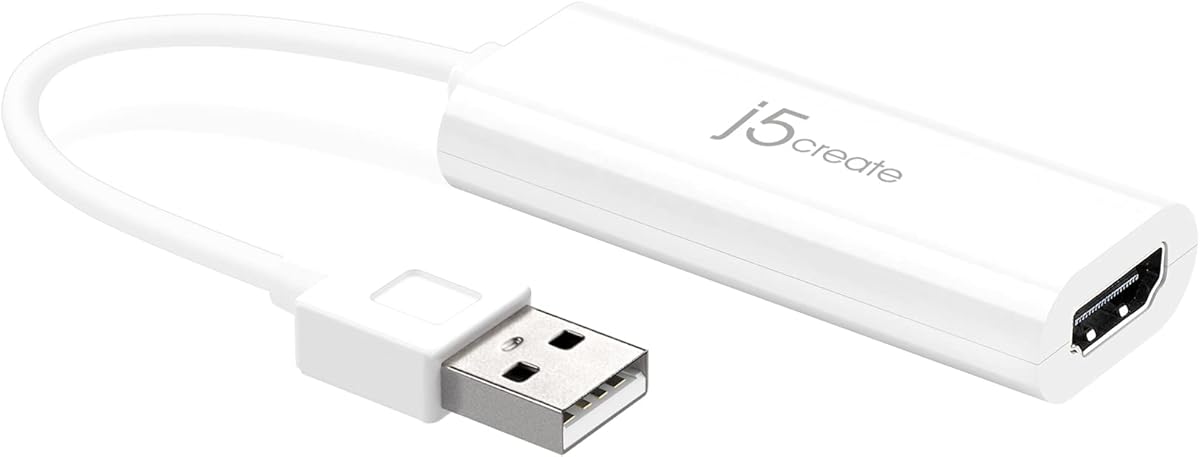
The j5create USB to HDMI Display Adapter is a straightforward tool for adding an external monitor without internal hardware changes. Its 4.5 rating reflects reliability for users who need quick display solutions.
We may earn a commission when you buy through this link, at no additional cost to you.
Hot-swappable functionality allows users to add or remove monitors without rebooting, which is particularly useful for dynamic work environments. The adapter works well for multitasking across different applications.
While it requires driver installation, the process is generally smooth. The adapter focuses on basic functionality, lacking advanced features like 4K support but delivering consistent 1080P performance.
This adapter is suitable for users who want a simple, effective way to extend their desktop. Its reliability and ease of use make it a practical choice for everyday work tasks.
Hot-swappable USB support enables users to connect or disconnect the adapter without restarting their computer, saving time and maintaining workflow continuity.
Avoiding the need for an internal video card makes this adapter a budget-friendly way to expand display capabilities without significant hardware investment.
We may earn a commission when you buy through this link, at no additional cost to you.
Selecting the right adapter requires understanding your device's ports and performance needs. This guide outlines key factors to consider before making a purchase.
Ensure the adapter supports your operating system. Some models work only with Windows, while others support macOS or Linux. Check if your device has USB-A or USB-C ports to match the adapter's connector type.
Verify that your device's USB-C port supports DisplayPort Alternate Mode if using a USB-C adapter. This is critical for enabling video output from the port.
Consider the resolution you need. Adapters typically support up to 1080P or 4K. For high-quality presentations or media, look for models supporting 4K at 60Hz.
Refresh rate affects smoothness. A 60Hz refresh rate ensures fluid video playback, whereas 30Hz may appear choppy during fast motion or gaming.
Some adapters require manual driver installation, which can be cumbersome. Look for models with automatic driver installation or plug-and-play functionality for easier setup.
If privacy is a concern, choose adapters where drivers run locally without internet access during installation. This reduces potential security risks associated with data transmission.
Most adapters are USB bus-powered, meaning they draw power from your device's port. Ensure your USB port can supply enough power to avoid performance issues.
Some adapters include additional charging ports to keep devices powered during use. This is useful for mobile devices like tablets or smartphones.
Look for adapters with sturdy materials like aluminum alloy or braided cables. These resist wear and tear better than plastic alternatives, extending the product's lifespan.
Check for certifications like DisplayLink, which indicate tested and optimized performance. Certified adapters are less likely to suffer from compatibility issues or signal drops.
If you travel frequently, choose a compact adapter that fits easily into a bag or pocket. Lightweight designs are easier to carry and less likely to break.
Consider the cable length. Shorter cables are more portable but may limit placement options, while longer cables offer flexibility but can be cumbersome.
A longer warranty period indicates the manufacturer's confidence in the product. Look for options with at least a one-year warranty to protect against defects.
Check if the brand offers technical support. Access to helpful customer service can resolve issues quickly if the adapter doesn't work as expected.
Identify your primary use. For presentations, ensure high resolution and audio pass-through. For multitasking, consider dual-output adapters to support multiple screens.
If using streaming services, verify DRM compatibility. Some adapters may restrict content from protected apps due to licensing regulations.
To begin, install any required drivers on your computer. Follow the provided instructions carefully, ensuring antivirus software is temporarily disabled during installation to prevent conflicts. Once installed, connect the adapter to your USB port and attach an HDMI cable to your display.
After connecting, adjust your display settings on your computer to enable extended or mirror modes. Most systems recognize the adapter automatically, allowing you to drag windows between screens. For mobile devices, simply plug in the adapter and select the appropriate output mode in your settings.
To maintain the adapter, avoid bending the cables sharply or exposing them to excessive heat. Store it in a protective case when not in use to prevent damage. Regularly check for driver updates to ensure optimal performance and security.
Not all adapters require manual driver installation. Some feature automatic driver setup, while others need you to download specific software. Check the product specifications to see if drivers are included or required for your operating system.
While some adapters support high refresh rates, most are not optimized for gaming. They may introduce lag, which affects responsiveness. For gaming, it is better to use dedicated graphics ports or adapters specifically designed for high performance.
Your USB-C port must support DisplayPort Alternate Mode for video output. If it only supports data transfer, the adapter will not function. Check your device's manual to confirm video output capabilities before using a USB-C adapter.
Some adapters support dual HDMI outputs, allowing two monitors. For more than two, you may need multiple adapters or a docking station. Check the adapter's specifications to confirm the maximum number of supported displays.
Ensure your computer's audio output is set to the HDMI device. Some adapters do not support audio pass-through. If sound is essential, choose an adapter that explicitly mentions audio capabilities.
Not all adapters support 4K. Many are limited to 1080P. Check the product details for resolution specifications. If 4K is required, select an adapter that explicitly states 4K support at your desired refresh rate.
Many adapters support macOS, but some are Windows-only. Verify the compatibility list before purchasing. Additionally, Mac devices with USB-C ports require DisplayPort Alternate Mode support for video output.
Lag can occur due to low refresh rates or insufficient USB bandwidth. Ensure you are using USB 3.0 ports for higher data transfer rates. Additionally, check that drivers are up to date to optimize performance.
Choosing the right adapter depends on your specific needs and device compatibility. Whether you prioritize budget, performance, or multi-monitor support, the options reviewed offer reliable solutions for various scenarios.
Focus on key factors like resolution support and driver requirements to ensure the adapter fits your workflow. Investing in a quality adapter can significantly improve productivity and viewing experiences.
Remember to verify current specifications and compatibility before purchasing. Technologies evolve, and checking the latest details ensures you get the best performance for your setup.