
Gwolves Skoll Mini SK-S Black
4.4Editor score
Fifty gram ultralight honeycomb design
Ergonomic shape for small hands
High performance three three eight nine sensor
This expert guide compares the top ten claw grip gaming mouse for small hands models to help you find the perfect lightweight option for precise control and
Finding the right claw grip gaming mouse for small hands is crucial for competitive play and long session comfort. A well designed mouse fits your palm securely while allowing your fingers to arch naturally for rapid clicking and precise aiming without strain.
We have carefully evaluated the top ten options available this month based on sensor performance, weight distribution, build quality, and ergonomic design. Our comparison focuses on models that specifically cater to smaller hand sizes while supporting the aggressive claw grip style.
Each pick in this list highlights key features and real world performance traits to help you make an informed decision. Please note that product availability and pricing can change frequently so always check the current details before purchasing.
4.4Editor score

4.6Editor score

4.1Editor score
The following table provides a side by side overview of all ten selected gaming mice. It highlights key specifications and features to help you quickly compare options based on your specific needs and preferences.


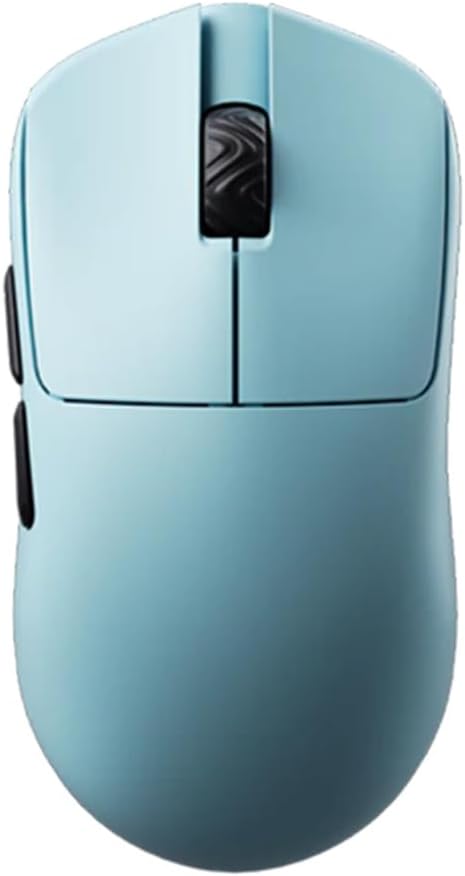

The Lamzu Atlantis Mini Champion Edition stands out as the top choice for players seeking a high performance claw grip gaming mouse for small hands. With a rating of 4.6 it delivers exceptional precision and comfort right out of the box.
We may earn a commission when you buy through this link, at no additional cost to you.
Its ultra lightweight fifty one gram design reduces wrist strain significantly during long gaming sessions. The symmetrical hourglass shape provides broad back support that helps prevent finger cramps while offering the stability needed for aggressive claw positioning.
While the premium price might be a consideration for some users the advanced features justify the cost. The optical switches ensure quick response times and the PAW3950 sensor tracks movements accurately without any noticeable lag or acceleration issues.
This mouse is ideal for competitive gamers who demand reliability and speed. If you prioritize ergonomic comfort and top tier sensor performance the Lamzu Atlantis Mini is a highly recommended investment for your setup.
The hourglass symmetry ensures your fingers rest naturally without cramping during extended use. This design specifically supports claw grip users by providing a broad back and curved top.
Equipped with the PAW3950 sensor this mouse supports up to thirty thousand DPI for precise tracking. It ensures low latency wireless performance with energy efficient operation.
We may earn a commission when you buy through this link, at no additional cost to you.
The Gwolves Skoll Mini offers excellent value for gamers looking for a lightweight option without breaking the bank. With a solid 4.4 rating it combines ergonomic design with a competitive price tag.
We may earn a commission when you buy through this link, at no additional cost to you.
Its fifty gram ultralight build helps reduce fatigue during intense matches. The honeycomb design not only cuts weight but also allows for better airflow keeping your hand cooler during extended play sessions.
While it lacks wireless connectivity the detachable cable provides flexibility and durability. The PTFE skates ensure smooth gliding across various mousepad surfaces which is crucial for precise aiming and movement.
This mouse is perfect for budget conscious players who still want high performance specs. It delivers a reliable experience for small handed users seeking an ergonomic claw grip mouse at an accessible price.
The honeycomb shell reduces overall weight to fifty grams while maintaining structural integrity. This design helps players move the mouse quickly without unnecessary strain on the wrist.
PTFE skates are included to ensure low friction movement across your desk or mousepad. This enhances precision and speed during fast paced gaming scenarios.
We may earn a commission when you buy through this link, at no additional cost to you.
The Pulsar X2H Mini Wireless brings a refined ergonomic design that supports aggressive claw grips with its elevated rear hump and narrower waist. It scores a 4.1 rating for its thoughtful adjustments over standard mini mice.
We may earn a commission when you buy through this link, at no additional cost to you.
The higher hump provides improved stability for players who keep their fingers arched high during gameplay. This shape enhances support for the palm while it rests ensuring comfort over many hours of use.
While this specific listing is a renewed unit the internal upgrades ensure consistent clicks and a sturdier structure. The optical switches minimize double click risks and deliver swift responses essential for competitive aiming.
Ideal for players wanting wireless convenience with tailored ergonomics the X2H Mini is a strong choice. The extended battery life and responsive sensor make it a reliable partner for small handed gamers.
The elevated rear hump offers a better grip point for claw users seeking stability. It supports the palm while allowing fingers to remain free for precise clicking actions.
Optical switches reduce the chances of unintended double clicks and offer pinpoint responses. This technology ensures durability and fast actuation for rapid inputs.
We may earn a commission when you buy through this link, at no additional cost to you.
The Pulsar X3 LHD redefines lightweight gaming with its forty three gram weight and hybrid ergonomic shape that blends palm and claw comfort. It earns a 4.3 rating for its unique balance of features.
We may earn a commission when you buy through this link, at no additional cost to you.
Designed specifically for left handed users this mouse offers a symmetrical button height and asymmetrical contours. The result is lasting comfort and control for extended sessions without unnecessary strain on the hand.
The XS1 sensor delivers precise tracking up to thirty two thousand DPI which suits high speed movements. Speed of Light optical switches ensure swift responses while the dust proof structure protects internal components.
If you need a left handed mouse that prioritizes speed and ergonomics this is a great pick. Its featherlight build helps reduce fatigue making it ideal for competitive play and long marathon sessions.
The RelaxClaw shape combines palm and claw benefits for a balanced feel. It offers control and comfort with consistent button heights for easy access.
The XS1 sensor provides up to thirty two thousand DPI resolution and seven hundred fifty IPS tracking. It ensures precision and speed for demanding gaming scenarios.
We may earn a commission when you buy through this link, at no additional cost to you.
The Bloody V7 Ergonomic is a solid choice for gamers who value customization and grip comfort over ultra light weight. It holds a 4.4 rating for its versatile button setup and adjustable settings.
We may earn a commission when you buy through this link, at no additional cost to you.
Its rubberized black coating ensures a secure hold which is essential for claw users aiming for precision. The eight programmable buttons allow for macros and keybinds that enhance productivity and gaming performance.
While the sensor is not as advanced as newer models it still offers reliable tracking for most games. The adjustable report rate allows you to tailor responsiveness to your specific system capabilities and preferences.
This mouse fits well for those who need extensive button control and a secure grip. It balances functionality and ergonomics making it a reliable tool for various tasks and gaming styles.
With eight programmable buttons you can map macros or specific functions easily. The software supports CPI adjustments for tailored responsiveness across different scenarios.
The rubberized coating provides a non slip surface that enhances control. It ensures your hand stays in place during intense rapid movements.
We may earn a commission when you buy through this link, at no additional cost to you.
The Corsair IRONCLAW Wireless SE stands out with its massive battery life which can last up to five hundred hours on Bluetooth. It is a powerful tool for productivity though it is shaped for larger hands.
We may earn a commission when you buy through this link, at no additional cost to you.
With ten programmable buttons and customizable RGB lighting it offers extensive control and style options. The CORSAIR MARKSMAN sensor provides surface calibration that adapts tracking to various desk materials effectively.
While its asymmetric shape is designed for right handed palm grips some claw users might find it less ideal. The battery performance remains a highlight for those who hate frequent charging interruptions.
This mouse works best for users prioritizing endurance and button depth. It is a solid choice if you need long term use without constant charging and value extensive customization features.
Battery life reaches up to five hundred hours on Bluetooth which exceeds most competitors. This ensures long sessions without interruption from low power warnings.
The Marksman sensor adapts to your mousepad surface for consistent tracking. This feature helps maintain precision even on varied or reflective materials.
We may earn a commission when you buy through this link, at no additional cost to you.
The V8 Gaming Mouse delivers exceptional lightness at roughly thirty six grams with a symmetrical shape that supports both claw and fingertip styles. It scores a 4.5 rating for its versatile design and performance.
We may earn a commission when you buy through this link, at no additional cost to you.
Its optical switches provide instant actuation with near zero debounce delay which improves click consistency. The PAW3950 chip ensures accurate tracking and low latency across different gaming scenarios seamlessly.
While the light build may feel less substantial to some it aids rapid movement and reduces fatigue. The web based driver simplifies setup by allowing adjustments without installing heavy software on your PC.
Ideal for speed focused gamers this mouse balances weight and precision well. It is a strong contender for those seeking a minimalist lightweight option with high end sensor technology.
The symmetrical shell supports various grip styles and hand sizes comfortably. This makes it a flexible option for users who switch between fingertip and claw grips.
Optical micro switches offer faster actuation and improved durability over mechanical ones. They ensure consistent clicks which is vital for competitive gaming scenarios.
We may earn a commission when you buy through this link, at no additional cost to you.
The Pulsar X2H Mini White offers a clean aesthetic with a raised hump designed to support aggressive claw grips. It matches the performance of the black version with a solid 4.2 rating.
We may earn a commission when you buy through this link, at no additional cost to you.
Its higher hump and narrower waist provide better stability for small hands during intense play. The upgraded internal structure ensures consistent clicks and smoother scroll wheel rotation without rattling.
While the white finish is attractive it may show dust and wear more than darker colors. The performance remains top tier with optical switches and a reliable sensor for fast inputs.
This mouse suits gamers who prefer a sleek look without sacrificing ergonomics. It delivers the same premium experience as its black counterpart with added visual flair for your desk setup.
The white finish offers a clean and modern look for your gaming setup. It matches well with lighter themed accessories and desks for a cohesive style.
Upgraded internal components ensure consistent clicks and reduce rattling. This enhances the tactile feedback and durability of the mouse over time.
We may earn a commission when you buy through this link, at no additional cost to you.
The V6 Gaming Mouse combines a solid no hole shell with a forty gram weight for a balanced experience. It earns a high 4.6 rating for its comfortable concave buttons and symmetrical design.
We may earn a commission when you buy through this link, at no additional cost to you.
Its concave buttons naturally fit the fingers providing clear click positioning and consistency during rapid inputs. The absence of holes makes it easier to clean and protects internal components from dust.
While some users prefer the ventilation of honeycomb shells the solid build offers a more traditional feel. The PAW3950 chip ensures stable tracking and low latency for competitive gaming sessions.
This model is great for those wanting lightness without the maintenance of perforated shells. It supports various grip styles well and delivers reliable performance for casual and competitive play alike.
The solid shell design prevents dust and debris from entering the mouse internally. It also simplifies cleaning and maintenance for long term use.
Ergonomic concave buttons fit your fingers naturally for improved control. This design helps maintain consistent click positioning during fast actions.
We may earn a commission when you buy through this link, at no additional cost to you.
The BenQ Zowie S2-C is designed specifically for small hands with a symmetrical shape that fits comfortably for palm or claw use. It scores a 4.3 rating for its driverless simplicity and esports pedigree.
We may earn a commission when you buy through this link, at no additional cost to you.
Its driverless setup means you can adjust DPI and polling rate directly on the mouse without installing software. The paracord cable reduces drag and ensures smooth movement during competitive matches.
While it lacks RGB lighting and wireless options the focus on raw performance is clear. The sensor is optimized for FPS titles providing reliable tracking without unnecessary software bloat.
This mouse is perfect for purists who value simplicity and ergonomic fit. It delivers professional level performance in a compact package suited for serious competitive gaming.
Adjust DPI and polling rate directly on the mouse without installing drivers. This simplifies setup and ensures no background software impacts system resources.
The included paracord cable minimizes drag for smoother movement. It provides freedom of movement without adding noticeable weight or resistance.
We may earn a commission when you buy through this link, at no additional cost to you.
Selecting the right mouse involves evaluating several key factors that impact comfort and performance. This section outlines the most important aspects to consider before making your purchase.
For claw grip users a lighter mouse often allows for faster movement and less strain on the fingers and wrist. Look for models between thirty and fifty grams to ensure agility without sacrificing structural integrity.
Prioritize mice with a sturdy shell that does not flex during rapid clicks to maintain consistent performance over time.
A high quality optical sensor is essential for accurate tracking during fast-paced games. Models with modern sensors like PAW3950 or equivalent provide low latency and consistent DPI settings across surfaces.
Check that the sensor supports at least 400 to 3200 DPI adjustable levels to match your sensitivity preferences accurately.
Symmetrical or specifically shaped ergonomic designs help small hands maintain a natural claw position without cramping. A higher rear hump can support aggressive claw users by providing a stable palm contact point.
Ensure the mouse feels comfortable in your hand when your fingertips are arched off the main buttons for extended periods.
Optical switches are becoming a standard for high performance mice because they reduce debounce delay and offer faster actuation. They typically have a longer lifespan than traditional mechanical switches.
Consider optical switches if you prioritize speed and click longevity during intense competitive sessions.
Wireless mice with low latency dongles provide greater freedom of movement compared to wired models. Ensure the wireless connection has a 1ms polling rate to avoid input lag during critical moments.
If you prefer reliability and do not mind cables a high quality paracord cable ensures minimal drag and resistance.
For wireless options battery life determines how often you need to recharge which can interrupt practice or gameplay. Look for models offering at least 100 hours of continuous use on a single charge.
USB rechargeable batteries are common and provide convenience over older replaceable battery systems.
The number and placement of buttons should suit your game requirements. A minimal layout reduces accidental clicks while a more complex layout supports macros for MMOs or strategy games.
Ensure side buttons are easily reachable with your thumb or pinky without changing your grip unexpectedly.
User friendly software allows you to customize DPI and macros without cluttering your system. Some high end mice offer web based drivers or driverless setups for simplicity.
A well designed software suite should not require constant background processes to maintain settings effectively.
To get the best performance place your mouse on a consistent surface like a smooth cloth pad and adjust your DPI to match your wrist movement range. Hold the mouse gently allowing your fingers to arch naturally while your palm rests lightly on the rear.
Regularly clean your mouse surface with a dry cloth to remove oils and dust that might affect tracking. If your model has a honeycomb shell use compressed air to prevent debris from clogging the internal switches.
For wireless models keep the receiver close to your setup to ensure a stable connection and charge the battery before it fully depletes. Update firmware occasionally through the manufacturer software to maintain optimal performance.
A mouse suitable for claw grip typically features a symmetrical or slightly humped rear to support the palm while allowing fingers to arch. Lightweight designs and responsive sensors help maintain precision during rapid movements.
Yes smaller mice allow for better control and easier reach to buttons without straining the fingers. A compact form factor ensures your palm and fingers stay in a comfortable natural position during play.
Lighter mice reduce fatigue and allow for faster flick movements which is crucial for competitive shooters. However the weight should not compromise stability so look for a balance between lightness and control.
Modern wireless mice with low latency technology match wired performance closely. Look for models with a 1ms polling rate to ensure no noticeable delay during critical gameplay moments.
Most claw grip players prefer DPI settings between 400 and 1600 to balance speed and precision. Adjust these based on your personal playstyle and the screen resolution you use.
Cleaning your mouse once every two weeks prevents dust and oil buildup that can impact performance. Use a dry cloth for the shell and compressed air for any vents or holes in the body.
The top picks in this guide offer a range of options from budget friendly choices like the Gwolves Skoll Mini to premium options such as the Lamzu Atlantis Mini. Each model provides specific features tailored to enhance comfort and performance.
When making your decision prioritize ergonomic fit and sensor performance over extra features that you may not use. Ensure the weight and shape support your natural hand position for long gaming sessions.
Remember to check current availability and pricing before purchasing as these details can change over time. Selecting the right mouse will significantly improve your control and enjoyment during competitive gaming.