
BENFEI USB 3.0 Switch
4.1Editor score
2 In 4 Out Ports
5Gbps Data Transfer Speed
LED Indicator Design
Find the best keyboard and mouse switch for 2 computers. This guide compares top USB and KVM switches for seamless dual PC setup control.
Managing multiple computers often requires constant cable swapping. A dedicated switch allows you to share peripherals like keyboards and mice across devices efficiently.
We evaluated ten top-rated switches based on port count, data speed, compatibility, and build quality. Our selection covers budget-friendly options to advanced high-speed models.
Each pick highlights key features and real-world performance. Prices and availability change frequently so check current listings before making your final purchasing decision today.
4.1Editor score

4.6Editor score
4.3Editor score
This side-by-side comparison highlights the unique strengths of each switch. Compare port types, switching methods, and included accessories to find your ideal match.


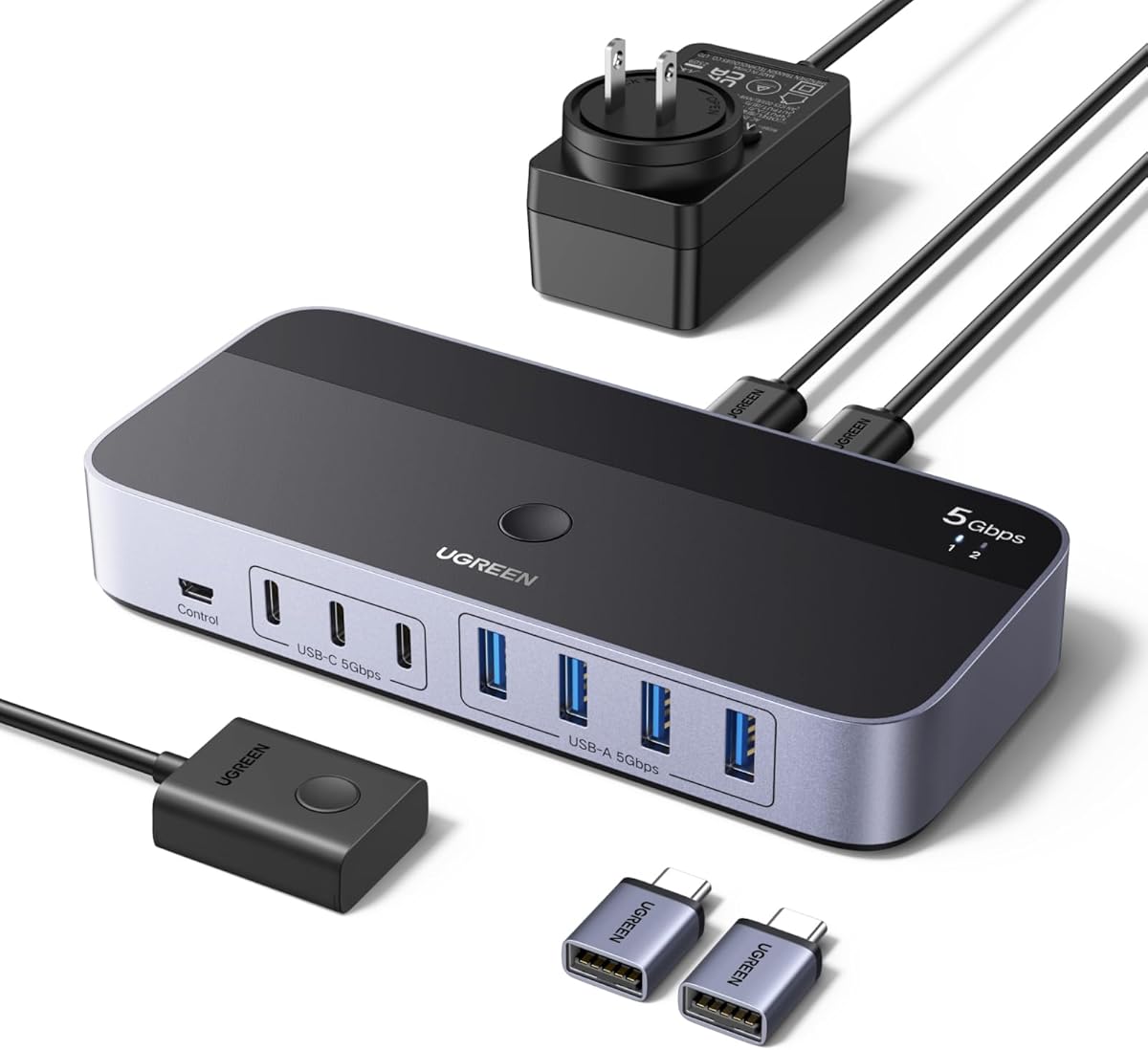
This UGREEN USB 3.0 switch allows seamless sharing of peripherals between two computers. With a 4.0 rating it balances modern USB C support and traditional USB A ports well.
We may earn a commission when you buy through this link, at no additional cost to you.
The standout feature is its flexible port configuration. You can connect mixed devices like keyboards and modern laptops needing USB C adapters without extra hubs.
While it lacks video switching the data switching is robust. The optional power supply ensures stability for high demand devices like external drives or webcams.
Ideal for dual PC setups needing reliable USB sharing. It offers a clean desktop solution with a controller to hide the switch itself.
The mix of USB C and A ports accommodates diverse modern and legacy peripherals effortlessly.
An external controller allows you to place the switch out of sight while keeping access convenient.
We may earn a commission when you buy through this link, at no additional cost to you.
The BENFEI USB 3.0 switch offers exceptional value for budget conscious users. It delivers core USB sharing functionality without unnecessary features that drive up cost.
We may earn a commission when you buy through this link, at no additional cost to you.
Its four USB 3.0 ports support high speed data transfer up to 5Gbps. This ensures quick file transfers and smooth peripheral performance across two systems.
The LED indicator clearly shows which computer is active. However users must supply their own power adapter for high drain devices to ensure stability.
A strong choice for standard office or home setups. It provides reliable switching for keyboards mice and printers at a very competitive price.
This switch delivers essential USB 3.0 performance at a price point that undercuts most competitors.
Built-in LEDs remove guesswork by showing exactly which computer is currently connected to your peripherals.
We may earn a commission when you buy through this link, at no additional cost to you.
With a 4.6 rating this switch stands out for reliability and simplicity. It focuses on sharing exactly two devices like a keyboard and mouse across two computers.
We may earn a commission when you buy through this link, at no additional cost to you.
The aluminum alloy shell provides excellent heat dissipation and durability. This sturdy build quality contributes to its high user satisfaction and longevity.
Two USB 3.0 cables are included in the box. This complete package means you can start using the switch immediately without buying extra accessories.
Perfect for users who only need keyboard and mouse sharing. It offers a hassle-free plug and play experience with premium build materials.
The aluminum casing protects internal components and ensures consistent performance over years of daily use.
Included cables eliminate the need for additional purchases making setup quick and straightforward out of the box.
We may earn a commission when you buy through this link, at no additional cost to you.
This UGREEN switch offers a compact solution for two device sharing. It maintains the 5Gbps speed expected from USB 3.0 in a small form factor.
We may earn a commission when you buy through this link, at no additional cost to you.
The one-button switch with LED indicator provides intuitive control. You can toggle between computers instantly without navigating menus or installing software.
It works flawlessly with Windows Mac and Linux systems. The driver free nature ensures compatibility across diverse environments without additional configuration.
Ideal for clean desk setups needing minimal hardware. It is a reliable choice for sharing keyboards mice and scanners between two PCs.
The compact size allows the switch to fit easily on tight desks without cluttering your workspace.
Driver free operation means you can plug it in and start sharing peripherals immediately without setup hassles.
We may earn a commission when you buy through this link, at no additional cost to you.
This switch combines USB and video sharing for a complete dual PC setup. It allows control of two computers and one monitor with seamless switching.
We may earn a commission when you buy through this link, at no additional cost to you.
Supporting 4K at 60Hz ensures high resolution visuals. The HDMI integration eliminates the need for a separate monitor switch making it a true KVM solution.
Four USB 3.0 ports handle all your peripheral needs. The included wired remote keeps the switch tidy while keeping control accessible on your desk.
Best for users needing both display and peripheral sharing. It streamlines complex workstations into a single clean connection point.
This unit manages both your video output and USB peripherals from one central control point for two computers.
Supporting 4K at 60Hz ensures your external display runs at full resolution without frame rate compromises.
We may earn a commission when you buy through this link, at no additional cost to you.
This USB 2.0 switch is perfect for older systems or basic peripherals. It offers reliable switching for keyboards and printers at a low cost.
We may earn a commission when you buy through this link, at no additional cost to you.
The one-button swapping feature is straightforward and efficient. LEDs indicate which computer is active ensuring you always know your connection status.
While speeds are limited to USB 2.0 it handles standard input devices well. This makes it a great choice for office setups not needing high bandwidth.
A solid option for budget constrained environments. It provides essential functionality without the need for USB 3.0 performance.
USB 2.0 compatibility ensures it works with older computers and devices that do not support newer standards.
Ideal for keyboards mice and printers that do not require high data transfer speeds for optimal performance.
We may earn a commission when you buy through this link, at no additional cost to you.
This switch provides a solid balance of features and performance. Four USB 3.0 ports allow sharing multiple devices between two computers easily.
We may earn a commission when you buy through this link, at no additional cost to you.
The one-button switch and LED indicator offer user-friendly operation. It is plug and play across all major operating systems without drivers.
High power devices can be supported via the USB C power port. This ensures stable operation even when using external hard drives or webcams.
Recommended for users needing more than two ports. It delivers consistent performance at a competitive price point.
Four ports give you the flexibility to share a keyboard mouse printer and flash drive simultaneously across two systems.
An extra USB C power port helps maintain stable connections for power hungry peripherals like external drives.
We may earn a commission when you buy through this link, at no additional cost to you.
This switch supports up to seven USB devices across two computers. It is ideal for users with many peripherals needing seamless switching.
We may earn a commission when you buy through this link, at no additional cost to you.
The mix of USB C and A ports ensures modern compatibility. Including a power adapter and controller adds significant value and convenience.
USB 3.0 speeds ensure fast data transfer for connected storage. This makes it suitable for creative professionals or power users.
Best for complex desktop setups needing maximum connectivity. It reduces cable clutter by consolidating all USB needs into one hub.
Seven ports allow you to connect a wide range of peripherals without needing additional hubs or splitters.
Three USB C ports cater to modern laptops and devices while four A ports support legacy peripherals.
We may earn a commission when you buy through this link, at no additional cost to you.
A straightforward switch for two device sharing. It focuses on reliability and ease of use for basic peripherals.
We may earn a commission when you buy through this link, at no additional cost to you.
The single push button with LED indicator makes switching intuitive. You do not need to install drivers or configure settings.
It works with all major operating systems including Windows Mac and Linux. The included USB cables ensure you can start using it immediately.
Recommended for simple setups on a tight budget. It provides the essentials without unnecessary features.
This switch strips away complex features to provide just the core need of swapping USB devices between two computers.
Included cables and plug and play design mean no extra purchases or installations are needed before you start.
We may earn a commission when you buy through this link, at no additional cost to you.
This is the fastest option in our comparison supporting USB 3.2 Gen 2 speeds. It transfers data up to 10Gbps making it ideal for large files.
We may earn a commission when you buy through this link, at no additional cost to you.
With seven ports and both A and C connectors it offers maximum flexibility. The included power adapter and C to A adapter simplify setup.
The speed advantage ensures rapid file transfers between connected storage and computers. This saves significant time for users working with heavy data.
Best for power users needing speed and capacity. It represents the high end of USB switching technology today.
10Gbps transfer speeds allow you to move gigabytes of data in seconds saving valuable productivity time.
USB 3.2 Gen 2 ensures your switch is ready for next generation devices and high bandwidth peripherals.
We may earn a commission when you buy through this link, at no additional cost to you.
Selecting the right switch depends on your specific device needs and performance requirements. These factors help you find the best fit.
Consider how many devices you need to share. Two ports work for keyboard and mouse. Four or more allow printers and drives.
Choose a model with enough ports to cover all your peripherals without needing extra hubs.
USB 3.0 offers 5Gbps speeds suitable for most tasks. USB 3.2 Gen 2 doubles this to 10Gbps for heavy file transfers.
Select USB 3.0 or higher for modern devices to ensure fast data and responsive peripherals.
Modern laptops often lack USB-A ports. Switches with USB-C inputs or adapters ensure compatibility with current MacBooks and ultrabooks.
Verify your computers connectors and choose a switch that matches or includes necessary adapters.
Physical buttons on the unit are simple. External controllers or remotes allow placement away from the switch for cleaner desk layouts.
Decide if you want direct access or prefer a remote for a tidy workspace.
High power devices like external drives may need external power. Look for USB-C power ports or included adapters for stability.
Ensure the switch can power all your connected devices reliably without disconnection.
Basic switches share USB only. KVM switches add HDMI or DisplayPort to share monitors as well.
If you need to switch monitors too invest in a KVM switch rather than a USB-only model.
Aluminum housings dissipate heat better than plastic. Sturdy builds ensure longevity under daily use.
Prioritize models with metal cases for better durability and thermal management.
Most switches are plug and play for Windows Mac and Linux. Check system requirements if you use specialized operating systems.
Choose a universally compatible switch to avoid driver issues across different environments.
Connect your peripherals to the switch output ports and link both computers to the switch input ports. Ensure all cables are firmly seated to avoid intermittent connections.
Use the button or controller to toggle between systems. The active computer will show its LED indicator lighting up to confirm the current selection.
Keep the switch in a well-ventilated area to prevent overheating. Clean dust from ports periodically with compressed air to maintain reliable signal transfer.
A USB switch shares only USB peripherals like keyboards and mice. A KVM switch shares USB devices plus the monitor display allowing full control of both screens from one setup.
Most modern switches are plug and play and require no drivers. They work immediately with Windows macOS Linux and Chrome OS upon connection.
Yes compatible switches support multiple operating systems simultaneously. You can switch between a Mac and a PC without reconfiguring your peripherals.
Power hungry devices may need extra power. Use a switch with an external power adapter to ensure stable connections for drives and webcams.
Yes USB 3.0 switches are backward compatible with USB 2.0 and 1.1 devices. They will function correctly at the slower speed.
USB ports on switches are for data transfer not charging. Phones may not charge reliably when connected through a switch without direct power.
Include USB cables in the package save buying extra ones. Check cable lengths to ensure they reach your computers comfortably.
It depends on the switch ports. Basic models share two devices while advanced models share seven or more peripherals seamlessly.
We reviewed ten switches ranging from budget USB 2.0 to high-speed USB 3.2 models. Our top picks offer reliable performance for most dual PC setups.
Prioritize USB 3.0 or higher and enough ports for your needs. Consider external power options if you connect many devices to ensure stability.
Prices and availability change frequently so check current listings for the best deals. Always verify compatibility before purchasing to ensure a smooth setup.