
ELUTENG Curved Monitor Light Bar
4.6Editor score
Compact 15 75 inch length
Wireless remote control included
No base space saving design
Finding the right lighting for your workspace is essential for productivity and eye health. A curved monitor light bar provides even illumination without screen glare, making it ideal for long hours of work or gaming sessions on modern displays.
We evaluated ten leading models based on optical design, adjustability, and build quality. Our comparison focuses on how well each unit fits curved screens, manages ambient light, and offers features like remote controls or auto-dimming sensors.
Each pick highlights specific strengths for different user needs, from budget-friendly options to premium solutions. Prices and availability may change, so check current listings before purchasing to ensure you get the best value for your setup.
4.6Editor score

4.7Editor score

4.7Editor score
As an Amazon Associate we earn from qualifying purchases.
This side-by-side comparison reviews all ten models to help you decide which lighting solution fits your specific monitor curvature, desk space, and functional needs.




The Quntis Curved Monitor Light Bar stands out as a top-tier option for users with large ultrawide setups. It holds a strong 4.7 rating and offers a unique dual light design that pivots independently to cover more surface area.
We may earn a commission when you buy through this link, at no additional cost to you.
Its standout quality is the ability to deliver up to 1400 lux at the center, ensuring your workspace is brightly lit without relying on harsh overhead lights. The asymmetric optical design directs light strictly onto the desk, eliminating screen glare completely.
While the price is higher than entry-level bars, the build quality and feature set justify the cost for professionals. The clamp accommodates screens up to 3.35 inches thick, providing stability even on irregular monitor backs.
If you need maximum coverage and color accuracy for design work or gaming, this model is the clear recommendation. It balances advanced features like stepless dimming with reliable hardware for long-term daily use.
You can extend both bars for wide coverage or fold them in for focused tasks, adapting instantly to your workflow.
With a Ra98 index, colors appear true to life, which is critical for photographers and video editors.
We may earn a commission when you buy through this link, at no additional cost to you.
The ONWAY Curved Monitor Light Bar earns high marks for its ease of use and integrated features. With a 4.5 rating, it appeals to users who want smart controls without paying for top-tier branding.
We may earn a commission when you buy through this link, at no additional cost to you.
It features a wireless remote that allows you to change brightness and color temperature without reaching up to the monitor. This convenience is paired with a dedicated camera mount base, keeping your webcam secure and centered.
The asymmetric design ensures that light is cast only on your desk surface, preventing reflections on the screen. Users appreciate the variety of RGB modes which add a playful touch to gaming environments.
For those who value convenience and a clean desk setup, this bar is a solid choice. It balances functionality with affordability, making it an excellent fit for home offices that also serve as gaming stations.
Adjust settings from your chair using the sensitive touch remote, which simplifies daily lighting changes.
The built-in mount ensures your webcam stays in place, eliminating the need for separate clips.
We may earn a commission when you buy through this link, at no additional cost to you.
This model from Quntis is specifically designed for ultrawide screens that often leave corners dark. It has a 4.5 rating and uses a curved optical design to match the arc of modern displays perfectly.
We may earn a commission when you buy through this link, at no additional cost to you.
The two light bars can pivot independently, giving you precise control over where the light falls. This flexibility is rare in this category and ensures even illumination across a large desk area.
Despite the specialized design, the unit maintains a simple control scheme on the bar itself. A one-touch brightness button and auto-dimming sensor reduce the need for constant manual tweaking during sessions.
If you use a 34 inch or larger curved monitor, this bar is likely the best fit for your geometry. It solves the specific problem of uneven lighting on wide screens without adding bulky hardware.
The arc shape follows your screen curvature, preventing light from spilling onto the monitor edges.
Pivot the bars to focus on your keyboard or widen them for reading documents on the desk.
We may earn a commission when you buy through this link, at no additional cost to you.
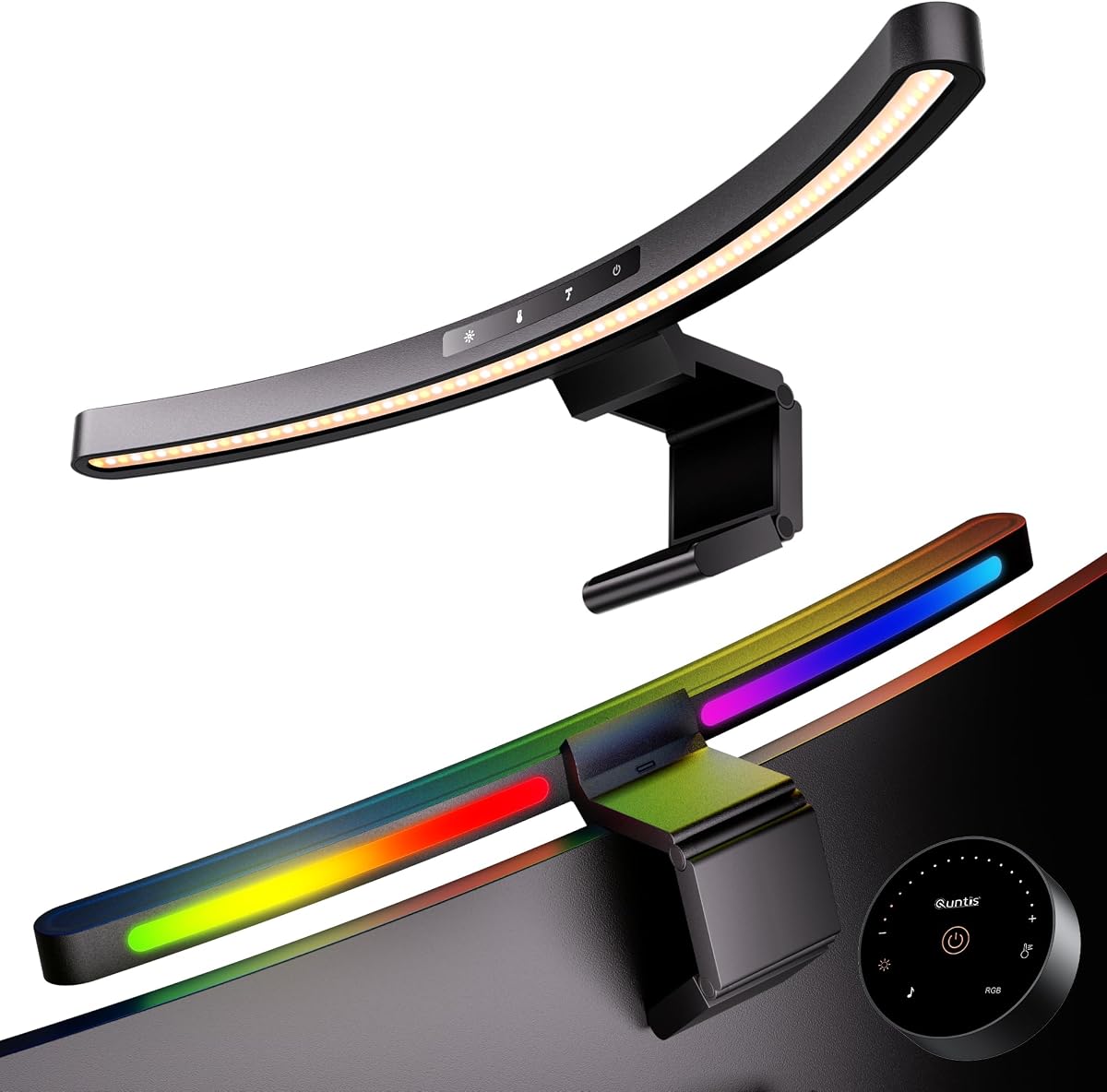
Gamers will appreciate the dynamic lighting features of this Quntis model. With a 4.6 rating, it combines functional desk lighting with an ambient RGB backlight that reacts to sound.
We may earn a commission when you buy through this link, at no additional cost to you.
The front light provides clear illumination for your workspace, while the backlight adds immersion during game sessions. The music sync mode allows the lights to dance to the beat, creating a lively atmosphere.
Even with the focus on effects, the bar maintains solid build quality and a compact 17.7 inch length. This makes it suitable for smaller desks where a full-size bar might be too imposing.
If you want to add a bit of flair to your setup without sacrificing task lighting, this is the ideal pick. It offers a blend of utility and entertainment that appeals to content creators and streamers.
The RGB mode responds to audio input, syncing colors with music or game sound effects.
At 17.7 inches, it fits neatly on smaller desks without overcrowding your peripheral setup.
We may earn a commission when you buy through this link, at no additional cost to you.
Eye comfort is the primary focus of this model, which holds a 4.4 rating among users. It includes a built-in rest timer that reminds you to take breaks, which is crucial for long workdays.
We may earn a commission when you buy through this link, at no additional cost to you.
The auto-dimming sensor adjusts brightness based on room light, ensuring your eyes are not strained by sudden changes. The asymmetric optical design directs light downward to prevent glare on the screen.
The weighted clamp adapts well to both curved and flat monitors, offering a stable fit without heavy manual adjustments. This reliability makes it a strong choice for shared workspaces.
If you often work late or suffer from eye fatigue, this light bar provides the features needed to protect your vision. It prioritizes health and comfort over aesthetic RGB effects.
The sensor detects room changes and dims or brightens the light automatically to maintain comfort.
A built-in timer alerts you to step away from the screen after two hours of continuous use.
We may earn a commission when you buy through this link, at no additional cost to you.
The ELUTENG Curved Monitor Light Bar offers a highly accessible entry into quality workspace lighting. With a 4.6 rating, it proves that you do not need to spend heavily to get glare-free illumination.
We may earn a commission when you buy through this link, at no additional cost to you.
It features a base-free design that saves significant desk space, making it perfect for tight setups. The wireless remote allows for easy adjustments without needing to touch the bar itself.
Although the light flux is lower than premium models, it provides sufficient brightness for standard reading and writing tasks. The stepless dimming gives you precise control over the light intensity.
This model is the best choice for those on a strict budget who still want modern features like remote control. It delivers value and function without compromising on the essential task of reducing screen glare.
The lack of a base means the bar mounts directly, leaving your desk surface completely clear.
Remote adjust settings from anywhere at your desk, adding convenience to basic lighting control.
We may earn a commission when you buy through this link, at no additional cost to you.
This model brings RGB backlighting to the desk without a high price tag. It has a 4.3 rating and is designed for users who want a bit of style alongside their functional desk lamp.
We may earn a commission when you buy through this link, at no additional cost to you.
The dual mode allows you to switch between task lighting and ambient RGB effects. The touch buttons make it easy to cycle through colors or set a timer to rest your eyes.
While it does not match the brightness of professional models, it serves well as a secondary light source or accent lamp. The anti-slip clamp holds it securely on most standard curved monitors.
If you want to add color to your room without breaking the bank, this bar is a practical solution. It combines basic utility with gaming aesthetics for a versatile workspace upgrade.
The RGB backlight sets the mood in your room, creating a cohesive gaming or work environment.
A one-hour timer helps you manage work sessions, reminding you to rest periodically.
We may earn a commission when you buy through this link, at no additional cost to you.
The LYMAX Curved Monitor Light Bar stands out with its advanced PIR sensor technology. It has an impressive 4.9 rating for its ability to turn on automatically when you sit down and off when you leave.
We may earn a commission when you buy through this link, at no additional cost to you.
This feature saves energy and ensures your light is always ready when you start working. The dual control system lets you use the wireless remote or the touch strip for precise brightness adjustments.
The Ra97 CRI ensures that colors on your screen and desk are rendered accurately. The reinforced clamp grips screens up to 50mm thick without damaging the surface.
If you want a high-tech solution that minimizes manual interaction, this is the top pick. It offers a seamless experience that keeps your workspace lit exactly when you need it.
The sensor detects your presence and toggles the light automatically, saving power and effort.
With Ra97 color rendering, the light maintains true colors for creative tasks.
We may earn a commission when you buy through this link, at no additional cost to you.
The BenQ ScreenBar Halo 2 is widely regarded as the industry standard for monitor lighting. With a 4.7 rating, it offers professional-grade features that justify its premium position in the market.
We may earn a commission when you buy through this link, at no additional cost to you.
Its wireless dial controller provides precise control over brightness and color temperature without cluttering your workspace. The adjustable backlight reduces eye strain by balancing the contrast between the screen and room.
Built for longevity, the LEDs are rated for over 50,000 hours of use. The Asymlight technology ensures that no light hits the screen, maintaining a distraction-free viewing experience.
If you prioritize build quality and precise light control, this is the best investment for your desk. It is designed for professionals who need reliable lighting for long creative or coding sessions.
The dial allows for fine-tuning of light settings, giving you precise control with a simple twist.
With a 50000 hour lifespan, this unit is built to last through years of daily use.
We may earn a commission when you buy through this link, at no additional cost to you.
The Laliled Monitor Light Bar is designed for simplicity and ease of use. It has a 4.2 rating and offers a straightforward approach to desk lighting with essential features.
We may earn a commission when you buy through this link, at no additional cost to you.
The snap-on design allows for quick installation on monitors up to 5cm thick. Touch controls let you switch between three color temperature modes to match your mood or task.
A built-in one-hour timer helps you maintain a healthy work rhythm. While it lacks advanced sensors or remotes, it provides reliable light for reading and typing tasks.
If you need a no-frills light that gets the job done without complexity, this model fits well. It is an ideal choice for users who want basic illumination without extra technical features.
The snap-on design allows you to mount the bar in seconds without tools or complicated adjustments.
The timer reminds you to take breaks, helping you maintain eye health during long work sessions.
We may earn a commission when you buy through this link, at no additional cost to you.
Choosing the right curved monitor light bar depends on your specific setup and daily tasks. Consider these factors to find a model that matches your needs.
Check the radius of your monitor to ensure the light bar fits correctly. Some models work best with standard 1000R or 1800R curves, while others accommodate wider ranges.
Always verify the curvature specs in the product description to avoid mismatched designs.
Higher lumens provide better illumination for detailed tasks like reading or drawing. Look for bars that offer stepless dimming to adjust the intensity based on the room.
Ensure the brightness is sufficient for your desk size without causing glare on your screen.
If you work with design or media, choose a bar with a high Color Rendering Index (CRI). A CRI of 95 or higher ensures colors appear true and vibrant.
High CRI lighting is essential for maintaining color consistency across your projects.
Controls can be built-in, touch-based, or via a remote. Remote controls offer convenience, while touch buttons save space on your desk.
Consider how you prefer to adjust lighting settings during your workflow.
A secure clamp is vital to prevent the bar from slipping or damaging your screen. Look for non-slip pads and adjustable tension to fit your monitor thickness.
Stable mounting ensures the light stays positioned correctly over long hours.
Features like RGB backlight, motion sensors, or auto-dimming add value depending on your use. These features can enhance ambiance and save power.
Select features that align with your daily habits rather than optional extras.
Base-free designs save significant desk space compared to traditional lamps. This is crucial for setups where every inch counts for peripherals.
Choose a design that complements your existing workspace layout without clutter.
USB power is standard, but check if a long enough cable is included for your setup. Right-angle connectors help route wires neatly behind the monitor.
Good cable management keeps your desk tidy and prevents interference.
Install the light bar by clamping it securely to the top center of your monitor. Ensure the clamp pads are clean to prevent scratches on the screen surface.
Adjust the light angle so it points directly at your desk, avoiding any reflection on the screen. Use the remote or touch controls to set a comfortable brightness level.
Clean the light bar gently with a dry cloth to remove dust. Avoid using harsh chemicals that could damage the surface or the optical components.
Many curved light bars can work on flat monitors, but the fit may vary. Check the product description to see if it supports both curved and flat screens for optimal stability.
Auto-dimming uses a built-in sensor to detect ambient light levels. It adjusts the brightness of the light bar to match the environment, reducing eye strain and saving energy.
Most models rely on physical remotes or touch controls. While some high-end units offer app integration, standard USB power light bars typically use hardware controls for simplicity.
Quality models are designed with asymmetric optics to direct light downward. This prevents glare on the screen when installed correctly at the top center of the monitor.
Yes, standard USB ports provide sufficient power for most light bars. However, ensure your power source delivers the required voltage and amperage for consistent performance.
Yes, there are specific models designed for ultrawide screens. They often have longer bodies or pivoting bars to cover the wider desk area evenly.
We reviewed ten top models to help you find the ideal lighting for your curved monitor setup. From the versatile Quntis options to the premium BenQ experience, there is a choice for every budget.
Consider your primary needs such as color accuracy, remote control, or auto-dimming when making your final decision. The right light bar can significantly improve your workspace comfort and productivity.
Prices and availability may change quickly, so verify the current details before buying. Investing in a quality light bar today will enhance your daily work and gaming experience for years.