
HP 15.6 Portable Laptop
4.1Editor score
Affordable Entry Level Option
Includes Microsoft 365 Year
Compact and Portable Design
Finding a laptop with a built-in numeric keypad is crucial for professionals who handle data entry daily. These devices streamline workflows in accounting, finance, and administrative roles by providing quick access to numbers without needing external peripherals.
We evaluated ten models based on performance, display quality, and keyboard ergonomics. Our analysis focuses on devices that balance portability with the essential full-size keyboard layout required for efficient number crunching and spreadsheet management.
Each recommendation highlights specific strengths tailored to different user needs and budgets. Prices and availability fluctuate frequently, so please verify the latest details on the retailer page before making your final purchasing decision for these productivity machines.
4.1Editor score

4.3Editor score

4.5Editor score
As an Amazon Associate we earn from qualifying purchases.
The following table provides a side-by-side technical comparison of all ten recommended laptops. Review the processor speed, memory capacity, storage type, and display resolution to identify the model that best fits your specific computational requirements and budget constraints.



The Lenovo V15 Gen 4 stands out as our top pick for professionals needing a reliable machine with a numeric keypad. It combines a robust Intel Core i5 processor with ample RAM to handle heavy workloads efficiently without breaking the bank.
We may earn a commission when you buy through this link, at no additional cost to you.
Its performance shines in real-world applications where speed matters. The 16GB of RAM ensures that you can run multiple browser tabs, spreadsheets, and video conferencing software simultaneously without noticeable lag or system slowdown.
While it excels in processing power, users should note the display is standard FHD. This is adequate for most office tasks but may not be the best choice for creative work requiring color accuracy or ultra-high resolution details.
We recommend this laptop for accountants and office managers who need a durable, fast workhorse with a full-size keyboard layout. It balances performance and price effectively for daily business computing needs.
The Intel Core i5-13420H offers significant headroom for demanding business applications and ensures smooth operation during long work sessions.
The full-size keyboard includes a dedicated numeric keypad which is essential for rapid data entry and financial calculations.
We may earn a commission when you buy through this link, at no additional cost to you.
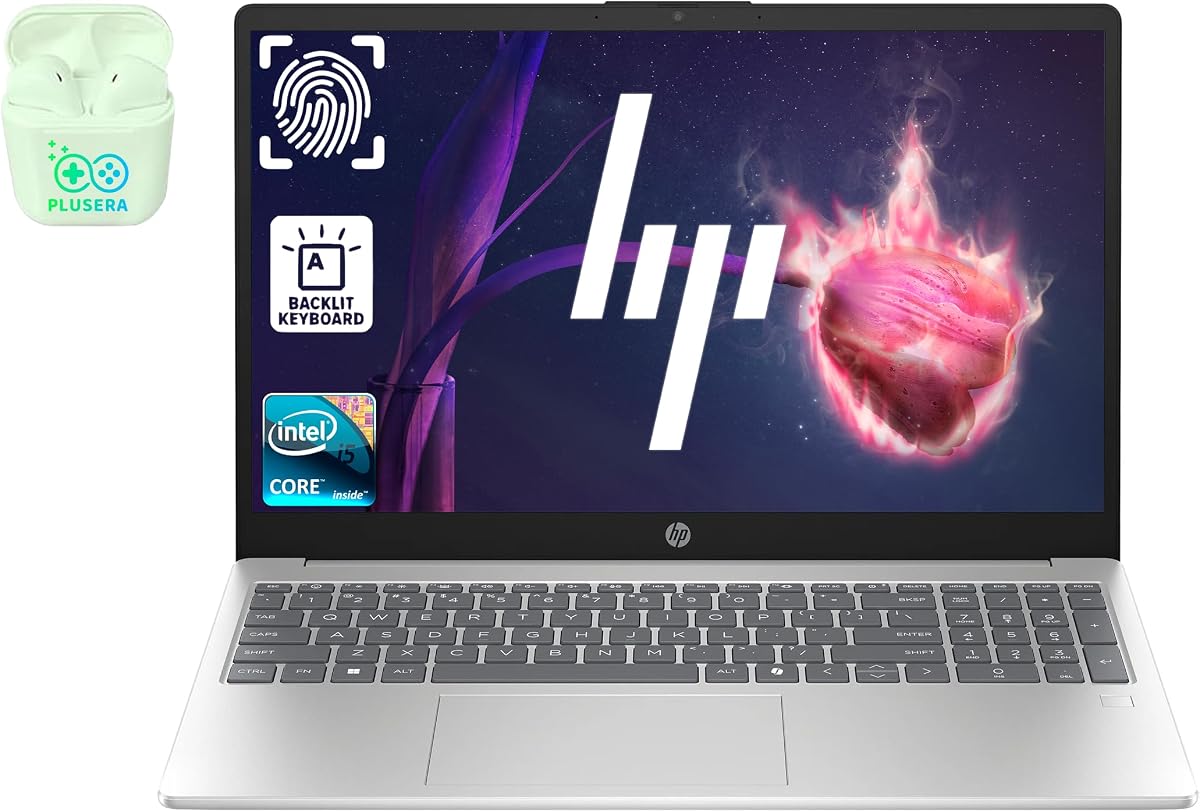
The HP 15.6 Portable offers an incredibly low entry price while still providing the crucial numeric keypad feature many users require. It is a solid choice for students or light home users who do not need heavy processing power.
We may earn a commission when you buy through this link, at no additional cost to you.
Value is the primary advantage here. The inclusion of a year of Microsoft 365 adds significant worth to the package, allowing users to get started with productivity software immediately without extra costs or subscriptions.
The trade-offs involve performance and storage. With only 128GB of storage, you may need to rely heavily on cloud storage or external drives for larger media files or extensive document libraries over time.
Choose this model if your priority is saving money and you primarily work with documents and web browsing. It meets the basic need for a numeric keypad without a high financial commitment.
This device delivers essential computing features at a price point that is hard to beat for budget-conscious buyers.
The bundled Microsoft 365 subscription ensures you have access to Word, Excel, and PowerPoint for a full year.
We may earn a commission when you buy through this link, at no additional cost to you.
The HP 17.3 Business Laptop delivers a premium experience for power users who need screen real estate and processing power. The large display is particularly beneficial for professionals working with complex spreadsheets or multiple open documents.
We may earn a commission when you buy through this link, at no additional cost to you.
Performance is robust thanks to the 10-core Intel Core 5 processor. This allows for smooth handling of modern office applications and ensures that system responsiveness remains high even when running resource-heavy tools or background processes.
Portability is the main compromise with this device. The larger chassis makes it less convenient for frequent travel or commutes compared to 15-inch models, making it better suited for desk-bound office work.
We recommend this laptop for accountants and data analysts who prioritize screen space and speed over portability. It offers a desktop-like experience in a laptop form factor with essential input features included.
The 17.3-inch screen provides ample space to view multiple windows side by side which boosts productivity significantly.
The 10-core architecture handles multitasking efficiently ensuring that your workflow is not interrupted by system lags.
We may earn a commission when you buy through this link, at no additional cost to you.
This HP model offers a distinctive red finish and a generous amount of RAM for its price range. It targets users who want a vibrant looking machine that can handle everyday tasks without constant interruptions or slowdowns.
We may earn a commission when you buy through this link, at no additional cost to you.
The 16GB of RAM is a significant plus for general productivity. It allows you to keep more applications open simultaneously which is helpful for multitasking during busy workdays or complex web browsing sessions.
Battery life claims are promising for a portable unit. This is appealing for students or remote workers who need to move between locations without carrying a charger constantly for their daily computing needs.
Ideal for home office users who want style and standard performance. The numeric keypad ensures you can handle data entry tasks efficiently without needing an external accessory setup.
With 16GB of memory this system supports smooth operation of multiple browser tabs and applications.
The slim and portable design makes it easy to move this machine between different rooms or workspaces.
We may earn a commission when you buy through this link, at no additional cost to you.
The HP 255 G10 stands out with its powerful AMD Ryzen 7 processor which is excellent for demanding computing tasks. It provides a solid alternative to Intel systems with strong multi-threading capabilities for faster processing speeds.
We may earn a commission when you buy through this link, at no additional cost to you.
Professional users will appreciate the inclusion of Windows 11 Pro. This operating system version offers enhanced security features and management tools that are valuable for business environments requiring higher control over device settings.
Storage performance is another highlight. The 512GB PCIe SSD ensures that boot times are fast and files are accessed quickly which keeps your workflow moving efficiently throughout the day without waiting on system read operations.
Choose this laptop if you need high performance for data analysis or heavier business applications. The numeric keypad is fully functional and well-integrated for efficient number entry during work sessions.
The eight-core processor delivers robust speeds for complex calculations and multitasking environments.
Windows 11 Pro provides enhanced security and management tools for professional business users.
We may earn a commission when you buy through this link, at no additional cost to you.
This HP Pavilion model is highly rated by users for its reliability and everyday performance. It strikes a good balance between cost and features making it a safe choice for general home office use.
We may earn a commission when you buy through this link, at no additional cost to you.
The full HD display is a key feature for comfortable viewing. It offers sharp text and images which reduces eye strain during long work sessions when reviewing documents or spreadsheets on screen.
Storage is efficient with a 256GB SSD ensuring that the system starts up quickly. While not massive this space is sufficient for most documents and applications without the need for excessive file management.
It is a great fit for students or light office workers. The numeric keypad adds necessary functionality for data entry while the design remains sleek and easy to transport between classes or home.
The 15.6 inch anti-glare screen provides clear visuals for extended periods of work.
The PCIe NVMe SSD ensures that applications load quickly and the system is responsive.
We may earn a commission when you buy through this link, at no additional cost to you.
This HP 255 variant delivers strong value with a high satisfaction rating from users. It focuses on providing essential business features like Windows 11 Pro and adequate memory for smooth operations.
We may earn a commission when you buy through this link, at no additional cost to you.
The AMD Ryzen 3 processor handles everyday tasks with ease. While not a high-end chip it is efficient for standard office work and ensures that the system does not overheat during regular use.
Having 16GB of RAM is a significant advantage for multitasking. You can switch between applications easily without the system slowing down or requiring constant memory management to keep things running smoothly.
We suggest this for small business owners who need reliability. The numeric keypad is a standard feature here making it suitable for financial tasks or inventory management on the go.
Customers appreciate the reliability and performance of this model for daily business operations.
The Windows 11 Pro OS offers better security and management tools than the home version.
We may earn a commission when you buy through this link, at no additional cost to you.
This renewed business laptop offers a budget-friendly way to access modern Core i5 performance. The high rating suggests that these refurbished units are in excellent condition and perform well for daily tasks.
We may earn a commission when you buy through this link, at no additional cost to you.
Security is enhanced with the inclusion of a fingerprint reader. This allows for quick and secure logins which is particularly useful in shared work environments or for users who handle sensitive business data regularly.
The backlit keyboard is a thoughtful addition for working in low light. It ensures that typing remains comfortable and accurate even during late night sessions when ambient lighting is poor or nonexistent.
Opt for this model if you want a secure and fast machine at a lower cost. The numeric keypad is fully present making it a great choice for budget conscious professionals.
The fingerprint reader adds an extra layer of protection for your device and personal data.
The backlit keys make typing easier in dimly lit environments without strain.
We may earn a commission when you buy through this link, at no additional cost to you.
The Dell Inspiron brings a touchscreen interface to the mix which adds versatility to your workflow. It is ideal for users who prefer direct interaction with content or need to navigate menus more intuitively.
We may earn a commission when you buy through this link, at no additional cost to you.
Performance is driven by a 10-core processor that handles modern tasks efficiently. This ensures that applications run smoothly and that the device remains responsive even when multiple programs are active.
The inclusion of AI Copilot features suggests future readiness. These tools can assist with organizing tasks and managing information efficiently which saves time and increases productivity in daily workflows.
Choose this laptop if you value interactive displays and strong processing power. The numeric keypad ensures you can handle standard business input needs without any additional hardware.
The FHD touchscreen allows for intuitive navigation and direct content manipulation.
Built-in AI Copilot helps organize tasks and optimize workflows effectively.
We may earn a commission when you buy through this link, at no additional cost to you.
This HP 17-inch model is designed for those who want maximum screen real estate. The larger display makes it easier to view complex spreadsheets and documents without constant scrolling or zooming during work.
We may earn a commission when you buy through this link, at no additional cost to you.
The 2026 Edition tag suggests updated hardware components. The AMD Ryzen 5 processor provides a strong balance of speed and efficiency suitable for a wide range of business applications and daily computing needs.
Battery life is highlighted as a key strength. This is beneficial for professionals who travel or work in spaces with limited access to power outlets and need to stay productive throughout the day.
We recommend this for stationary work setups. The combination of a large screen and a numeric keypad makes it an excellent stationary workstation for accounting or administrative roles.
The 17.3-inch screen provides ample space for side by side multitasking.
Long battery life ensures you can work unplugged for extended periods.
We may earn a commission when you buy through this link, at no additional cost to you.
Selecting the right laptop with a numeric keypad requires careful consideration of performance needs, display size, and specific business requirements. This guide outlines the essential factors to help you make an informed decision.
The processor is the engine of your laptop and dictates how fast it can complete tasks. For data entry and office work, a modern Core i5 or Ryzen 5 is typically sufficient. If you run complex calculations or virtual machines, consider a higher core count.
Prioritize a processor with at least 6 cores for smooth multitasking and future proofing.
Random Access Memory (RAM) determines how many applications you can run simultaneously. 8GB is the minimum for basic tasks but 16GB is recommended for heavy multitasking and large spreadsheets.
Opt for 16GB of RAM if you plan to keep many browser tabs and applications open at once.
Solid State Drives (SSDs) are essential for fast boot times and quick file access. Aim for at least 256GB of storage to hold your operating system, software, and essential documents without clutter.
Choose a 512GB SSD if you store large files or need more space for media and archives.
A Full HD (1920×1080) display is standard and ensures text looks sharp. For larger screens consider 17-inch models for better visibility of multiple windows or complex spreadsheets without squinting.
Ensure the screen has anti-glare coating to reduce eye strain during long working sessions.
Since you need a numeric keypad verify that the keyboard layout is full-size. The keys should have enough travel and spacing to prevent accidental typos during rapid data entry sessions.
Look for a backlit keyboard if you often work in low light conditions for better visibility.
Battery life is crucial if you work away from a desk. Look for models promising at least 8 to 10 hours of usage to get through a full workday without hunting for a power outlet.
Check real user reviews to confirm the battery meets advertised claims in real-world use.
Windows 11 Pro offers better security and management tools than the Home edition. For business use Pro is often preferred but Home is sufficient for small offices and individual users.
Ensure the OS supports your specific business applications and cloud storage integrations.
A good selection of ports ensures you can connect your peripherals. Look for USB-A for mice, USB-C for charging, and HDMI for external monitors to avoid needing dongles.
Wi-Fi 6 support is beneficial for faster and more stable internet connections in modern offices.
To get the most out of your numeric keypad ensure your laptop is positioned on a stable surface. Place your hands flat on the keyboard so your fingers rest naturally on the number pad to reduce strain during long sessions.
Keep your laptop clean by regularly wiping down the keyboard and screen with a microfiber cloth. Dust can accumulate in the keys and cause them to stick which disrupts your workflow when you are typing numbers rapidly.
Manage your battery life by unplugging the charger once the battery reaches full charge. This helps maintain battery health over time and ensures that your laptop remains portable for business trips and meetings.
No, most 13 and 14-inch laptops omit the numeric keypad to save space. You will typically find this feature on 15-inch or larger models designed for business and office use where data entry is common.
Yes, you can connect a USB or Bluetooth external numeric keypad to any laptop. This is a cost-effective solution if you need a number pad on a smaller laptop that does not have one built into the keyboard.
For basic spreadsheets 8GB is adequate. However, for large financial models with complex formulas and multiple tabs 16GB is recommended to ensure smooth performance and prevent the system from slowing down.
Accountants rely on the numeric keypad for rapid and accurate data entry. It allows them to input numbers with their right hand while using the left hand to navigate, significantly speeding up billing and reconciliation processes.
Yes, a larger screen allows you to view more columns and rows at once without scrolling. A 17-inch display is ideal for managing large datasets as it provides more real estate for complex tables and charts.
A business laptop should ideally last between 8 to 10 hours on a single charge. This ensures you can work through a standard business day or during travel without needing to search for a power outlet.
Apple laptops do not include a built-in numeric keypad. Mac users typically rely on external USB or wireless keypads if their workflow requires frequent number entry for accounting or data entry tasks.
For standard data entry a Core i5 or Ryzen 5 processor is sufficient. These chips offer enough speed to handle word processing and spreadsheets without lag while maintaining good power efficiency and performance.
We have highlighted ten reliable options ranging from budget-friendly choices to high-performance models. The Lenovo V15 Gen 4 stands out for its balance of power and value while the HP 17.3 offers superior screen real estate for complex tasks.
When choosing a model prioritize features that match your daily workflow needs. If you travel often consider a 15-inch model with good battery life but if you work from a desk a 17-inch screen might boost your productivity more.
Please verify current prices and availability on the retailer pages as these details change frequently. Selecting the right tool with a dedicated numeric keypad can significantly improve your efficiency and comfort during long work sessions.