This guide compares the top ten digital mixing consoles for live sound and studio use, highlighting features, connectivity, and performance for audio profession
As an Amazon Associate we earn from qualifying purchases. We may earn a commission when you buy through links on this page, at no additional cost to you. Read our affiliate disclosure.As an Amazon Associate we earn from qualifying purchases.Purchases through our links may earn us a commission, at no extra cost to you. Read our affiliate disclosure.
Digital mixing consoles have revolutionized how audio engineers manage sound for live events and recording sessions. These devices offer unprecedented control over audio signals, allowing for precise adjustments and automation that analog boards simply cannot match.
We have evaluated ten leading models based on their input capacity, audio quality, connectivity options, and ease of use. Our analysis focuses on real-world performance, software integration, and the specific needs of different audio environments.
Each selection in this list demonstrates distinct strengths tailored to various budgets and applications. Please note that pricing and availability fluctuate frequently, so verify current details before making your final purchase decision today.
Top 3 Picks for Best Digital Mixing Consoles
Best Budget
Behringer X AIR XR18 18-Channel, 12-Bus Digital Mixer for iPad/Android Tablets with 16 Programmable Midas Preamps, Integrated Wifi Module and Multi-Channel USB Audio Interface
Top 10 Best Digital Mixing Consoles in 2026 Compared
The following table provides a side-by-side comparison of all ten selected digital mixing consoles to help you identify the model that best fits your specific audio production requirements.
The Behringer X32 stands out as a top-tier choice for professionals needing deep control over complex audio environments. With a rating of 4.7 stars, users praise its ability to deliver audiophile sound quality across various applications.
Pros
Exceptional audio quality
Extensive routing options
Motorized faders
Flexible scene management
Robust connectivity
Cons
Complex learning curve
Large physical footprint
We may earn a commission when you buy through this link, at no additional cost to you.
Its core strength lies in the 32 MIDAS-designed mic preamps which provide pristine signal capture. The console offers 40 input channels and 25 buses, allowing for intricate routing and mixing scenarios that smaller boards cannot support.
While the feature set is comprehensive, it requires time to master fully. The motorized faders facilitate instant visual overviews but add to the console's bulk. These trade-offs are acceptable given the professional-grade performance.
This console is ideal for live sound engineers and studio producers who need versatile, high-fidelity mixing capabilities. It represents a solid investment for those seeking long-term reliability and advanced functionality.
Superior Sound Quality
The MIDAS preamps ensure low noise and high headroom for clean signal capture.
Flexible Workflow
Motorized faders and dynamic LCD scribble strips streamline channel assignment and management.
The Yamaha DM3 is designed for users needing high-quality audio in a portable format. Its 4.4 rating reflects satisfaction with its ultracompact build and professional-grade sound capabilities.
Pros
Ultracompact design
96kHz sample rate
Large touch screen
Easy USB recording
Yamaha sound quality
Cons
Limited input count
Fewer bus options
We may earn a commission when you buy through this link, at no additional cost to you.
It features 22 channels and a 96kHz sample rate ensuring detailed audio reproduction. The 9-inch touch screen provides intuitive control while the built-in USB interface simplifies recording and playback tasks.
The limited channel count may not suffice for large productions but is perfect for smaller venues. The trade-off between size and capacity is well-balanced for mobile users prioritizing portability.
This console suits educators, content creators, and small venue operators. It offers a refined balance of power and convenience without compromising on core audio performance.
Portable Professionalism
Despite its size, it delivers full-featured mixing with 16 Yamaha preamps.
Seamless Recording
The USB audio interface allows for direct recording to computers or mobile devices.
The Behringer WING delivers maximum flexibility for demanding production environments with a 4.2 rating. It is engineered for professionals requiring extensive input and output capabilities.
Pros
High channel count
Midas PRO preamps
Extensive bus routing
Touch screen editing
Remote I/O support
Cons
High price point
Complex interface
We may earn a commission when you buy through this link, at no additional cost to you.
With 48 channels and 28 buses it supports complex audio setups including large-scale live events. The inclusion of Midas PRO preamps ensures superior sound quality while AES50 ports enable remote I/O expansion.
The price reflects its professional status and the learning curve is steep for beginners. These factors are acceptable for users who need top-tier performance and scalability in their audio chain.
This console is best for large touring crews and broadcast facilities. It sets a high standard for digital mixing power and offers future-proof connectivity options.
Expandable Connectivity
AES50 SuperMAC ports allow for up to 144 input and output signals.
Precision Editing
The touch-sensitive channel section provides direct access to detailed parameters.
The Yamaha MGX12 is designed for home recording with a perfect 5.0 rating. It combines ease of use with essential digital features tailored for independent producers and streamers.
Pros
Perfect rating
Dual USB-C ports
Included software bundle
Bluetooth audio input
Built-in DSP processor
Cons
Basic features only
Limited bus routing
We may earn a commission when you buy through this link, at no additional cost to you.
It includes a versatile I/O set with New MGX preamps and Bluetooth input. The included software bundle like Cubase AI and WaveLab Cast LE adds significant value for those starting their studio journey.
While it lacks the depth of larger consoles it offers everything needed for basic mixing. The trade-off in routing complexity is justified by its simplicity and focus on core recording tasks.
This mixer is ideal for podcasters and home studio enthusiasts. It provides a reliable entry point into digital mixing with strong performance and intuitive controls.
All-Inclusive Bundle
Software and hardware work together to streamline the production workflow immediately.
Efficient Monitoring
Built-in DSP ensures low latency monitoring for real-time audio adjustments.
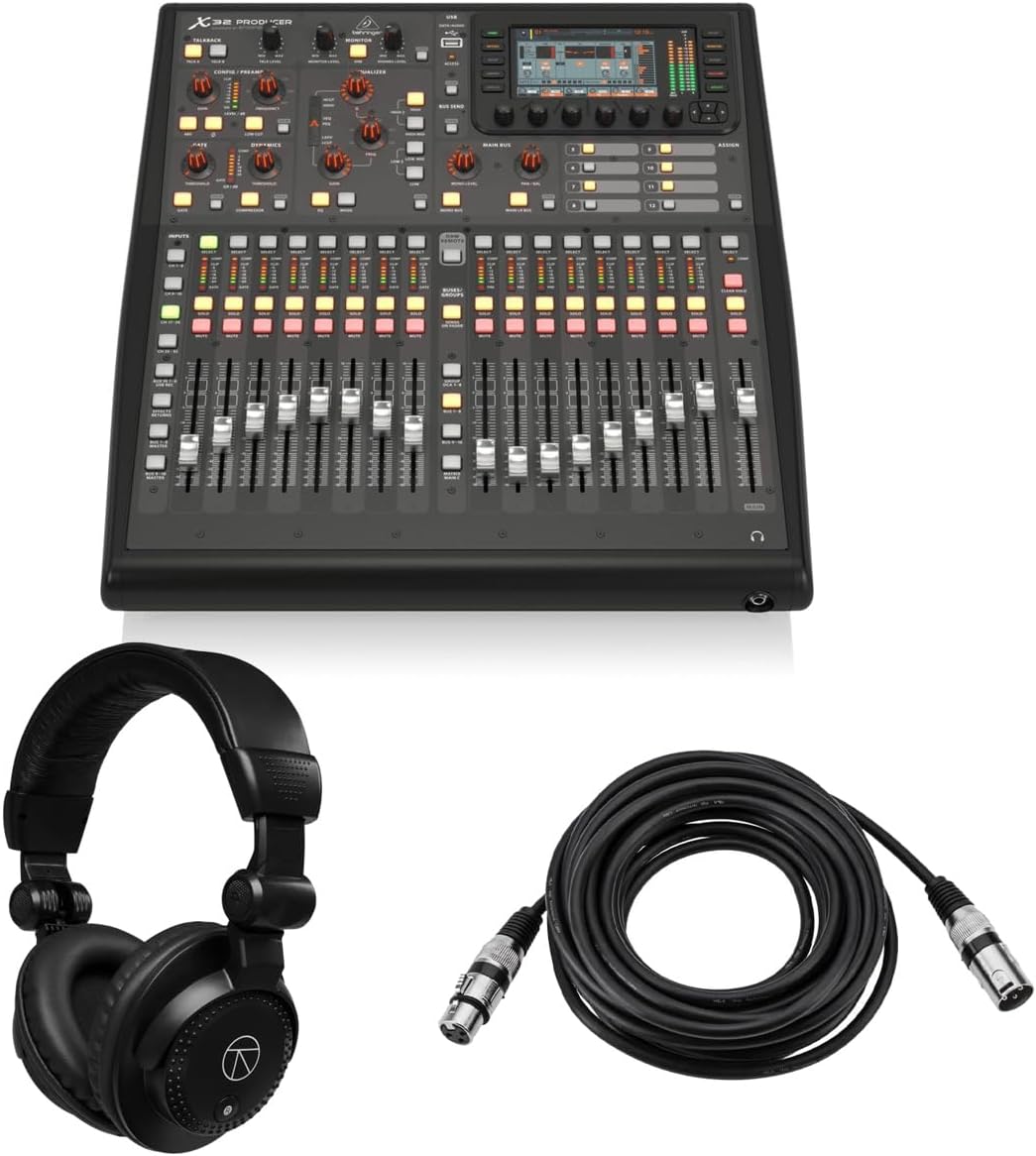
The Behringer X32 Producer is a robust rack-mountable solution rated 5.0 stars by users. It offers significant power in a form factor suitable for permanent installation.
Pros
Perfect user rating
Rack mount capability
MIDAS preamps included
Bundle includes cables
114 dB dynamic range
Cons
No motorized faders
Smaller display
We may earn a commission when you buy through this link, at no additional cost to you.
It brings 40 input channels and 16 MIDAS preamps to the table delivering professional-grade dynamic range. The included headphones and cables make it a ready-to-go package for immediate use.
The absence of motorized faders simplifies the unit for rack use but limits visual control. This is an acceptable compromise for users who prefer remote control or fixed setups.
This console is perfect for broadcast studios and fixed installations. It provides a cost-effective way to access premium audio processing in a compact form.
Space-Saving Design
Rack-mountable chassis allows for easy integration into existing rack systems.
Complete Bundle
Included accessories ensure you have all essentials for setup right out of the box.
The Behringer X32 Compact delivers a blend of power and portability with a 4.7 rating. It is a versatile option for those who need X32 features without the full-size bulk.
Pros
4.7 star rating
Compact form factor
Motorized faders included
MIDAS preamps onboard
Flexible input options
Cons
Slightly lower I/O
Requires external I/O for full range
We may earn a commission when you buy through this link, at no additional cost to you.
It retains 40 input channels and 17 motorized faders ensuring a familiar workflow. The inclusion of MIDAS preamps guarantees audiophile quality even in a smaller chassis.
While it lacks some I/O connectivity it remains highly capable for small to medium venues. This trade-off is manageable through external expansion options when needed.
This unit is suited for mid-sized events and mobile engineers. It balances performance with practicality ensuring great sound quality on the go.
Familiar Workflow
Motorized faders allow for consistent operation similar to larger console models.
MIDAS Sound
Preamps deliver high fidelity ensuring clear audio capture for any application.
The PreSonus StudioLive Classic 16.0.2 is a practical choice for bands with a 3.9 rating. It focuses on simple and effective tools for recording live performances.
Pros
Fat Channel EQ
USB multitrack
Free DAW included
Wireless aux control
Simple interface
Cons
Older technology
3.9 rating
We may earn a commission when you buy through this link, at no additional cost to you.
It features Fat Channel processing and 12 XMAX preamps delivering solid signal quality. The USB interface captures all channels allowing for multitrack recording directly to a computer.
While the software stack is dated it remains functional for basic live recording needs. The trade-off is simplicity over advanced features making it less ideal for complex productions.
This mixer is best for small bands needing reliable recording tools. It offers straightforward operation and good sound without overwhelming complexity.
Live Recording
Capture and recording software ensures easy session capture for live sets.
Fat Channel
Processing on all channels provides essential dynamics and EQ for every source.
The Behringer X AIR XR18 is an accessible entry into digital mixing with a 4.6 rating. It offers professional features at a budget-friendly price point for casual users.
Pros
18 input channels
Tablet control
16 Midas preamps
Integrated Wi-Fi module
Very affordable price
Cons
No physical controls
Requires tablet
We may earn a commission when you buy through this link, at no additional cost to you.
Its control relies on Wi-Fi and tablets allowing for remote operation anywhere. The 16 Midas preamps ensure high fidelity audio capture while the USB interface handles direct recording.
The lack of physical faders means you depend on a mobile device for operation. This limitation is acceptable for those seeking portability and cost efficiency over tactile control.
This mixer is perfect for solo streamers and small events. It delivers robust sound quality and flexibility without requiring a full-sized console setup.
Remote Operation
Built-in router enables seamless connectivity to mobile devices for control.
Professional Audio
MIDAS preamps provide high-end signal quality even at an affordable price.
The Allen & Heath Qu-5 is a robust mixer designed for high-demand environments. Its features support professional applications such as broadcast and advanced recording with precision.
Pros
38 inputs and 24 outputs
96kHz processing
USB-C multichannel
7-inch touchscreen
High-speed processing
Cons
No rating listed
Limited local outputs
We may earn a commission when you buy through this link, at no additional cost to you.
It boasts 38 inputs and 24 outputs alongside 96kHz FPGA processing. The USB-C interface allows for direct multitrack recording ensuring high-fidelity capture of complex sessions.
Although local output options are limited the digital routing flexibility compensates. This design prioritizes digital workflow efficiency over traditional analog output needs.
This console is best for streaming setups and professional recording. It combines speed with versatility ensuring professional sound for modern audio applications.
High-Speed Processing
FPGA engine delivers ultra-low latency and exceptional audio fidelity.
Intuitive Interface
The capacitive touchscreen and motorized faders simplify complex operations.
The QSC TouchMix-16 is an all-in-one package with a 4.4 rating. It targets professionals seeking reliability and ease of use in compact environments.
Pros
20 full function inputs
6 Aux outputs
4-band parametric EQ
Includes carrying bag
IEM ready
Cons
Proprietary software
Less flexible routing
We may earn a commission when you buy through this link, at no additional cost to you.
It offers 20 inputs and 6 Aux outputs alongside built-in DSP. The included bag makes transport easy while TRS aux outs enable direct IEM connections for performers.
While routing is less flexible than larger units it covers most live sound needs. This trade-off ensures consistent results without complex setup procedures.
This mixer is perfect for house churches and small venues. It provides a reliable and portable solution for high-quality audio management.
Complete Package
Carrying bag and software tools ensure you can start immediately.
IEM Ready
TRS aux outs support direct in-ear monitor connections for stage clarity.
We may earn a commission when you buy through this link, at no additional cost to you.
Buying Guide – How to Choose the Best Digital Mixing Consoles
Selecting the right digital mixer requires understanding your specific needs and budget. This section breaks down the most important factors to consider before buying.
Input and Output Count
You must ensure the mixer supports the number of microphones and instruments you plan to use. Inputs should match your stage setup while outputs need to cover your monitors and recording devices.
Always count your current sources and anticipate future growth when selecting an I/O count.
Microphone Preamps Quality
Preamps determine the cleanliness and clarity of your audio signals. Higher quality preamps provide better dynamic range and less noise especially for sensitive instruments.
Look for branded preamps like MIDAS or Yamaha if sound quality is a priority.
Connectivity Options
Modern consoles rely heavily on digital connections for recording and expansion. USB interfaces should support multitrack recording and compatibility with your DAW software.
Check for additional ports like Ethernet or Wi-Fi for remote control and routing.
Control Surface and Workflow
Motorized faders and touch screens streamline complex mixing tasks during live events. Consider whether you need physical controls or prefer tablet-based remote operation.
A good workflow reduces errors and improves speed during critical performances.
Software and Firmware
Digital mixers require software for control and remote access. Check if the manufacturer provides updates and apps that fit your devices and operating system.
Regular firmware updates ensure long-term compatibility and access to new features.
Portability and Size
If you travel often a compact unit or rackmount model might be preferable. Larger consoles offer more controls but may require significant transport time and equipment.
Choose a size that fits your transport needs without sacrificing essential controls.
Built-in Effects
Many digital mixers include internal effects like reverb and delay to save costs. Ensure the quality of these processors matches the standards of your production.
A versatile FX engine reduces the need for external rack gear and cabling.
Expandability
Consider whether the system allows for adding more inputs via remote stage boxes. Protocols like AES50 enable you to scale your setup without replacing the main console.
Future-proofing your system saves money and extends the console's usable life.
How to Use and Care for Your Digital Mixing Consoles
Always begin by powering down all connected gear to avoid electrical surges that can damage internal components. Connect all audio and data cables before turning the mixer on to ensure stable signal flow.
Regularly update the firmware using the manufacturer's recommended software to access new features and security patches. Check that your DSD or recording software matches the current USB driver version for smooth operation.
Store the mixer in a cool, dry environment away from direct sunlight or extreme temperatures. Use padded cases for transport to protect sensitive faders and screens from impact and dust.
Frequently Asked Questions
What is the difference between analog and digital mixing consoles?
Digital mixing consoles process audio using internal computers allowing for scene storage and recall. Analog consoles use physical circuits and require manual adjustments for each setting. Digital units offer more flexibility while analog provides simpler tactile operation.
Do digital mixing consoles require a computer to work?
Most digital mixers can operate independently without a computer. However connecting a computer via USB allows for multitrack recording and advanced scene editing using dedicated software.
Can I use a digital mixer for live streaming?
Yes digital mixers with USB outputs can send multitrack audio to your computer for streaming. Ensure your software supports the USB configuration of the specific mixer model.
Are digital mixing consoles difficult to learn?
Learning curves vary but digital systems offer automation that simplifies repetitive tasks. Start with presets and gradually explore features to build proficiency over time.
What is the benefit of motorized faders?
Motorized faders adjust automatically to match saved scenes ensuring consistent volume levels. They provide an instant visual overview of the current mix without needing to recall values.
How do I choose the right number of inputs?
Count every microphone and line input needed plus at least 20 percent extra for expansion. This ensures you never run out of channels during live events.
Is a touchscreen better than physical knobs?
Touchscreens offer faster access to detailed parameters while physical knobs are better for quick adjustments. The best systems combine both for a versatile mixing experience.
Do digital mixers work with in-ear monitors?
Yes most digital mixers have dedicated aux outputs suitable for driving in-ear monitor systems. Check for TRS or XLR connections that match your monitor hardware.
Final Thoughts on Choosing the Best Digital Mixing Consoles
The Behringer X32 Yamaha DM3 and Behringer WING represent top choices across professional compact and high-end categories. Each offers distinct advantages based on your specific production requirements.
Prioritize input capacity and sound quality when making your final decision. Ensure the selected model integrates seamlessly with your existing workflow and devices.
Always verify current pricing and availability before purchasing. Prices may change and new models might offer improved value in the near future.
Discover the top leather cases for AirPods Pro 3 in this guide comparing genuine leather options, wireless charging compatibility, and premium protection
This guide compares the top 10 gaming mice for Xbox Series X, evaluating sensors, connectivity, ergonomics, and compatibility to help you choose the perfect