
Kids Microphone with Stand
4.6Editor score
Rotatable light ball base
Adjustable height range
Kid-friendly durable design
This guide compares the top Light Up LED Mic Stand options for streaming, gaming, and performances based on features, build quality, and user reviews.
Lighting effects can transform any performance into a visually stunning experience. A light up LED mic stand adds color and ambiance to your setup without requiring extra equipment. These stands blend functionality with style for creators and performers.
We evaluated ten top models based on stability, adjustability, and lighting features. Our comparison covers floor stands, desk arms, and specialized kits. Each option offers unique benefits for different budgets and environments.
Each pick highlights key strengths and ideal use cases for you. Prices and availability change frequently so verify details before purchasing. Read on to find the perfect illuminated stand for your needs.
4.6Editor score

4.9Editor score

4.4Editor score
This table provides a side-by-side comparison of all ten stands to help you quickly identify key specifications and features.



The YOUSHARES RGB Mic Arm stands out as the top choice for creators seeking both performance and visual flair. With a 4.9 rating users praise its ability to merge high-quality support with dynamic lighting effects.
We may earn a commission when you buy through this link, at no additional cost to you.
Its intelligent pickup feature adjusts lighting based on sound rhythm creating an immersive audio-visual experience. The build quality is exceptional with high-quality steel ensuring durability and stability for heavy microphones up to four pounds.
While the lighting customization is impressive it does require installing a mobile app which may add a step to setup. The price is higher than basic stands but the advanced features justify the investment for professional streamers.
This arm is ideal for gamers and podcasters who want their desk setup to look as good as it sounds. The included adapters ensure compatibility with popular mics like Blue Yeti and HyperX QuadCast making it a versatile investment.
The lighting syncs with your voice or game audio adding life to your stream without manual adjustments.
Steel construction and a built-in cable management system keep your workspace tidy and equipment secure.
We may earn a commission when you buy through this link, at no additional cost to you.
The InnoGear Mic Stand Tripod is a reliable floor stand option for singers and speakers needing solid support. Its adjustable height and stable base make it suitable for various performers and environments.
We may earn a commission when you buy through this link, at no additional cost to you.
The thickened steel poles enhance durability while the boom arm offers flexible positioning from sixteen to thirty inches. The included carrying bag makes transport easy for those moving between venues regularly.
While it lacks integrated lighting effects its core function as a microphone stand is excellent. The weight prevents tipping during use which is crucial for live performances where movement is expected.
Buy this if you need a robust floor stand that adapts to different heights and comes with transport convenience. It pairs well with external lighting for a complete stage setup without extra bulk.
The included bag allows you to store and transport the stand effortlessly for gigs or studio sessions.
Rotate the arm horizontally and vertically to find the perfect angle for any microphone type.
We may earn a commission when you buy through this link, at no additional cost to you.
The Kids Microphone with Stand offers a playful take on illuminated stands perfect for young performers. With flashing lights and a rotatable ball it turns living rooms into stage-like environments instantly.
We may earn a commission when you buy through this link, at no additional cost to you.
Constructed from safe ABS materials it withstands drops and rough handling while remaining lightweight for small hands. The height adjusts from fifteen to thirty-five inches accommodating toddlers to older children easily.
While not intended for professional adult use it excels at encouraging confidence and musical expression in kids. Battery operation means no cords but you will need to replace them occasionally for continuous fun.
Choose this for a child's gift or casual home karaoke where fun lighting matters most. It is an affordable way to introduce kids to performance gear without compromising on safety or entertainment value.
The colorful LED stage lights create a concert atmosphere that motivates kids to sing and perform.
Smooth edges and non-toxic materials ensure safe play for children ages three to twelve years old.
We may earn a commission when you buy through this link, at no additional cost to you.
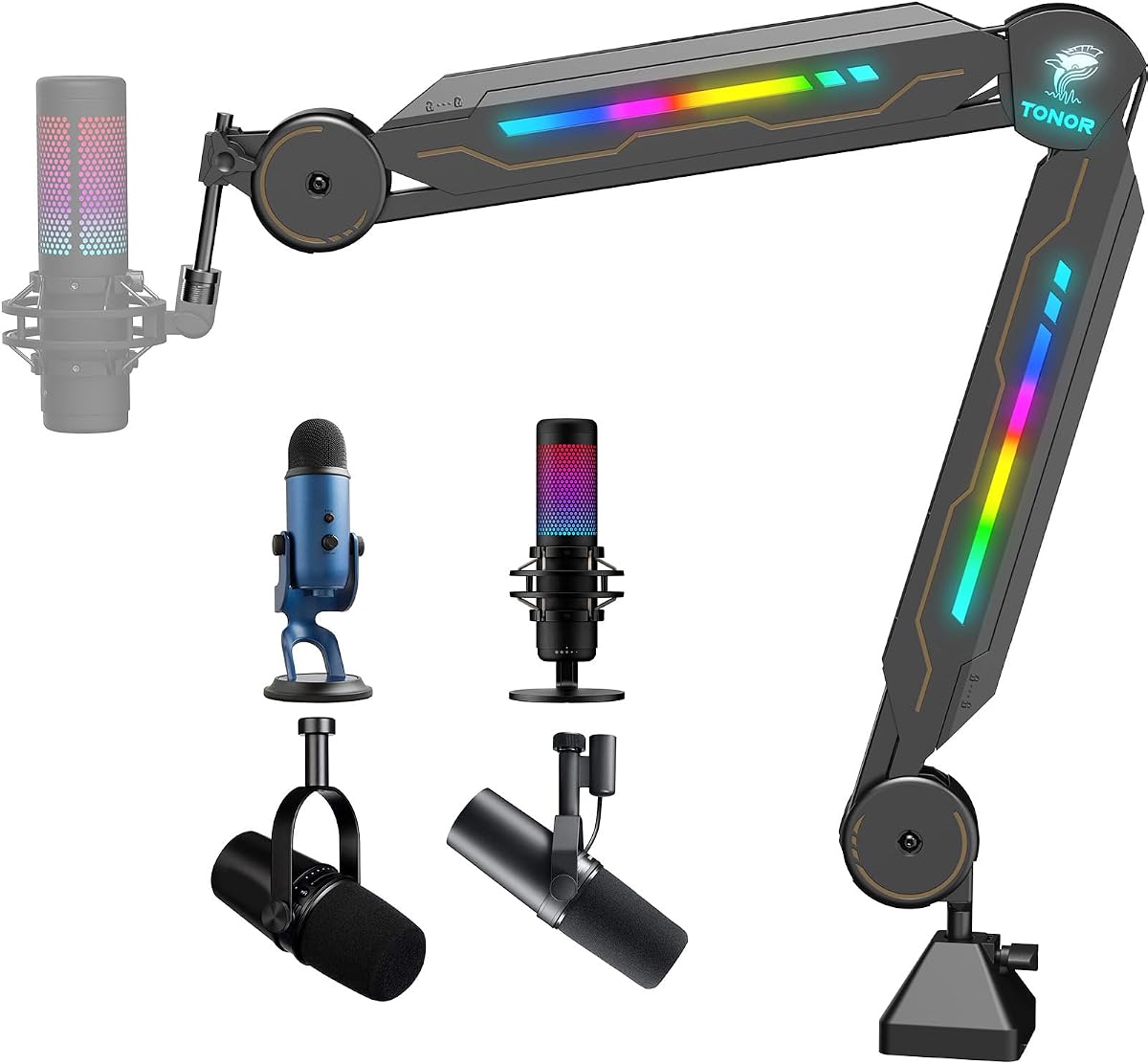
The TONOR RGB Boom Arm adds style to gaming desks with eleven distinct light modes. Its scissor design allows precise positioning while keeping the desktop organized with hidden cable channels.
We may earn a commission when you buy through this link, at no additional cost to you.
Built with premium steel it supports up to two kilograms ensuring stability even during intense gaming sessions. Setup takes under thirty seconds making it convenient for streamers who value efficiency and aesthetics.
The lack of a floor base limits it to desk use and the clamp may not suit all desk types. However the visual appeal and ease of use make it a strong contender for home office setups.
This arm suits gamers and podcasters who want RGB lighting integrated into their mic solution. The compatibility with most standard microphones ensures you can use your existing gear without adapters.
The integrated cable channel keeps wires hidden for a tidy desktop appearance during broadcasts.
Tap to switch light modes and set the perfect mood for your gaming or recording environment.
We may earn a commission when you buy through this link, at no additional cost to you.
The InnoGear Mic Stand Weighted focuses on stability for vocal performances with a robust round base. Its design prioritizes steady positioning and durability for singers who move while performing.
We may earn a commission when you buy through this link, at no additional cost to you.
The thickened arm prevents deformation under heavy microphones while the clutch ensures swift height settings. Non-slip pads prevent sliding on smooth stages or studio floors during active routines.
It lacks lighting effects but excels as a dedicated performance stand. The base weight prevents tipping which is vital when leaning on the mic or dancing nearby during shows.
Buy this for live vocal performances where reliability is key. The portability allows you to disassemble it for transport making it useful for touring or frequent venue changes.
A four point five pound weighted base ensures the stand stays put even during energetic performances.
Thickened steel arm construction resists bending and deformation from heavy microphones.
We may earn a commission when you buy through this link, at no additional cost to you.
The MAONO DGM20 offers an integrated solution combining a microphone with RGB lighting features. It delivers pro-grade clarity and aesthetic appeal without needing separate stand components for desktop use.
We may earn a commission when you buy through this link, at no additional cost to you.
Smart noise cancellation enhances voice quality while the headphone jack provides zero latency monitoring for streaming. The RGB lighting adds visual appeal to your setup with dynamic color modes.
Note that this is a microphone not a stand so you will need to purchase a mount separately. This may add cost but the bundled audio quality and lighting are excellent for entry-level setups.
Ideal for gamers who want an easy plug-and-play solution with visual flair. Pair it with a basic boom arm for a complete desk setup that looks and sounds professional.
Active noise cancellation suppresses background sounds so your voice comes through clearly to viewers.
Choose from solid colors to breathing lights to match your gaming PC setup.
We may earn a commission when you buy through this link, at no additional cost to you.
The Pyle Universal Mic Stand offers exceptional value by providing two stands in one package. Their compact design and adjustable height make them suitable for home studios or small stage setups.
We may earn a commission when you buy through this link, at no additional cost to you.
Metal bases offer stability while the lightweight construction allows easy transport between locations. The finish resists wear ensuring they look professional for extended use in rehearsals or performances.
They lack integrated lighting but provide reliable support for microphones. Buying a pair allows you to set up dual voices or backup mics without spending extra on separate units.
Choose this for budget-conscious users needing multiple stands. They are durable enough for regular practice and gigging without the cost of premium professional-grade equipment.
Getting a pair allows you to set up multiple performers or have a backup stand ready.
Lightweight steel and compact bases mean you can transport both easily for gigs.
We may earn a commission when you buy through this link, at no additional cost to you.
The ARES WING Aluminum Mic Arm blends premium materials with unique visual features like infinity mirror joints. Its integrated volume knob allows quick adjustments without reaching for your keyboard.
We may earn a commission when you buy through this link, at no additional cost to you.
Aluminum construction ensures strength while keeping weight manageable for long recording sessions. The foldable design keeps your desk tidy when the arm is not in use.
Installation requires no tools making setup fast and non-destructive to furniture. While the price is higher the combination of functionality and aesthetics justifies it for dedicated creators.
This arm is perfect for streamers who value desk space and quick audio control. The RGB lighting adds visual depth to your setup while maintaining professional performance standards.
Infinity mirror joints create a modern look that elevates the aesthetic of your studio.
Adjust volume instantly with the integrated knob so you never miss a recording moment.
We may earn a commission when you buy through this link, at no additional cost to you.
The LED Speaker Stand ASC is ideal for DJs needing stands that double as lighting fixtures. Integrated RGB lights allow you to create a visual atmosphere without extra equipment.
We may earn a commission when you buy through this link, at no additional cost to you.
A reinforced steel frame ensures safety during performances with safety pins locking the height securely. The non-slip rubber feet protect floors and keep gear stable during events.
This is a speaker stand not a dedicated mic stand so check compatibility carefully. It works well for full PA setups but may not suit handheld microphone needs directly.
Buy this if you are setting up a DJ rig where visual impact matters. The remote control lets you sync lights with music energy for dynamic events.
Built-in LED lighting transforms spaces instantly creating atmosphere for mobile DJs.
Safety pins and rubber feet ensure heavy speakers remain secure during performances.
We may earn a commission when you buy through this link, at no additional cost to you.
The SUNMON Boom Arm RGB offers Bluetooth lighting control via a mobile app for customization. Its extension tube allows height adjustment beyond standard desk arm limits.
We may earn a commission when you buy through this link, at no additional cost to you.
Lighting flows in seven colors creating a modern look suitable for streaming or gaming. The design supports most USB microphones ensuring you can use your current mic easily.
The app requirement adds setup steps but offers deeper control over lighting patterns. The weight capacity is moderate so check if your mic exceeds the three-pound limit.
Choose this for a customizable lighting experience controlled from your phone. It fits well in setups where height adjustability and visual effects are priorities.
Control brightness and color patterns from your smartphone to match your mood.
An extension tube adds height so the mic clears your monitor for better positioning.
We may earn a commission when you buy through this link, at no additional cost to you.
Selecting the right illuminated stand depends on your specific needs. This section outlines key factors to consider before purchasing.
Decide between floor stands and desk arms based on your space. Floor stands suit performance areas while desk arms save space for home setups.
Choose the type that matches your environment to avoid clutter or instability.
Look for RGB modes, app control, or reactive lighting depending on your preference. Reactive lighting syncs with audio for immersive effects.
Ensure the lighting system offers enough customization to suit your aesthetic goals.
Check the load capacity to support your microphone weight comfortably. Exceeding limits risks sagging or damage over time.
Select a stand rated higher than your heaviest mic for long-term reliability.
Steel or aluminum builds offer better longevity than plastic options. Reinforced joints prevent wobbling during movement.
Invest in solid materials to ensure the stand lasts through frequent use.
Verify the adjustable range fits your height or desk setup. Floor stands should cover sitting to standing positions.
Ensure smooth adjustment mechanisms for quick repositioning during sessions.
Built-in channels keep wires organized and reduce tripping hazards. Clean setups improve professionalism and aesthetics.
Prioritize models with routing solutions to maintain a tidy workspace.
If you travel for events look for detachable or foldable designs. Carrying cases add convenience for transport.
Choose a compact option if mobility is important for your use case.
Confirm screw adapters match your microphone thread size like 5/8 inch. Many models include multiple adapters for flexibility.
Check included accessories to ensure your specific mic fits without extra purchases.
Assemble the stand according to the manual ensuring all knobs are tight before use. For desk arms secure the clamp firmly to avoid tipping during movement.
Connect LED components to power sources or USB ports as instructed. Test lighting modes before streaming to ensure they function properly.
Clean the stand regularly with a dry cloth to prevent dust buildup. Avoid harsh chemicals that might damage the lighting coatings or finishes.
Most require USB power for lights or plug into outlets. Check the manual for power requirements before connecting. Some models include cables but you may need an adapter depending on your setup.
Yes most universal stands accept standard shock mounts. Verify the adapter size matches your mic before installation. Some models include necessary screws but you might need to buy extra ones.
Many models support remote or app control for real-time adjustments. This allows you to change colors without leaving your streaming software. Check if the app runs smoothly while broadcasting.
Troubleshoot by checking power connections and restarting the device. Sometimes disconnecting and reconnecting USB fixes glitches. If issues persist contact the seller for warranty support or a replacement.
Floor stands typically need at least two feet of diameter space. Desk arms take up less floor space but require a sturdy surface. Measure your room before choosing to ensure it fits.
Yes wireless mics work with any standard stand as long as the thread fits. Ensure the receiver is placed near the stand to avoid cable tension. This setup keeps your desk or stage tidy.
Our top picks highlight a range of options from budget-friendly kids sets to premium desk arms. The YOUSHARES arm leads in features while the Kids set offers affordability.
Prioritize stability and lighting control that fit your workflow. A reliable stand should hold your mic securely while providing the visual effects you desire.
Check current stock and warranty details before purchasing to ensure satisfaction. Prices fluctuate so compare deals carefully to get the best value today.