
GIGABYTE B550 Gaming X V2
4.5Editor score
AM4 Socket Support
DDR4 Memory Compatible
PCIe 4.0 Slots
This guide compares the top Gigabyte Motherboard models for 2026, analyzing performance, features, and value to help you choose the right AMD or Intel platform
Selecting the right Gigabyte Motherboard is crucial for any PC builder seeking reliability and performance. These boards support the latest AMD and Intel processors, offering robust power delivery and advanced connectivity options for gaming and productivity.
We evaluated ten top-rated models based on power design, thermal management, connectivity, and user feedback. Each product was analyzed for its specific strengths, ensuring you find the perfect match for your budget and system requirements.
Every pick highlights key features and real-world performance traits to guide your decision. Note that availability and pricing may fluctuate, so verify current details before purchasing to ensure you get the best value available.
4.5Editor score

4.4Editor score

4.2Editor score
This side-by-side comparison outlines the core specifications and unique features of each selected Gigabyte Motherboard to help you quickly identify which model aligns best with your hardware needs and upgrade goals.


The GIGABYTE B650 AORUS Elite AX stands out as a top choice for builders seeking a balance of performance and features. With a 4.4-star rating, it delivers reliable support for Ryzen processors and DDR5 memory.
We may earn a commission when you buy through this link, at no additional cost to you.
Its twin 14+2+1 phase power design ensures stable voltage delivery for demanding workloads. The advanced thermal design includes fully covered MOSFET heatsinks and an M.2 thermal guard to maintain optimal operating temperatures.
While the BIOS offers extensive control, it may require some time to navigate for newcomers. However, the EZ-Latch system simplifies component installation significantly for most users.
This board is ideal for gamers and creators needing PCIe 5.0 readiness and robust connectivity. It represents a solid investment for AMD AM5 platform enthusiasts.
The 70A power stage digital VRM solution provides consistent power to the CPU even under heavy loads.
Front and rear USB-C ports along with PCIe 5.0 slots ensure compatibility with next-gen peripherals.
We may earn a commission when you buy through this link, at no additional cost to you.
The X870 AORUS Elite WIFI7 brings cutting-edge networking and storage options to the AM5 platform. Its 4.5-star rating reflects user satisfaction with its feature-rich design and reliable performance.
We may earn a commission when you buy through this link, at no additional cost to you.
With four M.2 slots and dual USB4 ports, it offers extensive storage and peripheral connectivity. The WIFI7 module ensures the fastest possible wireless speeds for modern gaming and streaming.
The main trade-off is the higher cost compared to B650 options. Users prioritizing future connectivity standards will find the extra value worthwhile for high-end setups.
This board is best suited for enthusiasts who want maximum bandwidth and the latest wireless tech. It is a premium choice for serious AMD system builds.
Four M.2 slots allow for massive NVMe storage configurations without sacrificing PCIe lanes.
WIFI7 support delivers ultra-low latency and high throughput for competitive online gaming.
We may earn a commission when you buy through this link, at no additional cost to you.
The X870E AORUS PRO ICE is designed for builders who demand top-tier aesthetics alongside performance. Its white color scheme stands out and complements high-end PC cases perfectly.
We may earn a commission when you buy through this link, at no additional cost to you.
Powered by an 80A smart power stage, it handles overclocking and high-core count CPUs with ease. The feature set matches the elite X870 model with WIFI7 and USB4 included.
While the price is higher due to the premium design and materials, the build quality is exceptional. It caters to users who value visual impact without compromising technical specs.
This board is perfect for themed builds requiring a clean white look. It delivers flagship performance for those who want the best visual and technical experience.
The unique white aesthetic creates a striking centerpiece for any custom PC build setup.
Smart power stages ensure voltage remains stable during intensive gaming or rendering tasks.
We may earn a commission when you buy through this link, at no additional cost to you.
The Z890 AORUS Master is a powerhouse for Intel Core Ultra processors, offering top-end features. It supports the latest LGA 1851 socket and provides extensive storage and networking capabilities.
We may earn a commission when you buy through this link, at no additional cost to you.
Its 18+1+2 phase power design with 110A smart stages ensures extreme stability. Five M.2 slots and Thunderbolt 4 ports make it ideal for professionals needing fast data transfer.
The advanced networking includes a 10GbE LAN port for ultra-fast wired connections. However, the sheer number of features can make the BIOS interface feel overwhelming initially.
This board is best for professionals and enthusiasts needing maximum bandwidth and reliability. It represents the pinnacle of Gigabyte's current Intel motherboard lineup.
10GbE LAN allows for blisteringly fast local network speeds suitable for NAS or servers.
Five M.2 slots provide unmatched storage capacity for high-performance NVMe SSD arrays.
We may earn a commission when you buy through this link, at no additional cost to you.
The B650 Eagle AX offers an impressive 4.6-star rating thanks to its strong value proposition. It provides essential AM5 features like DDR5 support and WiFi 6E at a competitive price.
We may earn a commission when you buy through this link, at no additional cost to you.
Its 12+2+2 phase VRM ensures reliable power for Ryzen 7000 and newer chips. Three M.2 slots give users plenty of room for fast storage drives.
While it lacks some premium connectivity options found on AORUS models, it covers the basics well. The lower price point makes it accessible for budget-conscious builders.
This board is perfect for gamers needing reliable performance without overspending. It strikes an excellent balance between cost and essential features for AM5 systems.
Delivers core AM5 performance at a price point accessible to a wider audience.
Triple M.2 slots allow for multiple SSDs to optimize game load times and storage.
We may earn a commission when you buy through this link, at no additional cost to you.
The B550 AORUS Elite AX V2 is a robust choice for existing AM4 users or budget builds. It supports Ryzen 5000 series processors with reliable DDR4 memory and PCIe 4.0 support.
We may earn a commission when you buy through this link, at no additional cost to you.
Features like Q-Flash Plus allow BIOS updates without a CPU installed, simplifying maintenance. The 2.5GbE LAN and WIFI6 provide modern networking at a lower cost than newer boards.
Since AM4 is older, future upgrade options are limited compared to AM5. However, for current systems or budget constraints, it remains a very capable board.
This board is best for users upgrading an older system without changing the CPU. It offers great value and reliability for established AM4 platforms.
Q-Flash Plus simplifies BIOS updates by removing the need for CPU installation during upgrades.
2.5GbE LAN offers faster internet speeds than standard Gigabit connections for home networks.
We may earn a commission when you buy through this link, at no additional cost to you.
The Z790 Eagle AX delivers essential features for Intel 12th to 14th Gen processors. It offers DDR5 support and PCIe 5.0 readiness at a price lower than premium models.
We may earn a commission when you buy through this link, at no additional cost to you.
Its 12+1+1 phase power design is sufficient for most gaming and productivity workloads. Three M.2 slots and WIFI6E provide practical connectivity for modern builds.
While it lacks the ultra-high-end features of Master series boards, it covers the basics well. It is a great middle ground for those wanting Z790 features without overspending.
This board is ideal for gamers needing Intel performance at a reasonable cost. It supports the latest CPUs and memory standards effectively for daily use.
Compatible with the latest DDR5 memory for faster data speeds and improved performance.
PCIe 5.0 readiness ensures compatibility with next-gen graphics cards and storage drives.
We may earn a commission when you buy through this link, at no additional cost to you.
The Z790 AORUS Elite AX balances high power phases with practical connectivity. With a 16+1+2 phase design, it handles high-end Intel CPUs with stability and low thermal output.
We may earn a commission when you buy through this link, at no additional cost to you.
Four M.2 slots provide ample space for fast NVMe drives, supporting demanding workflows. The inclusion of DDR5 and PCIe 5.0 ensures the board remains relevant for future upgrades.
The price sits between budget and high-end models, offering solid value for its specs. It is a reliable choice for users needing consistent performance for gaming and work.
This board is recommended for Intel users seeking robust power and storage options. It delivers strong performance without the premium price of top-tier models.
Advanced thermal design keeps power delivery cool even during sustained high loads.
Four M.2 slots allow for extensive storage without needing extra expansion cards.
We may earn a commission when you buy through this link, at no additional cost to you.
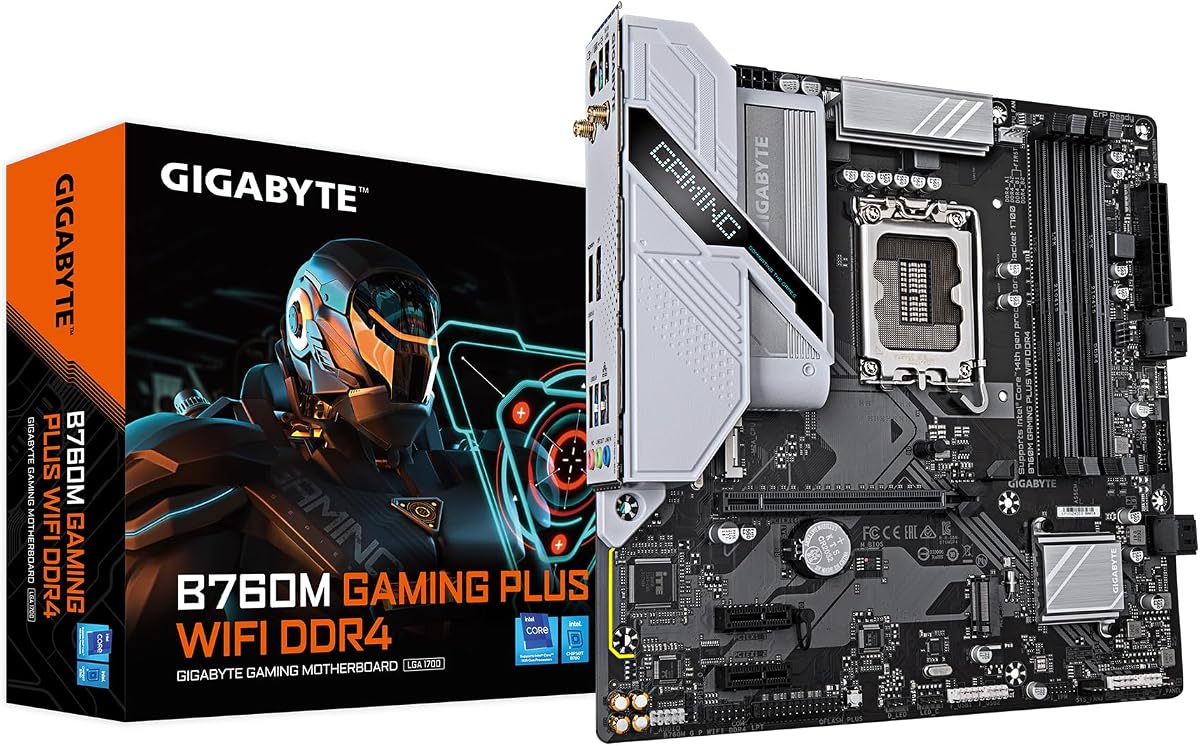
The B760M Gaming Plus WiFi is a compact option for smaller cases without sacrificing performance. It supports Intel 12th to 14th Gen processors with DDR4 memory and essential WiFi.
We may earn a commission when you buy through this link, at no additional cost to you.
Its M-ATX form factor fits into smaller towers while still offering two M.2 slots and PCIe 4.0. This makes it suitable for budget builds or office PCs needing Wi-Fi.
The limited number of M.2 slots compared to ATX boards is a minor trade-off. However, the lower cost and space savings are significant advantages for specific build types.
This board is perfect for users building in small form factor cases. It offers reliable performance and WiFi at an affordable price for casual users.
M-ATX size ensures compatibility with smaller cases while maintaining full Intel support.
Lower price point makes it an excellent entry option for Intel 14th Gen builds.
We may earn a commission when you buy through this link, at no additional cost to you.
The B550 Gaming X V2 is one of the most affordable options for AM4 users. It supports Ryzen 5000 series and delivers solid performance with its 10+3 phase power design.
We may earn a commission when you buy through this link, at no additional cost to you.
Features like Q-Flash Plus ensure easy BIOS updates, saving trouble during hardware changes. While it lacks some premium RGB or port features, it covers the essentials reliably.
The simple design keeps costs down but may not appeal to RGB enthusiasts. However, for those prioritizing function over form, it is an excellent budget choice.
This board is perfect for first-time builders on a tight budget. It provides the necessary performance for gaming and daily tasks without breaking the bank.
Delivers high value with essential features at one of the lowest price points available.
Q-Flash Plus allows quick BIOS updates without needing to install CPU first.
We may earn a commission when you buy through this link, at no additional cost to you.
Choosing the right Gigabyte Motherboard involves balancing socket compatibility, power design, and connectivity features with your specific build goals.
Ensure the board matches your processor generation. AMD AM5 boards support Ryzen 7000/8000/9000 series, while AM4 supports Ryzen 5000. Intel LGA 1700/1851 boards fit Core 12th to Ultra Series 2.
Always verify socket type before purchasing to avoid incompatibility issues with your chosen CPU.
Modern boards use DDR5 for better bandwidth, but some older or budget models still use DDR4. Check if your selected memory kit matches the motherboard standard.
Matching memory type ensures stable performance and prevents boot failures during system setup.
Higher phase counts like 16+1+2 or 18+1+2 provide more stable power for overclocking or high-end CPUs. Basic models may have 12+1+1 or lower which is fine for stock use.
Choose a power design that matches your CPU's TDP to prevent thermal throttling under load.
Look for multiple M.2 slots and PCIe 5.0 support if you plan to use fast NVMe drives. Some boards offer up to five M.2 slots for extensive storage needs.
More slots allow you to expand storage without needing PCIe add-on cards or external drives.
Wi-Fi 6E or WIFI7 offers wireless convenience, while 2.5GbE or 10GbE LAN provides wired speed. Select based on whether you prefer cable or wireless connectivity.
Advanced networking ensures low latency for gaming and fast file transfers over your network.
PCIe 5.0 slots are future-proof for GPUs and SSDs. Ensure there are enough PCIe slots for your graphics card and expansion needs.
Sufficient slots prevent bottlenecks and allow for easy upgrades of peripherals later.
Check for USB-C ports on the rear and front of the case. Models with USB4 or Thunderbolt 4 offer faster data transfer speeds.
Having enough modern ports reduces the need for extra dongles or hubs.
ATX boards fit most cases but M-ATX boards are compact. Ensure your PC case supports the board size to avoid fit issues.
Correct form factor selection simplifies cable management and ensures a clean build.
Before installing, static discharge yourself and place the board on its box. Ensure you match your processor socket with the motherboard type correctly.
Update the BIOS immediately using Q-Flash if your CPU is not recognized. This step prevents compatibility issues with newer processors.
Keep the board cool by ensuring good airflow around the VRM area. Regular dust removal maintains thermal performance over time.
Yes, boards with AM5 sockets like the B650 and X870 support Ryzen 9000 series. Older AM4 boards will not work without BIOS updates and may require different CPU compatibility.
DDR5 offers higher speeds and bandwidth than DDR4. Most modern Gigabyte boards use DDR5 for better performance, but budget or older models may still support DDR4 for cost savings.
No, AMD and Intel CPUs use different sockets and cannot be swapped. You must choose a motherboard specifically designed for your CPU brand and generation.
Sometimes, BIOS updates are needed for newer Ryzen 5000 CPUs on older boards. Using Q-Flash Plus allows updates without installing the CPU first.
WIFI7 is the latest wireless standard offering faster speeds and lower latency than WIFI6E. It is found on newer models like the X870 and Z890 series.
Most boards offer between two and five M.2 slots depending on the model. Higher-end boards have more slots for faster NVMe storage and expansion.
M-ATX boards like the B760M Gaming Plus are designed for smaller cases. ATX boards will need standard mid-tower or full-tower cases for proper fit.
Yes, many Gigabyte boards support RGB Fusion to sync lighting across components. This software allows users to customize colors and effects easily.
We have explored ten Gigabyte Motherboard models ranging from budget to premium. Each offers unique strengths in power, connectivity, and compatibility.
Prioritize your CPU generation and budget when making your choice. Ensure you have enough storage and power phases for your workload.
Check current availability and verify prices before buying. Prices and stock can change quickly in the market.