
H/D VGA DVI LVDs Controller Board
4.4Editor score
Supports 15.6 inch panels
VGA DVI video input
40 pin LVDS interface
Finding the right LCD Controller Board for Laptop Screen is essential for DIY repairs or custom monitor builds. These boards act as the brain connecting your display panel to external video sources like HDMI VGA or DVI ensuring stable image output and proper signal decoding.
We evaluated ten verified products based on their resolution support interface compatibility and power requirements. Each entry was selected for its ability to handle specific panel models ranging from 11.6 inch to 23.8 inch screens with eDP LVDS or HDMI inputs.
Each pick below highlights key specifications and compatibility notes to guide your selection. Please note that availability and pricing fluctuate frequently so always verify the current details before purchasing to ensure the board matches your specific screen model.
4.4Editor score

4.4Editor score

5.0Editor score
As an Amazon Associate we earn from qualifying purchases.
The following table provides a side-by-side comparison of all ten products reviewed in this guide. Use this overview to quickly identify which board matches your screen size resolution and interface requirements before diving into the detailed reviews.



This H/D LCD Controller Board stands out as a top choice for users working with standard HD resolution panels. It is specifically engineered for 1366×768 displays using a 30-pin eDP interface which covers a wide range of popular laptop screens from 11.6 inches to 15.6 inches.
We may earn a commission when you buy through this link, at no additional cost to you.
The board delivers a stable high-quality signal ensuring that your DIY monitor or repair project functions without flickering or signal loss. It features a pre-connected signal cable that simplifies the installation process significantly. Users can easily align the connector with Pin 1 which is clearly marked by a red circle on the board to avoid connection errors.
While the product is optimized for HD resolution it will not work with 1920×1080 Full HD screens so checking your panel model is critical before purchase. The power requirement is a standard 12V 2A adapter which must be sourced separately. However the low standby consumption of under 0.3W makes it energy efficient for long-term use.
This board is ideal for hobbyists or technicians repairing common laptop models like the NT156WHM-N42 or B156XTN04.1. The solid green LED confirms signal presence and factory mode can be reset easily with the ON/OFF key. Its reliable performance and clear instructions make it a strong candidate for straightforward HD panel projects.
The pre-connected signal cable and clear Pin 1 marking reduce the risk of connection errors during setup.
With a low standby power usage below 0.3W this board conserves energy when not in active use.
We may earn a commission when you buy through this link, at no additional cost to you.
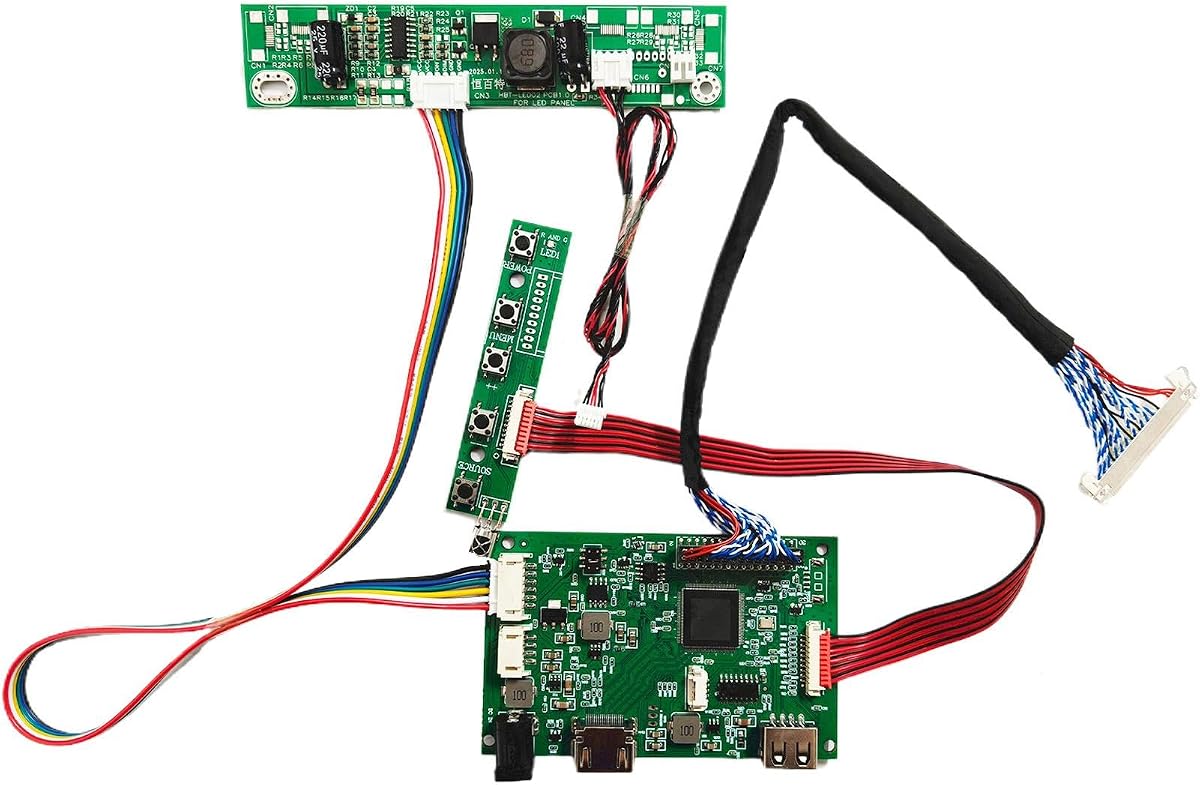
The VSDISPLAY H/D VGA DVI LVDs Controller Board offers an excellent entry point for budget-conscious builders. It is designed for 15.6 inch screens with 1366×768 resolution and a 40-pin LVDS interface which is common in many older laptop models.
We may earn a commission when you buy through this link, at no additional cost to you.
This board supports both VGA and DVI video inputs giving users flexibility in how they connect their source devices. The inclusion of a speaker connector for 8ohm 2W speakers adds extra value for audio output without needing extra hardware. The self-check LED system helps users diagnose issues quickly by indicating board status via green or red lights.
It requires a 12V DC power adapter with more than 2A current to operate smoothly. Users should ensure their power supply meets these requirements to avoid restart loops. The board is plug and play with compatible screens meaning you simply connect the cables and power on to see the signal.
Ideal for those working with specific LP156WH2 or B156XW02 panels this board balances cost and functionality well. It is a solid choice for basic monitor conversions where high-end features are not needed but reliable signal conversion is essential for daily use.
Support for both VGA and DVI inputs allows connection to a variety of older or modern video sources.
The built-in speaker connector supports simple audio output setups directly from the controller board.
We may earn a commission when you buy through this link, at no additional cost to you.
This VGA Controller Board is specifically built for Full HD 1920×1080 displays using a 30-pin eDP interface. It supports a wide range of screen sizes from 11.6 inches up to 17.3 inches making it versatile for various laptop panel replacements or custom monitor builds.
We may earn a commission when you buy through this link, at no additional cost to you.
The board works directly without requiring any driver installation on your computer. Users simply connect the signal cable and power adapter then select the correct resolution settings to get a clear image. The LED light turns green when the board is ready which simplifies the initial power-on check.
A critical requirement is a 12V DC power supply with more than 2A current. If the screen restarts repeatedly it usually indicates the power supply current is too low and needs to be upgraded. This is a common issue with many DIY kits and proper attention to power specs prevents most problems.
It fits popular models like the B156HAN01.1 and LP156WF4 which are often found in higher resolution laptops. The ability to handle 17.3 inch panels sets it apart from boards that only support smaller sizes. This makes it a strong option for users looking to repurpose larger screens into desktop monitors.
Designed for 1920×1080 resolution this board supports high-definition displays common in modern laptops.
Support for screens up to 17.3 inches allows for larger DIY monitor projects compared to smaller options.
We may earn a commission when you buy through this link, at no additional cost to you.
The H/D VGA DVI Audio LVDs Controller Board is tailored for 17 and 19 inch displays with 1280×1024 resolution. It is an excellent choice for gaming screen panels or older workstation monitors that use a 30-pin LVDS interface.
We may earn a commission when you buy through this link, at no additional cost to you.
This board features both VGA and DVI video inputs and a dedicated speaker connector for audio output. It supports a variety of panel models including M170EG01 and LTM170EU which are common in 17 inch laptop screens. The plug and play nature means you can connect the cables and power on immediately.
Users must provide a 12V DC power adapter with more than 3A current which is higher than many other boards. This ensures stable operation and prevents flickering or restart issues during heavy use. The LED light on the board indicates status with green or red to help with troubleshooting.
Ideal for converting a 17 inch laptop screen into a standalone monitor this board offers reliable performance. Its ability to support audio and high resolution for its size makes it a great pick for retro gaming setups or secondary displays in a home office.
Specifically supports gaming screen panels like M170EG01 for smooth video display experiences.
Includes a speaker connector for easy audio integration without needing external speakers.
We may earn a commission when you buy through this link, at no additional cost to you.
This VSDISPLAY VGA DVI Controller Board is designed for large screens from 21.5 inches to 23.8 inches with 1920×1080 Full HD resolution. It is a strong option for users looking to build a desktop monitor from a large laptop screen.
We may earn a commission when you buy through this link, at no additional cost to you.
The kit includes a USB cable specifically for touch screens like the LM238WF5 SSA1 model which adds versatility for interactive displays. It also comes with a keyboard and cable for OSD settings allowing you to adjust menu options directly. Video input supports both VGA and DVI formats.
The power requirement is a 12V DC adapter with more than 3A to handle the larger panel size effectively. Users should note that the power adapter is not included in the package so you must source it separately. The board supports models like T215HVN01.0 and LM238WF1 SLE3.
It is well suited for DIY enthusiasts wanting a large high-resolution display. The inclusion of touch support and an OSD keyboard makes it easier to manage settings without needing extra controllers. This board bridges the gap between laptop parts and full desktop monitor solutions.
Includes a USB cable for compatible touch panels allowing interactive display functionality.
Comes with an OSD keyboard to adjust settings directly without relying on external software.
We may earn a commission when you buy through this link, at no additional cost to you.
This H/D Controller Driver Board is a reliable choice for Full HD 1920×1080 screens using a 30-pin eDP interface. It is field-tested and compatible with popular models like B156HAN01.1 and LP156WF4 ensuring a smooth experience for screen repairs or conversions.
We may earn a commission when you buy through this link, at no additional cost to you.
The signal cable comes pre-connected to the board which simplifies the installation process for users. Pin 1 is clearly marked with a red circle to prevent misalignment during connection. It supports screens from 11.6 inches to 17.3 inches offering a wide range of compatibility.
Power is supplied via a 12V 2A DC adapter with a 5.5×2.1mm port. Users should ensure the adapter meets these specs to avoid flickering or restarting issues. If the screen shows a black or white screen checking cable connections and resolution settings is the first troubleshooting step.
It is ideal for technicians or hobbyists working with modern laptop screens that require Full HD resolution. The pre-connected cable and clear instructions reduce setup time making it a solid pick for quick repairs or custom monitor builds.
Compatibility with models like B156HAN01.1 has been verified to ensure stable performance.
Pre-connected cables and clear markings reduce setup time and error risk during installation.
We may earn a commission when you buy through this link, at no additional cost to you.
The Taidacent Universal LVDS Controller Board is designed for flexibility supporting screens from 10 inches up to 65 inches. It features HDMI DVI and VGA video inputs making it a versatile kit for various DIY display projects.
We may earn a commission when you buy through this link, at no additional cost to you.
This board uses the NT68676 chipset which is known for stability and broad compatibility. The OSD menu supports multiple languages including English French and German allowing users to navigate settings easily. It includes basic functions like power volume and adjust controls.
While it offers wide size support it does not provide a specific list of compatible models so users must verify LVDS pinouts manually. The kit is sold as a single drive board meaning additional adapters may be needed for different screen interfaces. It is best for advanced users who can match specifications themselves.
Ideal for those needing HDMI input on older screens this board provides a pathway to modern video sources. Its multi-language support and universal design make it a useful tool for creating custom displays in different regions or for specific needs.
HDMI input support allows connection to modern devices without needing extra adapters.
OSD menu includes multiple languages to accommodate international users or preferences.
We may earn a commission when you buy through this link, at no additional cost to you.
This VSDISPLAY H/D USB LCD Controller Board stands out with its USB video playback capability alongside standard HDMI input. It is designed for 21.5 to 23.8 inch Full HD screens which are popular for desktop monitor builds.
We may earn a commission when you buy through this link, at no additional cost to you.
The board supports image rotation up to 180 degrees which allows for flexible screen orientation. It also includes a keyboard for OSD settings and an inverter board for certain configurations. Video input via USB supports picture text and video playback directly from a drive.
It requires a 12V DC power adapter with more than 2A current for stable operation. The packing list includes the board signal cable and keyboard but not the power adapter. Users should check compatibility with models like LM238WF1-SLE3 before purchase.
With a perfect 5.0 rating it is a highly rated choice for users wanting standalone media playback. The USB feature allows using the screen without a computer which is useful for digital signage or photo frames. It offers a convenient solution for multimedia use cases.
USB input supports video and picture playback directly without a connected computer.
Image rotation up to 180 degrees allows for portrait or landscape display adjustments.
We may earn a commission when you buy through this link, at no additional cost to you.
This 15.6 inch Controller Board is designed for stable signal transmission with 1366×768 resolution panels. It supports HDMI and VGA inputs using a 40-pin LVDS interface which is common for standard laptop screens.
We may earn a commission when you buy through this link, at no additional cost to you.
The board is capable of stably receiving and decoding video signals to prevent lag or screen distortion. It features adjustable parameters for brightness contrast and color to dynamically adapt to content for a better visual experience. Response time to remote commands is rapid for seamless operation.
Stable operation is ensured by continuously monitoring the screen status and adjusting voltage as needed. This extends the lifespan of the hardware and prevents overload. The board is compatible with external devices like set-top boxes for multi-device signal switching.
Ideal for those needing precise color and signal control this board offers enhanced image quality features. Its ability to handle multiple devices and maintain stability makes it a good option for media centers or general desktop displays.
Adjustable parameters allow for dynamic adaptation to content ensuring vivid colors and clear details.
Compatible with external devices for flexible signal switching in various use scenarios.
We may earn a commission when you buy through this link, at no additional cost to you.
This 17.3 inch Laptop Matrix Kit offers a premium solution for Full HD displays using a 40-pin LVDS interface. It is designed to work specifically with models like B173HW02 V0/V1 ensuring high compatibility.
We may earn a commission when you buy through this link, at no additional cost to you.
The signal processing core converts host outputs into screen-recognizable formats and handles brightness and color instructions. It features high interface matching requirements so input and output must be consistent with the host and screen. This board is small in size relying on notebook power which increases functional integration.
It supports low power modes which extends battery life when connected to laptop power systems. Strict screen adaptability means parameters must match the panel type and resolution exactly. This ensures high-quality display without anomalies or signal errors.
Ideal for professional upgrades or high-fidelity projects this board provides reliable signal processing and power management. Its compact design and high integration make it a top choice for users who need precise control and stability in their display setup.
Compact size and functional integration allow for efficient use of space in laptop setups.
Support for low power modes helps extend battery life in portable or hybrid configurations.
We may earn a commission when you buy through this link, at no additional cost to you.
Choosing the right controller board requires careful attention to technical specifications. This guide breaks down the key factors to help you select a board that matches your panel perfectly.
Resolution compatibility is the most critical factor when selecting a controller board. Panels come in different resolutions such as 1366×768 HD or 1920×1080 Full HD and a board designed for one will not display the other correctly. Always check the native resolution of your screen before purchasing.
Verify your panel model number against the boards compatibility list to ensure it supports your exact resolution.
The interface type defines how the board connects to the screen. Common interfaces include 30-pin eDP 40-pin LVDS or 30-pin LVDS. Using the wrong interface type will prevent the board from sending signals to the display.
Inspect the connector on your screen panel and match it to the board specifications to avoid connection issues.
Video input options determine which devices can connect to your monitor. Some boards support VGA DVI and HDMI while others may only support specific ports. Consider your source devices when choosing the right inputs.
Select a board with HDMI if you plan to connect modern consoles or computers for better quality.
Screen size range indicates which panel sizes the board can support. A board might support 11.6 to 15.6 inches or extend to 23.8 inches. Ensure the board covers your screen size to maintain proper signal scaling.
Check the product description for supported inches to confirm your screen size is included.
Power supply requirements vary between boards with some needing 12V 2A and others 12V 3A. Insufficient current can cause flickering restarting or black screens. Always use a power adapter that meets the board minimum specs.
Ensure your adapter provides enough current to prevent instability during operation.
Panel model specifics refer to exact manufacturer codes like LP156WH4 or B156HAN01.1. Boards are often optimized for specific model families to ensure signal stability. A mismatch here can lead to non-functional displays.
Compare your panel model number against the listed compatible models in the product description.
Additional features include OSD controls touch support or audio output. Some boards offer USB video playback or keyboard access for menu settings. These features can enhance usability for specific projects.
Consider if you need extra functions like touch control or standalone media playback before deciding.
Signal stability ensures the image remains clear without distortion or lag. Boards with proper decoding capabilities and voltage monitoring provide consistent performance. This is vital for long term reliability.
Look for boards that mention stable signal transmission to avoid visual artifacts.
To begin use safely connect the 30 or 40 pin cable to the board and screen ensuring Pin 1 aligns with the red mark. Power the board with the correct adapter and plug in your source device to see the image.
Adjust the OSD menu settings using the provided keyboard to configure resolution brightness and contrast. Save these settings to ensure they persist after power cycles and improve viewing quality.
Keep the board in a well ventilated area to prevent overheating during operation. Avoid touching components directly with bare hands to prevent static discharge or damage to the circuitry.
No you cannot use a 1366×768 board for a 1920×1080 screen. The board is not designed to decode the higher resolution signal and will result in a black or distorted image. You must purchase a board specifically built for Full HD panels.
Most controller boards do not include a power adapter in the package. You will need to source a 12V DC adapter with the correct amperage separately. Check the product details to confirm the required specs before buying.
LVDS and eDP are different video transmission standards with distinct connector pinouts. eDP is often used for newer panels while LVDS is common in older models. Matching the interface type is crucial for successful connection.
Flickering often indicates insufficient power supply current. Ensure your adapter meets the minimum amperage requirements like 2A or 3A. Also check that all cables are seated correctly without loose connections.
Not all boards support HDMI output. Some only support VGA or DVI inputs so verify the input types before purchasing. Look for models explicitly listing HDMI compatibility if that is your primary requirement.
Leaving the board on 24 7 is possible but may reduce lifespan due to heat. Ensure proper ventilation and consider using a timer to power off when not in use for longevity.
We reviewed ten top controller boards that offer reliable solutions for DIY monitor projects. From budget options like the VSDISPLAY H/D VGA DVI to premium kits like the 17.3 Laptop Matrix Kit each option serves different needs.
Prioritize resolution and interface compatibility above all else to ensure your panel works correctly. Power requirements and input types are also key factors that determine usability with your source devices.
Prices and availability change frequently so verify the current details before purchasing. We hope this guide helps you find the perfect board to bring your screen back to life or create a custom display.