
Redragon K618 PRO
4.1Editor score
Tri-mode wireless connectivity
Dedicated macro zone keys
Slim design for travel
This expert guide compares the top 10 low profile mechanical keyboards for 2026, evaluating design, switches, connectivity, and value for work and gaming.
Low profile mechanical keyboards offer a unique blend of slim design and tactile feedback. They reduce wrist strain while delivering the precision expected from mechanical switches. These boards are ideal for professionals and gamers seeking comfort without sacrificing performance in a compact footprint.
We evaluated ten top-rated models based on switch quality, connectivity options, build materials, and user feedback. Each product was analyzed for ergonomics, customization potential, and overall typing experience. Our goal is to help you find the perfect fit for your specific workflow and budget constraints.
Each pick in this guide highlights key strengths and potential trade-offs to consider before buying. Ratings reflect user satisfaction and expert analysis of real-world performance. Please note that prices and availability change frequently, so verify current details on the product pages before purchasing.
4.1Editor score

4.7Editor score

4.6Editor score
The following table provides a side-by-side comparison of all ten models featured in this guide. It highlights key specifications such as layout size, connectivity types, switch characteristics, and unique features to help you differentiate between options quickly.




The Keychron K1 Ultra 8K stands out as a premier choice for users demanding high performance. With a 4.7 rating, it delivers a responsive typing experience suited for both work and competitive gaming. Its 8K polling rate ensures minimal latency, making it ideal for fast-paced tasks.
We may earn a commission when you buy through this link, at no additional cost to you.
Key strengths include its hot-swappable low-profile POM switches, allowing easy customization without tools. The 80% TKL layout saves desk space while keeping essential keys. Sound-dampening layers reduce noise, and the durable hardwood side panels add a premium feel to the build quality.
Trade-offs include a higher price compared to entry-level options and a weight that may not suit portable setups. However, these are acceptable given the robust construction and advanced features. The trade-off ensures longevity and a superior typing experience over standard keyboards.
Ideal for professionals and gamers who prioritize speed and customization. The K1 Ultra 8K is recommended for those willing to invest in a long-term, high-performance low-profile mechanical keyboard that balances ergonomics with advanced technical specifications effectively.
The 8K polling rate provides ultra-fast responsiveness, ensuring every keystroke is registered instantly for competitive gaming and productivity.
Hot-swappable sockets let you change switches easily, while the Launcher Web App enables deep customization of macros and layers.
We may earn a commission when you buy through this link, at no additional cost to you.
The Redragon K618 PRO is an excellent entry point for those seeking a low-profile mechanical keyboard on a budget. It offers a 4.1 rating and features tri-mode connectivity, allowing seamless switching between USB-C, Bluetooth, and 2.4GHz wireless. Its slim design enhances portability.
We may earn a commission when you buy through this link, at no additional cost to you.
Key features include a dedicated macro zone and media scroll wheel, which let you control volume and records instantly without installing software. The linear feedback from the switches is smooth for both typing and gaming. One-touch Win/Mac switching adds versatility for multi-device users.
While it lacks the premium build of high-end models, its plastic construction is functional and lightweight. Some users note minor Bluetooth lag, but the 2.4GHz mode mitigates this for gaming. The budget price makes these trade-offs acceptable for cost-conscious buyers.
This keyboard is perfect for students or casual gamers needing reliable wireless functionality. It offers the essential features of mechanical keyboards without a high cost. We recommend it as a solid first step into the world of low-profile mechanical typing experiences.
Tri-mode connectivity allows you to jump between PC, laptop, and tablet instantly without needing to re-pair devices constantly.
Record macros and adjust media settings on-the-fly using dedicated keys, saving time and simplifying complex workflows.
We may earn a commission when you buy through this link, at no additional cost to you.
The Keychron K3 Max SE combines premium build quality with advanced customization features. With a 4.6 rating, it offers a 75% layout that balances compactness with essential keys. The QMK firmware and hot-swappable switches make it a favorite for enthusiasts who love tuning their setup.
We may earn a commission when you buy through this link, at no additional cost to you.
Its Milk POM switches are 31% slimmer than traditional ones, providing a unique low-profile feel. Advanced acoustic foam layers dampen noise, creating a quieter typing environment. The double-shot PBT keycaps ensure legends stay sharp and resist shine over time.
Trade-offs include needing a wired connection for the Launcher app and varying battery life depending on backlight usage. These are minor inconveniences given the extensive customization options. The solid aluminum frame ensures durability, justifying the higher price for serious users.
Ideal for power users and Mac professionals who value flexibility and sound quality. The K3 Max SE is recommended for those seeking a high-end low-profile keyboard that supports deep customization and offers a superior typing experience.
EPDM and bottom case acoustic foam layers reduce hollow sounds, delivering a quieter and more cushioned typing experience.
Change switches in seconds without soldering, allowing you to experiment with different tactile preferences easily.
We may earn a commission when you buy through this link, at no additional cost to you.
The Keychron K3 Version 2 is designed for users seeking a balance between portability and functionality. Its 75% ultra-slim design makes it one of the thinnest wireless mechanical keyboards. It supports up to three devices via Bluetooth 5.1, enabling seamless multitasking across laptops and tablets.
We may earn a commission when you buy through this link, at no additional cost to you.
The K3 features open-source QMK firmware, allowing you to remap keys and create macros via the Keychron Launcher web app. It includes all necessary Mac multimedia keys and comes with extra keycaps for Windows. The reinforced aluminum body adds durability to the slim profile.
While the plastic bottom frame is lighter, it may feel less premium to some users. The lack of a number pad suits compact setups but might inconvenience data entry tasks. However, the compact design prioritizes desk space, making it a strong contender for mobile professionals.
This keyboard is ideal for travelers and Mac users needing a compact, reliable typing tool. The K3 V2 offers excellent connectivity and customization for its size. It is recommended for those who value thin profiles and wireless flexibility in their daily workflow.
All necessary Mac multimedia keys are included, with extra keycaps provided to ensure full compatibility with Windows devices too.
The built-in AI assistant helps you configure macros and key mappings using plain language, simplifying complex setups.
We may earn a commission when you buy through this link, at no additional cost to you.
The Cherry MX 10.0N delivers the reliability expected from the iconic Cherry brand. It uses genuine MX Low Profile Speed switches, which are linear, quiet, and responsive. These are ideal for gamers who need quick actuation and minimal keystroke resistance during intense sessions.
We may earn a commission when you buy through this link, at no additional cost to you.
Its ultra-thin profile at 0.87 inches combines style with functionality. The aluminum housing ensures durability and a premium look. RGB backlighting offers customizable colors and effects, adding personality to your setup. The integrated stand bar allows for an ergonomic typing position.
While the RGB and build are excellent, software customization is less flexible than open-source options. The non-detachable cable might limit portability for some users. However, for those prioritizing genuine switches and a sturdy build, these limitations are minor trade-offs.
This keyboard is best for gamers and office workers wanting a slim, durable board. The Cherry MX 10.0N offers a consistent typing experience with a premium feel. It is recommended for users who trust the Cherry brand and value hardware quality over advanced software features.
Genuine Cherry MX Low Profile Speed switches ensure consistent linear feedback and rapid response times for gaming and typing.
The aluminum housing provides a durable, sleek frame that resists wear and maintains a professional look on any desk.
We may earn a commission when you buy through this link, at no additional cost to you.
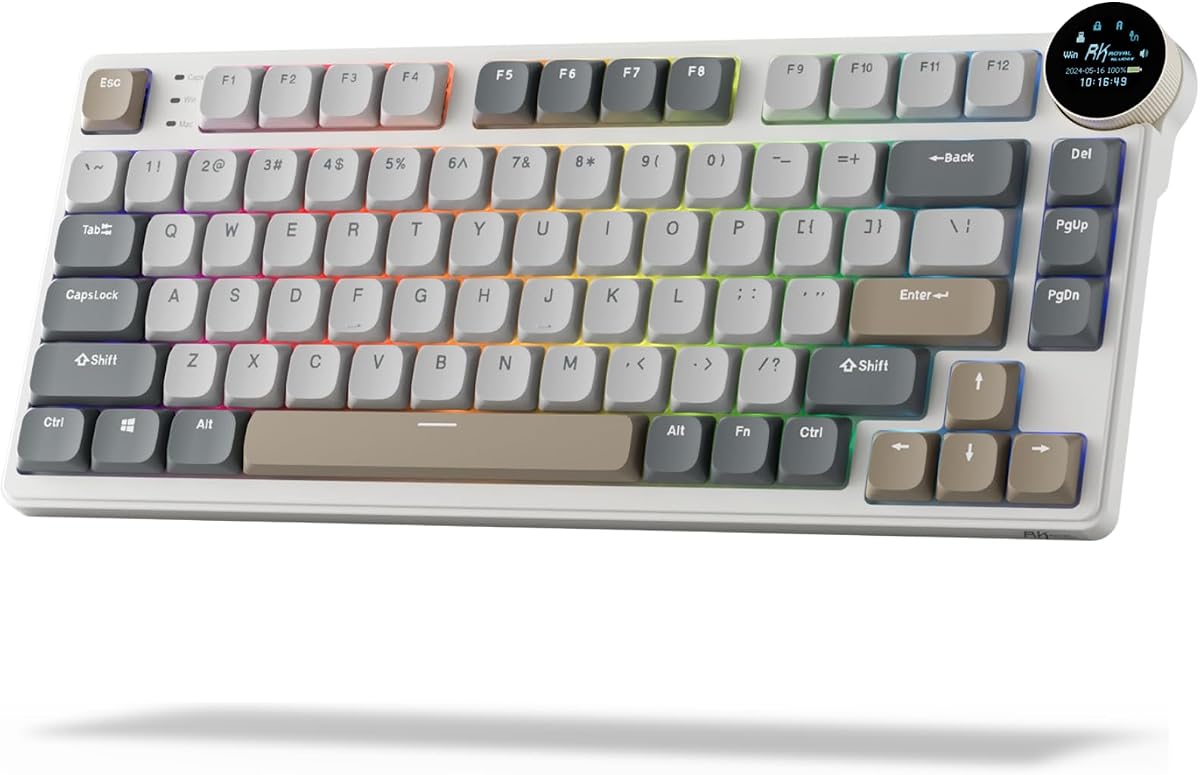
The RK ROYAL KLUDGE N80 stands out with its unique smart display screen. This dynamic display shows custom GIFs, battery status, and connection modes. The knob control lets you adjust volume and RGB settings effortlessly. It combines tech innovation with functional design.
We may earn a commission when you buy through this link, at no additional cost to you.
Its top-mounted structure ensures a firm keystroke and increased feedback, solving wobbling issues common in low-profile boards. Triple sound-absorbing layers minimize hollow sounds, delivering a smooth and quiet typing experience. Tri-mode connectivity offers flexibility for various devices.
The display can drain the battery faster, but the convenience it offers is unique. Initial setup might be complex for some users to customize the screen. However, these factors are minor compared to the innovative features and solid typing performance it provides.
This keyboard is perfect for tech enthusiasts and gamers wanting a distinct desk setup. The N80 offers a blend of visual customization and performance. It is recommended for those who appreciate innovative features and a quiet, stable typing experience.
The small screen showcases custom GIFs and status updates, adding a unique personal touch to your workspace.
Top-mounted structure provides a firm keystroke and stability, ensuring reliability during intense typing or gaming sessions.
We may earn a commission when you buy through this link, at no additional cost to you.
The Flow Lite 84 Keys is designed with ergonomics in mind. It features a lower front height to let your wrists relax during long hours. The Specter linear switches have a 40gf operating force, reducing muscle strain and finger fatigue significantly.
We may earn a commission when you buy through this link, at no additional cost to you.
It uses PBT double-shot keycaps for a textured, matte feel and sharp legends that resist wear. The gasket design provides a soft and cushioned typing experience, with enriched sound-dampening layers. Flexible 3-mode connectivity lets you switch between devices easily.
While the body material is ABS and the polling rate is standard, the focus is on comfort and typing quality. These trade-offs are acceptable for office users prioritizing ergonomics over competitive gaming specs. The 2000mAh battery ensures long-lasting use.
This keyboard is ideal for professionals who type frequently and value comfort. The Flow Lite 84 offers a soothing typing experience with reliable wireless features. It is recommended for those seeking a low-profile keyboard that prioritizes wrist health and durability.
Lower front height and 40gf switches reduce wrist strain and finger fatigue for comfortable long-hour typing sessions.
Durable PBT double-shot keycaps offer a textured matte feel and ensure characters stay sharp and non-slip.
We may earn a commission when you buy through this link, at no additional cost to you.
The Keychron K17 Max features a popular 96% layout, retaining the number pad while saving desk space. It uses Gateron low-profile Brown switches for a satisfying tactile response. The aluminum frame makes it one of the thinnest wireless keyboards available.
We may earn a commission when you buy through this link, at no additional cost to you.
QMK firmware and the Launcher web app allow transparency and security in customization. The double-shot PBT keycaps are non-shine-through with excellent oil resistance. With 2.4 GHz and Bluetooth connections, it supports seamless switching between up to three devices.
The narrow key spacing might take time to adjust for some users. The higher price point reflects the compact, high-quality build. However, for those needing a number pad in a slim form, these trade-offs are worth the efficiency gains.
This keyboard is perfect for professionals who need a number pad and compact design. The K17 Max delivers productivity and performance with a slim profile. It is recommended for users balancing full functionality with ergonomic low-profile typing comfort.
The 96% layout retains essential keys like the number pad, maximizing desk space without sacrificing functionality.
Gateron low-profile Brown switches provide a satisfying tactile bump with a responsive feedback for precise typing.
We may earn a commission when you buy through this link, at no additional cost to you.
The Flow Lite 100 Keys offers a full-size layout with low-profile mechanical comfort. It shares many features with the 84 version but includes more keys. The Specter linear switches reduce finger joint fatigue with a 40gf operating force for effortless precision.
We may earn a commission when you buy through this link, at no additional cost to you.
It comes with a 3000mAh battery, providing up to 100 hours of working time. The PBT double-shot keycaps ensure a durable, textured typing experience. The gasket mount design enriches each keystroke with a satisfying tone, minimizing hollow sounds during use.
The larger footprint requires more desk space compared to compact options. The feature set is similar to the 84-key version, which might not justify the price difference for some. However, full-size users will appreciate the added convenience of a number pad.
This keyboard is ideal for data entry professionals and traditionalists. The Flow Lite 100 Keys provides ergonomic typing with full functionality. It is recommended for those wanting a complete keyboard experience without sacrificing low-profile comfort.
The 3000mAh battery supports up to 100 hours of use on a single charge, reducing the need for frequent recharging.
With 100 keys, it offers all necessary keys for data entry and navigation in a slim ergonomic profile.
We may earn a commission when you buy through this link, at no additional cost to you.
The Razer Ornata V3 bridges the gap between membrane and mechanical keyboards. It uses Mecha-Membrane switches for satisfying tactile feedback. The slim design allows natural hand positioning, reducing strain during long sessions. It feels responsive and precise for everyday use.
We may earn a commission when you buy through this link, at no additional cost to you.
UV-coated keycaps ensure fade-resistant legends and protection against wear. A magnetic soft touch wrist rest provides ample comfort and support. Dedicated backlit media keys offer ultimate convenience for adjusting volume and playback. These features enhance usability without sacrificing style.
While it lacks true mechanical switches, the Mecha-Membrane offers a comfortable alternative. Software customization requires Chroma app use, which may be a hurdle for some. However, the overall durability and ergonomic design make it a strong choice for casual gamers.
This keyboard is perfect for gamers seeking a sleek, comfortable experience. The Ornata V3 delivers a unique typing feel at a budget price. It is recommended for those who want a slim keyboard with good ergonomics and reliable media controls.
Fuses the snappy feedback of mechanical switches with the familiar feel of a conventional keyboard for precise, satisfying keystrokes.
The magnetic soft touch wrist rest snaps on seamlessly, providing essential comfort and support during long periods of use.
We may earn a commission when you buy through this link, at no additional cost to you.
Choosing a low profile mechanical keyboard involves balancing size, switch type, and features. This guide breaks down the essential factors to help you find the best fit for your specific needs and preferences.
Switches determine the tactile feedback and sound of your keyboard. Low-profile switches come in linear, tactile, and clicky varieties. Linear switches offer smooth, quiet keystrokes ideal for gaming, while tactile switches provide a bump for typing accuracy. Clicky switches deliver an audible click for feedback but can be noisy in shared spaces. Consider your noise tolerance and usage environment before selecting a switch type.
Layout refers to the arrangement of keys and the overall size. Compact layouts like 60%, 75%, or TKL save desk space, while full-size or 96% layouts include number pads. Consider how much desk space you have and whether you need a numpad for data entry. A smaller layout offers more mouse space, while a larger one provides traditional functionality for office tasks.
Connectivity includes wired USB-C, Bluetooth, or 2.4GHz wireless. Wired offers the lowest latency for competitive gaming, while wireless provides flexibility and cleaner desk setups. Look for tri-mode options if you switch between multiple devices. Ensure the connection is stable and supports the polling rate needed for your activities to avoid input lag during critical moments.
Build quality impacts durability and typing stability. Aluminum frames provide a sturdy, premium feel, while plastic cases are lighter and more portable. Check for features like gasket mounting or sound-dampening layers to reduce hollow sounds. A solid build ensures the keyboard remains stable during intense typing or gaming without wobbling or flexing.
Ergonomics are critical for long typing sessions. Low-profile designs reduce wrist strain by keeping hands closer to the desk. Look for a low front height and optional wrist rests. Proper ergonomics prevent fatigue and long-term repetitive strain injuries. A comfortable keyboard enhances productivity and reduces discomfort during extended use.
Customization includes software support for remapping keys, creating macros, and lighting effects. Open-source firmware like QMK offers deep customization. RGB backlighting and keycap options allow for personalization. Ensure the software is user-friendly and supports your operating system. Good customization options let you tailor the keyboard to your specific workflow preferences.
For wireless keyboards, battery life is a key consideration. Look for capacities that support at least 40 to 80 hours without backlighting. Charging via USB-C is convenient and standard. Check how long it takes to fully charge. Long battery life ensures the keyboard remains functional throughout your workday or gaming sessions without interruptions.
Prices range from budget-friendly to premium options. Determine your budget and prioritize features that matter most to you. Sometimes spending more means better build quality and reliability. However, budget options often deliver excellent value for casual users. Balance cost with the longevity and features offered to ensure a worthwhile investment for your setup.
To begin, connect your keyboard via USB-C, Bluetooth, or 2.4GHz dongle depending on your preference. Pair Bluetooth devices through your operating system settings. For wired use, simply plug into an available USB port. Ensure the keyboard is charged or connected to power before first use for optimal performance.
Customize your keys using the provided software or web app. Set up macros for repetitive tasks to save time. Adjust RGB lighting to suit your mood or workspace aesthetic. For wireless models, manage multiple device connections by switching profiles as needed. Regularly update firmware to access new features and security patches.
Maintain your keyboard by cleaning dust with a soft brush or compressed air. Avoid eating or drinking near it to prevent spills. Use a keyboard cover if portability is frequent. Check battery levels regularly for wireless models. Store in a cool, dry place when not in use to ensure long-term durability.
Low profile mechanical keyboards can be excellent for gaming due to their shorter travel distance and faster actuation. They offer a sleeker profile that reduces wrist strain during long sessions. However, traditional mechanical switches may provide more feedback for competitive play. Choose based on your preference for speed and comfort over tactile response.
Battery life varies by model but typically ranges from 40 to over 100 hours with lights off. Using RGB lighting and wireless connectivity reduces battery life. Most models feature USB-C charging for convenience. Check product specifications for exact capacity estimates before purchasing your preferred model.
Most modern low profile mechanical keyboards are compatible with both Mac and Windows systems. They often include extra keycaps or physical toggles to switch operating system layouts. Ensure the model explicitly mentions multi-system support to avoid keymapping issues during daily use across devices.
Low profile switches are designed with durability similar to standard mechanical switches, often rated for 50 million keystrokes. Their shorter travel does not inherently reduce lifespan. Proper care and maintenance ensure longevity regardless of profile. Regular cleaning helps maintain consistent performance over years of use.
Yes, low profile keyboards are suitable for programming due to their compact size and ergonomic design. The reduced height helps reduce wrist strain during long coding sessions. Many models offer customization for macros and key remapping which aids productivity. Check for tactile options if you prefer feedback while typing code.
Modern wireless keyboards with 2.4GHz dongles offer reliability comparable to wired connections for most games. Bluetooth is better for multitasking and non-competitive play. Look for models with high polling rates to ensure minimal latency. Competitive gamers should test wireless performance to ensure it meets their specific reaction needs.
We reviewed ten excellent low profile mechanical keyboards ranging from budget to premium. Key highlights include the Keychron K1 Ultra 8K for speed, the Redragon K618 PRO for value, and the Keychron K3 Max SE for customization. Each option offers unique benefits depending on your specific workflow priorities.
Prioritize comfort and connectivity when selecting your next keyboard. A low-profile design helps reduce strain, while wireless options improve desk space. Choose a switch type that matches your preference for feedback. Investing in the right model ensures a productive and comfortable typing experience for work and gaming.
Remember that prices change frequently and models may get updated regularly. Always check the current price and specifications before finalizing your purchase. This guide provides a comprehensive overview to help you make an informed decision. Happy typing with your new low profile mechanical keyboard.