
Anker 2.4G Wireless Ergonomic Mouse
4.2Editor score
800 to 1600 DPI
USB receiver connectivity
Power-saving sleep mode
This guide compares the top ergonomic mice for wrist pain to help you find a vertical design that reduces strain and improves comfort during long work hours.
Finding the right ergonomic mouse can transform your daily workflow by reducing wrist strain and promoting a natural handshake position. These devices are specifically designed to alleviate pain caused by prolonged computer use.
We evaluated ten leading vertical mice based on their ergonomic design, connectivity options, battery life, and user feedback. Each product was assessed for its ability to maintain comfort during extended sessions without sacrificing precision or performance.
Each pick highlights unique features like silent clicks, multi-device switching, and rechargeable batteries. Please note that availability and pricing may change, so verify details on the product page before purchasing your new mouse.
4.2Editor score

4.4Editor score

4.4Editor score
The following table provides a side-by-side comparison of all ten selected models, highlighting key specifications such as connectivity types, DPI ranges, and unique ergonomic features to help you make an informed decision.



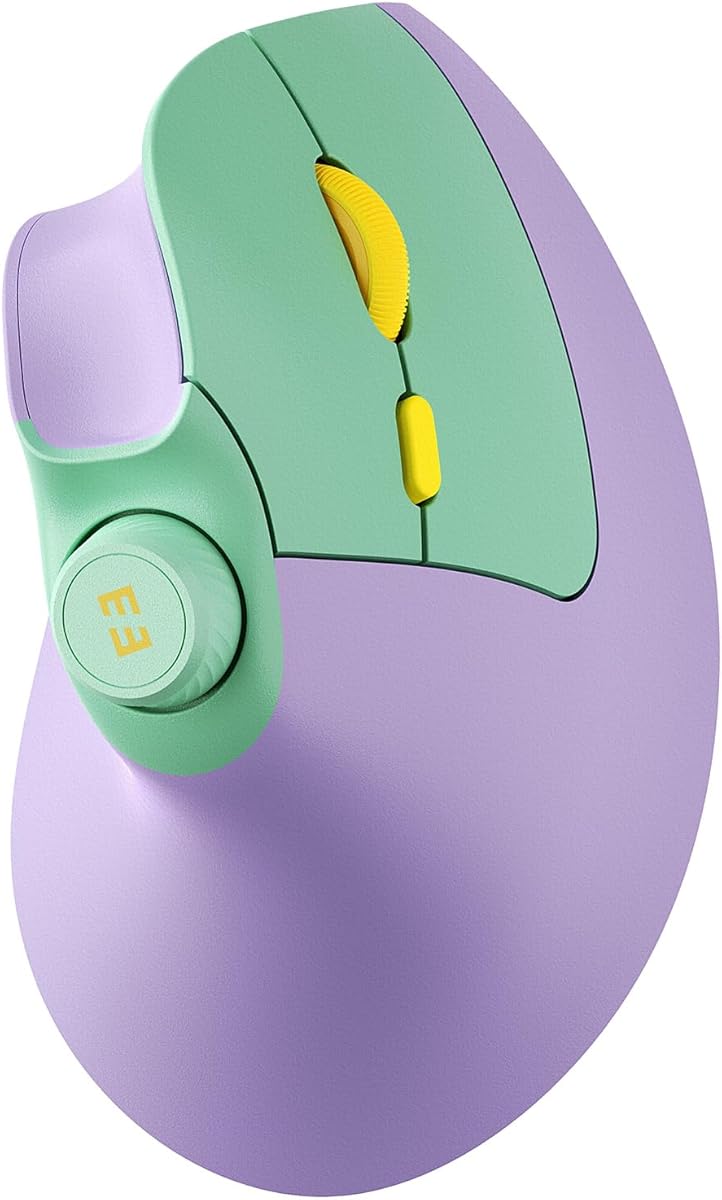

The Logitech Lift Vertical Ergonomic Wireless Mouse stands out as a top contender for users seeking relief from wrist pain. With a rating of 4.4 stars, it is praised for its vertical design that promotes a natural handshake posture.
We may earn a commission when you buy through this link, at no additional cost to you.
Its 57-degree vertical angle helps align the wrist and forearm in a neutral position, reducing muscle strain during long work sessions. The mouse features a softly textured grip and a snug thumb rest that enhances comfort significantly throughout the day.
While it offers customizable buttons and a SmartWheel for seamless scrolling, users with larger hands might find the fit less ideal compared to bulkier models. The silent clicks are excellent for quiet environments but may lack tactile feedback for some.
This mouse is highly recommended for those with small to medium hands who prioritize ergonomic health and long battery life. It connects via Bluetooth or USB and works seamlessly across Windows, macOS, and Linux systems.
Designed and tested by leading ergonomists, the Lift ensures that its shape meets strict criteria for reducing wrist pressure and promoting healthy posture during daily computer use.
Plastic parts in the Graphite version include 70% certified post-consumer recycled plastic, reflecting a commitment to sustainability without compromising performance or build quality.
We may earn a commission when you buy through this link, at no additional cost to you.
The Anker 2.4G Wireless Ergonomic Mouse offers exceptional value for budget-conscious users seeking ergonomic benefits. Rated 4.2 stars, it features a scientifically designed structure that promotes a healthy neutral wrist position.
We may earn a commission when you buy through this link, at no additional cost to you.
Its optical tracking technology provides sensitivity ranging from 800 to 1600 DPI, ensuring smooth movement across various surfaces. The mouse includes next and previous buttons that make browsing webpages effortless for internet enthusiasts and office workers.
While it lacks Bluetooth and has audible clicks, these trade-offs are acceptable given the low price point and robust 18-month warranty. The power-saving mode activates after eight minutes of inactivity to extend battery life effectively.
This mouse is ideal for those who need a reliable vertical alternative without breaking the bank. It connects via a USB receiver and is compatible with Windows and macOS systems for versatile workplace use.
The 1600 DPI resolution offers more sensitivity than standard mice, allowing for precise cursor control whether you are working on spreadsheets or casual browsing.
Automatic power-saving mode disconnects power after inactivity, ensuring that your AAA batteries last longer even with frequent daily use in an office environment.
We may earn a commission when you buy through this link, at no additional cost to you.
TECKNET ergonomic mouse offers seamless switching between three devices via Bluetooth or USB, making it versatile for hybrid workers. With a 4.4 rating, it features a high-performance chip and six adjustable DPI levels up to 4800 for precise tracking.
We may earn a commission when you buy through this link, at no additional cost to you.
The silent click design allows for quiet operation in libraries or open offices, though only the left and right buttons are silent. It connects easily and includes a built-in USB receiver for quick connections without port clutter.
Users should note that side buttons may not work with macOS, and it requires AAA batteries which are not included. The 36-month warranty provides added peace of mind for long-term usage across Windows and Linux systems.
This model is best suited for users who need high sensitivity and multi-device support at a competitive price. It reduces wrist pressure by placing the palm at a near-vertical angle on the desktop.
Operating quietly ensures that your work or study remains undisturbed, making it a great choice for shared spaces where noise control is important for focus.
With six DPI levels from 800 to 4800, you can switch between precise editing and fast browsing with ease, adapting the mouse to different tasks instantly.
We may earn a commission when you buy through this link, at no additional cost to you.
The UGREEN Ergonomic Wireless Mouse is designed with a natural vertical handshake position to reduce muscle strain and wrist rotation. It features quiet-click buttons and a practical five-button layout that enhances daily productivity and browsing efficiency.
We may earn a commission when you buy through this link, at no additional cost to you.
Its PTFE glide feet ensure effortless movement with reduced friction, offering smoother tracking across different surfaces. You can switch between up to three devices using Bluetooth or 2.4G wireless connectivity with a range of up to 10 meters.
While it supports Windows, macOS, and Android, users may need to swap out the included AA battery as needed. The adjustable DPI levels allow you to match precision needs from document editing to fast scrolling tasks.
This mouse is a versatile choice for users with larger hands who want a quiet and reliable vertical option. Its wide system compatibility makes it suitable for laptops, desktops, and tablets alike.
Built with durable Teflon glide pads, this mouse minimizes surface friction to ensure accurate cursor control and comfortable movement throughout long work hours.
Dual wireless options let you connect via Bluetooth or USB, offering flexibility for devices that may not support both connection types equally.
We may earn a commission when you buy through this link, at no additional cost to you.
The ProtoArc EM11 NL is specifically designed for small to medium hands under 7.5 inches, ensuring a perfect ergonomic fit. With a 4.4 rating, it reduces wrist strain by aligning with your natural grip and features a rechargeable Li-Ion battery.
We may earn a commission when you buy through this link, at no additional cost to you.
It connects to up to three devices via Bluetooth and 2.4G USB, offering seamless switching for multi-device workflows. The silent clicking on left and right buttons helps maintain focus, though the scroll wheel is not silent.
Users should note that this model is not intended for large hands and uses a Type-C cable for charging which is included. It supports Windows, Mac, and Android systems but has limited Mac compatibility for side buttons.
Ideal for users with smaller hands seeking a rechargeable option, this mouse improves comfort over time. The learning curve of about two weeks helps you adapt to the vertical shape for better long-term health.
Tailored for hand lengths under 7.5 inches, this mouse ensures a snug fit that reduces wrist strain by aligning with your natural hand shape and grip posture.
The built-in 500mAh battery eliminates the need for disposable batteries, providing convenient charging via USB Type-C for consistent use across multiple devices.
We may earn a commission when you buy through this link, at no additional cost to you.
The Lekvey Ergonomic Mouse encourages a healthy neutral handshake wrist position to reduce overall strain during computer work. Rated 4.3 stars, it features a high-capacity rechargeable battery that offers over 150 hours of continuous use per charge.
We may earn a commission when you buy through this link, at no additional cost to you.
With three DPI levels and page back and forward buttons, it provides convenience for web browsing and document navigation. The nano USB receiver allows for plug and play simplicity without needing drivers or Bluetooth pairing.
Most customers report significant wrist pain reduction after a few days of adjustment to the vertical shape. It is compatible with Windows and Linux systems and comes with an industry-leading 36-month manufacturer warranty.
This model is well-suited for medium to large hands seeking a rechargeable vertical mouse with good battery life. Its ergonomic design helps streamline work and reduce repetitive strain injuries over time.
Enjoy over 150 hours of continuous use on a single charge, eliminating the hassle of frequent battery replacements during your daily workflow.
Three DPI levels allow you to adjust sensitivity to match your task needs, ensuring smooth movement whether you are browsing or working on detailed tasks.
We may earn a commission when you buy through this link, at no additional cost to you.
TECKNET ergonomic mouse features a 52-degree vertical angle designed to reduce carpal tunnel strain and fatigue. Rated 4.6 stars, it offers versatile connectivity via Bluetooth 5.0 and 2.4G for smooth switching between three devices.
We may earn a commission when you buy through this link, at no additional cost to you.
The 600mAh rechargeable battery provides up to two months of use per charge, saving money on disposable batteries. Its silent click technology reduces noise by 99%, making it ideal for libraries or open office environments.
With six adjustable DPI levels from 800 to 4800, users can adapt the cursor speed for photo editing or gaming with precision. Side buttons allow for faster web navigation though they may not work on Mac systems.
This mouse is best for professionals who value efficiency and need a durable option for long work sessions. It supports Windows and Mac systems and includes a 36-month warranty for registered users.
The silent click technology reduces noise by 99%, ensuring distraction-free work in quiet environments like libraries or shared office spaces where sound control is key.
With 4800 DPI and six adjustable levels, you can switch between pixel-perfect editing and fast-paced browsing with a single press for ultimate control.
We may earn a commission when you buy through this link, at no additional cost to you.
The seenda MOU-302 stands out with its built-in volume control button, allowing you to pause or adjust music directly from the mouse. Rated 4.6 stars, it promotes a natural handshake grip to reduce pressure and discomfort during long hours.
We may earn a commission when you buy through this link, at no additional cost to you.
It connects to three devices simultaneously via Bluetooth and USB, offering flexibility for hybrid workers who switch between laptops and tablets. Silent clicks prevent distractions while adjustable DPI ensures smooth control across different surfaces.
The 500mAh battery lasts up to two months per charge, and it works with Windows, macOS, iOS, and Android. This universal solution suits diverse devices like PCs and iPads for home or work environments.
Ideal for music lovers and multitaskers needing quick audio control, this mouse boosts efficiency without breaking workflow. Its ergonomic design helps reduce wrist strain while keeping your workspace organized and quiet.
Pause and adjust volume directly from the mouse, boosting efficiency for streamers and remote workers who need quick control without switching windows.
With a built-in 500mAh battery, this mouse lasts up to two months per charge, ensuring reliable use anywhere without frequent interruptions for recharging.
We may earn a commission when you buy through this link, at no additional cost to you.
The Logitech MX Vertical is a premium ergonomic mouse designed with a natural handshake position that reduces muscular activity by 10 percent. Rated 4.4 stars, it features a unique 57-degree vertical angle to reduce pressure on your wrist.
We may earn a commission when you buy through this link, at no additional cost to you.
Its advanced optical tracking with a 4000 DPI sensor results in 4x less hand movement, reducing fatigue during extensive use. The cursor speed switch instantly adjusts DPI speed with the touch of a button for better precision.
The textured rubber surface assures a natural grip and fits a variety of hand shapes. While it is more expensive than other models, it is tested and approved by leading ergonomists for improving posture and lowering strain.
This mouse is recommended for professionals willing to invest in high-quality ergonomic equipment. It includes a USB receiver and is a robust solution for reducing wrist pressure and improving overall productivity.
MX Vertical has been designed and tested with criteria set out by leading ergonomists to improve posture, lower muscle strain, and reduce wrist pressure effectively.
The 4000 DPI high-precision sensor results in 4x less hand movement, reducing fatigue and providing precise control even for detailed and complex tasks.
We may earn a commission when you buy through this link, at no additional cost to you.
TECKNET 2.4G Wireless Ergonomic Vertical Mouse features a 60-degree vertical grip that lets you hold it like a natural handshake to relax your forearm. Rated 4.4 stars, it speeds up workflow with six programmable buttons and five adjustable DPI levels.
We may earn a commission when you buy through this link, at no additional cost to you.
The left and right buttons feature a silent design to ensure a focused workspace without distracting noise. It provides a stable and interference-free connection of up to ten meters, allowing for easy pairing between desktops and laptops.
Users are advised to give it three days to adapt as muscles correct years of poor posture. This model supports Windows and macOS systems and comes with a 36-month warranty for added peace of mind.
This mouse is an affordable investment in wrist health that requires a short adjustment period. It is best for office productivity with smooth scrolling and quick navigation through documents and webpages.
With a scientific 60-degree vertical grip, this mouse lets you hold it like a natural handshake, keeping your forearm straight to reduce wrist strain and pain at the source.
With six programmable buttons and five adjustable DPI levels, this mouse speeds up your workflow by reducing repetitive click fatigue and allowing for quick task adjustments.
We may earn a commission when you buy through this link, at no additional cost to you.
Selecting the right ergonomic mouse requires understanding several key factors that impact comfort and usability during long work sessions. This guide breaks down the essential elements to consider before making a purchase.
The vertical angle of a mouse determines how much your wrist is rotated during use. Most ergonomic mice feature angles between 52 and 60 degrees to promote a neutral handshake posture that reduces muscle strain and carpal tunnel pressure.
Look for a mouse with a 57-degree angle or similar to ensure proper alignment of your wrist and forearm for daily comfort.
Ergonomic mice come with Bluetooth, 2.4G wireless, or both. Bluetooth is great for saving USB ports but requires pairing. Wireless receivers offer instant plug-and-play convenience that is often more stable for desktop use.
Choose dual connectivity if you need to switch between multiple devices seamlessly during your workday for maximum versatility.
Battery life varies significantly between models. Some use replaceable AAA batteries for endless use while others offer rechargeable batteries via USB-C for convenience. Rechargeable options reduce waste but add charging time to your workflow.
Select rechargeable models if you dislike buying batteries often or prefer a cleaner desk setup without cables cluttering your workspace.
Dots Per Inch (DPI) measures mouse sensitivity. Higher DPI allows for faster movement on large screens while lower DPI offers precision for detailed tasks like photo editing or spreadsheet work. Adjustable DPI buttons are a valuable feature for flexibility.
Opt for a mouse with adjustable DPI levels to match different tasks and ensure smooth cursor control across various screen resolutions.
Ergonomic mice often include extra buttons like back, forward, and volume controls to improve productivity. Silent clicks are also a common feature for shared environments where noise can be disruptive. Check which buttons are programmable for shortcuts.
Ensure the mouse has enough programmable buttons and features that align with your daily workflow needs for efficient operation.
Fit is crucial for comfort. Some mice are designed for small to medium hands while others target large hands. An ill-fitting mouse can cause more strain than it relieves. Check product dimensions and recommended hand sizes before buying.
Measure your hand length and compare it to the product specs to ensure the mouse fits your hand properly for maximum comfort.
While most mice work with Windows and macOS, some features may be limited on specific operating systems. Side buttons or software customization tools might not function correctly on Linux or Chrome OS without additional configuration.
Verify full compatibility with your primary operating system to avoid losing access to key features like side buttons or software customization.
A strong warranty indicates manufacturer confidence in product durability. Many ergonomic mice come with 12 to 36-month warranties. Good customer support can help resolve connectivity or hardware issues quickly to minimize downtime.
Prioritize brands that offer at least a one-year warranty and responsive customer service for a safer purchase decision.
Start slowly by using the ergonomic mouse for short intervals of 15 to 30 minutes daily to allow your hand to adjust to the vertical position. As you become more comfortable, gradually increase usage time to reduce wrist fatigue.
Keep your forearm supported on your desk surface and ensure your wrist is straight rather than bent while using the mouse. Avoid gripping the mouse tightly as a loose hold reduces muscle tension during operation.
Clean the mouse regularly with a soft cloth to remove dust and oils from the sensor and surface. Check battery levels periodically or recharge before full depletion to maintain consistent performance and extend the device life.
Yes, ergonomic mice help reduce wrist pain by positioning your hand in a neutral handshake posture. This alignment minimizes rotation of the wrist and reduces muscle strain which can prevent conditions like carpal tunnel syndrome.
Most users experience a learning curve of about one to two weeks when switching to a vertical mouse. It may feel awkward at first but regular use improves comfort and reduces pressure on your wrist over time.
Most vertical mice are designed for right-handed users only. Some models support left-handed use but you should check product specifications carefully to confirm if it is ambidextrous before purchasing.
Connect via a USB receiver or Bluetooth. Plug the receiver into your PC or pair via Bluetooth settings. Follow the manufacturer instructions for pairing and installation of any required software for full functionality.
Yes, many ergonomic mice offer high DPI and adjustable sensitivity suitable for gaming. However, they may feel different than traditional mice so test one to see if it meets your precision needs.
Choose a size that matches your hand length. Small to medium hands fit compact models while larger hands need full-size options. Measure your hand length to ensure a comfortable fit that supports natural posture.
The ten ergonomic mice reviewed in this guide offer diverse options ranging from budget-friendly to premium solutions. Each model provides unique features designed to reduce wrist strain and improve daily productivity in various work environments.
Prioritize a mouse that fits your hand size and meets your connectivity needs for long-term comfort. Investing in a vertical design can significantly reduce muscle strain and help prevent repetitive stress injuries during prolonged computer use.
Remember to check current prices and availability on product pages before purchasing as these details change frequently. Choosing the right ergonomic mouse can transform your workspace and improve your overall health and productivity effectively.