
MINISFORUM MS-S1 MAX
4.5Editor score
128GB Unified Memory
AMD Ryzen AI Max+ 395
Dual Unit Cluster Support
This guide compares the top 10 dual GPU AI setups for local model inference, training, and heavy workloads across workstation, server, and mini PC categories
Building a powerful dual GPU AI setup is essential for developers and researchers who need to run large language models locally without relying on cloud services. These systems provide the raw compute power and massive VRAM capacity required for efficient inference, fine-tuning, and complex neural network tasks.
We evaluated ten distinct configurations ranging from compact mini workstations to enterprise-grade server racks. Each product was assessed based on GPU architecture, memory bandwidth, cooling solutions, and software compatibility to ensure they meet the rigorous demands of modern artificial intelligence workflows.
Every pick in this list highlights specific strengths such as cost efficiency, thermal management, or scalability. Please note that pricing and availability can fluctuate rapidly due to high demand in the AI hardware market, so verify current details before making a purchase decision.
4.5Editor score

4.8Editor score

4.7Editor score
The following comparison table breaks down the key specifications of each top-rated dual GPU AI setup to help you identify the best fit for your specific computational needs and budget constraints.


The WEELIAO MAXSUN Intel Arc Pro B60 48G Turbo Workstation Graphics Card stands out as a highly cost-effective solution for developers needing substantial VRAM. It features an innovative dual-GPU design that combines two Arc Pro B60 units into a single card, offering 48GB of GDDR6 memory. This configuration is ideal for running quantized models like DeepSeek-R1:70B entirely on a single card, which significantly reduces the need for expensive cloud services.
We may earn a commission when you buy through this link, at no additional cost to you.
Its standout feature is the massive 48GB VRAM combined with dual compute power delivering 394 TOPS total. This allows for high-concurrency inference and multi-turn dialogues without bottlenecks. The card utilizes a PCIe 5.0 x8 + PCIe 5.0 x8 interface, which works well with motherboards supporting x16 lane bifurcation. This lowers system costs significantly compared to traditional multi-card setups.
While it offers impressive specs for the price, users should ensure their motherboard supports PCIe bifurcation to get full bandwidth. The cooling system is robust, featuring a triple-thermal design with a blower fan, ensuring stability during long inference tasks. This makes it a reliable choice for those who need consistent performance over extended periods.
This card is perfect for small teams or individual researchers who need to run large models locally. It supports major frameworks like PyTorch and vLLM, making integration straightforward. If you prioritize VRAM capacity and cost efficiency over raw ray-tracing performance, this is a compelling option.
Eliminates the need for multi-card setups or cloud services by running 70B-class models on a single card.
The triple-thermal design ensures efficient heat dissipation, maintaining stable temperatures during long tasks.
We may earn a commission when you buy through this link, at no additional cost to you.
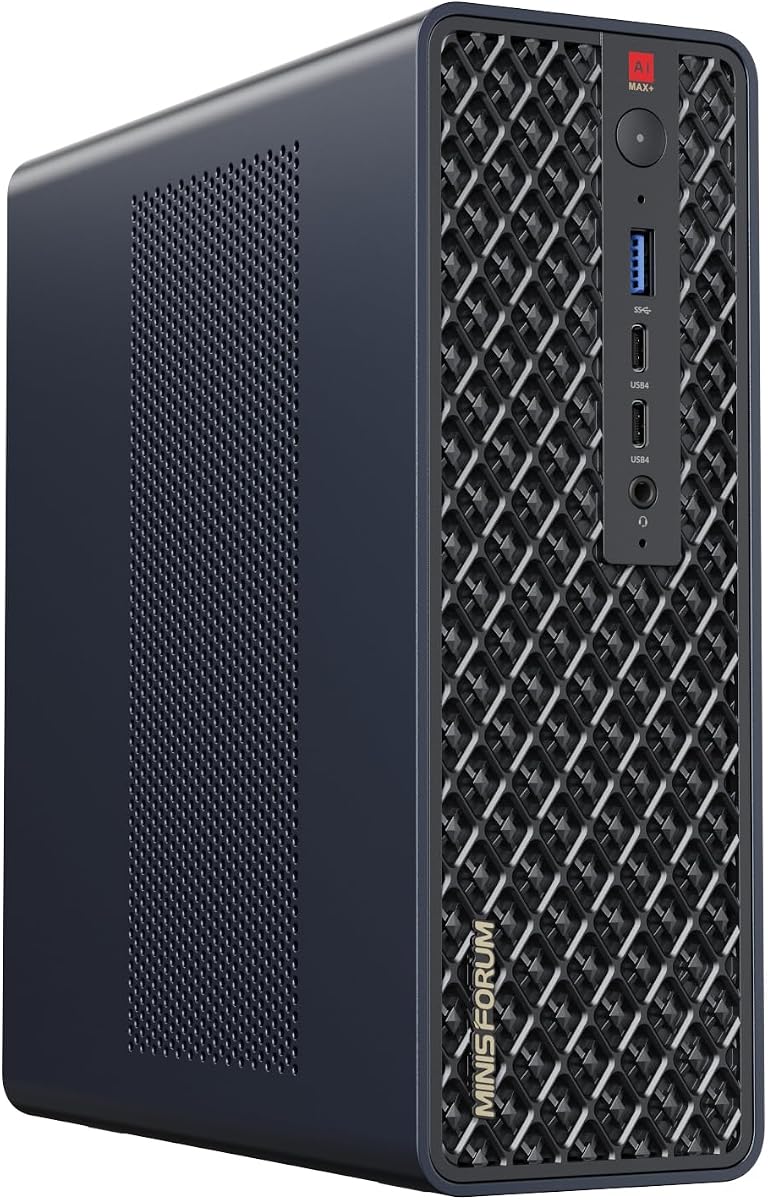
The MINISFORUM MS-S1 MAX Mini AI Workstation PC offers a surprisingly powerful solution for AI workloads in a tiny package. Featuring the AMD Ryzen AI Max+ 395 APU, it integrates a Zen 5 architecture CPU with an RDNA 3.5 GPU and an NPU. The total system output reaches 126 TOPS, making it capable of running local LLMs and multimodal models efficiently.
We may earn a commission when you buy through this link, at no additional cost to you.
Its defining feature is the 128GB LPDDR5x unified memory. This allows the CPU and GPU to access a shared memory pool with extremely low latency, eliminating traditional VRAM bottlenecks. This design is particularly beneficial for large-scale AI inference and complex video editing timelines. The system also supports clustering, allowing two units to run a large 235B Q4 model locally.
Trade-offs include the lack of discrete GPU expansion and limited physical upgrade paths. However, the cooling system is robust with six heat pipes and dual turbine fans, maintaining stable performance under continuous loads. Connectivity is excellent with USB4 V2 and dual 10GbE LAN ports.
This mini PC is ideal for developers with limited desk space who still need serious compute power. It supports cluster deployments, which means you can scale up by adding more units. If you need a compact, efficient workstation for AI prototyping, this is a fantastic choice.
Eliminates traditional VRAM bottlenecks, ensuring smoother data transfer during high-intensity computations.
Multiple units can be cascaded to create a high-efficiency AI computing center for larger models.
We may earn a commission when you buy through this link, at no additional cost to you.
The APC ES620 Dual GPU AI Workstation is a top-tier system designed for serious AI training and inference workloads. It is powered by the AMD Ryzen 9-9950X processor and features dual NVIDIA GeForce RTX 5090 GPUs. This setup provides 64GB of GDDR7 memory per GPU, totaling 128GB of VRAM, which is critical for handling massive datasets.
We may earn a commission when you buy through this link, at no additional cost to you.
Its key strengths lie in its thermal management and memory capacity. The system includes a 360mm liquid cooler for the processor, ensuring stable temperatures during intense computations. With 256GB of DDR5 RAM and 8TB of NVMe SSD storage in RAID, it eliminates data bottlenecks, allowing for real-time dataset ingestion and manipulation.
The main drawbacks are the high cost and large physical size. The system is a full tower with a 1600W power supply, which requires adequate cooling and space. However, for professionals who need maximum performance and reliability, these trade-offs are acceptable. It comes fully tested and ready to use.
This workstation is best suited for enterprise researchers or studios that need to run local LLMs and deep learning models. The connectivity includes Wi-Fi 7 and multiple USB ports, making it versatile. If you need a turnkey solution with no compromises on performance, this is the ideal choice.
Paired with Gen5 NVMe SSDs, it eliminates bottlenecks for real-time dataset ingestion and manipulation.
Liquid cooling on the processor ensures consistent performance during demanding AI workloads.
We may earn a commission when you buy through this link, at no additional cost to you.
The NVIDIA DGX Spark 2 Pack delivers supercomputer performance directly to your desktop in a compact, energy-efficient design. It leverages the powerful Grace Blackwell architecture to provide up to 1 petaFLOP of AI performance. This allows for local model fine-tuning, inference, and analytics right where you need it.
We may earn a commission when you buy through this link, at no additional cost to you.
Its standout quality is the seamless integration of the full NVIDIA AI software stack. This means you can develop locally and deploy anywhere without friction. With 128GB of unified memory per unit, it supports running large models with up to 200 billion parameters directly on your desktop. This unlocks new ideas and experimentation possibilities.
While it comes at a premium price, the ROI for increased productivity is high. It allows you to augment cloud or data center resources effectively. The design is sleek and fits well in professional settings. It is fully tested and ready for immediate use.
This setup is perfect for innovators and enterprises that need a secure, high-performance setting for AI testing. It empowers rapid validation and iteration cycles. If you need a powerful tool to experiment with large models without cloud latency, this is a top-tier choice.
Delivers enterprise-scale AI and high-performance computing right where you need it.
Enables you to prototype, test, and innovate faster by augmenting resources locally.
We may earn a commission when you buy through this link, at no additional cost to you.
The ASUS Dual EPYC 9965 Server is a high-performance computing configuration designed for HPC clusters. It features two AMD EPYC 9005 processors with up to 192 Zen 5c cores and supports up to eight NVIDIA RTX PRO 6000 Blackwell GPUs. This creates a dense 4U GPU server capable of housing massive compute resources.
We may earn a commission when you buy through this link, at no additional cost to you.
Its key strengths include superior networking connectivity supporting up to 15 total NICs and 10 high-bandwidth 200GbE NICs. The storage expansion allows for up to 122.88TB per drive across ten PCIe 5.0 NVMe SSDs. This setup eliminates bottlenecks and provides efficient maintenance with toolless design.
The trade-offs are primarily cost and physical footprint. This is clearly an enterprise solution not meant for home use. However, the advanced management features and hardware-level security make it ideal for organizations needing reliability. It includes ASUS Control Center software for streamlined IT management.
This system is best for businesses needing scalable, secure, and efficient maintenance. It supports up to 200TB of storage and advanced networking. If you require a high-density, high-bandwidth platform for multi-user AI workloads, this is the definitive enterprise choice.
Capable of housing eight 600W NVIDIA GPUs for massive compute capacity.
Includes hardware-level Root-of-Trust solution for enhanced security and control.
We may earn a commission when you buy through this link, at no additional cost to you.
The Cloud Ninjas Iron Bull AI Workstation is designed for professionals using specialized software like PIX4Dsurvey. It features the Ryzen Threadripper 9970X processor running at 4.0GHz and up to 5.4GHz turbo. The system includes a powerful GeForce RTX 5090 32GB GPU and 128GB of ECC Reg DDR5 memory.
We may earn a commission when you buy through this link, at no additional cost to you.
Its standout feature is the 10G networking capability paired with onboard AQtion AQC113C 10GbE LAN. This ensures fast data transfer which is critical for large AI datasets. The power supply is a robust 1600W unit rated 80 PLUS Platinum, and it includes a 360mm AIO CPU liquid cooler.
Trade-offs include being a single GPU system which limits total VRAM compared to dual GPU setups. However, it delivers excellent performance for the specific workload it targets. It also has Wi-Fi 7 for wireless connectivity. The system is custom built and fully tested.
This workstation is ideal for surveyors or engineers who need reliable, high-performance hardware for photogrammetry and AI analysis. It supports high-speed networking for large file transfers. If you need a system tuned for specific industry software, this is a highly effective solution.
Designed for PIX4Dsurvey ensuring optimized performance for photogrammetry workflows.
1600W power supply and liquid cooling ensure stable operation under heavy loads.
We may earn a commission when you buy through this link, at no additional cost to you.
The Empowered PC EPYC Workstation offers ultimate local AI training power with a 192-core AMD EPYC 9965 processor. It is equipped with three NVIDIA RTX PRO 6000 Blackwell GPUs totaling 288GB of VRAM and 768GB of DDR5 ECC RDIMM memory. This setup is designed for training massive local LLMs without cloud latency.
We may earn a commission when you buy through this link, at no additional cost to you.
Its key strengths include the massive 768GB RAM pool and Gen5 NVMe SSDs for fast data pipelines. The cooling is handled by a premium 4U-SP5 cooler. It comes with a 2800W PSU and supports 24/7 uptime. The build quality is backed by a 3-Year Limited Hardware Warranty.
Trade-offs are the high cost and the need for 240V power. Without 240V, the system runs at reduced compute power. However, the performance is unmatched for local training. The chassis is spacious and fully managed for enterprise use.
This is perfect for organizations needing to future-proof their tech infrastructure locally. It is turnkey and ready to run complex neural networks. If you need to train massive models without relying on cloud services, this workstation is the ultimate solution.
Driven by the 192-core AMD EPYC processor for unmatched parallel processing.
Backed by a 3-Year Limited Hardware Warranty and lifetime technical support.
We may earn a commission when you buy through this link, at no additional cost to you.
The NVIDIA RTX PRO 6000 Max-Q Workstation Edition delivers high-performance computing with a massive 96GB of GDDR7 ECC memory. It is built on the cutting-edge NVIDIA Blackwell architecture and provides up to 3,511 TOPS of AI performance. This card is engineered for agentic workflows and advanced data science.
We may earn a commission when you buy through this link, at no additional cost to you.
Its standout quality is the efficient power consumption capped at 300 Watts while delivering massive VRAM. This makes multi-GPU desktop scaling viable. The card features a 512-bit bus width and supports up to four DisplayPort 2.1 outputs. It also includes advanced cooling for stable operation.
Trade-offs include OEM bulk packaging without retail boxes. The price is high for a single card. However, the efficiency and VRAM capacity justify it for professional workloads. It bridges the gap between heavy calculation and visual output.
This is the definitive choice for teams needing to scale intelligence rapidly on desktops. It is ideal for studios needing real-time rendering. If you need maximum local VRAM efficiency without massive power draw, this is the premium option.
Engineered for agentic workflows and advanced data science locally.
Makes multi-GPU desktop scaling perfectly viable for demanding research labs.
We may earn a commission when you buy through this link, at no additional cost to you.
The MINISFORUM MS-S1 Max Mini Workstation is a compact powerhouse featuring the AMD Ryzen AI Max+ 395 processor. It offers up to 126 TOPS total performance and 50 TOPS NPU performance. The integrated Radeon 8060S Graphics supports ultra-high frame rates and multi-monitor setups.
We may earn a commission when you buy through this link, at no additional cost to you.
Its standout feature is five 8K video outputs allowing massive multi-monitor displays. It includes dual 10G LAN ports for high-speed wired networking. It has 128GB LPDDR5 RAM and expandable M.2 slots supporting RAID. The cooling system is robust with phase change technology.
Trade-offs are the lack of discrete GPU slots and single GPU architecture. It is also small, which limits airflow compared to towers. However, the efficiency is impressive. The system is quiet and handles complex CAD workflows well.
This mini PC is ideal for digital signage or securities trading. It provides a wider field of view for engineering design. If you need compact hardware for high-performance computing, this is an excellent choice.
Supports multiple monitors simultaneously to improve efficiency.
Integrates phase change cooling technology for superior heat management.
We may earn a commission when you buy through this link, at no additional cost to you.
The WEELIAO MAXSUN Intel Arc Pro B60 48G Turbo Workstation Graphics Card stands out as a highly cost-effective solution for developers needing substantial VRAM. It features an innovative dual-GPU design that combines two Arc Pro B60 units into a single card, offering 48GB of GDDR6 memory. This configuration is ideal for running quantized models like DeepSeek-R1:70B entirely on a single card.
We may earn a commission when you buy through this link, at no additional cost to you.
Its standout feature is the massive 48GB VRAM combined with dual compute power delivering 394 TOPS total. This allows for high-concurrency inference and multi-turn dialogues without bottlenecks. The card utilizes a PCIe 5.0 x8 + PCIe 5.0 x8 interface, which works well with motherboards supporting x16 lane bifurcation. This lowers system costs significantly.
While it offers impressive specs for the price, users should ensure their motherboard supports PCIe bifurcation to get full bandwidth. The cooling system is robust, featuring a triple-thermal design with a blower fan, ensuring stability during long inference tasks. This makes it a reliable choice for those who need consistent performance over extended periods.
This card is perfect for small teams or individual researchers who need to run large models locally. It supports major frameworks like PyTorch and vLLM, making integration straightforward. If you prioritize VRAM capacity and cost efficiency over raw ray-tracing performance, this is a compelling option.
Eliminates the need for multi-card setups or cloud services by running 70B-class models on a single card.
The triple-thermal design ensures efficient heat dissipation, maintaining stable temperatures during long tasks.
We may earn a commission when you buy through this link, at no additional cost to you.
Selecting the right dual GPU AI setup requires careful evaluation of several critical factors to ensure compatibility with your specific models and workflows.
VRAM capacity is the most critical factor for local LLM inference and training. Larger models require more VRAM to store weights and activations. High bandwidth ensures faster data movement between memory and compute units, reducing latency during operations.
Modern architectures like NVIDIA Blackwell or Intel Arc offer significant efficiency improvements. Ensure your GPU supports the latest CUDA or IPEX frameworks. Compatibility with software like PyTorch or vLLM is essential for running open-source models smoothly.
Dual GPU setups demand substantial power. Look for a PSU rated at least 1600W for high-end configurations. Efficient cooling and stable voltage delivery are essential to prevent throttling during prolonged inference tasks.
Effective cooling prevents thermal throttling during sustained loads. Consider liquid cooling or robust air cooling systems. Stable temperatures ensure consistent performance and extend hardware lifespan under heavy use.
Fast DDR5 RAM and NVMe SSDs reduce data loading times. High storage throughput is vital for parsing large datasets. Ensure enough system memory to handle large batch processing without bottlenecks.
Motherboards must support PCIe bifurcation to provide sufficient lanes for multiple GPUs. Check your motherboard's PCIe configuration. Without proper support, GPUs may operate at reduced speeds and lower bandwidth.
Choose setups that allow for future upgrades. Systems with expandable memory and multiple PCIe slots offer more longevity. This ensures your investment remains viable as models grow larger and more complex over time.
Balance performance with cost. Sometimes a dual lower-end GPU setup offers better VRAM per dollar than a single high-end card. Evaluate total system cost including power and cooling to get the best return on investment.
Ensure proper BIOS configuration to enable PCIe lane bifurcation before installation. This guarantees both GPUs receive full bandwidth and operate at peak performance levels. Refer to your motherboard manual for specific settings.
Maintain clean cooling systems by regularly removing dust from fans and filters. Dust buildup can restrict airflow and cause overheating, which leads to performance throttling. Use compressed air to clean vents weekly.
Keep your system updated with the latest drivers and firmware. This ensures compatibility with new AI models and security patches. Regular updates optimize performance and stability for your specific workflows.
Not necessarily. Performance depends on whether the workload can be parallelized across both GPUs efficiently. Some models may not scale linearly. Check benchmark results for your specific use case.
It is generally not recommended due to driver conflicts and VRAM limitations. Most software expects identical GPU configurations for load balancing. If mixing is required, use virtualization to separate workloads.
At least 128GB of system RAM is recommended for modern LLMs. This prevents bottlenecks when loading models. Higher capacities ensure smoother operations during training and complex inference tasks.
Yes, for most dual GPU cards to access full bandwidth. Without it, PCIe lanes are shared between GPUs which slows them down. Check if your motherboard supports x16 bifurcation before purchasing.
Yes, modern GPUs support both rendering and inference tasks. You can assign one GPU for display and the other for AI. Ensure your software supports multi-GPU rendering for best results.
Not always, but it helps maintain stability under heavy loads. High-end GPUs generate significant heat. Robust air cooling can work, but liquid cooling offers better thermal headroom for continuous use.
The top picks in this guide offer exceptional capabilities ranging from compact mini PCs to powerful enterprise servers. The WEELIAO MAXSUN Intel Arc Pro B60 offers incredible value for developers with 48GB VRAM on a single card. For those needing premium performance, the APC ES620 workstation provides top-tier RTX 5090 GPUs.
When choosing a setup, prioritize VRAM capacity and PCIe compatibility for your specific models. Consider your budget and power requirements carefully to ensure stable long-term operation. Selecting the right combination of CPU and GPU will define your productivity.
Prices and availability fluctuate often due to high market demand for AI hardware. Always check current listings and warranty terms before purchasing. Ensure you verify motherboard support for PCIe bifurcation to avoid performance issues after setup.