
Akai Professional MPC Sample Portable Sampler
4.8Editor score
Compact Portable Sampler Design
16 Responsive MPC Pads
Battery Powered Standalone Operation
This guide compares the top grooveboxes for live performance including samplers and sequencers to help you choose the best portable music production workstation
Finding the right groovebox for live performance means balancing portability with powerful sound and sequencing tools. Musicians need devices that let them build tracks from scratch on stage without relying on a computer. A good groovebox combines sampling, synthesis, and effects into one unit that fits your workflow.
We evaluated ten leading models based on their standalone capabilities, workflow intuitive, and connectivity options for stage use. Each product offers unique strengths ranging from simple beat making to complex multi track arrangements. This list covers options for beginners and professionals looking to expand their live sets with hardware.
Every pick includes detailed specs pros and cons to help you match a device to your musical style. Prices and availability change frequently so check current listings before buying. Use this guide to find the perfect partner for your next live show or creative session.
4.8Editor score

4.8Editor score
4.5Editor score
This side-by-side comparison highlights the core specifications of each groovebox to help you quickly identify the best fit for your live performance needs.



The Ableton Move is a standout groovebox for live performance because it combines portability with deep creative tools. With a rating of 4.8 it is praised for its ability to let musicians sketch ideas without a computer. The device shines in its standalone operation and high quality sound handling.
We may earn a commission when you buy through this link, at no additional cost to you.
Its 32 velocity sensitive pads with polyphonic aftertouch offer expressive control for melodies and drums. The four flexible tracks can be set as synths samplers or drum kits giving you a full production suite. Built in time stretching and sample slicing on the device make it easy to remix tracks live.
While the 4 track limit might feel restrictive for complex arrangements it keeps the workflow focused and simple. You cannot expand storage beyond the 64 GB included but the included sounds are extensive. This trade off ensures the device remains lightweight and easy to carry to any gig.
Buy this if you want a seamless bridge between hardware performance and software production. It is ideal for artists who use Ableton Live and want to extend their studio to the stage. The Move delivers a polished experience that respects your time and creativity.
The built-in battery and speaker mean you can create anywhere without needing extra gear or a laptop to get started.
Wireless features let you stream audio and transfer sets directly to your computer for seamless hybrid workflows.
We may earn a commission when you buy through this link, at no additional cost to you.
The Akai Professional MPC Sample is a fantastic entry point into standalone sampling with a 4.8 rating for ease of use. It captures the classic MPC workflow in a tiny portable package that fits in any backpack. This makes it perfect for beatmakers who need a quick way to record and play on the go.
We may earn a commission when you buy through this link, at no additional cost to you.
Its 16 responsive pads and 2.4 inch display provide intuitive control for chopping and sequencing. The device includes over 100 factory kits and instant sample chop mode to help you start making music immediately. Four internal FX processors give you creative sound design options without needing plugins.
The main trade off is the smaller screen which can make navigation tricky compared to larger units. You also have fewer pads to work with which may limit complex finger drumming sessions. However for a budget focused device it delivers exceptional value and reliability for live use.
Choose this if you want a simple affordable tool for sampling and beat making without a computer. It suits beginners and experienced producers who need a portable backup for their main rig. The MPC Sample offers a reliable and fun way to capture ideas anywhere.
Experience the legendary MPC sampling style with modern features like instant chop and resampling all in one unit.
With a rechargeable battery and internal speaker you can create and play back tracks without any extra equipment.
We may earn a commission when you buy through this link, at no additional cost to you.
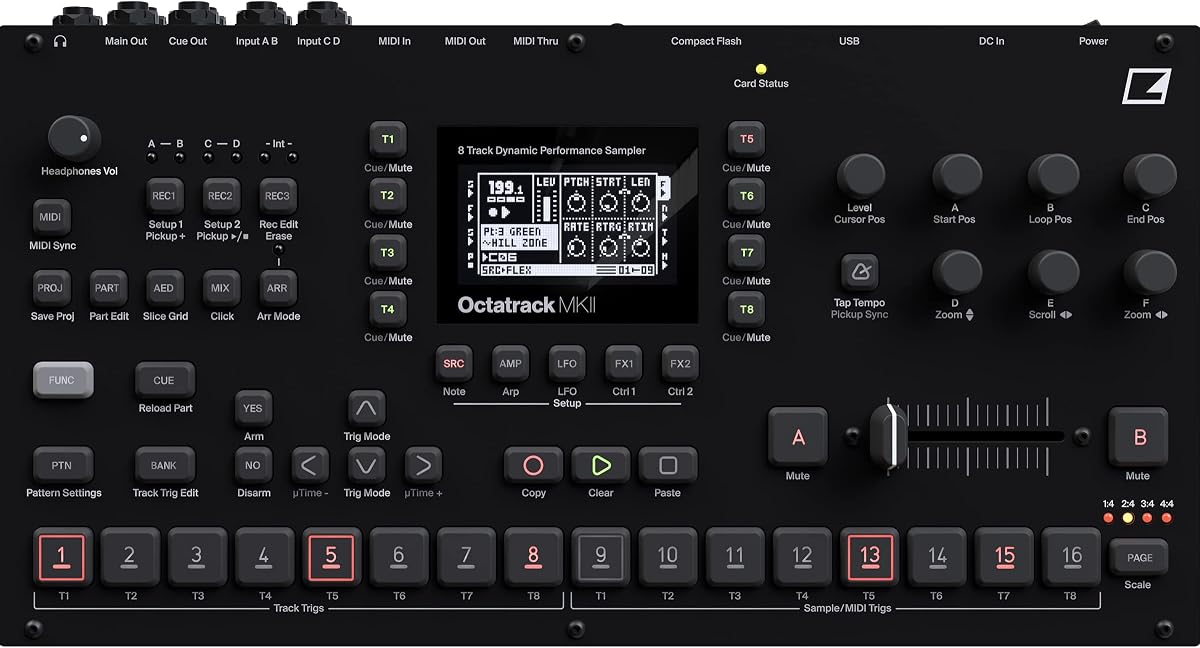
The Elektron Octatrack MKII is a powerhouse for live performers seeking complete control over their sound. With a rating of 4.5 it is known for its powerful sampling and sequencing engine that handles complex arrangements easily. Its 8 stereo audio tracks and 8 MIDI tracks offer extensive routing and processing options.
We may earn a commission when you buy through this link, at no additional cost to you.
Real-time pitch shifting and time stretching allow you to manipulate samples on the fly for dynamic performances. The ultra-smooth contactless crossfader and rugged buttons make it ideal for intense stage use without worry of wear. High-resolution encoders ensure every tweak is precise and repeatable across shows.
This device comes with a steep learning curve which can be daunting for those new to electronic music production. The price is also significantly higher than many competitors making it an investment for serious artists. However the flexibility it provides is unmatched for customizing live sets in real time.
Invest in this if you need a pro level instrument that can handle any genre or style. It is perfect for electronic musicians who want to craft unique sounds live without relying on a laptop. The Octatrack MKII is a reliable companion for demanding performances.
Adjust pitch time stretch and process audio instantly using the dedicated buttons and crossfader for dynamic live changes.
Built with buttons rated for millions of presses and balanced inputs this unit survives the rigors of touring.
We may earn a commission when you buy through this link, at no additional cost to you.
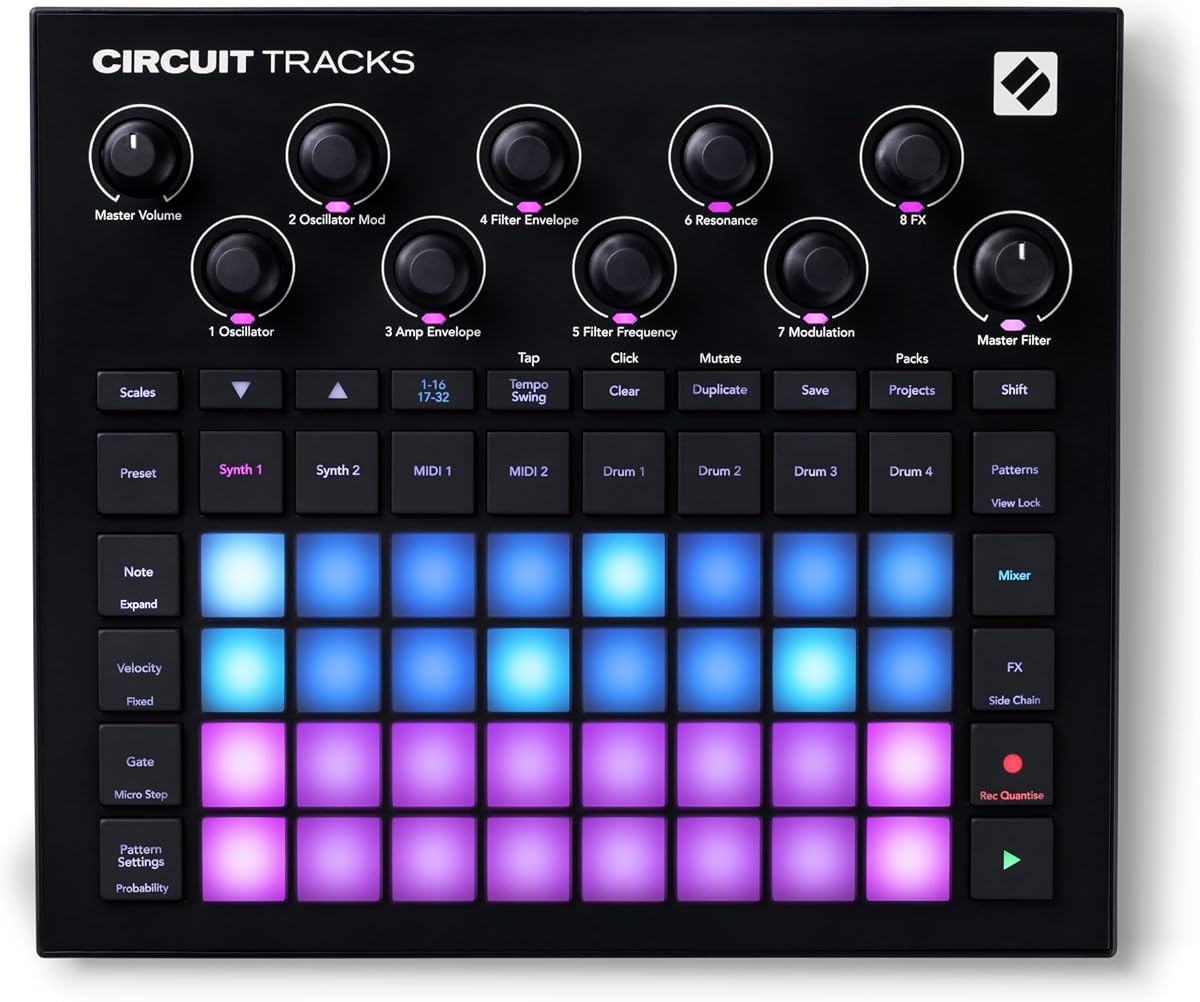
The Novation Circuit Tracks stands out for its hybrid approach combining two synth tracks with MIDI and drum tracks. Rated 4.7 it appeals to producers who want to layer melodies and drums without needing a full DAW setup. The velocity sensitive pads and customizable patches allow for expressive live performance.
We may earn a commission when you buy through this link, at no additional cost to you.
You can chain patterns up to 256 steps giving you ample room for developing complex arrangements. The included artist samples and Components online companion let you expand sounds easily without complex loading. It serves as a great hub for controlling external hardware as well as internal sounds.
This model leans more on synthesis than deep sample manipulation which might limit some sound designers. Audio input options are also limited compared to dedicated sampling workstations. Yet for creating evolving musical ideas on stage it remains a strong and flexible choice.
Pick this if you want a compact unit that balances synthesis and sequencing for live sets. It suits musicians who need both internal sounds and external MIDI control in one easy to use box. The Circuit Tracks offers a clean and powerful creative experience.
Use two tracks for digital synths and two for MIDI control to build full songs on one device.
Chain sequences and use probability features to keep your live performance dynamic and evolving every time.
We may earn a commission when you buy through this link, at no additional cost to you.
The Roland MC-707 is designed as a complete music production workstation that excels in standalone recording. With a 4.3 rating it offers 8 tracks and 128 clips for creating full arrangements without a computer. Its comprehensive connectivity lets you integrate seamlessly with other studio or stage gear.
We may earn a commission when you buy through this link, at no additional cost to you.
You get access to tone drum kit and looper track types plus extensive effects processing for detailed sound shaping. The SD card expansion means you can store vast libraries of samples and projects. This makes it ideal for touring artists who need to save and recall complex setups quickly.
Its size and complexity make it less portable than more compact grooveboxes and may slow you down on a small stage. The menus can be deep requiring practice to navigate efficiently during a live set. However the depth of control it offers is a major plus for producers.
Choose this if you need a full production suite on the road with recording and mixing features. It is best for those who want to create and play back finished arrangements without outside help. The MC-707 provides professional power in a standalone unit.
Capture multi-track recordings and mix your tracks live using the built-in mixer and effects for a complete show.
Use SD cards to load custom samples and expand your library to handle any style or genre you play.
We may earn a commission when you buy through this link, at no additional cost to you.
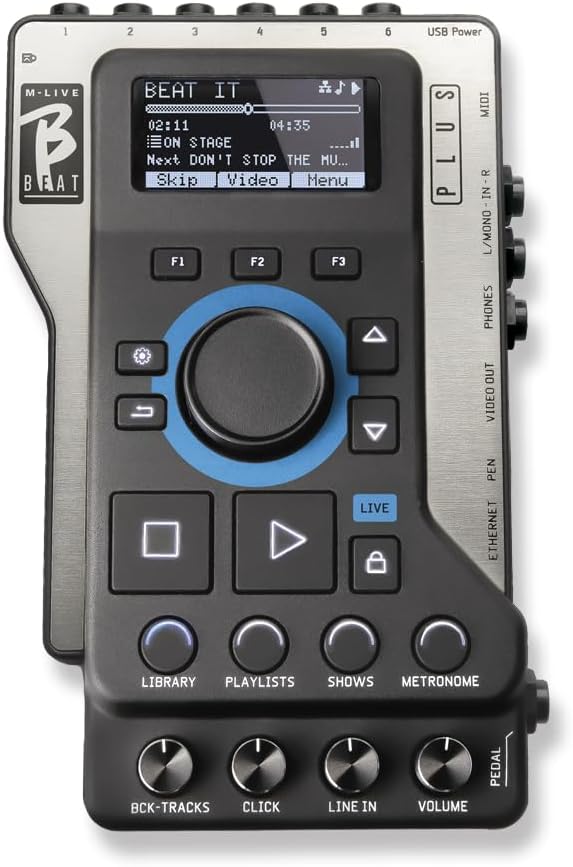
The M-Live B.Beat Plus is tailored for musicians who need reliable backing tracks without the risk of a laptop. It scores 4.7 for simplifying live rigs by replacing bulky computers and mixers with one compact unit. It supports up to 16 mono or 8 stereo tracks for detailed set management.
We may earn a commission when you buy through this link, at no additional cost to you.
You can sync tracks with video via HDMI and adjust the mix in real time using six balanced outputs. Features like live loops and markers give you control to jump sections or extend songs on the fly. Stem removal tools also let you remove vocals or instruments from tracks instantly.
It is not a full synthesizer so it lacks sound creation tools and focuses on playback and control. Initial setup requires using desktop software to organize your shows which adds a prep step before gigs. Still for bands and solo artists it provides a stable and powerful backing system.
Select this if you want to streamline your stage setup with precise track and video control. It is ideal for bands that rely on pre-recorded parts but need to adapt to live conditions easily. The B.Beat Plus ensures your backing tracks are always ready.
Use markers and loops to trigger parts of your song or repeat sections without stopping the performance.
Eliminate laptops and mixers to reduce failure points and keep your focus entirely on performing music.
We may earn a commission when you buy through this link, at no additional cost to you.
The Elektron Digitakt II is celebrated for its powerful sequencing and sound design capabilities with a 4.4 rating. It offers 16 audio tracks and a 128-step sequencer that enables complex and precise rhythmic patterns. The swappable filters and per-track effects give you rich creative tools for sound sculpting.
We may earn a commission when you buy through this link, at no additional cost to you.
You can assign up to three LFOs per track for modulation and use Euclidean generators for mathematical rhythms. This level of control allows for dynamic live performances where every element can be tweaked. It is a favorite for those who enjoy deep programming and sound tweaking.
The device requires significant time to learn and master which may discourage beginners. Its polyphony is limited compared to synths so it shines best in rhythm and sampling tasks. For those willing to learn it offers unmatched depth for electronic performance and production.
Opt for this if you want to build intricate sequences and enjoy hands-on sound shaping. It is best for electronic producers who value precision and customization over simple preset use. The Digitakt II is a serious tool for creative expression.
Assign filters and LFOs to individual tracks to craft unique sonic textures and evolving rhythms.
Use the 128-step sequencer and Euclidean tools to program complex patterns that keep your set exciting.
We may earn a commission when you buy through this link, at no additional cost to you.
The myTRACKS Groovebox is designed for users who want to make music without prior experience or lessons. With a 4.6 rating it simplifies song creation using automated notes and intuitive controls. This makes it an excellent gift for aspiring musicians or families wanting to explore sound together.
We may earn a commission when you buy through this link, at no additional cost to you.
You can combine drums instruments loops and effects to create full songs in minutes. The built-in sampler lets you record your voice or everyday sounds and turn them into beats easily. Hands-on controls for filters and echoes let you shape your own musical style instantly.
It lacks the depth of professional units and may not satisfy advanced users seeking complex workflows. The sound library is also smaller so you may want to expand later with other tools. But as an entry-level device it is fun and effective for learning basics.
Choose this if you want to start making music immediately without frustration or technical barriers. It fits beginners and casual creators who value fun and simplicity over complex features. The myTRACKS Groovebox removes the barriers to musical creativity.
Build complete songs from scratch with automated notes and simple controls that guide you through the process.
Use hands-on effects and sampling to transform any sound into music and discover your unique style.
We may earn a commission when you buy through this link, at no additional cost to you.
The Roland MC-101 brings professional sound in a small package that runs on standard batteries. While rated N/A this bundle offers the same core features as the larger MC-707 in a four-track version. It is perfect for travelers who need a reliable tool for writing and performing anywhere.
We may earn a commission when you buy through this link, at no additional cost to you.
It uses the ZEN-Core synthesis system to deliver classic Roland sounds that have defined electronic music. You can import custom samples and sync them to tempo for seamless integration. The included cables and polishing cloth add immediate value for setting up your rig.
The limited track count and lack of advanced video sync restrict complex arrangements but ensure portability. It requires AA batteries which means carrying spares but avoids needing power outlets for short sessions. This makes it a flexible companion for quick recording or jamming sessions.
Buy this if you need a lightweight device that still offers top-tier Roland sound quality. It suits solo artists who need a portable production tool without sacrificing tone or reliability. The bundle ensures you have what you need to start making music right away.
Access decades of Roland synth sounds in a small device that fits in your pocket for any venue.
Includes necessary cables and cleaning tools so you can start performing without needing extra purchases.
We may earn a commission when you buy through this link, at no additional cost to you.
The Akai APC40 MKII is a powerful controller that brings hands-on control to your Ableton Live setup. With a 4.8 rating it is praised for its seamless integration with clip launching and mixing. While not a standalone groovebox it works with your software to create a hybrid live rig.
We may earn a commission when you buy through this link, at no additional cost to you.
You get a 5×8 clip matrix with RGB feedback to see track status visually. The nine faders and eight knobs give direct access to mixer and device controls without touching your laptop. It also doubles as a lighting control surface for dynamic visual shows during performances.
This device needs a computer connection which limits true portability compared to standalone units. It is designed as a controller not a self-contained production environment. However for those who already use Ableton Live it enhances their workflow significantly on stage.
Choose this if you want to control your laptop performance with tactile buttons and faders. It is best for producers who use computers but want a more engaging and reliable way to launch clips and mix. The APC40 MKII adds a professional edge to your live setup.
Map clips and effects directly to the board to trigger changes instantly during your performance without lag.
Use RGB feedback and assignable buttons to control lighting cues and add visual flair to your show.
We may earn a commission when you buy through this link, at no additional cost to you.
Selecting the right groovebox involves understanding your musical needs workflow preferences and technical requirements.
A true groovebox for live performance should work without a computer so you can create and perform independently. Look for units with rechargeable batteries built-in speakers and sufficient internal memory to store your sounds. This independence ensures you avoid connection issues during shows and keeps your setup compact.
Always verify battery life and charging options to ensure it meets your gig duration needs.
Consider how many tracks and patterns you need to build your arrangements. Some devices offer four tracks which suits simple sets while others provide eight or more for complex compositions. Understanding these limits helps you avoid workflow frustration when layering drums melodies and bass lines.
Match the track count to the complexity of your usual live set to maintain performance flow.
Sampling capabilities vary widely so check if you can record import and manipulate audio directly on the device. Features like time stretching pitch shifting and onboard FX are vital for live sound design and flexibility. Without these tools you may feel restricted to fixed loops and presets during performances.
Prioritize devices that let you edit and slice samples on the fly for dynamic shows.
The sequencing engine defines how fast you can program beats and patterns during a performance. Look for intuitive step sequencers pattern chains and real-time recording that match your playing style. Complex workflows can slow you down so choose a device with controls you can use by muscle memory.
Choose a workflow that matches your natural creative process to reduce mistakes on stage.
Check inputs and outputs to ensure you can connect to mixers synthesizers or lighting rigs. MIDI and USB ports allow you to expand your setup while audio outputs ensure clean sound transmission. Good integration means you can add external gear without creating a complicated or messy stage.
Ensure the device has all necessary ports for your existing hardware to keep your rig tidy.
For live use the size weight and durability of the device matter a lot. A smaller unit is easier to carry but may sacrifice screen size or control layout. Rugged materials and sturdy controls protect against wear and tear from travel and frequent use on stage.
Balance size and durability to ensure the unit fits your transport needs and survives the road.
An extensive factory library gets you started quickly but expansion via SD cards or downloads matters for long-term use. Consider whether the device allows you to load your own samples or sounds to match your unique style. A flexible sound engine ensures you can grow with the device without needing to upgrade.
Look for flexible storage options that let you keep your sound library current and personalized.
Set a budget that reflects the features you truly need rather than paying for extras you won't use. Many models offer great performance at different price points so compare what you get for your investment. Remember that accessories cables and software bundles can affect the total cost and value of a purchase.
Evaluate total cost of ownership including accessories to get the best value for your budget.
Start by learning the basic layout of your device to locate essential controls and menus quickly. Spend time in practice sessions creating simple patterns and effects to build muscle memory before performing live.
Organize your samples and patches in folders or projects to access them efficiently during a set. Regularly back up your projects and files to external storage to prevent data loss and technical issues.
Keep your device clean by gently wiping dust and fingerprints from controls and screens after each use. Store it in a padded case when traveling to protect it from shocks and environmental damage that could affect performance.
Most modern grooveboxes are standalone and do not require a computer for basic operation. They come with built-in storage and audio engines that let you create and play tracks independently. Some models offer optional computer connectivity for extra features or sound library expansion.
Yes many grooveboxes support MIDI syncing and audio output making them suitable for live DJ or performance sets. You can mix audio signals or trigger loops and samples with external hardware for a flexible hybrid show.
Focus on battery life weight and input output options when choosing a portable groovebox. You want a device that is light enough to carry but still has enough power and connectivity for your needs.
Most solo artists find four to eight tracks sufficient for live sets with drums and melodies. Complex productions might need more but starting with fewer tracks keeps the workflow simple and focused.
Some models have steep learning curves but many modern units are designed with intuitive workflows for easy use. Starting with preset sounds and simple patterns can help beginners gain confidence quickly.
Yes most grooveboxes have standard audio inputs and outputs that let you route signals through external effects pedals. This expands your creative options without affecting the internal sound processing of the device.
Choosing the best groovebox for live performance depends on balancing portability features and ease of use. The Ableton Move and Akai MPC Sample lead our recommendations for their powerful standalone capabilities and creative flexibility.
For those seeking advanced sequencing consider the Elektron Octatrack MKII or Digitakt II for their deep control and sound options. Beginners may prefer myTRACKS or Novation Circuit Tracks for their intuitive design and accessible workflows.
Remember to check current prices and availability before purchasing to ensure you get the best value for your budget. Use this guide to find a groovebox that supports your artistic vision and enhances your live music experiences.