
LG 24U411A-B
4.5Editor score
Full HD 1920×1080 resolution
120Hz refresh rate
HDR10 support
Slim bezel design
Finding a monitor that stays visible in direct sunlight is crucial for outdoor professionals and mobile workers. Standard screens often wash out under bright conditions, making tasks like photo editing or data entry nearly impossible without shade.
We evaluated ten top-rated displays based on brightness levels, contrast ratios, color accuracy, and portability. Our analysis covers portable options with ultra-high nits as well as larger desktop models designed for high-ambient light environments.
Each pick below highlights key features like resolution, connectivity, and eye comfort technologies. Prices and availability change frequently, so verify current details before purchasing to ensure you get the best value for your specific workflow needs.
4.5Editor score
4.5Editor score

4.2Editor score
As an Amazon Associate we earn from qualifying purchases.
This side-by-side comparison highlights the key specifications of all ten monitors, helping you quickly identify which models offer the highest brightness and best value for outdoor or high-light indoor use.




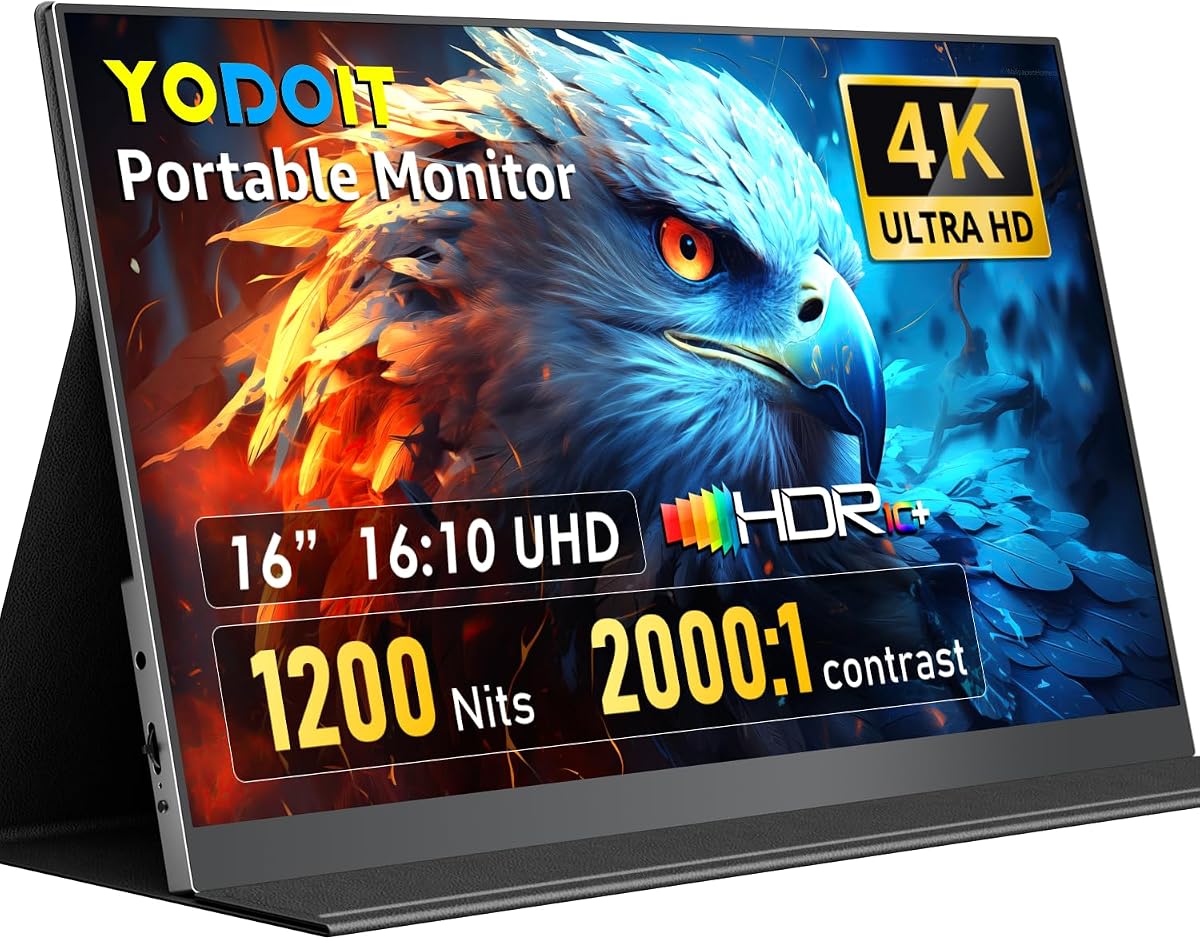
The Yodoit 4K Portable Monitor stands out as the top choice for professionals who need to work in direct sunlight. With a peak brightness of 1200 nits, it overcomes the limitations of standard portable screens that struggle in bright environments. Its 4K resolution and wide color gamut make it ideal for creative tasks like photo editing on location.
We may earn a commission when you buy through this link, at no additional cost to you.
This monitor delivers exceptional visual clarity thanks to its IPS panel and 145% sRGB coverage. The matte anti-glare coating significantly reduces reflections, allowing you to focus on your content without squinting. The 2000:1 contrast ratio ensures deep blacks and bright highlights remain distinct even in high-ambient light conditions.
While the monitor is designed for portability, it requires a power connection to achieve its peak brightness levels. This is a minor trade-off given the performance it offers in challenging lighting. The included magnetic cover serves as a stand and protector, adding to the convenience of this travel-friendly device.
Anyone who needs a reliable outdoor display for work or creative projects should consider this model. Whether you are a field inspector, photographer, or digital nomad, this monitor provides the clarity and brightness needed to stay productive anywhere. It is the definitive choice for sunlight-readable portable displays.
The 1200 nits brightness ensures that text and images remain sharp and readable even under direct sunlight, eliminating the need for shade.
With 145% sRGB coverage and a 16:10 aspect ratio, this screen offers ample space and color fidelity for detailed creative work on the go.
We may earn a commission when you buy through this link, at no additional cost to you.
The Dell 24 Monitor SE2426H offers a great balance of performance and value for users needing a responsive display. While its brightness is optimized for indoor environments, the IPS panel ensures consistent colors across wide viewing angles. The 144Hz refresh rate makes it suitable for both productivity tasks and casual gaming.
We may earn a commission when you buy through this link, at no additional cost to you.
This monitor prioritizes user comfort with TÜV Rheinland certification for reduced blue light. The thin bezels create a modern look that fits well in dual setups. Its Full HD resolution is sufficient for general office work and web browsing in well-lit rooms.
Although not designed for direct sunlight, its performance in bright indoor spaces is solid. The tilt adjustment allows for basic ergonomic positioning. However, users needing outdoor visibility should look at higher brightness portable options.
This monitor is ideal for home offices or workstations where budget and comfort are key. It provides a reliable viewing experience with smooth motion and accurate colors. For indoor use, it represents a strong choice among standard desktop displays.
The 144Hz refresh rate combined with a 1ms response time ensures fluid motion and minimal blur during fast-paced content consumption.
TÜV Rheinland certification helps reduce eye strain during long sessions by filtering harmful blue light without compromising image quality.
We may earn a commission when you buy through this link, at no additional cost to you.
The Dell 27 Monitor S2725QS provides a stunning 4K experience for users with ample desk space. Its high resolution allows for detailed work and sharp visuals. While its brightness is not optimized for direct sunlight, it excels in controlled indoor environments with good lighting.
We may earn a commission when you buy through this link, at no additional cost to you.
Features like ComfortView Plus help maintain eye comfort during extended use. The 120Hz refresh rate adds smoothness to motion, and the built-in speakers deliver improved audio quality. The design is sleek, with minimal bezels that focus attention on the screen content.
This monitor is a strong contender for multimedia and professional tasks indoors. It offers excellent value for a 4K display at its price point. Users seeking outdoor capabilities should consider portable high-nit models instead.
Ideal for home entertainment and office productivity, this screen delivers vibrant colors and smooth performance. The combination of resolution and refresh rate makes it versatile for work and play. It is a solid upgrade for those moving from lower-resolution displays.
The 4K resolution combined with 99% sRGB ensures rich colors and sharp details for professional work and media consumption.
ComfortView Plus reduces blue light while preserving color accuracy, making it suitable for long working sessions without fatigue.
We may earn a commission when you buy through this link, at no additional cost to you.
The Dell 24 Plus Monitor S2425HSM offers exceptional ergonomic flexibility with full height and pivot adjustments. It is well-suited for users who need to customize their viewing position for comfort. The display provides a smooth visual experience with a 144Hz refresh rate.
We may earn a commission when you buy through this link, at no additional cost to you.
Built-in speakers enhance multimedia consumption without needing external audio. The TÜV-certified eye comfort features help reduce strain during long hours. While the brightness is suitable for indoor use, it does not offer outdoor visibility capabilities.
This monitor is an excellent choice for office environments where ergonomics are a priority. The adjustable stand allows for portrait mode or height customization. It balances performance and comfort effectively for daily productivity tasks.
Anyone needing a highly adjustable Full HD monitor will find this model compelling. It supports various working styles and maintains a professional look. For those prioritizing posture and viewing angles, this monitor delivers significant benefits.
Adjustable height, tilt, pivot, and swivel allow users to find their optimal viewing position throughout the day.
TÜV 4-star certification ensures reduced blue light emissions while maintaining excellent image quality for prolonged use.
We may earn a commission when you buy through this link, at no additional cost to you.
The LG 24U411A-B offers a great entry point for users needing a responsive monitor on a budget. While not designed for direct sunlight, its HDR10 support and 120Hz refresh rate enhance visual quality in indoor settings. The IPS panel ensures consistent colors from various angles.
We may earn a commission when you buy through this link, at no additional cost to you.
Its slim bezels and stand create a floating appearance that fits modern workspaces. Reader mode helps protect eyes during text-heavy tasks. The flicker-safe feature further reduces potential strain during long use.
This monitor is well-suited for home entertainment and general office work. It provides good value for its price range with solid performance. For sunlight readability, higher-end portable options are necessary.
Ideal for students and budget-conscious buyers, this display delivers smooth motion and decent color accuracy. It is a reliable choice for casual gaming and productivity. Its design and features make it a strong contender in the budget segment.
HDR10 support enhances contrast and brightness in compatible content for a more engaging viewing experience.
Adjustable tilt allows you to customize the angle for comfort, reducing neck strain during long sessions.
We may earn a commission when you buy through this link, at no additional cost to you.
The Acer SB273 G0bi provides a spacious 27-inch view ideal for multitasking and office productivity. Its zero-frame design maximizes visibility and creates a sleek appearance. While designed for indoor use, its performance in bright rooms is satisfactory.
We may earn a commission when you buy through this link, at no additional cost to you.
The 120Hz refresh rate ensures smooth motion, and adaptive sync prevents tearing during dynamic content. The IPS panel offers consistent colors across the screen. Its price point makes it accessible for those needing a larger display without breaking the budget.
This monitor is suitable for general office work and casual media consumption. The larger size helps reduce the need for multiple windows on one screen. It lacks outdoor capabilities but excels in indoor environments.
Anyone seeking an affordable large monitor will find this model compelling. It balances size and performance well for typical office tasks. It is a practical choice for expanding your desktop workspace.
The zero-frame design offers maximum edge-to-edge visibility for an immersive and modern look.
Adaptive sync support and 120Hz refresh rate deliver fluid visuals without screen tearing during playback.
We may earn a commission when you buy through this link, at no additional cost to you.
The LG 32 inch QHD monitor delivers a large, detailed display perfect for professionals. Its USB-C port simplifies connections by providing both video and power. While its brightness is for indoor use, it handles ambient light well.
We may earn a commission when you buy through this link, at no additional cost to you.
The 99% sRGB coverage ensures accurate colors for creative work. Dynamic action sync and 100Hz refresh rate enhance motion clarity. The sleek bezel design offers a clean look for modern setups.
This monitor is ideal for power users needing a spacious workspace and convenient connectivity. It supports productivity and entertainment equally. For outdoor use, portable high-brightness options are recommended.
Anyone needing a large, modern monitor with USB-C convenience will appreciate this model. It combines performance with a minimalist aesthetic. It is a top choice for advanced users seeking a high-quality display.
USB-C allows video transmission and device charging via a single cable, reducing desktop clutter.
99% sRGB coverage and HDR10 support create vibrant, accurate colors for content creation and media.
We may earn a commission when you buy through this link, at no additional cost to you.
The Dell 27 Plus QHD Monitor offers a versatile display for both work and entertainment. Its QHD resolution provides sharper visuals than Full HD options. The fully adjustable stand supports ergonomic comfort throughout the day.
We may earn a commission when you buy through this link, at no additional cost to you.
Built-in speakers and eye comfort certifications add to its appeal. The 144Hz refresh rate ensures smooth motion. It is optimized for indoor environments, delivering clear images in well-lit rooms.
This monitor is suitable for professionals needing detailed visuals and adjustability. It handles gaming and productivity tasks efficiently. It lacks sunlight visibility but performs well indoors.
Ideal for users seeking a balanced QHD display, this model delivers performance and comfort. Its features make it a reliable choice for modern workspaces. It is a strong option for those needing a versatile monitor.
The QHD resolution delivers crisp details and vibrant colors for professional and entertainment use.
Height, tilt, pivot, and swivel adjustments allow perfect positioning to reduce physical strain.
We may earn a commission when you buy through this link, at no additional cost to you.
The Acer KB242Y G0bi provides a compact and cost-effective display for small workspaces. Its zero-frame design creates a modern look. While designed for indoor use, it handles bright rooms well.
We may earn a commission when you buy through this link, at no additional cost to you.
The 120Hz refresh rate ensures smooth motion for dynamic content. Its price makes it accessible for budget buyers. It lacks outdoor capabilities but offers solid indoor performance.
This monitor is ideal for students or home office users needing basic functionality. It supports general productivity and casual gaming. It is a practical choice for those needing a simple, effective display.
Anyone seeking an affordable, compact monitor will find this model suitable. It balances size and performance well. It is a reliable option for everyday computing tasks.
The zero-frame design maximizes screen visibility and complements modern desk setups.
Adaptive sync support delivers smooth motion without screen tearing for immersive viewing.
We may earn a commission when you buy through this link, at no additional cost to you.
The Newsoul 4K Portable Monitor matches the brightness and quality of top models with a focus on durability and connectivity. Its 1200 nits brightness ensures readability in direct sunlight. The matte screen further reduces glare effectively.
We may earn a commission when you buy through this link, at no additional cost to you.
It supports VESA mounting for flexible setups. The aluminum alloy shell provides better heat dissipation. This model is ideal for professionals needing high performance on the go.
While slightly pricier, it delivers premium features. Its design supports various usage scenarios. It is a top choice for those seeking a portable high-brightness display.
Ideal for mobile professionals, this monitor offers exceptional visibility and color accuracy. It handles challenging lighting conditions with ease. For outdoor tasks, this model delivers significant value and performance.
Aluminum alloy construction ensures durability and effective heat dissipation for extended use.
VESA mount compatibility allows custom viewing angles for portable or desktop setups.
We may earn a commission when you buy through this link, at no additional cost to you.
Selecting the right monitor for sunlight exposure involves balancing brightness, contrast, and other technical specs to ensure visibility in bright conditions.
Brightness is the most critical factor for sunlight readability. Standard monitors offer 250–400 nits, which struggle outdoors. Aim for models with 1000+ nits for clear visibility in direct sunlight.
Prioritize displays with high peak brightness to ensure content remains visible without glare.
A high contrast ratio helps separate bright highlights from deep shadows in bright light. Models with 2000:1 contrast maintain depth better than standard 1000:1 displays.
Look for higher contrast numbers to preserve image detail in sunny conditions.
Matte or anti-glare coatings reduce reflections significantly. This helps maintain visibility in environments with multiple light sources.
Choose matte screens to minimize glare and improve readability.
High color gamut coverage like sRGB ensures accurate reproduction even in bright environments. This is vital for creative professionals requiring consistent colors.
Prioritize monitors with 140%+ sRGB for professional color work.
Ensure the monitor has compatible ports like USB-C, HDMI, or Mini HDMI. Some portable models need power adapters for peak brightness.
Verify connectivity matches your devices for seamless setup.
For outdoor work, lightweight designs and built-in cases help with transport. Some models include magnetic covers that act as stands.
Choose portable models with protective cases if mobility is a priority.
High-brightness portable monitors often need external power to reach peak performance. Ensure you have access to power sources for your setup.
Check power needs before purchasing to avoid disruptions.
IPS panels offer wide viewing angles ensuring consistent colors from any position. This is useful for collaborative outdoor work.
Prefer IPS technology for reliable color consistency.
Position your monitor to avoid direct sun glare whenever possible. Adjust brightness settings based on ambient light to reduce eye strain.
Keep the screen clean using a microfiber cloth to maintain visibility. Avoid harsh chemicals that might damage anti-glare coatings.
For portable monitors, ensure proper ventilation to prevent overheating. Store them in their protective cases when not in use.
For direct sunlight, look for monitors with at least 1000 nits. Standard monitors around 250-400 nits will wash out in outdoor conditions.
Yes, matte anti-glare coatings significantly reduce reflections. This improves readability and reduces eye strain in bright environments.
Most portable monitors can connect to a laptop via USB-C, but peak brightness often requires external power. Check the manual for power requirements.
While helpful for smooth motion, refresh rate is secondary to brightness for sunlight readability. Prioritize brightness first for outdoor viewing.
Use a protective case or magnetic cover. These provide scratch protection and often double as stands for stable viewing.
IPS panels offer wider viewing angles and consistent color accuracy. This helps maintain image quality when viewed from different angles outdoors.
High brightness and fast refresh rates are essential. Look for portable monitors with 1000+ nits and high refresh rates for clarity.
Yes, high-brightness monitors work well indoors. You can lower brightness settings to reduce eye strain in normal indoor conditions.
This guide highlighted ten top monitors for visibility in bright conditions. Models like the Yodoit 4K Portable Monitor lead in brightness and portability for outdoor professionals.
Prioritize brightness, contrast, and anti-glare coatings when selecting your display. These features ensure consistent performance whether working under the sun or in a bright office.
Remember to check current prices and availability before purchasing. Conditions change rapidly so verifying product details ensures you find the best option for your needs.