
Tripp Lite OMNIVSX1500
4.0Editor score
Affordable tower design
240V output support
Reliable AVR protection
This guide compares the top 240V UPS systems for home and enterprise use, evaluating capacity, runtime, and reliability to ensure your critical equipment stays
Finding the right power protection is essential for keeping your equipment running smoothly. A reliable uninterruptible power supply safeguards against outages and surges. This guide reviews the best 240V UPS systems available today for your needs.
We evaluated each unit based on power capacity, battery runtime, and build quality. Our team analyzed technical specifications and user feedback to determine performance. The list covers a range of options from entry-level to enterprise-grade solutions.
Each pick highlights key strengths and specific use cases to help you decide. Prices and availability can change frequently so verify details before buying. We aim to provide clear insights so you can invest in the right protection.
4.0Editor score

3.9Editor score

5.0Editor score
The following table provides a side-by-side view of all ten models. It highlights their core technical capabilities and output configurations to help you compare performance and compatibility at a glance.


The CyberPower PR2200ELCDRTXL2U offers robust power protection with high voltage input capabilities. It stands out with its sinewave output which is vital for sensitive equipment. Its rating reflects solid performance in demanding environments.
We may earn a commission when you buy through this link, at no additional cost to you.
This unit provides ample capacity for servers and network gear. The rotatable LCD panel ensures you can read status data easily in any position. It supports remote monitoring features that enhance manageability for IT admins.
While the price is higher than standard models, the extended warranty justifies the investment. The sinewave output ensures compatibility with active PFC power supplies found in modern servers.
Ideal for businesses needing reliable backup for critical infrastructure. Choose this model if you require high input voltage and advanced monitoring features to keep your systems online.
The pure sinewave output supports advanced power supplies without risk of damage.
This UPS works as a tower or rackmount unit offering installation flexibility.
We may earn a commission when you buy through this link, at no additional cost to you.
This UPS is designed for absolute continuous operation without any power interruption. It uses online double conversion technology to condition power constantly. The perfect rating highlights its reliability for mission critical systems.
We may earn a commission when you buy through this link, at no additional cost to you.
Users appreciate the zero transfer time which keeps sensitive hardware running smoothly. The large capacity supports multiple devices and offers substantial runtime during outages. It includes energy-saving modes to optimize efficiency.
Note that this model uses European outlets and voltage standards. Ensure your equipment matches these specifications before purchasing to avoid adapter needs or voltage issues.
Best for data centers requiring uncompromised power quality. Choose this if you need true online UPS performance and can accommodate the outlet configuration.
Online double conversion ensures stable voltage and frequency for your devices.
The unit offers a three-hour recharge time to reach full capacity.
We may earn a commission when you buy through this link, at no additional cost to you.
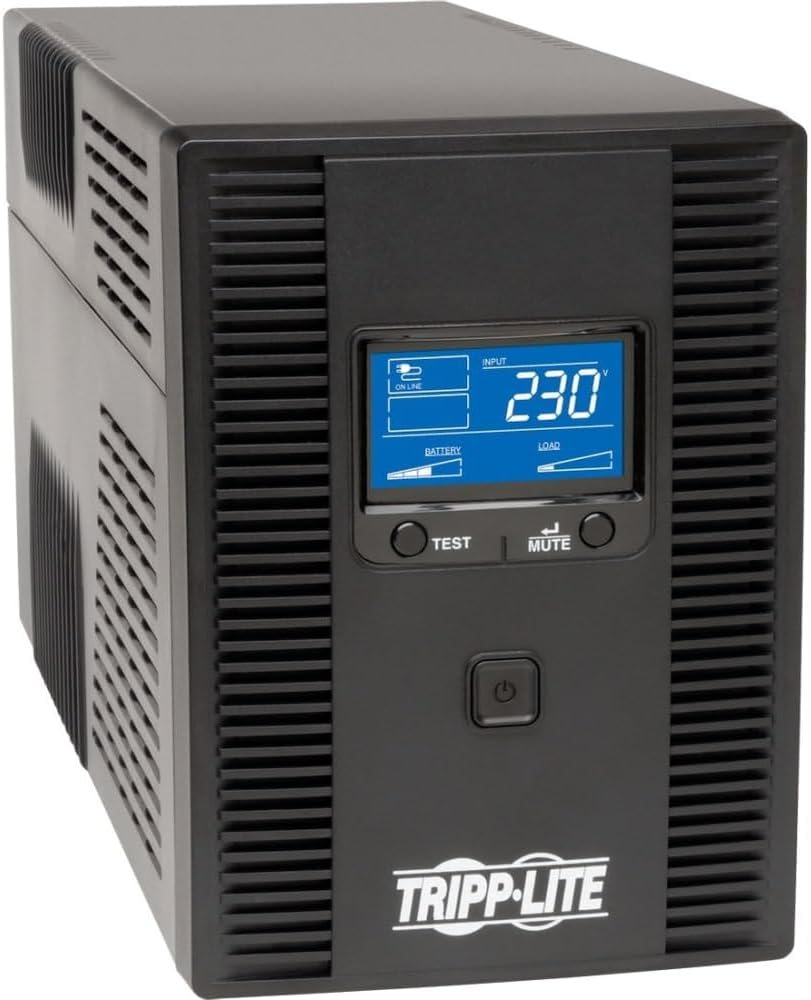
This tower UPS delivers essential protection at an accessible price point. It supports 240V output which makes it versatile for various international setups. The rating suggests steady performance for standard workstations and media setups.
We may earn a commission when you buy through this link, at no additional cost to you.
It offers eight outlets for connecting multiple devices easily. The AVR feature helps correct voltage fluctuations to protect equipment. It is a solid choice for users needing simple reliability.
While it lacks advanced monitoring features it covers the basics well. The recharge time ensures the unit is ready quickly after use. It is a practical solution for home offices.
Perfect for those needing cost-effective backup power. Select this model if you want simple 240V protection without paying for enterprise features.
Supports 220V 230V and 240V output for broad compatibility.
The tower design saves floor space while providing robust power.
We may earn a commission when you buy through this link, at no additional cost to you.
This unit provides straightforward power protection for home offices and workstations. It features an LCD screen that displays power conditions clearly. The lower rating reflects mixed feedback on reliability and build quality.
We may earn a commission when you buy through this link, at no additional cost to you.
The eight outlets offer ample connectivity for various devices. AVR technology ensures that minor voltage fluctuations are corrected automatically. It helps extend battery life by reducing unnecessary switching.
Surge protection is included to shield equipment from spikes. Users report that the LCD is useful but overall performance varies. It is a decent entry level option for basic needs.
Best for users who want visual feedback on power status. Choose this if you need basic surge protection with clear monitoring capabilities.
The LCD panel shows battery and load data at a glance.
We may earn a commission when you buy through this link, at no additional cost to you.
This large capacity unit is designed for enterprise environments with high power needs. It features NEMA outlets that are standard in many data centers. The transformer helps adapt voltage for different equipment configurations.
We may earn a commission when you buy through this link, at no additional cost to you.
It offers robust protection for critical servers and networking gear. The tower design fits easily into standard server racks. It provides significant runtime for essential hardware during outages.
The price reflects its professional grade capabilities and build quality. Note that the kit is not included so verify your needs before purchasing. It is a heavy duty solution.
Ideal for businesses with large power budgets and high demands. Select this if you need a high capacity tower UPS with NEMA compatibility.
A transformer helps adapt 208/240V to 120V for flexibility.
We may earn a commission when you buy through this link, at no additional cost to you.
This hybrid UPS allows for both rack and tower installation. It features 2U dimensions which fit standard equipment racks perfectly. The eight IEC outlets provide convenient connectivity for your server gear.
We may earn a commission when you buy through this link, at no additional cost to you.
It supports a variety of input voltages for global deployment. The AVR function helps maintain stable power levels without battery use. It is a flexible choice for IT professionals.
The unit is heavy and requires careful handling during installation. Setup may be complex for those unfamiliar with rack mounting. It offers solid protection and versatility.
Best for server rooms needing flexible mounting options. Choose this if you want a 2U rack UPS that also supports tower setups.
The unit works in racks or as a standalone tower with stands.
We may earn a commission when you buy through this link, at no additional cost to you.
This UPS is built for high density power protection in data centers. It uses a specific L6-20P plug which ensures stable connections. The high capacity supports multiple server units simultaneously.
We may earn a commission when you buy through this link, at no additional cost to you.
The output connectors include C13 and C19 for server compatibility. It includes an RS-232 port for basic monitoring and management. It is a specialized unit for technical environments.
Be aware that the specialized plug may require hardwiring or adapters. It is not suitable for standard household outlets. The build is rugged for professional use.
Best for facilities needing professional high density UPS. Select this if you need 3000VA protection with L6 connectivity.
Offers multiple C13 and C19 connectors for server racks.
We may earn a commission when you buy through this link, at no additional cost to you.
This unit offers extensive protection with a maintenance bypass switch. It ensures power continues even during service operations. The high capacity is ideal for large networks and servers.
We may earn a commission when you buy through this link, at no additional cost to you.
It features a pre-installed network card for full remote management. This helps admins manage power settings from anywhere easily. The bypass switch reduces downtime risks significantly.
The 3U form factor requires ample rack space. It is designed for enterprise deployment with strict uptime requirements. The warranty provides peace of mind.
Best for mission critical data centers. Choose this if you need maximum capacity and maintenance safety features.
Pre-installed network card allows for full remote configuration.
We may earn a commission when you buy through this link, at no additional cost to you.
This unit provides simple protection for small devices and offices. It has a compact tower design that saves valuable floor space. The rating indicates it is a basic option for standard needs.
We may earn a commission when you buy through this link, at no additional cost to you.
It supports 220V input which works in specific regions. It is easy to plug in and start using quickly. It covers the basics for small scale users.
Do not expect advanced monitoring or high capacity. It is best suited for basic desktop and workstation needs. It is a straightforward solution.
Best for users needing minimal power backup. Select this if you want a compact unit for basic protection.
This UPS is designed for easy plug and play operation.
We may earn a commission when you buy through this link, at no additional cost to you.
This rackmount UPS offers double conversion for clean power. It features a front LCD panel for monitoring power details easily. It is designed for professional environments needing reliability.
We may earn a commission when you buy through this link, at no additional cost to you.
The load banks allow selective control of outlet groups. This helps extend runtime by powering down non essential equipment. It is a smart feature for managing energy.
Note that the network card is sold separately for remote access. Setup requires rack mounting knowledge and tools. It is a solid choice for managed setups.
Best for rack environments needing detailed monitoring. Select this if you want double conversion with a front display.
Outlets are split into controllable banks for flexible shutdowns.
We may earn a commission when you buy through this link, at no additional cost to you.
Selecting the right UPS requires understanding your power needs and environment. This guide breaks down the key factors to consider before making a purchase.
Power capacity measured in VA determines how much load your UPS can support. Calculate the total wattage of your devices to ensure the UPS is large enough.
Always choose a unit with at least 20% more capacity than your total load for safety.
Ensure the UPS supports 240V input as required by your region. Using the wrong input voltage can damage the unit or your equipment.
Check the specifications carefully to confirm 220V or 240V compatibility.
Different models offer various outlet types like C13 or NEMA. Ensure the outlets match the plugs on your equipment.
Count the number of outlets needed to avoid needing extra power strips.
Topology like offline or double conversion affects power quality. Double conversion provides the cleanest power for sensitive servers.
Choose double conversion for critical systems and offline for basic needs.
Runtime determines how long your devices stay on during an outage. Larger batteries provide longer runtime but cost more.
Look for runtime charts to estimate how long your load will last.
Advanced models offer LCDs or network cards for remote management. Monitoring helps you track battery health and power events.
Select units with remote capabilities for unattended server rooms.
Rackmount units save space in server rooms while towers are for offices. Decide where you will place the UPS before buying.
Verify that the unit includes rails or stands for your preferred setup.
Warranties typically cover the unit and the internal batteries. Longer warranties indicate better build quality and support.
Check the terms for battery replacement costs and labor.
Plug all critical equipment into the battery backup outlets on the rear panel. Connect your PC and network gear to ensure they stay safe during blackouts.
Perform monthly self-tests to ensure the batteries are functioning properly. Most units have a test button on the front LCD panel.
Replace batteries every three to five years depending on usage. Check the LED indicators to see if maintenance is needed.
240V indicates the voltage level the UPS accepts and provides to connected devices. It is common in international markets and enterprise environments. Ensure your equipment matches this standard.
Sum the wattage of all devices you want to protect and add a margin. Choose a UPS with VA rating higher than this total. This prevents overloading and ensures runtime.
Yes but you need to ensure the output matches your local sockets. Some models provide 240V output which is standard in data centers. Verify plug types before installation.
AVR stands for Automatic Voltage Regulation. It adjusts input voltage without switching to batteries. This protects equipment and extends battery life significantly.
Monthly testing is recommended to verify battery health. This ensures the unit is ready when a power failure occurs. Most units have a built-in test mode.
Network cards allow for remote monitoring and management. They are essential for server rooms but not needed for home use. Check if your model supports them.
Batteries typically last three to five years with regular use. Heat and frequent cycles reduce their lifespan. Plan for replacement to maintain protection.
We reviewed ten top models including the CyberPower PR2200ELCDRTXL2U and Tripp Lite OMNIVSX1500. Each offers unique strengths for different environments.
Prioritize capacity and input voltage when making your final decision. Ensure your equipment matches the outlet types provided.
Always check current prices and warranties before buying to ensure value. This guide helps you find reliable protection for your critical gear.