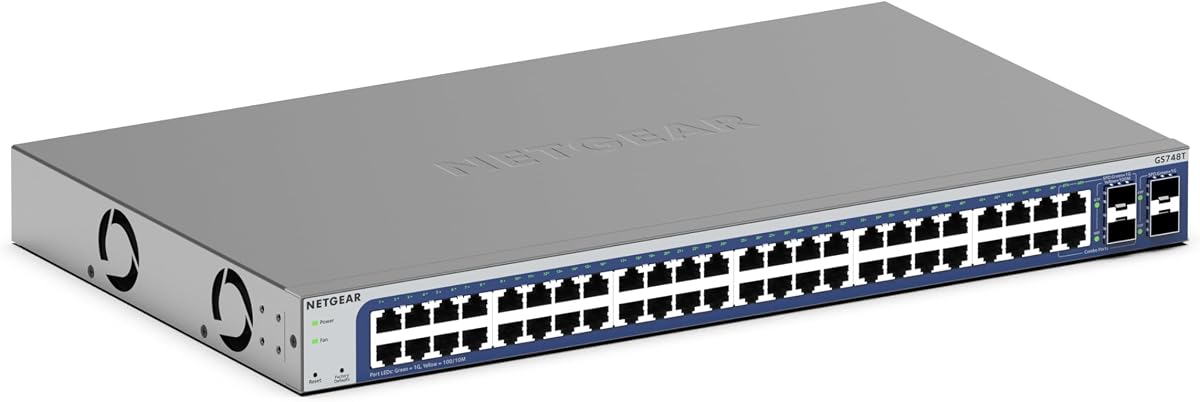
NETGEAR GS748T
4.4Editor score
48 Gigabit Ethernet Ports
4 x 1G SFP Ports
Insight Remote Management
This guide compares the top 48 Port Gigabit Managed Switch models for enterprise and SMB networks based on features performance security and value.
Choosing the right network infrastructure is critical for modern businesses requiring reliable connectivity across numerous devices. A 48 Port Gigabit Managed Switch provides the backbone for high-speed data transfer while offering advanced control over traffic flow and security protocols. These switches enable administrators to segment networks prioritize critical applications and protect sensitive data from unauthorized access effectively.
We evaluated ten leading models based on port density management capabilities security features and overall reliability. Our analysis includes switches from major vendors like TP-Link and NETGEAR alongside specialized options from Ubiquiti and YuanLey. Each product was assessed for its ability to handle demanding enterprise workloads while maintaining energy efficiency and operational quietness in various environments.
Each pick in this list highlights specific strengths such as PoE support cloud management or rugged design for harsh conditions. Readers will find detailed breakdowns of technical specifications real-world use cases and expert recommendations tailored to different organizational needs. Please note that pricing and availability fluctuate frequently so verify current details before making your final purchasing decision today.
4.4Editor score

4.7Editor score

4.8Editor score
The following table provides a side-by-side comparison of the top ten models evaluated in this guide to help you quickly identify the best fit for your network requirements.


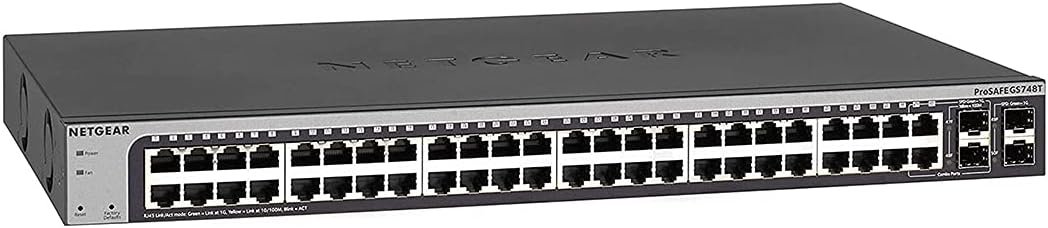


The TP-Link SG2452LP stands out as the top choice for organizations needing robust network control without excessive complexity. It offers a fully managed experience through the Omada Cloud Management Platform which integrates seamlessly with other network devices for unified administration. This switch provides 48 Gigabit ports ideal for connecting multiple workstations while maintaining high throughput and low latency.
We may earn a commission when you buy through this link, at no additional cost to you.
Its standout quality lies in the advanced security and management capabilities that protect your infrastructure from potential threats. Features like IP-MAC-Port binding and 802.1X authentication ensure that only authorized devices can access the network reducing the risk of data breaches. The fanless design ensures silent operation making it suitable for office environments where noise levels matter.
While the Omada ecosystem requires initial setup the long-term benefits of centralized control outweigh the initial effort. The switch supports both web GUI and CLI interfaces allowing administrators to choose their preferred method for configuration and monitoring. The only minor trade-off is the higher price point compared to unmanaged alternatives but the security and reliability justify the investment.
Network administrators seeking a balance of performance and ease of use should consider this switch for their core infrastructure. It is particularly well-suited for small to medium enterprises needing scalable solutions that grow with their business demands. The 5 year warranty further reinforces the confidence in its durability and long-term operational stability.
The Omada Cloud Management Platform allows remote monitoring and configuration from anywhere ensuring quick response to network issues.
Built-in security features defend against common network threats including DoS attacks and unauthorized access attempts.
We may earn a commission when you buy through this link, at no additional cost to you.
The NETGEAR GS748T offers an excellent entry point into managed networking for budget-conscious businesses needing essential control features. It delivers 48 Gigabit ports for high-speed connectivity and includes four SFP ports for fiber optic uplinks without costing a fortune. The smart managed interface simplifies configuration making it accessible even for teams with limited IT expertise.
We may earn a commission when you buy through this link, at no additional cost to you.
Its value proposition is strong given the inclusion of NETGEAR Insight which allows remote management for a full year. This feature reduces the need for on-site physical access during maintenance or troubleshooting sessions significantly saving time and resources. The switch also supports Energy Efficient Ethernet standards which helps lower electricity costs over its lifespan.
While it lacks PoE capability which is common in similar models the core switching performance remains reliable for standard data traffic. Users must rely on external PoE injectors if powering IP cameras or access points which adds minor complexity to deployment. For organizations prioritizing cost efficiency over power delivery this switch remains a solid and practical choice.
Small businesses or branch offices looking to upgrade from unmanaged switches will find this model meets most basic management needs effectively. The combination of fiber uplinks remote management and user-friendly tools makes it a versatile option for growing networks. Ensure your budget allows for future expansion if PoE becomes a requirement in later stages.
NETGEAR Insight provides cloud-based monitoring and management capabilities for distributed networks without extra hardware.
Four SFP slots enable flexible uplink options using fiber optics for longer distances or dedicated backbones.
We may earn a commission when you buy through this link, at no additional cost to you.
The Ubiquiti EdgeSwitch Lite delivers premium performance with a massive 140 Gbps switching capacity designed to handle heavy enterprise traffic loads. It features 48 Gigabit ports alongside dual SFP+ slots enabling high-speed uplinks that can support demanding applications like video editing or large file transfers. The non-blocking throughput ensures data flows smoothly even under peak utilization conditions without packet loss or bottlenecks.
We may earn a commission when you buy through this link, at no additional cost to you.
Its build quality and advanced architecture make it ideal for environments where reliability and speed are paramount. The fanless design keeps the device completely silent while the robust metal casing ensures durability in server rooms or industrial settings. The DC input option offers flexibility for redundant power setups which is crucial for mission-critical network deployments.
However the premium performance comes with a higher price tag and the requirement to use the UniFi Controller for full management. This ecosystem lock-in may not suit organizations preferring open standards or multi-vendor setups. Additionally the lack of PoE means external power solutions are needed if connecting powered devices which adds to the total cost of ownership.
Enterprises requiring high-speed backbones and reliable performance should invest in this switch for core or aggregation layer duties. It works exceptionally well within UniFi environments providing seamless integration with access points and controllers for unified network control. Consider your current infrastructure compatibility before making this significant investment for your network upgrade.
With 140 Gbps capacity this switch eliminates bottlenecks even when all ports are active simultaneously under load.
DC input capabilities allow for redundant power configurations essential for mission-critical network environments.
We may earn a commission when you buy through this link, at no additional cost to you.
The Omada SG3452 provides an excellent bridge between basic smart switches and fully managed solutions with its L2+ capabilities. It includes 48 Gigabit ports and supports static routing which helps optimize internal traffic flow and reduce reliance on external routers for local transfers. The switch integrates well with the Omada SDN platform allowing for seamless integration with other network devices like access points.
We may earn a commission when you buy through this link, at no additional cost to you.
Its ability to operate in standalone mode gives administrators flexibility to choose between centralized cloud management or direct local configuration. This versatility is valuable for organizations that may not want to rely solely on cloud-based controllers for all operations. The comprehensive security features including VLANs and ACLs provide robust protection for sensitive data across your network.
Users must ensure that all devices in the ecosystem run compatible SDN firmware for optimal performance and feature support. This can add a layer of complexity during deployment compared to simpler plug-and-play alternatives available on the market today. The learning curve for full Omada ecosystem integration might be steep for those unfamiliar with the platform's specific terminology.
Network engineers looking for a versatile switch that supports both local and cloud-based management will appreciate the flexibility of this model. It is a strong contender for businesses planning to expand their network infrastructure with unified management in the near future. The 5 year protection plan ensures long-term support and peace of mind for critical business operations.
Static routing capabilities improve internal traffic handling reducing latency for communication between local subnets.
Seamless integration with Omada SDN allows unified control over switches access points and gateways centrally.
We may earn a commission when you buy through this link, at no additional cost to you.
This version of the NETGEAR GS748T offers a reliable managed solution with a standout Lifetime Hardware Warranty that provides long-term assurance. It delivers the same core performance as newer models but at a price point that reflects its established track record and reliability. The 48 Gigabit ports combined with four SFP ports make it suitable for businesses needing flexible uplink options without overpaying.
We may earn a commission when you buy through this link, at no additional cost to you.
The software interface is praised for its simplicity allowing administrators to manage traffic and security settings without extensive training. It includes all necessary mounting hardware so installation in standard server racks is straightforward and efficient without extra costs. The unit operates quietly making it suitable for office environments where noise control is a priority for daily operations.
While it lacks the modern cloud insights found in newer models the essential management features remain robust and effective for daily needs. Users relying on SNMP or local web interfaces will find all necessary tools available without needing external subscriptions or services. The trade-off is that future features might not receive the same level of software updates as newer generations.
For businesses prioritizing durability and warranty coverage over new features this model remains a compelling choice for core network switching. The lifetime warranty ensures that hardware failures are covered which significantly reduces total cost of ownership over many years. It serves well as a workhorse for steady workloads where advanced cloud integration is not strictly required.
NETGEAR provides a limited lifetime warranty covering hardware defects ensuring long-term reliability for business users.
Includes all hardware for desktop or rack mount allowing flexible installation options in various office settings.
We may earn a commission when you buy through this link, at no additional cost to you.
The TP-Link TL-SG3452P is designed for environments needing power delivery across all 48 ports supporting devices like cameras and access points. With a massive 384W power budget it ensures consistent delivery without the need for external injectors or separate power supplies. The L2+ managed features allow for advanced traffic handling and security while maintaining the benefits of a unified network setup.
We may earn a commission when you buy through this link, at no additional cost to you.
Its Omada SDN integration provides a seamless experience for organizations already invested in the TP-Link ecosystem for their networking needs. The PoE Auto Recovery feature automatically restarts devices that become unresponsive which helps maintain uptime without manual intervention. Static routing capabilities further enhance performance by allowing efficient local traffic movement without unnecessary external hops.
The primary consideration is the higher cost associated with PoE switches but the operational savings often justify the initial investment over time. Users must ensure their electrical infrastructure can handle the load of 384 watts which may require dedicated circuits or UPS support. For businesses deploying numerous powered devices this switch simplifies cabling and management significantly.
Network planners deploying wireless networks or surveillance systems will find this switch an essential component for scalable infrastructure. The combination of high power budget and advanced management features makes it a versatile choice for modern enterprise environments. Ensure proper cooling and ventilation are available given the heat generated by high power delivery capabilities.
384W power budget supports high-demand devices like PTZ cameras or high-performance access points efficiently.
Automatically recovers unresponsive powered devices to minimize downtime and maintenance efforts for administrators.
We may earn a commission when you buy through this link, at no additional cost to you.
The NETGEAR GS348 offers a straightforward plug-and-play solution for organizations needing expanded ports without complex configuration steps. It delivers 48 Gigabit ports that automatically detect speeds and negotiate optimal connections for various devices. This unmanaged approach reduces the need for IT staff time and technical expertise making it ideal for simple network expansions.
We may earn a commission when you buy through this link, at no additional cost to you.
Its fanless design ensures silent operation which is particularly beneficial for open office environments or retail spaces where noise is disruptive. The compact metal design supports both desktop and rack mount options allowing versatile installation choices in any physical space. Energy efficiency features also help reduce power consumption which aligns with sustainability goals for modern businesses.
While it lacks traffic management or security protocols it excels in reliability and simplicity for basic connectivity needs. Users should be aware that VLANs or QoS settings are not available so all traffic shares the same bandwidth pool. For small businesses without complex routing needs this switch provides robust performance and longevity.
Administrators looking for an immediate expansion tool to support additional devices will appreciate the ease of use and reliability. It serves well as an access layer switch where basic connectivity is the primary goal without advanced controls. The high rating reflects its proven track record in diverse environments ranging from offices to commercial spaces.
No software or configuration required just plug in devices and the switch handles connections automatically.
Adheres to IEEE 802.3az standards reducing power consumption without compromising network speed or stability.
We may earn a commission when you buy through this link, at no additional cost to you.
The Renewed version of the NETGEAR GS748T offers access to managed features at a lower price point suitable for tight budgets. It retains the core capabilities of the original model including smart management and fiber uplinks for expanding network reach. Buyers can expect significant savings compared to purchasing brand new while still receiving lifetime protection from ProSAFE support.
We may earn a commission when you buy through this link, at no additional cost to you.
This option is particularly attractive for secondary sites or non-critical networks where advanced features are needed but cost is a major factor. The hardware is refurbished to meet quality standards ensuring that it functions reliably for standard business operations. However availability fluctuates so you might need to act quickly when units appear in stock.
While the hardware is older it still meets the demands of modern gigabit networks for most small to medium businesses. The trade-off is that you may miss out on the latest firmware features or security patches available for newer generations. Ensure your network requirements align with the capabilities of this proven model before committing to purchase.
Budget-conscious buyers looking for a reliable managed switch should consider this renewed model as a strategic option. It allows access to enterprise-grade features like SNMP and VLANs without the full retail price tag. Verify the condition details upon receipt to ensure it matches your operational expectations and standards.
Purchasing renewed units can save significant costs while still delivering reliable performance for standard business needs.
Includes lifetime hardware warranty and 24/7 chat support to ensure continued operational stability over time.
We may earn a commission when you buy through this link, at no additional cost to you.
The YuanLey L3 Switch delivers high performance with 6 x 10G SFP+ ports allowing for rapid data transfer and network backbone expansion. Its 460W power budget provides ample support for high-power devices ensuring stability across the entire network deployment. The L3 management features enable advanced routing and security protocols that are typically found in more expensive enterprise models.
We may earn a commission when you buy through this link, at no additional cost to you.
Its fanless design ensures that the unit runs silently while maintaining internal temperatures within safe operating limits for extended periods. The web interface is designed for ease of use allowing administrators to manage VLANs and QoS settings without relying on complex command lines. This makes it accessible for teams that require advanced control without specialized networking expertise.
The brand is less established than major vendors which may raise concerns about long-term support or firmware updates for the device. Users should verify the availability of local support resources or firmware before deployment to avoid potential operational issues later on. The high throughput is excellent for environments with heavy data traffic but requires careful network planning.
IT managers seeking high speed backbones and extensive power budgets without paying premium brand prices will find this model attractive. It serves well as a core switch for small data centers or network segments needing rapid aggregation and routing capabilities. Ensure physical space and ventilation meet requirements due to high power consumption and heat generation.
6 x 10G SFP+ ports allow for rapid uplink speeds essential for data-intensive workloads and aggregators.
L3 features provide routing capabilities that help optimize traffic flow and reduce latency within complex networks.
We may earn a commission when you buy through this link, at no additional cost to you.
The NETGEAR GS348TPv2 offers a compact PoE solution with 48 Gigabit ports and four SFP slots for versatile uplink connectivity. Its 380W power budget supports a wide range of powered devices making it suitable for offices needing both data and power delivery. The smart managed interface simplifies configuration allowing for quick deployment of VLANs and security settings for IT teams.
We may earn a commission when you buy through this link, at no additional cost to you.
Users appreciate the quiet operation which is vital for maintaining a professional environment without audible noise from equipment. The compact metal design supports flexible mounting options whether on a desktop or in a standard server rack. It provides a balance of features and usability that appeals to businesses needing PoE without overwhelming complexity.
While the 380W budget is substantial it may require careful planning if all ports are used for high-power devices simultaneously. The price point is higher than non-PoE models but the convenience of integrated power delivery often offsets this cost over time. The user-friendly interface reduces the time needed for network setup and daily maintenance tasks.
Network planners seeking a reliable PoE switch for unified deployments will find this model a strong contender for modern offices. It supports both data and power delivery efficiently making it ideal for growing businesses expanding their wireless and security infrastructure. Ensure your power supply can handle the load to prevent overloading during peak usage times.
Integrated PoE+ simplifies cabling by providing both data and power over a single Ethernet cable for devices.
Smart software offers intuitive controls for VLANs security and monitoring without needing command line expertise.
We may earn a commission when you buy through this link, at no additional cost to you.
Selecting the right 48 Port Gigabit Managed Switch requires evaluating several critical factors to ensure your network meets performance and reliability standards.
Managed switches allow administrators to control traffic flow, segment networks, and apply security policies. Look for features like VLAN support, QoS for prioritizing traffic, and SNMP for remote monitoring. Ensure the interface is intuitive whether you prefer web GUI, CLI, or cloud-based management options for your team's skill level.
Prioritize switches that offer the level of control you need without unnecessary complexity. If you require remote access, cloud integration is a vital feature to consider for modern network architectures.
If you plan to connect powered devices like cameras or access points, verify the switch offers Power over Ethernet (PoE). Check the total power budget to ensure it can handle all connected devices simultaneously. A higher budget provides headroom for high-demand devices without risking network instability or power shortages during peak usage.
Select a model with a power budget that exceeds your current needs by 20 percent to accommodate future expansion. This prevents the need for additional injectors or hardware upgrades later.
Consider the uplink options available to connect your local network to the wider internet or other switches. SFP ports allow fiber optic connections which are essential for long distances or high-speed backbone links. Ensure the switch supports the speed and type of connection your environment requires for optimal performance and scalability.
Choose a switch with multiple SFP slots to allow flexible upgrades as your bandwidth demands grow. Fiber options provide durability and speed advantages over copper cabling for long-range connections.
Security is paramount in managed switches to protect against unauthorized access and data breaches. Look for features like 802.1X authentication, port security, and ACLs to restrict access to critical segments. Advanced threat protection such as DoS defense and storm control helps maintain network integrity during attacks.
Ensure the switch offers regular firmware updates to patch vulnerabilities and maintain strong security protocols. A robust security suite is essential for businesses handling sensitive data or regulatory compliance.
Evaluate the switching capacity and forwarding rate to ensure the switch can handle peak traffic without bottlenecks. Non-blocking throughput ensures that all ports can operate at full speed simultaneously. High-performance models are necessary for environments with heavy file transfers or streaming video traffic.
Prioritize models with high forwarding rates and switching capacity to maintain low latency for real-time applications. Check the throughput specifications carefully to match your daily workload requirements.
Consider the physical size and mounting options to fit your server room or office space. Rack-mountable designs are standard for enterprise environments, while desktop options suit small offices. Ensure the unit includes necessary mounting hardware to avoid extra costs during installation.
Choose a form factor that aligns with your physical space constraints and cooling requirements. Proper ventilation is crucial to prevent overheating during long-term operations.
A solid warranty protects your investment against hardware failures. Look for lifetime warranties or long-term coverage plans that offer replacement or repair services. Check if technical support is available 24/7 or during business hours for troubleshooting assistance.
Prioritize brands with a reputation for reliable support to minimize downtime if issues arise. A comprehensive warranty ensures peace of mind for critical network infrastructure.
Energy-efficient switches reduce operational costs and environmental impact over time. Look for compliance with IEEE 802.3az standards which optimize power consumption based on usage. Reduced power draw also lowers heat generation, simplifying cooling requirements in server rooms.
Select models that adhere to energy-efficient standards to lower electricity bills and support sustainability initiatives. Efficiency is a key metric for large-scale deployments running continuously.
Begin by connecting the switch to your power supply and primary network uplink. Ensure all connected devices use compatible Ethernet cables and that the ports are not overloaded beyond the PoE budget. Configure the IP address for management access using the default credentials provided in the user manual.
Access the web interface or CLI to set up VLANs, security policies, and QoS rules. Regularly monitor traffic logs and adjust settings to optimize performance based on your usage patterns. Keep the firmware updated to ensure security patches and new features are applied promptly.
Maintain the switch by ensuring adequate airflow and cleaning dust from vents periodically. Check cable integrity and port status regularly to identify issues before they impact connectivity. Use the monitoring tools provided to track temperature and power consumption for proactive maintenance.
Managed switches allow administrators to configure traffic, security, and network settings, whereas unmanaged switches are plug-and-play with no configuration options. Managed switches support VLANs, QoS, and SNMP monitoring for better control and performance.
No, not all models include PoE. You must check the product specifications for PoE+ support and total power budget if you need to power devices like cameras or APs directly from the switch.
Connect your computer to one of the switch ports and access the default IP address via a web browser. Log in using the default credentials found in the manual and change them immediately for security.
SFP ports allow fiber optic connections for long-distance or high-speed uplinks. They are essential for connecting to other switches or routers across large distances without signal loss.
No, most switches support local web management. However, cloud platforms like Omada or Insight offer remote control and monitoring across multiple locations for added convenience.
Check for updates every few months or when new security patches are released. Regular updates ensure your network remains secure and benefits from the latest performance improvements.
Yes, simply replace your current switch with a 48-port model. Ensure your rack space and power supply match the new requirements before purchasing to avoid installation issues.
Managed switches prevent unauthorized access and data breaches through features like 802.1X and port security. Proper security configurations protect your network infrastructure from external and internal threats.
The TP-Link SG2452LP stands out as the best overall choice due to its comprehensive cloud management and robust security features. The NETGEAR GS748T offers a budget-friendly managed experience ideal for organizations prioritizing affordability without sacrificing core functionality.
When selecting a switch prioritize management capabilities, power requirements, and security features that match your specific business needs. Ensure the model supports future expansion to avoid frequent replacements as your network grows.
Prices and availability change frequently so always check current listings before finalizing your purchase. Comparing multiple models based on the factors discussed will help you find the perfect fit for your 48 Port Gigabit Managed Switch needs.