
Nektar SE49
4.5Editor score
Affordable price point
DAW integration support
Compact and lightweight
This guide compares the top 49 Key MIDI Keyboards for 2026, evaluating keybed quality, software bundles, and integration features.
Selecting the right 49 Key MIDI Keyboard is essential for producers seeking a balance between portability and playability. These controllers offer enough range for chords and melodies without taking up excessive desk space.
We evaluated ten top models based on keybed feel, software inclusion, DAW integration, and build quality. Our analysis focuses on features that enhance workflow and creative potential for users at various skill levels.
Each pick highlights specific strengths and trade-offs to help you find the perfect match for your studio setup. Please note that pricing and availability can change frequently, so check current listings before purchasing.
4.5Editor score

4.7Editor score

4.4Editor score
This side-by-side comparison highlights the core specifications and unique selling points of each controller to help you make an informed decision.




The Novation Launchkey 49 MK4 stands out as a top-tier choice for producers looking for deep software integration. It holds an impressive rating due to its responsive FSR pads and comprehensive control layout.
We may earn a commission when you buy through this link, at no additional cost to you.
Its standout feature is the seamless integration with major DAWs like Ableton and Logic. The pads function as step sequencers and clip launchers, giving you hands-on control over your arrangement without touching the mouse.
While it is priced higher than entry-level options, the included software and hardware quality justify the cost. Users might find the power requirements slightly inconvenient for mobile setups compared to bus-powered competitors.
This controller is ideal for intermediate to advanced users who prioritize workflow efficiency. If you need a versatile tool that grows with your production skills, the Launchkey 49 MK4 is a highly recommended investment.
Custom scripts ensure that mixing and automation controls are mapped instantly to your software environment.
The FSR pads support polyphonic aftertouch allowing for dynamic drum performance and sound modulation.
We may earn a commission when you buy through this link, at no additional cost to you.
The Arturia KeyLab mk3 offers a premium experience with its robust construction and full aftertouch capabilities. It is a top choice for users who demand high-fidelity control over their virtual instruments.
We may earn a commission when you buy through this link, at no additional cost to you.
Its integration with Analog Lab V provides access to a vast library of presets directly from the keyboard. The 12 pressure-sensitive pads and nine encoders give you extensive tactile control over synthesis and effects.
The main trade-off is the cost, which places it out of reach for some hobbyists. Additionally, relying on USB-C for power might limit portability if you do not have the right cables available.
For professional studios or serious producers, this controller is a centerpiece that enhances sound design capabilities. If you value premium materials and deep synthesis control, the KeyLab mk3 is the clear winner.
The chassis is built to withstand touring and heavy daily use ensuring longevity in any studio setting.
Full aftertouch allows for complex modulation techniques that are not possible with standard velocity only keys.
We may earn a commission when you buy through this link, at no additional cost to you.
The Nektar SE49 is an excellent entry point for those new to music production. It delivers solid performance and essential features at a price point that is hard to beat in the current market.
We may earn a commission when you buy through this link, at no additional cost to you.
Users appreciate the included DAW integration which automates control assignments for popular software. This means you can start recording and mixing immediately without spending hours manually mapping knobs and faders.
The lack of a pitch bend wheel is a notable omission for some users, but it keeps the cost low. It is also more basic than higher-end models regarding extra pads and encoders.
This controller is perfect for beginners or those working with a tight budget who still need reliable performance. If you need a straightforward tool for recording melodies and chords, the SE49 is a fantastic choice.
Nektar integrates scripts that automatically map controls to functions like transport and mixer in various DAWs.
The layout is efficient and saves desk space making it suitable for smaller home studio environments.
We may earn a commission when you buy through this link, at no additional cost to you.
The M-AUDIO Oxygen 49 MKV is specifically designed to streamline workflows for users of Native Instruments software. Its NKS integration allows you to browse presets directly from the keyboard without using a computer screen.
We may earn a commission when you buy through this link, at no additional cost to you.
It offers a strong selection of assignable knobs and faders which provide tactile control over your virtual synths. The auto-mapping feature ensures that these controls work immediately with your DAW parameters upon connection.
One drawback is that the pads are velocity sensitive but do not have pressure sensitivity. This limits their expressiveness compared to models that offer aftertouch or FSR technology for drumming.
If you are heavily invested in the Native Instruments ecosystem this controller is a logical upgrade. It balances professional features with a reasonable price, making it a strong contender for beat makers and producers.
NKS support lets you browse and load sounds instantly giving you immediate access to your library.
Smart Scale and Chord modes help users create professional sounding progressions even with limited theory knowledge.
We may earn a commission when you buy through this link, at no additional cost to you.
The M-AUDIO Keystation 49 MK3 focuses on simplicity and reliability for live performance or basic recording. It strips away complex controls to offer a clean experience for playing virtual instruments.
We may earn a commission when you buy through this link, at no additional cost to you.
Its primary strength is the ease of use. With pitch and modulation wheels and a standard layout it is intuitive for any pianist to pick up and start performing immediately without reading a manual.
The lack of assignable knobs or faders limits its ability to control software parameters dynamically. It is less suited for production workflows that require real-time tweaking of effects or synth envelopes.
This controller is best for performers or students who need a straightforward tool for practice and playback. If you want a no-fuss interface that just works, the Keystation 49 MK3 is a solid choice.
The keybed is designed to mimic the feel of a traditional piano making it comfortable for extended playing sessions.
It comes with a comprehensive suite of software including MPC Beats which adds significant value to the purchase.
We may earn a commission when you buy through this link, at no additional cost to you.
The Arturia KeyLab Essential mk3 is a versatile tool that bridges the gap between budget and pro models. It brings the same premium design language as higher-end units at a more accessible price point.
We may earn a commission when you buy through this link, at no additional cost to you.
Its strongest asset is the inclusion of Analog Lab V which offers thousands of professional sounds ready to use. The dedicated control layout allows you to tweak these sounds directly from the interface without navigating menus.
While it lacks full aftertouch the pads still offer good velocity and pressure sensitivity for performance. The plastic construction feels lighter than the mk3 model which may feel less sturdy in a rugged environment.
For producers seeking a modern interface with high-quality software this controller is a strong option. It is particularly suitable for those who want to experiment with diverse synthesizer sounds without buying extra plugins.
Analog Lab V provides instant access to vintage and modern synth sounds ensuring you never run out of inspiration.
The LCD screen provides real-time feedback on parameter changes which enhances the workflow when editing sounds.
We may earn a commission when you buy through this link, at no additional cost to you.
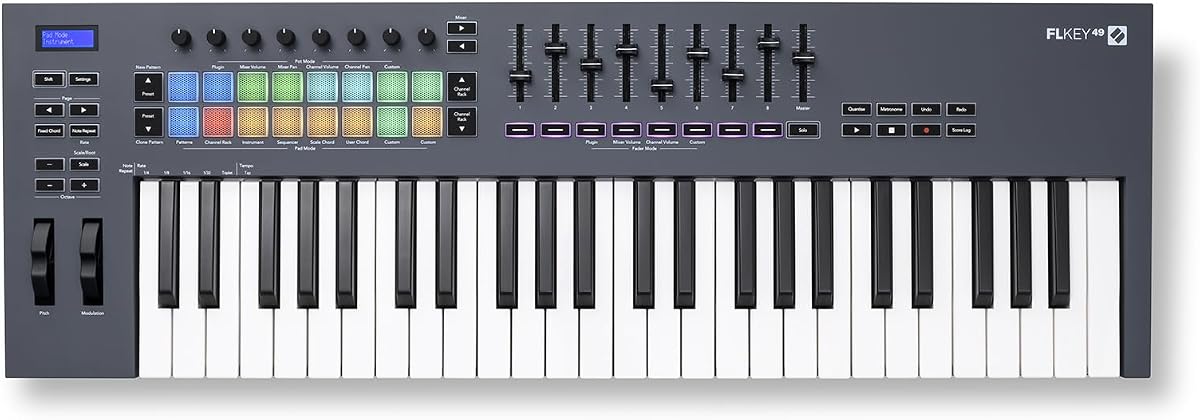
The Novation FLkey 49 is designed specifically to unlock the full potential of FL Studio users. It maps almost every essential function of the software to a physical control for faster production.
We may earn a commission when you buy through this link, at no additional cost to you.
Its nine faders and eight pots are directly mapped to channels and mixer parameters allowing you to mix without touching the computer. The step sequencer mode on the pads replicates the famous piano roll functionality.
If you use a different DAW like Logic or Ableton the value drops significantly. The mappings are less intuitive outside of FL Studio and you may lose the convenience of one-touch controls.
For dedicated FL Studio producers this controller is the best way to streamline your workflow. It reduces the time between idea and track by putting the software's core functions right under your fingers.
The pads act as a hardware step sequencer allowing you to create rhythms directly in the FL Studio engine.
Access to channel and mixer volumes via faders makes balancing tracks significantly faster and more precise.
We may earn a commission when you buy through this link, at no additional cost to you.
The M-AUDIO Oxygen Pro 49 offers a semi-weighted keybed that mimics the feel of a traditional piano. This makes it suitable for musicians who prefer a weighted action over a synth-style light touch.
We may earn a commission when you buy through this link, at no additional cost to you.
It includes aftertouch on the keys which adds expressiveness to performances. The 16 RGB backlit pads provide a wide range of visual feedback and control options for triggering samples and clips.
The addition of a 5-pin MIDI output makes it ideal for controlling hardware synthesizers alongside software. However this added connectivity and build quality make it heavier than compact USB-only models.
This controller is a great choice for performers who play live and need a sturdy, expressive tool. If you need to connect to outboard gear or prefer a heavier key feel this model is worth the extra weight.
The 5-pin MIDI port allows you to send MIDI data to hardware devices without needing additional interfaces.
Aftertouch on the keys allows you to add vibrato or filter sweeps while holding down notes for dynamic playing.
We may earn a commission when you buy through this link, at no additional cost to you.
The midiplus AK490 is a very basic controller designed for those who need essential functionality at the lowest possible price. It provides a simple interface for triggering notes without extra frills.
We may earn a commission when you buy through this link, at no additional cost to you.
It features piano-style keys and standard octave buttons which are sufficient for writing melodies. The inclusion of a MIDI out jack means it can connect to older hardware gear that does not use USB.
However it lacks many modern conveniences like pads faders or bundled software. You will need to source your own DAW and plugins which might not make it cost-effective for a full production setup.
This unit is best for students or hobbyists on an extremely tight budget who just want to input MIDI data. If you need more than basic note entry you should consider a more feature-rich model in this comparison.
The MIDI out DIN jack allows for connection to synthesizers and drum machines that rely on legacy interfaces.
It offers a functional 49-key layout that is perfect for beginners starting their first music production journey.
We may earn a commission when you buy through this link, at no additional cost to you.
This generic 49-Key MIDI Controller is built for simplicity and compactness. It is designed to fit on small desks and provide basic MIDI input for users with limited space.
We may earn a commission when you buy through this link, at no additional cost to you.
The ABS construction makes it lightweight and easy to carry. It provides a straightforward black finish that blends into any environment without drawing attention to itself.
It lacks the advanced controls found on branded models such as dedicated faders or complex DAW integration. It is purely a tool for note input without any extra production features.
This option is suitable for travel or for those who need a backup controller for simple tasks. If you require a full production experience with extensive controls you should look at the higher-end options.
The small footprint allows you to place this controller in tight spaces where larger boards will not fit.
Its lightweight build makes it easy to transport for casual sessions or recording in different locations.
We may earn a commission when you buy through this link, at no additional cost to you.
Choosing the right controller requires looking beyond key count to understand features that impact your specific workflow.
The feel of the keys is the most critical factor for pianists and performers. Semi-weighted keys offer more resistance and a piano-like experience suitable for expressive playing. Unweighted keys are lighter and faster for synth leads and rapid arpeggios.
Consider your playing style when choosing. If you play classical piano feel aim for semi-weighted. If you prioritize portability and speed synth action is often the better choice.
Deep integration with your Digital Audio Workstation can save hours of setup time. Some controllers come with custom scripts that map transport and mixer controls instantly to software like Ableton or Logic.
Verify that your preferred DAW is supported. Good integration allows you to control recording transport and mixing without touching your mouse.
Look for a layout that matches your production needs. Faders and knobs are essential for mixing and tweaking synth parameters. Pads are crucial for beat makers who need to trigger samples or drum patterns.
Ensure you have enough assignable controls for your typical workflow. A good layout should make common tasks accessible without reaching for the keyboard and mouse repeatedly.
Many mid-range and high-end controllers include significant software packages. These often contain DAWs like Ableton Live Lite and libraries of virtual instruments.
Calculate the value of these bundles. A higher upfront cost might be cheaper in the long run if it saves you from buying separate plugins and a full DAW license.
Check the input and output options on the controller. While USB is standard, some models also include a 5-pin MIDI Out for connecting hardware synthesizers.
If you have external gear, ensure the controller supports the connections you need to avoid buying extra interfaces or adapters for your setup.
Build quality affects longevity and stability during performance. Heavier units with sturdy knobs are less likely to move during a show or intense mixing session.
Read reviews regarding material quality. Plastic knobs may feel cheap and wear out faster than metal or rubberized alternatives in professional environments.
The physical dimensions of the controller matter if you travel or have limited desk space. 49 keys offer a compromise between a full 88-key keyboard and a compact 25-key mini board.
Measure your workspace and consider how easily the controller fits in a gig bag. Weight becomes a significant factor if you plan to move it frequently for live gigs.
Your budget will dictate which features are available to you. Entry-level models focus on basic functionality while high-end units offer premium features like aftertouch and metal construction.
Determine which features are non-negotiable for you. Sometimes a higher price is justified by better software bundles or a superior keybed feel.
Start by connecting your controller via USB to your computer. Install any required drivers or software provided by the manufacturer to ensure all features function correctly.
Regularly clean the keys and surface with a dry cloth to prevent dust buildup. Avoid using harsh chemicals that might damage the finish or electronics of the device.
Store the unit in a cool dry place when not in use. If you transport it often consider using a padded case to protect the controls from impact and wear.
A MIDI keyboard does not produce sound on its own; it sends data to a computer or synthesizer which generates the audio. A digital piano has built-in speakers and sounds and is often weighted to mimic an acoustic piano.
You need a Digital Audio Workstation or DAW to record and produce music. Many controllers come bundled with a DAW like Ableton Live Lite which provides a complete starting package for recording.
Yes, a 49 key keyboard is widely used for song production. It offers enough range for chords and basslines while remaining compact. You can use octave buttons to access lower or higher notes if needed.
Absolutely, they are a standard choice for live performers. They provide enough keys for playing keys parts and are usually compact and lightweight enough to transport to venues easily.
Velocity sensitivity detects how hard you press a key to vary the volume or intensity of the note. This feature is crucial for expressive performances and dynamic control over your sounds.
Yes, most modern USB MIDI keyboards work with iOS devices. You will need a compatible adapter like a Lightning to USB camera adapter to establish the connection with your tablet.
We have reviewed ten top options ranging from budget-friendly units to premium production hubs. Each model offers distinct advantages depending on whether you prioritize portability, software integration, or build quality.
Prioritize features that directly improve your workflow such as DAW integration and aftertouch. These elements significantly enhance the speed and expressiveness of your music production sessions.
Remember to check current pricing and availability as deals change frequently. Select the controller that aligns best with your specific needs and budget to enjoy the best possible experience.