
HP OmniBook 3 14 inch Next Gen AI PC
4.4Editor score
Snapdragon X X1 Processor
2K OLED Display
Up to 41 Hours Battery
Artificial intelligence is reshaping how we work and create on portable devices. Modern AI laptops integrate specialized neural processing units to handle complex tasks locally. These machines offer faster responses and smarter assistance without relying heavily on cloud connections for every operation.
We have evaluated ten leading models released this year to find the most capable options. Our analysis focuses on processor power, memory capacity, display quality, and specific AI-driven features. Each selection represents a distinct balance of performance, portability, and value for different user profiles.
Every pick highlights key strengths and potential limitations based on technical specifications. You will find detailed insights into how these systems handle real-world workflows. Please note that availability and configurations may vary by region and time of purchase.
4.4Editor score

4.3Editor score

5.0Editor score
As an Amazon Associate we earn from qualifying purchases.
The following table provides a side-by-side look at the core specifications of each model. This comparison helps you quickly identify differences in processing power, memory, storage, and display technology across the selected options.
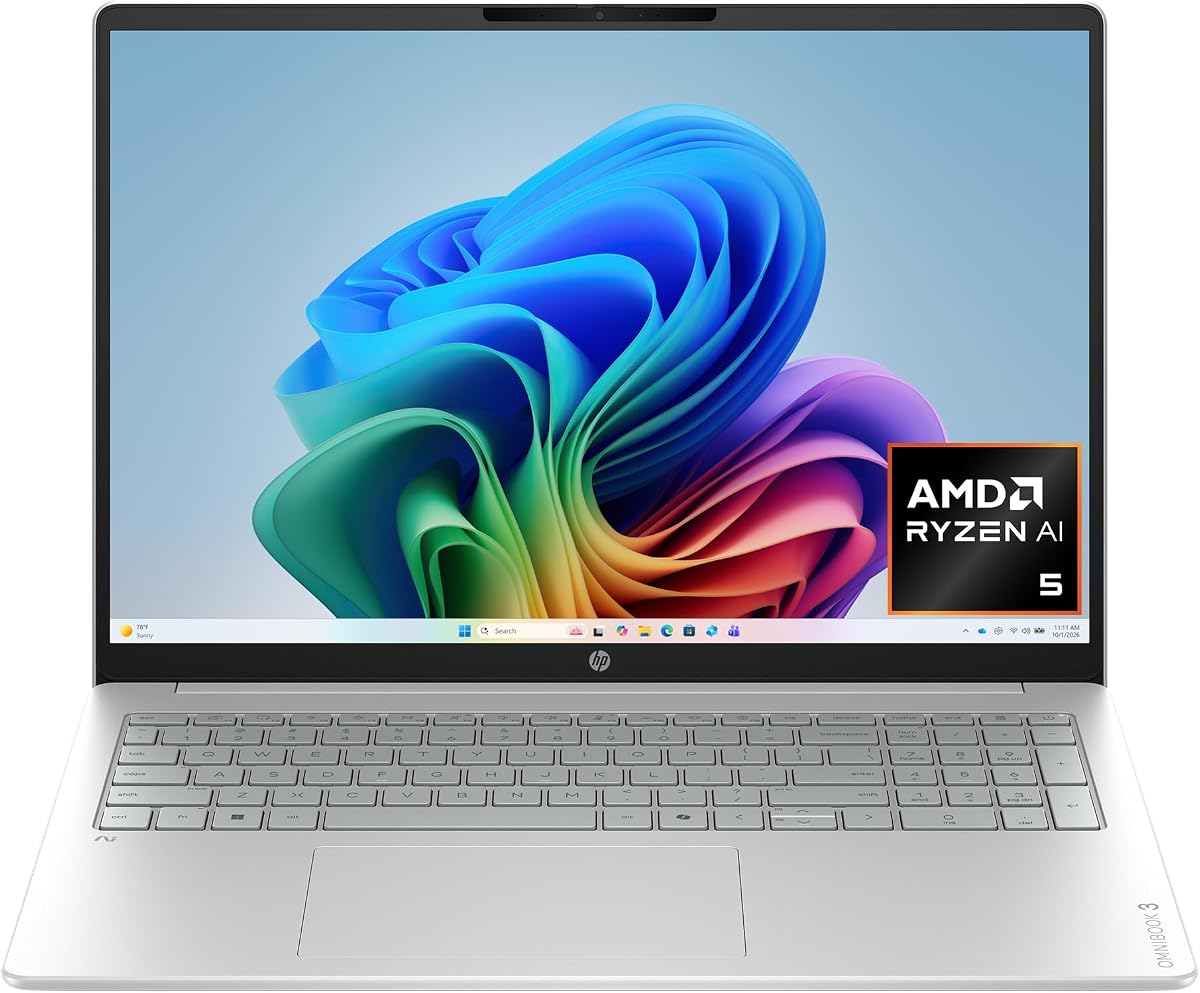


The HP OmniBook 3 16 inch stands out as a versatile machine for everyday productivity and light creative work. With a high rating of 4.8 stars, users praise its balanced performance and impressive battery longevity. The integration of AMD Ryzen AI technology ensures smooth handling of modern Windows features.
We may earn a commission when you buy through this link, at no additional cost to you.
Its 2K IPS touchscreen delivers clear visuals with wide viewing angles, making it suitable for media consumption and detailed document editing. The 16 GB DDR5 RAM supports multitasking without significant lag, while the SSD provides fast boot times. Advanced noise reduction keeps communication clear during virtual meetings.
While the integrated Radeon 840M GPU is efficient, it is not designed for demanding 3D rendering or high-end gaming. Additionally, the 512 GB storage is adequate for most but might fill quickly with large media libraries. These trade-offs are acceptable given the device focus on efficiency and portability.
This laptop is ideal for students, professionals, and home users seeking a reliable daily driver with strong AI capabilities. Its combination of battery life, display quality, and smart features makes it a top recommendation for general use cases.
The Advanced AI noise reduction feature tracks your voice during calls while filtering out background noise for clearer conversations.
Enjoy up to 19 hours and 30 minutes of battery life with HP Fast Charge restoring half the charge in about 45 minutes.
We may earn a commission when you buy through this link, at no additional cost to you.
The Lenovo ThinkBook 16 Gen 8 is engineered for demanding business environments where reliability and performance are paramount. It receives high marks for its Intel 16-Core Ultra 7 processor which handles complex spreadsheets and video calls with ease. The inclusion of Windows 11 Professional adds a layer of security essential for corporate data.
We may earn a commission when you buy through this link, at no additional cost to you.
With 32GB of DDR5 RAM, this device excels at running multiple business applications simultaneously without slowdowns. The 1TB PCIe SSD ensures fast access to large files and ample space for archival needs. Connectivity options like WiFi 6E provide stable connections for seamless file sharing and conferencing.
While the design is professional and durable, it may lack the flair or gaming optimization found in consumer-centric laptops. The cost reflects the enterprise-grade features, which might be unnecessary for casual users. However, for business workflows, the investment pays off in productivity and stability.
This machine is best suited for enterprise users, consultants, and power users who need robust security and high memory capacity. Its feature set aligns perfectly with professional demands and collaborative work scenarios.
Windows 11 Professional and a fingerprint reader protect sensitive business data with advanced security features and quick access.
WiFi 6E and Bluetooth 5.3 ensure stable connections for video conferencing and large file sharing across networks.
We may earn a commission when you buy through this link, at no additional cost to you.
The HP OmniBook X 14 inch combines cutting-edge display technology with long-lasting battery life for a premium user experience. Users appreciate the 3K OLED touchscreen which offers deep blacks and vibrant colors for media and creative work. The Intel Core Ultra 7 processor ensures responsive performance for daily tasks and AI features.
We may earn a commission when you buy through this link, at no additional cost to you.
Its standout feature is the battery endurance which can reach up to 27 hours and 30 minutes on a single charge. This is supported by efficient power management and a fast charging system that restores 50 percent in roughly 30 minutes. The 24 GB RAM allows for fluid multitasking across various applications.
The OLED panel is a luxury that may not be necessary for text-only tasks. Additionally the integrated graphics are not meant for intensive gaming. However for general productivity and media consumption these trade-offs are minor compared to the visual and power benefits.
This model is perfect for creatives, executives, and frequent travelers who prioritize screen quality and battery longevity. It represents a high-end choice for those willing to invest in superior hardware components.
The OLED display lights each pixel separately to deliver deeper blacks and richer contrast than traditional LED screens.
Smart Sense uses AI to switch modes based on your activity adjusting temperature and fan noise for comfort.
We may earn a commission when you buy through this link, at no additional cost to you.
The HP OmniBook 5 16 inch offers a balanced package with a large screen and significant storage for media files. Its Intel Core Ultra 7 processor provides efficient performance for productivity and creative workflows. The inclusion of Copilot AI enhances the Windows 11 experience with intelligent suggestions.
We may earn a commission when you buy through this link, at no additional cost to you.
The 1TB SSD ensures you have plenty of space for photos, videos, and applications without needing external drives. The 16-inch touchscreen adds versatility for navigation and interactive tasks. A backlit keyboard improves usability in dim environments which is common for travelers.
While the 16GB RAM is standard it might struggle with extremely heavy multitasking scenarios compared to 32GB models. Battery life details are less emphasized in this specific listing. However the combination of screen size and storage makes it a strong contender for general users.
This laptop is suitable for students and home users who need a spacious display and ample storage for everyday use. It offers a reliable entry into AI-enabled computing without compromising on core utility.
Copilot AI support helps you work smarter with intelligent suggestions and faster workflows across your applications.
The 16-inch touchscreen provides crisp visuals and responsive control perfect for work and creative tasks.
We may earn a commission when you buy through this link, at no additional cost to you.
The HP OmniBook 5 with Snapdragon X processor is designed for all-day mobile productivity with minimal charging. It receives praise for its impressive battery life that can last up to 34 hours and 45 minutes. The 2K OLED display ensures rich colors and clear visuals for your daily work.
We may earn a commission when you buy through this link, at no additional cost to you.
Snapdragon X chip delivers essential performance with AI capabilities that streamline tasks like meeting summaries via Otter.ai. The Qualcomm Adreno GPU optimizes power consumption while still supporting smooth UI and basic graphics. Wi-Fi 6E ensures high-speed wireless connectivity wherever you go.
Some software optimized for x86 architectures might require compatibility checks before purchasing. The 512 GB storage is functional but may need management for large media collections. However for cloud-based workflows and document tasks these limitations are often negligible.
This device is ideal for frequent travelers and professionals who prioritize battery longevity and portability. It offers a unique take on AI laptops with ARM-based efficiency and smart assistant tools.
Otter.ai records audio transcribes meetings and generates summaries so you can save time and stay organized.
The Snapdragon X processor delivers essential performance and AI capabilities for long-lasting battery life on the go.
We may earn a commission when you buy through this link, at no additional cost to you.
The HP OmniBook 3 14 inch brings AI features and long battery life to a more accessible price range. It offers a 2K OLED display that provides vibrant visuals for media consumption and clear text. The Snapdragon X processor ensures efficient performance for everyday tasks and quick wake times.
We may earn a commission when you buy through this link, at no additional cost to you.
Battery life is a major highlight with up to 41 hours and 45 minutes of usage on a single charge. This makes it excellent for students or professionals who move between locations without access to power outlets. The compact 14-inch design enhances portability significantly.
The 256 GB SSD is a limitation for users with large local file needs. A smaller screen may also feel cramped for extensive spreadsheet work. Despite these points it delivers high value for basic productivity and entertainment.
This laptop is perfect for budget-conscious buyers who still want modern AI features and great battery performance. It is a solid choice for light use cases and secondary devices.
Enjoy up to 41 hours and 45 minutes of battery life with HP Fast Charge for quick replenishment.
The 14-inch chassis makes it easy to carry while maintaining a rich 2K OLED display experience.
We may earn a commission when you buy through this link, at no additional cost to you.
The Dell 16 Plus is a high-performance laptop designed for future-proofing with advanced connectivity and processing power. It features Wi-Fi 7 support which offers faster speeds and lower latency for seamless file transfers. The Intel Core Ultra 9 processor handles demanding tasks with substantial NPU power.
We may earn a commission when you buy through this link, at no additional cost to you.
With 32GB of LPDDR5X memory the system ensures smooth multitasking for professional applications. The range of ports including Thunderbolt 4 and HDMI 2.1 removes the need for dongles during presentations. AI features like Studio Effects enhance video calls with real-time adjustments.
The higher price reflects the top-tier specs which may not be necessary for casual users. Weight might be a consideration for daily commuters compared to 14-inch models. However for stationary workstations this offers significant utility and speed.
This model is recommended for power users and professionals who need robust connectivity and raw processing speed. It serves well for technical work and media editing with stable network performance.
Wi-Fi 7 ensures faster speeds and enhanced connectivity for efficient work without lag or interruptions.
Includes Thunderbolt 4 and HDMI 2.1 to support external displays and fast data transfer directly.
We may earn a commission when you buy through this link, at no additional cost to you.
The ASUS Vivobook S16 delivers impressive AI performance with up to 50 NPU TOPS for localized tasks. Users report perfect satisfaction with its ability to handle writing and organizing efficiently. The Ryzen AI 9 processor powers smooth everyday computing and responsive interaction.
We may earn a commission when you buy through this link, at no additional cost to you.
Its sleek design weighs just 3.75 pounds making it easy to carry anywhere without sacrificing power. The OLED display offers deep contrast and vivid detail for an engaging viewing experience. Audio is enhanced with Dolby Atmos and a built-in speaker that fills the space.
The premium price tag may be a barrier for some budgets. OLED panels require careful usage to avoid static image burn-in though modern tech mitigates this. For creative tasks these trade-offs are generally accepted for the visual and AI benefits.
This laptop is best for creatives and professionals who need strong AI capabilities and a high-quality screen. It balances performance and portability exceptionally well for on-the-go work.
Copilot+ PC performance delivers fast on-device AI with up to 50 NPU TOPS keeping tasks running seamlessly.
The 16-inch OLED display delivers deep contrast vivid detail and smooth immersive viewing for all content.
We may earn a commission when you buy through this link, at no additional cost to you.
The Acer Aspire 16 AI features a 120Hz WUXGA touchscreen that provides smooth scrolling and responsive interactions. Its Snapdragon X processor supports up to 45 TOPs of NPU power for optimized processing across workloads. The display offers rich colors and sharp detail for visual clarity.
We may earn a commission when you buy through this link, at no additional cost to you.
Wi-Fi 7 ensures future-ready wireless speeds for efficient file transfers and media streaming. AcerSense solutions help streamline settings and optimize video presence through intelligent adjustments. The integrated GPU provides decent graphical performance for light creative tasks.
High refresh rate screens can reduce battery life compared to standard displays. The 16GB RAM is standard but limits heavy multi-application use. These trade-offs are acceptable for those prioritizing smooth visuals and connectivity.
This laptop is suitable for users who want a fluid visual experience and modern AI features. It works well for interactive work and media consumption with vibrant colors.
Enjoy a 120Hz WUXGA touchscreen that provides sharp detail and smooth visuals for entertainment and work.
AcerSense AI solutions let you streamline settings and optimize your video presence for better communication.
We may earn a commission when you buy through this link, at no additional cost to you.
The HP Omnibook 16 offers substantial RAM and storage for demanding professional workflows and creativity. Its Ryzen AI 7 processor is built on Zen 5 architecture for exceptional speed. The 50 TOPS NPU ensures seamless handling of AI workloads and studio effects.
We may earn a commission when you buy through this link, at no additional cost to you.
With 32GB DDR5 RAM multitasking is fluid even with large files and media libraries. Windows 11 Pro provides enterprise-grade security and advanced collaboration tools. The 2K IPS touchscreen delivers crystal-clear detail with anti-glare finish for comfort.
Portability might be reduced due to the larger chassis and components. Battery life depends heavily on workload intensity. However for stationary workstations these are minor concerns compared to performance gains.
This laptop is ideal for creators and professionals needing high memory and strong AI acceleration. It supports complex tasks with reliability and secure OS features.
Leverages a 50 TOPS NPU for seamless AI workloads ensuring future-ready workstation performance.
Windows 11 Pro includes enterprise-grade security and AI-powered Windows Studio Effects for safe collaboration.
We may earn a commission when you buy through this link, at no additional cost to you.
Selecting the right AI laptop requires balancing performance needs with portability and budget. Consider these factors to find a device that matches your workflow requirements.
NPUs handle local AI tasks like background noise removal and image generation efficiently. Higher TOPS ratings mean faster on-device responses without relying on cloud servers. Look for models with dedicated neural engines for the best AI integration.
Newer architectures like ARM-based chips offer better battery efficiency compared to traditional x86 options. However ensure software compatibility if you use specialized professional tools. Balance speed requirements with battery expectations when selecting.
At least 16GB RAM is recommended for smooth multitasking and handling large files. Solid State Drives provide fast boot times and quicker access to applications. Upgradeable options allow for future growth as needs expand.
Resolution and color accuracy affect how clearly you view content and edits. Touchscreen capability adds versatility for note-taking and navigation. Consider size based on your portability needs versus screen real estate requirements.
Efficient processors and screens directly impact how long the device lasts unplugged. Fast charging features minimize downtime when outlets are scarce. Review real-world benchmarks to understand practical usage duration.
Wi-Fi 6E or 7 ensures fast wireless speeds for large file transfers. Multiple USB ports reduce the need for external hubs. Bluetooth 5.3 supports stable connections to peripherals and speakers.
Windows 11 Home and Pro versions offer different levels of security and management tools. Copilot+ PC features integrate deeply with the OS for intuitive AI assistance. Verify system requirements for your essential applications.
Materials like aluminum provide protection against wear and tear over time. Keyboard comfort affects typing experience during long sessions. Check warranty options for peace of mind regarding repairs and support.
Protect the screen and keyboard from spills and dust when transporting the device. Use a soft cloth to clean the display and avoid harsh chemicals that damage coatings. Store in a protective sleeve to prevent physical damage in transit.
An AI laptop typically includes a dedicated Neural Processing Unit (NPU) that handles machine learning tasks locally. This allows for features like background noise cancellation and smart search without cloud dependency. It optimizes power efficiency and responsiveness for modern applications.
For basic tasks like word processing and browsing a standard laptop may suffice. However AI features can streamline workflows by automating notes and improving call quality. It is a useful upgrade if you value productivity enhancements.
Efficient processors like Snapdragon or Core Ultra offer longer runtimes compared to older chips. AI tasks consume power but optimized NPUs handle them without draining the battery quickly. Expect significant improvements over traditional non-AI devices.
Many AI laptops focus on efficiency and may have integrated graphics. While they handle casual games well dedicated GPUs are better for heavy gaming. Check GPU specs if gaming is a priority for you.
Copilot+ features require specific hardware like NPUs and certain RAM configurations. Not every AI laptop meets these exact requirements. Verify compatibility with Microsoft specifications for the latest features.
Regularly update software and drivers to ensure AI modules function correctly. Clean ventilation grills to prevent overheating and performance throttling. Monitor background processes to free up resources for active tasks.
Our top picks include the HP OmniBook X 14 for display quality, the HP OmniBook 3 14 for budget savings, and the ASUS Vivobook S16 for performance. Each model balances unique strengths to suit different user needs and preferences.
Prioritize what matters most to you whether it is battery life, storage capacity, or raw processing power. Matching these priorities with the hardware specifications will lead to a more satisfying daily experience.
Always check current availability and configurations before purchasing to ensure you get the best value. Prices and models change frequently so staying informed helps you make the right decision.