
FIREBAT Gaming Laptop Metal
5.0Editor score
32GB DDR5 RAM
1TB PCIe 4.0 SSD
Ryzen 7 H255 CPU
Finding a reliable all metal laptop means prioritizing durability, heat management, and premium aesthetics. These devices offer robust construction that protects internal components while providing a sleek professional look for modern work environments.
We analyzed ten leading models based on processor power, memory capacity, storage speed, and display quality. Each selection balances metal construction with practical features like touchscreens, fingerprint readers, and long battery life for versatile daily use.
Every pick highlights unique strengths from rugged durability to AI readiness. While prices fluctuate, these models represent consistent value. Check current listings for the latest deals and availability before making your final purchase decision today.
5.0Editor score

4.5Editor score

5.0Editor score
As an Amazon Associate we earn from qualifying purchases.
This side-by-side comparison evaluates ten all metal laptops across key specs like processor type, memory size, storage capacity, and display resolution to help you find the best fit.




This 16-inch touchscreen laptop stands out with its premium metal body and generous 32GB RAM configuration. It delivers smooth multitasking and reliable performance for daily tasks and light creative work in professional settings.
We may earn a commission when you buy through this link, at no additional cost to you.
The N95 quad-core processor paired with 2TB SSD storage ensures rapid boot times and ample space for files. The all-metal chassis provides effective heat dissipation, keeping the system stable during extended use sessions.
While the processor is efficient rather than high-performance, the 32GB RAM compensates well for memory-intensive workflows. The touchscreen interface adds versatility for navigation and design tasks, making it a versatile daily driver.
Ideal for professionals needing a durable, spacious laptop without breaking the bank. Its solid build and responsive touchscreen make it an excellent choice for office work, design, and general productivity tasks.
The all-metal body offers superior heat dissipation and scratch resistance compared to plastic alternatives, ensuring long-term durability and a premium feel.
Fingerprint recognition and backlit keyboard support secure, comfortable typing in any lighting environment for improved daily workflow efficiency.
We may earn a commission when you buy through this link, at no additional cost to you.
The Dell Latitude Rugged 5430 is engineered for reliability in demanding environments. Its robust build quality ensures protection against bumps and drops while delivering professional-grade performance for serious workloads.
We may earn a commission when you buy through this link, at no additional cost to you.
Powered by a Core i7-1185G7 processor and 32GB RAM, this machine handles complex applications and virtual machines with ease. The 1TB SSD provides fast access to critical data and quick system responsiveness.
While it is heavier than slim ultrabooks, the added weight reflects its sturdy construction designed for fieldwork or heavy travel. Windows 11 Pro adds enterprise features like BitLocker encryption and Active Directory support.
Perfect for IT professionals or field engineers needing a durable, secure laptop. The rugged chassis and strong hardware make it a trustworthy companion for mission-critical tasks in any environment.
Designed to withstand harsh conditions, this rugged laptop ensures continuous operation in environments where standard notebooks might fail.
Windows 11 Pro includes advanced security and management tools essential for organizations handling sensitive business data.
We may earn a commission when you buy through this link, at no additional cost to you.
The HP OmniBook 3 14 inch brings next-gen AI capabilities to a portable aluminum chassis. Its Snapdragon X processor optimizes power efficiency for all-day use while supporting advanced AI assistant features.
We may earn a commission when you buy through this link, at no additional cost to you.
The 2K OLED display offers stunning color accuracy and contrast for media consumption and design work. With 16GB LPDDR5x RAM, multitasking remains smooth even on the integrated Qualcomm Adreno GPU.
While storage is modest at 256GB, fast SSD speeds and cloud integration compensate for daily workflows. The ultra-long battery life and fast charging ensure productivity without constant outlet access during travel.
Ideal for students and mobile professionals seeking a lightweight, AI-enhanced notebook. The OLED screen and extended battery life make it a standout choice for on-the-go productivity and entertainment.
Built-in Copilot+ PC features automate tasks like meeting summaries and document analysis to save time during daily work.
The OLED display delivers rich colors and sharp text, enhancing readability and visual enjoyment for creative and multimedia tasks.
We may earn a commission when you buy through this link, at no additional cost to you.
The NIMO 15.6 AI Ready Laptop offers silent, efficient power ideal for library study and dorm use. Its metal top cover ensures durability against daily bumps while maintaining a lightweight profile for portability.
We may earn a commission when you buy through this link, at no additional cost to you.
Powered by an Intel N150 processor, this laptop handles schoolwork and light gaming without fan noise. The 180-degree hinge facilitates easy screen sharing in collaborative meetings or classroom settings.
Although RAM is limited to 8GB, fast SSD speeds and expandable storage options like Micro SD support growing file needs. The 2-year warranty provides peace of mind for students investing in long-term use.
Best for budget-conscious students needing a reliable, quiet notebook. The silent operation and fast charging make it a practical choice for campus life and remote study sessions.
A physical webcam shutter protects your privacy by blocking the lens when not in use, preventing unauthorized access.
Full-stack ports including dual USB-C and HDMI eliminate dongle anxiety during presentations or data transfers to external monitors.
We may earn a commission when you buy through this link, at no additional cost to you.
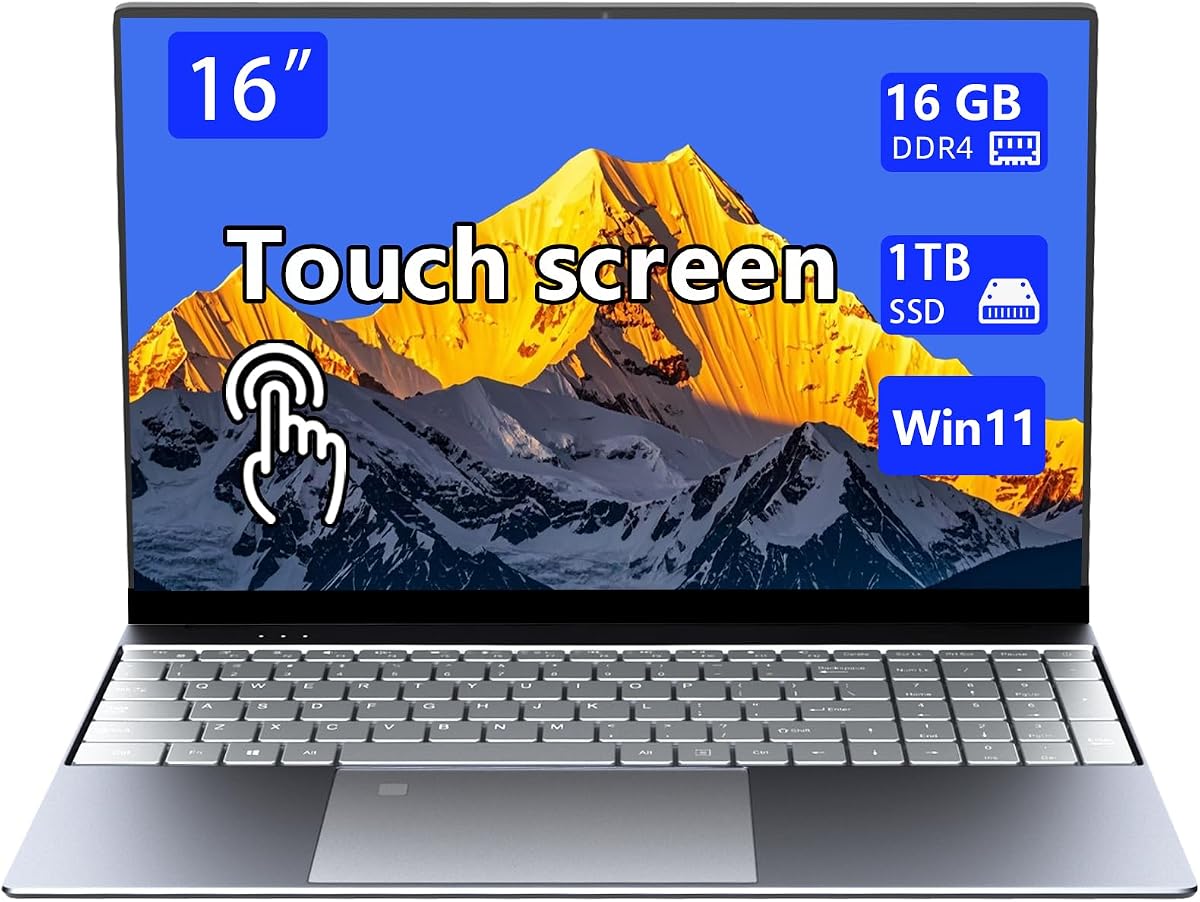
This 16-inch touchscreen laptop offers an engaging visual experience with its large display and responsive touch input. The all-metal body delivers a premium feel and effective heat management for daily office tasks.
We may earn a commission when you buy through this link, at no additional cost to you.
Equipped with 16GB DDR4 RAM and a 1TB SSD, it handles multiple browser tabs and office applications smoothly. The fingerprint reader adds a layer of security for unlocking the device quickly and safely.
While the N95 processor is not for heavy gaming, it is sufficient for media consumption and general productivity. The touchscreen functionality enhances navigation and design work, making interactions more intuitive and efficient.
Ideal for creative professionals needing a portable workstation with tactile feedback. Its solid build and responsive screen make it suitable for design reviews, presentations, and media editing on the go.
The ten-point super touchscreen allows natural gestures for zooming and scrolling, mimicking smartphone interaction for smoother workflows.
The high-end metal chassis ensures the laptop looks stylish in corporate meetings while protecting internal components from physical stress.
We may earn a commission when you buy through this link, at no additional cost to you.
The HP Everyday Slim Laptop is designed for productivity with included Microsoft Office 365 and Copilot AI features. Its lightweight design ensures portability for commuters and remote workers needing a reliable daily driver.
We may earn a commission when you buy through this link, at no additional cost to you.
Powered by an Intel N150 CPU, it manages emails, spreadsheets, and web browsing efficiently. The combination of 128GB SSD and 1TB OneDrive provides fast local access and ample cloud storage for documents.
While local storage is limited, OneDrive integration ensures files are synced across devices. The long battery life supports full workdays without needing a charger, perfect for meetings and travel scenarios.
Perfect for business users seeking a no-frills, productive machine. The included software suite and lightweight build make it ideal for administrative tasks and constant mobility in corporate environments.
Copilot AI helps summarize documents and automate tasks, streamlining workflows and increasing efficiency during busy workdays.
Wi-Fi 6 and Bluetooth 5.4 ensure stable connections for video calls and peripheral devices throughout the day.
We may earn a commission when you buy through this link, at no additional cost to you.
The Morostron Laptop 16-inch combines a powerful Core i7 processor with a high-resolution IPS display for professional content creation. Its full metal enclosure provides durability and heat dissipation for demanding creative tasks.
We may earn a commission when you buy through this link, at no additional cost to you.
With 16GB RAM and a 512GB SSD, it handles video editing software and graphics applications smoothly. The 16:10 aspect ratio display offers more vertical space for timelines and editing tools during complex projects.
The tempered glass panel enhances durability while delivering vivid colors for accurate visual work. The backlit keyboard allows comfortable typing in dimly lit studios or late-night editing sessions.
Ideal for freelancers and creative professionals needing a portable workstation. Its strong performance and vibrant screen make it a practical choice for editing video and designing graphics on the move.
The 16:10 aspect ratio provides extra screen real estate for multi-window workflows and detailed design tasks.
Fingerprint recognition ensures secure logins and protects sensitive project files from unauthorized access or tampering.
We may earn a commission when you buy through this link, at no additional cost to you.
The Dell 16 Touchscreen 2026 delivers desktop-class power with a Ryzen 7 processor and DDR5 RAM. It handles heavy multitasking, 3D rendering, and virtual machines with impressive speed and efficiency.
We may earn a commission when you buy through this link, at no additional cost to you.
The 16-inch FHD+ touchscreen features a 300-nit IPS display with wide viewing angles for accurate color work. Fast SSD speeds and modern connectivity options like USB-C with Power Delivery ensure rapid data access and charging.
While storage is modest, the performance is tailored for data-intensive workflows. The slim design and fast charging keep you productive throughout the workday without constant external accessories.
Perfect for developers and engineers needing portable desktop power. Its robust specs and modern ports make it ideal for running complex software and managing large projects on the go.
DDR5 memory offers significantly higher bandwidth, enabling faster data processing for intensive creative and development workflows.
ComfortView technology reduces blue light emission, protecting eyes during long editing or coding sessions without compromising color quality.
We may earn a commission when you buy through this link, at no additional cost to you.
The KONZID Laptop offers a reliable metal shell and efficient performance for small business users. Its N95 processor ensures smooth operation for documents and web browsing in daily office environments.
We may earn a commission when you buy through this link, at no additional cost to you.
With 16GB DDR4 RAM, multitasking remains lag-free for spreadsheets and email clients. The high-speed SSD provides quick boot times and rapid file transfers, keeping work moving without interruption.
The 15.6 FHD display offers sharp text and colors suitable for presentations. The ultra-narrow bezels maximize screen real estate, providing a comfortable viewing experience for long work sessions.
Ideal for entrepreneurs needing a dependable, portable computer. Its complete connectivity options and metal construction make it a practical choice for meetings and mobile office setups.
Multiple USB ports and Type-C support diverse peripherals without needing adapters during meetings or presentations.
The slim, light metal design ensures the laptop looks professional in client meetings while remaining easy to transport daily.
We may earn a commission when you buy through this link, at no additional cost to you.
The FIREBAT Gaming Laptop Metal combines high-performance specs with a durable all-metal chassis. Its Ryzen 7 processor and DDR5 RAM handle gaming, rendering, and heavy multitasking with desktop-class efficiency.
We may earn a commission when you buy through this link, at no additional cost to you.
The 2.5K display offers vibrant colors and a high refresh rate for smooth visuals. The PCIe 4.0 SSD ensures rapid data access, while expandable storage options allow future upgrades without replacing the whole unit.
While heavier than standard notebooks, the build quality justifies the weight. The RGB backlit keyboard enhances gaming aesthetics, and the precise touchpad ensures smooth navigation for creative applications.
Ideal for professionals needing a powerful hybrid workstation. Its premium specs and robust build make it perfect for gaming, content creation, and heavy business workflows in one reliable device.
The 120Hz refresh rate ensures fluid motion and reduces screen tearing for gaming and high-frame-rate video editing.
Dual memory and drive slots allow easy future upgrades, extending the laptop lifespan without complex replacements or downtime.
We may earn a commission when you buy through this link, at no additional cost to you.
Selecting the best all metal laptop requires evaluating construction, processor power, and screen quality to ensure long-term performance and durability for your specific workflow needs.
Look for an aluminum alloy or full magnesium chassis for superior scratch resistance and heat dissipation. Metal construction offers better rigidity and longevity than plastic alternatives, protecting internal components from daily wear and impact.
Prioritize laptops with reinforced hinges and thick metal bodies if you travel frequently. These structural features reduce flex and prevent cracking, ensuring the laptop remains sturdy over years of regular use.
Choose a processor that matches your workload; Core i7 or Ryzen 7 chips are ideal for heavy multitasking and video editing. For basic office tasks, efficient N-series or Core i5 processors provide adequate speed while maximizing battery life.
Ensure the CPU supports modern thermal management to handle sustained loads without throttling. A powerful processor paired with good heat dissipation ensures consistent performance even during intensive application usage.
Opt for at least 16GB of RAM for smooth multitasking, or 32GB for professional creative workflows. A solid-state drive (SSD) is essential for fast boot times and rapid file access during daily productivity tasks.
Verify if the device allows future upgrades to RAM or storage slots. Expandable options let you extend the laptop's lifespan without needing to purchase a completely new machine when your needs grow.
Select a screen with at least 1920×1080 resolution and IPS technology for accurate colors and wide viewing angles. OLED or 2K displays offer deeper blacks and sharper text, enhancing media consumption and creative precision.
Consider the aspect ratio; 16:10 displays provide more vertical space for documents and coding. Ensure the screen is matte or has an anti-glare coating to reduce eye strain in bright office or outdoor environments.
Aim for a battery that lasts at least 8 hours of real-world use to support full workdays. Look for fast charging capabilities that replenish significant power in under an hour to minimize downtime during travel.
Check for efficient power management software that optimizes background processes. Long battery life ensures you can work remotely without constantly searching for available power outlets during busy days.
Ensure the laptop includes essential ports like USB-C with power delivery, HDMI, and USB-A to minimize dongle dependence. A full set of ports simplifies connecting to external monitors, printers, and peripherals directly.
Modern connectivity standards like Wi-Fi 6 and Bluetooth 5.3 offer faster speeds and more stable connections. These features are crucial for video conferencing and transferring large files efficiently during professional tasks.
Check for a backlit keyboard and comfortable key travel to support late-night typing or dim environments. A fingerprint reader adds a layer of security for quick, protected access to your system.
Test the touchpad responsiveness and gesture support before purchasing if possible. A precise touchpad reduces reliance on an external mouse, maintaining productivity and comfort during travel or mobile use.
Prioritize models with hardware-based encryption and secure boot options to protect sensitive business data. TPM chips and biometric login methods ensure that your files remain safe from unauthorized physical access.
Look for physical webcam shutters to maintain privacy in shared office spaces. These simple features prevent accidental exposure and give you direct control over when your camera is active during work.
Keep your metal laptop clean by wiping the chassis with a soft, dry microfiber cloth regularly. Avoid abrasive cleaners that could scratch the aluminum finish, and ensure the device is powered off before cleaning vents or edges.
Use a padded sleeve or protective case to transport your laptop to prevent scratches and dents. Metal bodies are durable but can still suffer from surface abrasions when stacked with other items in a backpack.
Maintain optimal performance by allowing airflow around the laptop during intensive tasks. Elevate the device slightly to avoid blocking bottom vents, and clear dust from fans every few months to prevent overheating.
All metal laptops offer superior heat dissipation, structural rigidity, and scratch resistance compared to plastic. They provide a premium feel and protect internal components better during daily travel and handling.
Metal chassis often allow for better thermal management, which can help maintain consistent performance and efficiency. While weight may increase slightly, the improved cooling supports longer battery life by preventing overheating.
It depends on the model; some all metal laptops have soldered RAM to maintain a slim design, while others include accessible slots for upgrades. Check the specifications carefully to see if future memory expansion is possible.
Yes, metal enclosures are generally more robust against impacts and bending than plastic. They resist scratches better and offer better protection for sensitive internal components during accidental drops or bumps.
Metal conducts heat better than plastic, which helps dissipate warmth from the CPU and GPU more efficiently. This prevents internal temperatures from rising too high, maintaining stable performance during intensive workloads.
Regularly wipe the surface with a soft, dry cloth to avoid scratches. Avoid harsh chemicals or abrasive materials that could damage the anodized coating, and store the laptop in a protective case when traveling.
The top three picks offer distinct advantages; the FIREBAT Gaming Laptop excels with high-end power, while the Dell Latitude Rugged provides unmatched durability. The 16-inch Touchscreen Portable balances value and functionality for general users.
Consider your primary needs when prioritizing specs; heavy multitaskers should focus on RAM and processor speed, while students might value battery life and portability. Each model in this guide delivers solid metal construction for reliability.
Prices and availability change frequently, so check current listings before finalizing your purchase. Ensure the selected model meets your specific workflow requirements and fits within your budget for a worthwhile investment today.