
MAYFLASH Arcade Stick F700
4.5Editor score
Wireless Bluetooth support
Compatible with many systems
Affordable Sanwa components
Discover the top arcade sticks for PS5 ranked by pros. This guide compares build quality, layout, and compatibility to help you choose the best fightstick.
Finding the right arcade stick for PS5 can transform your fighting game experience. A quality fightstick offers precision, durability, and comfort that standard controllers cannot match for serious players.
We evaluated ten top models based on build quality, component reliability, and platform compatibility. Each option was reviewed for its ease of use, customization potential, and performance in competitive matches.
Every pick highlights key strengths and trade-offs to help you decide quickly. Note that availability and pricing fluctuate often, so verify current details before making your final purchase decision today.
4.5Editor score

4.6Editor score
4.5Editor score
This side-by-side comparison highlights the key specifications and strengths of each model to help you find the perfect match for your play style and budget needs.


This high-end pro fight stick is designed for serious players who demand tournament-grade performance. With a strong rating, it stands out for its reliability and official licensing by Sony which ensures seamless integration with your console.
We may earn a commission when you buy through this link, at no additional cost to you.
The standout quality here is the use of proprietary Hayabusa buttons and joystick which offer incredible speed and accuracy. The unit opens up easily for customization allowing you to swap panels or adjust components without specialized tools.
Trade-offs include the higher cost compared to generic options and a joystick base that cannot be replaced independently. However these factors are acceptable given the precision and build quality that competitive players value most.
If you want a reliable and officially sanctioned fight stick for PS5 this model is the top recommendation. It delivers the perfect balance of performance durability and ease of maintenance for long-term use.
The Hayabusa joystick and buttons are engineered for speed reducing input lag during intense matches.
The removable top panel lets you swap artwork quickly keeping your setup fresh without buying a new unit.
We may earn a commission when you buy through this link, at no additional cost to you.
The Nacon Daija Arcade Fight Stick is developed in collaboration with professional gamers to meet top-tier demands. It features authentic Sanwa parts and a comfortable palm rest designed for long tournament sessions without fatigue.
We may earn a commission when you buy through this link, at no additional cost to you.
Key strengths include full button mapping via dedicated software and the inclusion of two different joystick heads. This versatility allows you to tailor the stick to your specific grip preference and game style immediately.
The main trade-off is the requirement to use PC software for full configuration which adds a step before use. This is acceptable considering the deep customization options available that enhance your strategic control during matches.
For players who value adjustability and comfort this stick offers excellent value. It combines professional-grade components with user-friendly features that make it a strong contender for serious fighting game enthusiasts.
Built with input from pros the layout prioritizes speed and precision for competitive fighting titles.
The 3.5mm audio jack allows direct headset connection keeping you connected without extra adapters.
We may earn a commission when you buy through this link, at no additional cost to you.
The MAYFLASH F700 is a versatile stick that supports many systems including PS5 and Switch 2 via Bluetooth. It is an excellent choice for players who want wireless freedom without sacrificing the precision of Sanwa style controls.
We may earn a commission when you buy through this link, at no additional cost to you.
Its standout feature is the ability to connect via Bluetooth 2.4G or wired USB making it adaptable to any setup. The firmware updates ensure compatibility with newer consoles like Switch 2 which is rare at this price.
Trade-offs include the limitation to fighting games on PS5 to avoid compatibility issues and a lighter build. These are acceptable compromises given the budget-friendly cost and high flexibility across multiple platforms.
If you need a portable and versatile stick for your PS5 this model is ideal. It offers the best balance of cost and functionality for casual and intermediate players entering the competitive scene.
Bluetooth support means you can play without cables cluttering your desk while maintaining low latency.
Regular firmware updates keep the stick working with new consoles so you do not need to upgrade hardware.
We may earn a commission when you buy through this link, at no additional cost to you.
The Qanba N3 Drone 2 is an officially licensed Sony peripheral that brings authentic arcade feel to your PS5 setup. It uses Qanba branded buttons and an OMRON switch joystick for precise input registration during matches.
We may earn a commission when you buy through this link, at no additional cost to you.
Key strengths include the full control panel with a touch pad and a dedicated microphone input. This allows for clear communication during online matches without needing to manage separate accessories or headsets.
The trade-off is that it is wired only which reduces portability and cable management flexibility. This is acceptable for a home setup where stability is prioritized over the convenience of wireless connections.
For players seeking a certified and reliable stick this model delivers consistent performance. It is a strong choice for those who value official licensing and authentic arcade components in their fight stick.
Qanba buttons offer a crisp tactile feel that mimics real arcade cabinets for authentic gaming.
The 3.5mm mic input ensures you can chat clearly without extra adapters or dongles on your console.
We may earn a commission when you buy through this link, at no additional cost to you.
The MAYFLASH F700 Elite upgrades the standard model with premium Sanwa components for instant and reliable strikes. It is designed for high performance allowing you to maintain peak efficiency game after game without wear.
We may earn a commission when you buy through this link, at no additional cost to you.
Key strengths include the inclusion of a full size anti-slip rubber mat to hold the stick firmly in place. The turbo function supports different speed settings allowing you to execute combos quickly during intense tournament matches.
The trade-off is the restriction to fighting games on PS5 which limits versatility for other genres. This is acceptable because the device is optimized specifically for fighting titles where precision and speed are critical.
If you want the benefits of Sanwa parts with the flexibility of wireless or wired use this Elite model is perfect. It offers a robust feature set that supports serious play across multiple gaming systems.
The anti-slip mat ensures the stick does not slide during rapid inputs for accurate performance.
Premium Sanwa components reduce latency and increase durability for long term competitive reliability.
We may earn a commission when you buy through this link, at no additional cost to you.
This bundle includes the F500 stick and Magic Boots for PS5 and PS4 allowing plug and play without an extra controller. It is an affordable way to start playing fighting games on multiple consoles with one controller.
We may earn a commission when you buy through this link, at no additional cost to you.
Key strengths include compatibility with Xbox Series and PS5 via the included boots which simplifies setup significantly. The support for both Xinput and D input on PC ensures you can use it with any PC fighting game easily.
The trade-off is the need to use the Magic Boot accessory to connect to PS5 which adds a component to manage. This is acceptable given the low cost and broad compatibility that saves you buying separate sticks.
If you play on multiple systems this bundle offers excellent value for money. It provides the essential features needed for competitive play without requiring a large investment in hardware.
Works across PS5 Xbox Series and PC so you can use one stick for all your gaming sessions.
Magic Boots remove the need for an extra controller to bridge the connection on PlayStation consoles.
We may earn a commission when you buy through this link, at no additional cost to you.
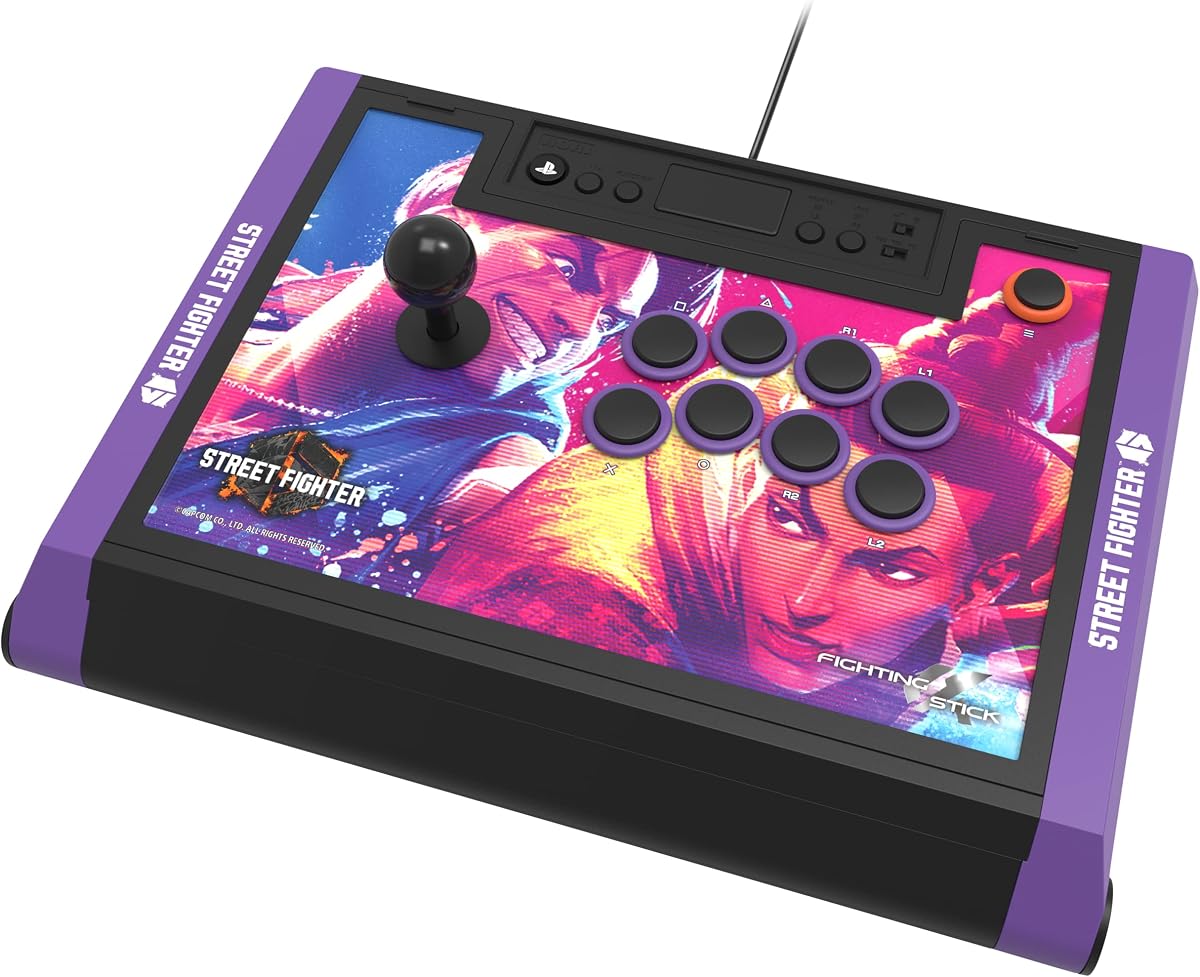
This special edition stick is designed for Street Fighter fans with official collaboration from Capcom. It maintains the high-end tournament grade build of the original Alpha model but adds unique aesthetic value for the community.
We may earn a commission when you buy through this link, at no additional cost to you.
Key strengths include the proprietary Hayabusa joystick and buttons that ensure tournament grade reliability. The package includes links to downloadable hi-res images of characters for top panel customization enhancing your visual setup.
The trade-off is the premium price compared to the standard version which may not fit all budgets. This is acceptable for fans who value the exclusive artwork and the official support from the game developers.
If you love Street Fighter 6 this edition offers the best visual and performance experience. It combines top tier hardware with exclusive branding that makes it a standout choice for collectors and pros.
Official Capcom and Sony licensing ensures this is an authentic piece of Street Fighter 6 gear.
The high-end construction ensures it meets the rigorous standards required for competitive events.
We may earn a commission when you buy through this link, at no additional cost to you.
The Qanba Q7 Obsidian 2 offers advanced features like a dedicated switch to change between PS5 PS4 and PC modes. It is an officially licensed peripheral that brings authentic Qanba components to your fighting game sessions.
We may earn a commission when you buy through this link, at no additional cost to you.
Key strengths include swappable Sanwa joystick tops and OBSF buttons which offer high quality input registration. The full control panel includes a touch pad for menu navigation without needing a standard controller nearby.
The trade-off is the wired connection and slightly heavier build compared to some portable options. This is acceptable for a home setup where stability and component quality are prioritized for competitive play.
If you want a stick with advanced control options and official licensing this model is ideal. It balances performance features with reliability making it a great choice for serious gamers.
A physical toggle switch lets you move between console modes instantly without unplugging cables.
OBSF buttons offer a distinct tactile feel that is preferred by many competitive players worldwide.
We may earn a commission when you buy through this link, at no additional cost to you.
This edition of the Alpha stick features official TEKKEN 8 artwork and is licensed by Bandai Namco. It delivers the same tournament grade performance as the original but with exclusive art for fans of the series.
We may earn a commission when you buy through this link, at no additional cost to you.
Key strengths include the proprietary Hayabusa joystick and buttons that ensure reliable inputs during intense combos. The top panel artwork and downloadable alternate prints allow you to keep the visual theme relevant.
The trade-off is the higher price compared to standard versions due to the branding and licensing. This is acceptable for TEKKEN players who want an authentic setup that matches their favorite game.
If you are a TEKKEN fan this stick offers the perfect visual and performance match. It combines official collaboration with high-end components for a truly immersive fighting game experience.
Authorized by Bandai Namco this art and branding are authentic and officially sanctioned by the game.
The hardware matches the standard Alpha model so you do not lose performance for the special edition.
We may earn a commission when you buy through this link, at no additional cost to you.
The GuileKeys GK-18 is a leverless controller with eighteen keys for complex combinations and precise inputs. It is designed for competitive players who want to reduce movement errors using a four-direction button layout.
We may earn a commission when you buy through this link, at no additional cost to you.
Key strengths include the use of Kailh Choc switches for low latency and a hot-swappable design that allows easy customization. The integrated OLED screen and RGB lighting let you personalize your setup and monitor input modes easily.
The trade-off is the need for an additional converter to connect to PS5 and the learning curve for leverless input. This is acceptable for advanced players who seek maximum precision and customization flexibility.
If you want to experiment with leverless layouts this controller offers the most customization. It is a powerful tool for players ready to refine their technique with innovative input technology.
By using buttons for movement you can reduce physical errors and execute precise inputs faster.
Hot-swap switches and web configurators allow you to adjust every aspect of the controller to fit you.
We may earn a commission when you buy through this link, at no additional cost to you.
Selecting the right fightstick requires balancing several key factors to match your play style and budget requirements.
A quality arcade stick should have a solid enclosure that does not slide or flex during intense combos. Look for models that use high-grade materials like wood or metal panels which reduce noise and increase stability over time.
Prioritize units that feel sturdy and heavy enough to stay in place during aggressive gameplay without sliding around your desk.
The internal switches determine how fast and accurate your inputs are. High-quality components like Sanwa or Hayabusa offer consistent actuation and durability that lasts through thousands of tournament matches.
Always verify that the joystick and buttons are replaceable or high-quality to ensure your stick remains functional for years.
Ensure the stick explicitly supports PS5 to avoid issues with system recognition or feature limitations. Some models require adapters or specific firmware updates to work correctly on modern consoles like the PS5.
Check the product listing for PS5 compatibility notes to ensure seamless plug and play functionality without extra steps.
A good fightstick should allow you to swap panels adjust buttons or change joystick heads to suit your needs. Look for models that open easily with tools or simple screws so you can upgrade parts without soldering.
Choose a unit that offers modular parts so you can personalize the look and feel without buying a new stick.
Wired connections generally offer lower latency which is critical for competitive fighting games. Wireless options provide convenience but ensure they have low latency modes and stable connections for tournament play.
If you play on a PC or PS5 wired is often preferred for consistent performance without battery concerns.
Advanced players may need custom button mappings or macros to execute complex combos quickly. Check if the stick includes software support on PC to remap keys and create profiles for different games easily.
Software that allows easy profile switching saves time and ensures you have the right controls for any game title.
Long match sessions require a stick that fits your hand and wrist comfortably. Look for textured surfaces or palm rests that reduce strain during extended practice or tournament play.
Prioritize units with a layout that allows your hand to rest naturally to prevent fatigue and improve consistency.
Budget options may lack premium components but can still perform well for casual play. High-end models offer better durability and features that justify the cost for serious competitive players.
Determine your budget early and choose the highest quality components you can afford within that range for best results.
Begin by connecting the stick to your PS5 via the included USB cable. Ensure your console recognizes the device automatically before launching any fighting game to avoid input errors.
Regularly clean the buttons and joystick with a soft dry cloth to remove dust and oils. If your model opens easily remove the panel occasionally to clean internal components and ensure smooth movement.
If your stick allows software mapping set up profiles for different games to streamline your setup. Save these profiles on your console to quickly switch layouts without manual button adjustments each time.
Most modern fightsticks do not require an extra controller because they function as the primary input device. However some older models may need a boot or adapter to bridge the connection to the PS5 console.
Many models in this roundup support multiple systems including Xbox and PC. Check the product specs to confirm compatibility with your specific console or operating system before buying.
Yes Sanwa parts are industry standard for competitive play due to their speed and durability. They offer more consistent input registration which is critical for advanced fighting game combos.
Use a soft dry cloth to wipe the joystick cap and surrounding area. Avoid using liquids directly on the button panel to prevent damage to the internal electronics.
Most options here support PS5 and PS4 plus other systems like PC or Switch. Always verify the specific system list on the product page to ensure compatibility with your setup.
Most modern sticks are designed for easy customization without soldering. Simple tools are usually included to swap panels or buttons so beginners can personalize their setup quickly.
The HORI PlayStation 5 Fighting Stick Alpha remains the top choice for most players due to its reliability and official licensing. The MAYFLASH F700 offers a strong budget alternative for those needing wireless support.
Prioritize build quality and component type over flashy aesthetics to ensure your stick lasts through years of competitive play. Consider whether you need wireless options or just a solid wired connection for your setup.
Prices and availability change frequently so verify the current pricing before completing your purchase. Check the product details on the retailer site to confirm the latest features and warranty information.