
Physical Click Auto Keyboard
5.0Editor score
Random click setup for human mimicry
Physical device requires no installation
Sturdy design with low noise operation
This comprehensive guide compares the top automated keyboard clicker devices for gaming and productivity, detailing their unique features, performance
Automated keyboard clickers are essential tools for gamers and professionals who need to keep systems active without constant manual input. These devices simulate human interaction to prevent idle disconnection in online environments. Choosing the right one ensures reliability and efficiency for your specific tasks.
We evaluated ten distinct physical clicker models based on their build quality, speed options, and ease of use. Our comparison highlights key differences in programmability, hardware design, and compatibility with various input devices. This analysis helps you identify the tool that best fits your workflow.
Each product entry provides detailed specifications and user-focused insights to guide your purchasing decision. We focus on functionality and durability rather than cost fluctuations which vary by region and time. Always check current availability and terms before finalizing your order online.
5.0Editor score

4.0Editor score

4.3Editor score
The following table offers a side-by-side comparison of all ten automated keyboard clicker devices. It highlights their core specifications to help you quickly identify which model aligns with your specific needs for gaming or computer activity maintenance.




This physical keyboard clicker offers a high degree of customization for users needing precise control over automated inputs. It stands out with its ability to define loop times and click intervals manually. The device operates independently of your computer software ensuring consistent performance.
We may earn a commission when you buy through this link, at no additional cost to you.
Each of the three ports can have its clicking speed adjusted independently to fulfill various needs. The device supports timed operation and rest periods allowing you to customize the number of timed repetitions. This flexibility makes it suitable for diverse clicking needs beyond simple tasks.
Users must be mindful not to exceed five clicks per second to avoid heat-related damage to the unit. The clicking arm has three adjustable parts making it easier to click on the keyboard accurately. This limitation is acceptable given the high level of control it provides.
It is an excellent choice for gamers or professionals who require frequent adjustments to their automation settings. The physical nature ensures it works without risking security concerns associated with software solutions. This model is highly recommended for those seeking a programmable tool.
You can define click press duration and enable rapid consecutive clicks for precise timing.
The device meets your computer clicking requirements without requiring any driver installation.
We may earn a commission when you buy through this link, at no additional cost to you.
This affordable physical clicker device is designed to keep your game active without manual intervention. It features a random click setup that customizes intervals to mimic human activity closely. This enhances the effectiveness of the tool in various online platforms.
We may earn a commission when you buy through this link, at no additional cost to you.
Unlike software solutions this physical clicker works independently of your computer software ensuring consistent performance. The motor is designed to be low noise and does not heat up during operation. Its sturdy construction ensures it does not break easily under regular use.
While it offers essential features like height adjustment users may find the random setup basic. The device requires you to modify the height and position of the click head yourself. This is a minor trade-off for a budget-friendly device that prevents offline status.
It is ideal for users who want a simple reliable tool to manage repetitive tasks. The physical nature ensures safety and stability without needing additional drivers. This model is a strong contender for those seeking value and performance.
Random intervals enhance the effectiveness of the tool in various online platforms.
Simply set it up on your computer and let it manage repetitive clicking tasks.
We may earn a commission when you buy through this link, at no additional cost to you.
This premium auto keyboard clicker stands out with its adjustable height feature fitting different keyboards in the market. It offers a wide range of random click time settings from 0.1 seconds to 9 seconds. The host allows you to set the time directly without programming.
We may earn a commission when you buy through this link, at no additional cost to you.
The device simulates manual clicking with fixed drops and random time for an irregular effect. It features a rubberized cover cover to prevent damaging the keyboard and reducing sound during use. This attention to detail ensures a more reliable user experience.
While it is priced higher than basic models the added features justify the investment for many users. The real simulation of manual clicking ensures it works effectively across various systems. Handling the rubberized cover requires care to maintain its protective qualities.
It is recommended for users seeking a high-quality tool that protects their hardware. The adjustable height and time settings provide significant flexibility for different tasks. This model represents a premium choice for dedicated gamers and professionals.
Rubberized cover prevents keyboard damage and reduces sound during use.
Host directly set the time without programming for easier use.
We may earn a commission when you buy through this link, at no additional cost to you.
The Pankia Auto Keyboard Clicker offers 15 different random click speeds to choose from. You can select the random clicking speed you need for your specific tasks. The device supports clicking most keyboards and mice saving you a lot of time.
We may earn a commission when you buy through this link, at no additional cost to you.
There are 5 random speeds for each of the three ports allowing independent settings. The indicator light flashes once to indicate Mode 1 and you can switch modes easily. The clicking arm can extend and adjust different positions for flexibility.
Users note that the rating is lower than top competitors which may reflect specific performance nuances. Pressing the button for 3 seconds starts the device and indicators show the mode number. Adjusting settings requires attention to the specific mode indicators provided.
It is a useful tool for those needing multiple speed options without complex programming. The wide compatibility and adjustable arm make it suitable for various setups. While ratings vary it provides solid functionality for manual clicking automation.
You can choose the random clicking speed you need from 15 options.
The clicking arm can extend and adjust different positions for optimal use.
We may earn a commission when you buy through this link, at no additional cost to you.
This Physical Click Auto Keyboard features a digital display function where click speed is clearly displayed in numbers. It supports press and release modes allowing you to set the number of clicks. The device is powered by 5V making it versatile for mobile phone chargers.
We may earn a commission when you buy through this link, at no additional cost to you.
You can configure ABC groups where group B and C can be closed or opened arbitrarily. This allows for complex timing scenarios from 0.1 seconds to 80 hours latency. The host directly sets the time without programming making it easier to use.
The complexity of the ABC groups logic may confuse users who prefer simple setups. Ensuring the correct order of timing and executing clicks requires careful attention. This limitation is acceptable given the high level of control it provides.
It is ideal for users who need detailed control over click timing and duration. The digital display helps you monitor settings without external software. This model is suitable for advanced automation needs.
The click speed is clearly displayed in numbers for easy monitoring.
ABC groups are executed sequentially with flexible timing options.
We may earn a commission when you buy through this link, at no additional cost to you.
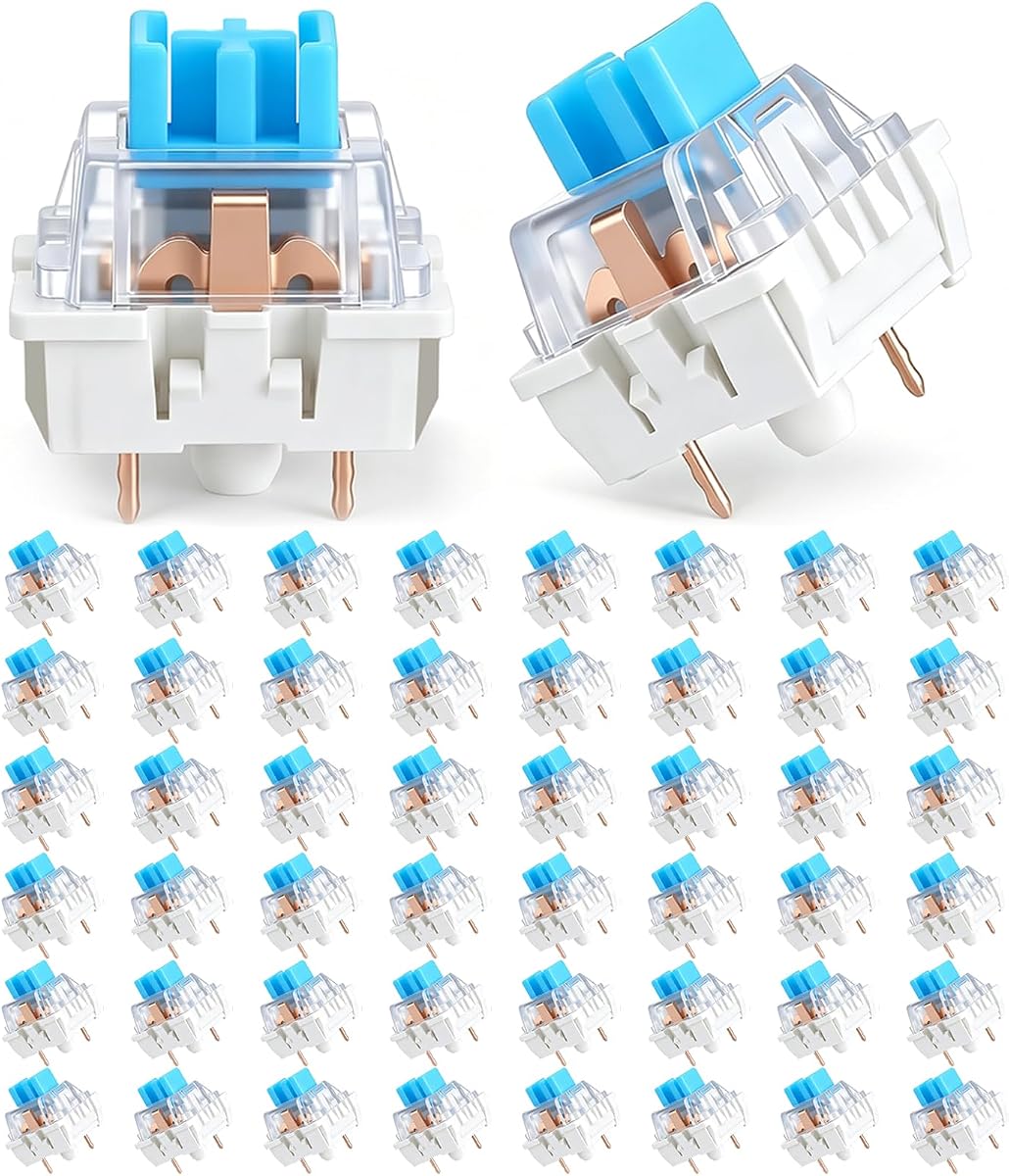
These keyboard clickers are mechanical keyboard switches designed for replacement or DIY builds. They produce a satisfying clicking tactile feedback enabling precise keystrokes. The blue housing with clear casing complements the LED backlight perfectly.
We may earn a commission when you buy through this link, at no additional cost to you.
Made of plastic housing and precision steel springs these switches are waterproof and dustproof. They have a service life of up to 50 million cycles ensuring durability. The 3-pin switches are compatible with most mechanical keyboards.
This product is a component not a standalone automated tool requiring manual installation skills. It is suitable for users looking to replace existing switches or build a fidget toy. This limitation is acceptable given the high quality of the switches.
It is ideal for mechanical keyboard enthusiasts or those building custom 3D print projects. The crisp clicky sound helps relieve stress during typing. These switches are a great addition for customization.
Mechanical keyboard switches produce a satisfying clicking tactile feedback.
Service life up to 50 million cycles ensures longevity.
We may earn a commission when you buy through this link, at no additional cost to you.
This product is a clicking arm only unit that requires the Pankia Box to work properly. It has three adjusting parts making it easier to click on the keyboard. Do not click more than 5 times per second to avoid heat damage.
We may earn a commission when you buy through this link, at no additional cost to you.
The clicking arm can only click the keyboard or mouse not the phone screen. You must buy a clicking head if you need to click the phone screen. This specific design ensures compatibility with the main controller box.
Users must be aware it does not work alone without the Pankia Box. It meets screen click needs when paired correctly with the main unit. This limitation is acceptable given the modular design philosophy.
It is ideal for users upgrading or repairing their existing Pankia setup. The adjustability and compatibility make it useful for specific hardware needs. This model is a component for an existing system.
Requires Pankia Box to work properly as a system component.
The clicking arm has three adjusting parts for easy use.
We may earn a commission when you buy through this link, at no additional cost to you.
The Pankia Box Physical Click clicker meets your screen click needs with its arm design. You simply place the clicking arm on the keyboard or mouse to let it click automatically. All three ports can adjust the speed separately to meet different needs.
We may earn a commission when you buy through this link, at no additional cost to you.
The clicking arm has three adjusting parts making it easier to click on the keyboard. Do not click more than 5 times per second to prevent heat damage. The device supports keyboard and mouse for a variety of clicking applications.
While the rating is average the device offers reliable physical operation without software. Users must pay attention to speed limits to ensure longevity. This limitation is acceptable given the simplicity of the design.
It is suitable for users who need a basic tool to keep computers active. The wide compatibility and separate port settings provide necessary flexibility. This model is a solid option for manual clicking automation.
All three ports can adjust the speed separately for different needs.
Physical device requires no software and supports keyboard and mouse.
We may earn a commission when you buy through this link, at no additional cost to you.
This 2-pack includes one quiet and one clicky keyboard fidget for different settings. The pink 4-key keyboard fidget is quiet for discreet pressing at a desk. The green keyboard clicker delivers audible feedback when sound is welcome.
We may earn a commission when you buy through this link, at no additional cost to you.
Each fidget uses four mechanical-style keys for a familiar finger-pressing feel. A clip-on keychain design allows you to carry it on keys or a bag. This makes it convenient for commutes breaks and travel.
While it is not an automated tool for tasks it provides stress relief during work. The choice between quiet and clicky ensures it fits different spaces. This limitation is acceptable given the focus on anxiety reduction.
It is ideal for adults who need stress relief or a tactile toy. The compact gift nature makes it perfect for friends and family. This model offers versatile sound profiles for shared spaces.
The pink and green fidgets offer distinct quiet or clicky feedback.
Clip-on keychain design includes a keychain clip for carrying easily.
We may earn a commission when you buy through this link, at no additional cost to you.
These 108PCS blue click switches provide a distinct tactile feedback with crisp sound. They are ideal for gaming and typing where distinct feedback is preferred. The service life is about 80 million cycles ensuring long-term durability.
We may earn a commission when you buy through this link, at no additional cost to you.
The blue switch has a satisfying mechanical clicky sound that helps reduce anxiety. However the loud sound makes it unsuitable for quiet environments like libraries. This limitation is acceptable given the high quality mechanical feel it provides.
Packed in a delicate PVC plastic box these switches are protected from damage. The design prevents the pin from bending during shipping. This ensures you receive switches that function correctly upon installation.
It is ideal for mechanical keyboard enthusiasts who need replacement switches. The distinct tactile feel minimizes fatigue during extended use. These switches are a great gift for keyboard enthusiasts.
Waterproof plastic housing design with high service life.
Satisfying mechanical clicky sound acts as a fingertip toy.
We may earn a commission when you buy through this link, at no additional cost to you.
Selecting the right automated keyboard clicker requires considering several key factors that affect performance and usability. This guide outlines essential aspects to help you choose a device that meets your specific needs.
Physical clickers operate independently of your computer software ensuring consistent performance without risking security. They are ideal for users who prefer hardware solutions that do not require installation.
Choose a physical device if you want to avoid software conflicts and ensure system stability.
Look for devices that allow adjustable speeds and click intervals to mimic human activity. This flexibility ensures the clicker can handle diverse tasks without becoming predictable.
Verify that the device supports multiple speed settings to meet various usage scenarios.
Consider the size and weight of the device especially if you plan to use it with a laptop. Compact designs with keychain options offer greater freedom of movement.
Select a compact model if you frequently travel or work in different locations.
Check the build quality and expected service life of the device. Sturdy materials like plastic housing and steel springs ensure the device withstands repetitive use over time.
Opt for a model with high durability ratings to avoid frequent replacements.
Some models offer programmable features like timed operation and rest periods. These advanced settings help automate complex workflows without manual intervention.
Choose a programmable unit if you need to define specific click sequences.
Noise levels vary significantly between models so consider where you will use the device. Low noise motors are preferable for office settings where sound may distract others.
Select a quiet model if you work in shared or noisy environments.
Ensure the device is compatible with your keyboard and mouse type. Some models require specific mounting or adjustment to work effectively.
Check compatibility requirements to ensure a seamless setup process.
Devices that allow direct setting without programming are easier to use. Look for intuitive controls and clear indicators for speed or mode changes.
Pick a user-friendly model if you prefer simple setup without technical knowledge.
Position the clicking arm carefully on your keyboard or mouse to ensure accurate clicks. Adjust the height and angle so the tip presses the key or button effectively.
Power the device using a USB connection or 5V adapter and configure settings like speed or random intervals. Verify the indicator lights show the correct mode before starting.
Clean the device regularly to prevent dust buildup on the clicking arm or sensor. Store it in a protective case when not in use to maintain its durability.
Physical automated keyboard clickers are generally safe as they do not require software installation. They operate independently reducing risks of security threats. Always ensure proper settings to avoid hardware damage.
Most models allow speed adjustment via buttons or ports. Refer to the indicator lights or digital display to select the desired speed. Some units require a specific button press sequence.
Yes, most physical clickers work on laptops if you adjust the arm height. Ensure the clicking arm fits the keyboard layout. Some models offer rubberized covers to prevent damage.
Physical clickers typically do not require driver installation. They are powered directly by USB or adapters. This ensures consistent performance without system conflicts.
Clicking faster than recommended may cause heat damage to the motor. Limit clicks to the specified maximum like 5 per second. Adjust settings to stay within safe limits.
Many models support both keyboard and mouse clicking. You may need to adjust the arm angle for mouse buttons. Some units have specific ports for different inputs.
Usage legality depends on the platform terms of service. Always check if automation tools are permitted. Using them in restricted games may lead to penalties.
Service life varies but high-quality models offer 50 to 80 million cycles. Proper care and avoiding overheating extend the lifespan. Check warranty terms for specific coverage.
We have reviewed ten automated keyboard clickers ranging from basic physical tools to programmable devices. Each offers unique features suited to different needs like gaming or productivity.
Prioritize factors such as customization durability and ease of use when selecting a model. Physical devices ensure consistency and security without software dependencies.
Remember to check current availability and terms before finalizing your order online. Prices may fluctuate and features can change with new releases.