
Brother HL-L2405W
4.1Editor score
Compact wireless design
Fast 30ppm printing
Mobile app support
This comprehensive guide compares the top Brother Laser Printer models for 2026, evaluating speed, connectivity, and features to help you choose the right
Finding the right printing solution can be challenging with so many options available on the market today. Brother has established itself as a reliable brand known for producing durable and efficient devices that meet diverse needs. Whether you need a simple monochrome unit or a multifunction color system, there is a suitable choice for every workspace.
We have carefully evaluated ten standout models based on their performance, connectivity options, and overall value. Our analysis focuses on real-world usability including print speeds, paper handling capabilities, and software integration. This list ensures you can make an informed decision without getting lost in technical jargon or marketing hype.
Each pick highlights specific strengths and ideal use cases ranging from home offices to small business environments. We provide detailed specifications and user-friendly summaries to help you compare features side by side. Please note that product availability and pricing can change frequently so verify details before purchasing.
4.1Editor score

4.1Editor score

4.0Editor score
The following table provides a side-by-side comparison of all ten selected models allowing you to quickly assess key specifications and features. Pay attention to print speeds paper capacities and connectivity options as these factors heavily influence daily productivity and user experience in various settings.



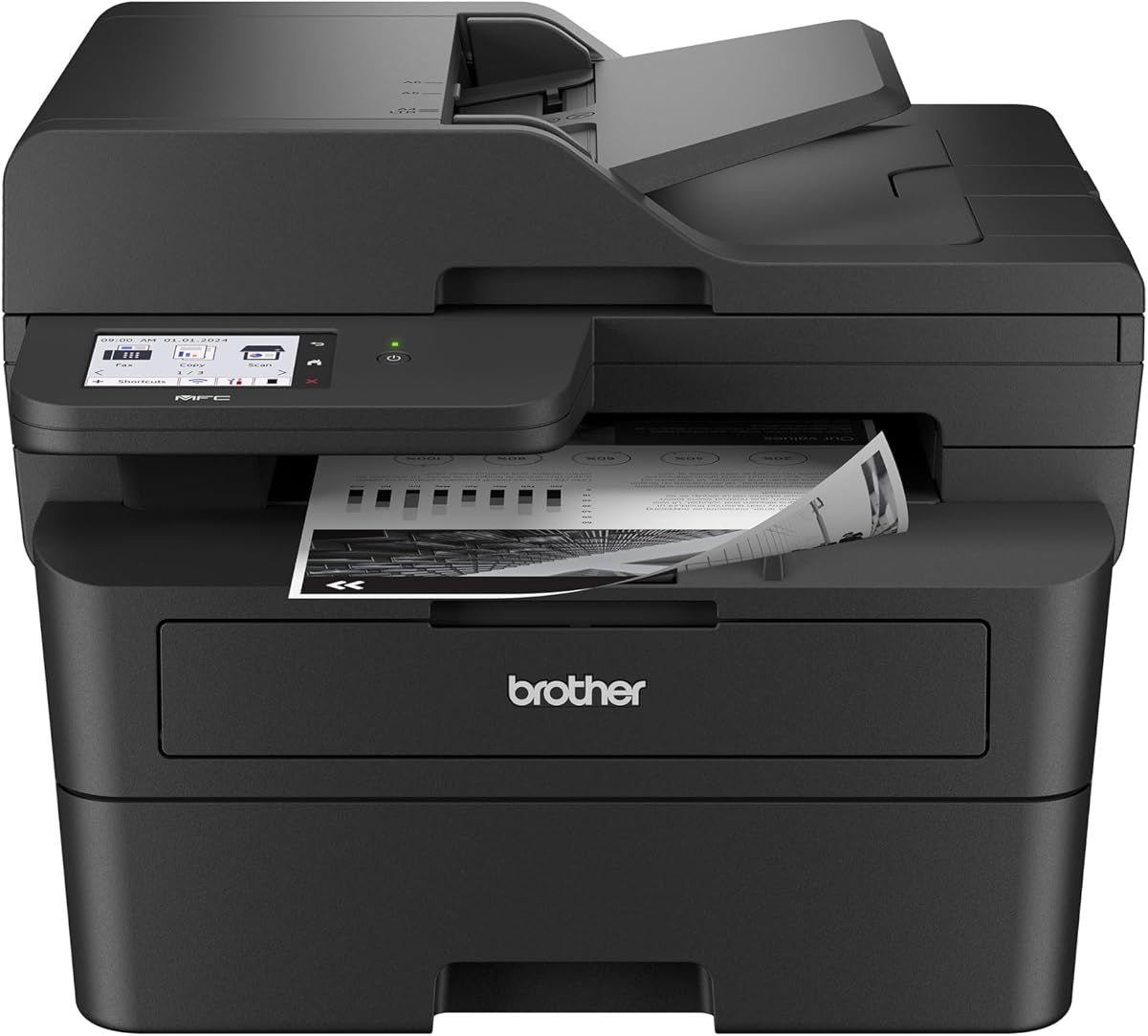


The Brother DCP-L2640DW stands out as a top contender for small businesses needing efficient document handling. With a 4.1 rating it offers a balance of speed and reliability that fits well in busy environments. Its 3-in-1 capability ensures you can print scan and copy without taking up excessive desk space.
We may earn a commission when you buy through this link, at no additional cost to you.
This model excels with print speeds reaching up to 36 pages per minute which keeps workflow moving quickly. The 50-page automatic document feeder allows for multi-page tasks without manual intervention saving valuable time. Connectivity is robust with dual-band wireless options ensuring stable connections across various devices.
While it lacks color printing this limitation is acceptable for users focused on text-heavy documents. The toner options like TN830 offer high yield reducing frequent replacements. The mobile app adds convenience allowing remote management of supplies and print jobs effectively.
Ideal for small offices this printer delivers consistent performance with minimal fuss. It is an excellent choice for those prioritizing efficiency and compact design over color capabilities. We recommend this for anyone needing a reliable workhorse for daily monochrome tasks.
The automatic document feeder allows seamless scanning of multi-page documents without manual page turning.
Dual-band wireless ensures stable connections and the mobile app enables printing from anywhere.
We may earn a commission when you buy through this link, at no additional cost to you.
The Brother HL-L2405W is an ideal entry-level printer for home offices or students needing basic functionality. It maintains a solid 4.1 rating reflecting user satisfaction with its simplicity and performance. This model focuses purely on printing ensuring quality without extra costs for unneeded features.
We may earn a commission when you buy through this link, at no additional cost to you.
With print speeds up to 30 pages per minute it handles daily tasks efficiently without lag. The 250-sheet paper tray minimizes refills ensuring continuous operation during longer print jobs. Connectivity options include dual-band wireless making it easy to share across multiple devices in a home network.
It lacks scanning and duplexing which may be a downside for heavy document workflows. However for simple text documents the quality remains sharp and professional. Voice control via Alexa adds a modern touch for hands-free operation which is convenient for multitasking.
This printer is perfect for budget-conscious users who prioritize core printing needs. It saves space on your desk while delivering consistent results for reports and assignments. We recommend it for anyone needing a straightforward reliable monochrome printer without breaking the bank.
Low initial cost combined with efficient toner usage makes this a great value option for limited budgets.
Alexa compatibility allows users to send print commands using voice prompts for added convenience.
We may earn a commission when you buy through this link, at no additional cost to you.
For businesses requiring color documents the Brother MFC-L3720CDW offers a premium all-in-one solution. With a 4.0 rating it balances advanced features with reliable performance for professional environments. The ability to print fax scan and copy in color sets it apart from standard monochrome models.
We may earn a commission when you buy through this link, at no additional cost to you.
This device delivers vivid colors and sharp text making presentations and marketing materials stand out. The 3.5-inch color touchscreen provides intuitive navigation and quick access to cloud services. Connectivity is extensive including Wi-Fi Direct and USB ensuring compatibility with almost any office setup.
Print speeds are moderate at 19 pages per minute which is typical for color lasers. The fax capability might be less relevant for some but useful for traditional business needs. Operating costs are higher due to four-color toner usage but the quality justifies the investment.
Ideal for creative agencies or offices needing high-quality color prints this machine is robust. It handles high volumes effectively with an adjustable paper tray and auto duplexing. We recommend it for those who need versatile color capabilities in a single reliable device.
Advanced color engine ensures vibrant graphics and crisp text suitable for professional presentations.
The large touchscreen simplifies navigation and allows direct cloud access for efficient document workflows.
We may earn a commission when you buy through this link, at no additional cost to you.
The Brother HL-L2460DW is designed for home offices needing fast and efficient document printing. With a 4.0 rating it is known for its speed and compact footprint. It focuses on delivering quality monochrome prints without unnecessary bulk or complexity.
We may earn a commission when you buy through this link, at no additional cost to you.
Print speeds of up to 36 pages per minute ensure quick turnaround for daily reports. Automatic duplex printing helps save paper and reduce costs over time. The 250-sheet tray is sufficient for small teams reducing the need for frequent refills.
Missing scanning or fax features limits its utility for those needing multifunctionality. However for pure printing tasks it performs exceptionally well. Connectivity is seamless with both Ethernet and wireless options allowing flexible network integration.
This printer is excellent for individuals or small teams prioritizing speed and efficiency. It handles high volumes effectively while maintaining a professional output. We recommend it for anyone needing a dedicated high-speed printer for text documents.
High speed printing combined with automatic duplexing makes this ideal for fast-paced office environments.
Both Ethernet and wireless connections provide reliable network access for multiple devices in the office.
We may earn a commission when you buy through this link, at no additional cost to you.
The Brother MFC-L2820DW is a highly rated multifunction printer that brings printing scanning and faxing together. With a 4.3 rating it is a favorite for small offices needing versatile functionality. Its compact design ensures it fits easily into tight workspace arrangements.
We may earn a commission when you buy through this link, at no additional cost to you.
Print speeds of 36 pages per minute keep productivity high even during busy periods. The 50-page automatic document feeder allows for quick scanning of contracts or reports. The included fax feature adds utility for businesses relying on traditional document transmission methods.
While it lacks color capabilities it delivers crisp black and white prints that look professional. The touchscreen interface makes navigation straightforward allowing quick access to cloud apps like Google Drive. Setup is intuitive and connectivity options are robust for most environments.
This unit is perfect for small businesses requiring a complete document solution in one device. It balances performance and size effectively making it a practical choice. We recommend it for offices needing reliable scanning and faxing alongside fast printing.
Combining scan fax and print capabilities into one unit reduces equipment clutter and simplifies workflows.
The intuitive touchscreen and cloud app support streamline navigation and reduce learning curves for staff.
We may earn a commission when you buy through this link, at no additional cost to you.
The Brother HL-L3220CDW is a dedicated color laser printer designed for professional home offices. While rated 3.9 it delivers consistent quality for those who need vibrant visuals. It transforms a standard desk into a powerful workspace capable of producing polished documents.
We may earn a commission when you buy through this link, at no additional cost to you.
Print speeds of 19 pages per minute are reasonable for color output ensuring efficiency. The advanced wireless capabilities keep data secure which is vital for business documents. The 250-sheet tray minimizes interruptions allowing for longer continuous print jobs.
It focuses purely on printing lacking scanning or copying features found in all-in-one units. The manual feed slot offers versatility for envelopes or labels adding extra utility. Connectivity to major cloud platforms makes remote management simple and effective.
Ideal for creatives or consultants needing high-quality color prints this model stands out. It handles complex graphics well making it suitable for portfolios and marketing materials. We recommend it for users prioritizing print quality and connectivity over multifunctionality.
Vibrant graphics and crisp text ensure your business materials look polished and impressive to clients.
Secure wireless protocols and cloud compatibility allow safe printing from any device within the network.
We may earn a commission when you buy through this link, at no additional cost to you.
The Brother HL-L2480DW is highly rated for its balance of speed and functionality in home offices. With a 4.5 rating users appreciate its reliability and ease of use. It combines printing scanning and copying into a sleek unit that fits neatly on a desk.
We may earn a commission when you buy through this link, at no additional cost to you.
Print speeds of up to 36 pages per minute ensure quick completion of daily tasks. The 2.7-inch touchscreen provides easy navigation allowing direct cloud access to services like Google Drive. A 250-sheet tray supports high-volume printing without constant refilling.
It lacks fax capabilities which might be a dealbreaker for some traditional business needs. However for most home users this limitation is minor compared to its other strengths. Wireless connectivity and mobile app support make remote printing seamless and convenient.
This printer is ideal for small teams or individuals needing versatile document handling. It delivers consistent results and saves space effectively. We recommend it for anyone looking for a reliable all-in-one printer for remote work.
Direct cloud app access and touchscreen controls streamline document management and reduce processing time.
Compact design ensures maximum utility from minimal footprint perfect for home office desks.
We may earn a commission when you buy through this link, at no additional cost to you.
The Brother MFC-L2900DW delivers professional-grade performance for businesses needing efficiency. With a 4.2 rating it is known for speed and advanced document handling features. It is designed to handle high volumes while maintaining quality and reliability.
We may earn a commission when you buy through this link, at no additional cost to you.
Print speeds of 36 pages per minute are complemented by single-pass scanning which drastically reduces processing time. The 3.5-inch touchscreen offers intuitive navigation and direct access to cloud services for seamless workflows. Energy efficiency features reduce electricity consumption helping lower operational costs.
While more expensive than basic models the investment pays off in productivity. The 50-page auto document feeder ensures smooth multi-page scanning without interruptions. Connectivity is robust with wireless and Ethernet options supporting diverse office setups.
This model is ideal for small to medium businesses requiring speed and advanced features. It handles heavy loads efficiently making it a workhorse for daily tasks. We recommend it for those needing professional performance and energy savings in one unit.
Single-pass scanning and high speeds significantly reduce time spent on document processing and copying.
Enhanced fuser design lowers electricity consumption helping businesses reduce costs and environmental impact.
We may earn a commission when you buy through this link, at no additional cost to you.
The Brother HL-6210DW is built for environments requiring extreme volume and speed. With a 4.1 rating it delivers consistent results for demanding office workflows. It is a dedicated printer that prioritizes performance over compactness.
We may earn a commission when you buy through this link, at no additional cost to you.
Print speeds of 50 pages per minute make it one of the fastest in its class. The massive 520-sheet paper tray and optional expansions allow uninterrupted operation for large jobs. Security features protect sensitive data ensuring safe transmission across networks.
It is expensive and physically larger than compact models which might not suit small spaces. However the high capacity reduces maintenance and refills saving operational time. Gigabit Ethernet ensures fast stable data transfer for busy networks.
This unit is ideal for departments with heavy printing requirements needing reliability. It handles thousands of pages efficiently reducing downtime. We recommend it for businesses where speed and volume are critical priorities.
Massive paper trays and high speeds ensure continuous operation without interruptions in demanding environments.
Multi-layer protection and Gigabit Ethernet ensure secure document transmission and safe network integration.
We may earn a commission when you buy through this link, at no additional cost to you.
The Brother Work Smart 1360 is a color inkjet option for those needing versatility on a budget. With a 3.8 rating it is a viable choice for home users needing occasional color prints. It offers a full set of features without the complexity of laser technology.
We may earn a commission when you buy through this link, at no additional cost to you.
Print speeds of 16 pages per minute in black are decent for home office use. The 20-page automatic document feeder supports quick scanning tasks. Cloud app connections allow easy printing from various devices without drivers.
Inkjet technology may require more maintenance and can be slower than lasers. However for small batches of color documents it is cost-effective. The 1.8-inch display simplifies navigation making it user-friendly for all ages.
Ideal for students or home users needing color occasionally this model is practical. It balances functionality and price well for casual workflows. We recommend it for those prioritizing color on a strict budget.
Compact design and basic features make this perfect for students or home users needing occasional color prints.
Cloud connections and wireless setup allow easy printing from various devices without technical hassle.
We may earn a commission when you buy through this link, at no additional cost to you.
Choosing the right printer involves balancing cost with features and performance needs. Consider your typical document types and volume before selecting a model.
Decide if you need color output or if black and white is sufficient for your needs. Color printers are more expensive to buy and operate due to extra toners.
Choose monochrome if you mostly print documents and reports to save money.
Look for models with speeds matching your daily volume needs such as 30 to 50 pages per minute. Faster models handle large jobs without bottlenecks in busy workflows.
Prioritize speed if you print in high volumes to maintain efficiency.
Consider all-in-one models that include scanning copying and faxing to replace separate devices. These units save space and streamline office workflows effectively.
Select multifunction units if you need document management beyond simple printing.
Check paper tray sizes to ensure they meet your refill needs such as 250 or 520 sheets. Higher capacity reduces interruptions during long print sessions.
Choose larger trays if you print frequently to minimize maintenance downtime.
Ensure the model supports both wireless and Ethernet options for flexible network setups. Mobile app support is crucial for remote printing and monitoring.
Verify connectivity matches your devices and network structure for seamless use.
Look for automatic duplexers to save paper and reduce costs for double-sided documents. High yield toners lower the cost per page over time.
Prioritize duplex and high yield toners to optimize long-term expenses.
Measure your available desk space to ensure the printer fits comfortably without clutter. Compact models are better for home offices with limited room.
Choose compact units if space is limited to keep your workspace tidy.
Determine your initial budget and long-term operating costs like toner and paper. Balance upfront price with maintenance and efficiency needs.
Pick a model that fits your budget while meeting essential performance requirements.
Begin by installing the printer software and drivers on your computer or mobile device. Follow the setup wizard to connect via wireless or Ethernet for proper network integration.
Regularly clean the exterior and rollers using a soft cloth to prevent dust buildup. Check toner levels via the app or control panel and replace cartridges when low.
Update firmware regularly to ensure security patches and performance improvements are applied. Use genuine supplies and paper to maintain print quality and prevent mechanical issues.
Laser printers use toner powder for speed and efficiency on text documents. Inkjet printers use liquid ink which is better for photos but slower on text.
Yes most models support mobile apps for iOS and Android devices. You can print directly from your phone or tablet to your network.
Clean rollers and update firmware regularly. Use fresh toner cartridges and genuine paper for consistent sharp results.
Duplex printing means the printer prints on both sides of the paper automatically. This saves paper and reduces waste significantly.
Yes but using genuine Brother toner ensures better quality and warranty protection. Compatible options are available but might vary in performance.
Use the printer's touchscreen menu to select Wi-Fi settings. Enter your network password and confirm connection for wireless printing.
Consider color models like the HL-L3220CDW for high-quality outputs. These allow vibrant graphics alongside text documents.
Brother offers standard limited warranties for most models. Extended plans are available for extra protection beyond the standard period.
This guide has highlighted ten models ranging from compact home units to powerful business workhorses. Each pick offers distinct advantages depending on your volume and budget needs.
Prioritize features like speed duplex printing and connectivity to match your daily workflow demands. Choosing the right model ensures efficiency and reliability for years.
Prices and availability change frequently so verify details before making your final decision. Check current deals to ensure you get the best value for your investment.