
HP DeskJet 2955
3.7Editor score
Compact wireless design
AI print formatting
Instant ink trial
Finding an affordable all in one printer can be challenging when you need reliable performance without breaking the bank. These devices combine printing, scanning, and copying capabilities into a single unit, making them ideal for home offices and students seeking efficiency.
We have carefully evaluated ten leading models based on their features, user ratings, and overall value. Our comparison focuses on essential aspects such as print speed, wireless connectivity options, and ease of setup to help you make an informed decision.
Each pick in this list highlights specific strengths and potential trade-offs to match different user needs. Please note that product availability and pricing can change frequently, so we recommend verifying current details before making your final purchase.
3.7Editor score

4.2Editor score

4.3Editor score
As an Amazon Associate we earn from qualifying purchases.
The following table provides a side-by-side comparison of all ten models to help you quickly identify the best fit for your specific printing requirements and budget constraints.



The HP DeskJet 2955 is an affordable all-in-one printer designed for basic home printing needs. With a 3.7 rating, it offers essential functions like printing, copying, and scanning while supporting wireless connectivity for seamless device integration.
We may earn a commission when you buy through this link, at no additional cost to you.
Its standout feature is HP AI formatting, which helps remove unwanted content from web pages and emails for cleaner prints. The device supports mobile printing via the HP app and includes a three-month trial of Instant Ink to reduce long-term costs.
While it lacks automatic double-sided printing, its compact design makes it ideal for small spaces. The dual-band Wi-Fi ensures stable connections, though users should note that the control panel is relatively simple compared to higher-end models.
This printer is best suited for students or home users who need reliable color printing without a high upfront cost. It is a solid entry-level choice for those prioritizing affordability and ease of use over advanced features.
Ideal for everyday documents like letters and recipes without breaking the budget.
HP AI optimizes print formatting to save paper and improve layout precision.
We may earn a commission when you buy through this link, at no additional cost to you.
The Canon PIXMA TS3720 is a straightforward all-in-one printer perfect for basic home printing tasks. It features a clean white design and offers reliable wireless connectivity for printing from various devices including smartphones and Chromebooks.
We may earn a commission when you buy through this link, at no additional cost to you.
Its fast print speeds reach approximately 7.7 images per minute for black documents, making it efficient for schoolwork and everyday files. The dual-band Wi-Fi connection ensures stability, while the Canon PRINT app simplifies mobile printing operations.
Despite lacking automatic duplex printing, it supports borderless photo printing up to 5 by 7 inches for creative projects. The setup process is streamlined, allowing users to get running in just a few minutes without technical hassle.
This model is ideal for casual users who need a reliable printer for documents and photos without complex features. Its 1-year warranty adds peace of mind, and the compact footprint fits well in any home workspace.
Get started quickly with an easy setup process designed for home users.
Print borderless photos and use online tools for banners and creative signage.
We may earn a commission when you buy through this link, at no additional cost to you.
The Canon PIXMA TS4320 offers exceptional value as a budget-friendly all-in-one printer for home users and hybrid workers. It provides automatic two-sided printing to save time and paper while delivering crisp and vibrant document and photo outputs.
We may earn a commission when you buy through this link, at no additional cost to you.
Its hybrid ink system uses only two cartridges for easy replacement and consistent color quality. The dual-band Wi-Fi ensures reliable wireless connections from anywhere in the home, making it convenient for printing from multiple devices without hassle.
This printer supports borderless printing on standard paper sizes up to 8.5 by 11 inches for creative projects. The EPEAT Silver certification reflects its eco-conscious design, helping users reduce their environmental footprint during daily use.
It is a solid choice for those who need automatic duplex printing at an affordable price point. The intuitive mobile app support and compact design make it a practical addition to any small office or home study area.
Optimize your workflow with automatic two-sided printing to reduce paper waste.
Enjoy sharp text and vivid colors with a simple two-cartridge hybrid ink setup.
We may earn a commission when you buy through this link, at no additional cost to you.
The HP DeskJet 4355 is an all-in-one printer that adds a 35-sheet auto document feeder for easy multi-page scanning. It includes HP AI formatting for precise web and email prints, along with reliable dual-band wireless connectivity for home use.
We may earn a commission when you buy through this link, at no additional cost to you.
Print speeds reach up to 8.5 ppm for black documents, making it efficient for everyday tasks like letters and financial documents. The three-month Instant Ink trial helps manage ongoing costs, and the HP app enables convenient mobile scanning and printing.
While it does not support automatic duplex printing, the compact design fits well in any home office space. The auto document feeder is a valuable addition for users who frequently need to copy or scan multi-page documents without manual page loading.
This model is recommended for home users who need scanning convenience without a high-end price tag. It balances basic functionality with useful features like AI optimization and wireless flexibility for varied printing needs.
Streamline multi-page scanning and copying with a 35-sheet auto document feeder.
HP AI removes unwanted content for precise web and email prints without waste.
We may earn a commission when you buy through this link, at no additional cost to you.
The Canon PIXMA TS6520 stands out with its intuitive 1.42-inch OLED display for easy status monitoring and settings adjustment. It offers automatic two-sided printing and delivers crisp, vibrant prints for both documents and photos using a hybrid ink system.
We may earn a commission when you buy through this link, at no additional cost to you.
Wireless connectivity is stable and consistent thanks to dual-band Wi-Fi support, ensuring smooth printing from smartphones or computers. The compact and stylish design complements any workspace while offering essential features like mobile printing and borderless photo capabilities.
Despite its compact size, it maintains high performance with efficient paper handling and reliable connectivity. The OLED display adds a premium touch to user interaction, allowing quick checks on ink levels without opening an app on your device.
This printer is ideal for users who value display convenience and duplex functionality in an affordable package. Its combination of style, performance, and smart features makes it a top contender for modern home office environments.
Monitor printer status and adjust settings easily with a built-in OLED display screen.
Reduce paper consumption and speed up workflow with automatic two-sided printing.
We may earn a commission when you buy through this link, at no additional cost to you.
The Canon PIXMA TR4720 is a versatile wireless printer that includes built-in fax functionality for comprehensive home office needs. It features an auto document feeder and automatic two-sided printing to streamline document handling and reduce manual effort.
We may earn a commission when you buy through this link, at no additional cost to you.
With a 100-sheet paper capacity, it handles moderate-volume printing tasks efficiently. The printer integrates with Alexa to provide smart reordering notifications for ink, ensuring you never run out during critical work times without manual intervention.
Its mobile printing support allows easy access from various devices, and the borderless photo printing capability adds creative flexibility. The compact design fits well in home spaces, though the interface is relatively basic compared to models with touch screens.
This model is best suited for users who need fax capabilities without moving to a larger machine. It balances essential office functions with smart features like Alexa integration for convenient ink management and connectivity.
Complete your office setup with built-in fax capabilities for sending documents remotely.
Monitor ink levels and place smart orders easily through voice-enabled Alexa notifications.
We may earn a commission when you buy through this link, at no additional cost to you.
The Brother Work Smart 1360 delivers fast print speeds up to 16 pages per minute in black, making it efficient for home office tasks. It supports direct cloud app connections for scanning to services like Google Drive and Dropbox without extra steps.
We may earn a commission when you buy through this link, at no additional cost to you.
Its 150-sheet paper tray and automatic duplex printing help manage moderate-volume needs smoothly. The 1.8-inch color display provides an easy-to-use interface for menu navigation, and the Brother Mobile Connect app simplifies device management.
While it lacks an auto document feeder, the overall performance and connectivity options offer strong value. The compact design fits well in workspaces, and its ability to print directly from cloud services reduces dependency on local computer storage.
This printer is ideal for users who prioritize speed and cloud integration in a home office setting. It offers full-size features in a compact design, making it a practical choice for busy hybrid workers.
Scan documents directly to popular cloud apps like Drive or Dropbox for easy access.
Enjoy fast printing speeds up to 16 ppm for efficient workflow and productivity.
We may earn a commission when you buy through this link, at no additional cost to you.
The Canon PIXMA TR7120 combines premium features like an auto document feeder and OLED display in a compact design. It delivers impressive print quality and supports automatic duplex printing to save time and paper for daily home office tasks.
We may earn a commission when you buy through this link, at no additional cost to you.
Wireless connectivity is reliable with dual-band Wi-Fi, ensuring smooth printing from multiple devices. The intuitive control panel and mobile app support make it easy to manage print jobs, while borderless printing adds creative flexibility for photos and banners.
Its hybrid ink system ensures vibrant colors and sharp text, and the compact footprint fits seamlessly into any workspace. The combination of advanced handling features and user-friendly interface sets it apart from basic models.
This printer is best for users who want premium functionality without a large machine footprint. Its balance of performance, design, and connectivity makes it a top choice for demanding home and hybrid work environments.
Tackle multi-page documents easily with an included auto document feeder for scanning.
Control and monitor printer settings conveniently with a dedicated OLED screen display.
We may earn a commission when you buy through this link, at no additional cost to you.
The HP DeskJet 2855e is a simple all-in-one printer designed for homes that need essential printing, scanning, and copying functions. It features HP AI formatting for precise document layouts and includes a three-month Instant Ink trial for cost savings.
We may earn a commission when you buy through this link, at no additional cost to you.
While it operates on 2.4GHz Wi-Fi, the connection remains reliable for typical home use. The 60-sheet input tray and mobile HP app provide flexibility for printing various documents like letters and recipes from multiple devices.
Its compact design fits easily into small spaces, and the setup process is straightforward for quick use. However, the lack of automatic duplex printing and dual-band support may limit efficiency for higher-volume workflows.
This model is suitable for budget-conscious users who prioritize basic functionality over advanced features. It offers solid performance for casual printing needs while keeping operational simplicity and upfront costs low.
HP AI removes unwanted content for clean web and email prints without wasted paper.
Get up to three months of Instant Ink trial to reduce ongoing printing costs.
We may earn a commission when you buy through this link, at no additional cost to you.
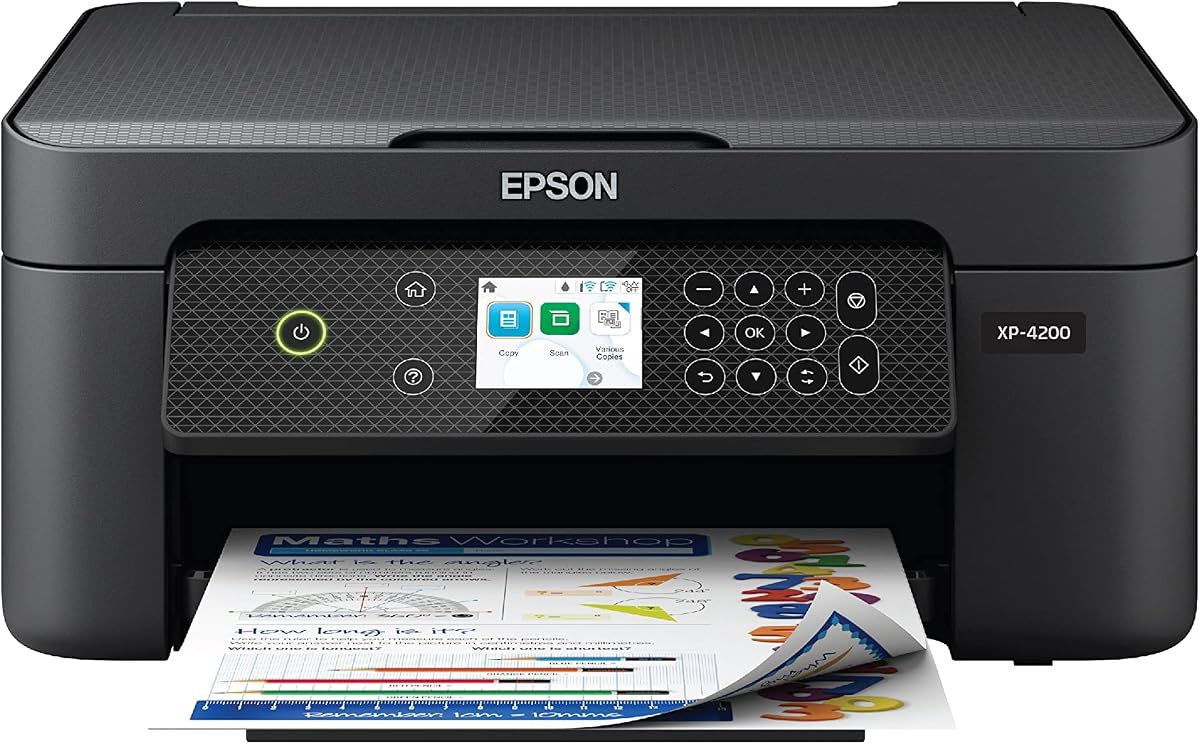
The Epson Expression Home XP-4200 features Micro Piezo Heat Free technology for reliable and consistent print quality. It supports automatic two-sided printing to save paper and includes voice-activated printing via Alexa for hands-free convenience.
We may earn a commission when you buy through this link, at no additional cost to you.
Individual ink cartridges allow you to replace only the colors you need, reducing long-term ink costs. The large 2.4-inch color display simplifies navigation, and the Epson Smart Panel app enables easy mobile printing and scanning from smartphones.
While it lacks an auto document feeder, its ergonomic design and eco-friendly features make it suitable for home use. The permanent printhead is designed to last the life of the printer, minimizing maintenance needs over time.
This model is ideal for users who value voice control and individual ink efficiency in a compact printer. Its blend of reliability, eco-friendly design, and smart features offers a practical option for home printing tasks.
Enjoy reliable prints with Micro Piezo Heat Free technology and a permanent printhead.
Print hands-free using Alexa for convenient voice-activated printing control.
We may earn a commission when you buy through this link, at no additional cost to you.
Selecting the right cheap all-in-one printer requires considering several key factors to ensure it meets your specific needs and budget.
Print speed is measured in pages per minute (ppm) and determines how quickly you can get your documents. Look for models that offer at least 5-7 ppm for black text and decent color speeds for photos. High resolution ensures crisp text and vivid images for professional results.
Wireless connectivity allows you to print from smartphones, tablets, and laptops without cables. Dual-band Wi-Fi provides stable connections for high data transfer needs. USB ports offer a reliable backup if wireless networks are unavailable during setup.
Input tray capacity affects how often you need to refill paper during heavy use. Models with 100 sheets or more reduce interruptions. Auto document feeders help with scanning or copying multi-page documents efficiently.
Individual ink cartridges let you replace only the color that runs out, saving money. Some models include ink subscriptions that automatically deliver cartridges. Calculate long-term costs to ensure the printer remains affordable over its lifespan.
Automatic two-sided printing saves paper and makes your documents look professional. This feature is useful for drafts or reports with multiple pages. It reduces waste and helps maintain an eco-friendly workspace environment.
Mobile apps allow you to print directly from your smartphone or tablet anywhere. Compatibility with AirPrint or Mopria simplifies setup without additional drivers. Look for intuitive apps that offer scanning and copying options.
A standard one-year warranty protects against manufacturing defects. Manufacturer support includes technical assistance and replacement parts availability. Check for extended warranty options to cover accidental damage or wear.
Compact designs save valuable desk space in small home offices. Sleek finishes like white or black blend into any decor. Adjustable feet ensure stability on uneven surfaces during high-volume printing.
Download the manufacturer's mobile app to enable wireless printing. Connect the printer to your home Wi-Fi network during the setup wizard. Regularly clean the print heads using built-in tools to maintain optimal print quality.
The HP DeskJet 2955 offers excellent value with basic functions and instant ink trials. For advanced features like duplex printing, the Canon PIXMA TS6520 is a strong choice. Consider your specific needs such as fax or cloud connectivity when selecting.
Many models include a trial period for subscription services like HP Instant Ink. This allows you to receive ink automatically before running out. Check the product details to see how long the trial lasts and what the subscription costs.
Yes, most models support mobile printing via dedicated apps like HP Smart or Canon PRINT. Some are compatible with AirPrint or Mopria for seamless operation without extra software. Ensure your device is connected to the same Wi-Fi network.
Use high-yield cartridges or subscription services to reduce long-term costs. Print drafts in draft mode for internal documents to conserve ink. Monitor levels regularly to avoid wasting money on emergency replacements.
Automatic duplex printing is found in mid-range budget models but less common in entry-level ones. It saves paper by printing on both sides. If this is important, look for terms like auto two-sided printing in the product specs.
HP printers often include Instant Ink trials and AI formatting features for better web prints. Canon models focus on vibrant colors and hybrid ink systems for photo quality. Both offer reliable connectivity with their respective mobile apps.
Look for ENERGY STAR or EPEAT certifications that indicate energy efficiency and sustainable materials. Features like duplex printing and individual ink cartridges reduce waste. These labels help you choose environmentally responsible models.
Most basic all-in-one printers lack built-in fax functionality. However, some models like the Canon PIXMA TR4720 include fax for a small additional cost. Alternatively, you can use online fax services connected to your computer.
Prices and availability change frequently so verify current details on the product pages. Use the comparison table to quickly assess specs and ratings side by side. Choosing the right printer ensures smooth printing operations for your home office.