
CMTECK USB Computer Microphone G009
4.5Editor score
Omnidirectional pickup pattern
Active noise cancelling chip
Adjustable gooseneck design
Finding a cheap desk microphone that delivers clear audio without breaking the bank can be challenging. Many budget options suffer from poor noise cancellation or weak build quality, making it hard to choose the right one for your needs.
We compared ten highly-rated USB microphones based on audio clarity, build durability, ease of use, and value for money. Our analysis focuses on models that offer premium features like noise cancellation and mute buttons at affordable price points.
Each pick highlights specific strengths for different use cases such as gaming, podcasting, or office meetings. Please note that product availability and pricing can change frequently, so check the latest details before making your final purchase decision.
4.5Editor score

4.4Editor score

4.4Editor score
As an Amazon Associate we earn from qualifying purchases.
The following table provides a side-by-side comparison of all ten selected microphones to help you quickly identify key specifications and features that matter most for your specific recording needs.
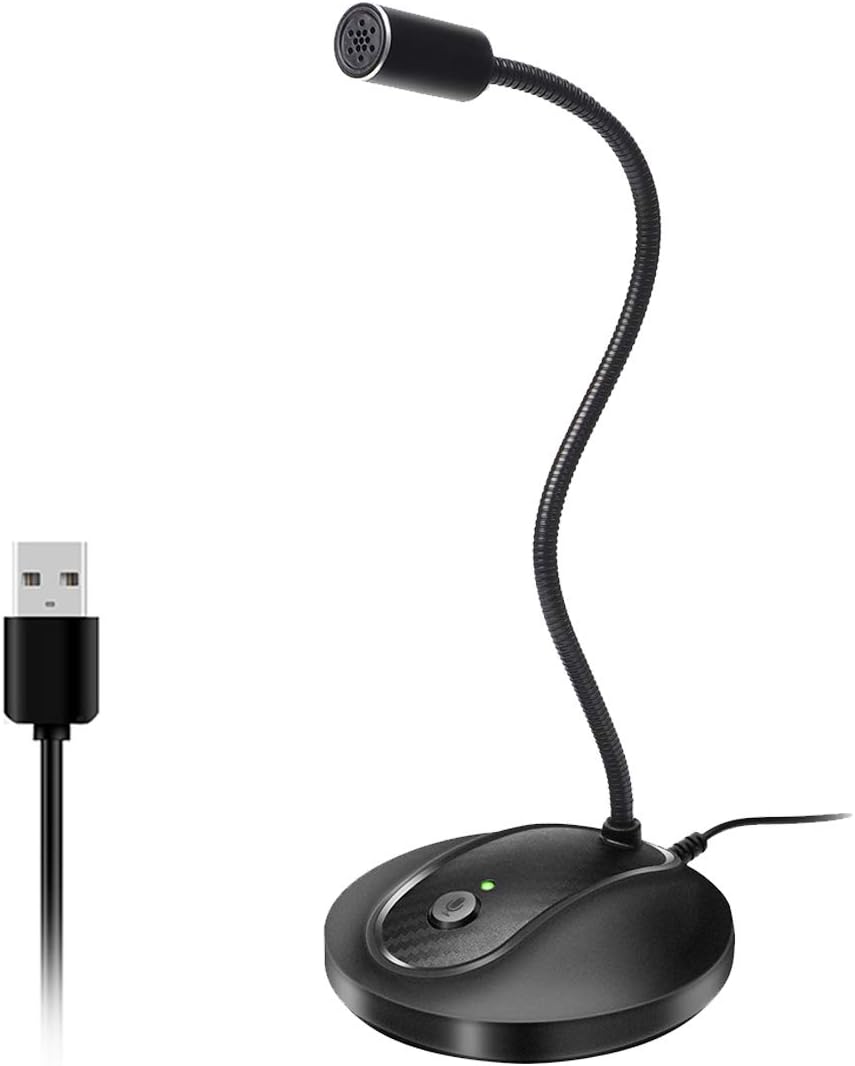


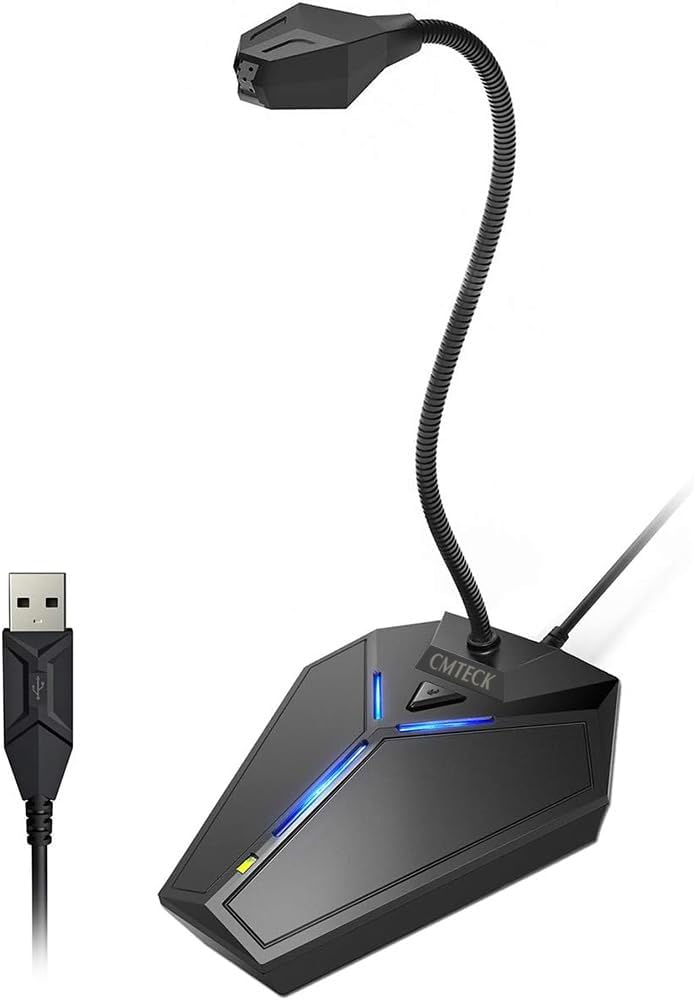

The CMTECK USB Computer Microphone G009 stands out as an excellent entry-level option for users seeking clear audio without high costs. With a strong 4.5 rating, it delivers reliable performance for online classes, casual streaming, and home office tasks.
We may earn a commission when you buy through this link, at no additional cost to you.
Its omnidirectional condenser design captures sound from all angles, while the CCS2.0 SMART chip actively reduces background noise to ensure your voice remains the focus. The flexible metal gooseneck allows precise positioning for optimal sound capture without cluttering your workspace.
While the base is compact, it may shift slightly under heavy use, and it lacks compatibility with Linux or Android systems. These trade-offs are minor given the low price and straightforward plug-and-play setup that requires no technical knowledge.
This microphone is ideal for students, remote workers, or anyone needing a basic yet effective tool for communication. Its combination of value and functional features makes it a top recommendation for budget-conscious buyers.
The built-in smart chip filters out ambient sounds like fan noise or typing, ensuring clearer recordings without software intervention.
Simply plug the USB cable into your computer, and the microphone is ready to use instantly with no driver downloads required.
We may earn a commission when you buy through this link, at no additional cost to you.
This generic USB microphone offers a balanced mix of durability and performance at a budget-friendly price. With a 4.4 rating, it is well-suited for voice dictation, gaming chats, and general computer tasks requiring clear audio input.
We may earn a commission when you buy through this link, at no additional cost to you.
Its 360-degree adjustable gooseneck design ensures you can position the mic exactly where needed for the best sound pickup. The premium metal pipe and heavy-duty ABS stand provide stability, reducing unwanted movement during use.
The lack of dedicated gain controls limits fine-tuning for professional recordings, and the six-foot cable might not reach all desk setups comfortably. However, for basic plug-and-play needs, these limitations are often acceptable.
Ideal for casual users who prioritize stability and ease of use, this mic handles daily communication tasks reliably. It is a practical choice for those needing a straightforward solution without advanced features.
The fully adjustable neck lets you orient the mic horizontally or vertically to match your speaking position perfectly.
The USB plug-and-play design ensures instant recognition by your operating system without any software configuration.
We may earn a commission when you buy through this link, at no additional cost to you.
With a standout 4.6 rating, this flexible gooseneck microphone is designed for gamers and streamers who need quick access and clear audio. It captures voice naturally within an optimal six-to-twelve-inch range, delivering professional-quality results effortlessly.
We may earn a commission when you buy through this link, at no additional cost to you.
The inclusion of windproof fluffy caps reduces plosive noise from speech, while the touch-sensitive mute button allows instant control during active sessions. The ABS shockproof base with non-slip pads keeps the mic steady even during energetic broadcasts.
While the lack of a volume knob means you rely on software controls, the lightweight design makes it easy to move or pack for travel. These trade-offs are minor compared to its overall functionality and build quality.
This mic is perfect for mobile gamers, streamers, or anyone needing a compact and reliable desktop solution. Its ease of use and solid performance make it a strong contender in the budget category.
Windproof caps and noise reduction technology work together to minimize background noise for clearer voice transmission.
Its small footprint and lightweight build allow you to carry it easily between home, office, or school setups.
We may earn a commission when you buy through this link, at no additional cost to you.
The Amazon Basics Condenser Microphone brings a more premium feel to the budget category with its high-sensitivity 14mm diaphragm and cardioid pickup pattern. It offers clear, low-distortion sound ideal for solo vocals, podcasts, and professional meetings.
We may earn a commission when you buy through this link, at no additional cost to you.
Its cardioid pattern effectively isolates your voice from surrounding noise, ensuring cleaner recordings. The built-in shock absorber and detachable design allow you to mount it on tripods or boom arms, adding significant versatility.
Unlike omnidirectional models, it requires precise positioning to capture sound accurately, and it lacks active noise cancellation chips. However, these trade-offs are acceptable for users who prioritize audio purity over convenience.
This mic is recommended for podcasters and content creators who want studio-quality results on a budget. Its flexibility and reliable performance make it a top choice for those willing to adjust placement slightly.
The large diaphragm and low-noise design ensure detailed and rich audio capture suitable for serious content creation.
Standard tripod threading allows you to use it with various stands or arms for customized setup options.
We may earn a commission when you buy through this link, at no additional cost to you.
The ZealSound K66 delivers broadcast-quality audio with features typically found in expensive microphones. Its intelligent noise reduction mode and wide frequency response make it perfect for podcasting, voiceovers, and professional streaming needs.
We may earn a commission when you buy through this link, at no additional cost to you.
With a dedicated 3.5mm headphone jack, you can monitor your recording in real time with zero latency, ensuring no surprises in your final output. The physical knobs for volume and echo allow quick adjustments without navigating software menus.
While it costs more than basic USB mics and requires some desk space, the versatility it offers is unmatched in this category. It supports multiple devices including phones and tablets, making it a versatile tool for multi-platform creators.
This microphone is ideal for serious creators who need professional-grade control without investing in complex gear. Its feature-rich design makes it the best all-around pick for demanding audio tasks.
Physical knobs for gain, echo, and monitoring give you precise control over your audio output in real time.
Included adapters allow seamless connection to iPhones, iPads, and USB-C devices for recording on the go.
We may earn a commission when you buy through this link, at no additional cost to you.
This TONOR microphone is engineered specifically for conference calls and group meetings, offering an omnidirectional pickup that captures voices from all directions. With a range of 11.5 feet, it ensures everyone in the room can be heard clearly.
We may earn a commission when you buy through this link, at no additional cost to you.
The nylon shielded cable minimizes signal interference, while the anti-slip mat keeps the unit stable on desktops during intense use. Its simple design makes it plug-and-play friendly across all major operating systems.
The omnidirectional nature can pick up background noise like keyboard typing or room chatter, which may require quiet environments. However, for meeting-focused tasks where capturing all voices is priority, it performs exceptionally well.
It is perfect for small teams or remote workers participating in group calls regularly. Its robust build and wide coverage make it a practical solution for collaborative audio needs.
The omnidirectional pattern ensures voices from any angle are captured equally, making it great for round-table discussions.
Shielded cabling reduces signal noise, ensuring a cleaner audio stream even in electrically busy environments.
We may earn a commission when you buy through this link, at no additional cost to you.
This microphone combines functional audio quality with a stylish aesthetic, featuring customizable breathing lights that enhance your gaming setup. With a 4.5 rating, it offers loud, powerful audio suitable for streaming and casual recording.
We may earn a commission when you buy through this link, at no additional cost to you.
The intelligent noise reduction filters out common distractions like fan hums and keyboard clicks, while the 360-degree metal gooseneck allows precise positioning. The one-tap mute button gives instant control over your audio transmission.
The LED lights add visual flair but can be turned off if they distract during quiet recordings. The five-inch neck offers good flexibility but may not reach far back on large desks.
It is perfect for gamers and streamers who value appearance alongside performance. Its compact design and vibrant lighting make it a standout choice for personalized workspace setups.
Breathing LED lights provide a sleek tech look that can be toggled on or off based on preference.
Lightweight construction and compact design allow for easy transport between workstations or to different rooms.
We may earn a commission when you buy through this link, at no additional cost to you.
This LIANGSTAR microphone offers a practical advantage with a physical volume control knob, allowing quick adjustments without touching your computer. Its omnidirectional condenser design ensures natural sound reproduction for various recording scenarios.
We may earn a commission when you buy through this link, at no additional cost to you.
The CCS3.0 smart chip effectively reduces background noise, making your voice clearer for podcasts, meetings, and gaming chats. The flexible design allows you to rotate the mic to any angle needed for optimal pickup.
While it lacks advanced features like echo control or monitoring jacks, it covers the basics exceptionally well. The simple and intuitive interface makes it accessible for users of all technical levels.
It is a reliable choice for general content creators who need consistent performance and physical control over their mic levels. Its balance of features and affordability makes it a strong contender.
A dedicated knob on the mic lets you adjust output levels quickly without diving into system settings.
Smart chip technology automatically suppresses ambient noise for clearer voice capture during calls and recordings.
We may earn a commission when you buy through this link, at no additional cost to you.
The CMTECK G007 provides a straightforward and effective solution for users needing a simple USB microphone. With a 4.4 rating, it delivers studio-quality audio through its smart chip technology that suppresses background noise efficiently.
We may earn a commission when you buy through this link, at no additional cost to you.
Its six-foot cable offers excellent reach across larger desks, ensuring flexibility in where you place the mic. The blue LED adds a subtle visual effect that can be toggled on or off based on your preference.
While it lacks advanced features like echo control or physical volume knobs, it handles basic communication tasks reliably. The shockproof base ensures stability, making it a durable choice for daily use.
It is perfect for students or home office workers who prioritize ease of use and basic audio clarity. Its simplicity and low cost make it an attractive entry-level option.
A six-foot cable ensures you can place the mic anywhere on your desk without worrying about limited reach.
Built-in smart chip technology effectively filters out ambient noise to keep your voice clear and focused.
We may earn a commission when you buy through this link, at no additional cost to you.
The KLIM Talk stands out for its robust five-year warranty, offering long-term reliability for users who want a risk-free purchase. It uses a patented audio filter to isolate your voice, ensuring clarity during professional calls and recordings.
We may earn a commission when you buy through this link, at no additional cost to you.
Its aerodynamic design balances elegance with functionality, while the flexible neck allows precise positioning. The lightweight yet stable build ensures it stays in place without taking up too much space on your desk.
Although it costs slightly more than some competitors, the warranty and unique filter technology justify the investment. It also supports Linux systems, which is a rare feature in this price range.
This microphone is ideal for professionals who value durability and long-term support. Its reliable performance and extended warranty make it a trustworthy choice for business and creative use.
A five-year assurance provides peace of mind and protection against defects over an extended usage period.
The patented audio filter focuses on capturing your voice while reducing surrounding noise for better clarity.
We may earn a commission when you buy through this link, at no additional cost to you.
Selecting the right microphone depends on your specific needs, whether for casual chats, professional recordings, or streaming. Understanding key factors like pickup patterns, build quality, and features will help you make an informed decision.
Pickup patterns determine which directions the microphone captures sound from. Cardioid mics focus on sound from the front, making them ideal for solo recording, while omnidirectional models capture sound from all angles, which is better for group meetings.
Choose a cardioid pattern if you want to isolate your voice and reduce background noise. Select omnidirectional if you need to capture multiple speakers around a table or in a room.
Background noise can ruin recordings, so look for microphones with active noise cancellation or smart chips. These features help filter out fans, keyboards, and ambient sounds automatically without needing software.
If you record in noisy environments, prioritize models with built-in noise reduction technology to ensure your voice remains the primary focus of the recording.
A sturdy build ensures your microphone lasts longer and stays stable during use. Metal goosenecks and ABS bases provide durability, while rubber feet prevent the mic from sliding on your desk.
Check for flexible yet durable necks that allow positioning without bending out of shape. Heavy or weighted bases are also helpful to prevent accidental knocking during intense usage.
Quickly muting your mic is essential for meetings and streams to avoid unintended audio transmission. Physical mute buttons with LED indicators are the most reliable way to manage audio status.
Always ensure the mute button provides clear visual feedback, such as color-changing lights, so you know your status at a glance during live interactions.
Not all microphones work with every operating system or device. Confirm that the mic supports your OS (Windows, Mac, or Linux) and has the right connectors for your computer or mobile devices.
Look for plug-and-play options that don't require drivers if you want immediate setup. If using mobile devices, check for USB-C or Lightning adapters included with the package.
The length of the USB cable affects where you can place the microphone on your desk. A longer cable provides more flexibility, while shorter ones may limit your setup options.
Standard lengths like six feet work for most desks, but consider a longer cable if your USB ports are far from your seating position or monitor setup.
Additional features like zero-latency monitoring or echo controls can enhance your recording experience. These tools allow you to hear yourself in real time or adjust audio effects without extra software.
Prioritize models with physical knobs if you need quick adjustments during live sessions. Avoid relying solely on software controls if you value hands-on convenience.
Budget microphones can range widely in price, but higher cost doesn't always mean better quality. Look for the best balance of features, durability, and performance relative to the price tag.
Focus on models that offer essential features like noise cancellation and mute buttons at affordable prices to get the best value for your specific needs.
Plug your microphone directly into a USB port on your computer to begin. Your operating system should recognize it automatically, but you may need to select it as the default input device in your system settings.
Position the microphone within six to twelve inches of your mouth for optimal audio quality. Adjust the gooseneck or stand so the mic is angled slightly upwards to capture your voice clearly without distortion.
Keep the microphone clean by wiping it with a dry cloth regularly. Avoid touching the microphone head with your hands to reduce oil buildup, and store it in a cool, dry place when not in use to extend its lifespan.
Most cheap USB microphones are plug-and-play and do not require driver installation. Simply connect them to your computer, and the operating system will automatically recognize them. However, checking the product details is recommended to confirm compatibility with your specific OS.
Some USB microphones are compatible with gaming consoles like PS4 or PS5, but Xbox support is limited. Always check the product specifications for console compatibility, as many budget models are designed primarily for PC and Mac usage.
Omnidirectional microphones capture sound from all directions, making them suitable for group meetings. Cardioid microphones focus on sound from the front, which helps isolate your voice and reduce background noise in solo recording scenarios.
This issue often arises from poor connection, incorrect input settings, or proximity to noise sources. Ensure the USB cable is secure, select the correct input device in your settings, and position the mic closer to your mouth for clearer audio.
Yes, many affordable USB microphones offer excellent audio quality suitable for starting podcasts. Look for models with noise cancellation and cardioid patterns to ensure professional sound without investing in expensive gear.
With proper care, USB microphones can last for several years. Avoid dropping them, keep them away from moisture, and store them safely to ensure durability. Some brands even offer extended warranties for added peace of mind.
Choosing the right microphone depends on your specific needs and budget. The top picks like the CMTECK G009 and ZealSound K66 offer excellent value with features like noise cancellation and flexible positioning.
Prioritize factors like pickup pattern, build quality, and extra features that matter most to your workflow. Whether you need a mic for streaming or casual calls, there is a suitable option among these ten recommendations.
Remember to check current availability and prices before purchasing since they can change frequently. Investing in the right microphone will significantly improve your audio quality and communication experience.