
Omada AX3000 Wireless Access Point
4.5Editor score
Free cloud management included
Ultra-slim design fits anywhere
5 years warranty coverage
This guide compares the top commercial wireless routers for businesses, highlighting features like WiFi 6, security, and scalability for optimal network
Selecting the right commercial wireless router is crucial for maintaining a reliable and secure network in any business environment. These devices handle high device counts and ensure seamless connectivity for employees and customers alike.
We evaluated ten leading models based on performance, security features, management tools, and scalability. Our analysis focuses on real-world usability and the ability to support demanding business applications effectively.
Each pick showcases unique strengths tailored to different business sizes and needs. Please note that pricing and availability can change frequently, so verify details before making a final purchasing decision.
4.5Editor score

4.2Editor score

4.6Editor score
This side-by-side comparison highlights the key specifications and capabilities of each router to help you find the perfect match for your business network requirements.





The ASUS ExpertWiFi EBR63 stands out as a top choice for businesses needing robust WiFi 6 performance. With a rating of 4.2, it offers a balance of speed, security, and manageability that fits well in small to medium enterprises.
We may earn a commission when you buy through this link, at no additional cost to you.
Its standout qualities include the ability to create up to five SSIDs for different business scenarios, ensuring guest traffic does not interfere with internal operations. The custom guest portal feature allows you to brand the login page, enhancing professionalism. Free commercial-grade security via AiProtection Pro provides peace of mind against cyber threats without extra costs.
While the backup WAN feature requires a mobile phone hotspot, it ensures internet connectivity remains stable during outages. Some users might prefer a dedicated 4G/5G modem for redundancy, but this option is cost-effective for many setups.
Businesses seeking a reliable, secure, and easily manageable router should consider this model. It is particularly well-suited for offices, retail spaces, and hospitality venues that need dedicated networks and strong protection.
Customize the guest portal with your brand name and templates to create a professional first impression for visitors.
Benefit from free subscriptions to AiProtection Pro and safe browsing features to keep your network environment secure.
We may earn a commission when you buy through this link, at no additional cost to you.
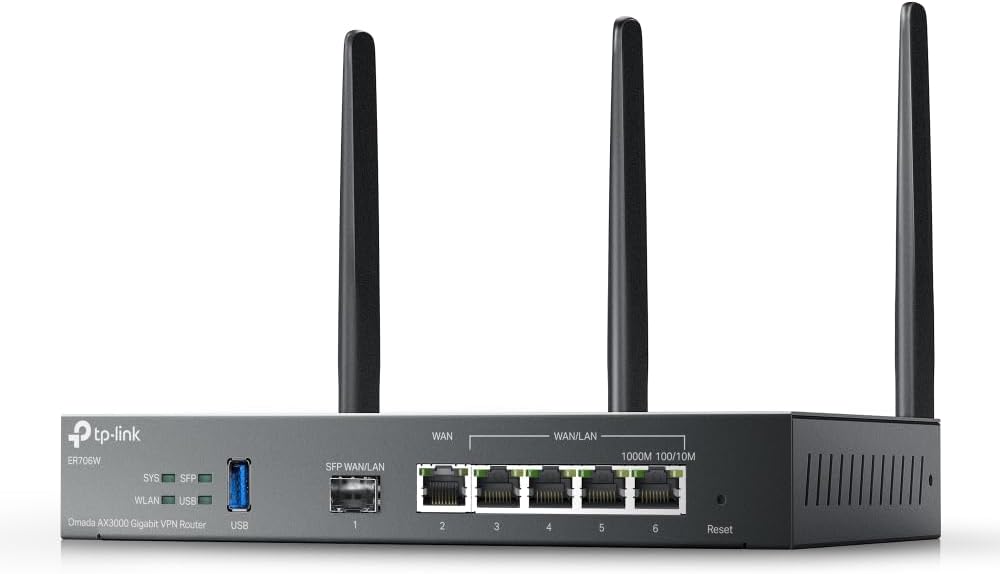
The Omada ER706W offers exceptional value for businesses looking to implement a secure and scalable network without breaking the bank. Its rating of 4.1 reflects solid performance in handling multiple WAN connections and providing robust VPN support.
We may earn a commission when you buy through this link, at no additional cost to you.
Key strengths include load balancing across up to five WAN ports, which maximizes broadband utilization and ensures internet reliability. The inclusion of a Gigabit SFP slot allows for fiber connectivity, adding flexibility to network design. High-security VPN protocols like SSL/IPSec and WireGuard keep data safe during transmission.
The system requires an Omada controller (hardware or software) for full functionality, which might be a learning curve for some users. However, this centralized management is a feature for professional networks rather than a drawback.
Small to medium businesses needing multi-line internet and secure remote access will find this router ideal. It pairs perfectly with other Omada devices to create a unified, manageable network infrastructure.
Load balancing on up to five WAN ports raises the utilization rate of multi-line broadband for better reliability.
High-security SSL, IPSec, and WireGuard VPN options ensure safe data transmission for remote employees.
We may earn a commission when you buy through this link, at no additional cost to you.
The Ruckus R750 is a specialized indoor access point designed for ultra-dense environments where many devices connect simultaneously. With a rating of 4.3, it delivers reliable performance in crowded spaces like conference centers or large retail stores.
We may earn a commission when you buy through this link, at no additional cost to you.
This access point excels at handling high client densities without compromising speed. Ruckus technologies ensure that signals are prioritized to reduce congestion. It is best deployed as part of a larger managed network to maximize its potential.
It does require an external controller for management, which adds complexity to setup. Additionally, it is not a standalone router, so it must be paired with appropriate routing hardware to function properly in a business network.
Venues expecting hundreds of concurrent users should consider this access point for its ability to maintain connectivity under load. It is a specialized solution for high-traffic indoor areas.
Designed specifically for ultra-dense environments to ensure stable connections even when many devices are active.
We may earn a commission when you buy through this link, at no additional cost to you.
The Ruckus R670 is a premium indoor access point featuring Wi-Fi 7 technology, making it one of the fastest options available for mainstream deployment. Although its rating is not currently listed, its specs promise exceptional end-user experiences in classrooms, meeting rooms, and guest areas.
We may earn a commission when you buy through this link, at no additional cost to you.
With a combined data rate of 9.34 Gbps and BeamFlex+ adaptive antenna technology, it maximizes signal coverage and minimizes errors. The 5 GbE port ensures wired backhaul is fast enough to support high-speed wireless performance without bottlenecks.
The high cost of this device is a significant consideration. It is best justified for enterprises needing future-proofing and maximum throughput for bandwidth-intensive applications.
Forward-thinking businesses aiming to stay ahead of technology curves should evaluate this access point. It offers unparalleled speed and features for environments where performance is critical.
Provides exceptional end-user experience with a 9.34 Gbps combined data rate for demanding applications.
BeamFlex+ technology offers first-of-its-kind smart antenna tech to maximize signal coverage and throughput.
We may earn a commission when you buy through this link, at no additional cost to you.
The NETGEAR Orbi 970 Series represents the pinnacle of home and business networking, offering WiFi 7 speeds that reach up to 27 Gbps. With a rating of 4.6, this mesh system ensures seamless coverage across up to 10,000 square feet without dead zones.
We may earn a commission when you buy through this link, at no additional cost to you.
Its exclusive quad-band technology dedicates a lane for satellite traffic, keeping devices fast even when many are connected simultaneously. The inclusion of 10 Gig internet and LAN ports supports multi-gigabit internet plans and wired high-speed connections.
The primary drawback is the cost, which is substantial compared to standard routers. Additionally, it may be excessive for small offices that do not require massive coverage areas.
Large enterprises, hotels, or multi-story commercial spaces needing reliable, high-speed WiFi across a broad area will find this system invaluable. It is a top-tier choice for performance and coverage.
The router plus two satellites create a seamless mesh system that blankets up to 10000 sqft in fast WiFi.
Link up to 200 devices on one network without slowing down for everyone connected.
We may earn a commission when you buy through this link, at no additional cost to you.
The Omada EAP650 provides excellent value for businesses needing reliable WiFi 6 access points. Its high rating of 4.5 underscores its reliability and performance in various settings from offices to cafes.
We may earn a commission when you buy through this link, at no additional cost to you.
One of its strongest features is free cloud management with no additional fees, simplifying network administration. The ultra-slim design ensures it blends into modern interiors, while the 5-year warranty offers long-term peace of mind.
Advanced features like seamless roaming require an Omada SDN controller, which might be an extra cost for those without one. However, the benefits of centralized control outweigh this for growing networks.
Small businesses and IT managers looking for a cost-effective and scalable solution should consider this access point. It balances performance and ease of management effectively.
Free cloud management with no additional fees allows you to manage the network in the cloud without extra hardware.
Backed by industry-leading 5-year warranty and free technical support, you can work with confidence.
We may earn a commission when you buy through this link, at no additional cost to you.
The Ubiquiti U6+ delivers a reliable wireless business network with high-speed data transfer rates. With a rating of 4.6, it is a trusted choice for small offices needing efficient and convenient connectivity.
We may earn a commission when you buy through this link, at no additional cost to you.
Its 3 Gbit/s wireless transmission speed ensures smooth communication, while PoE+ support simplifies installation by powering the device through a single cable. The wall-mountable form factor allows for flexible placement.
Setup requires the UniFi Controller software or hardware, which might be complex for non-technical users. However, once configured, the network is stable and easy to monitor.
Small offices and retail environments looking for a dependable access point should choose this model. It offers a solid balance of speed and simplicity.
IEEE 802.11 a/b/g/n/ac/ax wireless LAN standard ensures trouble-free and convenient connectivity.
PoE+ port allows data and power to be delivered through a single cable where outlets are not available.
We may earn a commission when you buy through this link, at no additional cost to you.
The TP-Link BE6500 is designed with the latest WiFi 7 technology, offering optimized performance for modern devices. With a rating of 4.3, it is a strong contender for businesses needing high speeds and low latency.
We may earn a commission when you buy through this link, at no additional cost to you.
Features like Multi-Link Operation (MLO) and 4K-QAM deliver faster throughput. The 2.5 Gbps WAN/LAN port supports multi-gig internet plans, ensuring wired connections keep pace with wireless speeds.
While it supports easy mesh expansion, it is not compatible with Deco systems, which might limit flexibility for existing users. However, standalone performance is robust and reliable.
Businesses adopting new devices and seeking future-ready networks should consider this router. It offers excellent speed and connectivity for a modern office setup.
Designed with the latest Wi-Fi 7 technology featuring Multi-Link Operation for optimized performance.
Get up to 2400 sq ft of coverage with strong connections for remote workers and students.
We may earn a commission when you buy through this link, at no additional cost to you.
The NETGEAR Nighthawk WiFi 7 Router offers a dedicated tri-band system built to keep up with growing connected environments. With a rating of 4.3, it delivers fast and reliable performance for streaming, video calls, and more.
We may earn a commission when you buy through this link, at no additional cost to you.
The dedicated high-speed 6 GHz band ensures fast devices have their own lane, preventing slowdowns. Multi-gig wired connections support modern internet plans, while the Nighthawk app simplifies setup and management.
Coverage is capped at 2,500 square feet, which may be insufficient for large floors. Users also need to supply a separate modem, adding to initial setup costs.
Small to medium businesses needing high speeds and reliable performance should find this router suitable. It balances speed, security, and ease of use effectively.
A dedicated tri-band WiFi 7 router with a third high-speed band for demanding devices.
Plug your modem into the 2.5 Gig WAN port to unlock multi-gig internet plans.
We may earn a commission when you buy through this link, at no additional cost to you.
The ASUS RT-BE88U boosts throughput up to 7200Mbps with WiFi 7 technology and includes two 10G ports for ultimate wired capacity. With a rating of 4.3, it is a powerhouse for bandwidth-heavy applications and future-proof networks.
We may earn a commission when you buy through this link, at no additional cost to you.
Features like AI WAN detection and 5G mobile tethering ensure always-on internet. The powerful quad-core CPU handles demanding applications without lag, while AiMesh support allows for easy expansion.
The cost is significant, and to leverage 10G speeds, other network hardware must also support those rates. However, this is justified for environments needing maximum wired and wireless capacity.
Large offices and tech-forward businesses should consider this router. It delivers high performance and versatile networking options for critical operations.
Bolster your wired network capacity up to 34G with one 10G SFP+ port and one standard 10G port.
Stay secure with commercial-grade AiProtection Pro powered by Trend Micro and comprehensive VPN support.
We may earn a commission when you buy through this link, at no additional cost to you.
Selecting a commercial wireless router requires understanding your network needs, security requirements, and scalability plans. This guide breaks down key factors to help you make an informed decision.
Modern businesses benefit from WiFi 6 or WiFi 7 routers that offer higher throughput and handle more devices efficiently. WiFi 7 provides multi-link operation and lower latency for demanding applications like video conferencing and large file transfers.
Prioritize routers that support the latest standards to ensure future-proofing and optimal performance for connected devices.
Security is critical for business networks to protect sensitive data from cyber threats. Look for routers with built-in intrusion prevention systems, guest network isolation, and support for strong encryption protocols like WPA3.
Choose models offering commercial-grade security subscriptions or free built-in protections to keep your network safe without extra costs.
Ease of management is vital for businesses without dedicated IT staff. Cloud-based management or intuitive mobile apps allow remote monitoring and configuration, saving time and reducing downtime.
Select routers that offer centralized management platforms to simplify network control across multiple devices or locations.
As businesses grow, their network infrastructure must expand accordingly. Routers that support mesh networking or are compatible with additional access points enable seamless coverage expansion without replacing core hardware.
Ensure the router supports mesh or add-on access points to accommodate growth and maintain consistent WiFi coverage.
Wired connections remain important for devices requiring stable high-speed links such as NAS drives or desktop computers. Look for Gigabit or multi-gigabit ports to support modern internet plans and reduce wireless congestion.
Prioritize routers with sufficient high-speed Ethernet ports to support your wired infrastructure needs effectively.
Businesses often need to provide internet access to customers or visitors securely. Routers with customizable guest portals and multiple SSIDs allow you to separate guest traffic from internal networks and maintain security.
Choose routers offering guest network features to provide secure and branded access for visitors.
Business continuity depends on reliable hardware and support. A solid warranty and responsive technical support ensure that any issues can be resolved quickly to minimize disruptions.
Opt for models backed by industry-leading warranties and accessible technical support for peace of mind.
Internet outages can halt operations, so having a backup connection is essential. Some routers support USB tethering or WAN failover to maintain connectivity if the primary line fails.
Look for routers with backup WAN options to ensure always-on internet for critical business functions.
Begin by positioning the router in a central location with minimal obstructions to ensure optimal signal distribution across your business space. Avoid placing it near thick walls or large metal objects that could interfere with wireless signals.
Regularly update the firmware using the manufacturer's app or web interface to ensure you have the latest security patches and performance improvements. Enable automatic updates if available to maintain protection without manual intervention.
Periodically review connected devices and remove unknown or inactive ones to maintain network security. Reboot the router occasionally to clear cache and prevent slowdowns caused by prolonged uptime.
Commercial routers offer advanced features like guest network isolation, VLAN support, and scalable management tools. They are built to handle higher device counts and provide better security and reliability for business environments.
For large offices, a router alone may not cover the entire area effectively. Adding access points or using a mesh system ensures seamless coverage without dead zones throughout the space.
Guest networks isolate visitor traffic from your main business network. This prevents unauthorized access to sensitive files and resources while still providing internet access to visitors.
Multi-gigabit support allows for internet speeds higher than 1Gbps, which is essential for businesses with high-speed fiber plans. It ensures your wired connections can utilize full bandwidth without bottlenecks.
Yes, many commercial routers offer cloud-based management that lets you monitor and control multiple sites from a single dashboard. This simplifies administration across different offices or branches.
WPA3 provides stronger encryption and protection against brute-force attacks compared to older standards. It ensures that business data and network access remain secure from modern cyber threats.
Choosing the right commercial wireless router depends on balancing speed, security, and management needs. Our top picks range from budget-friendly options like the Omada AX3000 to premium systems like the NETGEAR Orbi 970 for large-scale deployments.
Prioritize features like guest network support, robust security, and scalability to ensure your network grows with your business. Look for easy management tools to reduce IT workload and enhance overall performance.
Prices and availability change regularly, so verify current details before purchasing. Investing in a quality commercial wireless router is a key step toward building a reliable and efficient business network.