
AULA S99 Gaming Keyboard
4.2Editor score
Multi-device connectivity modes
Dual-mode rotary knob
Full key programmable macros
This guide compares the top 10 best creamy keyboards of October 2026 based on sound profile, build quality, wireless features, and user ratings for typing and
Creamy keyboards have become a standout trend in the mechanical keyboard world, offering a smooth, mellow typing sound that appeals to enthusiasts and casual users alike. These keyboards focus on delivering a thocky, muted acoustic profile that reduces harsh clicking noises while maintaining tactile feedback. Whether you are working in a shared office or gaming late at night, a creamy keyboard can enhance your experience.
To compile this list, we analyzed real user reviews, technical specifications, and expert assessments to identify the best models currently available. We considered factors such as connectivity options, switch types, build materials, and customization features like hot-swappability and RGB lighting. Our goal was to find keyboards that consistently deliver that sought-after creamy sound without compromising on performance or durability.
Each pick in this guide highlights specific strengths, from budget-friendly membrane options to premium wireless mechanical boards. You will find detailed breakdowns of features, pros and cons, and who each model is best suited for. Please note that product availability and pricing can change frequently, so we recommend checking current listings before making a purchase decision.
4.2Editor score

4.8Editor score

4.8Editor score
The following table provides a side-by-side comparison of all ten keyboards featured in this guide, highlighting key specifications and features to help you make an informed decision based on your specific needs.


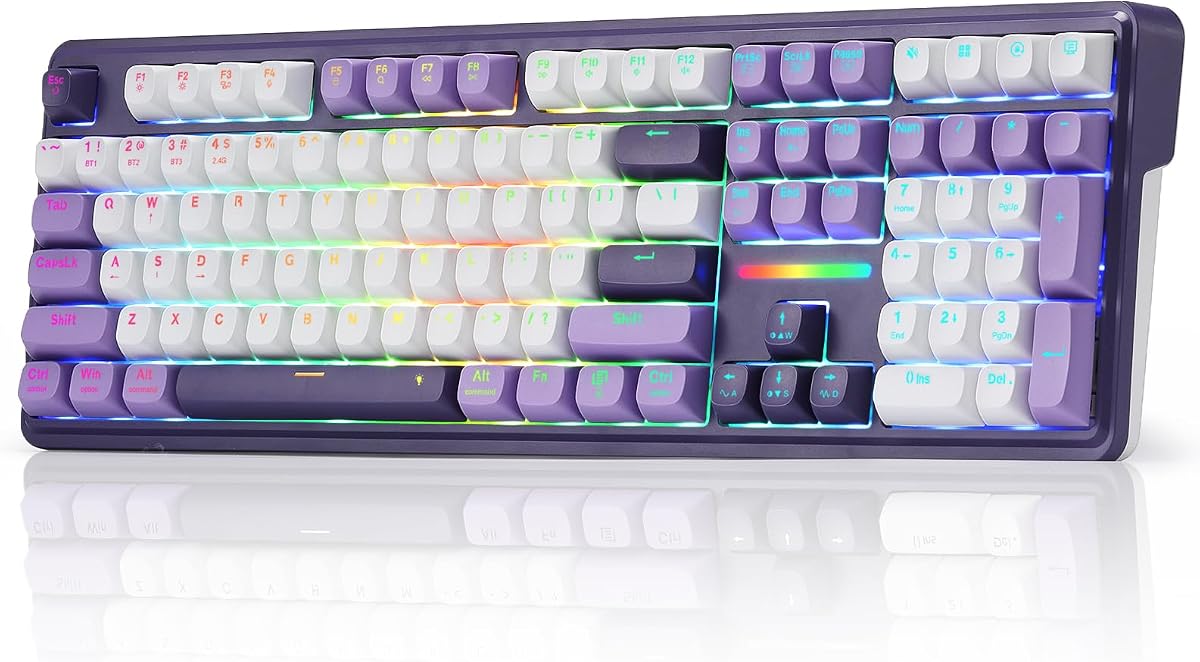


The AULA S99 Gaming Keyboard stands out as an accessible entry point for those seeking a creamy typing experience without a premium price tag. With a rating of 4.2 stars, users appreciate its versatility in connecting via Bluetooth, 2.4GHz wireless, or USB-C wired modes. The keyboard features a vintage aesthetic combined with modern functionality, making it suitable for both office and gaming environments.
We may earn a commission when you buy through this link, at no additional cost to you.
Key strengths include its comprehensive macro customization capabilities, allowing users to record complex actions for single-key execution. The integrated numeric keypad in a 96% layout saves desktop space while maintaining full functionality. The dual-mode rotary knob offers intuitive control over volume and lighting effects, enhancing the user experience significantly.
However, potential buyers should note that this is a membrane keyboard, which means it lacks the tactile feedback and hot-swappable capabilities of mechanical keyboards. The sound profile aims for a creamy feel but may not satisfy enthusiasts looking for deep thocky tones. The lack of hot-swapping limits future customization options.
This keyboard is ideal for users on a budget who need reliable multi-device connectivity and a compact footprint. It works well for general typing, casual gaming, and office productivity. If you prioritize cost-effectiveness and style over mechanical switch customization, the AULA S99 is a strong contender.
Supports Bluetooth 5.0, 2.4GHz wireless, and USB-C for seamless switching between devices and platforms.
Includes a foldable two-stage stand to adjust typing angles and reduce wrist pressure during extended use.
We may earn a commission when you buy through this link, at no additional cost to you.
The AULA F75 in White and Brown has earned a high rating of 4.6 stars for its impressive combination of wireless freedom and mechanical customization. This 75% layout keyboard delivers a creamy mechanical sound through pre-lubed linear switches and stabilizers, ensuring a smooth typing experience. Its tri-mode connectivity allows seamless transitions between up to five devices, making it a powerhouse for productivity.
We may earn a commission when you buy through this link, at no additional cost to you.
Users highlight the hot-swappable base as a major advantage, enabling easy switch replacement without soldering. The advanced structure with PCB single key slotting and five layers of silencer filling effectively reduces cavity noise. The multi-function knob provides convenient control over media and lighting, adding to the keyboard's usability in gaming and work scenarios.
While the keyboard offers extensive customization, accessing full features requires downloading specific driver software, which may be a hurdle for some users. The RGB lighting is vibrant with 16.8 million colors, but the aesthetic options are limited to the provided color schemes. The battery life is robust but may require periodic charging for heavy wireless use.
This model is perfect for enthusiasts who want a creamy sound profile with the flexibility to tweak switches later. It suits gamers and professionals who need reliable wireless connectivity and a compact footprint. If you value performance and customization in a wireless mechanical keyboard, the AULA F75 is an excellent choice.
Supports 3-pin and 5-pin switch replacement for DIY tuning without soldering tools.
Five-layer filling silencer fills gaps to counteract cavity noise for a solid feel.
We may earn a commission when you buy through this link, at no additional cost to you.
The HUO JI E-Yooso Creamy Mechanical Keyboard achieves a 4.6-star rating for its solid construction and focus on acoustic quality. It features a 99-key layout that reduces size while retaining full functionality. The gasket structure combined with five layers of sound-absorbing foams significantly reduces noise and hallow sound, delivering a creamy and clear feedback profile.
We may earn a commission when you buy through this link, at no additional cost to you.
Key strengths include its hot-swappable PCB, allowing users to replace switches and keycaps freely. The pre-lubed linear switches provide a smooth typing feeling and fast response for gaming. The double-shot injection PBT keycaps ensure character durability and resistance to fading over time. RGB lighting adds visual appeal with multiple effects and color options.
The primary limitation is its wired-only design, which may not suit users requiring mobile flexibility. While the sound dampening is effective, some users may find the build bulkier than slimmer mechanical options. The lack of wireless connectivity restricts its use in setups where cable management is a priority.
This keyboard is best for users who prioritize sound quality and tactile feedback over wireless freedom. It fits well in home office or gaming setups where a stable wired connection is acceptable. If you want a creamy mechanical experience with customization options and durable keycaps, the HUO JI E-Yooso delivers high value.
Ensures durability and stability with gasket mount for high-quality sound production.
Double-shot injection PBT material prevents character fading and grease accumulation.
We may earn a commission when you buy through this link, at no additional cost to you.
The YUNZII B98 PRO commands attention with a 4.8-star rating for its premium features and exceptional typing feel. Its 96% layout includes a numeric keypad, while the dual-style knob design allows personalization with either a 3D cat knob or metal knob. The QMK/VIA firmware offers deep customization for gamers and creators, enabling advanced macro and lighting designs.
We may earn a commission when you buy through this link, at no additional cost to you.
Key strengths include the tri-mode connectivity and an impressive 8000mAh battery, supporting long uninterrupted sessions. The gasket mount with five-layer filling structure creates a uniquely creamy and premium typing feel by absorbing vibrations. Hot-swappable switches and pre-lubed components ensure smooth keystrokes without soldering requirements.
While powerful, the QMK/VIA firmware may require a learning curve for users unfamiliar with open-source keyboard customization. The keyboard is heavier due to its robust build, which might reduce portability. The battery life is excellent but charging times may be longer compared to smaller units.
This model suits advanced users who value deep customization and high-quality materials. It is ideal for those working on multiple devices who need long battery life and versatile connectivity. If you seek a premium wireless mechanical keyboard with extensive modding potential, the YUNZII B98 PRO stands out.
Powered by QMK/VIA firmware for remapping keys, recording macros, and designing lighting.
Built-in 8000mAh battery provides exceptionally long life for work and gaming sessions.
We may earn a commission when you buy through this link, at no additional cost to you.
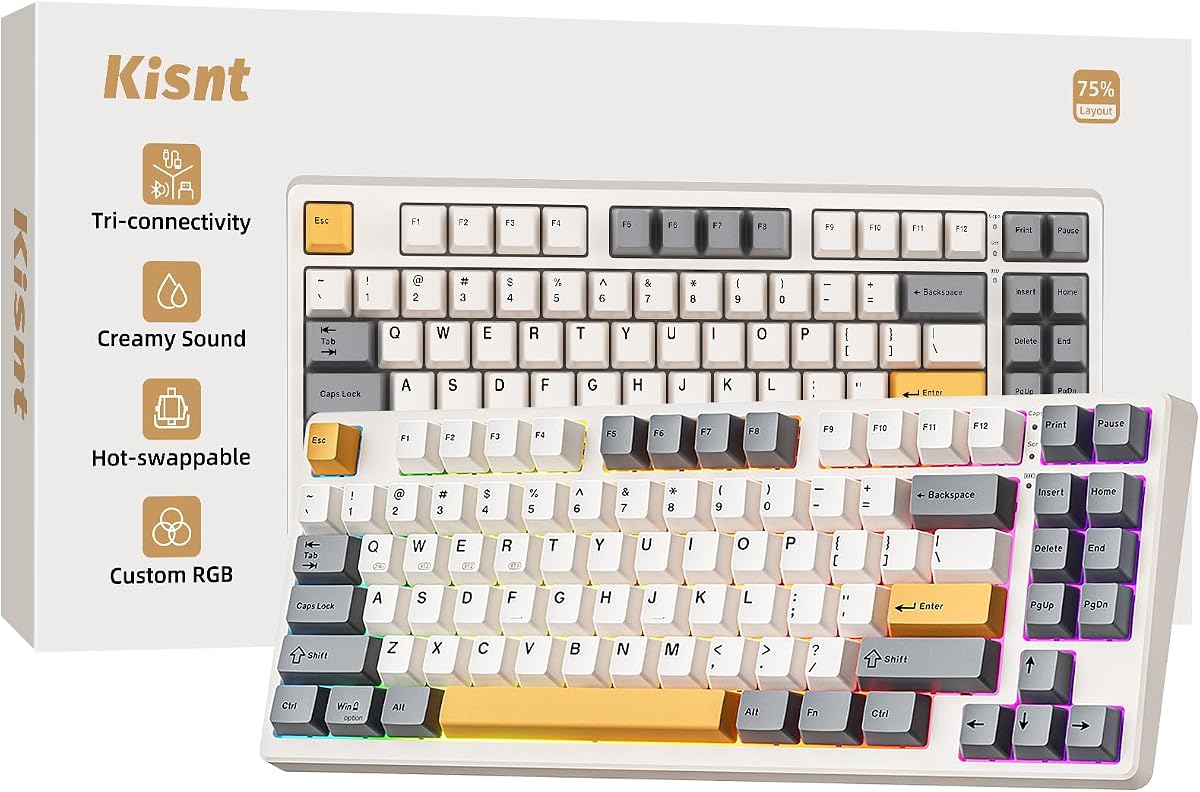
The Kisnt KN85 achieves a 4.6-star rating for its space-saving 75% layout and creamy thocky typing sound. The gasket mount absorbs harsh vibrations to produce a smooth marbly thock, making it enjoyable for typing and gaming. Its tri-mode connectivity supports ultra-low latency switching between Windows and Mac devices, accommodating multi-device workflows effectively.
We may earn a commission when you buy through this link, at no additional cost to you.
Users praise the pre-lubed Bsun linear switches for delivering a buttery response without soldering requirements. The warm ambient RGB lighting creates a calm desk vibe, complementing the retro beige aesthetic. The 4000mAh rechargeable battery ensures stable wireless performance, with wired charging options when power is low.
A limitation is that the driver software is available only for Windows, restricting customization for Mac users. The compact layout saves desk space but may require an adjustment period for those accustomed to full-size keyboards. The warranty is robust, but users should ensure proper charging habits to maintain battery health.
This keyboard is ideal for minimalists and users with smaller desks who still want full functionality. It suits programmers and students who need a reliable wireless mechanical keyboard with a pleasant acoustic profile. If you prioritize sound quality and compact design, the Kisnt KN85 is a strong contender.
Connects via USB-C, 2.4GHz, and Bluetooth 5.0 for seamless device switching.
Gasket mount produces smooth thocky sound, reducing harsh taps and hollow echoes.
We may earn a commission when you buy through this link, at no additional cost to you.
The Redragon K745 PRO delivers a 4.6-star rating for its full-size 108-key layout and gasket-mounted construction. It features four extra hotkeys for shortcuts like mute and calculator, enhancing productivity. The tri-mode connectivity offers zero lag switching between USB-C, Bluetooth, and 2.4GHz wireless, ensuring responsiveness in gaming and work.
We may earn a commission when you buy through this link, at no additional cost to you.
Users appreciate the creamy cushioned typing feel provided by the five-layer noise dampening structure. The see-through round PBT keycaps allow RGB to shine through while resisting greasy shine over time. Software support enables deep customization, including assigning hotkeys and programming macros for advanced workflows.
The larger footprint of a full-size keyboard may not suit smaller desks or users who prioritize portability. Transparent keycaps can be prone to collecting dust compared to solid colors. Battery life depends heavily on RGB usage, which may require more frequent charging with lighting enabled.
This keyboard is perfect for users who need a full-size layout with dedicated numeric keys and shortcuts. It suits office workers and gamers who require reliable wireless performance and a soft typing feel. If you want a full-sized creamy experience with enhanced productivity features, the Redragon K745 PRO is recommended.
Dedicated hotkeys for mute, calculator, screen lock, and desktop access.
See-through PBT material lets RGB shine through while resisting oily shine.
We may earn a commission when you buy through this link, at no additional cost to you.
The SOLAKAKA A99 Pro stands out with a 4.5-star rating and an LCD screen displaying time, battery, and connection info. Its multifunctional metal knob allows effortless control over settings like volume and lighting modes. The keyboard features a superior gasket structure with five layers of cushioning to eliminate internal cavity noise.
We may earn a commission when you buy through this link, at no additional cost to you.
Key strengths include full hot-swappable technology supporting 3/5-pin switches, and LEOBOG star vector switches for smooth typing. The 96% layout retains essential keys while saving space. Web driver support allows customization without software downloads, provided a wired connection is used for configuration.
The requirement for a wired connection to access the web driver can be inconvenient for wireless setups. The LCD screen and metal knob add to the weight, making it less portable. Battery life is robust with 8000mAh but backlighting usage affects runtime significantly.
This model is ideal for users who want visual feedback on their keyboard status and a tactile knob. It suits those who value gasket mount sound and easy switch swapping. If you need a versatile wireless mechanical keyboard with display features, the SOLAKAKA A99 Pro offers unique benefits.
LCD screen shows date, time, battery level, and connection mode for intuitive operation.
Premium gasket structure with cotton pads removes cavity noise for comfort.
We may earn a commission when you buy through this link, at no additional cost to you.
The AULA Pink S99 offers a 4.2-star rating with a focus on aesthetics and affordability. It features a 99-key layout with a numeric pad and dual-mode rotary knob for volume and lighting control. The keyboard supports macro customization, allowing complex actions to be programmed into single keys for real-time games.
We may earn a commission when you buy through this link, at no additional cost to you.
Key strengths include its RGB lighting effects with 16.8 million colors and a folding kickstand for ergonomic typing. The tri-mode connectivity supports Bluetooth, 2.4GHz, and wired connections for flexible use. It is compatible with multiple systems including Windows, Mac, Android, and iOS.
As a membrane keyboard, it lacks the mechanical switch depth and hot-swapping capabilities of higher-end models. The sound profile aims for creamy but may not satisfy those seeking genuine mechanical thock. Some users may find the RGB settings limited without driver software.
This keyboard is best for users prioritizing style and a compact layout at a budget-friendly price. It suits casual gamers and office workers who need a pink aesthetic with basic customization. If you want a colorful wireless keyboard with essential features, the AULA Pink S99 fits the bill.
RGB lighting with 16.8 million colors and macro software for unique setups.
Compatible with Windows, Mac, Android, and iOS with mode switch shortcuts.
We may earn a commission when you buy through this link, at no additional cost to you.
The AULA F75 in White and Blue matches the rating of 4.6 stars for its wireless flexibility and creamy sound profile. It features pre-lubed LEOBOG reaper switches that provide a smooth typing feeling and fast response for exciting games. The 75% layout saves desktop space while retaining necessary arrow keys for gaming.
We may earn a commission when you buy through this link, at no additional cost to you.
Users value the tri-mode connectivity allowing connections to up to five devices simultaneously. The hot-swappable base supports 3-pin or 5-pin switch replacement without soldering issues. RGB backlighting includes 16.8 million colors and music rhythm effects for an immersive atmosphere.
The need for driver software to unlock full macro and lighting features may be a hurdle for some users. The battery life is strong at 4000mAh but may require charging during heavy daily use. The keyboard is compact but lacks a numeric keypad which some users may need.
This model is ideal for gamers and mobile workers who need a compact wireless mechanical keyboard. It suits those who value sound quality and connectivity over full-size layouts. If you want a reliable 75% creamy keyboard with strong wireless capabilities, the AULA F75 White Blue is a top choice.
75% layout saves space while retaining essential keys for gaming and work.
RGB effects include 16.8 million colors and music rhythm with driver support.
We may earn a commission when you buy through this link, at no additional cost to you.
The Redragon K768 PRO secures a 4.8-star rating for its robust build and extended battery life. It features a single control knob for backlight brightness and media playback, simplifying daily operations. The precision-locked gasket covers with custom linear switches deliver a soft, silky bounce and creamy typing feel.
We may earn a commission when you buy through this link, at no additional cost to you.
Key strengths include the massive 8000mAh battery supporting days between charges in wireless modes. The fade-resistant PBT keycaps maintain texture and color for years compared to ABS alternatives. Pro software allows deep customization of lighting effects and macros for advanced workflows.
The 100-key layout is larger than compact options, which may impact desk space. The build is heavier due to the battery and gasket structure, reducing portability. Users should expect a longer charging time due to the larger capacity battery.
This keyboard is ideal for users who prioritize battery life and premium feel without sacrificing wireless freedom. It suits office workers and gamers who need a stable, high-quality typing experience. If you want a durable wireless mechanical keyboard with long runtime, the Redragon K768 PRO is recommended.
Backed by massive 8000mAh battery for far longer runtime than typical gaming keyboards.
PBT keycaps resist fading and remain textured and vibrant over years of use.
We may earn a commission when you buy through this link, at no additional cost to you.
Selecting the right creamy keyboard involves evaluating multiple factors beyond just sound. Consider your workflow, budget, and desired features to find a keyboard that meets your needs.
Creamy sound often comes from pre-lubed linear switches. Lubrication reduces internal friction and stabilizers reduce keycap wobble. Look for switches with factory lubes or those easily modifiable.
Check for pre-lubed switches to save time on DIY projects and ensure a smooth creamy experience right out of the box.
Gasket mount systems separate the plate from the case allowing the keyboard to flex slightly. This absorbs harsh vibrations and hollow echoes for a softer typing feel. Look for internal foam layers and silicon padding.
Prioritize keyboards with gasket mount and five-layer filling structures to achieve the deep and muted acoustic profile typical of creamy boards.
Tri-mode connectivity including Bluetooth 5.0, 2.4GHz wireless, and USB-C wired options offer flexibility. Wireless is essential for multi-device workflows while wired ensures zero lag for gaming.
Ensure the keyboard supports your preferred connection modes and has low latency for gaming needs without constant re-pairing.
Hot-swappable PCBs allow you to change switches without soldering. This future-proofs your keyboard and lets you experiment with different sound profiles.
Choose a hot-swappable keyboard if you plan to customize switches later to refine the creamy sound over time.
Materials like aluminum or high-quality plastic affect durability and sound. PBT keycaps resist shine and wear better than ABS. A sturdy case prevents unwanted flex during typing.
Look for premium materials like double-shot PBT keycaps and metal or reinforced plastic cases for long-term use.
Layouts range from 60% to full-size. 75% and 96% layouts balance compactness with arrow keys and numpads. Choose based on your space constraints and workflow needs.
Select a layout that retains necessary keys like arrows or numpad while saving desktop space for mouse movement.
Wireless keyboards require robust batteries. Look for capacities around 4000mAh or higher for multi-day use. Check if charging is via USB-C and if typing while charging is supported.
Opt for models with large batteries like 8000mAh if you want to minimize frequent charging interruptions during work.
Software support for macros, lighting effects, and key remapping enhances functionality. Some use web drivers while others require downloads. Check compatibility with your OS.
Verify software compatibility and features to ensure you can tailor the keyboard to your specific productivity or gaming workflow.
To maximize the creamy sound profile, ensure the keyboard is assembled correctly with all foam and gasket layers in place. If hot-swappable, gently press out old switches and insert new ones to avoid damage.
Regularly clean keycaps with compressed air to prevent dust buildup which can dampen the acoustic profile. Use a soft brush to reach between switches without applying excessive pressure.
Keep the battery charged and avoid exposing the keyboard to extreme temperatures. For wireless models, store the USB dongle safely when not in use to prevent loss and ensure consistent connectivity.
Creamy sound is achieved through lubricated linear switches, gasket mount designs, and internal dampening materials like foam. These elements reduce harsh clicks and hollow resonance. A solid and stable construction further enhances the mellow thocky acoustic signature.
While mechanical keyboards are preferred for deep creamy tones, some membrane models offer soft acoustic profiles. However, they lack the precision and customization of mechanical switches. For true creamy sound, mechanical boards with gasket mounts are recommended.
No, not all creamy keyboards support hot-swapping. Some models come with pre-lubed fixed switches. Check specifications before purchasing to ensure you can customize switches later if desired for better sound control.
Yes, modern wireless keyboards with Bluetooth 5.0 or 2.4GHz provide stable connections. Look for low latency features and dual-mode connectivity to ensure responsiveness for typing and gaming. Wired modes can also be used when battery is low.
Battery life varies by model and usage with RGB lighting draining power faster. Larger capacities like 8000mAh offer multi-day runtime while smaller ones may need daily charging. Check battery specs to match your expected daily usage.
Switching layout usually requires buying a new keyboard since keycaps and switches are not universal across sizes. Consider a layout that fits your needs from the start. Some models allow layout changes via software but physical keys remain fixed.
The best creamy keyboards balance sound quality, build durability, and connectivity options. Our top picks include the AULA S99 for budget users, the YUNZII B98 PRO for premium customization, and the Redragon K768 PRO for endurance and feel.
Prioritize factors like hot-swappability, gasket mount, and battery life based on your specific needs. Whether you are gaming or working, a creamy keyboard can transform your typing experience into something smoother and more enjoyable.
Prices and availability can change so check current listings before buying. Ensure compatibility with your devices and preferred operating system to get the most out of your new keyboard.