
Sonnet Breakaway Box 850 T5
4.5Editor score
850W ATX power supply
Integrated Thunderbolt 5 dock
Triple-wide GPU support
This guide compares the top 10 Egpu Enclosures for laptops and handhelds, evaluating performance, compatibility, and power delivery for gamers and creators in
External GPU enclosures transform laptops into desktop-grade workstations by connecting powerful graphics cards via high-speed ports. These devices enable gaming, rendering, and AI tasks that onboard graphics simply cannot handle efficiently.
We evaluated ten leading Egpu Enclosures based on bandwidth speed, power supply capacity, cooling efficiency, and peripheral connectivity. Our analysis focuses on Thunderbolt 5, USB4, and OCuLink solutions to ensure future-proof performance.
Each pick below highlights specific strengths like portability, modular power options, or AI-specific features. Please note that availability and pricing fluctuate frequently, so verify current details before making your final purchase decision today.
4.5Editor score

4.0Editor score
5.0Editor score
The following table provides a side-by-side comparison of all ten enclosures. It highlights key specifications like interface type, power capacity, and physical dimensions to help you quickly identify the right fit for your setup.


The Razer Core X V2 stands out as a top choice for users seeking maximum bandwidth and compatibility. With support for Thunderbolt 5, it offers up to 80Gbps transfer speeds, ensuring your external GPU performs near desktop levels.
We may earn a commission when you buy through this link, at no additional cost to you.
This enclosure is built to handle massive graphics cards up to four slots wide, making it future-proof for upcoming hardware releases. The active cooling fan system ensures that even under heavy gaming loads, thermal throttling is minimized effectively.
However, users should note that the power supply is sold separately, which adds to the initial investment. Additionally, macOS compatibility is restricted to Intel Macs, so Apple Silicon users cannot utilize this specific unit for graphics expansion.
If you prioritize raw performance and plan to use high-end NVIDIA or AMD desktop GPUs, this is the ideal enclosure. It delivers a seamless plug-and-play experience for Windows laptops and handhelds that need serious graphical power.
The 80Gbps bandwidth allows for uncompressed 4K video output and rapid data transfer during rendering tasks.
Tool-free thumbscrews let you swap GPUs in minutes without needing screwdrivers or technical expertise.
We may earn a commission when you buy through this link, at no additional cost to you.
Sonnet delivers premium quality with the Breakaway Box 850 T5, offering an all-in-one solution that includes a powerful 850W power supply. This is perfect for users who want to avoid the hassle of sourcing external power components separately.
We may earn a commission when you buy through this link, at no additional cost to you.
The enclosure features a built-in Thunderbolt 5 dock, providing extra connectivity like USB-A and Ethernet ports directly from the box. This reduces cable clutter on your desk and keeps your workspace organized while enhancing functionality.
One trade-off is the weight and size, which might make it less ideal for frequent travel. It is best suited for a stationary setup where the extra ports and power stability outweigh the need for portability in a daily carry.
For professionals needing reliable GPU acceleration for rendering or AI work, this unit offers the stability and power headroom required. It is a robust investment for those who demand top-tier performance from their external graphics setup.
Use the USB ports for peripherals like keyboards or drives without needing a separate hub device.
The 850W PSU handles high-draw GPUs like the RTX 4090 with ample headroom for stable operation.
We may earn a commission when you buy through this link, at no additional cost to you.
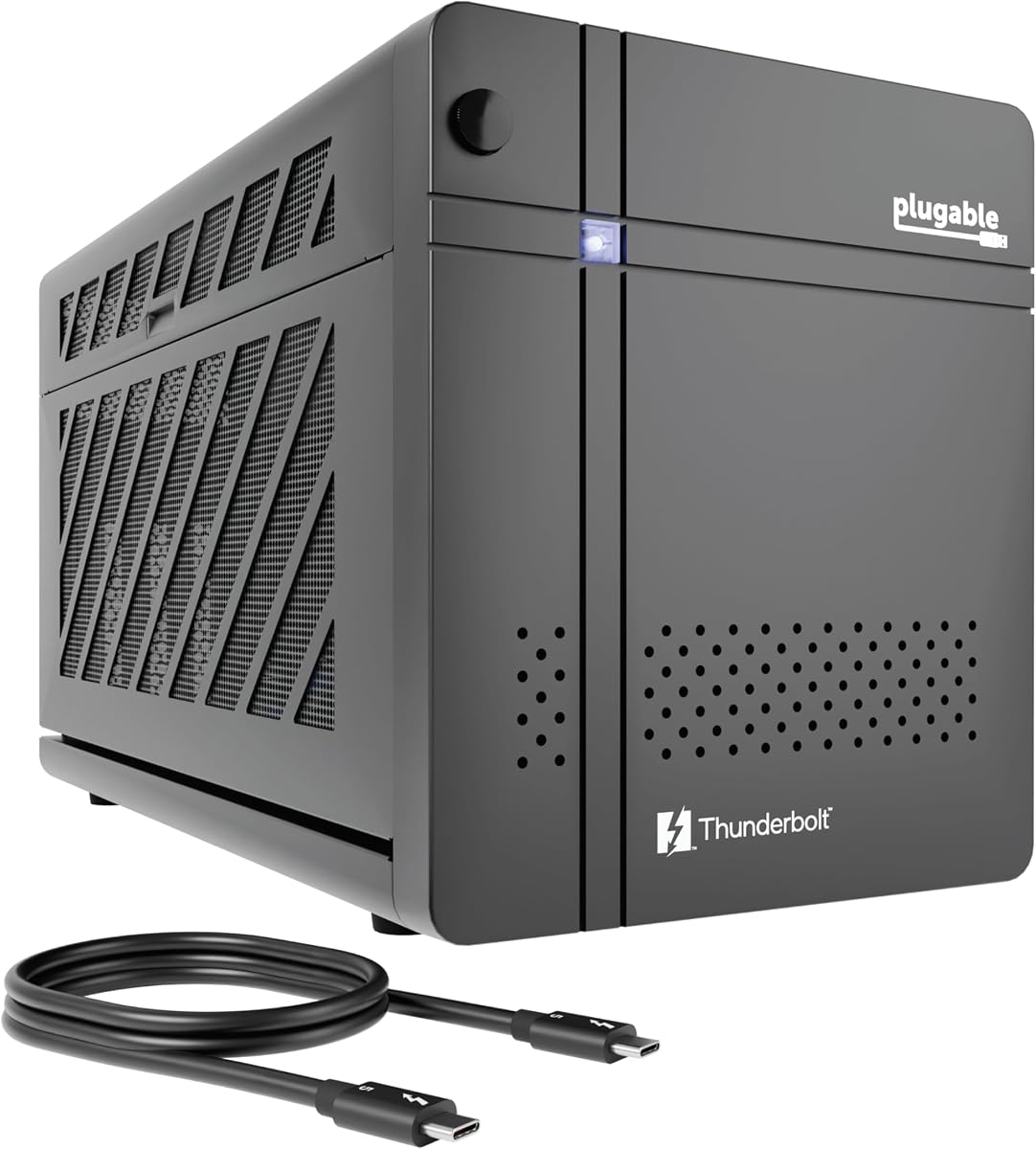
The Plugable TBT5-AI is specifically designed for users focused on running local AI models securely. It features a high-quality 850W power supply and emphasizes privacy by keeping data local rather than relying on cloud services.
We may earn a commission when you buy through this link, at no additional cost to you.
This enclosure supports standard ATX power supplies and offers robust connectivity including 2.5Gbps Ethernet. It is built to ensure that your sensitive prompts and data never leave your perimeter, which is critical for enterprise or privacy-conscious individuals.
While it is priced competitively for its features, it may not be the best fit for general gaming due to its specific tuning for AI workloads. You should verify your GPU dimensions carefully as it has strict size limits compared to others.
If you are building a secure AI workstation or need reliable connectivity with excellent support, this unit is a strong contender. The lifetime support warranty adds significant value, ensuring you are covered for long-term hardware needs.
Air gap capabilities mean your AI models run locally without transmitting data to external servers.
Includes downstream Thunderbolt 5 port for chaining additional high-speed devices effortlessly.
We may earn a commission when you buy through this link, at no additional cost to you.
This enclosure is a practical solution for users needing a complete package without extra purchases. It comes with a 240W power supply and a custom carrying case, making it ready to use right out of the box for gaming or editing.
We may earn a commission when you buy through this link, at no additional cost to you.
The aluminum shell provides durability while keeping the unit lightweight for travel. It supports Thunderbolt 4 and USB4 connections, allowing for decent bandwidth on a budget compared to the more expensive Thunderbolt 5 alternatives.
However, the power supply limits it to lower-wattage GPUs, and the length restriction may exclude very long high-end graphics cards. If you plan to use a massive GPU, you will need to check dimensions carefully before buying.
For casual gamers or content creators who need a portable boost without breaking the bank, this is a sensible choice. It balances affordability with essential features, offering a straightforward way to enhance laptop graphics performance easily.
The included case protects your hardware during transit, ensuring your setup stays safe on the go.
A single Thunderbolt cable connects your laptop, simplifying your desk setup significantly.
We may earn a commission when you buy through this link, at no additional cost to you.
The ANQ-L336 is designed with flexibility in mind, supporting a wide range of power supplies and operating systems. It is particularly notable for its compatibility with handheld gaming devices like the ROG Ally and Claw, enabling a portable gaming rig.
We may earn a commission when you buy through this link, at no additional cost to you.
With support for DC, ATX, SFX, and Flex power options, you have freedom in how you power the unit. This modularity helps you tailor the setup to your specific needs, whether you prioritize size or raw power capacity.
One downside is the Thunderbolt 3/4 bandwidth which is lower than the newest Thunderbolt 5 options. This means you might see a slight performance hit compared to top-tier models, especially in high-bandwidth tasks like 8K rendering.
For users with a MacBook or Linux setup who want a cost-effective solution, this unit offers great versatility. It is an excellent option for those who value adaptability and portability over cutting-edge maximum bandwidth speeds.
Connects directly to USB4 ports on handheld consoles to expand gaming graphics capabilities instantly.
Use your existing power supplies to reduce costs and environmental waste when building your eGPU.
We may earn a commission when you buy through this link, at no additional cost to you.
The VK-Y900 offers a solid balance of performance and value for users comfortable sourcing their own power supply. It features dual Thunderbolt ports allowing you to pass through connectivity to other devices while charging your laptop simultaneously.
We may earn a commission when you buy through this link, at no additional cost to you.
The use of ENIG PCB technology ensures better conductivity and oxidation resistance, which enhances the long-term reliability of the data transfer paths. This is a thoughtful detail often overlooked in budget-friendly enclosures on the market today.
While it lacks an internal power supply, this keeps the cost down and allows you to choose a PSU that fits your power budget. However, this means the total setup might require more cables and components compared to all-in-one kits.
If you are looking for a reliable chassis with good build quality without paying for premium features, this is a strong pick. It serves well as a standard desktop solution for gaming or light creative work with modern laptops.
Dual ports let you daisy chain displays or storage without needing a separate hub device.
Deliver up to 85W of power to your laptop so you do not need a wall charger.
We may earn a commission when you buy through this link, at no additional cost to you.
Sonnet remains a trusted name in Thunderbolt peripherals, and the 750ex is a robust option for users with older Thunderbolt 3 ports. It provides a stable 750W power supply capable of handling high-performance graphics cards with ease and efficiency.
We may earn a commission when you buy through this link, at no additional cost to you.
This model includes useful peripheral connections like USB ports and Ethernet, making it a functional hub as well as a GPU box. It is one of the few options that maintains good compatibility with macOS systems for creative workflows.
The main drawback is the Thunderbolt 3 interface, which caps bandwidth lower than newer standards. If you have a newer laptop with Thunderbolt 5 or USB4, you might not utilize the full potential of this older generation connection.
For owners of Intel Macs or laptops with Thunderbolt 3 ports, this unit delivers reliable performance and longevity. It is a great choice if you want a tried-and-tested solution that supports professional editing and rendering tasks reliably.
Unlike many newer models, this supports Mac systems with Intel chips for video editing workflows.
Connect a wired network or peripherals directly to the enclosure for a tidy workspace setup.
We may earn a commission when you buy through this link, at no additional cost to you.
This mini enclosure is ideal for users who need a small footprint without sacrificing too much performance. It supports Thunderbolt 3 and 4 interfaces, allowing for compatibility with a wide range of modern laptops and devices.
We may earn a commission when you buy through this link, at no additional cost to you.
The design is compact enough to sit on a shelf or in a bag, making it suitable for travel. It relies on universal power supplies, so you can reuse existing hardware to keep the overall cost of ownership low and manageable.
Keep in mind that you must handle driver compatibility settings yourself as it requires some DIY knowledge. If you are not comfortable with technical configuration, this might be frustrating compared to more automated premium options.
For budget-conscious builders who want a basic solution for boosting laptop graphics, this unit works well. It provides a straightforward path to external graphics without the bulk of larger enclosures or complex internal power requirements.
The small profile ensures it fits on tight desks or inside backpacks for mobility.
Using your own power supply saves money and reduces electronic waste significantly.
We may earn a commission when you buy through this link, at no additional cost to you.
The DEG2 offers a unique dual-mode approach with both USB4 V2 and OCuLink interfaces for flexible performance tuning. This allows you to switch between docking convenience and pure gaming performance with a simple hardware switch.
We may earn a commission when you buy through this link, at no additional cost to you.
An integrated M.2 NVMe slot lets you store games or project files directly on the dock, reducing load times and syncing issues. This feature is particularly useful for users who frequently move their GPU setup between different host machines.
However, the OCuLink mode may require specific host support and configuration, making it less plug-and-play than standard Thunderbolt. It is best suited for enthusiasts who want every last bit of performance from their graphics card.
If you need high speed and extra storage without external drives, this unit provides a modern solution. It balances innovation with practicality, making it a great choice for tech-savvy users who want maximum control over their setup.
Switch to this mode to reduce latency and get near internal PCIe performance for games.
Store large game libraries locally on the dock to free up space on your laptop drive.
We may earn a commission when you buy through this link, at no additional cost to you.
This kit offers everything you need to start using an external GPU immediately, including the enclosure and power supply. It supports Thunderbolt 4 and 3 connections, making it accessible for most laptops and handheld devices on the market.
We may earn a commission when you buy through this link, at no additional cost to you.
The aluminum chassis ensures durability while keeping the weight manageable for movement. It is designed to be user-friendly, focusing on ease of setup and reliable performance without requiring technical expertise to configure.
With a lower power supply wattage, it is best suited for mid-range graphics cards rather than top-tier high-wattage models. This keeps costs down but may limit performance for very demanding future GPU generations.
For beginners wanting a hassle-free entry into external graphics, this is a dependable choice. It provides a solid foundation for boosting your laptop or performance for gaming or rendering tasks without complexity or hidden costs.
Includes cables and case so you can begin using the enclosure the same day you receive it.
The metal shell protects internal components from damage during transport or daily use.
We may earn a commission when you buy through this link, at no additional cost to you.
Selecting the right eGPU enclosure involves balancing bandwidth, power, and port requirements. Here are the key factors to consider before making a purchase to ensure optimal performance.
The interface type determines how fast data moves between your laptop and the graphics card. Thunderbolt 5 offers the highest speeds at 80Gbps, while Thunderbolt 4 provides 40Gbps. Always check your laptop's port specifications to match the enclosure.
Prioritize the latest interface available on your device to avoid bottlenecks that limit GPU performance significantly.
Modern GPUs require significant power, often ranging from 200W to 450W. Ensure the enclosure includes or supports a power supply with enough wattage to handle your specific graphics card without instability.
A higher wattage PSU ensures stable operation and leaves room for future GPU upgrades.
Graphics cards vary widely in length and thickness. Verify that the enclosure supports your GPU's dimensions to avoid compatibility issues where the card does not fit inside the chassis.
Measure your GPU before buying to ensure it will fit within the enclosure limits.
Not all enclosures work with Mac, Linux, or Windows. Many units are optimized for Windows, so check the manufacturer's compatibility list if you use a different operating system for your tasks.
Ensure the device supports your OS to avoid driver headaches after purchase.
High performance generates heat, so the enclosure must have good cooling to prevent thermal throttling. Look for units with large fans and active airflow designs to maintain consistent performance during long sessions.
Better cooling means longer GPU life and more stable frame rates during intensive work.
Some enclosures act as hubs with extra USB or Ethernet ports. Consider if you need these additional connections to reduce cable clutter and save desk space.
A built-in hub can simplify your desktop setup by merging docking and graphics functions.
If you plan to travel with your setup, weight and size matter. Enclosures with carrying cases and aluminum shells offer better protection and ease of transport for on-the-go usage.
Choose a compact model if you need to move your workstation between home and office.
Technology evolves quickly, so investing in newer standards like Thunderbolt 5 or OCuLink may extend the life of your enclosure. Older interfaces might become obsolete sooner as GPUs increase their bandwidth demands.
Select a model with modern standards to ensure longevity and compatibility with future hardware.
Start by installing the graphics card and power supply inside the enclosure following the manual instructions. Secure all cables and screws before connecting the unit to your laptop via the Thunderbolt or USB4 cable.
Download and install the necessary drivers for your graphics card and the enclosure controller. Restart your system to ensure the laptop recognizes the external GPU and assigns tasks correctly.
Keep the enclosure in a well-ventilated area to allow heat to escape. Regularly clean dust from the fans to prevent overheating and maintain optimal performance over time.
No, your laptop must have a Thunderbolt 3 or 4, USB4, or OCuLink port that supports eGPU functionality. Many consumer laptops lack this feature, so check your device specifications before buying.
Most desktop graphics cards work, but size and power requirements matter. Ensure the card fits within the physical dimensions and does not exceed the power supply capacity of the enclosure.
There is typically a small performance loss due to bandwidth limits and connection latency. However, the gains are still significant compared to using a laptop's integrated graphics for most tasks.
No, you can use the laptop screen directly via the Thunderbolt or USB4 connection. Alternatively, you can connect a dedicated monitor to the GPU for better visual quality.
Most modern Macs with Apple Silicon chips do not support external graphics. Only older Intel Macs with Thunderbolt 3 ports have limited support for specific eGPU models.
Thunderbolt 5 offers higher bandwidth up to 80Gbps compared to 40Gbps on Thunderbolt 4. It also supports better power delivery, making it more suitable for high-end GPUs and future-proof setups.
Our top picks highlight the Razer Core X V2 for speed, the Sonnet Breakaway Box 850 T5 for power, and the Plugable Thunderbolt 5 AI for specialized needs. Each option brings unique strengths to the table for different user scenarios.
Prioritize bandwidth and power compatibility to ensure your graphics card performs at its peak. Choosing the right interface and PSU will determine how smoothly your setup handles gaming or professional tasks.
Remember that prices and stock levels change frequently. Verify current availability and specifications before finalizing your purchase to ensure you get the best value for your specific requirements.