
XPPen 10.95 Standalone Drawing Tablet
4.4Editor score
10.95 inch X-Paper display
16K pressure sensitivity levels
90Hz refresh rate screen
Electronic sketch pads have revolutionized how artists and students capture ideas by merging the tactile feel of paper with digital convenience. These devices allow for seamless editing, sharing, and storage of creative work without the clutter of physical notebooks or the mess of traditional art supplies.
We analyzed ten leading electronic sketch pads ranging from simple LCD doodle boards for kids to advanced standalone drawing tablets for professionals. Our comparison focuses on display quality, pressure sensitivity, battery life, and overall user experience to ensure you find the perfect tool for your creative needs.
Each product in this list offers unique strengths tailored to different budgets and use cases. Whether you need a portable note-taking solution or a full-featured digital art station, our detailed reviews highlight the key features and potential trade-offs to guide your decision-making process effectively.
4.4Editor score

4.2Editor score

4.6Editor score
As an Amazon Associate we earn from qualifying purchases.
This side-by-side comparison evaluates all ten electronic sketch pads based on their core specifications, target audience, and unique capabilities to help you identify the best match for your specific creative or educational requirements.



The HUION Note Digital Notebook bridges the gap between traditional paper and digital convenience. It holds a 4.2 rating for its unique ability to digitize handwritten notes while preserving the natural feel of pen on paper. This device is ideal for students and professionals who want to capture ideas without the clutter of physical notebooks.
We may earn a commission when you buy through this link, at no additional cost to you.
Its standout feature is the simultaneous capture of vector lines and audio. You can record a lecture or meeting while writing, then sync the audio with your notes later. The battery-free pen ensures you never run out of power mid-thought. The accompanying app allows for easy organization, merging, and splitting of pages into different groups.
While the device requires a mobile connection for full functionality, this is a reasonable trade-off for the seamless synchronization it offers. The lack of a built-in screen means you must rely on your phone or tablet to view digital copies, but this keeps the hardware light and portable for daily use.
Buyers seeking a tool to digitize handwritten work should prioritize the HUION Note. It is perfect for classroom settings, brainstorming sessions, and any scenario where tactile writing is preferred. The included USB-C cable and pen accessories make it a ready-to-use solution right out of the box.
The app automatically pairs via Bluetooth 5.0 to transfer your handwritten notes instantly to your mobile device.
Click play to relive your handwriting process and audio recording, ensuring nothing is lost during meetings.
We may earn a commission when you buy through this link, at no additional cost to you.
The XPPen Magic Note Pad is a premium standalone device designed for serious artists and professionals. With a 4.4 rating, it offers a realistic sketching experience thanks to its X-Paper display which mimics the friction of traditional paper. This device is perfect for those who want a full computer to without sacrificing artistic control.
We may earn a commission when you buy through this link, at no additional cost to you.
Its 16K pressure sensitivity allows for precise control over shading and line weight. The 90Hz refresh rate ensures smooth transitions without lag, making it feel like you are drawing on real paper. The inclusion of Android 14 means you can download creative apps directly from Google Play, making it a self-contained creative studio.
While it is more expensive than basic options, the vibrant color display and anti-glare technology justify the investment for heavy users. The battery-free pen means it is always ready to use, but the premium build and features come at a cost. However, it is ultra-portable at just 495g.
Artists looking for a high-end standalone solution should choose this XPPen tablet. It supports professional workflows with advanced features while remaining portable. The pre-installed Notes app provides a lifetime free tool for annotation and creativity without extra subscriptions.
The AG nano-etching technology delivers true paper-like texture and friction for natural pencil strokes.
Switch between nature, light color, and black and white modes to suit different tasks and reduce eye strain.
We may earn a commission when you buy through this link, at no additional cost to you.
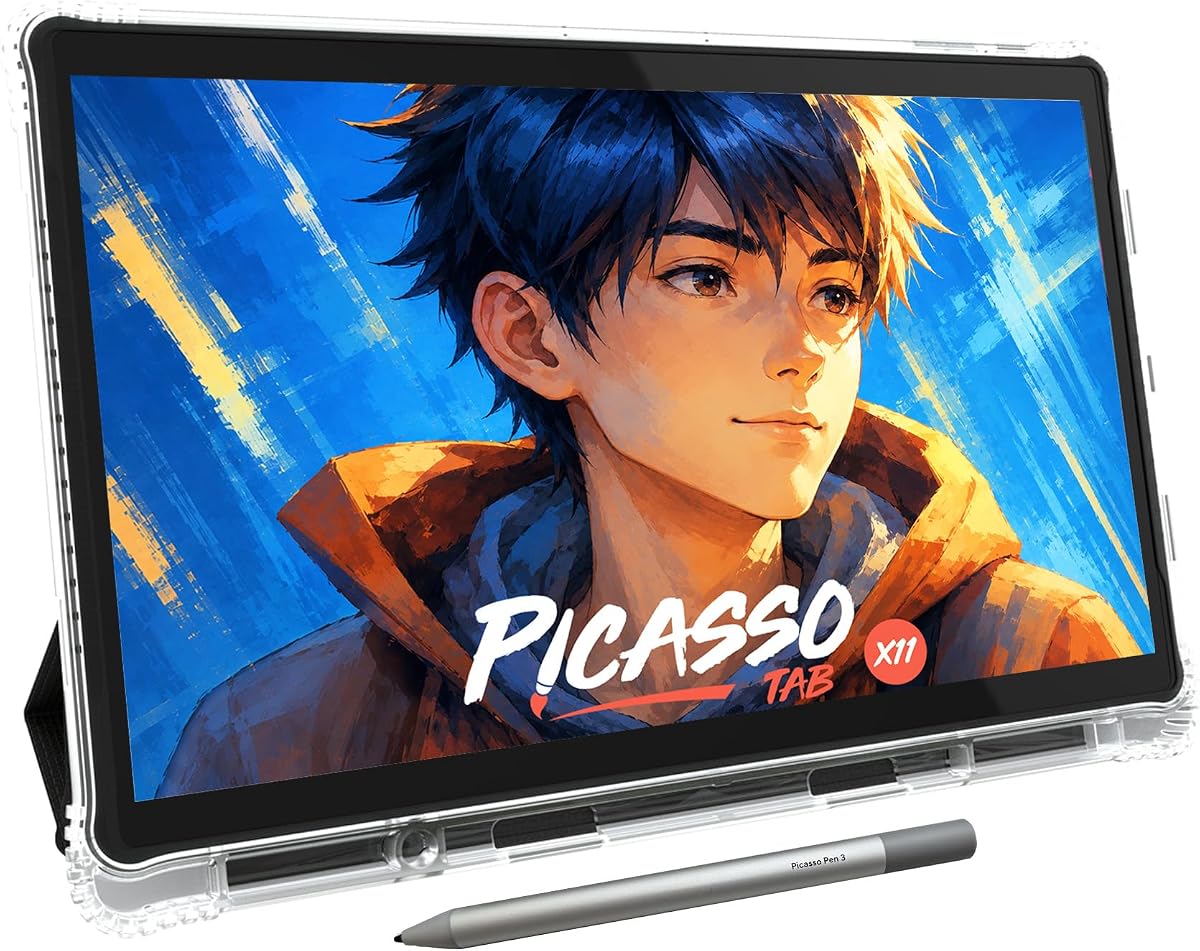
The PicassoTab X11 is an affordable standalone tablet designed to make digital art accessible to everyone. It holds a 4.2 rating and comes preloaded with creative apps and lifetime VIP tutorials, making it ideal for beginners. The device needs no computer to function, allowing you to draw directly on its 11-inch screen.
We may earn a commission when you buy through this link, at no additional cost to you.
Its laminated paper-like display reduces parallax and glare for a realistic drawing feel. The 4096-level pressure-sensitive stylus offers precise strokes for sketching and shading. The octa-core processor and 6GB RAM handle drawing apps and multitasking comfortably. The device also includes a bonus case, glove, and screen protector.
While the processor is efficient, it may not support the most demanding professional software smoothly. However, for learning and casual creation, the provided tools are extensive. The expandable storage ensures you can save thousands of drawings without worrying about running out of space.
Beginners and students should choose the PicassoTab X11 for its comprehensive entry-level package. The lifetime access to tutorials ensures you are not left guessing how to use the tablet. It is a worry-free purchase backed by a 1-year warranty and responsive support.
Artixo Lifetime VIP upgrade provides step-by-step lessons and guided practice specifically designed for beginners.
A fully laminated screen reduces glare while the upgraded stylus delivers precise strokes for illustration.
We may earn a commission when you buy through this link, at no additional cost to you.
The Kayoubi LCD Writing Tablet offers a massive canvas for creative expression at an accessible price. With a 4.6 rating, it features a 14.5-inch screen that provides endless room for imagination. This device is perfect for young creators who need space to doodle without the mess of paper and ink.
We may earn a commission when you buy through this link, at no additional cost to you.
Its one-click erase and lock function allows you to save masterpieces or clear the board instantly. The eye-friendly display has zero harsh blue light or glare, making it safe for long sessions. It is completely reusable, saving thousands of sheets of paper and reducing waste over time.
While it does not offer color or advanced digital features, it excels in simplicity and portability. The lack of color is a trade-off for the low cost and battery life. The locking feature prevents accidental deletion, which is essential for keeping work safe during play.
Parents looking for a screen-free toy should buy the Kayoubi LCD Writing Tablet. It keeps kids engaged and creative during travel or quiet time. It is an ideal gift for back-to-school or holidays, providing a clean and interactive alternative to traditional drawing boards.
The display is designed with zero harsh blue light to protect little eyes during hours of use.
Erase in a flash with a single button to clear space for new drawings instantly.
We may earn a commission when you buy through this link, at no additional cost to you.
The Bravokids 10 Inch LCD Writing Tablet is a colorful and durable tool for young children. It holds a 4.6 rating and features a screen that offers a better viewing experience than standard black screens. This device is lightweight and durable, making it perfect for travel and daily use at school.
We may earn a commission when you buy through this link, at no additional cost to you.
It supports over 100,000 rewrites, significantly reducing paper waste and protecting the environment. The one-second erase function saves time and effort, while the lock key ensures your work is saved when needed. The screen is radiation-free, offering a safe and comfortable experience for long sessions.
The battery door is fixed with a screw, ensuring safety for children, though it requires a tool to change the battery. This design choice prioritizes safety over convenience. The colorful display adds a fun element to drawing, keeping children engaged during trips or waiting times.
Parents should consider the Bravokids tablet for children aged 3 to 8. It provides silent entertainment that keeps kids occupied without the distraction of complex apps. The durable plastic design ensures it can withstand drops and bumps during active play or travel.
Over 100,000 rewrites help save thousands of paper and ink with just one drawing board.
The screen is radiation-free and glare-free, safe and comfortable even for long-time use.
We may earn a commission when you buy through this link, at no additional cost to you.
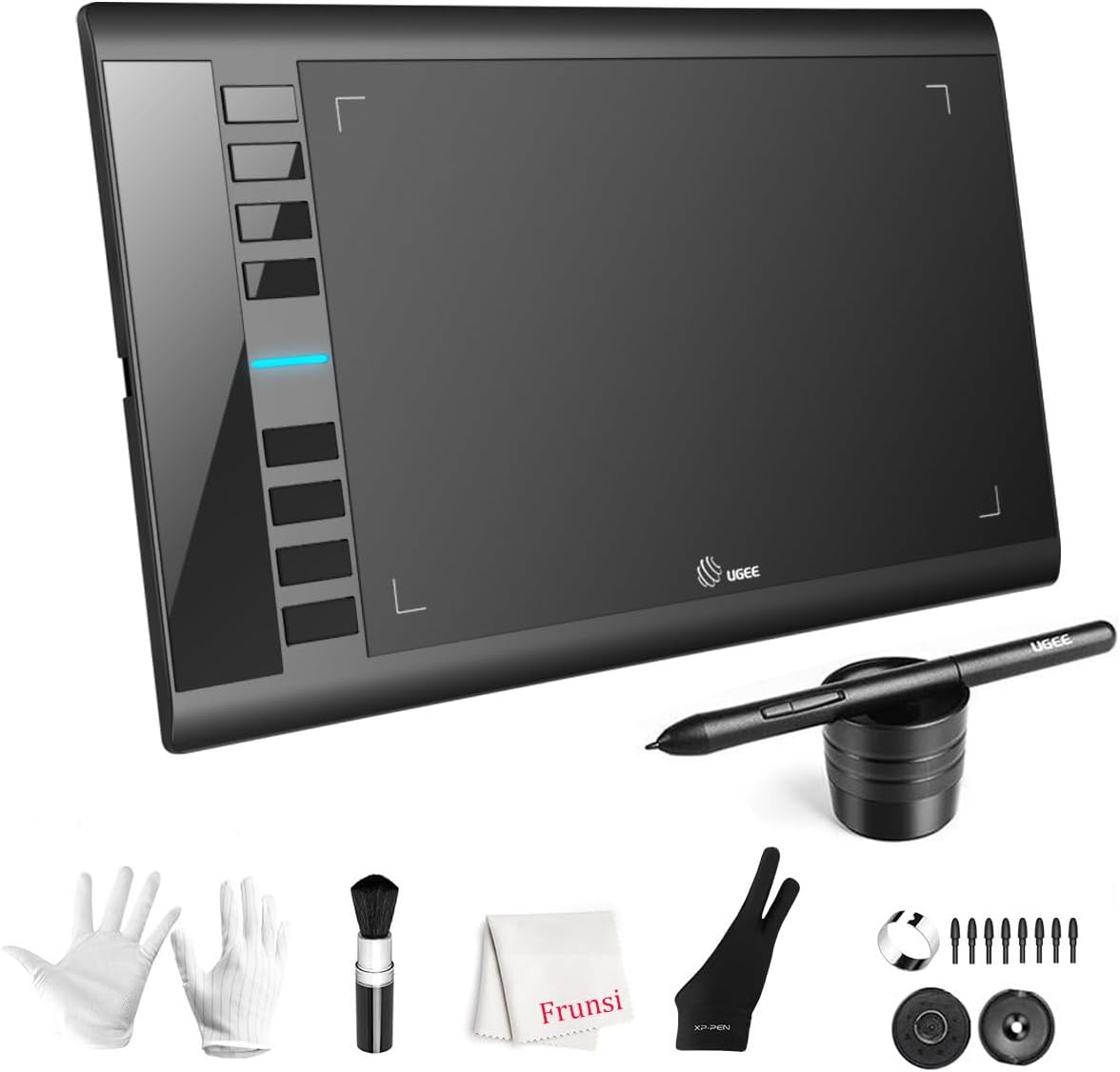
The UGEE M708 Drawing Tablet is a robust tool for digital artists working on a computer. It holds a 4.4 rating and features a large active space that allows for smooth and lag-free sketching. The device is designed to integrate seamlessly with your existing workstation for professional creativity.
We may earn a commission when you buy through this link, at no additional cost to you.
Its 16384 pressure levels offer precise control over line weight and opacity. The eight customizable express keys provide convenient shortcuts for tasks like zooming or erasing, enhancing productivity. It is compatible with Windows, Mac, Android, and Linux, running on major creative software like Photoshop and Illustrator.
While the tablet requires a computer connection, it offers a stable and powerful environment for detailed work. The ambidextrous design supports both right and left-handed users comfortably. The USB-C connectivity ensures easy connection to modern devices, simplifying the setup process.
Artists seeking a reliable entry-level tablet for PC work should choose the UGEE M708. Its large surface area and pressure sensitivity make it suitable for various digital art tasks. It is an excellent choice for designers who need efficiency without the cost of a high-end pen display.
Eight customizable express keys on the side help improve efficiency when creating digital art.
Driver program works with creative software like Photoshop, Illustrator, and SAI for seamless performance.
We may earn a commission when you buy through this link, at no additional cost to you.
The Mafiti LCD Writing Tablet is a practical tool for quick notes and messages. It holds a 4.2 rating and features a thicker writing line for easier visibility than previous versions. This device is versatile, serving as a writing board for kids or a memo pad for office use at home.
We may earn a commission when you buy through this link, at no additional cost to you.
It includes a replaceable coin-cell battery that can be easily swapped when it runs out. The stylus can double as a kick-stand to display messages to family or colleagues. Its ultra-lightweight and thin profile make it easy to carry anywhere you go without adding bulk to your bag.
While the 8.5-inch screen is smaller than other options, it is perfect for quick notes rather than full artwork. The lock-protection switch ensures your notes are not erased accidentally. The one-key clear button allows for quick clearing of the board when you need new space.
Users needing a simple and portable writing solution should choose the Mafiti LCD Writing Tablet. It is an excellent gift for children or a practical tool for office organization. The ability to reuse it thousands of times makes it an environmentally friendly choice.
The stylus can be used as a kick-stand to display your written messages to family and friends.
Erase your writing content quickly with a simple one press of the erase button for convenience.
We may earn a commission when you buy through this link, at no additional cost to you.
The TEKFUN LCD Writing Tablet is a reliable companion for kids on the go. It holds a 4.5 rating and features a 10-inch colorful screen that offers a better painting experience. This device is designed to be waterproof and anti-fall, ensuring it survives accidental drops or spills.
We may earn a commission when you buy through this link, at no additional cost to you.
Its battery lasts up to six months, providing thousands of writing and drawing sessions. The pressure-sensitive technology creates lines using any hard object, making it versatile for little hands. The lock key prevents accidental clearing, which is vital for preserving drawings during travel.
While it is simple in design, the waterproof feature sets it apart from standard LCD tablets. The colorful display enhances the fun factor for young children. It is lightweight and portable, fitting easily into travel bags or backpacks for trips and commutes.
Parents should pick the TEKFUN LCD Writing Tablet for long trips and road trips. It keeps kids engaged without screens or mess. The durable construction ensures it withstands the rigors of travel while providing a safe and clean creative outlet for children.
Made of high-quality plastic material, it is waterproof and anti-fall to handle accidental drops.
The built-in battery provides a 6-month lifespan for continuous use and replacement convenience.
We may earn a commission when you buy through this link, at no additional cost to you.
The Wacom Intuos Small is a trusted entry point into professional digital art. With a 4.6 rating, it delivers superior control and precision with Wacom's industry-leading pen technology. This device is designed for artists who want a reliable tool that integrates well with professional workflows.
We may earn a commission when you buy through this link, at no additional cost to you.
It features Wacom's EMR battery-free technology which feels like pen on paper. The tablet works with any software program, allowing you to explore new facets of creativity. Registration grants access to creative software and online training, adding value to your purchase immediately.
While the active area is small, it offers high precision for detailed work on a compact device. The wired connection ensures stable performance without battery concerns. The industry reputation of Wacom provides confidence in durability and driver support for years to come.
Professional designers should choose the Wacom Intuos Small for reliable performance. It is a preferred tool for graphic designers who need precision and compatibility. The included software and training make it an excellent choice for those ready to transition to professional-grade tools.
Wacom has been the global leader in drawing tablets for over 40 years in the market.
Register your tablet to gain access to some of the best creative software and online training.
We may earn a commission when you buy through this link, at no additional cost to you.
The XP-PEN Artist12 is a budget-friendly drawing monitor that delivers stunning visuals. With a 4.4 rating, it features an 11.6-inch HD IPS display with 72% NTSC color gamut for vivid images and extreme detail. This device bridges the gap between a tablet and a full screen for artists on a budget.
We may earn a commission when you buy through this link, at no additional cost to you.
Its 8192 pressure sensitivity offers precise control with a battery-free pen that feels traditional. The display comes with a pre-installed anti-reflective screen protector to reduce glare during long sessions. Customizable shortcut keys and a touch bar enhance workflow efficiency without needing to use your mouse frequently.
While it requires a computer connection, it offers an extended display option for online education and remote work. The color accuracy supports digital drawing and animation well. It is compatible with Windows, Mac, and Linux, making it versatile for different professional environments.
Artists wanting a screen-based drawing experience should choose the XP-PEN Artist12. It provides professional features at a competitive price. The one-year warranty and lifetime technical support ensure you are backed if you run into any technical issues.
The display presents vivid images and vibrant colors with 72% NTSC and 100% SRGB color gamut.
Advanced passive pen features a hexagonal design and non-slip grip for comfort and efficiency.
We may earn a commission when you buy through this link, at no additional cost to you.
Selecting the right electronic sketch pad depends on your specific needs, budget, and technical requirements. This guide outlines the essential factors to consider before making a purchase.
For standalone tablets, the screen quality determines how realistic the drawing experience feels. Look for features like anti-glare technology, high resolution, and a refresh rate that prevents lag. Color accuracy is vital for artists who need to match real-world tones.
Prioritize devices with anti-glare and high refresh rates for a smooth natural experience.
Pressure sensitivity levels control how the line responds to your pen pressure. Higher levels like 8192 or 16384 allow for finer control over shading and line weight. This is critical for digital painting and professional illustration work.
Choose at least 4096 pressure levels for professional-level shading and control.
Consider the weight and thickness of the device. A standalone tablet should be light enough to carry in a backpack without strain. Battery life is also a major factor if you plan to use it away from a power source.
Check battery life and weight specs to ensure the device fits your on-the-go lifestyle.
Some devices require a wired connection to a computer, while others are standalone with their own operating systems. Bluetooth connectivity is useful for syncing notes wirelessly. Ensure the device supports your preferred software and operating system.
Verify if you need a standalone unit or if a computer connection is acceptable for your workflow.
The included apps and software determine the value of the tablet. Look for lifetime access to drawing apps or compatibility with industry standards like Photoshop. Additional storage for saves is important for managing large projects.
Ensure the tablet supports necessary creative software and has ample storage for your files.
Battery-free styluses are preferable as they never need charging. Look for ergonomics and tip durability. Some pens include erasers on the end for convenience during sketching.
Opt for a battery-free pen with ergonomic grip and durable tips for uninterrupted use.
Build quality affects the longevity of the device. Look for durable plastic or metal casings. Waterproof or anti-fall features are beneficial for travel or for use by children.
Check for waterproofing and impact resistance if you plan to use the device frequently or with kids.
To get started, connect the device to your power source or check the battery status if it is standalone. Download the recommended apps on your computer or mobile device to enable syncing features. Ensure your stylus is charged or compatible with the tablet if it requires a battery.
Clean the screen with a soft, dry cloth to avoid scratches. Avoid applying excessive pressure with the stylus as some screens are sensitive. Regularly update the software to benefit from the latest features and bug fixes.
Store the device in a protective case to prevent dust and impact damage. If using a standalone tablet, keep it away from extreme temperatures. For models with replaceable batteries, keep spare batteries handy for uninterrupted creative sessions.
Yes, many models like the XPPen Magic Note Pad and PicassoTab are standalone tablets that function independently. These devices run their own operating systems, allowing you to draw and create without needing to connect to a desktop or laptop. Always check the product specifications to confirm standalone capabilities.
LCD writing tablets are simple monochrome screens used for basic drawing and notes with limited functionality. Active display pads are full-color screens connected to a computer for professional digital art. Active displays offer higher pressure sensitivity and color accuracy for serious work.
Yes, most LCD and electronic sketch pads are designed with eye protection features. They typically emit zero or very low blue light and lack glare, making them safer than traditional tablets or computers. Always monitor screen time to ensure healthy visual habits for kids.
Battery life varies by model. Standalone tablets often last 10 to 20 hours on a single charge. LCD tablets with replaceable batteries can last months on a single cell due to low power consumption. Check the manufacturer specs for exact battery longevity.
Many devices feature a lock button that prevents accidental erasing. You can save files to internal storage or external drives to prevent permanent loss. Some apps also offer version history features that allow you to revert to previous states of your drawing.
Most devices are compatible with industry-standard software like Photoshop, Illustrator, and SAI. Standalone tablets often include proprietary apps but may support downloads from app stores. Always check compatibility lists before buying for professional workflows.
We have reviewed ten top electronic sketch pads ranging from budget-friendly LCD boards to high-end standalone tablets. Our top picks include the XPPen Magic Note Pad for premium performance, the Kayoubi LCD Tablet for budget value, and the HUION Note for hybrid note-taking.
Prioritize display quality and pressure sensitivity if you are a professional artist. For students and casual users, portability and ease of use should guide your decision. Consider whether a standalone device or a computer-dependent one fits your workspace best.
Prices and availability can change frequently so please check the current listings before purchasing. We hope this guide helps you find the perfect tool to bring your creative ideas to life efficiently.