
Integral 4GB Crypto-197
4.1Editor score
FIPS 197 Certified Security
Automatic Brute Force Protection
Durable Dual Layer Design
This guide compares the top encrypted USB flash drives featuring hardware encryption, FIPS validation, and rugged designs to secure your sensitive data
Secure your sensitive data with an encrypted USB flash drive that uses hardware-based encryption to protect files from unauthorized access. These devices offer peace of mind for professionals and individuals handling confidential information.
We compared ten top-rated models based on encryption standards, durability, speed, and ease of use. Our analysis covers FIPS validated drives, biometric options, and budget-friendly choices for various needs.
Each pick highlights key strengths and trade-offs to help you choose the right drive for your workflow. Please note that prices and availability change frequently, so check current listings before buying.
4.1Editor score

4.4Editor score

4.5Editor score
This side-by-side comparison highlights the key specifications and security features of the top ten encrypted USB flash drives available on the market today.
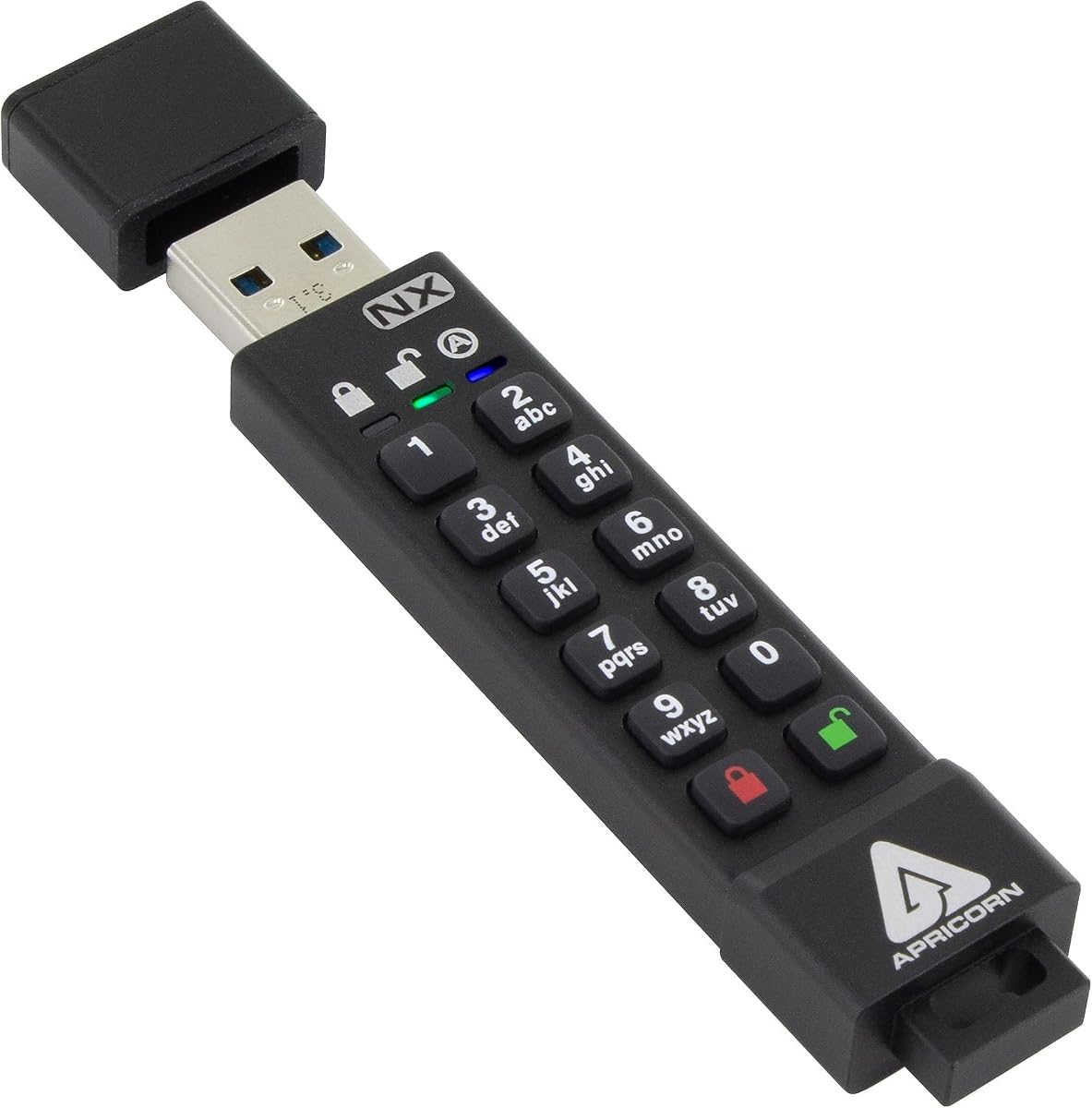


The Apricorn Aegis Secure Key 3 NX offers enterprise grade security with FIPS 140-2 Level 3 validation. It stands out for its robust hardware encryption and flexible configuration options.
We may earn a commission when you buy through this link, at no additional cost to you.
This drive supports separate admin and user modes allowing granular control over who accesses data. The configurator allows customization of security policies to meet organizational requirements.
While powerful it may require initial setup time for complex configurations. The 8GB limit suits documents but not large media files or backups.
Business users needing certified security should prioritize this drive. It delivers reliability and compliance for sensitive government or corporate data transfer.
Level 3 validation ensures physical tamper resistance and strong authentication requirements for high security environments.
Admins can set read only modes and recovery PINs to protect against accidental data loss or theft.
We may earn a commission when you buy through this link, at no additional cost to you.
The Kingston IronKey Vault Privacy 50 delivers high capacity storage with robust hardware encryption for sensitive data. It supports 256GB ensuring ample space for large files.
We may earn a commission when you buy through this link, at no additional cost to you.
Security features include protection against brute force attacks and BadUSB exploits through signed firmware. The passphrase mode allows longer memorable passwords for easier access.
Users may find the security features overwhelming without proper training. The price reflects its enterprise focus and high security standards.
Organizations requiring TAA compliance and maximum data protection will appreciate this drive. It is ideal for secure government or enterprise file sharing.
Digitally signed firmware prevents unauthorized changes and blocks BadUSB malware attacks from compromising the drive.
Longer passphrases improve security while remaining more user friendly than complex character only passwords.
We may earn a commission when you buy through this link, at no additional cost to you.
This model combines FIPS 140-2 Level 3 security with modern USB Type C connectivity for newer laptops and devices. It offers 128GB capacity for extensive data needs.
We may earn a commission when you buy through this link, at no additional cost to you.
Authentication is software free making it plug and play across systems. The hardware encryption ensures data remains protected without relying on OS security.
The Type C connector may require adapters for older USB A ports. Price is higher than standard drives but justified by certification.
Tech professionals using modern devices will find this drive highly compatible. It balances security compliance with convenience for daily secure transfers.
Type C interfaces provide faster data transfer speeds and reversible plug orientation for easier handling.
No drivers or installation are required reducing compatibility issues and security risks from software components.
We may earn a commission when you buy through this link, at no additional cost to you.
Integral offers a cost effective solution with FIPS 197 certification ensuring government approved security standards. It includes brute force protection that erases data after failed attempts.
We may earn a commission when you buy through this link, at no additional cost to you.
The dual layer waterproof design protects the drive from physical damage and liquids. Auto lock features secure data when the drive is removed.
Four gigabytes limits usage to small files like documents or keys. Security features are basic but sufficient for individual privacy needs.
Users needing affordable security for small data sets should consider this drive. It is a practical choice for students or casual users.
Drive locks automatically when disconnected or when screen protection activates preventing unauthorized access.
No software installation means no traces left on host computers enhancing privacy and security.
We may earn a commission when you buy through this link, at no additional cost to you.
The iStorage datAshur PRO uses a physical keypad for PIN entry eliminating the need for software or biometric sensors. It meets FIPS 140-2 Level 3 security standards.
We may earn a commission when you buy through this link, at no additional cost to you.
It operates on any device with a USB port including Linux and ChromeOS. Transfer speeds are fast supporting large file movements efficiently.
Users must enter PINs manually which may be slower than biometrics. Battery dependency for the keypad adds a maintenance factor.
Professionals needing cross platform compatibility will find this drive reliable. It is ideal for secure data sharing across diverse operating systems.
Works with Windows macOS Linux and embedded systems ensuring broad usability in varied IT environments.
On device PIN entry prevents keylogging attacks and keeps authentication credentials local to the drive.
We may earn a commission when you buy through this link, at no additional cost to you.
This drive features an aluminum alloy shell protecting internal components from physical damage. It provides AES256-bit encryption to secure stored data effectively.
We may earn a commission when you buy through this link, at no additional cost to you.
Automatic locking occurs when the drive is unplugged or idle. This ensures data safety even if the device is lost temporarily.
It lacks official FIPS validation which may be required for government contracts. Security is solid for general business or personal use.
Users seeking a durable portable option will appreciate the build quality. It serves well for everyday secure data transfers.
The metal shell resists impacts and heat better than plastic models enhancing overall device longevity.
Unplugging locks the drive immediately preventing access without entering the password again.
We may earn a commission when you buy through this link, at no additional cost to you.
Lexar offers a drive with a fingerprint sensor enabling quick authentication without typing passwords. It supports up to ten fingerprints for multiple users.
We may earn a commission when you buy through this link, at no additional cost to you.
Read speeds reach 400MB/s allowing fast data access. The AES encryption ensures stored files remain secure from prying eyes.
Fingerprint sensors may struggle with wet or dirty fingers. Lack of backup password method could lock users out if sensor fails.
Tech savvy users wanting speed will find this drive appealing. It is suitable for quick secure access to personal or work files.
Fingerprint recognition under one second speeds up workflow and improves usability.
Multiple fingerprints allow sharing the drive securely among family or team members.
We may earn a commission when you buy through this link, at no additional cost to you.
The PRO2 model improves on the PRO with IP68 water and dust resistance. It maintains FIPS 140-2 Level 3 certification for strict security compliance.
We may earn a commission when you buy through this link, at no additional cost to you.
PIN entry via keypad ensures no data leaks on connected devices. It works with various operating systems including embedded systems.
Thirty two gigabytes limits large file storage. High durability adds weight and bulk making it less ideal for everyday light use.
Field workers needing rugged security will benefit most. It is designed for harsh environments where drives face physical stress.
Fully dust tight and protected against prolonged water immersion ensuring drive survival in extreme conditions.
Level 3 certification guarantees strong physical and logical security suitable for government data.
We may earn a commission when you buy through this link, at no additional cost to you.
This drive offers a dual hidden partition feature allowing separate secure areas for different data sets. It features FIPS 140-3 Level 3 pending certification for future readiness.
We may earn a commission when you buy through this link, at no additional cost to you.
Zinc casing provides excellent protection against physical attacks. Brute force and BadUSB defenses ensure data integrity against modern threats.
Partitioning adds complexity for casual users. Sixteen gigabytes is modest for heavy media storage but fine for documents.
Users needing secure data segregation will value this drive. It balances advanced security with physical durability for high stakes environments.
Separate partitions allow different PINs and encryption contexts keeping data logically isolated.
Emergency password instantly wipes all data to prevent unauthorized access during device compromise.
We may earn a commission when you buy through this link, at no additional cost to you.
Kingston delivers a compact option with AES 256 XTS encryption for high security. The drive is small and easy to carry daily.
We may earn a commission when you buy through this link, at no additional cost to you.
It is designed for quick secure transfer of small files. Password protection ensures unauthorized access is prevented effectively.
Eight gigabytes limits data types to text or small images. It may not suit users needing large storage capacity.
Users needing a tiny secure drive will find this ideal. It fits well on keyrings and in tight pockets.
Small dimensions make it easy to carry without adding bulk to your bag or wallet.
XTS mode offers stronger block cipher security for data at rest on the drive.
We may earn a commission when you buy through this link, at no additional cost to you.
Choosing the right encrypted USB flash drive depends on your security needs, storage capacity, and device compatibility. This guide breaks down key factors to consider.
Look for hardware encryption using AES 256-bit to ensure strong data protection. Software encryption is less secure and vulnerable to OS attacks.
Prioritize drives with AES 256-bit hardware encryption for reliable data safety.
FIPS 140-2 or 140-3 Level 3 certified drives meet strict government security standards. This is vital for regulated industries.
Choose FIPS certified drives if you need compliance with security regulations.
Determine your storage needs based on file types. Larger capacities suit media while smaller sizes work for documents.
Select capacity that matches your typical file sizes to avoid excess cost.
PIN entry biometrics or passcodes determine how you access the drive. Physical PINs reduce software risks.
Pick authentication methods that suit your workflow and security level.
Rugged drives with waterproof or shockproof designs protect data from physical damage. Look for IP ratings like IP68.
Consider rugged designs if you work in harsh environments.
USB 3.0 or 3.2 interfaces provide faster transfers than 2.0. Higher speeds save time when moving large files.
Opt for USB 3.0 or higher for efficient file transfers.
Ensure the drive works with your operating system. Some drives support Windows macOS Linux and ChromeOS.
Check compatibility with your devices before buying to avoid issues.
Higher security and durability cost more but reduce risk. Balance budget with the sensitivity of data you store.
Invest in higher security if your data is highly sensitive.
Always store passwords securely offline. Avoid writing them down near the drive to prevent unauthorized access.
Eject the drive safely using your operating system to prevent data corruption. Do not remove it while files are open.
Keep the drive clean and dry. Dust or moisture can affect contact pins and damage the hardware over time.
Yes hardware encryption is generally more secure as it encrypts data directly on the drive independent of the computer OS. Software encryption relies on the host OS which may be vulnerable.
FIPS 140-2 Level 3 is a US government security standard requiring strong authentication and physical tamper resistance. It ensures the drive meets strict security requirements.
Many drives are compatible with both systems but check product specs. Some require specific software for Mac while others work plug and play.
Some drives have a master PIN or recovery PIN process. Others may erase data after multiple failed attempts to prevent brute force attacks.
Most hardware encrypted drives work with Linux without additional software. Check manufacturer support for specific distributions and configurations.
Use drives with rugged casing and waterproof ratings. Store them in secure locations and avoid leaving them in public spaces.
The Apricorn Aegis Secure Key 3 NX and Kingston IronKey Vault Privacy 50 lead our list for top security and capacity options. They balance enterprise features with reliable performance.
Prioritize FIPS validation and hardware encryption if your data is sensitive. Consider durability and interface speeds based on your usage environment.
Prices for these drives change so verify current listings before purchasing. Choose a model that meets your specific security and capacity needs today.